
7 Best Time Tracking Apps for Contractors in 2026
The 7 best time tracking app for contractors options compared on price, GPS, geofencing and payroll sync — prices checked November 10, 2026.
 Shamim Mia, Founder, SerpAstraLast verified November 10, 202613 min read
We compare pricing pages, documentation and public reviews. We never accept payment for rankings.

Key takeaways
- Workyard is the best fit for most contractors at $6/user/month billed annually, Connecteam follows with a free plan for up to 10 users, and QuickBooks Time at $20/month plus $10/user/month is the pick for teams already on QuickBooks.
- A 10-person crew pays $0 on Connecteam's free plan, $35 a month on its Basic plan, or $130 a month on Workyard Starter — the same crew, three very different bills.
- The single most important buying factor is proof: a GPS time clock with geofencing proves the crew was on site, while a simple timer only records how long they said they worked.
- Base fees are the hidden second bill: QuickBooks Time adds a $20 monthly base fee and Workyard adds $50, so always price the tool for your actual crew size.
On this page
Quick comparison
| Tool | Best for | Starting price | Free plan |
|---|---|---|---|
| Workyard | Multi-site construction crews that need GPS-verified hours tied to jobs and cost codes | $6/user/mo + $50 base | No (14-day trial) |
| Connecteam | Small field teams that want a free GPS time clock plus scheduling and chat in one app | Free; Basic $29/mo | Yes (up to 10 users) |
| QuickBooks Time | Businesses already running QuickBooks Online or Payroll that want hours to flow straight into pay runs | $20 base + $10/user/mo | No (30-day trial) |
| Clockify | Small offices, agencies and contractors that bill by the hour and want a free, simple record | Free; Basic $3.99/mo | Yes (up to 5 users) |
| Hubstaff | Contractors who want proof of work — screenshots and activity levels — alongside the hours | $4.99/user/mo | No (14-day trial) |
| Harvest | Contractors and small firms that bill clients for time and want invoicing built in | $9/user/mo | Yes (1 seat) |
| Toggl Track | Small office-based teams that want the simplest timer and will never need GPS | $9/user/mo | Yes (up to 3 users) |
Make one of these tools?
We re-check this list every quarter. Send a correction, request a review, or ask about a clearly labeled sponsored spot.
Request a listingThe best time tracking app for contractors

Workyard
Best for: Multi-site construction crews that need GPS-verified hours tied to jobs and cost codes
Workyard is the only tool here built for construction crews first: workers tap in on a phone, the app checks GPS and the geofence around the job site, and the hours land against the right job and cost code. Starter costs $6 per user a month billed annually, or $8 month to month, plus a $50 monthly base fee, and it covers the GPS time clock, geofencing, scheduling and basic reporting.
The catch is the base fee and the Pro gate: a five-person crew pays $80 a month on annual billing, and job costing with cost codes needs Pro at $13 per user a month. The mobile apps rate lower than the admin tools do, so run the 14-day trial with the crew first. Pick Workyard when proving the crew was on site matters as much as the hours themselves.
What we like
- GPS-verified clock-ins with geofencing on the Starter plan, built for construction sites
- Hours tie to jobs and cost codes, so payroll and job costing come from the same entries
- Offline mode captures time without a signal and syncs when the crew is back in range
- Native sync with QuickBooks, ADP, Sage, Paychex and Gusto for payroll-ready exports
Watch out for
- A $50/month base fee sits on top of the per-user price, so a small crew pays more than $6 per person
- Job costing and cost codes need Pro at $13/user/month, not the Starter plan
- Field-app ratings (4.1 on the App Store) trail the Capterra score, so test it with the crew first

Connecteam
Best for: Small field teams that want a free GPS time clock plus scheduling and chat in one app
Connecteam is the cheapest way into a GPS time clock, because the free plan is a real product: up to 10 users get time tracking with GPS, scheduling, forms, tasks and team chat, with one time clock and one job schedule. When the crew outgrows it, Basic costs $29 a month billed annually for the first 30 users on the Operations hub, then $0.80 per extra user.
The pricing to watch is the hub model. Each hub — Operations, Communications, HR — is billed separately at the same tier prices, so a team that wants all three pays three times the headline figure. Geofencing also waits for Advanced at $49 a month, and there is no built-in payroll. Pick Connecteam when the crew is small and you want the clock, the schedule and the chat in one free app.
What we like
- Free Small Business Plan covers up to 10 users with all hubs, not a cut-down demo
- Flat $29/month billed annually covers the first 30 users on the Operations hub
- GPS clock-in with location stamps plus scheduling, forms, tasks and chat in one app
- Mobile-first design suits cleaners, delivery staff, care workers and construction crews
Watch out for
- Each hub is billed separately, so adding Communications or HR multiplies the bill
- Geofencing waits for Advanced at $49/month, not the Basic plan
- No built-in payroll, so wages still run through a separate provider

QuickBooks Time
Best for: Businesses already running QuickBooks Online or Payroll that want hours to flow straight into pay runs
QuickBooks Time (formerly TSheets) is for teams already in the Intuit ecosystem, and that is its whole argument: hours flow from the mobile clock into QuickBooks Payroll and invoicing with no CSV in between. Premium costs $20 a month plus $10 per user, and it covers GPS tracking, geofencing, scheduling, time off, overtime alerts and a kiosk mode. Elite at $40 plus $12 per user adds mileage, project tracking and timesheet signatures.
The price is the honest drawback. A 10-person crew pays $120 a month on Premium before the QuickBooks Online subscription the product requires, which makes it the most expensive option here for a small team. The per-user rate also rose by $2 on July 1, 2026, so any roundup quoting $8 a user is out of date. Buy QuickBooks Time when the payroll already runs on QuickBooks.
What we like
- Native sync with QuickBooks Online and QuickBooks Payroll removes export and re-entry
- GPS tracking and geofencing are included on all plans, with job and project time tracking
- Scheduling, overtime alerts and mileage tracking sit in the same system as payroll
- The largest review base here at 1,449 G2 reviews, rated 4.5/5
Watch out for
- The most expensive option here for a small team once the base fee and per-user price add up
- Requires a QuickBooks Online subscription for full value — the clock alone is not the whole cost
- Per-user rates rose by $2 on July 1, 2026, so older roundups quote lower prices

Clockify
Best for: Small offices, agencies and contractors that bill by the hour and want a free, simple record
Clockify is the budget pick that does not feel like a compromise. The free plan covers up to 5 users with unlimited projects, clients, tasks, timers, timesheets and a kiosk mode for clocking in from a shared tablet, and paid plans start at $3.99 per user a month billed annually on Basic. That makes it the cheapest way to keep an honest record of billable hours for a small team.
The limits matter for contractors, though. GPS tracking waits for Pro at $7.99 a user a month billed annually, so the free and Basic plans cannot prove anyone was on site, and there is no shift scheduling below Pro. The free plan also changed in April 2026: it now stops at 5 users, where it used to be unlimited. Pick Clockify when the hours need recording, not proving.
What we like
- Free plan covers unlimited projects and time tracking for up to 5 users
- Basic at $3.99/user/month billed annually adds Kiosk clock-in, billable rates and report exports
- Timer, timesheet and calendar views with 100+ integrations keep billing simple
- Cheapest paid seats in this list, so a growing crew stays cheap the longest
Watch out for
- GPS tracking waits for Pro at $7.99/user/month billed annually, so the free plan cannot verify locations
- Free-plan reports cover only the last 31 days, so older history needs a paid plan
- No shift scheduling below Pro, so rosters need another tool

Hubstaff
Best for: Contractors who want proof of work — screenshots and activity levels — alongside the hours
Hubstaff answers a different question from the rest of this list: not just when someone worked, but what they were doing. Starter costs $4.99 per seat a month billed annually, or $7 month to month, and it covers the timer, timesheets, activity levels, 500 screenshots and 500 tracked apps and URLs per seat a month, plus client invoicing. A two-seat minimum applies on every plan below Enterprise.
The catch for contractors is that GPS is not in the base price. The Locations add-on costs $3.33 per seat a month on annual billing and can only be added to the Team plan at $10 a seat, so a crew that wants GPS pays $13.33 a seat before anything else. Screenshots can also feel intrusive to a field crew. Pick Hubstaff when proof of work matters more than proof of place.
What we like
- Screenshots and activity levels verify remote and field work, not just the clock-in time
- Payroll and payments, scheduling and timesheet approvals sit on the Team plan
- Client invoicing is included on every plan, so billable hours turn into bills in one place
- 500 screenshots and 500 tracked apps and URLs per seat a month on the Starter plan
Watch out for
- GPS tracking is a paid add-on ($3.33/seat/month) and only on the Team plan or above
- A 2-seat minimum on Starter, Grow and Team means a solo contractor pays for two seats
- Screenshots and activity monitoring can feel intrusive to a field crew

Harvest
Best for: Contractors and small firms that bill clients for time and want invoicing built in
Harvest is the pick when the hours exist to be billed. Track time against a project, and Harvest turns it into a professional invoice with expenses attached, sends it, and takes payment through Stripe, QuickBooks or Xero. Teams costs $9 per user a month billed annually, or $11 month to month, and it covers unlimited projects, team reporting and project budgets with alerts.
Two things to check before you buy. First, there is no GPS or geofencing, so Harvest cannot prove anyone was on site — it is an office tool, not a jobsite clock. Second, the price changed in 2026: older roundups still quote $10.80 or $12, and the new Flex billing adds usage fees for extra invoices, projects and clients. Pick Harvest when invoicing is the job and the crew works where you can see them.
What we like
- The shortest path from tracked time to invoice in this list, with expenses attached
- Project budgets with alerts warn before a job eats its hours
- One flat per-seat price with no tier ladder to climb for the core features
- Integrates with QuickBooks, Xero and Stripe for payments
Watch out for
- No GPS or geofencing, so it cannot prove a worker was on site
- Flex billing adds usage fees for extra invoices, projects and clients on top of the $9 seat price
- The free plan covers 1 seat and 2 projects, so a real team pays from the first hire

Toggl Track
Best for: Small office-based teams that want the simplest timer and will never need GPS
Toggl Track is the timer people actually enjoy starting: one click, synced across the browser, desktop and phone, with clean reports by project, client and tag. The free plan covers up to 3 users, and Starter at $9 per user a month billed annually adds billable rates, project estimates and team reports. It also publicly rules out screenshots, keystroke and location monitoring, which is why teams adopt it without a fight.
For contractors, the gap is the whole point of the category. Toggl Track has no GPS, no geofencing and no scheduling, so it cannot prove a worker was on site, and it does not turn hours into invoices. Approvals and profitability reports wait for Premium at $16 a user a month billed annually. Pick Toggl Track for office-based billable work, not for a crew spread across job sites.
What we like
- The fastest, simplest timer in this list — one click starts it, and it syncs everywhere
- No screenshots, keystroke or location monitoring, so crews actually adopt it
- Starter adds billable rates, project estimates and team reports from $9/user/month
- Strong reporting by project, client and tag with no learning curve
Watch out for
- No GPS, geofencing or scheduling, so it cannot verify jobsite attendance
- No invoicing, so billable hours still need an accounting export
- Timesheet approvals and profitability reports wait for Premium at $16/user/month billed annually
The best time tracking app for contractors proves the crew was on site, ties every hour to the right job, and turns those hours into payroll without retyping. We ranked the seven tools below by fit for the most common buyer — a contractor with a small field crew working across several job sites — starting with the tools built for construction and ending with the simple timers, and every price was checked on the vendor's own pricing page on November 10, 2026.
How to choose the best time tracking app for contractors
- Demand GPS and geofencing first. A timer records duration; only a GPS clock with a geofence proves the worker was on site. Workyard, Connecteam, QuickBooks Time and Hubstaff on Team verify location; Toggl Track, Harvest and Clockify's free plan do not.
- Work out the pricing model, not just the headline. Per-user pricing (Clockify, Toggl, Harvest, Hubstaff) scales with headcount, Connecteam charges a flat fee for the first 30 users, and QuickBooks Time and Workyard add a monthly base fee on top of the per-user price.
- Check what the free plan really covers. Connecteam is free for up to 10 users, Clockify for 5, Toggl Track for 3 and Harvest for 1 seat — and the free tiers skip geofencing, job costing and payroll sync.
- Decide where the hours have to end up. If they must land in payroll, QuickBooks Time or Workyard sync natively; if they must become invoices, Harvest does it in one step; if they only need recording, Clockify or Toggl Track is enough.
- Test the app where the crew works. A tool that is lovely in the office can fail on a job site with no signal, gloves on and a cracked screen. Workyard works offline; Connecteam needs an internet connection to sync.
A contractor also needs to be found online, not just clocked in. Our guide to contractor management software covers the wider job-running side, and before you publish new service pages, run your titles through the free SERP snippet preview tool — it shows exactly how the title and description will look in Google.
Whatever you shortlist, try it with a real crew week before you pay. The trials in this list run 14 to 30 days, which is long enough to run one genuine week — your jobs, your sites, your crew — and that week tells you more than any review can. Check two things in the trial: that clock-ins carry a GPS stamp from the actual job site, and that the approved hours export cleanly into your payroll. Every tool here exports timesheets, so there is no reason to buy before you have seen one land in payroll.
Time tracking pricing: what you will actually pay
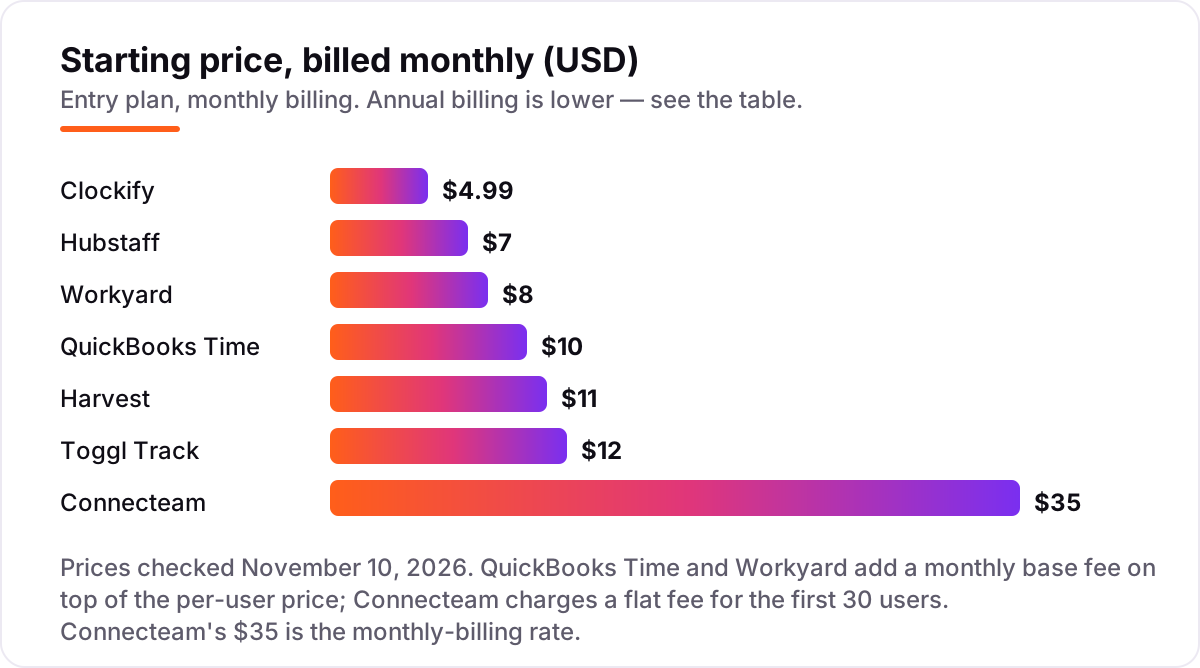
Take a 10-person crew at several job sites, paying month to month. On list prices, the subscription costs $35 a month on Connecteam Basic, $49.90 on Clockify Basic, $70 on Hubstaff Starter, $110 on Harvest Teams, $120 on Toggl Track Starter, $120 on QuickBooks Time Premium and $130 on Workyard Starter. The Connecteam figure is a flat fee for the first 30 users; the QuickBooks Time figure is a $20 base fee plus $10 per user, and the Workyard figure is a $50 base fee plus $8 per user.
Over a year on monthly billing, that is $420 on Connecteam, $598.80 on Clockify, $840 on Hubstaff, $1,320 on Harvest, $1,440 on Toggl Track, $1,440 on QuickBooks Time Premium and $1,560 on Workyard Starter. The same ten people cost $420 a year at the cheap end and $1,560 at the dear end — a $1,140 gap that comes from the pricing model, not from features. Annual billing cuts the bill on most tools: Connecteam drops to $348 a year, Clockify to $478.80, Hubstaff to $598.80, Harvest to $1,080, Toggl Track to $1,080 and Workyard to $1,320. QuickBooks Time publishes no annual discount, so the monthly figure is the whole story.
Two costs sit outside every number above. First, the free plans: a 10-person crew pays $0 on Connecteam's Small Business Plan, which covers one time clock and one job schedule but no payroll integration, so the $35 Basic plan is the honest comparison for a crew that needs payroll sync. Second, the accounting bill: QuickBooks Time requires a QuickBooks Online subscription on top, which is a separate bill, while Workyard and Connecteam sync to payroll without forcing a second subscription. If the crew also needs scheduling, the comparison changes — see our guide to project management software for contractors for the job-running side.
Know the difference: GPS time clocks vs simple timers
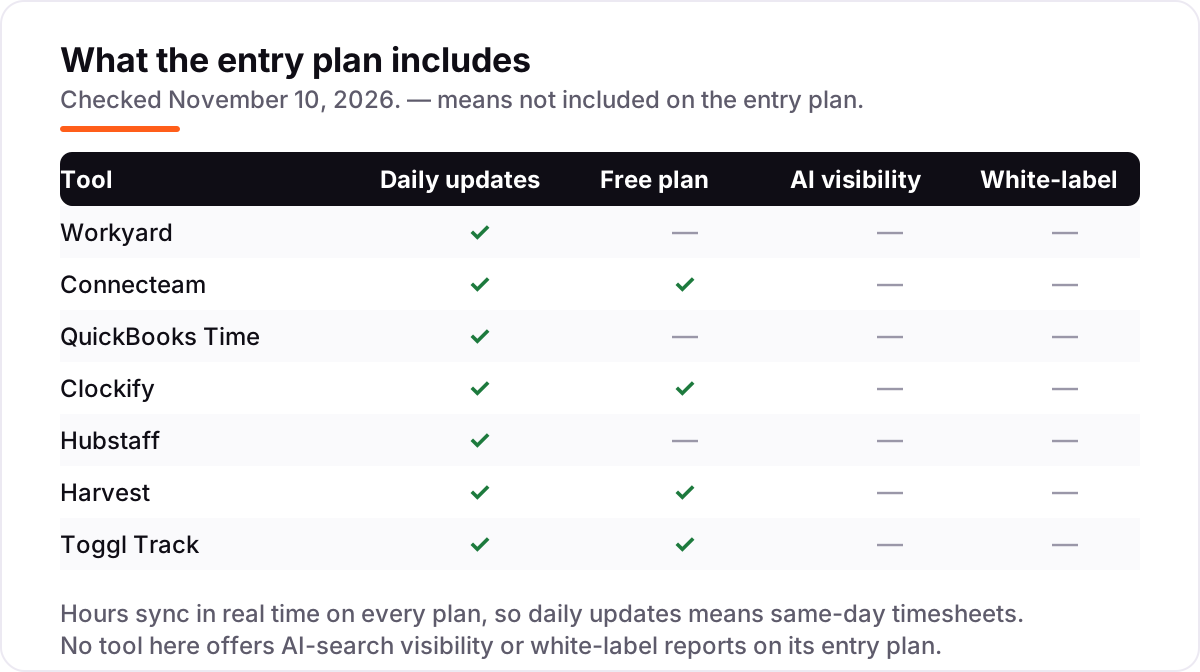
The confusion in this category is between a tool that records time and a tool that proves where the time was worked. A simple timer — Toggl Track, Clockify, Harvest — records duration: someone started at 7:00 and stopped at 15:30. A GPS time clock — Workyard, Connecteam, QuickBooks Time, Hubstaff on Team — also stamps the location at clock-in, and a geofence can refuse a clock-in from outside the job site. For a contractor, that stamp is the difference between a timesheet and evidence: it settles payroll disputes, backs up client billing and supports prevailing-wage records.
There is a second, quieter confusion: per-user, flat-fee and base-plus-per-user pricing. Two tools can both advertise about $10 a month and cost very different amounts for the same crew: Harvest Teams at $11 a user costs $110 a month for ten people, while QuickBooks Time Premium at $10 a user costs $120 because of the $20 base fee, and Connecteam Basic at $35 covers all ten people for one flat fee. Always price the tool for your actual crew size before comparing headline prices.
A third distinction worth knowing is tracking versus scheduling. Some tools in this list schedule shifts and rosters — Workyard, Connecteam and Hubstaff Team — while others only record the hours after the fact. If the foreman needs to plan the week as well as record it, the scheduler matters as much as the clock.
Quick comparison: tool type by need
| Buyer | Best pick | Why |
|---|---|---|
| Multi-site construction crew | Workyard | GPS-verified hours with geofencing, from $6/user/month billed annually |
| Small field team on a budget | Connecteam | Free for up to 10 users, Basic is $29/month billed annually |
| Team already on QuickBooks | QuickBooks Time | Hours flow into payroll, Premium is $20/month plus $10/user/month |
| Cheapest paid seats | Clockify | Basic is $3.99/user/month billed annually, free for up to 5 users |
| Proof of work needed | Hubstaff | Screenshots and activity levels, Starter is $4.99/user/month billed annually |
| Billing clients by the hour | Harvest | Time turns into invoices, Teams is $9/user/month billed annually |
| Simplest timer, no GPS needed | Toggl Track | One-click timer crews trust, Starter is $9/user/month billed annually |
Mistakes to avoid
- Budgeting on the per-user price alone. A $10 tool can cost $120 or $130 a month once the base fee is counted. QuickBooks Time adds $20 a month and Workyard adds $50 before the first worker clocks in.
- Buying a timer when you need proof. Toggl Track, Harvest and Clockify's free plan record duration but cannot prove anyone was on site. If payroll disputes or client billing depend on location, buy a GPS clock.
- Paying for GPS as an add-on without doing the maths. Hubstaff's Locations add-on costs $3.33 a seat but only works on the Team plan, so the real GPS price is $13.33 a seat a month, not $4.99.
- Forgetting the free plan limits. Connecteam's free plan stops at 10 users, Clockify's at 5, Toggl Track's at 3 and Harvest's at 1 seat. A crew of 11 pays on every tool here.
- Buying on the annual price, then paying monthly. Toggl Track Starter is $9 a month billed annually but $12 month to month, and Workyard Starter is $6 billed annually but $8 monthly. Compare tools on the billing cycle you will actually use.
- Ignoring the second subscription. QuickBooks Time requires QuickBooks Online, and Hubstaff's payroll features need the Team plan. Price the whole stack, not just the clock.
How we chose
We checked each vendor's own pricing page on November 10, 2026 and recorded the starting price exactly as shown, including the annual-billing figure where the page lists one, and we ranked the tools by fit for the most common buyer — a contractor with a small field crew working across several job sites — not by brand size. Ratings are shown only where a fresh G2 page gave a clear score and review count on November 10, 2026: all seven tools carry a G2 rating here. Two figures changed since older roundups and are worth flagging: Harvest's entry plan is now Teams at $9 billed annually, not the old $10.80 flat rate, and QuickBooks Time's per-user rate rose to $10 on July 1, 2026. No vendor paid for a place in this list, and none of the links here are affiliate links.
What to do next
Start with the free plan or trial of your top pick and run one real week of clock-ins through it. Check that the GPS stamps land on the right job site, that the foreman can approve the timesheets from a phone, and that the approved hours export cleanly into your payroll before you commit to a year. If the hours are sorted but new customers are not finding you, our local SEO service handles the visibility side — or compare providers in our guide to invoicing software for contractors. Software runs the business; search brings the customers. See where you rank locally, free.
New software won't fill your calendar on its own
Before you pay for another tool, see how your local business shows up on Google Maps and in AI answers.
Get a free local SEO audit→Sources we checked (14)
- Workyard pricing — workyard.com/pricing (checked November 10, 2026)
- Connecteam pricing — connecteam.com/pricing (checked November 10, 2026)
- QuickBooks Time pricing — quickbooks.intuit.com/time-tracking/pricing/ (checked November 10, 2026)
- Clockify pricing — clockify.me/pricing (checked November 10, 2026)
- Hubstaff pricing — hubstaff.com/pricing (checked November 10, 2026)
- Harvest pricing — getharvest.com/pricing (checked November 10, 2026)
- Toggl Track pricing — toggl.com/track/pricing/ (checked November 10, 2026)
- Workyard on G2 — 4.8/5, 49 reviews (checked November 10, 2026)
- Connecteam on G2 — 4.6/5, 3,505 reviews (checked November 10, 2026)
- QuickBooks Time on G2 — 4.5/5, 1,449 reviews (checked November 10, 2026)
- Clockify on G2 — 4.5/5, 204 reviews (checked November 10, 2026)
- Hubstaff on G2 — 4.4/5, 2,297 reviews (checked November 10, 2026)
- Harvest on G2 — 4.3/5, 846 reviews (checked November 10, 2026)
- Toggl Track on G2 — 4.6/5, 1,589 reviews (checked November 10, 2026)
Shamim
Founder of SerpAstra
A full-stack SEO and digital marketer who spends most days on Local SEO for dental practices, AI search visibility and lead generation.
Frequently asked questions
What is the best time tracking app for contractors?
Workyard is the best fit for most contractors: GPS-verified clock-ins with geofencing, job and cost-code tracking, and payroll integrations from $6/user/month billed annually. Connecteam is the best free start for up to 10 users, and QuickBooks Time is the pick for teams already on QuickBooks.
How much does time tracking software for contractors cost?
Entry prices run from $0 to $130 a month for a 10-person crew. Connecteam is free for up to 10 users, Clockify Basic costs $49.90 a month, and Workyard Starter costs $130 with its $50 base fee. QuickBooks Time adds a $20 base fee, and all of them charge payroll separately.
Is there a free time tracking app for contractors?
Yes, with limits. Connecteam is free for up to 10 users with GPS clock-ins, Clockify is free for up to 5 users, Toggl Track for up to 3, and Harvest for 1 seat and 2 projects. The free plans work for a small crew; once you need geofencing or job costing, a paid plan is cheaper than the hours you lose to disputes.
Do contractors need GPS time tracking?
Yes, if crews work off site. GPS stamps and geofencing prove a worker was at the job site when they clocked in, which settles payroll disputes and backs up client billing. If the whole team works in one office you can see, a simple timer like Toggl Track or Clockify is enough.
What is the difference between a GPS time clock and a timer?
A timer records how long someone worked; a GPS time clock also records where they were when they clocked in. Workyard, Connecteam, QuickBooks Time and Hubstaff (on Team) verify location, while Toggl Track, Harvest and Clockify's free plan only record duration. Contractors who bill by the job site need the clock.
Can I use QuickBooks Time without QuickBooks Online?
No. Intuit's pricing page states that a QuickBooks Online account is required to use QuickBooks Time, and it is a separate subscription on top of the $20 base fee plus $10 per user. If you do not run QuickBooks, Workyard or Connecteam give you GPS tracking without that second bill.
Can I switch time tracking apps later?
Yes, but plan the move for a quiet week. Export timesheets, job lists, cost codes and employee records from the old tool, then import them and run one pay period in parallel before going live. Switching mid-project means running two systems while the crew re-learns the clock-in routine.
Free SEO and AI visibility audit
Find out what is holding your rankings back
Send us your site. Within 2 business days you get a written audit, an AI visibility check and a short fix list ranked by impact. Free, with no contract attached.
Request my free audit→Related guides
 Local Business & Vertical Software10 Best Contractor Management Software in 2026, ComparedCompare the 10 best contractor management software platforms on price, compliance and global payments, with every price checked November 7, 2026.Read guide →
 Local Business & Vertical Software12 Best Invoicing Software for Contractors in 2026, ComparedCompare the 12 best invoicing software for contractors on price, invoice caps, free plans and payment fees — every price checked November 8, 2026.Read guide →
 Local Business & Vertical Software10 Best Project Management Software for Contractors in 2026, ComparedCompare the 10 best project management software for contractors on price, free plans, field tools and AI features, with every price checked November 8, 2026.Read guide →