
9 Best Tools for Content Creation and Social Media Management in 2026, Compared
Compare the 9 best tools for content creation and social media management on price, free plans and AI features, with every price checked November 6, 2026.
 Shamim Mia, Founder, SerpAstraLast verified November 6, 202614 min read
We compare pricing pages, documentation and public reviews. We never accept payment for rankings.

Key takeaways
- Canva Pro at $18/month and CapCut Pro at $19.99/month cover creation, while Buffer at $6 a channel and Metricool's free plan cover scheduling — the full stack costs under $45 a month on annual billing.
- The single most important buying factor is the billing unit: per channel, per seat, per profile or per brand decides what you actually pay, not the headline price.
- Six of the nine tools have usable free plans, but Hootsuite, Sprout Social and SocialPilot offer trials only — budget from day one on those three.
- Vista Social's entry plan is now Professional at $99 a month; the $39 Standard plan quoted in older roundups was retired in the 2026 restructure.
On this page
Quick comparison
| Tool | Best for | Starting price | Free plan |
|---|---|---|---|
| Canva | Solo creators and small teams that need on-brand social graphics without hiring a designer | $18/mo | Yes (free plan) |
| CapCut | Creators who make short-form video for Reels, TikTok and Shorts every week | $19.99/mo | Yes (free plan) |
| Buffer | Solo creators and small teams that want the cheapest credible scheduler and pay per channel | $6/mo per channel | Yes (free plan) |
| Later | Visual brands and creators who plan Instagram and TikTok first | $25/mo | Yes (free plan) |
| Metricool | Freelancers and small agencies that live in client reports and want analytics first | $25/mo | Yes (free plan) |
| SocialPilot | Small agencies and multi-account managers who want flat pricing for up to 5 accounts | $20/mo | No (14-day trial) |
| Vista Social | Small teams that want publishing, inbox, listening and AI in one plan | $99/mo | No (14-day trial) |
| Hootsuite | Larger teams that need social listening, approvals and multi-brand management at scale | $99/mo per user | No (14-day trial) |
| Sprout Social | Marketing teams that need deep analytics, a shared inbox and reporting that clients trust | $99/mo per seat | No (30-day trial) |
Make one of these tools?
We re-check this list every quarter. Send a correction, request a review, or ask about a clearly labeled sponsored spot.
Request a listingThe best content creation and social media management

Canva
Best for: Solo creators and small teams that need on-brand social graphics without hiring a designer
Canva is the default design tool for social teams, and its social features are the reason. Magic Switch takes one design and resizes it for every channel, turning one afternoon of design into a week of posts, and the template library covers every format on every network. The free plan is genuinely useful for individuals, with thousands of templates and basic AI tools at no cost.
Pro costs $18 a month, or $144 a year, and adds Brand Kits, background remover, premium stock and the full AI toolkit. The catch is the seat rule: Pro covers one person only, so a second teammate means Business at $25 per person a month. For a small team with no designer, Canva plus a scheduler is the highest-value stack in this list.
What we like
- Huge template library for every social format
- Magic Switch resizes one design for every channel
- Brand Kits, background remover and AI tools on Pro
- 30-day free trial of Pro
Watch out for
- Pro covers one person only — a second teammate means Business at $25 per person a month
- Designs can look generic without customization
- Video editing is basic next to CapCut

CapCut
Best for: Creators who make short-form video for Reels, TikTok and Shorts every week
Short-form video drives the most reach on every major network, and CapCut is the fastest way to make it. The free version includes a capable editor with auto-captions, trending templates and AI tools that turn a raw clip into a finished Reel in minutes, and it runs on desktop, mobile and the web.
Pro costs $19.99 a month, or $179.99 a year, and adds 4K export, the full AI toolkit, 1,200 AI credits a month and 1 TB of cloud storage. Two things to know before paying: Trustpilot reviewers rate the billing experience 1.2 out of 5, and built-in assets carry per-asset commercial-use rules even on Pro. Use the free plan first and pay only when the exports earn it.
What we like
- Strongest free video editor here, with auto-captions and templates
- 4K export, full AI toolkit, 1,200 AI credits and 1 TB storage on Pro
- Desktop, mobile and web versions
Watch out for
- Trustpilot score of 1.2/5 reflects billing and cancellation complaints
- A cheaper Standard tier at $9.99/month exists but its price is only shown in-app
- Per-asset commercial-use rules apply even on Pro

Buffer
Best for: Solo creators and small teams that want the cheapest credible scheduler and pay per channel
Buffer is the scheduler for people who find Hootsuite overwhelming, and its pricing model is what sets it apart. You pay per channel, not per seat, so a solo creator pays $6 per connected channel on Essentials, with unlimited posts and the AI assistant included. The free plan covers three channels with ten scheduled posts each.
Annual billing drops Essentials to $5 per channel a month, and the rate falls further past ten channels. What you do not get is social listening, deep analytics or approval workflows — those wait for Team at $12 per channel. For publishing and basic measurement on a budget, Buffer is the right call.
What we like
- Per-channel pricing, not per seat
- Free plan covers 3 channels
- AI assistant drafts captions and repurposes posts
- Unlimited scheduled posts on Essentials
Watch out for
- No social listening
- Analytics are basic next to Sprout Social or Metricool
- Approval workflows only on Team at $12 per channel

Later is built for visual content: drag posts onto a visual calendar, preview the Instagram grid, and schedule Reels and TikToks with a media-first workflow. The caption writer and hashtag suggestions help, and Link in Bio turns the profile link into a small storefront for creator brands.
Starter costs $25 a month, or $18.75 a month billed annually, for one social set of up to eight profiles, one user and 30 posts per profile a month. The limits to watch are the missing X support, dropped in August 2025, and the single-user cap — a second teammate needs Growth at $50 a month.
What we like
- Visual calendar with Instagram grid preview
- Link in Bio included on Starter
- 30 scheduled posts per profile a month on Starter
- Best Time to Post suggestions
Watch out for
- No X (Twitter) scheduling — support ended August 2025
- Starter covers 1 user and cannot add extra social sets or users
- Analytics are thinner than Sprout Social or Metricool

Metricool
Best for: Freelancers and small agencies that live in client reports and want analytics first
Metricool leads with analytics: one dashboard covering organic social, paid ads, competitors and website performance, with a free plan for a single brand and paid tiers from $20 a month billed annually. The scheduling tools are genuinely good too, but reporting is the reason teams switch to it.
Starter costs $25 a month, or $20 a month billed annually, for up to five brands, with unlimited scheduling under fair use. Two costs sit outside that price: X accounts cost $10 a month extra each, and prices exclude VAT. For freelancers and small agencies that live in client reports, Metricool saves hours a month.
What we like
- Unified reports across organic social, ads and competitors
- Free plan covers one brand with 30 days of analytics
- Prices per brand, not per user
- Unlimited scheduling on paid plans under fair use
Watch out for
- X (Twitter) costs $10 a month extra per account on every paid plan
- Team collaboration and approvals start on Advanced at $67 a month
- Prices exclude VAT, which is added at checkout

SocialPilot
Best for: Small agencies and multi-account managers who want flat pricing for up to 5 accounts
SocialPilot sells to the person who plans social for many accounts at once. Essentials costs $20 a month for five accounts and one seat, with bulk scheduling for 500 posts, a content library and 500 AI credits. The flat price is the appeal: the bill grows only when the account roster grows.
Annual billing drops Essentials to $17 a month, and extra accounts cost $4 a month each. What Essentials does not include is the social inbox or approvals — those start on Standard at $40 a month, so most teams should price Standard, not Essentials, before they commit.
What we like
- Flat $20 covers 5 accounts and 1 seat
- Bulk scheduling for 500 posts
- 500 AI credits on Essentials
- White-label client reports on Premium
Watch out for
- No social inbox or approvals on Essentials — those start on Standard at $40
- No free plan, only a 14-day trial
- Extra accounts cost $4 a month each

Vista Social
Best for: Small teams that want publishing, inbox, listening and AI in one plan
Vista Social is the all-in-one pick: publishing, a social inbox, review management and an AI assistant in a single plan, with 15 profiles and two users included on Professional. It also holds the highest G2 score in this list at 4.8 out of 5, with reviewers praising ease of use and value.
Professional costs $99 a month, or $950 a year, with 1,000 AI credits a month. The price is the story: the old $39 Standard plan is gone after the 2026 restructure, X costs $29 a month extra, and listening is a paid add-on. Buy it when one tool must replace three, not when Buffer would do.
What we like
- Publishing, social inbox, reviews and AI assistant in one plan
- 15 profiles and 2 users included
- Highest G2 score here at 4.8/5
- 1,000 AI credits a month on Professional
Watch out for
- Entry plan jumped from the old $39 Standard to $99 Professional in the 2026 restructure
- X costs $29 a month extra
- Social listening is a paid add-on from about $75 a month

Hootsuite
Best for: Larger teams that need social listening, approvals and multi-brand management at scale
Hootsuite is the enterprise all-rounder: scheduling, engagement, analytics, social listening and ad management under one roof. OwlyWriter AI generates post variations, suggests hashtags and recommends posting times based on audience activity. For teams managing multiple brands, the depth justifies the price.
Standard costs $99 per user a month billed annually — Hootsuite renamed the entry plan in 2026, so older roundups still call it Professional — and monthly billing costs more at checkout. Small teams should start elsewhere: Buffer or Vista Social covers the same scheduling for a tenth of the cost.
What we like
- Talkwalker-powered social listening
- Broadest platform support here
- OwlyWriter AI generates post variations and hashtags
- 30-day free trial with no card required
Watch out for
- No free plan since March 2023
- Per-user pricing punishes growing teams — 3 users cost $297 a month on Standard
- Monthly billing price is not published; it is only shown at checkout

Sprout Social
Best for: Marketing teams that need deep analytics, a shared inbox and reporting that clients trust
Sprout Social is the measurement pick: the deepest analytics and reporting in this list, a Smart Inbox that unifies messages from Standard, and review management for multi-location brands. Essentials covers publishing for one marketer, with up to five profiles, send-time suggestions and Trellis AI credits.
Essentials costs $99 per seat a month, or $79 per seat billed annually, with a 30-day free trial and no card required. The seat math is the catch: three people cost $297 a month on monthly billing, and the inbox waits for Standard at $199 per seat. Buy Sprout when reporting, not scheduling, is the job.
What we like
- Deepest analytics and reporting here
- Smart Inbox unifies messages from Standard
- Trellis AI agent credits included on Essentials
- 30-day free trial with no card required
Watch out for
- Essentials has no Smart Inbox, approvals or chatbots — those start on Standard at $199 per seat
- Per-seat pricing multiplies fast — 3 seats cost $297 a month
- Listening and premium analytics are paid add-ons
The best tools for content creation and social media management split into two halves: one tool makes the content, another schedules and measures it. We ranked the nine tools below by fit for the most common buyer — a small team or solo creator posting every week — starting with the creation tools and ending with the enterprise suites, and every price was checked on the vendor's own pricing page on November 6, 2026.
How to choose the best tools for content creation and social media management
- Split the budget between creation and management. A team spending $99 a month on Hootsuite but designing posts in a basic editor has it backwards. Canva Pro and CapCut Pro together cost under $38 a month and raise content quality more than any scheduler upgrade.
- Price schedulers on your actual channels and seats. Buffer charges per channel, Hootsuite and Sprout Social charge per seat, Metricool charges per brand. Count your channels, your users and your brands, then multiply — the cheap tool is the one that stays cheap at your scale.
- Match the tool to your network mix. Instagram and TikTok-first brands get the most from Later's visual planning. B2B teams on LinkedIn and X do better with Buffer or Hootsuite. If reporting is the job, Metricool or Sprout Social.
- Check what the free plan really covers. Buffer's free plan covers three channels, Metricool's covers one brand, and Later's covers one social set. A free plan that stops at twelve posts a month is a trial with a nicer name.
- Check the billing unit before you compare prices. A $25 tool priced per brand and a $25 tool priced per seat are different bills for a three-person team, and the comparison table below shows which unit each tool uses.
Social is one system in your stack, not the whole stack. If the business also needs to be found in search, our guide to AI social media management tools covers the AI side of the same workflow. And before you publish the landing pages your social posts link to, run your titles through the free SERP snippet preview tool — it shows exactly how the title and description will look in Google.
Whatever you shortlist, try it with real posts before you pay. The free plans and trials in this list are long enough to run one genuine week — your designs, your videos, your channels — and that week tells you more than any review can. Check two things in the trial: that scheduling actually publishes on time to every network you use, and that the analytics show the numbers you report to clients or a boss. Every tool here offers a free plan or a trial of at least 14 days, so there is no reason to buy before the trial has published real posts.
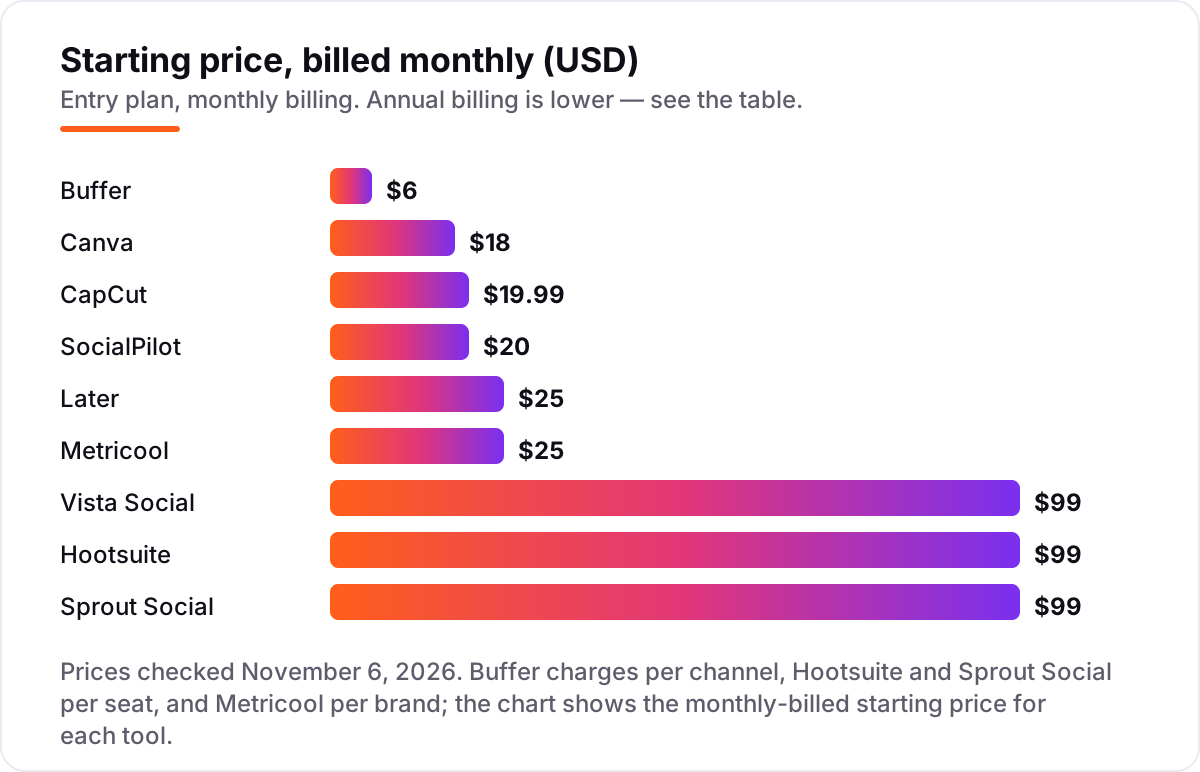
Content creation and social media management pricing: what you will actually pay
Take a solo creator posting daily to three channels — Instagram, TikTok and Facebook. On list prices, the creation half costs $18 a month on Canva Pro plus $19.99 on CapCut Pro, or $37.99 a month together. The scheduling half costs $18 a month on Buffer Essentials for three channels, $25 on Later Starter or Metricool Starter, and $99 on Vista Social Professional, Hootsuite Standard or Sprout Social Essentials. The full two-tool stack is $55.99 a month with Buffer, $62.99 with Later or Metricool, and $136.99 with any of the $99 suites.
Over a year on annual billing, the Buffer stack costs $144 on Canva Pro, $179.99 on CapCut Pro and $180 on Buffer Essentials for three channels — $503.99 a year in total. The same stack with Metricool Starter instead of Buffer costs $563.99 a year. The all-in-one route costs $950 a year on Vista Social Professional, $948 on Sprout Social Essentials for one seat, and $1,188 on Hootsuite Standard for one user. The two-tool stack saves roughly $450 to $680 a year against the suites, and the free plans cut it further: Canva free, CapCut free and Buffer free together cost $0 until the posting volume outgrows them.
Three costs sit outside every number above. First, the X add-ons: Metricool charges $10 a month per X account, and Vista Social charges $29 a month — a creator who posts to X pays that on top of the plan price. Second, the per-seat trap: a three-person team pays $237 a month on Sprout Social Essentials billed annually and $297 a month on Hootsuite Standard, while the same three channels on Buffer Team cost $36 a month. Third, CapCut's cheaper Standard tier at $9.99 a month exists, but its price is only shown inside the app, so we priced Pro, the tier published on its pricing page. If your posts drive traffic to a site that also needs search visibility, see our guide to the best platform for social media marketing for the wider stack.
Annual billing cuts the bill on most tools here: Canva Pro drops from $216 to $144 a year, CapCut Pro from $239.88 to $179.99, Buffer Essentials from $72 to $60 a channel, and SocialPilot Essentials from $240 to $204. Hootsuite's $99 figure is the annual-billed rate; the monthly-billed rate is $149 a user, shown at checkout. One more cost to check before you commit: a second brand is a second bill on Metricool, which prices per brand, and a second seat is a second bill on Hootsuite and Sprout Social — so price the second brand and the second teammate before you commit to a tool for the first.
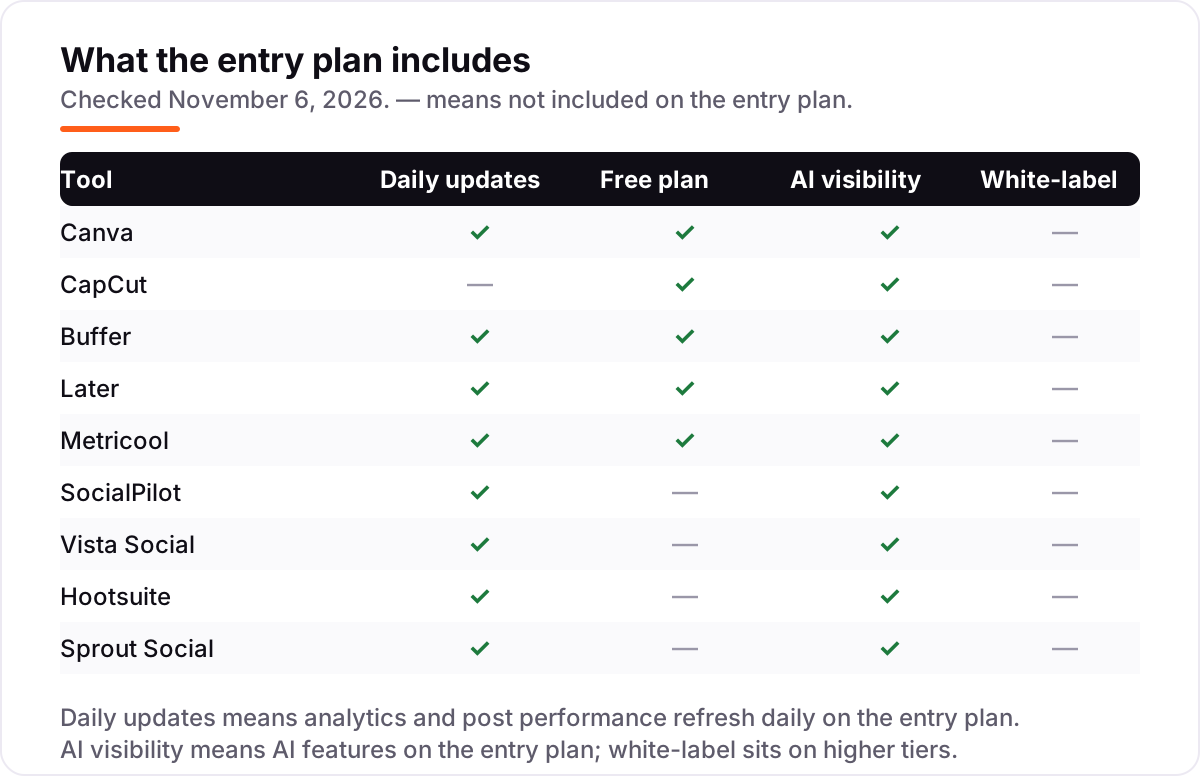
Know the difference: creation tools vs schedulers vs all-in-one suites
The confusion in this category is between three jobs that look like one. A creation tool makes the content — Canva designs the graphic, CapCut edits the video. A scheduler publishes it and measures it — Buffer, Later and Metricool post on time and report what happened. An all-in-one suite does both jobs plus listening and inbox — Vista Social, Hootsuite and Sprout Social — and charges enterprise prices for the privilege.
Trying to do both jobs in one platform usually means doing both badly, or paying for depth you never use. A solo creator who buys Hootsuite Standard at $99 a month for scheduling alone pays five times what Buffer Essentials costs for the same three channels, and still needs Canva to design the posts. The suites earn their price only when the team actually uses the extra jobs: listening across the web, a shared inbox for customer messages, approvals across five people, or reports a client will read.
There is a second, quieter confusion: the billing unit. Buffer's $6 is per channel, Hootsuite's $99 is per user, Sprout Social's $99 is per seat, Metricool's $25 is per brand, and SocialPilot's $20 is a flat price for five accounts. Two tools can show the same number and cost three times as much at your scale. Count channels, users and brands before you compare prices, and the cheapest tool on the chart is usually the cheapest tool on your invoice too.
Quick comparison: tool type by need
| Buyer | Best pick | Why |
|---|---|---|
| Solo creator on a budget | Buffer | Free plan covers 3 channels; Essentials is $6 per channel |
| Short-form video first | CapCut | Best free editor for Reels and TikTok; Pro is $19.99/month |
| Visual brand, Instagram-first | Later | Grid preview and Link in Bio; Starter is $25/month |
| Reports matter most | Metricool | Deepest analytics at this price; Starter is $25/month |
| Small agency, many accounts | SocialPilot | Flat $20/month covers 5 accounts |
| One tool for everything | Vista Social | Publishing, inbox and AI in one plan; Professional is $99/month |
| Large team, listening at scale | Hootsuite | Talkwalker listening; Standard is $99 per user/month |
Mistakes to avoid
- Budgeting on the annual price while paying monthly. Canva Pro is $18 a month, not $12 — the $12 figure is the annual-billing average. Compare tools on the billing basis you will actually use.
- Buying an all-in-one suite for scheduling alone. Vista Social, Hootsuite and Sprout Social all start at $99 a month. If all you need is publishing, Buffer at $6 a channel or Metricool at $25 does the job for a fraction of the price.
- Ignoring the billing unit. A $99 per-seat tool costs $297 a month for three people; a $99 flat tool costs $99. Count seats, channels and brands before you sign.
- Trusting old prices from older roundups. Vista Social's $39 Standard plan is gone, and Hootsuite's entry plan is now called Standard, not Professional. Check the vendor's own pricing page, not a roundup from last year.
- Forgetting the X add-on. Metricool charges $10 a month per X account and Vista Social charges $29 — if X is one of your channels, add it to the price before you compare.
How we chose
We checked each vendor's own pricing page on November 6, 2026 and recorded the starting price exactly as shown, including the annual-billing figure where the page lists one, and we ranked the tools by fit for the most common buyer — a small team or solo creator posting every week — not by brand size. Ratings come from fresh search-index copies of the exact G2 pages and the Trustpilot page, crawled within the last few days; CapCut's 1.2 out of 5 on Trustpilot reflects billing and cancellation complaints, not the quality of the editor. Two prices need a note: SocialPilot publishes two ladders, and we used the pricing page at $20 a month for 5 accounts rather than the $30 ladder on its plans page, and Later's free plan is not listed on its pricing page but is still offered through its help center and in-app plans page. No vendor paid for a place in this list, and none of the links here are affiliate links.
What to do next
Start with the free plan or trial of your top pick and run one real week of posts through it. Check that scheduling publishes on time to every network you use and that the analytics show the numbers you actually report. If the content side is sorted but new customers are not finding you, our monthly SEO service handles the visibility side — or compare providers in our guide to AI social media management tools. Once your tools are in place, find out what's holding your rankings back.
Your stack only works if people find you
SerpAstra fixes what keeps your site off page one and makes it easy for AI assistants to recommend.
Get a free audit→Sources we checked (16)
- Canva pricing — canva.com/pricing (checked November 6, 2026)
- CapCut pricing — capcut.com/pricing (checked November 6, 2026)
- Buffer pricing — buffer.com/pricing (checked November 6, 2026)
- Later pricing — later.com/pricing (checked November 6, 2026)
- Metricool pricing — metricool.com/pricing (checked November 6, 2026)
- SocialPilot plans — socialpilot.co/plans (checked November 6, 2026)
- Vista Social pricing — vistasocial.com/pricing (checked November 6, 2026)
- Hootsuite plans — hootsuite.com/plans (checked November 6, 2026)
- Sprout Social pricing — sproutsocial.com/pricing (checked November 6, 2026)
- Canva G2 rating — g2.com (checked November 6, 2026)
- CapCut Trustpilot rating — trustpilot.com (checked November 6, 2026)
- Buffer and Vista Social G2 ratings — g2.com (checked November 6, 2026)
- Later and Metricool G2 ratings — g2.com (checked November 6, 2026)
- SocialPilot G2 rating — g2.com (checked November 6, 2026)
- Hootsuite G2 rating — g2.com (checked November 6, 2026)
- Sprout Social G2 rating — g2.com (checked November 6, 2026)
Shamim
Founder of SerpAstra
A full-stack SEO and digital marketer who spends most days on Local SEO for dental practices, AI search visibility and lead generation.
Frequently asked questions
What is the best free stack for content creation and social media management?
Canva free for design, CapCut free for video, and Buffer's free plan for scheduling three channels. That combination costs nothing and covers the full workflow for a solo creator. Add Metricool's free plan when you need better reporting for one brand.
Do I need both a creation tool and a scheduler?
For any team posting regularly, yes. Schedulers like Buffer include basic design features, but they do not replace Canva or CapCut for quality content. The two-tool stack costs less than most all-in-one suites and produces better work on both sides.
Which is better, Hootsuite or Sprout Social?
Hootsuite wins on social listening depth and platform breadth; Sprout Social wins on analytics, reporting and the Smart Inbox. Both start at $99 per user or seat a month. Choose Hootsuite for monitoring-heavy teams and Sprout Social for measurement-heavy teams.
What is the cheapest paid social media scheduler?
Buffer at $6 per channel a month is the cheapest credible option, with a free plan below that for three channels. Metricool Starter at $25 a month covers up to five brands when reporting matters more. Avoid per-seat tools until your team actually needs their depth.
Can I manage social media without paying for software?
Yes, for a small presence. The native schedulers inside Meta Business Suite, TikTok and LinkedIn are free, and Canva and CapCut have strong free tiers. Paid tools earn their keep through multi-network scheduling, approvals, listening and reporting, which matter once the workload grows.
Why did Vista Social's price jump to $99 a month?
Vista Social restructured its plans in 2026 and retired the old $39 Standard plan. Professional at $99 a month is now the entry paid tier, with 15 profiles and 2 users included. Older roundups that still quote $39 are describing a plan that no longer exists.
Is CapCut safe for business use?
The editor itself is excellent and the free plan is the best free mobile video editor available. The risk is the subscription: Trustpilot reviewers rate CapCut 1.2 out of 5, mostly over billing and cancellation. Read the per-asset commercial-use rules before using built-in elements in client work.
Free SEO and AI visibility audit
Find out what is holding your rankings back
Send us your site. Within 2 business days you get a written audit, an AI visibility check and a short fix list ranked by impact. Free, with no contract attached.
Request my free audit→Related guides
 Email, SMS & Social Media9 Best AI Social Media Management Tools in 2026, ComparedCompare the 9 best ai social media management tools on price, AI writing, scheduling and analytics, with every price checked November 5, 2026.Read guide →
 Digital Marketing & Ads10 Best AI Tools for Social Media Content Creation in 2026, ComparedCompare the 10 best ai tools for social media content creation on price, free plans and AI features, with every price checked November 5, 2026.Read guide →
 Digital Marketing & Ads8 Best Platforms for Social Media Marketing in 2026, ComparedCompare the 8 best platform for social media marketing options on price, free plans, scheduling and AI features, with every price checked November 5, 2026.Read guide →