
10 Best Tools for Digital Illustration in 2026, Compared
Compare the 10 best tools for digital illustration on price, free plans, vector vs raster and AI features, with every price checked November 4, 2026.
 Shamim Mia, Founder, SerpAstraLast verified November 4, 202614 min read
We compare pricing pages, documentation and public reviews. We never accept payment for rankings.

Key takeaways
- Adobe Illustrator is the best fit for most illustrators at $22.99/month; Procreate follows at $12.99 one-time for iPad artists, and Affinity is now completely free after Canva made the full suite free in October 2025.
- Five tools in this list cost nothing: Affinity, Krita, Inkscape, Adobe Fresco and MediBang Paint — and two of them, Affinity and Krita, are professional-grade.
- The single most important buying factor is vector vs raster: vector tools scale logos and print work cleanly, raster tools paint natural textures — pick the type before the brand.
- One-time purchases still exist: Procreate is $12.99 once and Clip Studio Paint PRO is $63 once, while CorelDRAW is $269 a year and Illustrator is a $22.99 monthly subscription.
On this page
Quick comparison
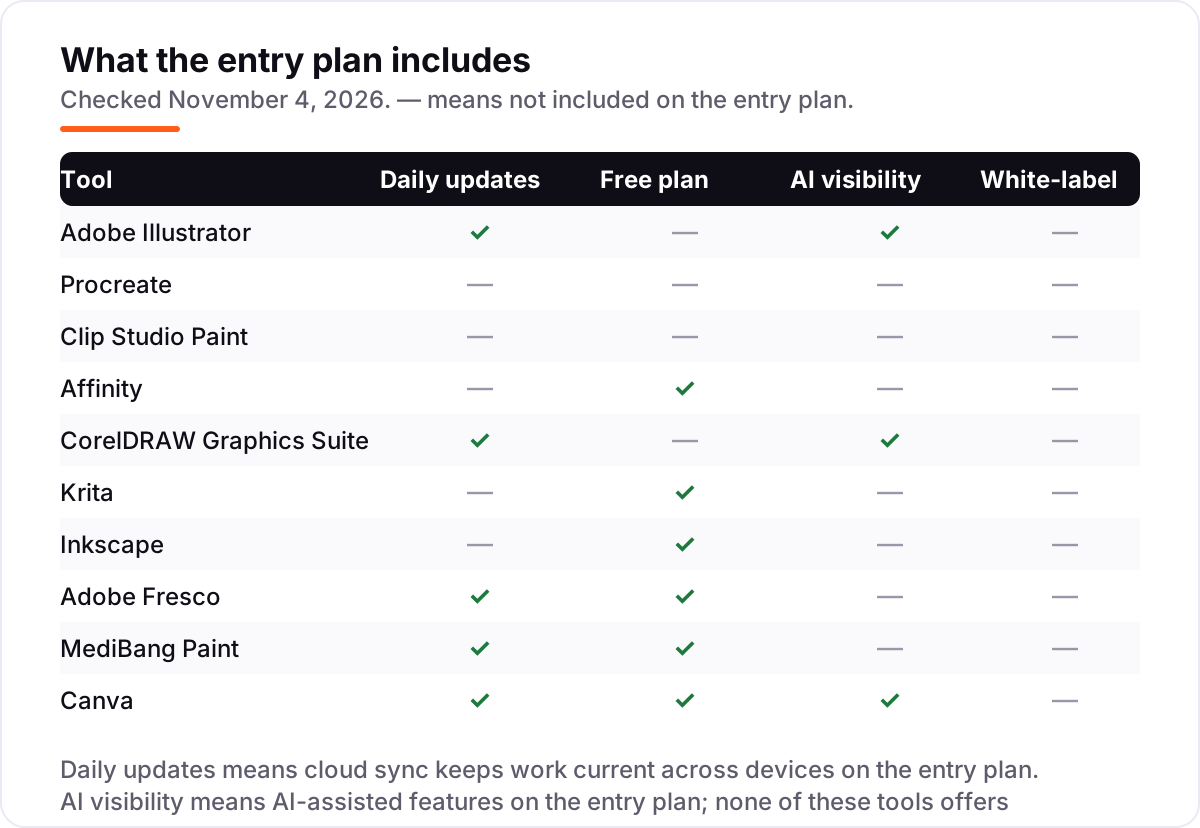
| Tool | Best for | Starting price | Free plan |
|---|---|---|---|
| Adobe Illustrator | Professional illustrators and brand designers who need the industry-standard vector editor | $22.99/mo | No (7-day trial) |
| Procreate | iPad illustrators who want a one-time purchase with a best-in-class brush engine | $12.99 once | No (paid app) |
| Clip Studio Paint | Comic, manga and character artists who need deep brush, 3D-model and panel tools | $63 once | No (free trial) |
| Affinity | Designers who want a free professional vector, pixel and layout suite on Mac or Windows | Free | Yes (free) |
| CorelDRAW Graphics Suite | Print, signage and packaging designers who want vector, layout and photo editing in one suite | $269/yr | No (15-day trial) |
| Krita | Digital painters and animators who want a free, open-source studio with no paywall | Free | Yes (free) |
| Inkscape | Logo and icon designers who want a free vector editor with strong SVG support | Free | Yes (free) |
| Adobe Fresco | Painters who want realistic watercolor and oil brushes on iPad or Windows | Free | Yes (free) |
| MediBang Paint | Manga and comic beginners who want free panel tools and cloud sync across devices | Free | Yes (free) |
| Canva | Non-designers and marketers who need illustrated social posts and templates fast | $18/mo | Yes (free plan) |
Make one of these tools?
We re-check this list every quarter. Send a correction, request a review, or ask about a clearly labeled sponsored spot.
Request a listingThe best tools for digital illustration
Adobe Illustrator
Best for: Professional illustrators and brand designers who need the industry-standard vector editor
Adobe Illustrator is the vector editor the design industry runs on, and that is its biggest advantage: files, fonts and workflows transfer to any studio, printer or client without conversion. The single-app plan costs $22.99 a month on an annual plan billed monthly, and it includes Illustrator on desktop and iPad, Adobe Express Premium, Adobe Fonts and 100GB of cloud storage.
The catch is the subscription itself. There is no perpetual licence, so the $275.88 a year continues as long as you use the software, and cancelling an annual plan early can trigger a fee of up to half the remaining balance. Buy Illustrator when your work has to open cleanly anywhere — logos, packaging, print — and buy Affinity or Inkscape when the budget matters more than the brand name.
What we like
- The vector editor most studios, printers and clients already use, so files transfer without conversion
- Precise vector tools that scale logos and print work cleanly to any size
- Runs on desktop and iPad with files synced through Creative Cloud
- Generative AI features such as Text to Vector are included on the single-app plan
Watch out for
- Subscription only — there is no perpetual licence, so $275.88 a year continues as long as you use it
- Cancelling an annual plan early can trigger a fee of up to half the remaining balance
- Steep learning curve and no free plan beyond a 7-day trial
Procreate
Best for: iPad illustrators who want a one-time purchase with a best-in-class brush engine
Procreate is the reason many illustrators buy an iPad: a $12.99 one-time purchase that covers the whole app, with no subscription, no in-app purchases and free updates for life. The brush engine is the best on a tablet — more than 200 brushes, a Brush Studio for building your own, and pressure and tilt support that makes the Apple Pencil feel like a real pen.
The limits are the platform and the pixels. Procreate runs on iPad only, so there is no desktop version, and it is raster-only, which means logos and icons will not scale the way vector art does. Artwork also lives inside the app, so back it up before deleting anything. Buy Procreate when you draw on an iPad and want the best painting experience for the price of a lunch.
What we like
- One-time $12.99 purchase with no subscription and free updates for life
- More than 200 brushes plus Brush Studio for building your own
- Animation Assist and time-lapse recording are built in
- Fast, touch-first interface built around the Apple Pencil
Watch out for
- iPad only — there is no Mac, Windows or Android version
- Raster only, so logos and icons cannot scale like vector art
- Artwork lives in the app, so deleting it without a backup loses your work
Clip Studio Paint
Best for: Comic, manga and character artists who need deep brush, 3D-model and panel tools
Clip Studio Paint is the tool comic and manga artists reach for when Procreate runs out of room: deep brush controls, posable 3D models, panel and tone tools, and a huge library of community materials. The PRO Ver. 5.0 perpetual licence costs $63 one-time on Windows or Mac, and the subscription route starts from about $0.99 a month — the cheapest way in is a subscription, the cheapest way to own it is the licence.
The catch is the version lock. A perpetual licence covers Ver. 5.0 only, so new features need the $10.99-a-year Update Pass, and on iPad or Android the subscription is the only option. Multi-page manga also waits for EX at $277. Buy Clip Studio Paint when you draw comics, characters or manga seriously; buy Procreate when you want a simpler iPad sketchbook.
What we like
- Deepest brush and 3D-model tools in this list, with posable models and photo-to-pose import
- Huge Clip Studio Assets library of brushes, tones and materials from other artists
- Vector layers let you correct lines after drawing without redrawing
- Perpetual licence option — pay once and keep the version
Watch out for
- A perpetual licence locks to Ver. 5.0 — new features need the $10.99/year Update Pass
- Subscription is the only option on iPad and Android
- Multi-page manga tools wait for EX at $277 one-time
Affinity
Best for: Designers who want a free professional vector, pixel and layout suite on Mac or Windows
Affinity is the biggest change in this list: in October 2025 Canva folded Designer, Photo and Publisher into one free app, so the vector, pixel and layout studios now cost nothing on Mac or Windows. You sign in with a free Canva account, download it, and every tool and export is unlocked — no watermark, no subscription, no feature tiers.
The trade-offs are the account and the AI. You need a Canva account to activate it, and the generative AI tools inside Affinity need a paid Canva plan, so the free app is the design tools only. The unified iPad app is still coming, listed for November 2026. Download Affinity first when the budget is $0 and the work is professional — it is the best free vector editor available today.
What we like
- Completely free since October 2025 — the full suite costs nothing
- Vector, Pixel and Layout studios in one app, working on the same file
- No subscription and no watermark or export limits
- Opens files from the old Affinity V1 and V2 apps
Watch out for
- AI tools inside Affinity need a paid Canva plan
- The unified iPad app is still coming, listed for November 2026
- You need a free Canva account to download and activate it

CorelDRAW Graphics Suite
Best for: Print, signage and packaging designers who want vector, layout and photo editing in one suite
CorelDRAW Graphics Suite is the print shop's vector tool: illustration, page layout and photo editing in one purchase, with strong colour management, free Pantone libraries and PowerTRACE for turning bitmaps into clean vectors. The 2026 Annual Plan costs $269 a year and adds CorelDRAW Web, cloud assets and 2,000 AI credits a month; the one-time purchase is $549 and keeps that version forever.
The price is the decision. Two years on the annual plan costs $538, which is $11 less than the one-time licence, so the outright purchase only starts saving money in year three — and it drops the web app, the monthly AI credits and the cloud tools. Buy CorelDRAW when your work is print, signage or packaging; buy Illustrator when your clients expect Adobe files.
What we like
- Vector illustration, page layout and photo editing in a single suite
- PowerTRACE converts bitmaps to clean, editable vectors
- Strong print and colour management, including free Pantone libraries
- One-time purchase is still offered alongside the subscription
Watch out for
- The annual plan is the dearest subscription here after Illustrator, at $269 a year
- Reviewers call the interface dated next to newer rivals
- CorelDRAW Web and cloud assets are subscription-only, not in the one-time purchase
Krita
Best for: Digital painters and animators who want a free, open-source studio with no paywall
Krita is the free painting studio that professionals actually use: a full raster editor with a wide brush library, customizable brush engines, animation tools and HDR painting, all included at $0 with no account, no trial and no paywall. It runs on Windows, Mac and Linux, and it stays usable on modest hardware that would choke a heavier suite.
The limits are scope, not price. Krita is raster-first, so its vector layers are basic next to Inkscape or Illustrator, and animation export needs FFmpeg downloaded separately. Support comes from the community rather than a help desk. Start on Krita when you paint or animate and the budget is $0 — it is the strongest free painting tool in this list.
What we like
- Free and open source, with every feature included at $0
- Wide brush library with customizable brush engines for painting and inking
- Animation tools and HDR painting built in
- Runs on Windows, Mac and Linux, and works well on modest hardware
Watch out for
- Raster-first: vector layers exist but are basic next to Inkscape or Illustrator
- Animation export needs FFmpeg downloaded separately
- Support comes from the community, not a help desk
Inkscape
Best for: Logo and icon designers who want a free vector editor with strong SVG support
Inkscape is the free vector editor that logo and icon designers keep coming back to: precise node editing, Bezier and Spiro curves, strong SVG support and an extension system that adds features, all at $0 with no account and no trial. It runs on Windows, Mac and Linux, and the files it produces are clean, scalable vectors that open anywhere.
The gaps are print and polish. There is no native CMYK support, so print work needs a workaround, and very complex files with many nodes can lag. The interface also feels dated next to newer rivals. Use Inkscape when you need free vector work — logos, icons, web graphics — and pair it with Krita when the same project needs painting.
What we like
- Free and open source, with every feature included at $0
- Strong SVG support — clean, scalable files for web and print
- Precise node editing with Bezier and Spiro curves
- Extensions add features, from export helpers to new effects
Watch out for
- No native CMYK support, so print work needs a workaround
- Can lag on very complex files with many nodes
- Interface feels dated and takes time to learn

Adobe Fresco
Best for: Painters who want realistic watercolor and oil brushes on iPad or Windows
Adobe Fresco is the painting app for people who miss real paint: live brushes that blend watercolor and oil on textured canvas, vector and pixel brushes in the same app, and animation tools for short loops. Adobe cancelled the $9.99-a-month Premium subscription, so the full app — thousands of brushes, Adobe Fonts and all — is now completely free on iPad, iPhone and Windows.
The limits are the platform and the vector tools. There is no Mac version, and the vector brushes are weaker than Illustrator, so Fresco is a painting app first and a vector tool second. It also has a small review base, with 35 G2 reviews. Pick Fresco when you want the most realistic digital paint for $0; pick Procreate when you want the deeper brush controls.
What we like
- Completely free since Adobe cancelled the $9.99/month Premium subscription
- Live brushes simulate watercolor and oil paint on textured canvas
- Vector and pixel brushes in one app, with animation tools
- Thousands of brushes and Adobe Fonts included
Watch out for
- No Mac version — iPad, iPhone and Windows only
- Vector tools are weaker than Illustrator, so it is a painting app first
- Small review base: 35 G2 reviews, so ratings are thin
MediBang Paint
Best for: Manga and comic beginners who want free panel tools and cloud sync across devices
MediBang Paint is the free comic app that runs everywhere: Windows, Mac, iPad, iPhone and Android, with cloud sync that moves your pages between devices. The comic tools are built in — panel dividers, screentones, speech bubbles and a large free brush library — and the whole app costs $0, which makes it the easiest way to start drawing manga.
The trade-offs are the ads and the depth. The free mobile app shows ads, the brush library is smaller than Procreate or Krita, and reliability reports are mixed, at 3.5 stars from 238,727 Google Play ratings. Start on MediBang Paint when you are learning comics and want free panel tools on any device; move to Clip Studio Paint when the work outgrows it.
What we like
- Free on every platform, with cloud sync across devices
- Comic panel tools, screentones and speech-bubble tools built in
- Large free brush library with a manga-focused community
- Runs on Windows, Mac, iPad, iPhone and Android
Watch out for
- The free mobile app shows ads, which some users find intrusive
- Fewer brushes than Procreate or Krita
- Mixed reliability reports: 3.5 stars from 238,727 Google Play ratings

Canva
Best for: Non-designers and marketers who need illustrated social posts and templates fast
Canva is the odd one out here, and it earns its place: it is the fastest way to turn an idea into a finished illustrated graphic, with 3.6 million templates, 141 million premium assets on Pro, a Brand Kit and Magic Resize for keeping work on-brand. The free plan is genuinely useful, and Pro costs $18 a month billed monthly, or $144 a year billed annually.
The limits are precision and originality. There is no true vector path editing, so fine adjustments need a dedicated design tool, and the most popular templates are widely used, so designs can look generic without heavy customization. Use Canva when the job is fast marketing graphics; use Illustrator or Affinity when the illustration itself is the product.
What we like
- Fastest route from a blank page to a finished graphic in this list
- 3.6M+ templates and 141M+ premium assets on Pro
- Brand Kit and Magic Resize keep work on-brand across formats
- Free plan is genuinely useful, with 250,000+ templates
Watch out for
- No true vector path editing — fine adjustments need a dedicated design tool
- Pro rose to $15 a month in 2025, up from $12.99
- Templates are widely used, so designs can look generic without heavy customization
The best tools for digital illustration split into two camps, and the split matters more than the brand: vector tools draw with paths that scale cleanly to any size, while raster tools paint with pixels that capture texture. We ranked the ten tools below by fit for the most common buyer — a freelance illustrator who sells finished work — starting with the professional standard and ending with the fastest template option, and every price was checked on the vendor's own pricing page on November 4, 2026.
How to choose the best tools for digital illustration
- Pick vector or raster first. Logos, icons and print need vector tools such as Illustrator, Affinity or Inkscape; painting, comics and textured work need raster tools such as Procreate, Krita or Fresco.
- Check the platform before the price. Procreate is iPad-only, Affinity's unified iPad app is still coming, and Fresco has no Mac version — the cheapest tool is no bargain on hardware you do not own.
- Count the real cost over a year, not a month. Illustrator is $275.88 a year, Procreate is $12.99 once, and Canva Pro is $144 a year on annual billing but $216 on monthly billing.
- Try the free tier before you pay. Five tools here are free and three more have trials, so run one real project through your shortlist before committing to a subscription.
- Check the file formats your clients need. If clients expect native Illustrator or SVG files, a raster-only tool will force a conversion step on every delivery.
Illustration is one system in a creative stack, not the whole stack. If the work also needs to be found online, our guide to AI tools for video content creation covers the visibility side for creators who publish. And before you publish new pages for the work you sell, run your titles through the free SERP snippet preview tool — it shows exactly how the title and description will look in Google.
Whatever you shortlist, try it with real work before you pay. The free plans and trials in this list are long enough to finish one genuine illustration — your brushes, your canvas size, your export formats — and that project tells you more than any review can. Check two things in the trial: that the export formats match what your clients ask for, and that the brush or pen tools feel right after an hour of drawing, not just five minutes.
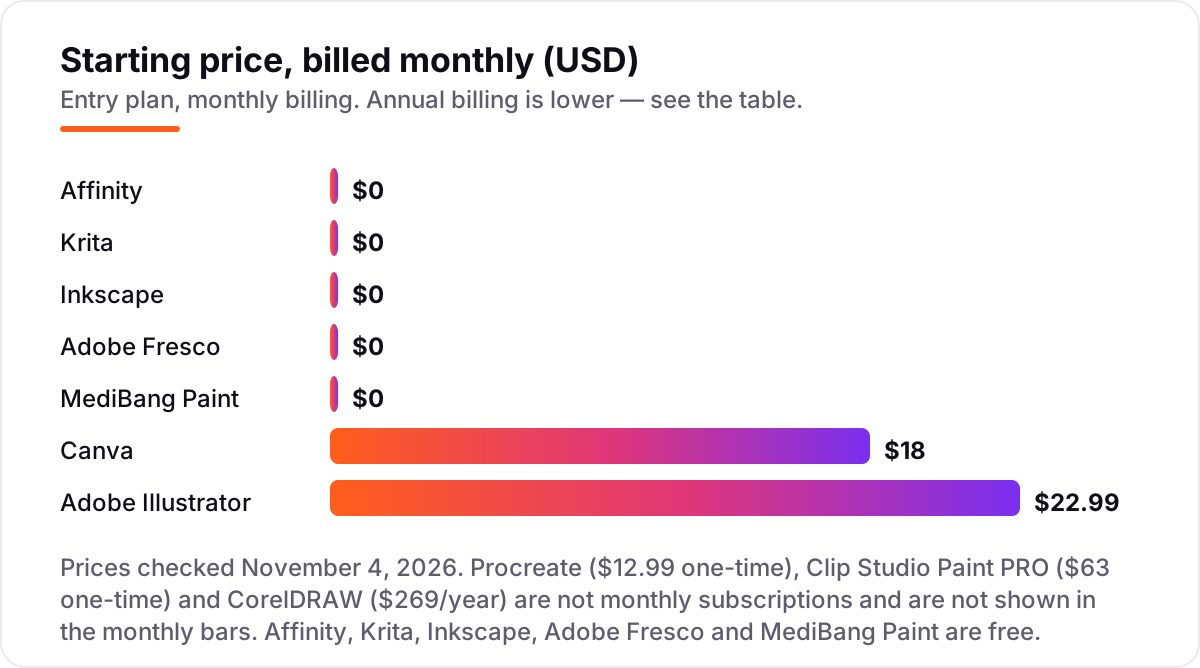
Tools for digital illustration pricing: what you will actually pay
Take a freelance illustrator who needs one vector tool and one painting tool for a year. On list prices, the vector side costs $0 on Affinity or Inkscape, $269 on CorelDRAW's annual plan, or $275.88 on Illustrator's annual plan billed monthly. The painting side costs $0 on Krita or Fresco, $12.99 once on Procreate, or $63 once on Clip Studio Paint PRO. So a professional setup runs from $0 — Affinity plus Krita — to $288.87 for Illustrator plus Procreate in the first year, and $275.88 a year after that, since Procreate never charges again.
Canva Pro is the one price where the billing choice changes the answer. Billed monthly it costs $18 a month, or $216 a year; billed annually it costs $144 a year. That is a $72 gap for the same plan, so pay annually if you commit. Clip Studio Paint has a similar trap in the other direction: the subscription starts from about $0.99 a month, but that is a first-time rate, and the perpetual PRO licence is $63 once with new features held for a $10.99-a-year Update Pass.
Three costs sit outside every number above. First, the hardware: Procreate needs an iPad and an Apple Pencil, and a pen tablet for Krita or Clip Studio Paint runs roughly $50 to $400. Second, the learning time: Illustrator and Clip Studio Paint both take weeks to learn well, and that time is the real price for a beginner. Third, the files: a raster-only tool cannot produce the scalable vector files some print clients demand, so the wrong pick can cost you a job. If your work is video rather than still images, see our guide to the best AI tools for video content creation.
Know the difference: vector vs raster
The confusion in this category is between two kinds of image, and buying the wrong kind is the most expensive mistake in this list. Vector art is built from paths and anchor points, so it scales from a favicon to a billboard without losing quality. Raster art is built from pixels, so it captures brush texture and blending beautifully but blurs when enlarged. Illustrator, Affinity, Inkscape and CorelDRAW are vector tools; Procreate, Krita, Fresco and MediBang Paint are raster tools; Clip Studio Paint and Canva sit in between, with vector layers or vector-style shapes inside a mostly raster workflow.
There is a second, quieter confusion: a drawing app is not a design suite. An app such as Procreate or Fresco is built for drawing — brushes, layers, canvas — while a suite such as Illustrator, Affinity or CorelDRAW adds layout, typography and print preparation. If your deliverable is a finished illustration file, a drawing app is enough. If your deliverable is a logo, a package or a multi-page document, you need the suite, or you will be exporting to one.
A third distinction worth knowing is free versus free-to-start. Five tools here are free with no paywall: Affinity, Krita, Inkscape, Fresco and MediBang Paint. The rest are free to try, not free to use — Illustrator has a 7-day trial, CorelDRAW has a 15-day trial, and Canva's free plan is a limited tier, not the full product. A trial is a deadline, not a price, so count it that way when you compare.
Quick comparison: tool type by need
| Buyer | Best pick | Why |
|---|---|---|
| Professional illustrator, any client | Adobe Illustrator | The industry standard vector editor, from $22.99/month |
| iPad artist | Procreate | Best brush engine on a tablet, $12.99 one-time |
| Comic and manga artist | Clip Studio Paint | Deep brush, 3D-model and panel tools, PRO $63 one-time |
| Best free professional tool | Affinity | Full vector, pixel and layout suite, free since October 2025 |
| Free painting and animation | Krita | Full open-source painting studio at $0 |
| Print, signage and packaging | CorelDRAW Graphics Suite | Vector, layout and photo editing in one suite, $269/year |
| Free vector and logos | Inkscape | Strong SVG editing at $0, on Windows, Mac and Linux |
| Natural-media painting | Adobe Fresco | Realistic live brushes, now completely free |
| Starting comics for free | MediBang Paint | Panel tools and cloud sync at $0, on every platform |
| Fast illustrated graphics | Canva | Templates and AI tools, Pro from $18/month |
Mistakes to avoid
- Buying a subscription before trying the free tier. Five tools here cost nothing and three more have trials. Run one real project through the free option first — a paid plan is rarely the fastest way to learn a tool.
- Buying raster when the job needs vector. Procreate and Krita paint beautifully, but a logo drawn in pixels will blur on a billboard. If the deliverable scales, buy a vector tool.
- Budgeting on the first-time price. Clip Studio Paint's subscription starts from about $0.99 a month for first-time subscribers, and Canva Pro is $144 a year only on annual billing. The renewal price is the real price.
- Paying for a suite when one app does the job. Creative Cloud Pro is $69.99 a month for 20+ apps, but Illustrator alone is $22.99. Buy the bundle only when you use three or more Adobe apps every week.
- Ignoring the platform. Procreate is iPad-only, Fresco has no Mac version, and Affinity's unified iPad app is still coming. Check the download page for your device before you check the price.
How we chose
We checked each vendor's own pricing page on November 4, 2026 and recorded the starting price exactly as shown, and we ranked the tools by fit for the most common buyer — a freelance illustrator who sells finished work — not by brand size. Two prices needed a note. CorelDRAW's page renders its prices through a JavaScript checkout widget our tools could not read, so the $269-a-year annual plan and $549 one-time figures come from independent reads of Corel's own pages in October 2026, and we present them as third-party-sourced, not vendor-verified. Adobe's pricing page renders the same way, so Illustrator's $22.99 a month is corroborated by multiple sources quoting Adobe's own page in October 2026. Canva's $15 a month and $120 a year come from Canva's own pricing page data, read on November 4, 2026.
Eight of the ten tools carry a G2 rating checked on November 4, 2026. Affinity has no rating here because G2's profile covers the discontinued paid Designer 2, not the free unified app released in October 2025, and MediBang Paint has no G2, Capterra or Trustpilot profile at all — we would rather show no rating than a stale or mismatched one. No vendor paid for a place in this list, and none of the links here are affiliate links.
What to do next
Start with the free tool that matches your work — Affinity for vector, Krita for painting, Inkscape for logos — and finish one real illustration in it before you spend anything. If the free tool covers the job, you have saved the subscription entirely; if it does not, you now know exactly which paid feature you are buying. If the illustrations are sorted but new customers are not finding you, our monthly SEO service handles the visibility side — or compare providers in our guide to video SEO. Once your tools are in place, find out what's holding your rankings back.
Your stack only works if people find you
SerpAstra fixes what keeps your site off page one and makes it easy for AI assistants to recommend.
Get a free audit→Sources we checked (18)
- Adobe Illustrator pricing — adobe.com/creativecloud/plans.html (checked November 4, 2026)
- Procreate — procreate.com (price on the App Store listing, $12.99; checked November 4, 2026)
- Clip Studio Paint lineup — clipstudio.net/en/lineup (checked November 4, 2026)
- Affinity — affinity.serif.com (free app; checked November 4, 2026)
- CorelDRAW Graphics Suite — coreldraw.com/en/product/coreldraw (checked November 4, 2026)
- Krita — krita.org (free and open source; checked November 4, 2026)
- Inkscape — inkscape.org (free and open source; checked November 4, 2026)
- Adobe Fresco — adobe.com/products/fresco.html (free; checked November 4, 2026)
- MediBang Paint — medibangpaint.com/en (free; checked November 4, 2026)
- Canva pricing — canva.com/pricing (checked November 4, 2026)
- Adobe Illustrator G2 reviews — g2.com/products/adobe-illustrator/reviews (checked November 4, 2026)
- Procreate G2 reviews — g2.com/products/procreate/reviews (checked November 4, 2026)
- Clip Studio Paint G2 reviews — g2.com/products/clip-studio-paint/reviews (checked November 4, 2026)
- CorelDRAW G2 reviews — g2.com/products/coreldraw/reviews (checked November 4, 2026)
- Krita G2 reviews — g2.com/products/krita/reviews (checked November 4, 2026)
- Inkscape G2 reviews — g2.com/products/inkscape/reviews (checked November 4, 2026)
- Adobe Fresco G2 reviews — g2.com/products/adobe-fresco/reviews (checked November 4, 2026)
- Canva G2 reviews — g2.com/products/canva/reviews (checked November 4, 2026)
Shamim
Founder of SerpAstra
A full-stack SEO and digital marketer who spends most days on Local SEO for dental practices, AI search visibility and lead generation.
Frequently asked questions
What is the best tool for digital illustration?
Adobe Illustrator is the best fit for most illustrators: the industry-standard vector editor, from $22.99/month. Procreate is the better pick for iPad artists at $12.99 one-time, and Affinity is the best free option now that Canva made the full suite free.
What is the best free tool for digital illustration?
Affinity is the strongest free option: a full vector, pixel and layout suite at $0. Krita is the best free painting tool, and Inkscape is the best free vector editor. Adobe Fresco is also free now, and MediBang Paint is free for comics.
How much does digital illustration software cost?
From $0 to $22.99 a month. Five tools here are free, Procreate is $12.99 once, Clip Studio Paint PRO is $63 once, CorelDRAW is $269 a year, and Illustrator is $22.99 a month. A professional setup costs $0 to $276 a year.
Is Procreate or Illustrator better for illustration?
It depends on the work. Illustrator is vector, so logos and print scale cleanly to any size and files open anywhere. Procreate is raster, so it paints natural textures better, but only on iPad. Many illustrators use both: Procreate to paint, Illustrator to finish.
Can I use these free illustration tools commercially?
Yes. Every tool in this list, including the free ones, allows commercial work on finished pieces — you can sell what you make. Affinity, Krita, Inkscape, Fresco and MediBang Paint are all free for commercial use, with no watermark on your exports.
Do I need a drawing tablet for digital illustration?
Not for vector work: Illustrator, Affinity and Inkscape work fine with a mouse. For painting, a tablet helps a lot — a pen tablet for Krita or Clip Studio Paint, or an iPad with Apple Pencil for Procreate and Fresco. Start with what you have and add hardware later.
What is the difference between vector and raster illustration?
Vector art is made of paths and anchor points, so it scales to any size without losing quality — best for logos, icons and print. Raster art is made of pixels, so it paints natural textures but blurs when enlarged — best for painting, comics and textured work.
Free SEO and AI visibility audit
Find out what is holding your rankings back
Send us your site. Within 2 business days you get a written audit, an AI visibility check and a short fix list ranked by impact. Free, with no contract attached.
Request my free audit→Related guides
 AI, Data & Analytics12 Best AI Tools for Video Content Creation in 2026, Compared12 best AI tools for video content creation compared with real prices, free plans and G2 ratings, so you can pick the right video maker without overpaying.Read guide →
 SEO & AI SearchBest Video Analytics Software for 2026: 9 Options Compared by Use Case9 best video analytics software tools compared on price, engagement analytics and free plans. Prices checked on the vendor pricing page, November 2, 2026.Read guide →
 ContentVideo SEO: how to rank videos on Google and YouTubeVideo SEO explained: how to rank videos on Google and YouTube with titles, thumbnails, chapters, transcripts and the signals each platform actually rewards.Read guide →