
7 Best Tools for Digital Note Taking in 2026 (Free and Paid, Compared)
Compare the 7 best tools for digital note taking on price, free plans, sync, storage and handwriting, with every price checked November 12, 2026.
 Shamim Mia, Founder, SerpAstraLast verified November 12, 202612 min read
We compare pricing pages, documentation and public reviews. We never accept payment for rankings.

Key takeaways
- Notion leads for most people at $0, with Plus from $10 a user a month billed annually; OneNote, Apple Notes and Google Keep cost nothing at all.
- The single most important buying factor is where your notes live: cloud apps sync everywhere, while Obsidian and Joplin keep the files on your own device.
- Apple Notes and Google Keep have no paid tier at all, and OneNote, Obsidian and Joplin are free unless you pay for storage or sync.
- Every price below was checked on November 12, 2026. Ratings are G2, except Google Keep (Capterra), with review counts shown.
On this page
Quick comparison
| Tool | Best for | Starting price | Free plan |
|---|---|---|---|
| Notion | Individuals and small teams who want notes, docs, tasks and a wiki in one workspace | $12/user/mo | Yes (free plan) |
| Microsoft OneNote | Microsoft 365 households and students who want a free-form notebook on every device | Free; 365 $99.99/yr | Yes (free app) |
| Evernote | People with years of saved documents who need powerful search across everything they clip | $14.99/mo | Yes (50 notes) |
| Obsidian | Writers and researchers who want private linked notes in plain files they own | Free; Sync $5/mo | Yes (free app) |
| Apple Notes | Apple users who want fast, private notes that open instantly on every Apple device | Free | Yes (free) |
| Google Keep | Google users who want the fastest way to capture a thought, list or reminder | Free | Yes (free) |
| Joplin | Privacy-minded users who want open-source notes with sync they control | Free; Cloud €2.99/mo | Yes (free app) |
Make one of these tools?
We re-check this list every quarter. Send a correction, request a review, or ask about a clearly labeled sponsored spot.
Request a listingThe best tools for digital note taking
Notion
Best for: Individuals and small teams who want notes, docs, tasks and a wiki in one workspace
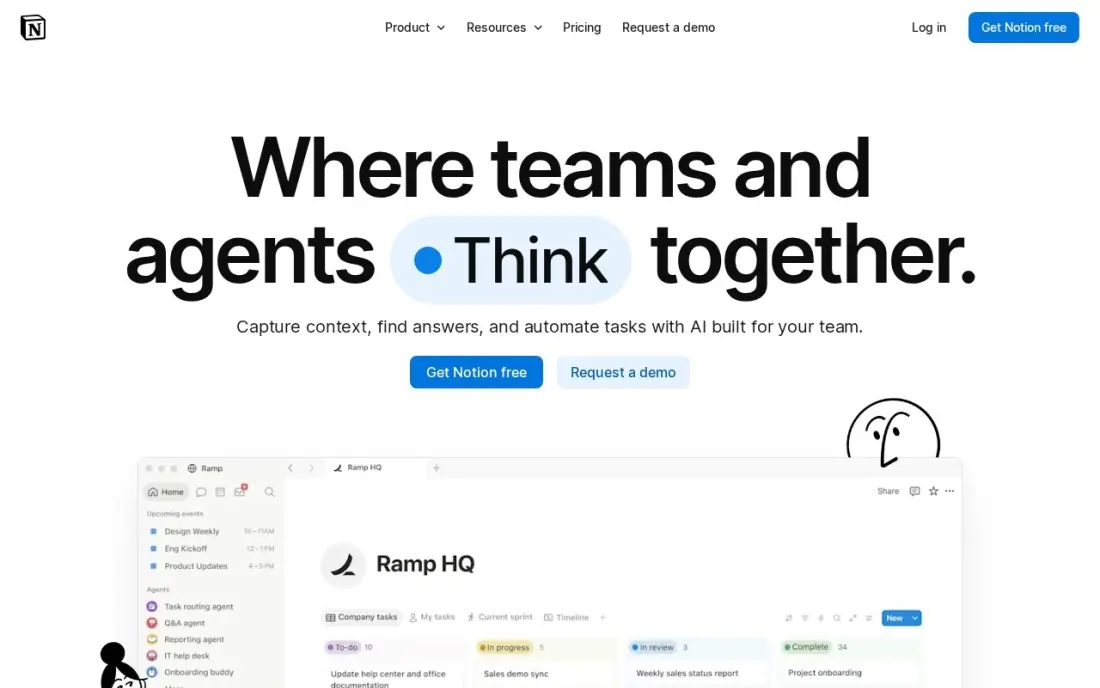
Notion is the most flexible tool in this list, and that flexibility is why it sits first. One workspace holds typed notes, meeting pages, task lists and a wiki, and databases let the same notes become a content calendar or a project tracker without a second subscription. The free plan is genuinely unlimited for one person, so most solo users never pay at all.
The catch is that flexibility costs simplicity. Setting up a good system takes an afternoon of templates and properties, and the web app needs a connection to work properly. Full Notion AI also waits for the $20 a month Business plan, since Plus only gets a limited trial. Pick Notion when notes, docs and tasks belong in one place; pick OneNote or Apple Notes when you only need somewhere fast to write.
What we like
- Free plan is genuinely unlimited for one person, with unlimited pages and blocks
- Databases turn notes into a wiki, task list or content calendar without a second tool
- Plus adds unlimited file uploads, 30-day page history and custom forms and sites from $10 a month billed annually
- Syncs across Windows, Mac, iOS, Android and the web, with offline access on mobile and desktop
Watch out for
- Full Notion AI needs the $20 a month Business plan; Plus only gets a limited trial
- Large workspaces can feel slow, and the learning curve is steep for simple note-taking
- No true offline mode on the web app, and export options are limited compared with local-first tools
Microsoft OneNote
Best for: Microsoft 365 households and students who want a free-form notebook on every device
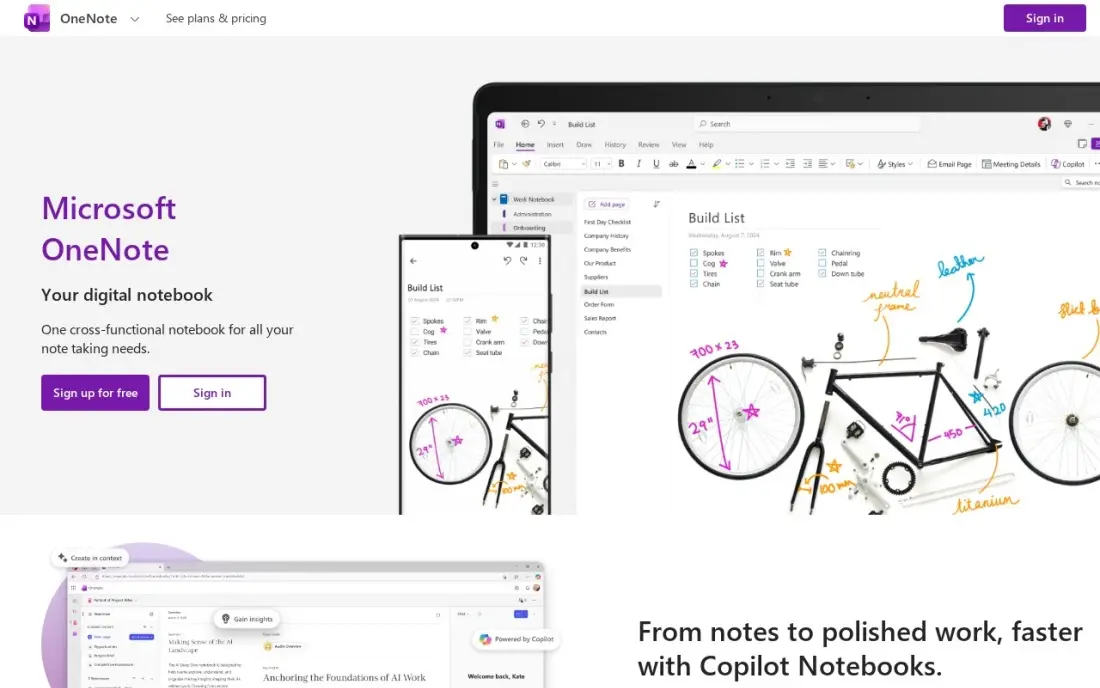
OneNote is the closest thing to paper in this list, and it costs nothing. The free-form canvas lets you write, draw, paste a photo or drop an audio recording anywhere on the page, and sections and pages work like the dividers in a binder. There is no note limit on the free app, and it runs on Windows, Mac, iOS, Android and the web.
The trade-off is structure. There is no Markdown and no backlinking, so notes live in a folder hierarchy rather than a linked web, and the interface looks dated next to Notion or Apple Notes. Copilot and the full 1 TB of storage need Microsoft 365 Personal at $99.99 a year. Pick OneNote when you live in Microsoft 365 and want a free notebook that takes ink; pick Obsidian when the notes need to link together.
What we like
- Free on every platform with no note limit, and the free-form canvas takes handwriting, drawings, audio and files anywhere on the page
- Section and page notebooks mirror a paper binder, so large collections stay organised without tags or links
- Syncs through OneDrive across Windows, Mac, iOS, Android and the web
- Audio recording can sit beside typed notes, and handwriting search works on inked pages
Watch out for
- No Markdown support and no backlinks, so notes stay in a folder hierarchy rather than a linked web
- Copilot and the full 1 TB of storage need a Microsoft 365 subscription at $99.99 a year
- Large notebooks can sync slowly, and the interface feels dated next to newer apps

Evernote
Best for: People with years of saved documents who need powerful search across everything they clip
Evernote built its name on capture, and it still leads on one thing: finding a note again. Clip a web article, photograph a receipt or scan a handwritten page, and the text inside becomes searchable later — including text inside PDFs and photos. For someone with years of saved documents, that search is the product, and no other tool here matches it.
The problem is value at the current price. The free plan allows only 50 notes and one notebook, so it works as a trial rather than a long-term home, and Personal at $14.99 a month costs more than Notion Plus while doing less. Evernote's plan names and prices also change often, so confirm the price at checkout. Pick Evernote when searchable archives matter most; pick Notion when you want more tool for less money.
What we like
- Search finds text inside scanned documents, PDFs and photos, which no other tool here does as well
- Web Clipper saves full articles, receipts and screenshots into a notebook in one click
- Personal adds offline notebooks, 10 GB of monthly uploads and unlimited devices from $10.83 a month billed annually
Watch out for
- The free plan allows only 50 notes and one notebook, so it works as a trial rather than a home
- Personal costs more than Notion Plus for fewer features, and plan names and prices change often
- No Markdown support and no backlinking, so notes stay in notebooks rather than a linked web

Obsidian
Best for: Writers and researchers who want private linked notes in plain files they own
Obsidian is the only tool here where you own the notes in the plainest sense: every note is a Markdown file in a folder on your own device, readable in any text editor even if Obsidian disappeared. Backlinks and a graph view link those files into a personal knowledge base, and the app is free for personal and commercial use with no account, no sign-up.
The price of that ownership is setup. Obsidian hands you a blank canvas and expects you to build your own system, so the first weeks go into configuring plugins instead of writing, and there is no real-time collaboration. Sync is also a paid add-on at $4 a month billed annually, or a cloud folder you arrange yourself. Pick Obsidian when your notes are a long-term archive; pick Notion when you need to share them.
What we like
- Every note is a plain Markdown file on your own device, readable in any text editor even if Obsidian disappears
- Backlinks and a graph view turn notes into a linked knowledge base with no subscription
- More than 2,700 community plugins add tasks, calendars, databases and AI without a paid plan
Watch out for
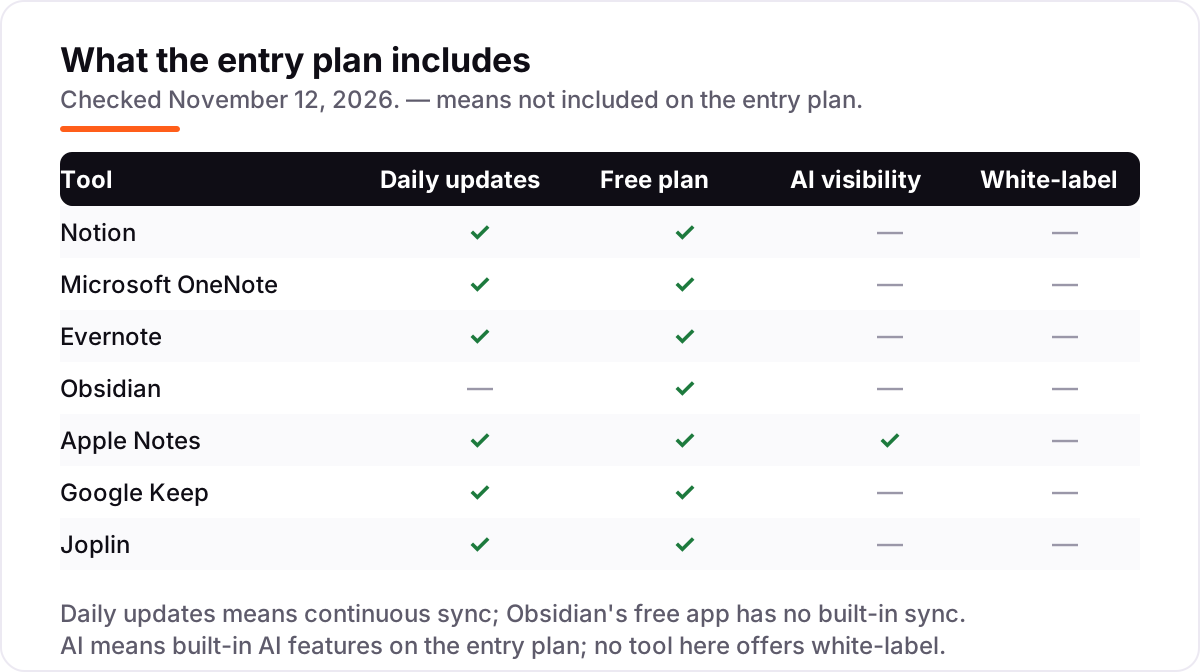
- No built-in sync on the free app — Sync costs $4 a month billed annually, or you arrange your own cloud folder
- Blank-canvas setup takes real configuration before it feels like a notes app
- No real-time collaboration, so shared editing needs another tool

Apple Notes
Best for: Apple users who want fast, private notes that open instantly on every Apple device
Apple Notes is the zero-cost default for anyone who lives on Apple hardware, and it has quietly become one of the most capable free note apps. It opens instantly, works fully offline, and supports rich text, checklists, tables, document scanning, Apple Pencil handwriting with searchable ink, and audio transcription — all included, with nothing locked behind a subscription.
The limit is the ecosystem. There is no Windows or Android app, only limited web access through iCloud.com, so a household with mixed devices hits a wall. The free 5 GB of iCloud storage also fills fast once notes carry photos and scans, and extra storage starts at $0.99 a month. Pick Apple Notes when every device in the house is Apple; pick OneNote or Google Keep when it is not.
What we like
- Free with every iPhone, iPad and Mac, with no subscription, no account and no feature locked behind a paywall
- Apple Pencil handwriting with searchable handwriting, document scanning and audio transcription built in
- Syncs through iCloud with end-to-end encryption, and locked notes protect sensitive pages
- Apple Intelligence adds writing tools and summaries on supported devices at no extra cost
Watch out for
- Apple devices only — there is no Windows or Android app, only limited web access through iCloud.com
- No Markdown support and no backlinks, so long research notes stay in folders
- The free 5 GB of iCloud storage fills fast once notes carry photos and scans; extra storage costs from $0.99 a month

Google Keep
Best for: Google users who want the fastest way to capture a thought, list or reminder
Google Keep is the simplest tool in this list, and for quick capture that is the point. A note, a checklist, a photo or a voice memo takes seconds, and colour labels, pinning and reminders keep short notes findable without folders or tags. It syncs instantly across Android, iOS and the web through a Google account, and sharing a note is one tap.
The simplicity is also the ceiling. There are no folders, no Markdown and almost no text formatting, so a long research note has nowhere to grow, and there is no handwriting canvas or PDF annotation. The 15 GB of free Google storage is shared with Gmail and Drive, so heavy users hit it sooner than they expect. Pick Keep for fleeting notes and lists; pick Notion or Obsidian when notes turn into documents.
What we like
- The fastest capture here: a note, checklist, photo or voice memo takes seconds on any device
- Location and time reminders, colour labels and pinning keep short notes findable without folders
- Syncs instantly across Android, iOS and the web through a Google account, with real-time sharing
Watch out for
- No folders, no Markdown and almost no text formatting, so long notes become hard to organise
- No handwriting canvas and no PDF annotation, unlike OneNote or Apple Notes
- The 15 GB of free Google storage is shared with Gmail and Drive, so heavy users hit the ceiling

Joplin
Best for: Privacy-minded users who want open-source notes with sync they control
Joplin is the open-source answer in this list: a free note app that stores notes as Markdown files you can export any time, with to-dos, alarms and a web clipper included. Sync is your choice — Dropbox, OneDrive, Nextcloud, WebDAV or S3 — so you can keep notes in step across devices without paying Joplin anything, and sync is end-to-end encrypted.
Joplin Cloud is the paid convenience layer: Basic at €2.99 a month, or €2.40 billed annually, adds hosted sync, a web app and note publishing, but caps each note at 10 MB, so scanned PDFs can hit the limit. The interface is plain next to Notion or Apple Notes, and there is no real-time collaboration on the free app. Pick Joplin when privacy and ownership matter most; pick Obsidian when you want the bigger plugin ecosystem.
What we like
- Free and open source, with notes stored as Markdown files you can export any time
- Sync through Dropbox, OneDrive, Nextcloud, WebDAV or S3 costs nothing extra — Joplin Cloud is optional
- End-to-end encryption on sync, plus a web clipper, to-dos and alarms in the free app
Watch out for
- Cloud Basic is €2.40 a month billed annually and caps notes at 10 MB each, so scanned PDFs can hit the limit
- The interface is plain next to Notion or Apple Notes, and setup takes more steps
- No real-time collaboration on the free app; sharing needs a paid Cloud plan
The 7 best tools for digital note taking below are ranked by fit for the most common buyer: someone who wants notes that sync across a phone and a laptop without paying for features they will never use. Every tool here has a free tier, and two have no paid plan at all — so the real choice is about where your notes live and how you write them, not the price.
How to choose the best tools for digital note taking
- Check where the notes live first. Cloud apps such as Notion, Evernote and OneNote keep notes on the vendor's servers; Obsidian and Joplin keep them as files on your own device. The cloud is easier, the files are yours forever.
- Check how you write. Typed notes suit Notion, Evernote and Google Keep; handwriting suits Apple Notes and OneNote; linking ideas together suits Obsidian and Joplin. Buy for the way you actually take notes, not the way you wish you did.
- Check the free-plan limits. Evernote stops at 50 notes, Joplin Cloud caps each note at 10 MB, and Apple Notes shares the free 5 GB of iCloud. A free plan that runs out mid-semester is not a free plan.
- Check sync and offline access. Notion, OneNote and Keep sync continuously on the free tier; Obsidian's sync is a paid add-on. If notes must be on your phone and your laptop, confirm sync is included before you commit.
- Check the exit. Export a few notes before you commit years to a tool. Obsidian and Joplin store plain Markdown files you already own; Notion and Evernote export, but the result needs tidying.
Notes are where ideas start, but they do not bring readers on their own. If your notes become posts that need to rank, our local SEO service covers the visibility side for local businesses. And before you publish a note as a blog post, run the title through the free SERP snippet preview tool — it shows exactly how the title and description will look in Google.
Whatever you shortlist, try it with real notes before you pay. A week of meetings, ideas and clipped articles shows more than any feature list: whether capture is fast enough, whether search finds things, and whether the app is still open on day seven. Every tool here has a free tier, so there is no reason to buy before you have run a real week on it.
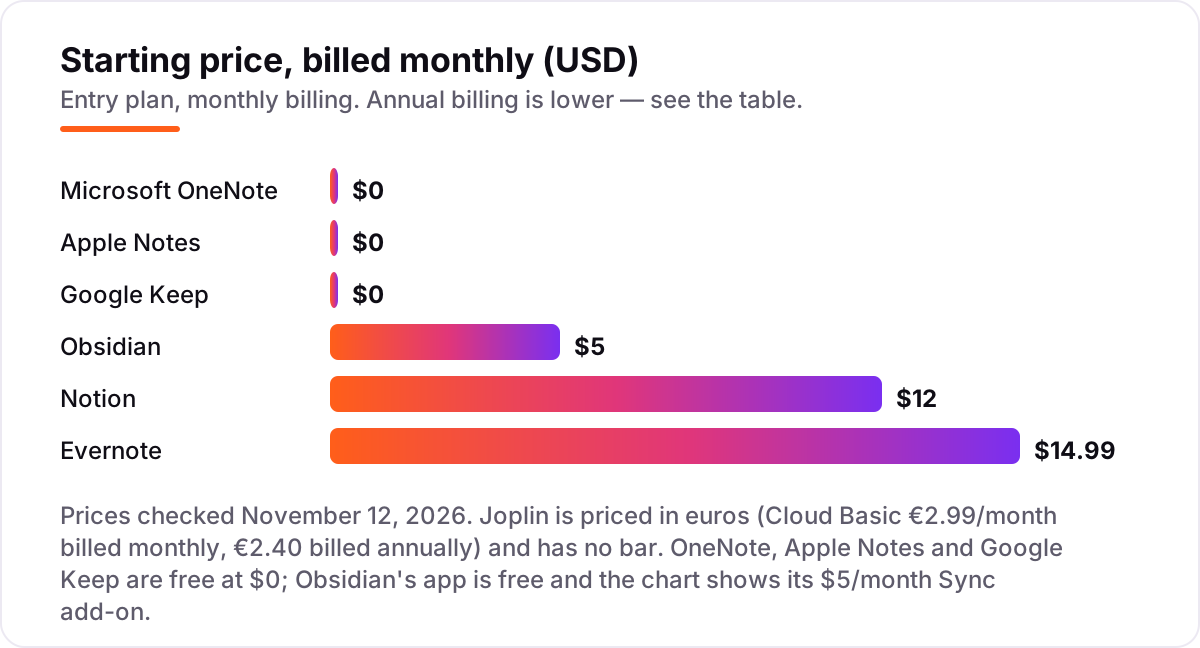
Tools for digital note taking pricing: what you will actually pay
Take one person who takes notes every day, plus a five-person team sharing a workspace. On list prices, one person pays $0 on OneNote, Apple Notes, Google Keep, Obsidian and Joplin, $129.99 a year on Evernote Personal, and $120 a year on Notion Plus billed annually. A five-person team on Notion Plus pays $600 a year billed annually, or $720 on monthly billing; the same team on Evernote Personal pays about $650 a year. Obsidian Sync for five people costs $240 a year billed annually, and Joplin Cloud Basic for five costs €143.45 a year.
Over a year, the gap between the cheapest workable setup and the dearest is about $650 — small next to a software budget, but the free tools cover most people completely. Paying only makes sense when the paid plan adds something specific: unlimited devices on Evernote, databases on Notion, or official sync on Obsidian. The hidden cost is storage, not the subscription: Apple Notes shares the free 5 GB of iCloud, and extra storage starts at $0.99 a month, while Google Keep shares the free 15 GB of Google storage with Gmail and Drive. Budget the storage upgrade with the app, not after it.
Know the difference: typed notes, handwritten notes and linked notes
The confusion in this category is that three different jobs share the name "note taking". Typed notes are what most people mean: quick text, checklists and clipped articles, kept in order. Notion, Evernote and Google Keep are built for this, and they are the fastest way to get a thought down and find it again. Handwritten notes are a different job: ink on a page, with diagrams, margins and sketches. Apple Notes and OneNote are built for this, and they are the only tools here where a stylus feels natural.
Linked notes are the third job, and the one buyers most often confuse with the other two. Obsidian and Joplin do not organise notes into folders so much as link them into a web: a note about a client links to a note about a project, which links to a note about an idea, and the graph shows how they connect. That is powerful for research and writing, and pointless for a shopping list. The mistake is buying a linked-notes tool for typed notes, then spending weeks configuring plugins instead of writing — or buying a typed-notes tool for research, then losing the thread between notes that never link.
There is a second, quieter confusion: a free app is not a free system. OneNote, Apple Notes and Google Keep cost $0 a month, but every photo, scan and audio note eats shared cloud storage, and the storage upgrade is the real bill. Obsidian and Joplin are free as apps, but sync across devices costs $4 a month on Obsidian or €2.40 on Joplin Cloud, unless you arrange your own cloud folder. Budget the subscription plus the storage plus the sync, not the $0 headline.
Quick comparison: tool type by need
| Buyer | Best pick | Why |
|---|---|---|
| One workspace for notes, docs and tasks | Notion | Free plan, Plus is $10/user/month billed annually |
| Lives in Microsoft 365 | Microsoft OneNote | Free app, 365 Personal is $99.99/year |
| Saves and searches documents | Evernote | Free plan is 50 notes; Personal is $14.99/month |
| Wants to own the files | Obsidian | Free app; Sync is $4/month billed annually |
| Apple-only and wants $0 | Apple Notes | Free, no paid tier |
| Fastest capture on any device | Google Keep | Free, no paid tier |
Mistakes to avoid
- Paying for storage you already have. Apple Notes uses iCloud and Google Keep uses Google storage; check what is already paid for before buying a second cloud plan for the same gigabytes.
- Comparing monthly prices without checking billing. The annual price is usually about 17% lower — Notion Plus drops from $12 to $10 a user a month — and a few tools have no monthly option at all.
- Ignoring the free-plan caps. Evernote stops at 50 notes, Joplin Cloud caps each note at 10 MB, and Apple Notes shares 5 GB of iCloud. A free plan that runs out mid-project forces an upgrade at the worst moment.
- Buying a linked-notes tool for simple lists. Obsidian and Joplin reward research and long writing; for shopping lists and meeting notes they are setup overhead with no payoff.
- Forgetting the export test. Before committing years of notes, export a few and open them in a plain text editor. If the export is a mess, the notes are hostages, not assets.
How we chose
We ranked the tools by fit for the most common buyer — one person or a small team taking notes across a phone and a laptop — not by brand size. Prices were corroborated through multiple independent reads of each vendor's own pricing page dated November 2026, because our direct fetches of those pages failed on November 12, 2026: the browser service timed out and the virtual machine's outbound network returned nothing. The figures are therefore corroborated rather than read directly today: Notion Plus $10 a month billed annually or $12 monthly, Evernote Personal $14.99 a month or $129.99 a year, Obsidian Sync $4 a month billed annually or $5 monthly, Joplin Cloud Basic €2.40 a month billed annually or €2.99 monthly, and Microsoft 365 Personal $99.99 a year. Ratings come from fresh search-index copies of the exact G2 and Capterra pages, crawled within the last three days: Notion 4.6 from 13,976 reviews, Evernote 4.3 from 2,046, OneNote 4.5 from 1,871, Obsidian 4.5 from 14 and Google Keep 4.7 from 248 on Capterra. Apple Notes and Joplin show no rating because neither has a G2, Capterra or Trustpilot page with a score and review count. No vendor paid for a place in this list, and none of the links here are affiliate links.
What to do next
Start with the free tier of your top pick and use it for a week of real notes — meetings, ideas, clipped articles — before you pay anything. If you write on an iPad with a stylus, test Apple Notes or OneNote first; if your notes are mostly typed and shared, start with Notion. When the free tier runs out, usually on storage or device limits, you will know exactly which paid plan to buy, and if those notes become posts that need to rank, our monthly SEO service handles the visibility side. Once your tools are in place, find out what's holding your rankings back.
Frequently asked questions
What is the best tool for digital note taking in 2026?
Notion is the best fit for most people: a genuinely unlimited free plan, and Plus from $10 a user a month billed annually for teams. OneNote is the best free pick for Microsoft households, Apple Notes for Apple users, and Obsidian for anyone who wants to own their notes as plain files.
How much do digital note taking tools cost?
From $0 to $14.99 a month. Apple Notes and Google Keep are completely free, OneNote's app is free, and Notion, Obsidian and Joplin all have free apps with paid sync or team plans. The only paid starting prices here are Notion Plus at $12 a month, Evernote Personal at $14.99 and Obsidian Sync at $5.
Is there a free digital note taking tool?
Yes, several. Apple Notes and Google Keep have no paid tier at all, OneNote's app is free, and Notion, Obsidian and Joplin all have free apps with no note limit. The free plan to avoid is Evernote's: it allows only 50 notes and one notebook, so it works as a trial rather than a home.
What is the difference between Notion and OneNote?
Notion organises notes into databases, wikis and task lists, so it works as a workspace as well as a notebook. OneNote is a free-form notebook: you write, draw and paste anywhere on a page, like paper. Notion is better for shared team docs; OneNote is better for handwriting and free-form pages, and it is free.
Can I use Obsidian for free?
Yes. The Obsidian app is free for personal and commercial use, with unlimited notes, backlinks, a graph view and more than 2,700 community plugins. The only paid extra is Sync, at $4 a month billed annually for one vault, or you can sync through a cloud folder you arrange yourself.
Which note taking app is best for handwriting?
Apple Notes is the best free pick for handwriting on iPad, with Apple Pencil support, searchable ink and document scanning built in. OneNote is the best cross-platform pick: its free-form canvas takes ink, drawings and audio on Windows, Mac, iOS and Android. Both are free.
What should I check before paying for a note taking app?
Check four things: what the free plan actually limits, whether sync is included or a paid add-on, whether the price is monthly or annual billing, and how your notes export. All four vary widely here — Evernote's free plan stops at 50 notes, Obsidian's sync is extra, and annual billing saves about 17% on Notion.
Sources we checked (12)
- Notion pricing — notion.com/pricing (confirmed by multiple independent reads, November 2026)
- Notion on G2 — 4.6/5, 13,976 reviews (checked November 12, 2026)
- Microsoft 365 Personal pricing — microsoft.com/en-us/microsoft-365/personal (confirmed by multiple independent reads, November 2026)
- Microsoft OneNote on G2 — 4.5/5, 1,871 reviews (checked November 12, 2026)
- Evernote pricing — evernote.com/pricing (confirmed by multiple independent reads, November 2026)
- Evernote on G2 — 4.3/5, 2,046 reviews (checked November 12, 2026)
- Obsidian pricing — obsidian.md/pricing (confirmed by multiple independent reads, November 2026)
- Obsidian on G2 — 4.5/5, 14 reviews (checked November 12, 2026)
- Apple Notes — apple.com/notes (confirmed by multiple independent reads, November 2026)
- Google Keep — keep.google.com (confirmed by multiple independent reads, November 2026)
- Google Keep on Capterra — 4.7/5, 248 reviews (checked November 12, 2026)
- Joplin Cloud plans — joplinapp.org/plans (confirmed by multiple independent reads, November 2026)
Make one of these tools?
We re-check this list every quarter. Send a correction, request a review, or ask about a clearly labeled sponsored spot.
Request a listingShamim
Founder of SerpAstra
A full-stack SEO and digital marketer who spends most days on Local SEO for dental practices, AI search visibility and lead generation.
Free SEO and AI visibility audit
Find out what is holding your rankings back
Send us your site. Within 2 business days you get a written audit, an AI visibility check and a short fix list ranked by impact. Free, with no contract attached.
Request my free audit→Related buying guides
 Productivity & Office10 Best Cross-Platform Note Taking Apps in 2026, ComparedCompare the 10 best cross-platform note taking apps on price, sync, free plans and AI features, with every price checked on November 10, 2026.Read guide →
 Productivity & Office10 Best AI Writing Tools for Content Workflows in 2026, ComparedThe 10 best AI writing tools for content workflows, compared on real prices, free plans and AI visibility. Prices checked November 10, 2026.Read guide →
 Productivity & Office10 Best Apps for Writing a Book in 2026: Free and Paid Apps RankedCompare the 10 best app for writing a book picks on price, free plans and formatting, with every price checked November 4, 2026, and ranked by use case.Read guide →