
10 Best Cross-Platform Note Taking Apps in 2026, Compared
Compare the 10 best cross-platform note taking apps on price, sync, free plans and AI features, with every price checked on November 10, 2026.
 Shamim Mia, Founder, SerpAstraLast verified November 10, 202614 min read
We compare pricing pages, documentation and public reviews. We never accept payment for rankings.

Key takeaways
- Notion Plus leads for most people at $12 a month, with Evernote Starter at $14.99 a month and Microsoft OneNote free at $0.
- The single most important buying factor is how sync works: check whether cross-device sync is included free or sold as a paid add-on before you compare prices.
- Free plans are genuinely usable here — Google Keep costs $0 with no paid tier, and OneNote, Obsidian, Joplin and Logseq are free apps with optional paid sync.
- Every price below was checked on the vendor's own pricing page on November 10, 2026, except Evernote, whose prices load client-side (see How we chose).
On this page
Quick comparison
| Tool | Best for | Starting price | Free plan |
|---|---|---|---|
| Notion | People and small teams who want notes, docs, wikis and project tracking in one workspace | $12/mo | Yes (free plan) |
| Evernote | People with years of saved documents, scans and web clips who need powerful search | $14.99/mo | Yes (50 notes) |
| Microsoft OneNote | Students and Microsoft 365 households who want a free digital notebook on every device | Free | Yes (free app) |
| Obsidian | Writers, researchers and developers who want local Markdown files and linked notes | $5/mo (Sync) | Yes (free app) |
| Google Keep | Anyone in the Google ecosystem who wants fast capture, lists and reminders for $0 | Free | Yes (free) |
| Joplin | Privacy-minded note-takers who want open-source Markdown notes with cheap hosted sync | €2.99/mo | Yes (free app) |
| Standard Notes | People who store private journals and sensitive writing and want encryption by default | $90/yr | Yes (free plan) |
| UpNote | People who want a simple, fast Evernote-style app with a one-time lifetime option | $1.99/mo | Yes (50 notes) |
| Logseq | Outliner fans and researchers who think in daily journals and linked blocks | $5/mo (Sync) | Yes (free app) |
| Zoho Notebook | Casual note-takers who want a pretty, card-based app with generous free sync | $1.99/mo | Yes (free plan) |
Make one of these tools?
We re-check this list every quarter. Send a correction, request a review, or ask about a clearly labeled sponsored spot.
Request a listingThe best cross-platform note taking apps
Notion
Best for: People and small teams who want notes, docs, wikis and project tracking in one workspace
Notion leads this list because it is the only tool here that can be both a notes app and a team workspace. The free plan is unlimited for one person, and Plus at $12 a month billed monthly removes the limits that matter for teams: unlimited file uploads and 30-day page history. Databases, templates and 100+ integrations mean meeting notes can live next to project trackers and wikis.
The trade-off is focus. Notion is a big app with a learning curve, and it works best with an internet connection — offline mode is limited, so a flight without Wi-Fi is a bad time to edit a database. Full AI features also wait for the $20-a-month Business plan. Buy Notion when your notes are shared work; buy a simpler app when you only need to capture your own thoughts.
What we like
- Free plan is unlimited for one person, with unlimited pages and blocks
- Databases, templates and 100+ integrations turn notes into a team workspace
- Apps on iOS, Android, Mac, Windows and web, with real-time collaboration
- Plus adds unlimited file uploads and 30-day page history
Watch out for
- Needs an internet connection for the best experience; offline mode is limited
- Full AI features need the $20/month Business plan, not Plus
- Per-member pricing adds up fast: five people on Plus cost $50 a month billed annually

Evernote
Best for: People with years of saved documents, scans and web clips who need powerful search
Evernote built its name on capture and search, and both still lead this list. Clip a web article, photograph a receipt or scan a handwritten page, and the text inside becomes searchable later — including text inside PDFs and images. In November 2025 Evernote replaced Personal and Professional with Starter and Advanced, so $14.99 a month now buys Starter: 1,000 notes, 20 notebooks, 3 synced devices and 5 GB of storage.
The 1,000-note ceiling is the number to check before you pay. Anyone with years of notes will hit it, and the only uncapped plan is Advanced at $249.99 a year. The free plan is tighter still at 50 notes and one notebook. Evernote is the right buy for a searchable archive of documents and clips; for plain daily notes, the free tools below do the job for $0.
What we like
- Search finds text inside PDFs, images and handwritten notes
- Web Clipper saves full articles, receipts and screenshots in one click
- Apps on iOS, Android, Mac, Windows and web, with offline notes on paid plans
Watch out for
- Starter caps at 1,000 notes, 20 notebooks and 3 synced devices
- AI features (AI Assistant, semantic search, AI Edit) need the $249.99/year Advanced plan
- The free plan allows only 50 notes and 1 notebook, so it works as a trial, not a home
Microsoft OneNote
Best for: Students and Microsoft 365 households who want a free digital notebook on every device
OneNote is the best free notebook in this list, and it is hard to argue with the price: the full app costs $0 on Windows, Mac, web, iOS and Android, with a Microsoft account and 5 GB of OneDrive storage. The free-form canvas is its real strength — click anywhere and type, draw, record audio or write maths by hand — and the notebook, section and page layout organises years of notes without a database to learn.
The catch is storage, not features. Five gigabytes of free OneDrive fills up fast once notebooks hold PDFs and recordings, and the step up is Microsoft 365 Personal at $9.99 a month, which adds 1 TB and Copilot. Pick OneNote if you already live in Microsoft's world; pick Notion if your notes are shared team work.
What we like
- Free on Windows, Mac, web, iOS and Android with a Microsoft account
- Free-form canvas with handwriting, drawing, audio notes and maths input
- Notebooks, sections and pages organise large collections without a database to learn
Watch out for
- Only 5 GB of free OneDrive storage; heavy notebooks need a Microsoft 365 plan
- Copilot in OneNote needs Microsoft 365 Personal at $9.99 a month
- The experience differs between desktop, web and mobile, and large notebooks can load slowly

Obsidian
Best for: Writers, researchers and developers who want local Markdown files and linked notes
Obsidian is the local-first pick in this list: the app is free without limits, even for commercial use, and every note is a plain Markdown file on your own device. Backlinks and a graph view connect ideas across a vault, and a large community plugin library adds kanban boards, calendars, tables and more. Your notes never sit on a server you do not control.
Sync is the one thing that costs money. Obsidian Sync Standard is $4 a month billed annually for one vault and 1 GB of encrypted storage, or you can sync the files yourself through iCloud, Dropbox or Git for free. The app also starts as a blank slate, so the first week goes into setup rather than writing. Choose Obsidian when owning your files matters more than having everything ready out of the box.
What we like
- Notes are plain Markdown files on your own device, so there is no lock-in
- Backlinks, graph view and a large community plugin library link ideas together
- Free for personal and commercial use, with no account and no note limits
Watch out for
- Cross-device sync costs $4 a month billed annually, or you must set it up yourself
- Starts as a blank slate, so beginners spend the first week configuring it
- No real-time collaboration and no built-in AI features

Google Keep
Best for: Anyone in the Google ecosystem who wants fast capture, lists and reminders for $0
Google Keep is the fastest capture in this list and the only tool here with no paid tier at all. Open the app, type or dictate a thought, and it is saved — no folders to set up, no blocks to configure, no upgrade screen. Labels, reminders, checklists and colour coding cover everyday notes, and Keep sits inside Gmail, Docs and Calendar, so a note is one click from your inbox on any device.
The simplicity has a ceiling. There are no notebooks or folders, so a collection of hundreds of notes gets hard to organise, and there is no desktop app — Windows and Mac users get the web version at keep.google.com. Keep is the right pick for lists, reminders and quick capture; for long-form writing or a research archive, Notion or Evernote fits better.
What we like
- Free with no paid tier, no ads and no feature paywalls
- Opens in seconds on Android, iOS and the web, with labels, reminders and checklists
- Sits inside Gmail, Docs and Calendar, so notes are one click from your inbox
Watch out for
- No folders or notebooks, so large collections get hard to organise
- No dedicated desktop app for Windows or Mac — desktop use is the web version
- Needs a Google account, and notes share your 15 GB Google storage

Joplin
Best for: Privacy-minded note-takers who want open-source Markdown notes with cheap hosted sync
Joplin is the open-source answer to Evernote: a free app with Markdown notes, notebooks, tags, a web clipper and end-to-end encryption, on Windows, Mac, Linux, iOS and Android. The difference is sync — Joplin does not lock you into its own cloud. Use Dropbox, OneDrive, Nextcloud or WebDAV for free, or pay for Joplin Cloud Basic at €2.99 a month for hosted sync, a web app and note publishing.
The price is the lowest hosted sync in this list, but it is priced in euros, so the dollar figure on a US card moves with the exchange rate. The interface is also plainer than Notion or Evernote, and there is no handwriting input. Choose Joplin when you want Evernote-style notes without a vendor holding your files; choose Evernote when search inside scans matters most.
What we like
- Free and open source, with end-to-end encryption and Markdown files you can export
- Syncs through Joplin Cloud, Dropbox, OneDrive, Nextcloud or WebDAV — your choice
- Web Clipper, tags, notebooks and a large plugin library cover most Evernote workflows
Watch out for
- Joplin Cloud is priced in euros, so US buyers pay a converted price
- The interface looks plain next to Notion and Evernote, and setup takes longer
- No handwriting input and no built-in AI features on the free app

Standard Notes
Best for: People who store private journals and sensitive writing and want encryption by default
Standard Notes is the privacy pick in this list, and it is owned by Proton, the company behind Proton Mail. Every note is end-to-end encrypted on every plan, including the free one, which also includes unlimited notes, unlimited device sync and offline access. The apps run on Windows, Mac, Linux, iOS, Android and the web, and plain-text notes export cleanly whenever you want to leave.
The free plan is deliberately spare: plain text only, with Markdown, rich text, checklists, spreadsheets and folders waiting on the $90-a-year Productivity plan. There is no monthly billing, so the full $90 is due up front, and there is no real-time collaboration. Buy Standard Notes when your notes are private by nature; buy Notion when your notes are shared work.
What we like
- End-to-end encryption on every plan, including the free one
- Free plan includes unlimited notes, unlimited device sync and offline access
- Plain-text notes export cleanly, and the app runs on every platform including Linux
Watch out for
- The free plan is plain text only — Markdown, rich text and checklists need Productivity
- No monthly billing: Productivity is $90 a year, paid up front
- No real-time collaboration, so it suits solo notes rather than team work

UpNote
Best for: People who want a simple, fast Evernote-style app with a one-time lifetime option
UpNote is the simplest paid app in this list: a clean, fast Evernote-style notebook with nested notebooks, tags, tables, code blocks and note locking, on Mac, Windows, Linux, iOS and Android. Premium is $1.99 a month, but the real draw is the $39.99 one-time lifetime licence — pay once and the subscription question goes away for good, which no other tool here offers.
Two limits are worth knowing. There is no web app, so a borrowed computer cannot open your notes in a browser, and Premium cannot be bought from the Windows or Linux apps — you buy on Mac, iOS or Android and it syncs to your account. There is also no end-to-end encryption. Choose UpNote when you want a simple notebook and a price that never rises; choose Joplin when encryption matters.
What we like
- Premium is $1.99 a month, or $39.99 once for a lifetime licence
- Clean rich-text editor with nested notebooks, tags, tables and note locking
- Apps on Mac, Windows, Linux, iOS and Android, with offline access
Watch out for
- No web app, so desktop use needs the installed app
- The free plan stops at 50 notes, and Premium cannot be bought from the Windows or Linux apps
- No end-to-end encryption and no built-in AI features

Logseq
Best for: Outliner fans and researchers who think in daily journals and linked blocks
Logseq is a free, open-source outliner for people who think in daily journals and linked blocks rather than folders. Every day gets a journal page, blocks link to each other, and queries pull related ideas together — with flashcards and PDF annotation built in. Notes are plain-text files on your own device, and the 2.0 database version, released in beta in July 2026, adds real-time collaboration sync.
Sync is the awkward part. There is no checkout page: official Logseq Sync is sold as a $5-a-month contribution on Open Collective and is still in beta, or you sync the files yourself with Git, iCloud or Dropbox for free. The outliner style also takes time to learn. Pick Logseq when daily journaling and linked thinking fit how you work; pick Obsidian for a gentler version of the same idea.
What we like
- Free and open source, with daily journals, backlinks, flashcards and PDF annotation
- Notes are local plain-text files, so you can sync with Git, iCloud or Dropbox for free
- Block references and queries connect ideas without folders
Watch out for
- Official Sync costs $5 a month and is still in beta, sold via Open Collective
- The outliner style and 2.0 database version take time to learn
- No real-time collaboration on the free app, and no built-in AI features

Zoho Notebook
Best for: Casual note-takers who want a pretty, card-based app with generous free sync
Zoho Notebook is the prettiest free plan in this list: card-based notebooks with colour, covers and checklists, no ads, no cap on the number of notes, and sync across iOS, Android, Mac, Windows and web at $0. Audio notes, document scanning and reminders cover everyday capture, and the $1.99-a-month Pro plan raises storage to 100 GB with Noteboards, OCR search and editable sharing.
The July 2026 change is the one to know about: AI features such as transcription and mind maps moved out of Pro into a new Pro Plus tier at $3.99 a month, so Pro no longer buys them. Integrations are also thinner than Notion or Evernote, which can make Notebook feel like a silo. Choose it for beautiful, free everyday notes; choose Evernote when search across a large archive matters more.
What we like
- Free Essential plan has no note cap, no ads and sync across all devices
- Card-based notebooks with checklists, audio notes, document scanning and reminders
- Pro is $1.99 a month and raises storage to 100 GB
Watch out for
- AI features (transcription, mind maps) moved to Pro Plus at $3.99 a month in July 2026
- Fewer integrations than Notion or Evernote, so it can feel like a silo
- Search and organisation are weaker than Evernote for large archives
The best cross-platform note taking app is the one that is already open on the device in your hand — phone on the train, laptop at your desk, tablet on the sofa — with the same notes on all three. The ten tools below all run on iOS, Android and desktop or web, and they are ranked by fit for the most common buyer: one person, or a small team, taking notes across a phone and a laptop. Every price was checked on the vendor's own pricing page on November 10, 2026.
How to choose the best cross-platform note taking app
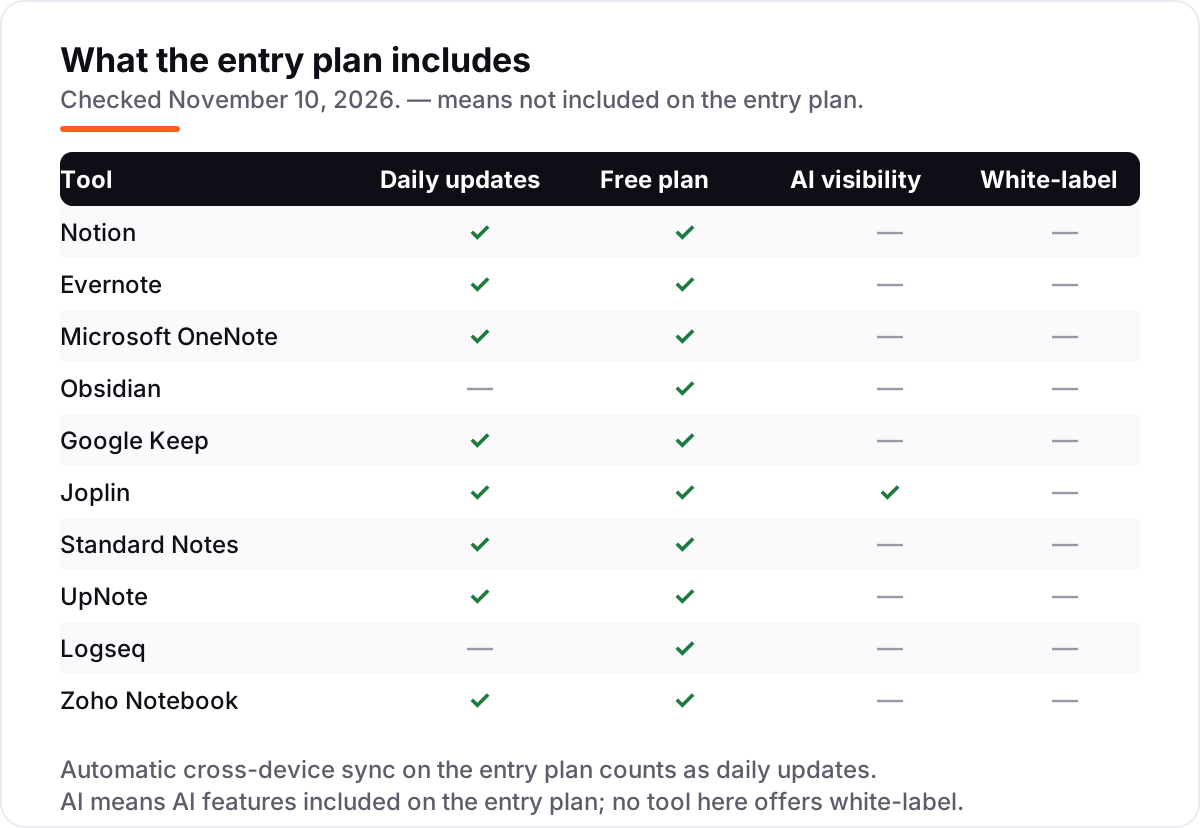
- Check what sync costs. Sync is the whole point of a cross-platform app, and it is free on Notion, OneNote, Keep, Joplin, Standard Notes and Zoho Notebook — but Obsidian and Logseq sell it as a paid add-on. Price the sync, not just the app.
- Count the free plan's limits. Evernote's free plan stops at 50 notes and UpNote's at 50 notes, while Keep, OneNote and Standard Notes have no note cap. A free plan with a hard cap is a trial, not a home.
- Decide how much structure you need. Keep and UpNote are for quick capture; Notion adds databases and wikis; Obsidian and Logseq add linked notes and graphs. More structure means more setup, so match the tool to how you actually think.
- Check export before you commit. Obsidian, Joplin, Logseq and Standard Notes store notes as plain text or Markdown that moves anywhere. Notion and Evernote export too, but formatting and links can break on the way out.
- Try the mobile app first. You will capture most notes on your phone, so the mobile app matters more than the desktop one. If capture feels slow or sync lags on mobile, the tool will not stick.
A note app does not bring in readers on its own. If your notes become public pages, our local SEO service covers the visibility side. And before you publish a note as a web page, the free SERP snippet preview tool shows exactly how its title and description will look in Google.
Whatever you shortlist, try it with real notes before you pay. The free plans in this list are generous enough for a full week of real use: capture on your phone, edit on your laptop, and check that sync never makes you wait. Check two things in the trial: that a note written offline appears on your other device, and that search finds it a week later.
Cross-platform note taking app pricing: what you will actually pay
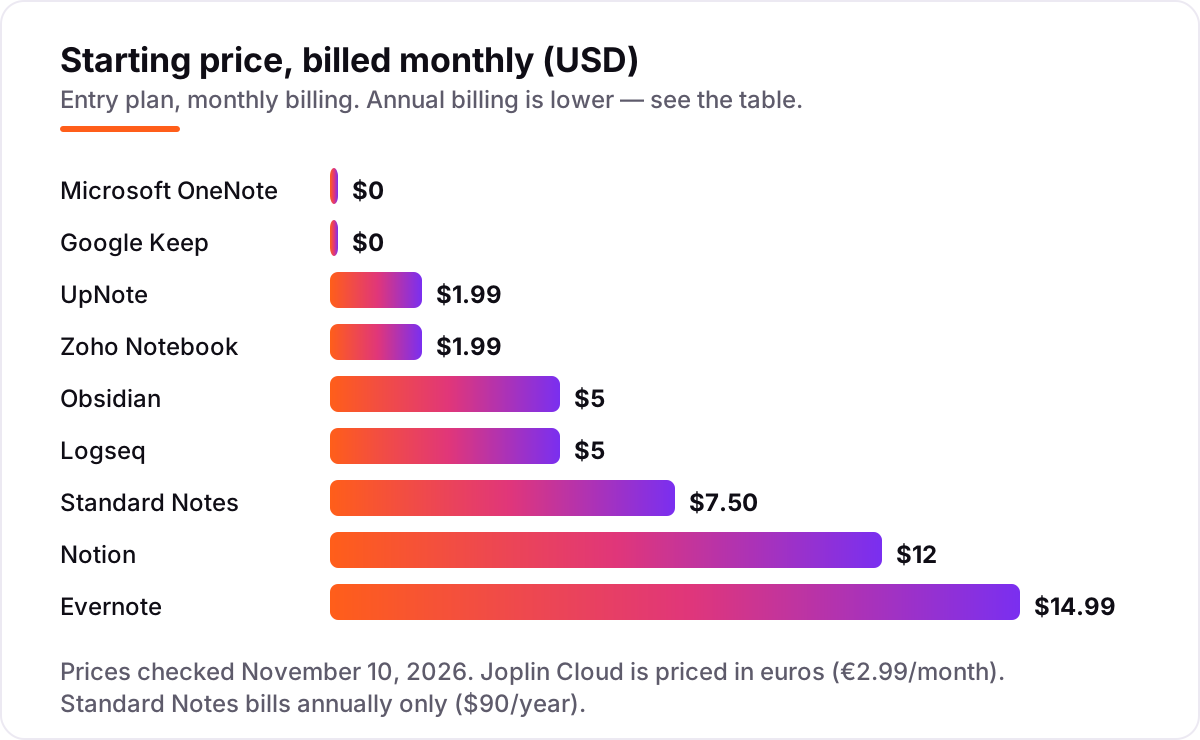
Take one person who wants sync on phone and laptop for a year. On list prices that costs $0 on Google Keep or Microsoft OneNote, $19.99 on Zoho Notebook Pro billed annually, $23.88 on UpNote Premium, €28.69 on Joplin Cloud Basic billed annually, $48 on Obsidian Sync Standard billed annually, $60 on Logseq Sync, $90 on Standard Notes Productivity, $99 on Evernote Starter billed annually and $120 on Notion Plus billed annually. The same notes and the same two devices cost nothing at the cheap end and $120 at the dear end — a gap that comes entirely from whether sync and storage are included or sold separately.
A five-person team changes the picture. On Notion Plus billed annually, five people cost $600 a year; on Keep or OneNote the same five people pay $0. Evernote's team pricing starts from $10 per seat a month on the Flexible plan, so five people cost about $600 a year there too. And the step up inside Evernote is steep: Starter at $99 a year stops at 1,000 notes, and the only uncapped plan, Advanced, costs $249.99 a year — mostly because that is where the AI features live.
Two costs sit outside every number above. First, the AI paywall: Notion's full AI needs Business at $20 a month, Evernote's AI needs Advanced at $249.99 a year, and Zoho's AI needs Pro Plus at $3.99 a month. Second, storage beyond the free allowance: OneNote gives 5 GB free and Keep shares your 15 GB Google storage, so heavy notebooks with PDFs and recordings push you toward a paid plan sooner than the headline price suggests.
Know the difference: a notes app vs a docs app vs a second brain
The confusion in this category is what the tool is for, not which one is best. A notes app — Keep, UpNote, Zoho Notebook — is built for capture and retrieval: write it down fast, find it later. A docs app — Google Docs, Microsoft Word — is built for long-form writing and real-time collaboration on one document, and it is a poor place to store hundreds of small notes. A second brain — Obsidian, Logseq, Roam-style tools — is built for linked thinking: notes connect to each other with backlinks and a graph, so ideas compound over years.
Most buyers need a notes app, and the second brain is where people overspend their time rather than their money. Obsidian and Logseq are free, so the cost is setup: choosing plugins, building a folder system, learning queries. If you enjoy building a system, that time pays off. If you just want somewhere to put meeting notes and find them again, a notes app or Notion does the job in an afternoon, and the graph view will not be missed.
There is a second, quieter confusion: sync is not the same as backup. Every tool here syncs your notes to its cloud, but only the local-first tools — Obsidian, Joplin, Logseq, Standard Notes — keep plain files you can back up yourself. With a cloud-only tool, export your notes every month, so a price rise or an account problem never locks you out of your own writing.
Quick comparison: tool type by need
| Buyer | Best pick | Why |
|---|---|---|
| One workspace for notes and projects | Notion | Databases, wikis and real-time collaboration from $12/month |
| Best search across scans and clips | Evernote | OCR search inside PDFs and handwriting, Starter is $14.99/month |
| Free, with no strings attached | OneNote or Google Keep | Full apps at $0; Keep has no paid tier at all |
| Wants to own the files | Obsidian | Plain Markdown files you keep, Sync is $5/month |
| Privacy and encryption first | Standard Notes | End-to-end encryption on the free plan, Productivity is $90/year |
| Cheapest paid plan | UpNote or Zoho Notebook | $1.99/month; UpNote lifetime is $39.99 once |
Mistakes to avoid
- Paying for sync you already have. Obsidian and Logseq files sync for free through iCloud, Dropbox, Git or Syncthing. Buy their official sync only if you want it managed, with version history and support.
- Comparing monthly prices without checking billing. Notion Plus is $12 a month billed monthly but $10 billed annually; Evernote Starter is $14.99 billed monthly but $99 a year, which works out to $8.25 a month. The annual price is the honest comparison.
- Buying on the free plan, then hitting the cap. Evernote and UpNote stop free users at 50 notes, and Evernote Starter stops at 1,000 notes. If you already have more notes than that, the cheap plan does not exist for you.
- Ignoring the AI paywall. AI features sit on higher tiers almost everywhere here: Notion Business at $20 a month, Evernote Advanced at $249.99 a year, Zoho Pro Plus at $3.99 a month. If AI matters, price the tier that has it, not the entry plan.
- Picking a second brain when you need a notebook. Obsidian and Logseq reward setup time, but a week spent configuring plugins is a week not writing. Start with a simple notes app and move to a linked system only when simple search stops finding things.
How we chose
We checked each vendor's own pricing page on November 10, 2026 and recorded the starting price exactly as shown, including the annual-billing figure where the page lists one, and we ranked the tools by fit for the most common buyer — one person or a small team taking notes across a phone and a laptop — not by brand size. Bear and Apple Notes are not in this list because they run on Apple devices only, not across iOS, Android and Windows. Three prices need a note. Evernote's pricing page injects its prices with client-side code, so the Starter and Advanced figures come from the vendor page's own pricing data as read on November 10, 2026, cross-checked against reads from November 5. Logseq publishes no pricing page of its own: Sync is sold as a $5-a-month Open Collective contribution, and that is the figure we use. Standard Notes bills annually only, so its $7.50-a-month figure is the $90 annual price divided by 12, and Joplin Cloud is priced in euros. Ratings come from G2, checked November 10, 2026. We show no rating for Google Keep, which has no G2 product page; for Joplin, whose G2 base is only 5 reviews; or for UpNote and Logseq, where G2 returned an access error. No vendor paid for a place in this list, and none of the links here are affiliate links.
What to do next
Start with the free plan of your top pick and use it for one real week: capture on your phone, edit on your laptop, and check that sync never makes you wait. If the free limits bite — Evernote's 50 notes, UpNote's 50 notes, Evernote Starter's 1,000-note cap — you will know within days, before you pay. Once your tools are in place, find out what's holding your rankings back.
Your stack only works if people find you
SerpAstra fixes what keeps your site off page one and makes it easy for AI assistants to recommend.
Get a free audit→Sources we checked (16)
- Notion pricing — notion.com/pricing (checked November 10, 2026)
- Notion on G2 — 4.6/5, 13,973 reviews (checked November 10, 2026)
- Evernote pricing — evernote.com/pricing (checked November 10, 2026)
- Evernote on G2 — 4.3/5, 2,046 reviews (checked November 10, 2026)
- Microsoft 365 Personal pricing — microsoft.com/en-us/microsoft-365/personal (checked November 10, 2026)
- Microsoft OneNote on G2 — 4.5/5, 1,871 reviews (checked November 10, 2026)
- Obsidian pricing — obsidian.md/pricing (checked November 10, 2026)
- Obsidian on G2 — 4.5/5, 14 reviews (checked November 10, 2026)
- Google Keep — keep.google.com (checked November 10, 2026)
- Joplin Cloud pricing — joplinapp.org/plans (checked November 10, 2026)
- Standard Notes plans — standardnotes.com/plans (checked November 10, 2026)
- Standard Notes on G2 — 4.0/5, 13 reviews (checked November 10, 2026)
- UpNote pricing — getupnote.com/#pricing (checked November 10, 2026)
- Logseq Sync — opencollective.com/logseq (checked November 10, 2026)
- Zoho Notebook pricing — zoho.com/notebook (checked November 10, 2026)
- Zoho Notebook on G2 — 4.4/5, 70 reviews (checked November 10, 2026)
Shamim
Founder of SerpAstra
A full-stack SEO and digital marketer who spends most days on Local SEO for dental practices, AI search visibility and lead generation.
Frequently asked questions
What is the best cross-platform note taking app?
Notion Plus is the best fit for most people at $12 a month, because it covers notes, docs, wikis and project tracking in one workspace that syncs across phone, laptop and web. If you only need notes, Microsoft OneNote and Google Keep are free and excellent. For private notes, Standard Notes is the strongest choice.
How much does a cross-platform note taking app cost?
Between $0 and $14.99 a month at the entry level. Google Keep and Microsoft OneNote are free, UpNote and Zoho Notebook start at $1.99 a month, and Obsidian Sync and Logseq Sync cost $5 a month. Notion Plus is $12 a month and Evernote Starter is $14.99 a month, both cheaper when billed annually.
Is there a free cross-platform note taking app?
Yes, several. Google Keep is free with no paid tier at all, and Microsoft OneNote, Obsidian, Joplin and Logseq are free apps with optional paid sync. Standard Notes and Zoho Notebook also have free plans with unlimited notes and sync. The paid plans mostly add storage, richer editors or hosted sync.
What is the difference between a note taking app and a second brain?
A note taking app captures and finds notes fast — that is what most people need. A second brain, such as Obsidian or Logseq, links notes together with backlinks and a graph so ideas connect over time. It is more powerful for research but takes setup and upkeep, so pick it only if you enjoy building a system.
Can I sync my notes across devices for free?
Yes, in most cases. Notion, Evernote, OneNote, Keep, Joplin, Standard Notes and Zoho Notebook all sync free on their free plans, with limits on some. Obsidian and Logseq charge for official sync, but you can sync their local files yourself for free with iCloud, Dropbox, Git or Syncthing.
Can I switch note taking apps later?
Yes, but check export before you commit. Obsidian, Joplin, Logseq and Standard Notes store notes as plain text or Markdown, which moves anywhere. Notion and Evernote export too, but formatting and links can break on the way out. Export a test notebook first, and keep the old app until the move is proven.
Free SEO and AI visibility audit
Find out what is holding your rankings back
Send us your site. Within 2 business days you get a written audit, an AI visibility check and a short fix list ranked by impact. Free, with no contract attached.
Request my free audit→Related guides
 AI, Data & Analytics8 Best AI Tools for Content Creators in 2026 (Free and Paid, Compared)The 8 best ai tools for content creators, compared on price, free plans and strengths — writing, design, video. Prices checked on vendor sites, Nov 2, 2026.Read guide →
 Email, SMS & Social Media9 Best Tools for Content Creation and Social Media Management in 2026, ComparedCompare the 9 best tools for content creation and social media management on price, free plans and AI features, with every price checked November 6, 2026.Read guide →
 Digital Marketing & Ads12 Best Project Management Software for Marketing Teams in 2026, ComparedCompare the 12 best project management software for marketing teams on price, proofing, timelines and client seats, with prices checked November 5, 2026.Read guide →