
12 Best Travel Booking Apps in 2026, Tested on Features and Price
Compare the 12 best travel booking apps on price, coverage, cancellation and loyalty perks, with every price checked on the vendor's page on November 4, 2026.
 Shamim Mia, Founder, SerpAstraLast verified November 4, 202614 min read
We compare pricing pages, documentation and public reviews. We never accept payment for rankings.

Key takeaways
- Booking.com is the best all-rounder for stays, Expedia the best for bundling flights, hotels and cars, and Kayak the best for comparing prices across sites — all three are free, and Going Premium is the only paid plan here at $49 a year.
- Eleven of the twelve apps cost nothing to download or use; they earn commission from bookings, not subscriptions, so the real cost is the nightly rate, the flight fare and the fees at checkout.
- The single most important buying factor is who holds the booking when something goes wrong: booking apps hold the reservation themselves, while search apps hand you to a third party to pay.
- Free cancellation is a filter, not a guarantee — check the terms on each listing, since the same hotel can offer free and non-refundable rates side by side.
On this page
Quick comparison
| Tool | Best for | Starting price | Free plan |
|---|---|---|---|
| Booking.com | Travelers who want the widest choice of stays in one app, with free cancellation filters and a free loyalty program | Free | Yes (free) |
| Expedia | Travelers booking a whole trip — flights, hotel and car together — who want one reservation and one loyalty balance | Free | Yes (free) |
| Airbnb | Travelers who want a whole home, a cabin or a room in a local neighborhood instead of a hotel | Free | Yes (free) |
| Kayak | Travelers who want to compare flight, hotel and car prices from hundreds of sites before choosing where to book | Free | Yes (free) |
| Skyscanner | Travelers hunting the cheapest flight, especially flexible travelers who can move dates or try a new destination | Free | Yes (free) |
| Tripadvisor | Travelers who pick stays, restaurants and attractions by reviews and want to compare prices before booking | Free | Yes (free) |
| Hopper | Flexible travelers who want a data-backed answer to the only question that matters: book now or wait | Free | Yes (free) |
| Agoda | Travelers heading to Asia, where Agoda's hotel coverage and local deals are strongest | Free | Yes (free) |
| Hotels.com | Hotel loyalists who book often and want member prices plus a shared rewards balance across Expedia and Vrbo | Free | Yes (free) |
| Vrbo | Families and groups who want a whole vacation home to themselves, with a kitchen and space to spread out | Free | Yes (free) |
| Priceline | Last-minute bookers who want opaque Express Deals and a simple flight-plus-hotel bundle | Free | Yes (free) |
| Going | US travelers who fly at least once a year and would rather be told about a cheap fare than search for one | $49/yr | Yes (Limited free) |
Make one of these tools?
We re-check this list every quarter. Send a correction, request a review, or ask about a clearly labeled sponsored spot.
Request a listingThe best travel booking apps

Booking.com
Best for: Travelers who want the widest choice of stays in one app, with free cancellation filters and a free loyalty program
Booking.com is the biggest stays marketplace in this list, with more than 29 million listings across 150,000 destinations, from hotels and apartments to villas and hostels, and the app is free. Search filters cover free cancellation, breakfast, pools and pet-friendly stays, and the Genius loyalty program is free to join, unlocking member prices and travel rewards. Most listings show the full price with taxes before checkout, so the number you compare is close to the number you pay.
The catch is consistency. Cancellation terms, cleaning standards and check-in details vary by property, so read the fine print on each listing. Customer support is the most common complaint in reviews, and fixing a problem can take patience. Pick Booking.com when you want the widest choice of stays; pick Airbnb or Vrbo when the stay itself, not the choice, matters most.
What we like
- More than 29 million listings across 150,000 destinations, from hotels and apartments to villas and hostels
- Free cancellation, breakfast, pool and pet-friendly filters on almost every search
- Genius loyalty is free to join and unlocks member prices and travel rewards after a few stays
- Most stays show the full price including taxes before checkout, with no subscription to pay
Watch out for
- Cancellation terms, cleaning standards and check-in details vary by property, so each listing needs its own check
- Customer support is the most common complaint in reviews, and fixing a problem with a property can take patience
- The same hotel can list free-cancellation and non-refundable rates side by side, so the headline price can mislead

Expedia
Best for: Travelers booking a whole trip — flights, hotel and car together — who want one reservation and one loyalty balance
Expedia is the bundler in this list: flights, hotels, cars, cruises and activities in one booking, with one itinerary and one place to manage changes. Bundling usually beats buying the same pieces separately, and the One Key loyalty program is free, earning OneKeyCash across Expedia, Hotels.com and Vrbo. Member Prices and app-only deals cut the rate on many hotels and flights, and the app's AI help and price tracking cost nothing extra.
Bundle savings depend on the dates and the property, so check the pieces separately before assuming the bundle wins. Customer support draws the most complaints in reviews, especially around refunds and changes, and some Member Prices need a signed-in account. Pick Expedia when the trip has several moving parts and one reservation sounds better than three; pick Kayak or Skyscanner when you only need the cheapest fare.
What we like
- Bundles flights, hotels, cars, cruises and activities in one booking with one itinerary
- One Key loyalty is free and earns OneKeyCash across Expedia, Hotels.com and Vrbo
- Member Prices and app-only deals cut the price on many hotels and flights
- AI trip-planning help and price tracking are built into the app at no cost
Watch out for
- Bundle savings depend on the dates and the property, so a bundle is not always cheaper than booking separately
- Customer support is the most common complaint in reviews, especially around refunds and changes
- Member Prices need a free account and sign-in, and some deals are app-only

Airbnb
Best for: Travelers who want a whole home, a cabin or a room in a local neighborhood instead of a hotel
Airbnb is the app for stays a hotel site cannot sell: entire homes, cabins, treehouses and rooms in local neighborhoods, with guest reviews and host ratings on every listing. The app is free to browse and book, and the total price including taxes and fees is shown before checkout, so there is no surprise at the last step. Experiences book in the same app.
The nightly rate is not the total. Cleaning fees can add a large share to short stays, and the service fee lands on top, so a two-night stay can cost far more per night than listed. Listing quality varies by host, and photos do not always match the place. Pick Airbnb when a whole home or a local stay is the point of the trip; pick Booking.com for a hotel with a front desk.
What we like
- Entire homes, cabins, rooms and unusual stays you cannot find on hotel sites
- Guest reviews and host ratings on every listing, with verified photos on many stays
- Experiences and services can be booked in the same app as the stay
- The total price, including taxes and fees, is shown before checkout
Watch out for
- Cleaning fees and service fees can add a large share to short stays, so the nightly rate is not the total
- Listing quality varies by host, and photos do not always match the place you arrive at
- Cancellation policies are set per listing and strict ones can mean losing the full payment

Kayak
Best for: Travelers who want to compare flight, hotel and car prices from hundreds of sites before choosing where to book
Kayak is a metasearch app: it compares flights, hotels and cars from hundreds of airlines, hotels and booking sites in one search, then hands you to the cheapest seller. Price alerts watch a route for you, and the fare forecast gives a straight answer on whether to book now or wait. Hacker Fares combine two one-way tickets when that beats the round trip, and the KAYAK.ai assistant answers travel questions in plain language.
Kayak takes no booking and no payment, so changes, refunds and complaints go through the site you booked with. The cheapest fare can come from a third-party seller with stricter terms than the airline, and forecasts are estimates, not promises. Pick Kayak when comparing prices is the job; pick Booking.com or Expedia when you want the app itself to hold the reservation.
What we like
- Compares flights, hotels and cars from hundreds of airlines, hotels and booking sites in one search
- Price alerts and a fare-forecast guide show whether to book now or wait
- Hacker Fares combine two one-way tickets when that beats the round-trip price
- KAYAK.ai answers travel questions in plain language and builds trip options
Watch out for
- Kayak takes no booking and no payment, so changes and refunds go through the site you booked with
- The cheapest fare shown can come from a third-party seller with stricter terms than the airline
- Price predictions are estimates, not guarantees, and fares can rise after you decide to wait

Skyscanner
Best for: Travelers hunting the cheapest flight, especially flexible travelers who can move dates or try a new destination
Skyscanner is the widest fare search in this list, covering hundreds of airlines and agents, including budget carriers rivals miss, and the app is free with no booking fees of its own. The Everywhere search finds the cheapest destination from your airport when the dates are flexible, the cheapest-month view shows when to fly, and Price Alerts track a route without daily searching. It hands you to the airline or agent to pay.
That handoff is the trade-off. Skyscanner takes no booking itself, so a problem with the ticket belongs to the seller you paid, and the cheapest result can come from an unfamiliar third-party seller with poor support. Prices can change between the search and checkout. Pick Skyscanner when the cheapest flight is the goal; pick Hopper when you want a prediction on whether to wait.
What we like
- Searches hundreds of airlines and travel agents, including budget carriers many rivals miss
- Everywhere search finds the cheapest destination from your airport when dates are flexible
- Cheapest-month view and Price Alerts track a route without daily searching
- No booking fees of its own: it compares prices and hands you to the airline or agent
Watch out for
- Skyscanner takes no booking itself, so a problem with the ticket belongs to the seller you paid
- The cheapest result can come from an unfamiliar third-party seller with poor support
- Prices shown can change between the search and the seller's checkout page

Tripadvisor
Best for: Travelers who pick stays, restaurants and attractions by reviews and want to compare prices before booking
Tripadvisor is the reviews library first and a booking app second. It holds the largest collection of traveler reviews in this list, covering hotels, restaurants and attractions, with traveler photos that show what a place really looks like. Price comparison runs across booking partners on the same stay, and the AI trip builder turns saved places into a day-by-day itinerary. Travelers' Choice awards flag the stays and attractions reviewers rate highest.
Booking goes through partner sites, so Tripadvisor holds no reservation and cannot change or refund one. Review quality varies too: some listings carry very few reviews or old ones, and the volume of reviews and ads can make a simple search feel crowded. Pick Tripadvisor when reviews decide the stay; pick Booking.com or Expedia when you want the booking itself handled in the app.
What we like
- The largest travel-review library in this list, covering hotels, restaurants and attractions
- Price comparison across booking partners on the same stay, with traveler photos
- AI trip builder turns saved places into a day-by-day itinerary
- Travelers' Choice awards flag the stays and attractions reviewers rate highest
Watch out for
- Booking goes through partner sites, so Tripadvisor holds no reservation and cannot change it
- Review quality varies: some listings carry very few reviews or old ones
- The sheer volume of reviews and ads can make a simple search feel crowded

Hopper
Best for: Flexible travelers who want a data-backed answer to the only question that matters: book now or wait
Hopper answers the one question every flight buyer asks: book now or wait. Its color-coded calendar predicts whether a fare will rise or fall, and price watches alert you when a fare drops. The app books flights, hotels, cars and homes in one place, and the loyalty program is free. Price Freeze locks a fare for a set time while you decide, for a per-booking fee.
Predictions cover flights and hotels only, and a prediction is not a guarantee — a fare can still rise after the app says wait. Price Freeze and Cancel for Any Reason are paid add-ons, not included free, and the best deals need flexible dates. It is strongest on US domestic routes. Pick Hopper when timing is the decision; pick Going when you want a human-vetted deal alert instead of a prediction.
What we like
- Color-coded price calendar predicts whether a fare will rise or fall before you book
- Price Freeze locks a fare for a set time while you decide, for a per-booking fee
- Watch a trip and get a push alert when the price drops or a better fare appears
- Books flights, hotels, cars and homes in one app, with a free loyalty program
Watch out for
- Price predictions cover flights and hotels only, and a prediction is not a guarantee
- Price Freeze and Cancel for Any Reason are paid add-ons priced per booking, not included free
- The best deals need flexible dates, and the app is strongest on US domestic routes

Agoda
Best for: Travelers heading to Asia, where Agoda's hotel coverage and local deals are strongest
Agoda is the Asia specialist in this list, with the deepest hotel coverage on the continent, including many small and local properties the big global sites miss. Secret Deals and app-only prices cut the rate on selected stays, AgodaCash comes back as credit toward a later booking, and homes, flights and airport transfers can be booked in the same app. The app is free to download and use, with no subscription.
Cancellation terms vary widely by listing, and some of the cheapest rates are non-refundable, so check the terms before the price. Support is mostly chat and email, with no phone line in many markets, and prices can differ between the app and the website for the same room and dates. Pick Agoda when the trip is in Asia; pick Booking.com when the trip spans several continents.
What we like
- The deepest hotel coverage in Asia in this list, with many small and local properties
- Secret Deals and app-only prices cut the rate on selected stays
- AgodaCash rewards come back as credit toward a later booking
- Homes, flights and airport transfers can be booked in the same app
Watch out for
- Cancellation terms vary widely by listing, and some of the cheapest rates are non-refundable
- Support is mostly chat and email, with no phone line in many markets
- Prices can differ between the app and the website for the same room and dates

Hotels.com
Best for: Hotel loyalists who book often and want member prices plus a shared rewards balance across Expedia and Vrbo
Hotels.com is the hotel-only app in this list, and its draw is the One Key loyalty program shared with Expedia and Vrbo. Joining is free and unlocks Member Prices of 10% or more on hundreds of thousands of stays, and OneKeyCash earned here spends on Expedia and Vrbo bookings too. The search is hotel-only, with strong filters for deals, guest ratings and free cancellation, and the app carries a price-match promise on selected bookings.
The old collect-10-nights free-night program is gone: One Key pays back in OneKeyCash instead, worth $1 per $1 only on eligible Pay Now bookings, not on every stay. Flights earn little or no OneKeyCash, so the program rewards hotel stays, not airfare. Pick Hotels.com when hotels are the whole trip and loyalty matters; pick Expedia when flights and cars join the booking.
What we like
- One Key is free to join and unlocks Member Prices of 10% or more on hundreds of thousands of stays
- OneKeyCash earned on Hotels.com also spends on Expedia and Vrbo bookings
- Hotel-only search with strong filters for deals, guest ratings and free cancellation
- Price Match Guarantee on selected bookings through the app
Watch out for
- The old collect-10-nights free-night program is gone; One Key pays back in OneKeyCash instead
- OneKeyCash is worth $1 per $1 only on eligible Pay Now bookings, not on every stay
- Flights earn little or no OneKeyCash, so the program rewards hotel stays, not airfare

Vrbo
Best for: Families and groups who want a whole vacation home to themselves, with a kitchen and space to spread out
Vrbo lists whole homes only, so there are no shared spaces and no surprise roommates: two million-plus vacation rentals, from cabins and condos to beach houses, with filters for pools, hot tubs and pet-friendly stays. The app is free, One Key loyalty is free and earns OneKeyCash shared with Expedia and Hotels.com, and verified guest reviews sit on every listing. Eligible stays carry a Book with Confidence Guarantee.
A whole home costs more than a hotel room for one or two travelers on a short trip, and cleaning and service fees can add a large share to the nightly rate on short stays. Cancellation policies are set per property, and strict ones can mean losing the full payment. Pick Vrbo when the group needs space and a kitchen; pick Airbnb when a single room or a city apartment is enough.
What we like
- Whole homes only, so no shared spaces and no surprise roommates
- Two million-plus vacation rentals, with filters for pools, hot tubs and pet-friendly stays
- One Key loyalty is free and earns OneKeyCash shared with Expedia and Hotels.com
- Verified guest reviews and a Book with Confidence Guarantee on eligible stays
Watch out for
- Whole-home stays cost more than a hotel room for one or two travelers on short trips
- Cleaning fees and service fees can add a large share to the nightly rate on short stays
- Cancellation policies are set per property and strict ones can mean losing the full payment

Priceline
Best for: Last-minute bookers who want opaque Express Deals and a simple flight-plus-hotel bundle
Priceline is the last-minute app in this list. Its Express Deals offer deep discounts on hotels, flights and rental cars by hiding the brand until after payment, and bundling a flight and hotel in one booking usually beats buying them separately. Penny, the AI assistant, helps search, compare and rebook in plain language, and free-cancellation filters and a price-match promise cover selected bookings. The app is free, with no subscription.
An Express Deal hides the hotel name until after payment — fine for a bed, risky for a special trip. Customer support draws the most complaints in reviews, especially around refunds, and the cheapest fares shown can carry strict change and baggage rules from the airline. Pick Priceline when the dates are fixed and the brand is flexible; pick Booking.com when knowing the hotel matters.
What we like
- Express Deals offer deep discounts on hotels, flights and rental cars by hiding the brand until payment
- Bundling a flight and hotel in one booking usually beats buying them separately
- Penny, the AI assistant, helps search, compare and rebook in plain language
- Free cancellation filters and a price-match promise on selected bookings
Watch out for
- Express Deals hide the hotel name until after payment, so the stay is a surprise
- Customer support is the most common complaint in reviews, especially around refunds
- The cheapest fares shown can carry strict change and baggage rules from the airline

Going
Best for: US travelers who fly at least once a year and would rather be told about a cheap fare than search for one
Going is the only app here that charges a subscription, and it earns it differently: human flight experts vet cheap fares, flash sales and mistake fares, then email the deals worth your time for the airports you follow. Premium costs $49 a year and adds international economy deals, mistake fares from up to 10 home airports and Price Drop, which watches a flight you already booked. A free Limited plan sends a sample of US deals.
Deals cover departures from US airports only, so Going adds nothing to a trip that starts elsewhere. Premium is annual only, and the first-year 10% discount does not repeat. Elite costs $199 a year and suits premium-cabin flyers only. Pick Going when you fly yearly and want the deal to find you; pick Skyscanner to search yourself.
What we like
- Human flight experts vet every deal, including mistake fares, before it reaches your inbox
- Premium members get international economy deals and mistake fares from up to 10 home airports
- Price Drop watches a flight you already booked and flags a cheaper rebooking
- Going says Premium members save an average of $500 on international flights and $200 on domestic ones
Watch out for
- Deals cover departures from US airports only, so it adds nothing to a trip that starts elsewhere
- Premium is annual only at $49 a year, with a first-year 10% discount that does not repeat
- Elite costs $199 a year and only pays off for premium-cabin flyers
The best travel booking apps split into two camps: booking apps that take your money and hold the reservation, and search apps that compare prices and send you elsewhere to pay. We ranked the twelve apps below by fit for the most common traveler — someone booking flights and stays for a holiday from a phone — and every price was checked on the vendor's own page on November 4, 2026.
How to choose the best travel booking apps
- Start with who holds the booking. Booking.com, Expedia and Airbnb take your payment and hold the reservation; Kayak and Skyscanner compare prices and hand you to another site to pay.
- Check the cancellation terms on the rate, not the app. The same hotel can offer free-cancellation and non-refundable rates side by side, and the cheapest rate is usually the one you cannot change.
- Match the app to the trip. Booking.com and Agoda lead on hotels, Airbnb and Vrbo on whole homes, Skyscanner and Hopper on flights, and Going on deal alerts for US departures.
- Join the free loyalty program before you book. One Key covers Expedia, Hotels.com and Vrbo, Genius covers Booking.com, and both are free — but rewards only count when you are signed in.
- Compare the total at checkout, not the nightly rate. Cleaning fees, service fees and taxes can add a large share to a short stay, and the cheapest fare can come with the strictest change rules.
Booking the trip is one half of the job; being found is the other, if the trip doubles as content for a travel site. Our monthly SEO service can help the site get found, and before you publish the trip report, run your titles through the free SERP snippet preview tool to see exactly how they will look in Google.
Whatever you shortlist, test it on a real booking before the big trip. Book one night or one short flight through each app, and check two things: that the confirmation arrives with the details you expect, and that the total at checkout matches the price you compared. An app that hides fees until the last step is an app to drop.
Travel booking apps pricing: what you will actually pay
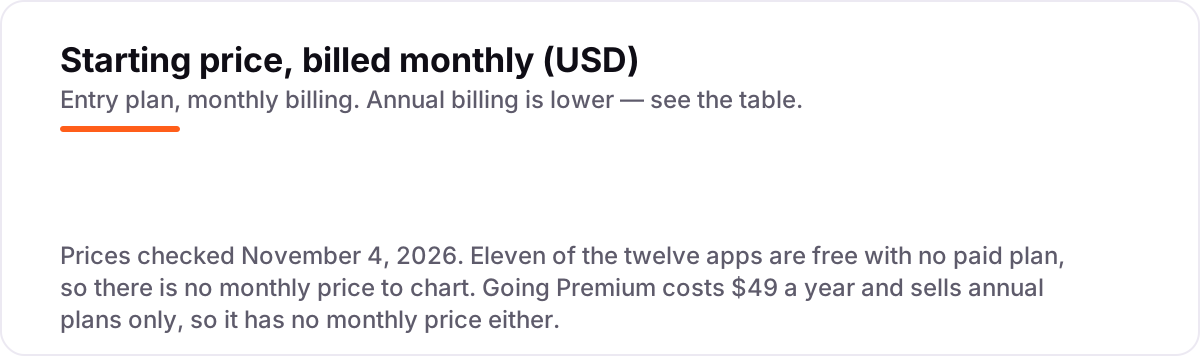
The apps themselves cost $0: eleven of the twelve charge no subscription and no booking fee, and the only paid plan in this list is Going Premium at $49 a year. The money goes to the stay and the flight, not the app. Take a 7-night stay at $150 a night: $1,050 before taxes and fees. On Booking.com or Expedia the price shown usually includes taxes, so the checkout total stays close to $1,050. On Airbnb or Vrbo, add the cleaning fee shown on the listing plus the service fee shown at checkout, so the same week can cost noticeably more for the same dates.
The one subscription is the easiest math in the list. Going Premium costs $49 a year, and Going says members save an average of $500 on international flights and $200 on domestic ones. One international trip booked through an alert covers ten years of Premium at that average; one domestic trip covers four. Hopper's add-ons sit in the middle: Price Freeze and Cancel for Any Reason are priced per booking, so they cost nothing until you buy protection for a specific trip.
The most common waste in this category is paying for flexibility you do not need — and the most common surprise is the reverse: booking a non-refundable rate to save a little a night, then paying far more to change it. Compare the total at checkout, not the nightly rate, and buy the free-cancellation rate when the plans are not yet fixed.
Know the difference: a booking app vs a search app
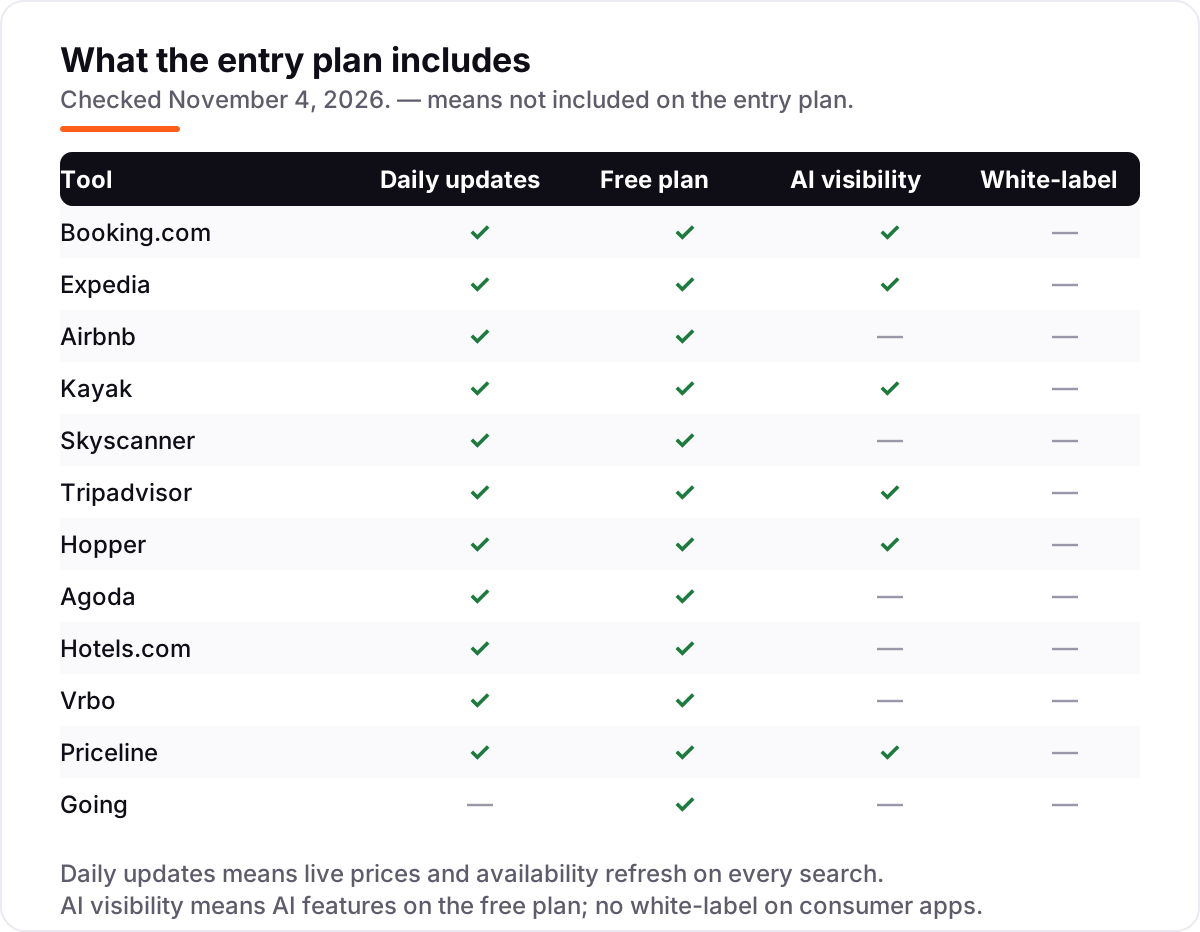
The confusion in this category is between two different jobs. A booking app takes your money and holds the reservation: Booking.com, Expedia, Airbnb, Agoda, Hotels.com, Vrbo and Priceline all sell you the stay or the flight directly, so changes, refunds and complaints go to them. A search app compares prices and sends you elsewhere to pay: Kayak and Skyscanner show you the cheapest fare or room, then hand you to the airline, hotel or booking site that actually takes the payment.
That handoff changes who fixes a problem. When a flight is cancelled, the company that took your money is the one that rebooks or refunds you — and with a search app, that company is a third party you may never have heard of, not the app whose name is on your home screen. The cheapest fare in a search result often comes from the seller with the strictest terms, so the saving can cost more than it saves.
A third distinction is loyalty. Booking apps run loyalty programs that pay you back — Genius on Booking.com, One Key across Expedia, Hotels.com and Vrbo — while search apps earn nothing from your stay and offer no rewards for it. If you book often, the loyalty balance can be worth more than the small price gap a search app finds.
Quick comparison: tool type by need
| Buyer | Best pick | Why |
|---|---|---|
| Most travelers, widest choice of stays | Booking.com | 29 million listings, free cancellation filters, free Genius loyalty, $0 |
| Booking flights, hotel and car together | Expedia | One booking and one One Key balance for the whole trip, $0 |
| Whole homes and local stays | Airbnb | Entire homes and cabins you cannot find on hotel sites, $0 |
| Comparing prices across sites | Kayak | Hundreds of sites in one search, with a book-now-or-wait forecast, $0 |
| Cheapest flights, flexible dates | Skyscanner | Widest fare search with Everywhere and cheapest-month tools, $0 |
| Deciding by traveler reviews | Tripadvisor | The largest review library, with price comparison on the same stay, $0 |
| Deciding when to book | Hopper | Price predictions and fare watches, free, with optional Price Freeze |
| Trips in Asia | Agoda | Deepest hotel coverage in Asia, with app-only Secret Deals, $0 |
| Hotel stays with loyalty rewards | Hotels.com | Member Prices plus OneKeyCash that spends on Expedia and Vrbo, $0 |
| Families needing a whole home | Vrbo | Two million-plus whole homes, all private, with One Key rewards, $0 |
| Last-minute deals | Priceline | Express Deals hide the brand for a deep discount, $0 |
| Flight deals that find you | Going | Human-vetted deal alerts, Premium is $49 a year, Limited is free |
Mistakes to avoid
- Booking the cheapest non-refundable rate. The saving is small and the cost of changing it is large. Buy the free-cancellation rate unless the dates are fixed and the trip is certain.
- Comparing nightly rates instead of checkout totals. Cleaning fees, service fees and taxes can add a large share to a short stay. The cheapest nightly rate is often not the cheapest trip.
- Searching without signing in. Genius and One Key rewards only count when you are signed in, and member prices only show to members. Sign in before you search, not after you book.
- Booking through an unfamiliar third-party seller. The cheapest fare in a search result can come from a seller with poor support and strict terms. If the seller is unknown, book direct with the airline or hotel instead.
- Paying for Going Premium when you never fly from the US. Its deals cover departures from US airports only. If your trips start elsewhere, the free Limited plan and Skyscanner cover the same need for $0.
How we chose
We checked each vendor's own site on November 4, 2026 and recorded the starting price exactly as shown; eleven apps publish no subscription price because the app is free, and the only paid plan is Going Premium at $49 a year on going.com. Ratings appear only where we opened a G2 or Trustpilot page today — Booking.com on G2, Airbnb on G2 and Skyscanner on Trustpilot — and the other nine apps carry no rating rather than a stale or estimated one. Booking.com's G2 score comes from its seller page, where most reviews cover its business-travel product. No vendor paid for a place in this list, and none of the links here are affiliate links.
What to do next
Start with the free pair: Skyscanner to compare flights and Booking.com to book the stay, both free, and run one real booking through each before the big trip. Check that the confirmation matches the price you compared and that the cancellation terms are the ones you chose. If you fly from a US airport, add Going's free Limited plan and upgrade to Premium at $49 a year only after an alert saves you money. If the trip doubles as content for a travel site, our monthly SEO service can help it get found — or compare flight apps in our guide to booking flights on mobile. Once your tools are in place, find out what's holding your rankings back.
Your stack only works if people find you
SerpAstra fixes what keeps your site off page one and makes it easy for AI assistants to recommend.
Get a free audit→Sources we checked (15)
- Booking.com — booking.com (checked November 4, 2026)
- Booking.com reviews — g2.com/sellers/booking-com (checked November 4, 2026)
- Expedia — expedia.com (checked November 4, 2026)
- Airbnb — airbnb.com (checked November 4, 2026)
- Airbnb reviews — g2.com/products/airbnb/reviews (checked November 4, 2026)
- Kayak — kayak.com (checked November 4, 2026)
- Skyscanner — skyscanner.com (checked November 4, 2026)
- Skyscanner reviews — trustpilot.com/review/www.skyscanner.net (checked November 4, 2026)
- Tripadvisor — tripadvisor.com (checked November 4, 2026)
- Hopper — hopper.com (checked November 4, 2026)
- Agoda — agoda.com (checked November 4, 2026)
- Hotels.com — hotels.com (checked November 4, 2026)
- Vrbo — vrbo.com (checked November 4, 2026)
- Priceline — priceline.com (checked November 4, 2026)
- Going Premium pricing — going.com/premium (checked November 4, 2026)
Shamim
Founder of SerpAstra
A full-stack SEO and digital marketer who spends most days on Local SEO for dental practices, AI search visibility and lead generation.
Frequently asked questions
What is the best travel booking app?
Booking.com is the best travel booking app for most travelers: the widest choice of stays, free cancellation filters and a free loyalty program, all in a free app. Expedia is better for bundling flights, hotels and cars in one booking, and Kayak is better for comparing prices across sites. Most travelers need two apps: one to compare, one to book.
Are travel booking apps free?
Yes, almost all of them. Eleven of the twelve apps in this list are free to download and use, with no subscription and no booking fee of their own; they earn commission from the hotels and airlines. Going is the exception: its Limited plan is free, while Premium costs $49 a year for international deals and mistake fares.
Is it cheaper to book flights on an app or a website?
Usually the price is the same, since the app and the website sell the same inventory. The difference is the extras: app-only member prices on Booking.com, Expedia and Hotels.com, and push alerts for price drops on Kayak, Skyscanner and Hopper. Check both, and book where the total at checkout is lowest.
What is the difference between Kayak and Skyscanner?
Both are metasearch apps that compare prices and hand you to a seller to pay. Kayak adds a fare forecast, Hacker Fares and an AI assistant, and covers hotels and cars as deeply as flights. Skyscanner searches more budget airlines and has the stronger flexible-date tools, with Everywhere search and a cheapest-month view.
Which travel booking app is best for cheap flights?
Skyscanner finds the cheapest fares across the most airlines, and Hopper predicts whether a fare will rise or fall before you book. Going is the third option: its experts email vetted cheap fares and mistake fares to Premium members for $49 a year. Use Skyscanner to search, Hopper to time the booking, and Going to catch deals you would miss.
Can I cancel a booking made in a travel app?
It depends on the rate, not the app. Free-cancellation rates can be cancelled before the deadline shown on the booking, while non-refundable rates cannot, even if you booked in the app. Metasearch apps such as Kayak and Skyscanner cannot cancel for you: the seller you paid handles the cancellation, so read the terms before paying.
Do I need more than one travel booking app?
Two is the practical number: one search app and one booking app. Use Kayak or Skyscanner to compare prices across sites, then book on Booking.com or Expedia so one company holds the reservation. Add Going only if you fly from a US airport at least once a year and want deal alerts.
Free SEO and AI visibility audit
Find out what is holding your rankings back
Send us your site. Within 2 business days you get a written audit, an AI visibility check and a short fix list ranked by impact. Free, with no contract attached.
Request my free audit→Related guides
 Consumer Apps8 Best Apps for Booking Flights on Mobile in 2026Compare the 8 best app for booking flights on mobile options: every one is free, with price alerts, fare forecasts and flexible search checked November 4, 2026.Read guide →
 Companies & Services7 Best Tour Companies for Spain and Portugal in 2026Compare the 7 best tour companies for Spain and Portugal on price, group size and reviews, with every trip price checked on November 4, 2026.Read guide →
 Accounting, Tax & Finance12 Best Map Apps for Road Closures in 2026: Free and Paid Apps Ranked12 best map app for road closures picks compared on live closure data, offline maps and price. Most are free — see which app reroutes you fastest.Read guide →