
8 Best Apps for Booking Flights on Mobile in 2026
Compare the 8 best app for booking flights on mobile options: every one is free, with price alerts, fare forecasts and flexible search checked November 4, 2026.
 Shamim Mia, Founder, SerpAstraLast verified November 4, 202614 min read
We compare pricing pages, documentation and public reviews. We never accept payment for rankings.

Key takeaways
- Google Flights is the best fit for most travelers and costs nothing; Skyscanner follows for flexible searches, and Kayak for watching several routes at once — all three are free.
- Every app in this list is free to download and use. The only money you pay is the fare itself, plus optional per-booking add-ons on Hopper and Kiwi.com.
- The single most important buying factor is who sells the ticket: metasearch apps hand you to the airline or agency, so check that seller's change and refund rules before you pay.
- Hopper is the only app here with a buy-now-or-wait forecast. The rest show today's price and let alerts do the watching.
On this page
Quick comparison
| Tool | Best for | Starting price | Free plan |
|---|---|---|---|
| Google Flights | Travelers who want the fastest free flight search with flexible dates and price tracking in one place | Free | Yes (free) |
| Skyscanner | Flexible travelers who want to search everywhere, any month, before picking a destination | Free | Yes (free) |
| Kayak | Travelers watching several routes at once who want a buy-or-wait call and one itinerary app | Free | Yes (free) |
| Hopper | Travelers with flexible dates who want a forecast that says buy now or wait | Free | Yes (free app) |
| Expedia | Travelers who book flights, hotels and cars together and want rewards on the whole trip | Free | Yes (free) |
| Kiwi.com | Adventurous travelers building multi-city trips from airlines that never sell connections together | Free | Yes (free) |
| CheapOair | Travelers who want a real person on the phone when a booking goes wrong | Free | Yes (free) |
| Momondo | Bargain hunters who want to see what smaller booking sites charge for the same flight | Free | Yes (free) |
Make one of these tools?
We re-check this list every quarter. Send a correction, request a review, or ask about a clearly labeled sponsored spot.
Request a listingThe best app for booking flights on mobile

Google Flights
Best for: Travelers who want the fastest free flight search with flexible dates and price tracking in one place
Google Flights is the free search most travelers should start with: fast, plain fares, and it never tries to sell you anything. The date grid lays departure and return dates in a matrix with a price in every cell, and the price graph shows how the fare moves across the coming months, so shifting a trip by a day is a visible choice, not a guess.
Track prices watches exact dates or any dates on a route and emails you when the fare changes, and the Explore map finds cheap destinations from your home airport within a budget. The catch is that Google Flights never takes your money, so changes and refunds go through the airline or agency you clicked to. Select US itineraries carry a price guarantee that refunds the difference if the fare drops after booking.
What we like
- Completely free with no ads in the results, no markup on fares and no premium tier
- Date grid and price graph show the cheapest days at a glance, with a low, typical or high price verdict
- Track prices watches exact dates or any dates on a route and emails you when the fare moves
- Explore map finds the cheapest destinations from your home airport within a budget
Watch out for
- Price tracking needs a Google account, and alerts arrive by email rather than push
- Some airlines do not list fares on Google Flights, so a direct check is still worth doing
- It shows fares but never sells the ticket, so changes and refunds go through the seller

Skyscanner
Best for: Flexible travelers who want to search everywhere, any month, before picking a destination
Skyscanner is the flexible-travel pick: the app for when you know you want to go somewhere, but not where or exactly when. Type Everywhere as the destination and it ranks the cheapest countries and cities from your home airport; pick a whole month or the cheapest month and a color-coded calendar shows the lowest fares day by day.
Price alerts watch a route and email you when the fare changes, and Skyscanner charges no booking fees at all — you pay the airline or travel agency directly. The trade-off is that the prices shown are estimates, so the fare can rise when you reach the seller's checkout. Check the seller's name and reviews before you pay, especially on the smallest ones.
What we like
- Everywhere search ranks the cheapest destinations worldwide from your home airport
- Whole month and cheapest month views show the lowest fares across a month or a year
- Price alerts email you when the fare on a watched route changes
- No booking fees and no charges of any kind — you pay the airline or agency directly
Watch out for
- Prices are estimates that can change when you reach the seller's checkout
- No buy-now-or-wait prediction, so timing the purchase is left to you and your alerts
- Small or unfamiliar booking sites appear in results, so the seller needs a check before paying

Kayak
Best for: Travelers watching several routes at once who want a buy-or-wait call and one itinerary app
Kayak is the all-rounder: a metasearch engine with a forecast, unlimited alerts and a full trip organizer in one free app. The Price Forecast box on most round-trip searches says buy now or wait, based on how the fare is expected to move over the next seven days, and price alerts are free with no stated limit on how many routes you watch.
Trips pulls flights, hotels and cars into one itinerary with live flight status and gate changes, and it works offline, which matters at the airport. The Fee Assistant folds baggage fees into the displayed price, so a cheap fare that charges for a bag compares honestly. The catch is the handoff: Kayak never sells the ticket, so the price can change on the seller's site.
What we like
- Price Forecast gives a buy-now-or-wait call on most round-trip searches, based on the next seven days
- Price alerts are free with no stated limit on how many routes you can watch at once
- Trips pulls every booking into one itinerary with flight status, gate changes and offline access
- Fee Assistant folds baggage fees into the displayed price so cheap fares compare honestly
Watch out for
- Kayak hands you to another site to book, and the price you saw does not always survive the click-through
- The Price Forecast covers roughly the next seven days, so it cannot time a trip months out
- Hacker Fares combine separate one-way tickets, so each leg has its own change and refund rules

Hopper
Best for: Travelers with flexible dates who want a forecast that says buy now or wait
Hopper is the only app here built around telling you when to buy, not just what a flight costs. Its predictions say buy now or wait for a route, and Hopper claims 95% accuracy on those forecasts. Watch a trip and the app monitors the fare around the clock, and the color-coded deals calendar shows the cheapest dates to travel at a glance.
Price Freeze locks a fare for a set period for a fee, so a rise during that window does not cost you more. The extras are the catch: the freeze fee is not refundable if you cancel, and flexibility plans are priced per booking. In 2026 Hopper settled an FTC complaint about pre-selected fees without admitting wrongdoing, so read every add-on line before you pay.
What we like
- Price predictions say buy now or wait, with Hopper claiming 95% accuracy on its forecasts
- Watch a trip and Hopper monitors the fare around the clock, notifying you when a deal appears
- Price Freeze locks a fare for a set period so a rise does not cost you more
- Color-coded deals calendar shows the cheapest dates to travel at a glance
Watch out for
- Price Freeze and flexibility plans are paid per booking and the freeze fee is not refundable if you cancel
- Hopper sells the ticket itself, so changes and refunds usually go through Hopper, not the airline
- In 2026 Hopper settled an FTC complaint about pre-selected fees without admitting wrongdoing, so check every add-on at checkout

Expedia
Best for: Travelers who book flights, hotels and cars together and want rewards on the whole trip
Expedia is the one-stop shop in this list: flights, hotels, cars and packages in a single app, with a free rewards program on top. One Key costs nothing to join and gives Member Prices of 10% or more on eligible hotels, cars and activities, plus OneKeyCash toward future travel. Price Tracking is free at every tier and alerts you when a watched fare changes.
Bundling a flight with a hotel or car can save up to 30%, per Expedia, and Gold and Platinum members get Price Drop Protection free on eligible flights booked in the app. The catch is on flights alone: members earn no OneKeyCash on standalone flights, so the rewards sit on the hotel and car side of the trip.
What we like
- One Key is free to join and gives Member Prices of 10% or more on eligible hotels, cars and activities
- Price Tracking is free at every membership tier and alerts you when a watched fare changes
- Bundling a flight with a hotel or car can save up to 30%, per Expedia
- Flight Deals on the map shows cheap flights from your home airport without a destination in mind
Watch out for
- Members earn no OneKeyCash on standalone flights under the current program
- Price Drop Protection is free only for Gold and Platinum members, not for everyone
- OneKeyCash can only be spent on Expedia, Hotels.com and Vrbo, never as cash

Kiwi.com
Best for: Adventurous travelers building multi-city trips from airlines that never sell connections together
Kiwi.com is the route-builder: it stitches together flights from airlines that do not partner with each other, a trick called virtual interlining, and sells the combination as one trip. Nomad takes the cities you want to visit and the nights you want in each, then finds the cheapest order to visit them in — a job no ordinary multi-city search does.
Price alerts notify you when a watched route drops, and the app searches flights, trains and buses together. The risk is real, though: a self-transfer means separate tickets, so you collect your bags and check in again at each stop, and the Kiwi.com Guarantee that covers a missed connection is a paid add-on. Leave long gaps between legs.
What we like
- Virtual interlining combines airlines that do not partner, opening routes no single airline sells
- Nomad finds the cheapest order to visit several cities, instead of pricing the order you typed
- Price alerts notify you by email or push when a watched route drops
- Searches flights, trains and buses together, with date ranges and whole-month views
Watch out for
- A service fee is added at booking and is not shown until checkout
- Virtual interlining means separate tickets: you re-check in and collect bags at each self-transfer
- The Kiwi.com Guarantee that covers a missed self-transfer is a paid add-on, not included

CheapOair
Best for: Travelers who want a real person on the phone when a booking goes wrong
CheapOair is the human-help pick: fares from 500+ airlines in one search, plus a real person on the phone around the clock. Fare alerts and a Low Fare Calendar show prices across a two-month window for US domestic routes, and ClubMiles is free to join, earning up to 6X points on eligible bookings made through the app.
The Price Match Promise refunds the difference if the same itinerary is cheaper on Expedia, Orbitz, Priceline or Travelocity within 24 hours of booking. The catch is the fine print: a service fee may apply on some bookings and is disclosed only at checkout, and change and cancellation fees are a common complaint. Read the fare rules before you pay.
What we like
- Compares fares from 500+ airlines in one search, with flexible dates and fare alerts
- Travel Experts are available 24/7 by phone or in-app calling, including free in-app calls abroad
- ClubMiles is free to join and earns up to 6X points on eligible bookings through the app
- Price Match Promise refunds the difference if the same itinerary is cheaper elsewhere within 24 hours
Watch out for
- CheapOair may apply a service fee on some bookings, disclosed only at checkout
- Change and cancellation fees are a common complaint, so read the fare rules before paying
- Price Drop Payback and the Price Match Promise have conditions and time limits

Momondo
Best for: Bargain hunters who want to see what smaller booking sites charge for the same flight
Momondo casts the widest net in this list: a metasearch engine that compares fares from hundreds of sites, including small online travel agencies the bigger apps never show. Flight Insights analyze the route and tell you the cheapest month, day and time to fly and the cheapest time to buy, and the Anywhere search lists the cheapest destinations for your dates.
Mix & Match can pair an outbound ticket from one seller with a return from another for a lower total, and price alerts are free. The catch is the handoff: Momondo never sells the ticket, so the fare can rise at the seller's checkout and any change or refund goes through that seller. Check the seller before you pay.
What we like
- Flight Insights show the cheapest month, day and time to fly and the cheapest time to buy
- Anywhere search lists the cheapest destinations from your home airport for your dates
- Mix & Match combines an outbound ticket from one seller with a return from another
- Price alerts are free, and the calendar view shows fare changes around your dates
Watch out for
- Momondo never sells the ticket, so changes and refunds go through the seller you clicked to
- Prices can rise at the seller's checkout, and some of the smaller sellers are unfamiliar
- Mix & Match tickets can mean two separate bookings with two sets of change and refund rules
The best app for booking flights on mobile is the one that shows you the real fare, tells you whether to buy now or wait, and hands you to a seller you can trust. We ranked the eight apps below by fit for the most common traveler — someone booking a flight on a phone, with dates that can move a little — and every app here is free, checked on November 4, 2026.
How to choose the best app for booking flights on mobile
- Start with who sells the ticket. Metasearch apps (Google Flights, Skyscanner, Kayak, Momondo) show fares and hand you to the seller. Online travel agencies (Expedia, CheapOair, Kiwi.com, Hopper) sell you the ticket themselves. The seller, not the app, handles changes and refunds.
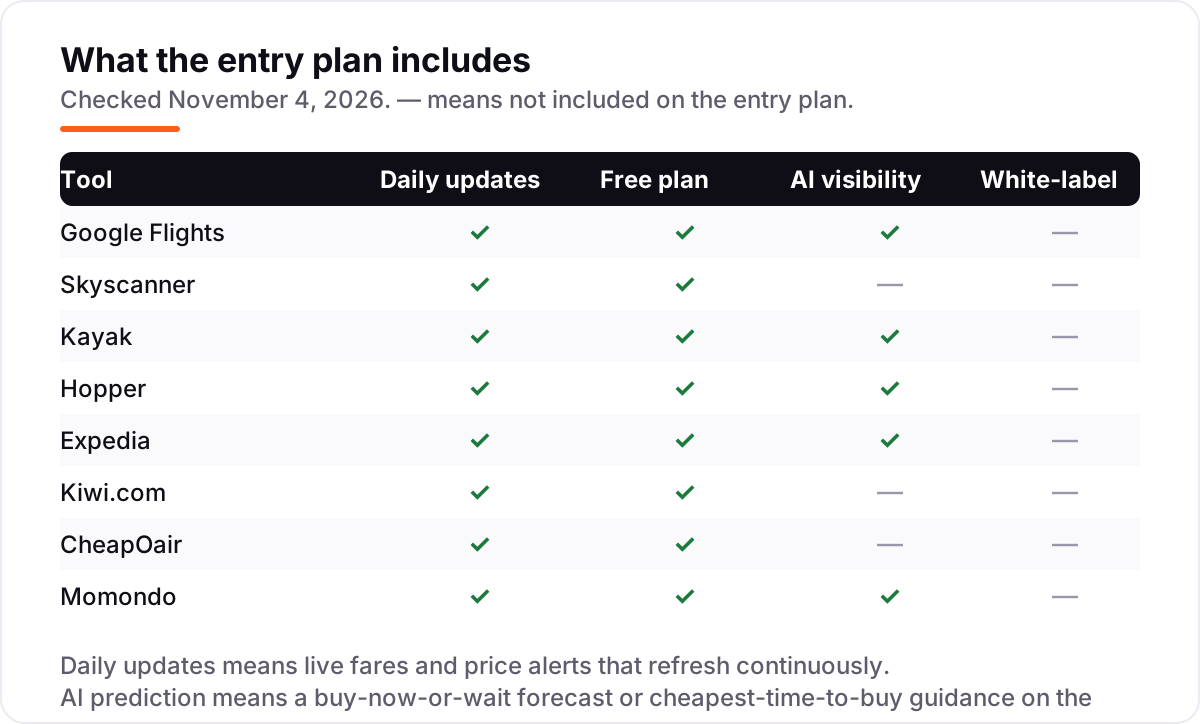
- Decide whether you need a prediction or an alert. Only Hopper and Kayak forecast whether the fare will rise or fall. The rest show today's price and watch it for you with alerts. If your dates are fixed, an alert is enough; if they can move, a forecast earns its keep.
- Check how flexible your search can be. If the destination is open, Skyscanner's Everywhere search and Google Flights' Explore map find it for you. If the dates are open, whole-month and cheapest-month views matter more than any single fare.
- Count the real total, not the headline fare. Baggage fees, seat selection and service fees change the answer. Kayak's Fee Assistant folds bag fees into the price; Kiwi.com and CheapOair add service fees at checkout.
- Think about what happens when plans change. A cheap fare with no changes allowed is expensive the day you need to move it. Hopper sells flexibility per booking, and Expedia's Price Drop Protection covers Gold and Platinum members on eligible flights.
- Keep the itinerary in one place. Kayak Trips and the Expedia app hold flights, hotels and cars together with live status and offline access, which matters at the airport more than it does at home.
Flight search is one system in your stack, not the whole trip. Once the flights are sorted, our guide to the best map app for road closures covers the drive to the airport, and if the trip is abroad, our guide to the best AI Spanish learning app helps with the language on arrival. Before you publish the trip photos, run your titles through the free SERP snippet preview tool — it shows exactly how the title and description will look in Google.
Whatever you shortlist, install two apps, not one. Run the same route and dates through Google Flights and one rival, set a price alert on both, and let the alerts argue with each other for a week. That week tells you more than any review can: which app finds the fare first, which alert fires first, and which seller the fare actually leads to.
Flight booking app pricing: what you will actually pay
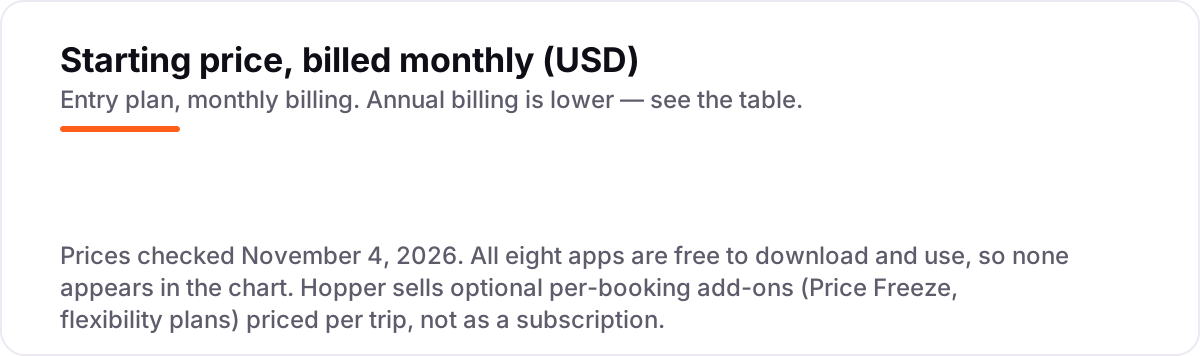
The honest answer is $0 for the apps and the full fare for the flight. None of the eight apps charges a subscription, a download fee or a premium tier, so the price of using them is nothing. What you actually pay is the fare, plus whatever the seller adds: baggage, seat selection, a service fee, or an optional extra like a price freeze.
Take a real example from a 2026 booking: a round-trip Detroit to Las Vegas fare of $178 on Hopper, with a Price Freeze offered at $48 per person for 7 days. The freeze locks the $178 fare, covers a rise of up to $300 per traveler, and costs $48 whether or not you book — about 27% of the fare for a week of certainty. If the fare falls during that week, you pay the lower fare, but the $48 is gone either way. That is the real arithmetic of Hopper's extras: cheap insurance against a rise, expensive if the fare never moves.
Two other costs sit outside every number above. First, the service fee: Kiwi.com adds one at booking and does not show it until checkout, and CheapOair may apply one on some bookings, disclosed only at checkout. A fare that looks $20 cheaper than the airline's own price can cost more once the fee lands. Second, the flexibility plan: Hopper's refundable and flexible-date plans are priced per booking, so a traveler who changes plans often pays for flexibility on every trip, while a traveler with fixed dates pays nothing.
At the other end, Expedia's bundle is the one place the app itself saves money: booking a flight with a hotel or car can save up to 30%, per Expedia, and One Key members get Member Prices of 10% or more on eligible hotels, cars and activities. The saving sits on the hotel and car side, not the flight — members earn no OneKeyCash on standalone flights. For the trip budget as a whole, see our guide to expense software to keep the spending in one place.
Know the difference: metasearch vs online travel agency
The confusion in this category is between a search engine and a seller. A metasearch app — Google Flights, Skyscanner, Kayak, Momondo — collects fares from airlines and booking sites, shows them side by side, and sends you to the seller to complete the booking. You never pay the metasearch app, and it never holds your ticket. An online travel agency — Expedia, CheapOair, Kiwi.com, Hopper — sells you the ticket itself: you pay the agency, the agency issues the ticket, and the agency is the one you call when something goes wrong.
That distinction decides who helps you when a flight is cancelled. Book through a metasearch app and the airline or the agency you clicked to owns the booking; the app can show you the status, but it cannot rebook you. Book through an agency and the agency owns it, for better or worse: Expedia and CheapOair have 24/7 support lines, while Hopper's support is a frequent complaint in customer reviews. Neither model is wrong, but they are not the same purchase.
There is a second, quieter confusion: a fare shown is not a fare paid. Metasearch prices are estimates that can change when you reach the seller, because the seller reprices at checkout. Kiwi.com's virtual interlining adds a service fee that appears only at checkout. And a Hacker Fare or Mix & Match ticket can be two separate bookings with two sets of change and refund rules. The price on the screen is the start of the bill, not the end of it.
A third distinction worth knowing is prediction versus alert. Hopper and Kayak forecast where the fare is heading — Hopper claims 95% accuracy — while Google Flights, Skyscanner, Expedia, Kiwi.com, CheapOair and Momondo watch the fare and tell you when it moves. A forecast answers "should I buy now"; an alert answers "has it changed yet". Use the forecast when your dates can move, and the alert when they cannot.
Quick comparison: tool type by need
| Buyer | Best pick | Why |
|---|---|---|
| Most travelers | Google Flights | Fastest free search, clearest calendar, free price tracking |
| Flexible destination | Skyscanner | Everywhere search and cheapest month view, no booking fees |
| Watching many routes | Kayak | Free alerts with no stated limit, Price Forecast, Trips organizer |
| Timing the purchase | Hopper | Buy-now-or-wait prediction, Price Freeze, deals calendar |
| Flight plus hotel | Expedia | Bundles save up to 30%, free One Key rewards, Price Tracking |
| Multi-city adventure | Kiwi.com | Virtual interlining and Nomad build routes no airline sells |
| Needs phone support | CheapOair | 500+ airlines, 24/7 real people, Price Match Promise |
| Bargain hunting | Momondo | Widest net of sellers, Flight Insights, Mix & Match fares |
Mistakes to avoid
- Booking the cheapest fare without checking the seller. A fare from an unfamiliar agency can rise at checkout or come with refund rules you would never accept. Check who sells the ticket before you pay, not after.
- Paying for flexibility without reading the terms. Hopper's Price Freeze fee is not refundable if you cancel, and its flexibility plans are priced per booking. Know what the extra actually covers before you buy it.
- Treating the shown price as the final price. Baggage, seat selection and service fees change the total. Kiwi.com adds a service fee at checkout, and a fare that excludes a bag is not cheaper than one that includes it.
- Watching only one app. Fares differ between apps because they show different sellers. Set alerts on two apps for the same route and let them compete for a week.
- Booking separate tickets with a tight connection. Kiwi.com's self-transfers and Kayak's Hacker Fares are separate tickets: if the first flight is late, the second airline owes you nothing. Leave long gaps between legs, or book one ticket.
How we chose
We checked each app's own pages and app-store listings on November 4, 2026 and recorded the starting price exactly as shown: every app in this list is free to download and use, with no subscription or premium tier, so there is no monthly price to chart. Hopper's per-booking add-ons are priced per trip rather than per month, and the $48 Price Freeze example comes from a 2026 review of a real Detroit to Las Vegas booking, not from Hopper's own pages. We ranked the apps by fit for the most common traveler — someone booking a flight on a phone with dates that can move a little — not by brand size. This list carries no review ratings: the Trustpilot pages for these travel companies returned stale cached copies with conflicting scores across regional pages, so we show no rating rather than a stale or estimated one. No vendor paid for a place in this list, and none of the links here are affiliate links.
What to do next
Install two apps — Google Flights and one rival from this list — and run the same route and dates through both. Set a price alert on each, then wait a week and see which one finds the fare first and which seller the fare leads to. When the price looks right, check the airline's own price for the same flight before you pay, and read the fare rules for changes and baggage. If the flights are sorted but new customers are not finding your business, our monthly SEO service handles the visibility side. Once your tools are in place, find out what's holding your rankings back.
Your stack only works if people find you
SerpAstra fixes what keeps your site off page one and makes it easy for AI assistants to recommend.
Get a free audit→Sources we checked (8)
- Google Flights — google.com/travel/flights (checked November 4, 2026)
- Skyscanner — skyscanner.net (checked November 4, 2026)
- Kayak app — kayak.com/news/kayak-app (checked November 4, 2026)
- Hopper — media.hopper.com/articles/welcome-to-hopper (checked November 4, 2026)
- Expedia One Key — expedia.com/newsroom/best-travel-rewards-program (checked November 4, 2026)
- Kiwi.com travel hacks — kiwi.com/stories/kiwi-coms-travel-hacks-explained (checked November 4, 2026)
- CheapOair — cheapoair.com (checked November 4, 2026)
- Momondo — momondo.com (checked November 4, 2026)
Shamim
Founder of SerpAstra
A full-stack SEO and digital marketer who spends most days on Local SEO for dental practices, AI search visibility and lead generation.
Frequently asked questions
What is the best app for booking flights on mobile?
Google Flights is the best app for booking flights on mobile for most travelers: free, fast, with a date grid, price graph and free price tracking. Skyscanner is better when your dates or destination are flexible, and Kayak is better when you are watching several routes at once.
Are flight booking apps free?
Yes, all eight apps in this list are free to download and use, with no subscription or premium tier. You pay only for the fare itself. The exceptions are optional extras: Hopper charges per booking for Price Freeze and flexibility plans, and Kiwi.com adds a service fee at checkout.
Is it cheaper to book flights on an app or a website?
The fare is usually the same on the app and the website of the same service, since both show the same inventory. Apps sometimes add mobile-only hotel rates, as Kayak and Momondo do, and app-only deals. The bigger saving comes from comparing several apps, not from the app itself.
Which app is best for predicting when flight prices will drop?
Hopper is the only app here built around prediction: it tells you to buy now or wait and claims 95% accuracy on its forecasts. Kayak's Price Forecast gives a shorter seven-day buy-or-wait call. Google Flights, Skyscanner and Momondo show today's price and rely on alerts instead.
Is Skyscanner or Google Flights better?
Google Flights is better for a fixed route and dates, with the clearest calendar and price tracking. Skyscanner is better when you are flexible: its Everywhere search and cheapest month view find destinations and dates you would not have thought of. Use Google Flights to time a trip, Skyscanner to discover one.
Should I book through the app or directly with the airline?
Book directly with the airline when the price is the same, because changes, refunds and rebooking are simpler with the company flying the plane. Use an app to find the fare and compare sellers, then check the airline's own price before you pay. The gap is usually small, and the support is usually better.
Do flight booking apps charge booking fees?
Metasearch apps like Google Flights, Skyscanner, Kayak and Momondo charge no booking fees; you pay the seller. Online travel agencies sometimes add a service fee: Kiwi.com adds one at checkout, and CheapOair may apply one on some bookings. Always check the final total before paying.
Free SEO and AI visibility audit
Find out what is holding your rankings back
Send us your site. Within 2 business days you get a written audit, an AI visibility check and a short fix list ranked by impact. Free, with no contract attached.
Request my free audit→Related guides
 Accounting, Tax & Finance12 Best Map Apps for Road Closures in 2026: Free and Paid Apps Ranked12 best map app for road closures picks compared on live closure data, offline maps and price. Most are free — see which app reroutes you fastest.Read guide →
 AI, Data & Analytics7 Best AI Spanish Learning Apps in 2026: Free and Paid Apps RankedThe 7 best ai spanish learning apps of 2026, ranked with real prices, free plans and AI conversation features — pick the app that fits how you actually study.Read guide →
 Accounting, Tax & Finance9 Best Expense Software for Small Business in 2026, Compared9 best expense software for small business compared on price, free plans, cards and AI receipt capture — with real prices checked November 2, 2026.Read guide →