
Best Video Cropper Tools for 2026: 7 Picks Ranked by What You Need
Compare the 7 best video cropper tool picks on price, free plans, aspect-ratio presets and export quality, with prices checked November 4, 2026.
 Shamim Mia, Founder, SerpAstraLast verified November 4, 202613 min read
We compare pricing pages, documentation and public reviews. We never accept payment for rankings.

Key takeaways
- Kapwing is the best fit for most buyers at $24/month; VEED follows at $24/month with the fastest caption workflow, and CapCut at $19.99/month for phone-first creators.
- Every tool here has a free plan, but all seven watermark free exports except CapCut and Canva, so the first paid plan is the real starting price for publishable video.
- The single most important buying factor is the limit that forces your next upgrade: watermark rules, export resolution, AI credit caps and media-hour meters decide what you actually pay, not the headline price.
- Adobe Express Premium at $9.99/month is the cheapest premium plan here, and Clideo Pro at $12/month is the cheapest way to crop one video properly.
On this page
Quick comparison
| Tool | Best for | Starting price | Free plan |
|---|---|---|---|
| Kapwing | Creators who crop the same video for several social platforms every week and want one browser editor to do the whole job | $24/mo | Yes (free plan) |
| VEED | Social creators who crop short clips and need captions on them in the same pass | $24/mo | Yes (free plan) |
| CapCut | Phone-first creators who crop vertical video daily and want the most features before paying anything | $19.99/mo | Yes (free plan) |
| Canva | Small businesses whose cropped video sits inside social graphics, slides and brand templates they already make in Canva | $18/mo | Yes (free plan) |
| Adobe Express | Creators who want the lowest-priced premium plan and whose crops are short social clips, especially if they already pay for Creative Cloud | $9.99/mo | Yes (free plan) |
| Clideo | Anyone who crops one video at a time and wants the cheapest paid plan that does the job properly | $12/mo | Yes (free plan) |
| Descript | Podcasters and course creators who crop talking-head video by editing its transcript | $24/mo | Yes (free plan) |
Make one of these tools?
We re-check this list every quarter. Send a correction, request a review, or ask about a clearly labeled sponsored spot.
Request a listingThe best video cropper tool

Kapwing
Best for: Creators who crop the same video for several social platforms every week and want one browser editor to do the whole job
Kapwing is the strongest all-round browser cropper here because cropping is built into a full editor: drag the corners to any frame, snap to 16:9, 9:16, 1:1 or 4:5 presets, and the Smart Resizer reframes the shot for each platform without starting over. Pro costs $24 a month billed monthly, or $16 a month billed annually, and removes the watermark while unlocking 4K exports, uploads up to 6 GB and 1,000 AI credits a month.
The catch is the credit meter. Auto-subtitling, dubbing and other AI tools draw on the monthly credit allowance, and Pro cannot buy more credits — only Business can. Free exports carry a watermark, stop at 720p and four minutes, and projects are stored for three days. Choose Kapwing when you crop video for several platforms weekly and want one browser tool to do the job.
What we like
- Cropping is built into a full editor, with 16:9, 9:16, 1:1 and 4:5 presets and a Smart Resizer that reframes for each platform
- Pro removes the watermark and unlocks 4K exports, uploads up to 6 GB and 1,000 AI credits a month
- Shared workspace, Brand Kit and custom fonts included on Pro, not held for a team tier
- Free plan covers the whole editor, so you can test every crop before paying
Watch out for
- AI tools draw on a monthly credit allowance, and Pro cannot buy more credits — only Business can
- Free exports carry a watermark, stop at 720p and four minutes, and projects are stored for three days
- No free trial of the paid plans; the free plan is the only way to test it

VEED
Best for: Social creators who crop short clips and need captions on them in the same pass
VEED pairs a clean crop tool with the fastest subtitle workflow in this list, which matters because most cropped clips are destined for muted social feeds. Drag to crop, pick a preset for TikTok, Reels or YouTube Shorts, and add auto-subtitles in the same pass. Lite costs $24 a month billed monthly, or $12 a month billed annually, and removes the watermark with 1080p exports and stock media included.
The limits sit in the subtitle allowance and the seat pricing. Lite includes a yearly subtitle allowance rather than an unlimited monthly one, and every extra editor in the workspace pays the full per-seat price. Exports on Lite stop at 1080p — 4K needs Pro. Pick VEED when your cropped clips need captions and you publish short social video several times a week.
What we like
- The fastest subtitle workflow here: crop, add auto-subtitles and resize for each platform in one pass
- Lite removes the watermark with 1080p exports, stock media and a clean browser editor
- One-click presets for TikTok, Reels and YouTube Shorts, with no install
- Rated 4.6 out of 5 on G2 from more than 2,100 reviews
Watch out for
- Lite includes a yearly subtitle allowance rather than an unlimited monthly one
- Every extra editor in the workspace pays the full per-seat price
- Exports on Lite stop at 1080p — 4K needs Pro at a higher price

CapCut
Best for: Phone-first creators who crop vertical video daily and want the most features before paying anything
CapCut is the cheapest route to polished cropped video if you already edit on a phone: the free plan covers cropping, auto-captions and templates, and the mobile app is faster than any browser tool here for quick vertical cuts. Pro costs $19.99 a month and adds 1,200 AI credits a month, all premium templates, premium effects and 1 TB of cloud storage, with a 7-day free trial with no card required.
The trade-offs are the AI credit meter and the desktop experience. Heavy AI use burns through the 1,200 monthly credits, and extra credits cost more, while the web editor is thinner than the mobile app. CapCut is also owned by ByteDance, so teams with strict data rules should check their policy first. Choose CapCut when you crop on a phone and want the most features before paying anything.
What we like
- The free plan already covers cropping, auto-captions and templates — the most generous free tier here
- Mobile app is faster than any browser tool here for quick vertical cuts
- Pro adds 1,200 AI credits a month, all premium templates and effects, and 1 TB of storage
- 7-day free trial of Pro with no credit card required to start it
Watch out for
- Heavy AI use burns through the 1,200 monthly credits, and extra credits cost more
- The web editor is thinner than the mobile app for longer edits
- Owned by ByteDance, so teams with strict data rules should check their policy first

Canva
Best for: Small businesses whose cropped video sits inside social graphics, slides and brand templates they already make in Canva
Canva fits when the video is one piece of a wider design job: crop a clip, drop it into a branded template, add text and export for every platform from one canvas. Pro costs $15 a month billed monthly, or $120 a year billed annually, and adds the Magic Studio AI set, Background Remover, Magic Resize, a Brand Kit and 100 GB of storage, with a 30-day free trial.
Canva is not a video editor at heart, and it shows on longer clips: timeline control is basic, there is no frame-level trimming finesse, and exports are capped by the design canvas rather than a video timeline. The free plan covers cropping, so pay only when you need the AI tools and brand features. Pick Canva when your cropped video sits inside social graphics and slide decks you already make there.
What we like
- Crop a clip, drop it into a branded template and export for every platform from one canvas
- Magic Resize reframes one design for every platform size in a few clicks
- Pro adds the full Magic Studio AI set, Background Remover, Brand Kit and 100 GB of storage
- 30-day free trial of Pro before paying
Watch out for
- Timeline control is basic — no frame-level trimming finesse for longer clips
- Exports are capped by the design canvas rather than a video timeline
- Paying monthly costs $60 a year more than the $120 annual plan

Adobe Express
Best for: Creators who want the lowest-priced premium plan and whose crops are short social clips, especially if they already pay for Creative Cloud
Adobe Express is the cheapest premium plan in this list at $9.99 a month, and the best value if you already pay for Creative Cloud, since Premium is included with most single-app and All Apps plans at no extra cost. The free plan covers basic cropping and resizing, while Premium adds the full template library, 200 million Adobe Stock assets, 30,000 Adobe Fonts, brand kits and 250 Firefly generative credits a month.
The video tools are simpler than the design tools: cropping and resizing are quick, but there is no multi-track timeline, no advanced trimming and no caption workflow to match VEED or Descript. The 250 monthly AI credits also run out fast on heavy generative work. Choose Adobe Express when you want the lowest-priced premium plan and your crops are short social clips rather than edited sequences.
What we like
- The cheapest premium plan here at $9.99 a month
- Premium is included with most Creative Cloud single-app and All Apps plans at no extra cost
- 200 million Adobe Stock assets, 30,000 Adobe Fonts and brand kits on Premium
- Free plan covers basic cropping and resizing with no card required
Watch out for
- No multi-track timeline, no advanced trimming and no caption workflow to match VEED or Descript
- The 250 monthly AI credits run out fast on heavy generative work
- Premium is the only paid individual tier — there is no middle step before Firefly Pro

Clideo
Best for: Anyone who crops one video at a time and wants the cheapest paid plan that does the job properly
Clideo is the simplest tool here: open the crop page, upload a clip, drag the frame or type exact dimensions, and download — no account, timeline or project to manage. Pro costs $12 a month billed monthly, or $9 a month billed annually ($108 a year), and removes the watermark, lifts the upload limit, unlocks 4K exports and adds 500 AI credits a month for auto-subtitles and translation.
Simplicity is also the limit. Clideo is a set of single-task tools, not an editor: there is no timeline, no captions editor and no brand kit, so anything beyond a crop means opening another tool. Free exports carry a watermark and projects are stored only briefly. Pick Clideo when you crop one video at a time and want the cheapest paid plan that does the job properly.
What we like
- The simplest workflow here: upload, drag the frame or type exact dimensions, download
- Pro removes the watermark, lifts the upload limit and unlocks 4K exports
- 500 AI credits a month on Pro for auto-subtitles and translation
- No account, timeline or project to manage — nothing to learn
Watch out for
- No timeline, no captions editor and no brand kit — anything beyond a crop needs another tool
- Free exports carry a watermark and projects are stored only briefly
- No free trial of Pro; the free plan is the only way to test it

Descript
Best for: Podcasters and course creators who crop talking-head video by editing its transcript
Descript crops video by editing words: import a talking-head recording, delete sentences from the transcript, and the video cuts itself — then reframe the shot for vertical or square in the same project. Hobbyist costs $24 a month billed monthly, or $16 a month billed annually, and includes 10 media hours a month, 400 AI credits, watermark-free 1080p export and the Underlord AI editor.
The meter is the catch. Every upload counts against 10 media hours a month, and Hobbyist cannot buy top-ups — run out and you wait for the reset or upgrade to Creator. Descript is also built for spoken video, so it is the wrong tool for music clips or b-roll with no dialogue. Choose Descript when your cropped videos are interviews, lessons or podcasts with a transcript worth editing.
What we like
- Crop video by editing words: delete sentences from the transcript and the video cuts itself
- Reframe the shot for vertical or square in the same project, with captions included
- Underlord AI editor, Studio Sound and filler-word removal included on Hobbyist
- Rated 4.6 out of 5 on G2 from more than 900 reviews
Watch out for
- Every upload counts against 10 media hours a month, and Hobbyist cannot buy top-ups
- Built for spoken video — the wrong tool for music clips or b-roll with no dialogue
- No 4K export on Hobbyist; 4K needs Creator at $24 a month billed annually
The best video cropper tool depends on what you crop and where it goes: a social creator cutting vertical clips needs presets and captions, while a podcaster reframing interviews needs transcript editing. We ranked the seven tools below by fit for the most common buyer — someone who crops short video for social platforms every week — starting with the all-round browser editors and ending with the single-task and transcript-led options, and every price was checked on the vendor's own pricing page on November 4, 2026, unless noted otherwise in "How we chose".
How to choose the best video cropper tool
- Start with the watermark rule. Every free plan here watermarks exports except CapCut and Canva, so if the clip goes public, budget for the first paid plan from day one.
- Match the aspect ratios to your platforms. A tool with 9:16, 1:1 and 4:5 presets saves a rebuild per platform; Kapwing, VEED and Canva all ship them, while Clideo needs manual dimensions for odd sizes.
- Check the export resolution. Free plans stop at 720p; paid plans reach 1080p, and only Kapwing Pro and Clideo Pro in this list export 4K. Cropping a 4K source to vertical keeps far more detail than cropping 1080p.
- Count the meters, not just the price. AI credits, media hours and subtitle allowances are the real limits: Kapwing Pro cannot buy more credits, Descript Hobbyist cannot buy more media hours, and VEED Lite rations subtitles yearly.
- Decide whether cropping is the whole job. If you only crop, Clideo is enough; if you also edit, caption and brand the clip, a full editor like Kapwing or VEED replaces three tools.
Cropping is one step in getting video seen, not the whole job. Once the clips are cut, our guide to AI tools for video content creation covers the wider workflow, and our video SEO guide explains how to title and describe the finished clips so search engines find them. Before you publish, run your titles through the free SERP snippet preview tool — it shows exactly how the title and description will look in Google.
Whatever you shortlist, try it with a real clip before you pay. The free plans and trials in this list are long enough to crop one genuine video end to end — your footage, your aspect ratio, your export — and that test tells you more than any review can. Check two things in the trial: that the export has no watermark at the resolution you need, and that the crop holds up on a phone screen, where most of your audience will watch it.
Video cropper tool pricing: what you will actually pay
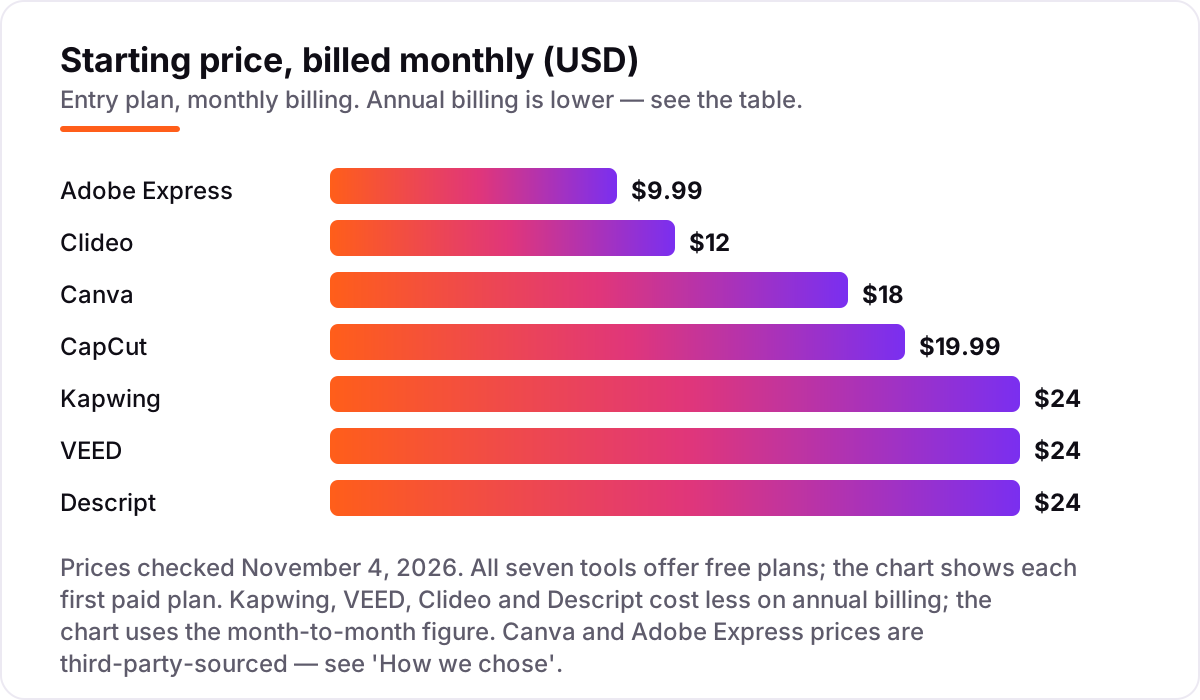
Take a creator who publishes four cropped clips a week — about 16 a month — across TikTok, Reels and Shorts. On list prices, the subscription costs $9.99 a month on Adobe Express Premium, $12 on Clideo Pro, $18 on Canva Pro, $19.99 on CapCut Pro, and $24 on Kapwing Pro, VEED Lite or Descript Hobbyist. Over a year at the monthly rate, that is $119.88 on Adobe Express, $144 on Clideo, $216 on Canva, $239.88 on CapCut, and $288 on Kapwing, VEED or Descript.
Annual billing cuts most of those bills. Clideo Pro drops from $144 to $108 a year, Canva Pro from $216 to $144, Kapwing Pro from $288 to $192, VEED Lite from $288 to $144, and Descript Hobbyist from $288 to $192. CapCut and Adobe Express publish no annual individual price on their pricing pages, so the monthly figure is the whole story for them. The gap between the cheapest and dearest annual plan is $84 a year — $108 on Clideo against $192 on Kapwing or Descript — and that gap buys 4K export, a shared workspace and AI credits rather than a better crop.
Two costs sit outside every number above. First, the meters: a creator who leans on AI subtitles or generative features can burn through Kapwing's 1,000 credits, CapCut's 1,200 credits or Descript's 10 media hours before the month ends, and only some plans sell top-ups. Second, seats: Kapwing, VEED and Descript all charge per member or per editor, so a two-person team doubles the subscription. A solo creator pays the chart price; a team of two pays twice it.
Know the difference: cropping vs resizing vs reframing
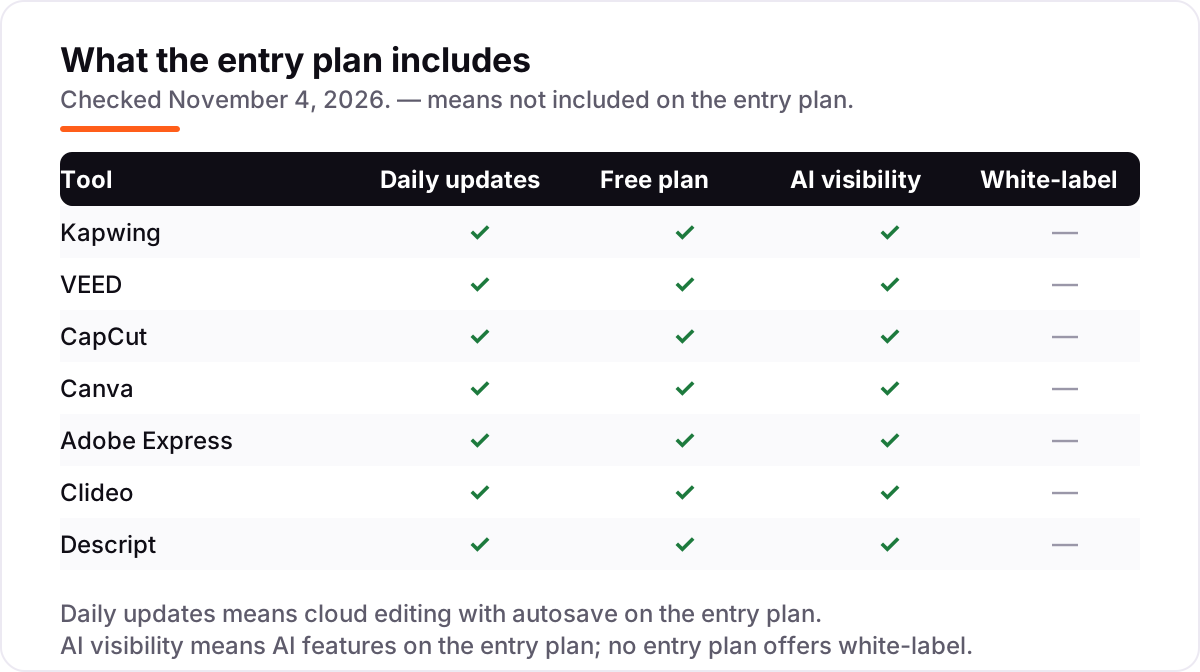
The confusion in this category is between three words that sound alike. Cropping cuts away part of the frame: a wide shot becomes a vertical slice, and whatever falls outside the new frame is gone. Resizing changes the frame dimensions, usually by scaling the whole picture or adding bars, so nothing is cut but the picture may shrink or letterbox. Reframing is the smart version of cropping: the tool tracks the subject and keeps it centered as the frame changes shape, which is what Kapwing's Smart Resizer and VEED's presets do when a landscape interview becomes a vertical clip.
A second confusion is between cropping and trimming. Trimming cuts time — the start and end of a clip — while cropping cuts space. Every tool here does both, but the dedicated croppers like Clideo are built for the space job and offer little for the time job. If your main need is cutting minutes out of a long video, a transcript editor like Descript or a full editor like Kapwing fits better than a single-task cropper.
A third distinction is export resolution versus source resolution. Cropping a 4K source down to vertical still leaves plenty of pixels; cropping a 720p source the same way leaves a soft, blurry clip. That is why the 4K export on Kapwing Pro and Clideo Pro matters more than it looks: it is not about publishing in 4K, it is about having enough pixels left after the crop.
Quick comparison: tool type by need
| Buyer | Best pick | Why |
|---|---|---|
| Most creators, all-round browser editing | Kapwing | Full editor with Smart Resizer, Pro is $24/month |
| Social clips that need captions | VEED | Crop plus auto-subtitles in one pass, Lite is $24/month |
| Phone-first vertical editing | CapCut | Best free tier and fastest mobile app, Pro is $19.99/month |
| Video inside a wider design job | Canva | Crop inside branded templates, Pro is $18/month |
| Cheapest premium plan | Adobe Express | Premium is $9.99/month, free with most Creative Cloud plans |
| One video at a time, simplest tool | Clideo | Single-task cropping, Pro is $12/month |
| Talking-head video with a transcript | Descript | Edit the words and the crop follows, Hobbyist is $24/month |
Mistakes to avoid
- Budgeting on the free plan, then finding the watermark. Every free plan here except CapCut and Canva watermarks exports. If the clip goes public, count the first paid plan in the price from day one.
- Paying monthly when annual is far cheaper. VEED Lite halves from $24 to $12 a month on annual billing, and Kapwing Pro drops from $24 to $16. Check the annual figure before you commit to monthly.
- Ignoring the meter that bites first. A tool can be cheap and still be the wrong buy: Descript Hobbyist at $24 is no bargain once you pass 10 media hours a month, and Kapwing Pro at $24 is no bargain once you burn 1,000 AI credits.
- Cropping a low-resolution source. A 720p clip cropped to vertical and exported at 720p looks soft on a phone. Start from the highest-resolution source you have, and pick a tool with 4K export when the source allows it.
- Buying a cropper when you need an editor. If you also trim, caption, brand and schedule the clip, a single-task tool like Clideo means paying for a second tool anyway. Buy the editor first when cropping is one step among many.
How we chose
We checked each vendor's own pricing page on November 4, 2026 and recorded the starting price exactly as shown, including the annual-billing figure where the page lists one, and we ranked the tools by fit for the most common buyer — a creator who crops short video for social platforms every week — not by brand size. Two prices are third-party-sourced and we say so plainly: Canva's pricing page would not load for automated access, so its $18/month Pro figure comes from independent pricing guides that quote Canva's own page, and Adobe Express returned an access error to automated requests, so its $9.99/month Premium figure comes from the same kind of third-party check. VEED's pricing page loads its prices through scripts, so we confirmed its Lite figures against VEED's own published pricing guide. Clideo's $9/month annual figure was confirmed on its own pricing page; its $12/month monthly figure comes from a dated October 30 capture of the same page. Ratings are shown only where we opened the G2 page on November 4, 2026 — Kapwing, VEED and Descript — and omitted for the other four tools because G2 returned rate-limit errors when we tried to open their pages. No vendor paid for a place in this list, and none of the links here are affiliate links.
What to do next
Start with the free plan or trial of your top pick and crop one real video end to end — your footage, your aspect ratio, your export. Check that the export has no watermark at the resolution you need and that the crop holds up on a phone screen before you commit to a year. If the clips are sorted but new customers are not finding you, our monthly SEO service handles the visibility side — or compare video performance in our guide to video analytics software. Once your tools are in place, find out what's holding your rankings back.
Your stack only works if people find you
SerpAstra fixes what keeps your site off page one and makes it easy for AI assistants to recommend.
Get a free audit→Sources we checked (14)
- Kapwing pricing — kapwing.com/pricing (checked November 4, 2026)
- Kapwing subscription FAQ — kapwing.com/help/subscription-faq-2 (checked November 4, 2026)
- Kapwing reviews — g2.com/products/kapwing/reviews (checked November 4, 2026)
- VEED pricing — veed.io/pricing (checked November 4, 2026)
- VEED pricing guide — veed.io/learn/best-video-translation-software (checked November 4, 2026)
- VEED reviews — g2.com/products/veed/reviews (checked November 4, 2026)
- CapCut pricing — capcut.com/pricing (checked November 4, 2026)
- Canva pricing — canva.com/pricing (checked November 4, 2026)
- Canva Pro pricing, third-party check — techsifted.com/guides/canva-ai-pricing-2026 (checked November 4, 2026)
- Adobe Express pricing — adobe.com/express/pricing (checked November 4, 2026)
- Adobe Express pricing, third-party check — testedai.blog/reviews/adobe-express-review (checked November 4, 2026)
- Clideo pricing — clideo.com/pricing (checked November 4, 2026)
- Descript pricing — descript.com/pricing (checked November 4, 2026)
- Descript reviews — g2.com/products/descript/reviews (checked November 4, 2026)
Shamim
Founder of SerpAstra
A full-stack SEO and digital marketer who spends most days on Local SEO for dental practices, AI search visibility and lead generation.
Frequently asked questions
What is the best video cropper tool?
Kapwing is the best fit for most buyers: a full browser editor with aspect-ratio presets and a Smart Resizer, from $24/month. VEED is better when your clips need captions, CapCut when you edit on a phone, and Clideo when you crop one video at a time.
Is there a free video cropper tool without a watermark?
Not among the dedicated tools here — every free plan in this list watermarks exports except CapCut and Canva, which still limit resolution or features. The cheapest watermark-free route is Adobe Express Premium at $9.99/month or Clideo Pro at $9/month billed annually.
How much does a video cropper tool cost?
First paid plans run from $9.99 to $24 a month. Adobe Express Premium is $9.99/month, Clideo Pro is $12/month, Canva Pro is $18/month, CapCut Pro is $19.99/month, and Kapwing, VEED and Descript start at $24/month. Annual billing cuts most of these by 25–50%.
What is the difference between cropping and resizing a video?
Cropping cuts away part of the frame, changing what viewers see. Resizing changes the frame dimensions, often by scaling the whole picture or adding bars. Most tools here do both: crop to remove edges, then resize to fit 9:16, 1:1 or 16:9 for each platform.
Can I crop a video for TikTok or Instagram Reels for free?
Yes. CapCut and Canva both crop to 9:16 on their free plans, and Kapwing, VEED and Clideo offer free cropping with a watermark. For clean, watermark-free vertical clips for TikTok or Reels, expect to pay $9.99–$24 a month depending on the tool.
Does cropping a video reduce its quality?
Cropping itself does not lower quality, but exporting at a lower resolution does. A 1080p clip cropped to vertical and exported at 1080p stays sharp; exported at 720p it softens. Tools with 4K export, like Kapwing Pro and Clideo Pro, give the most headroom.
Can I switch video cropper tools later?
Yes, easily — cropping is non-destructive in most of these tools, and your source clips stay yours. Export finished videos before cancelling, since cloud projects do not transfer between tools, and check that your new tool supports the same aspect ratios and export resolutions.
Free SEO and AI visibility audit
Find out what is holding your rankings back
Send us your site. Within 2 business days you get a written audit, an AI visibility check and a short fix list ranked by impact. Free, with no contract attached.
Request my free audit→Related guides
 AI, Data & Analytics12 Best AI Tools for Video Content Creation in 2026, Compared12 best AI tools for video content creation compared with real prices, free plans and G2 ratings, so you can pick the right video maker without overpaying.Read guide →
 SEO & AI SearchBest Video Analytics Software for 2026: 9 Options Compared by Use Case9 best video analytics software tools compared on price, engagement analytics and free plans. Prices checked on the vendor pricing page, November 2, 2026.Read guide →
 ContentVideo SEO: how to rank videos on Google and YouTubeVideo SEO explained: how to rank videos on Google and YouTube with titles, thumbnails, chapters, transcripts and the signals each platform actually rewards.Read guide →