
10 Best Workload Automation Tools in 2026 (Free and Paid, Compared)
10 best workload automation tools compared on price, platforms and scheduling depth in 2026. Only two publish a price; the rest are custom quote.
 Shamim Mia, Founder, SerpAstraLast verified November 2, 202613 min read
We compare pricing pages, documentation and public reviews. We never accept payment for rankings.

Key takeaways
- JAMS Scheduler is the best value for most teams: published pricing from $833/month billed annually, broad platform coverage and a free trial. BMC Control-M follows at $2,400/month billed annually, and Redwood RunMyJobs is custom quote.
- Only two tools here publish a starting price. The other six enterprise platforms are custom quote, so budget for a sales cycle and ask what the vendor counts: executions, agents or tasks.
- Apache Airflow and Rundeck are free open source — the cheapest way in — but you run the infrastructure, upgrades and monitoring yourself.
- The single most important buying factor is the pricing model: per-execution, per-agent and per-task pricing produce very different bills for the same workload.
- Every price below was checked on the vendor's own pricing page or, for custom-quote tools, confirmed as unpublished on November 2, 2026. No ratings are shown because the review pages could not be opened that day.
On this page
Quick comparison
| Tool | Best for | Starting price | Free plan |
|---|---|---|---|
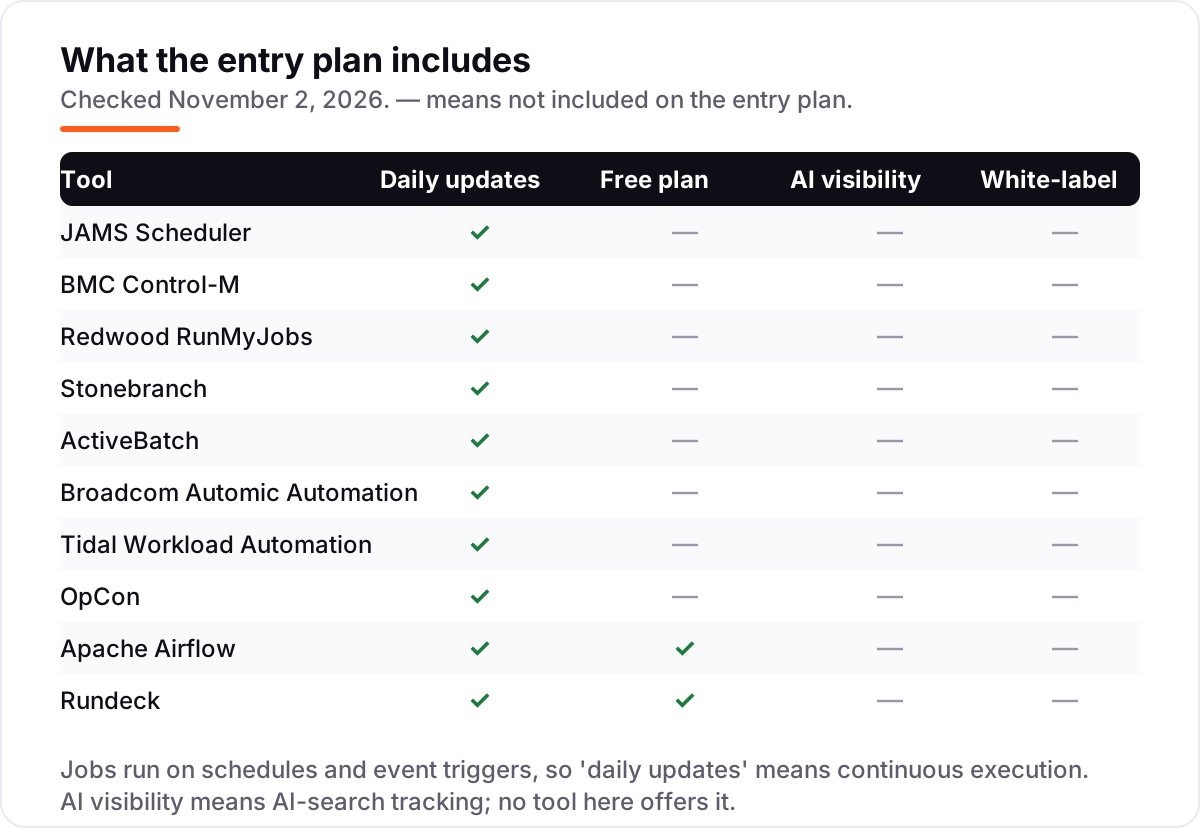
| JAMS Scheduler | Mid-market IT teams running Windows, Linux, IBM i and ERP jobs from one console | $833/mo (annual) | No (free trial) |
| BMC Control-M | Large enterprises orchestrating hybrid cloud, mainframe and data workflows at scale | $2,400/mo (annual) | No |
| Redwood RunMyJobs | SAP- and ERP-heavy enterprises moving orchestration to a cloud-native SaaS | Custom quote | No (free trial) |
| Stonebranch | Enterprises running event-driven hybrid workloads across on-prem, cloud and mainframe | Custom quote | No (free trial) |
| ActiveBatch | IT operations teams that need broad integrations without writing scripts | Custom quote | No (free trial) |
| Broadcom Automic Automation | Large enterprises combining workload automation with release and deployment automation | Custom quote | No |
| Tidal Workload Automation | Enterprises centralising scheduling with strict SLA and audit requirements | Custom quote | No |
| OpCon | Banks, credit unions and insurers automating core batch and end-of-day processing | Custom quote | No (demo) |
| Apache Airflow | Data teams orchestrating Python-defined pipelines they fully control | Free | Yes (open source) |
| Rundeck | DevOps and SRE teams handing safe self-service runbooks to the whole organisation | Free | Yes (open source) |
Make one of these tools?
We re-check this list every quarter. Send a correction, request a review, or ask about a clearly labeled sponsored spot.
Request a listingThe best workload automation tools

JAMS Scheduler
Best for: Mid-market IT teams running Windows, Linux, IBM i and ERP jobs from one console
JAMS Scheduler is the value pick in this list because it is the only enterprise scheduler here that publishes a price. Core starts at $833 a month billed annually, priced per agent, so adding jobs never changes the bill. It runs Windows, Linux, IBM i, SAP, JD Edwards and cloud workloads from one console, with 24x7 support and unlimited seats included.
The trade-off is the Advanced tier. SAP, mainframe and Informatica integrations are custom quote, so the published price covers the mid-market core, not the full enterprise estate. JAMS also became an independent company in June 2025 after Fortra sold it, so ask about the roadmap under the new owners before signing a multi-year deal. For most teams, though, Core is the cheapest honest route into enterprise scheduling.
What we like
- Priced per agent, so adding jobs does not change the bill
- Core includes 24x7 support, .NET and REST APIs, a managed file transfer client and unlimited seats
- JAX, an AI agent in the web client, and JAMS MCP are included at no extra charge
- JUMP, the free migration tool, converts job definitions from nine competing platforms
Watch out for
- Advanced tier (SAP, mainframe, Informatica) is custom quote, not published
- Independent company since the June 2025 divestiture from Fortra, so confirm the roadmap under the new ownership
- No free plan, only a free trial

BMC Control-M
Best for: Large enterprises orchestrating hybrid cloud, mainframe and data workflows at scale
Control-M is the broadest orchestrator in this list, and the Starter Pack is unusually honest for enterprise software: you get full Control-M SaaS functionality from $2,400 a month billed annually, with only execution volume capped at 500 a month. It covers cloud, hybrid and mainframe in one platform, including AWS, Azure, GCP, Snowflake and Databricks, so one team can run the whole estate.
The catch is scale. Five hundred executions a month is a small allowance for a busy estate, and anything beyond it means the custom Enterprise tier and a sales conversation. There is also no free plan or trial listed on the pricing page, so evaluation starts with a demo. Buy Control-M when you need one platform for everything; buy JAMS when a published price matters more.
What we like
- Full Control-M functionality on the Starter Pack; only execution volume is capped
- Covers cloud, hybrid and mainframe in one platform, including AWS, Azure, GCP, Snowflake and Databricks
- Jobs-as-Code and event-driven orchestration with Kafka, SQS, RabbitMQ and Azure Service Bus
- Available on AWS Marketplace for faster procurement
Watch out for
- Entry price is $2,400/month, the highest published starting price in this list
- Execution-volume caps mean heavy workloads need the custom Enterprise tier
- No free plan and no free trial listed on the pricing page

Redwood RunMyJobs
Best for: SAP- and ERP-heavy enterprises moving orchestration to a cloud-native SaaS
RunMyJobs is the cloud-native option in this list. It is delivered as SaaS, so there is no scheduler infrastructure to run, patch or scale, and pricing follows completed process executions rather than seats or job definitions. That model suits SAP- and ERP-heavy operations, where the work is spiky and the estate spans on-prem, hybrid and public cloud.
The honest limitation is predictability. With no published price and a consumption model, the monthly bill depends on how much you run, and you will not know the number until you have run it. G2 review data also puts average implementation at around four months. Choose RunMyJobs when you want SaaS simplicity and ERP depth; choose JAMS when you want a number before the first call.
What we like
- Consumption-based pricing: you pay per completed process execution, not per seat or definition
- Cloud-native SaaS, so there is no scheduler infrastructure to run or patch
- Deep ERP process coverage, including SAP, across on-prem, hybrid and public cloud
- Parent company Redwood was named a Leader in Gartner's 2026 Magic Quadrant for service orchestration and automation platforms
Watch out for
- No published price, so every deal needs a sales conversation
- Consumption pricing makes the monthly bill hard to predict before you run real volume
- G2 review data puts average implementation at around 4 months
Stonebranch
Best for: Enterprises running event-driven hybrid workloads across on-prem, cloud and mainframe
Stonebranch is the event-driven pick in this list. Its Universal Automation Center triggers jobs in real time when files arrive, events fire or schedules hit, and universal agents run them across on-prem systems, cloud, containers and mainframe from one console. Managed file transfer and SAP integrations come with the platform, and the task-based subscription scales with the work you run.
The price is the problem for budgeting. Stonebranch publishes no starting price, and a task-based quote needs a scoping call before you can put a number in a business case. G2 reviewers also note the trial version has limited capabilities, and review data puts implementation at around five months. Pick Stonebranch when real-time triggers matter; pick a published-price tool when the budget must be fixed first.
What we like
- Real-time event triggers plus time-based scheduling in one console
- Universal agents cover on-prem, cloud, containers and mainframe from a single platform
- Task-based subscription scales with the work you actually run
- Managed file transfer and SAP integrations are included in the platform
Watch out for
- No published price; task-based quotes need a scoping call before you can budget
- G2 reviewers note the trial version has limited capabilities
- G2 review data puts average implementation at around 5 months

ActiveBatch
Best for: IT operations teams that need broad integrations without writing scripts
ActiveBatch is the low-code pick in this list. Its drag-and-drop designer and library of prebuilt, pretested job steps cover SQL Server, SharePoint, SAP, ServiceNow and more, so common integrations need no scripting at all. SLA management with predictive alerts and automated remediation comes with the platform, and agent-based licensing means adding jobs does not add fees.
The catch is the quote. ActiveBatch publishes no price, and usage-based licensing is tailored to each environment, so two similar teams can pay very different amounts. Some features, including dedicated support and change management tools, also come only with the full licence. Choose ActiveBatch when your team wants breadth without code; choose JAMS when you want the price in writing first.
What we like
- Drag-and-drop designer with prebuilt, pretested job steps for SQL Server, SharePoint, SAP, ServiceNow and more
- SLA management with predictive alerts and automated remediation
- Cross-platform scheduling across on-prem, cloud and hybrid environments
- Agent-based licensing scales without per-job fees
Watch out for
- No published price; quotes are usage-based and tailored to each environment
- Enterprise-leaning cost puts it out of reach for small teams
- Dedicated support and change management tools come only with the full licence

Broadcom Automic Automation
Best for: Large enterprises combining workload automation with release and deployment automation
Automic Automation is the combined pick in this list: it orchestrates batch workloads and continuous delivery from one platform, so the same team can schedule nightly jobs and deploy releases without a second tool. It covers cloud-native apps, packaged apps, middleware and mainframe, and it has a long enterprise track record going back to its CA Automic days.
The buying experience is the weakness. Broadcom publishes no price and offers no free trial, so evaluation runs entirely through the sales team, and licensing is negotiated per environment. That makes Automic a poor fit for teams that want to try before they buy. Pick it when release automation and workload automation must share one platform; otherwise a SaaS-native rival is easier to start.
What we like
- Unifies workload automation with continuous delivery automation in one platform
- Covers cloud-native apps, packaged apps, middleware and mainframe
- Open, scalable architecture for automation across the whole enterprise
- Long enterprise track record, formerly CA Automic
Watch out for
- No published price and no free trial, so evaluation runs through the sales team
- Enterprise-only fit: overkill for teams below enterprise scale
- Licensing is negotiated per environment, so budgeting needs a full sales cycle

Tidal Workload Automation
Best for: Enterprises centralising scheduling with strict SLA and audit requirements
Tidal Workload Automation is the central-control pick in this list. It gives one enterprise-wide console for planning and controlling job execution across business, operations and IT processes, with SLA management and critical-path tracking built in. Its 40-plus pre-built integrations span applications, middleware and infrastructure, and time-zone-aware calendars handle daylight saving and regional holidays.
The price is the friction. Tidal publishes no pricing, and buyers typically get numbers through quotes or resellers, with adapters and extra schedulers priced separately. There is also no free plan or trial to test with. Choose Tidal when SLA discipline and audit logs are the priority; choose Redwood RunMyJobs when you want the same parent company's SaaS model instead.
What we like
- SLA management with critical-path tracking built in
- 40+ pre-built integrations across applications, middleware and infrastructure
- Time-zone-aware calendars handle daylight saving and regional holidays
- High-integrity logs support audit and compliance needs
Watch out for
- No published price; pricing runs through quotes or resellers
- Adapters and extra schedulers carry separate pricing, per G2 reviewers
- No free plan and no free trial

OpCon
Best for: Banks, credit unions and insurers automating core batch and end-of-day processing
OpCon is the financial-services specialist in this list. It is built for banks, credit unions and insurers, with more than 400 banking-specific integrations including Jack Henry, Fiserv, FIS and Corelation, and it handles the core batch, ACH and end-of-day processing those institutions run every night. Self Service lets business users trigger workflows without raising IT tickets.
The limits follow the focus. Pricing is tiered per institution and unpublished, so budgeting needs a sales conversation, and coverage outside banking and insurance is thinner than the general-purpose platforms. Setup can also be intricate, with SMA consultants often needed to simplify it. Pick OpCon when you run a financial institution; look elsewhere when your workloads are not banking-shaped.
What we like
- 400+ banking-specific integrations, including Jack Henry, Fiserv, FIS and Corelation
- Self Service lets business users trigger workflows without raising IT tickets
- Built-in audit trails and SLA-aware dependencies for regulated work
- Serves more than 700 banks and credit unions, per SMA Technologies
Watch out for
- No published price; tiered licensing is priced per institution
- Financial-services focus means thinner coverage outside banking and insurance
- Setup can be intricate, and SMA consultants are often needed to simplify it

Apache Airflow
Best for: Data teams orchestrating Python-defined pipelines they fully control
Apache Airflow is the free pick in this list, and the most widely used open source scheduler for data work. Pipelines are defined as Python code in DAGs, versioned in Git like any other software, and the platform schedules and monitors them across your infrastructure. The provider ecosystem covers AWS, GCP, Azure, Snowflake and more, and managed versions exist if self-hosting stops making sense.
The cost is your time. Airflow is free, but you run the infrastructure, upgrades, scaling and monitoring, and the Python-first design means non-developers need engineering help to build workflows. There is no vendor support or SLA without a paid managed service. Choose Airflow when your data team writes Python and wants full control; choose a commercial scheduler when you want someone else on call.
What we like
- Completely free under the Apache 2.0 licence, with no licence fees at any scale
- Pipelines defined as Python code and versioned in Git like any other software
- Huge provider ecosystem for AWS, GCP, Azure, Snowflake and more
- Managed versions such as Cloud Composer and Amazon MWAA exist if you outgrow self-hosting
Watch out for
- You run the infrastructure: setup, upgrades, scaling and monitoring are your job
- Python-first design means non-developers need engineering help to build workflows
- No vendor support or SLA without a paid managed service

Rundeck
Best for: DevOps and SRE teams handing safe self-service runbooks to the whole organisation
Rundeck is the runbook pick in this list. It gives DevOps and SRE teams self-service access to operational procedures, with access control and a full audit trail for every job, and it runs commands across nodes over SSH or WinRM. The Community edition is free open source under the Apache 2.0 licence, so a small team can start without a purchase order.
The ceiling is the commercial edition. Clustering, high availability, advanced access controls and enhanced dashboards need PagerDuty Runbook Automation, which is custom quote, and Rundeck is weaker than the enterprise schedulers on ERP and mainframe depth. Pick Rundeck when your problem is safe self-service operations; pick an enterprise scheduler when your problem is cross-platform batch at scale.
What we like
- Free Community edition under the Apache 2.0 licence, maintained on GitHub
- Self-service access with access control and a full audit trail for every job
- Commercial PagerDuty Runbook Automation adds clustering, high availability and enterprise support
- Strong with SSH and WinRM node execution across existing infrastructure
Watch out for
- Enterprise features such as clustering, high availability and advanced access controls need the paid commercial edition
- Runbook-focused, so weaker than the enterprise schedulers on ERP and mainframe depth
- Community edition is small-scale by design; production scale needs the commercial bundle
What a workload automation tool actually does
The best workload automation tools take the jobs that keep a business running — nightly batch, data pipelines, file transfers, ERP posting — and run them on time, in the right order, without someone watching a screen. This list compares 10 of them, sorted by who they fit best: enterprise platforms, mid-market value picks and free open source options. Only two publish a starting price, and that fact shapes most of the buying advice below.
A workload automation tool is not a fancier cron job. It manages dependencies between jobs, reacts to events such as a file arriving, enforces SLAs, retries failures, and keeps an audit log a regulator or an auditor can read. The market is growing with the complexity it serves: The Business Research Company puts the workload scheduling and automation market at $3.99 billion in 2026, rising to $5.62 billion by 2030.
The tools below split three ways. Enterprise platforms such as Control-M, RunMyJobs and Stonebranch orchestrate thousands of jobs across hybrid estates. Mid-market picks such as JAMS and ActiveBatch cover the same ground for smaller estates, often with a published price. And open source tools such as Airflow and Rundeck cost nothing in licences, but ask your team to run them.
The price picture: two published prices, six custom quotes
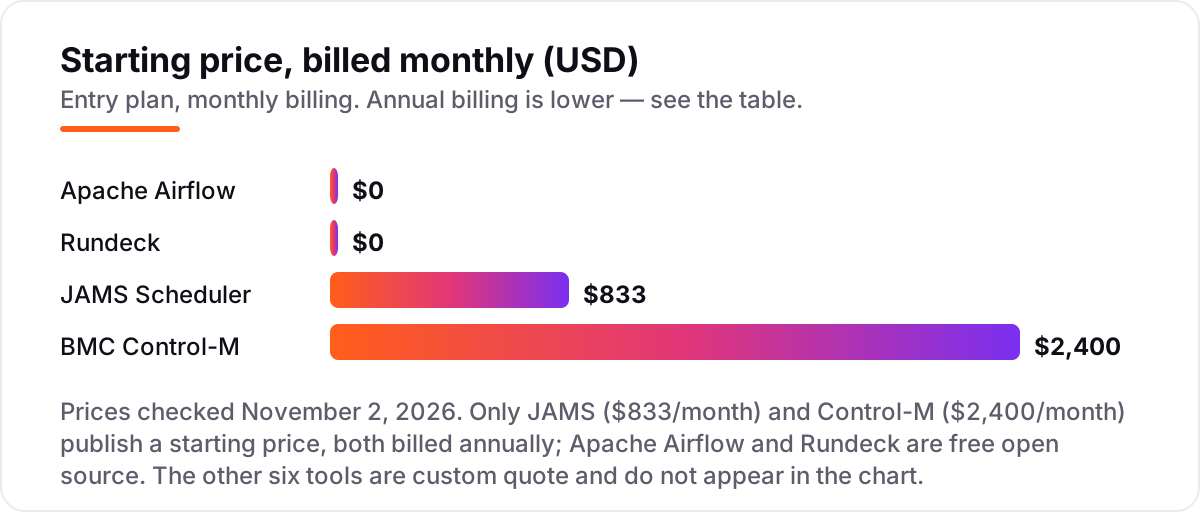
Price is the hardest part of this category to compare, because most vendors do not publish one. JAMS Scheduler starts at $833 a month billed annually and BMC Control-M at $2,400 a month billed annually, and those are the only two numbers in this list that come from a vendor pricing page. Airflow and Rundeck are free open source, so their licence cost is zero and their real cost is engineering time.
The other six tools — RunMyJobs, Stonebranch, ActiveBatch, Automic, Tidal and OpCon — are custom quote. RunMyJobs charges per process execution, Stonebranch per task, ActiveBatch by usage and OpCon by institution tier, so even the unit being priced changes between vendors. Ask every vendor what it counts before you compare numbers, and get the quote in writing with the volume assumptions attached.
Enterprise orchestration for large estates
If you run thousands of jobs across mainframe, cloud and SaaS, start with Control-M, RunMyJobs, Stonebranch, Automic or Tidal. Control-M is the broadest, with the only published SaaS starter pack in this group. RunMyJobs is the cloud-native choice, Stonebranch the event-driven one, Automic the combined workload-plus-release platform, and Tidal the central-control option with the strongest SLA tooling.
All five are sales-led purchases with implementation measured in months, not days, so run a proof of concept on your own jobs before signing. Gartner's 2026 Magic Quadrant for service orchestration and automation platforms named Redwood, the parent of RunMyJobs, ActiveBatch and Tidal, a Leader for the third time — a useful check, but no substitute for running your own workload through the tool.
Mid-market value and specialist picks
Most buyers are not running a global bank's batch estate. They need a few hundred jobs to run reliably across Windows, Linux and an ERP, with a price they can put in a budget. JAMS is the standout here: published pricing, per-agent licensing and a free trial, with a free migration tool for teams leaving a rival. ActiveBatch is the low-code alternative for teams that want breadth without scripting.
OpCon is the specialist. It is built for banks, credit unions and insurers, with more than 400 banking integrations and self-service for business users, and it is the natural pick inside that industry. Outside financial services, the general-purpose tools cover more ground for less effort.
Free and open source options
If the licence budget is zero, Airflow and Rundeck are real tools, not demos. Airflow is the standard for Python-defined data pipelines, and Rundeck is the standard for self-service runbooks with access control and audit trails. Both are free under the Apache 2.0 licence, and both have paid routes — managed Airflow services, or PagerDuty Runbook Automation — when you outgrow self-hosting.
The honest cost is operations. Someone on your team owns upgrades, scaling, monitoring and the 3 a.m. failure, and there is no vendor SLA to call. For a data team that writes Python, that trade is usually worth it. For a team that wants a phone number to call, a commercial scheduler is cheaper than the hire.
Quick comparison: tool type by need
| Buyer | Best pick | Why |
|---|---|---|
| Mid-market team that wants a published price | JAMS Scheduler | $833/month billed annually, per-agent pricing |
| Large enterprise, broadest orchestration | BMC Control-M | Full SaaS functionality from $2,400/month billed annually |
| SAP- and ERP-heavy, cloud-native | Redwood RunMyJobs | Consumption-based SaaS, deep ERP process coverage |
| Event-driven hybrid workloads | Stonebranch | Real-time triggers, universal agents, task-based pricing |
| Low-code, broad integrations | ActiveBatch | Prebuilt job steps, no scripting for common systems |
| Financial services batch | OpCon | 400+ banking integrations, self-service, audit trails |
| Data pipelines on a zero licence budget | Apache Airflow | Free open source, Python-defined DAGs |
| DevOps runbooks and self-service | Rundeck | Free Community edition, access control and audit logs |
How to choose the best workload automation tools: a short decision path
- Count and map your jobs first. List what runs, where it runs and what depends on what. Under a few hundred jobs on Windows and Linux, JAMS or ActiveBatch will cover you; thousands of jobs across mainframe and cloud point to Control-M or Stonebranch.
- Pick your deployment. SaaS if you want no infrastructure to run, on-prem if regulation or mainframe demands it, hybrid if your estate already spans both. Most large buyers end up hybrid.
- Decide what the vendor counts. Executions, agents and tasks produce very different bills for the same workload. Get the quote with the volume assumptions in writing before you compare.
- Check the platforms, not the brochure. Confirm native coverage for your ERP, databases and operating systems. A tool that needs custom scripting for your core system is not the cheap option.
- Run a trial on your own jobs. Every tool here except Automic and Tidal offers a free plan or a free trial. Run your real nightly batch for a week and check the audit logs and SLA reports before you sign.
Mistakes to avoid
- Comparing custom quotes without matching the unit. Per-execution, per-agent and per-task pricing cannot be compared as monthly numbers until the volume is the same.
- Buying an enterprise platform for a few dozen jobs. Control-M, Automic and Tidal are built for estates of thousands of jobs; below that scale, JAMS, Airflow or Rundeck do the same work for far less.
- Ignoring what counts as a job. One vendor's job is another's execution, and tracking the same workflow in five systems can cost five times the headline figure.
- Forgetting the implementation timeline. Enterprise tools take months to implement, per G2 review data. Budget the project time, not just the licence.
- Choosing open source without staffing the operations. Airflow and Rundeck are free, but upgrades, scaling and the 3 a.m. failure are yours. If nobody owns that, the free tool is the expensive one.
How we chose
We checked each vendor's own pricing page on November 2, 2026 and recorded the starting price exactly as shown. Only JAMS Scheduler and BMC Control-M publish a starting price, so the other six enterprise tools are listed as custom quote, with the custom-quote status confirmed through their G2 or TrustRadius listings. Ratings are not shown in this post: the G2 review pages could not be opened on the day of writing, so no score or review count is claimed for any tool. We ranked the tools by fit for the most common buyer — a mid-market IT team replacing scripts and manual scheduling — not by brand size. No vendor paid for a place in this list, and none of the links here are affiliate links.
What to do next
Start with the decision path above: map your jobs, pick a deployment, and pin down what each vendor counts before you compare prices. Then take the free plan or trial of your top pick and run your real nightly batch for a week. If the jobs finish on time and the audit logs make sense to an auditor, you have your tool. Before automating reporting around search traffic, make sure the numbers are right — our SEO audit service checks exactly that — and if you publish pages about the change, check them first with the free SERP snippet preview tool. If you'd rather have this set up and read for you, request a free SEO + AI visibility audit and get a ranked fix list in 2 business days.
Rather not run the tools yourself?
Tools show you the data. SerpAstra turns it into higher rankings, more map-pack calls and citations in AI answers.
Get a free SEO + AI visibility audit→Sources we checked (15)
- BMC Control-M pricing — bmc.com/it-solutions/control-m-pricing.html (checked November 2, 2026)
- JAMS Scheduler pricing — jamsscheduler.com (checked November 2, 2026)
- JAMS Scheduler pricing on G2 — Core $9,996/year (checked November 2, 2026)
- Redwood RunMyJobs pricing on G2 — pricing available upon request (checked November 2, 2026)
- Stonebranch pricing on G2 — pricing not listed by the vendor (checked November 2, 2026)
- ActiveBatch pricing on G2 — pricing available upon request (checked November 2, 2026)
- Broadcom Automic Automation pricing on TrustRadius — no pricing plans listed (checked November 2, 2026)
- Tidal Automation pricing on G2 — pricing not listed by the vendor (checked November 2, 2026)
- OpCon pricing — no price information available (checked November 2, 2026)
- Apache Airflow — open source under the Apache Licence (checked November 2, 2026)
- Rundeck introduction — Rundeck Open Source is free under the Apache 2.0 licence (checked November 2, 2026)
- Rundeck open source community — free open source software (checked November 2, 2026)
- Tidal by Redwood — workload automation products (checked November 2, 2026)
- Workload scheduling and automation market report 2026 — The Business Research Company (checked November 2, 2026)
- Tidal Automation — Gartner 2026 Magic Quadrant Leader note (checked November 2, 2026)
Shamim
Founder of SerpAstra
A full-stack SEO and digital marketer who spends most days on Local SEO for dental practices, AI search visibility and lead generation.
Frequently asked questions
What is the best workload automation tool in 2026?
JAMS Scheduler is the best value for most teams: published pricing from $833 a month billed annually, per-agent licensing, broad platform coverage and a free trial. BMC Control-M is the broadest enterprise platform at $2,400 a month billed annually. Teams with no licence budget should start with Apache Airflow for data pipelines or Rundeck for runbooks.
How much does workload automation software cost?
From free to $2,400 a month at the published starting prices. Apache Airflow and Rundeck cost nothing in licences. JAMS Scheduler starts at $833 a month billed annually and BMC Control-M at $2,400 a month billed annually. The other six enterprise tools are custom quote, so the real entry price depends on executions, agents or tasks — ask each vendor what it counts.
Is there a free workload automation tool?
Yes, two in this list. Apache Airflow is free open source under the Apache 2.0 licence and suits Python-defined data pipelines. Rundeck Community is also free open source and suits self-service runbooks with access control. Both have paid routes when you outgrow self-hosting, but the free editions are complete tools, not trials.
What is the difference between workload automation and a simple job scheduler?
A simple scheduler runs jobs at set times. A workload automation tool also manages dependencies between jobs, reacts to events such as a file arriving, enforces SLAs, retries failures automatically and keeps an audit log. It also spans platforms — Windows, Linux, mainframe, cloud and ERP — from one console instead of one scheduler per system.
Do I need cloud, on-prem or hybrid workload automation?
It depends on where your jobs live. Cloud-native SaaS such as RunMyJobs fits teams that want no infrastructure to run. On-prem suits regulated estates and mainframe shops. Most large buyers end up hybrid, with jobs spanning cloud and on-prem, so pick a tool that orchestrates both rather than one that only covers a single side.
What should I check before buying a workload automation tool?
Four things: what the vendor counts as a billable unit, which platforms and ERP systems it covers natively, whether the price is published or custom quote, and how long implementation takes. Enterprise tools average months to implement, per G2 review data. Run a trial on your own jobs first, and check the audit logs and SLA reporting before you sign.
Free SEO and AI visibility audit
Find out what is holding your rankings back
Send us your site. Within 2 business days you get a written audit, an AI visibility check and a short fix list ranked by impact. Free, with no contract attached.
Request my free audit→Related guides
 SEO & AI Search8 Best SEO Automation Tools in 2026 (Free and Paid, Compared)8 best SEO automation tools compared on price, automation depth and free plans, with every price checked on the vendor's own pricing page, November 1, 2026.Read guide →
 SEO & AI Search7 Best AI Visibility Tools for AEO in 2026 (Free and Paid, Compared)7 best ai visibility tools for aeo compared on price, prompt limits and engines — from $29/month to custom enterprise plans. Prices checked November 1, 2026.Read guide →
 StrategyHow to track your Google ranking (and what the numbers actually mean)Track your Google ranking the right way: Search Console, free checkers and rank trackers explained, and what average position and CTR really mean today.Read guide →