
9 Best Free CAD Software for 3D Printing in 2026, Compared
Compare the 9 best free CAD software for 3D printing on price, free plans and print-ready export, with every price checked November 4, 2026.
 Shamim Mia, Founder, SerpAstraLast verified November 4, 202614 min read
We compare pricing pages, documentation and public reviews. We never accept payment for rankings.

Key takeaways
- Tinkercad is the easiest first step at $0; FreeCAD is the best fully free parametric CAD, also $0; and Fusion gives hobbyists pro-grade tools free for personal use, with the commercial subscription at $680 a year.
- The single most important buying factor is the free plan's catch: Fusion and Onshape ban commercial use on their free tiers, Onshape's free documents are public, and SketchUp Free is personal use only.
- Six of the nine tools cost nothing at all — Tinkercad, FreeCAD, Blender, OpenSCAD, SolveSpace and LibreCAD have no paid plan — while the first paid plans run from $129 a year for SketchUp Go to $1,500 a year for Onshape Standard.
- Match the tool to the shape: Tinkercad and SketchUp for simple parts, Fusion or FreeCAD for measured functional parts, Blender for figures, OpenSCAD for code-driven parts, and LibreCAD for 2D profiles.
On this page
Quick comparison
| Tool | Best for | Starting price | Free plan |
|---|---|---|---|
| Tinkercad | Complete beginners and kids printing their first model the same day they sign up | Free | Yes (free) |
| FreeCAD | Makers who want real parametric CAD for functional printed parts, with no license limits at all | Free | Yes (free) |
| Autodesk Fusion | Hobbyists who want professional-grade parametric CAD free for personal projects | Free; $680/yr | Yes (personal use) |
| Onshape | Makers who want professional parametric CAD in a browser, with version control built in | Free; $1,500/yr | Yes (free plan) |
| Blender | Makers printing organic shapes, figures, props and cosplay pieces that need sculpting | Free | Yes (free) |
| OpenSCAD | Programmers who want to design precise parametric parts by writing code | Free | Yes (free) |
| SketchUp | Makers who sketch ideas fast and want the quickest route from an idea to a printable block | Free; $129/yr | Yes (free plan) |
| SolveSpace | Makers who want a small, fast parametric modeler for simple mechanical parts | Free | Yes (free) |
| LibreCAD | Makers who need precise 2D drawings and DXF profiles to feed into a 3D workflow | Free | Yes (free) |
Make one of these tools?
We re-check this list every quarter. Send a correction, request a review, or ask about a clearly labeled sponsored spot.
Request a listingThe best free CAD software for 3D printing
Tinkercad
Best for: Complete beginners and kids printing their first model the same day they sign up
Tinkercad is the fastest way to go from zero to a printed part. It runs entirely in a browser, so there is nothing to install and it works on a Chromebook, a school computer or a borrowed laptop. You build models by dragging solid shapes onto a workplane, grouping them and cutting holes. The built-in lessons walk you through a first model in under an hour, and one-click STL export sends it straight to your slicer.
Autodesk runs it free for everyone. The trade-off is the ceiling: there is no parametric history, so changing a dimension usually means rebuilding the shape, and precise mechanical parts with tight tolerances are hard work. Start here when the printer is new and the goal is a first successful print, then move to Fusion or FreeCAD when the parts get serious.
What we like
- The easiest start in this list: drag-and-drop shapes, no install, runs in any browser
- Built-in lessons and starter projects get a first print out in under an hour
- One-click STL export sends models straight to any slicer
- Free forever with no paid tier, and it runs fine on a Chromebook
Watch out for
- No parametric history, so changing one dimension often means rebuilding the shape
- Too simple for precise mechanical parts, assemblies and tight tolerances
- Designs live in Autodesk's cloud, so there is no offline mode

FreeCAD
Best for: Makers who want real parametric CAD for functional printed parts, with no license limits at all
FreeCAD is the strongest fully free option for functional printed parts. It is open-source parametric CAD: you sketch constrained 2D profiles, extrude them into solids and edit any dimension later through the model history. There is no account, no revenue limit and no commercial-use restriction, so you can print and sell what you make. It reads and writes STEP, IGES, STL, OBJ and DXF, and Python scripting plus a large add-on library extend it into CAM and simulation.
The price is the learning curve. The interface is crowded, with workbenches and panels that confuse first-time users, and large assemblies can run slowly. Community support is the only support. Pick FreeCAD when you want a tool that never asks for money and never limits what you print — and accept that the first week will feel harder than Tinkercad.
What we like
- Full parametric modeling with sketches, constraints and a real part history, at $0
- No account, no revenue limit and no commercial-use restriction — print and sell what you make
- Wide file support: STEP, IGES, STL, OBJ and DXF in and out
- Python scripting and a large add-on library extend it into CAM, FEA and BIM
Watch out for
- The interface is crowded and the learning curve is steep for a first CAD tool
- Large assemblies can run slowly, and some tools feel unfinished next to paid CAD
- Community support only — there is no paid support line to call

Autodesk Fusion
Best for: Hobbyists who want professional-grade parametric CAD free for personal projects
Fusion is the professional tool hobbyists get nearly free. The personal-use license costs nothing for home-based, non-commercial projects by makers earning under $1,000 a year, and it includes the core parametric modeler that professionals pay for: sketches, assemblies, 2D drawings, basic simulation and CAM, plus mesh editing that suits 3D printing. Cloud version history saves every change, and STL and 3MF export go straight to the slicer.
The limits are real. Personal use caps you at 10 active documents, bans commercial work, and needs an internet connection for sign-in and cloud saves. Advanced simulation, generative design and some CAM features sit behind paid extensions. The commercial subscription is $680 a year. Choose Fusion when you want pro-grade tools now and a clear paid path if printing becomes a business.
What we like
- Professional parametric modeling, assemblies and CAM in one tool, free for hobbyists
- Cloud version history and collaboration built in — no files to lose or email around
- Mesh editing and direct STL import suit 3D printing workflows
- The same tool professionals use, so skills transfer if printing becomes a business
Watch out for
- Personal use caps at 10 active documents and bans commercial use entirely
- Needs an internet connection for sign-in and cloud saves
- Advanced simulation, generative design and CAM sit behind paid extensions

Onshape
Best for: Makers who want professional parametric CAD in a browser, with version control built in
Onshape is professional parametric CAD that runs entirely in a browser, so it works on any computer — including a Chromebook — with nothing to install. The Free plan includes the full modeler, real-time collaboration, mobile apps and unlimited public storage, for non-commercial projects. Built-in version control and branching mean a bad edit never loses a good design, and FeatureScript lets makers automate and share custom modeling features.
The catch is visibility: free documents are public, so anyone can see and copy your designs, and commercial use needs Standard at $1,500 a year per user. There is no offline mode. Pick Onshape when you model on more than one machine, collaborate on shared printer projects, or want version control without managing files — and pay Standard the day your designs need to stay private.
What we like
- Runs in any browser — no install, no powerful computer, works on a Chromebook
- Built-in version control and branching, so a bad edit never loses a good design
- Real-time multi-user editing makes shared printer projects easy
- FeatureScript lets makers automate and share custom modeling features
Watch out for
- Free documents are public, so anyone can see and copy your designs
- No private storage or commercial use until Standard at $1,500 a year
- Needs a steady internet connection — there is no offline mode

Blender
Best for: Makers printing organic shapes, figures, props and cosplay pieces that need sculpting
Blender is the tool for everything parametric CAD does badly: figures, creatures, cosplay props and organic shapes. Its sculpting tools, modifiers and mesh editing are the best free option anywhere, and the built-in 3D print toolbox add-on checks wall thickness, overhangs and manifold edges before you export. It is free and open source, with no account and no license limit on what you print or sell.
Blender is not an engineering tool. There is no real parametric history, so changing a measured dimension means pushing vertices by hand, and meshes often need repair before they slice cleanly. The interface packs hundreds of tools and takes weeks to learn. Pick Blender when the shape is organic and the look matters more than the measurements — and pair it with FreeCAD for the brackets that hold the figure up.
What we like
- The best free sculpting tools anywhere — figures, creatures and props print beautifully
- Huge library of free tutorials and add-ons, including a 3D print toolbox that checks wall thickness
- Mesh editing, modifiers and boolean tools handle complex organic geometry
- Free forever, no account, no license limits on what you print or sell
Watch out for
- Built for animation and art, not measured engineering — no real parametric history
- The interface packs hundreds of tools and takes weeks to learn
- Meshes often need repair (non-manifold edges, thin walls) before they slice cleanly

OpenSCAD
Best for: Programmers who want to design precise parametric parts by writing code
OpenSCAD turns CAD into code. You describe a part in a short script — cylinders, cubes, differences and unions — and the model rebuilds from the parameters. One script makes a whole family of sizes, which is ideal for brackets, mounts, enclosures and gears. Designs live in plain text, so Git tracks every change, and shared libraries on Printables and Thingiverse cover threads, gears and hinges. It is free, open source and runs on old hardware.
There is no mouse-driven modeling at all: every shape is typed as code, which suits programmers and frustrates everyone else. Preview and render are slow on complex models, and organic shapes are hard work. Pick OpenSCAD when you think in parameters and want repeatable, version-controlled parts — or when a parametric family of prints beats a single one-off model.
What we like
- Parts are code, so one script makes a whole family of sizes — ideal for brackets and mounts
- Designs live in plain text, so Git tracks every change like software
- Huge shared libraries on Printables and Thingiverse cover gears, threads and enclosures
- Free forever, tiny download, runs on old hardware
Watch out for
- No mouse-driven modeling at all — every shape is typed as code
- Preview and render are slow on complex models, with no GPU help
- Organic shapes and freeform surfaces are hard work compared with sculpting tools

SketchUp
Best for: Makers who sketch ideas fast and want the quickest route from an idea to a printable block
SketchUp is the quickest way to rough out a simple printable shape. The push/pull workflow turns a flat sketch into a solid in seconds, and the huge 3D Warehouse library offers millions of ready-made models to remix and print. SketchUp Free runs in the browser with nothing to install, includes 10 GB of cloud storage, and exports STL files. Go at $129 a year adds commercial use, iPad modeling and wider import and export.
The free plan is personal use only — selling prints needs Go — and there is no parametric history, so edits to finished parts are fiddly. The desktop app and LayOut need Pro at $399 a year. Pick SketchUp when the part is a simple block, bracket or housing and speed matters more than precision, and move to Fusion or FreeCAD when the tolerances tighten.
What we like
- The push/pull workflow makes simple boxes, brackets and housings fast to build
- Huge 3D Warehouse library of ready-made models to remix and print
- Runs in the browser with nothing to install, and the iPad app is solid
- Go at $129 a year adds commercial use, iPad modeling and wider import/export
Watch out for
- Free is personal use only — selling prints needs Go at $129 a year
- No parametric history, so edits to finished parts are fiddly
- Curved and organic shapes are awkward; the desktop app and LayOut need Pro at $399 a year

SolveSpace
Best for: Makers who want a small, fast parametric modeler for simple mechanical parts
SolveSpace is a small, fast parametric modeler for simple mechanical parts. You sketch constrained 2D profiles, extrude and revolve them into solids, and assemble parts with a real constraint solver — so dimensions drive the model and edits propagate cleanly. It exports STL, STEP and DXF directly, simulates linkages and mechanisms, and runs on almost any machine. It is free and open source, with no cloud, no account and no sign-up.
The feature set is small next to FreeCAD: no CAM, no FEA and no large assemblies, and the interface looks dated, with thin learning resources. Development moves slowly, with long gaps between releases. Pick SolveSpace when you want a tool that starts in seconds, stays out of the way, and models a bracket or a hinge without a subscription — and accept that bigger projects will outgrow it.
What we like
- Tiny and fast — it runs well on old laptops and starts in seconds
- Real constraint solver: dimensions drive the model, so edits propagate cleanly
- Direct STL export with no cloud, no account and no sign-up
- Linkages and mechanisms can be simulated with the built-in solver
Watch out for
- Small feature set next to FreeCAD — no CAM, no FEA, no large assemblies
- The interface looks dated and the learning resources are thin
- Development is slow, with long gaps between releases

LibreCAD
Best for: Makers who need precise 2D drawings and DXF profiles to feed into a 3D workflow
LibreCAD is the 2D companion in this list. It is a free, open-source 2D drafting tool with layers, dimensions and DWG/DXF support, and it runs fast on any machine. For 3D printing it earns its place at the start of the workflow: draw a precise flat profile, export it as DXF, and extrude it into a solid in FreeCAD or Fusion. It exports PDF and SVG too, and its AutoCAD-style commands feel familiar to anyone who has drafted before.
LibreCAD cannot model a 3D part on its own, so it always pairs with another tool here — that is the deal, not a hidden catch. The interface is plain, community development moves slowly, and large drawings can occasionally crash. Pick LibreCAD when your prints start as precise 2D drawings.
What we like
- Precise 2D drafting with layers, dimensions and DWG/DXF support — free forever
- Lightweight and fast on any machine, including older laptops
- DXF profiles export cleanly for extrusion in FreeCAD or Fusion
- Familiar AutoCAD-style commands, so 2D drafters feel at home quickly
Watch out for
- 2D only — it cannot model a 3D part, so it always pairs with another tool here
- The interface is plain and community development moves slowly
- Occasional crashes on large drawings, and macOS builds lag behind
The best free CAD software for 3D printing turns an idea into a file your printer can read, without charging you for the privilege. We ranked the nine tools below by fit for the most common buyer — a maker with a new printer and no CAD background — starting with the easiest first step and ending with the specialist picks, and every price was checked on the vendor's own page on November 4, 2026.
How to choose the best free CAD software for 3D printing
- Start with the shape, not the software. Simple signs, boxes and organizers need Tinkercad or SketchUp; measured brackets and functional parts need FreeCAD or Fusion; figures and props need Blender; code-driven parts need OpenSCAD.
- Read the free plan's catch before you commit. Fusion caps personal use at 10 active documents, Onshape makes free documents public, and SketchUp Free bans commercial use. Open-source tools have no catch at all.
- Check the export format. Every 3D tool here exports STL, which is what your slicer reads. If you also need STEP or DXF for other machines, FreeCAD, Fusion and SolveSpace cover those.
- Match the tool to your computer. Tinkercad, Onshape and SketchUp Free run in a browser and work on a Chromebook. Blender, FreeCAD and the rest are desktop downloads that need Windows, macOS or Linux.
- Think about where you will be in a year. If you might sell prints, start on a tool whose paid step is affordable: SketchUp Go is $129 a year, Fusion is $680, Onshape Standard is $1,500.
If you are still deciding between the easiest tools, our guide to beginner CAD software for 3D printing compares the same free tier from a first-timer's angle. And before you publish a page about the parts you sell, run its title through the free SERP snippet preview tool — it shows exactly how the title and description will look in Google.
Whatever you shortlist, print something real before you commit to a tool. Pick one small part you actually need — a bracket, a hook, a replacement knob — design it in your top pick, slice it and print it. That one print tells you more than any review: whether the workflow clicks, whether the export is clean, and whether the learning curve is worth it. A tool that feels good on a first print is the tool you will still be using in six months.
Free CAD software for 3D printing pricing: what you will actually pay
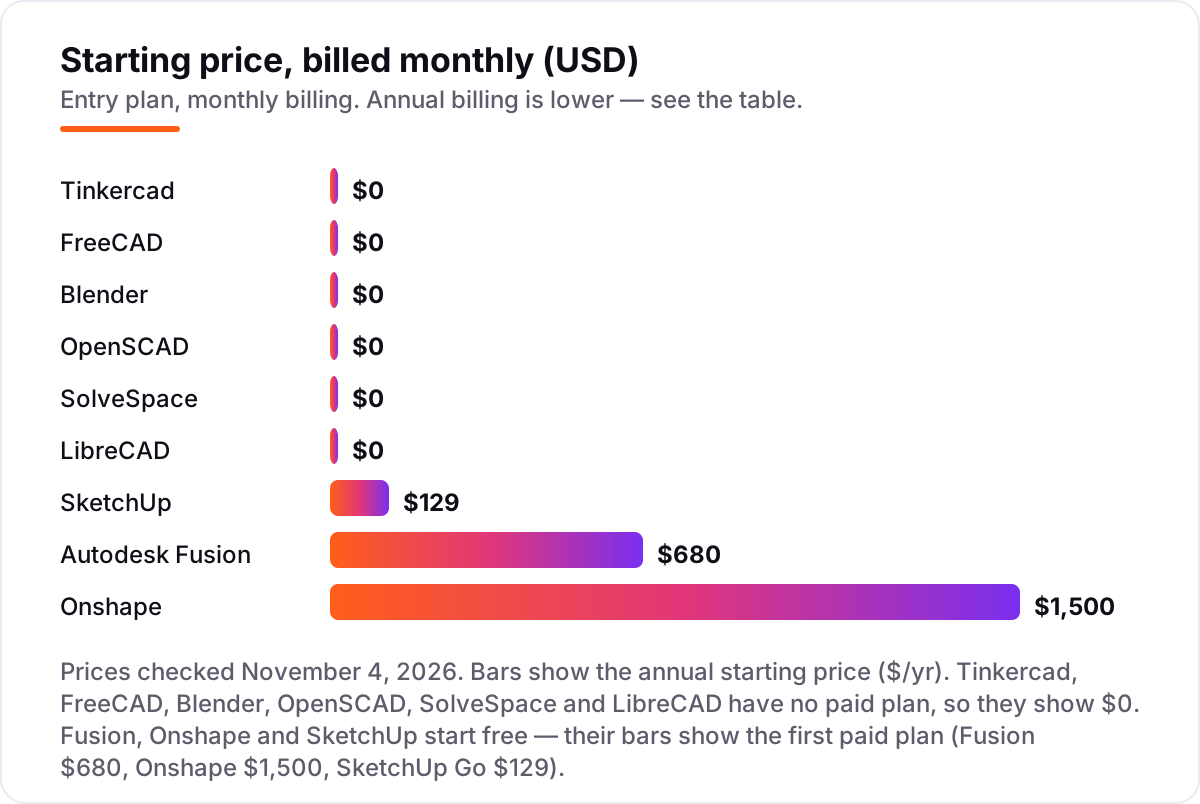
Take a maker who prints for friends today and may sell parts next year. Right now the software costs $0 a year on any of the six tools with no paid plan — Tinkercad, FreeCAD, Blender, OpenSCAD, SolveSpace and LibreCAD — and $0 on the free tiers of Fusion, Onshape and SketchUp. The first bill arrives only when a free tier's catch bites: commercial use needs SketchUp Go at $129 a year, Fusion at $680 a year, or Onshape Standard at $1,500 a year per user.
Scale that to two people sharing a small print business. Two seats on SketchUp Go cost $258 a year; two Fusion subscriptions cost $1,360 a year; two Onshape Standard seats cost $3,000 a year. The same two people, the same printer, the same parts — a $2,742 gap that comes entirely from which free tier they started on, not from the prints themselves. That is why the license terms in this list matter more than the feature lists.
Three costs sit outside every number above. First, the printer itself: filament is an ongoing cost on top of the software, and it dwarfs the $0 software bill for a busy hobbyist. Second, the slicer is free — PrusaSlicer and Ultimaker Cura both cost $0 — so budget nothing for slicing. Third, the learning time: a parametric tool like FreeCAD or Fusion takes a few weekends to learn, while Tinkercad takes an afternoon. If you want to see how other makers turn 3D content into an audience, our guide to AI tools for video content creation covers the video side.
One more cost to check before you commit: the paid plans are per user, not per printer. A second printer costs nothing extra in software, but a second person at the same desk needs a second seat on Fusion, Onshape and SketchUp. The open-source tools never charge per seat, which is one more reason they are the safe long-term home for a print farm.
Know the difference: a free plan is not free software
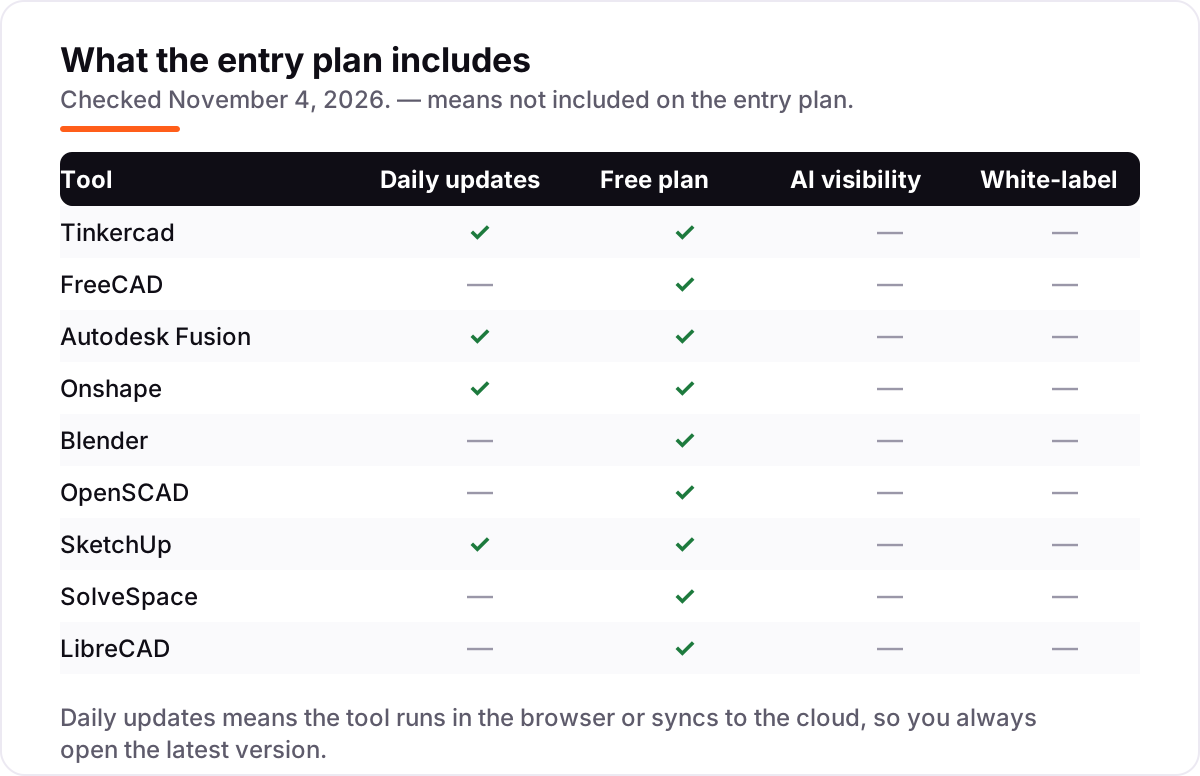
The confusion in this category is between a free plan and free software. A free plan is a vendor's gift with strings: Fusion's personal use ends at 10 active documents and bans commercial work, Onshape's free documents are public, and SketchUp Free is personal use only. The vendor can change those terms, narrow the features, or end the tier. Free software — FreeCAD, Blender, OpenSCAD, SolveSpace and LibreCAD — is open source: nobody owns the license, nobody can take it back, and there is no account to lose.
There is a second confusion worth clearing: CAD software is not a slicer. CAD designs the part; a slicer such as PrusaSlicer or Ultimaker Cura turns the STL file into the layer-by-layer G-code your printer follows. Every tool in this list is CAD, and none of them talks to the printer directly. If a tool only slices, it belongs in a different list.
A third distinction is parametric versus mesh modeling. Parametric tools (FreeCAD, Fusion, Onshape, OpenSCAD, SolveSpace) build parts from sketches and dimensions, so you can change a measurement later and the model follows. Mesh tools (Blender, and Tinkercad in its simple way) build parts from surfaces and triangles, which suits organic shapes but makes precise edits harder. For functional printed parts with exact dimensions, parametric wins; for figures and props, mesh wins.
Quick comparison: tool type by need
| Buyer | Best pick | Why |
|---|---|---|
| Complete beginner, first print today | Tinkercad | Free, browser-based, drag-and-drop shapes, one-click STL export |
| Functional parts with exact measurements | FreeCAD | Full parametric CAD at $0, no license limits, STEP and STL export |
| Hobbyist who wants pro-grade tools | Autodesk Fusion | Professional CAD free for personal use, $680/year when you go commercial |
| Modeling on any computer, with version control | Onshape | Browser CAD with built-in versions, free for personal projects |
| Figures, props and organic shapes | Blender | Best free sculpting tools, 3D print toolbox add-on, $0 forever |
| Precise parts designed as code | OpenSCAD | Script-based parametric parts, Git-friendly, $0 forever |
Mistakes to avoid
- Building a business on a free tier that bans commercial use. Fusion, Onshape and SketchUp Free all forbid selling what you make. If you plan to sell prints, price the paid step — $129, $680 or $1,500 a year — before you invest weeks learning the tool.
- Designing in a tool that cannot export STL. Every 3D tool here exports STL, but LibreCAD is 2D only: it exports DXF, not STL. Check the export list before you design your first part.
- Learning the wrong modeling style for your parts. Parametric tools suit brackets and mounts; mesh tools suit figures and props. Picking Blender for a measured bracket, or FreeCAD for a dragon, wastes weeks.
- Ignoring the document cap until it bites. Fusion personal use stops at 10 active documents. Archive finished projects as read-only to free slots, or you will hit the wall mid-project.
- Forgetting the slicer step. CAD is only half the job: the STL still needs slicing into G-code. Budget an evening to learn your slicer, and test-print small before committing to a 20-hour print.
How we chose
We checked each vendor's own pricing page on November 4, 2026 and recorded the starting price exactly as shown, and we ranked the tools by fit for the most common buyer — a maker with a new 3D printer and no CAD background — not by brand size. Six tools in this list have no paid plan at all, so their price is $0 and their bars show $0; Fusion, Onshape and SketchUp start free, and their bars show the first paid plan. Two ratings are missing because the G2 review pages for Tinkercad and SolveSpace returned rate-limit errors when we tried to open them on November 4, 2026, and we would rather show no rating than a stale or estimated one. SketchUp's pricing page renders its prices in JavaScript, so the Go $129 figure was confirmed against the vendor-supplied pricing on SketchUp's G2 profile and current guides quoting the vendor page. No vendor paid for a place in this list, and none of the links here are affiliate links.
What to do next
Start with Tinkercad if the printer is new, or FreeCAD if you already know you want measured, functional parts. Print one small part you actually need, and check that the STL slices cleanly and the dimensions come out right. If the free tier's limits start to bite — document caps, public files, or the commercial-use ban — that is the moment to pay for a plan, not before. If the parts are sorted but customers are not finding your print shop, our monthly SEO service handles the visibility side — or compare options in our guide to video analytics software. Once your tools are in place, find out what's holding your rankings back.
Your stack only works if people find you
SerpAstra fixes what keeps your site off page one and makes it easy for AI assistants to recommend.
Get a free audit→Sources we checked (17)
- Tinkercad — tinkercad.com (checked November 4, 2026)
- FreeCAD — freecad.org (checked November 4, 2026)
- Autodesk Fusion pricing — autodesk.com/products/fusion-360/pricing (checked November 4, 2026)
- Autodesk Fusion subscription types — autodesk.com (checked November 4, 2026)
- Onshape pricing — onshape.com/en/pricing (checked November 4, 2026)
- Blender — blender.org (checked November 4, 2026)
- OpenSCAD — openscad.org (checked November 4, 2026)
- SketchUp plans and pricing — sketchup.com/plans-and-pricing (checked November 4, 2026)
- SolveSpace — solvespace.com (checked November 4, 2026)
- LibreCAD — librecad.org (checked November 4, 2026)
- Autodesk Fusion reviews — g2.com (checked November 4, 2026)
- FreeCAD reviews — g2.com (checked November 4, 2026)
- Onshape reviews — g2.com (checked November 4, 2026)
- Blender reviews — g2.com (checked November 4, 2026)
- OpenSCAD reviews — g2.com (checked November 4, 2026)
- SketchUp reviews — g2.com (checked November 4, 2026)
- LibreCAD reviews — g2.com (checked November 4, 2026)
Shamim
Founder of SerpAstra
A full-stack SEO and digital marketer who spends most days on Local SEO for dental practices, AI search visibility and lead generation.
Frequently asked questions
What is the best free CAD software for 3D printing?
Tinkercad is the best first step: free, browser-based and printing within an hour. FreeCAD is the best fully free parametric tool for functional parts, with no license limits. Fusion is the best pro-grade free tier, but personal use caps at 10 documents and bans commercial work. Pick by the shape you print, not by the brand name.
Is Tinkercad really free?
Yes. Tinkercad's own homepage calls it a free web app for everyone, with no downloads and no paid plan behind it. You need a free Autodesk account to save designs, and the app is ad-free and kidSAFE-certified. More than 100 million people have used it, according to Tinkercad's homepage. There is no trial clock and nothing to upgrade into.
Can I sell 3D prints made with free CAD software?
It depends on the license. The open-source tools here — FreeCAD, Blender, OpenSCAD, SolveSpace and LibreCAD — place no commercial restriction on what you make, and Tinkercad has no paid plan or license fee. Fusion, Onshape and SketchUp Free all ban commercial use on their free tiers, so selling prints needs Fusion at $680 a year, Onshape Standard at $1,500 a year, or SketchUp Go at $129 a year.
What file format do I need for 3D printing?
STL is the standard: every 3D tool in this list exports it, and every slicer reads it. 3MF is the newer alternative and keeps units and colors intact; Fusion and FreeCAD both export it. LibreCAD is the exception — it is 2D only, so it exports DXF profiles that you extrude into a solid in FreeCAD or Fusion before exporting STL.
FreeCAD vs Fusion for 3D printing — which is better?
FreeCAD wins on freedom: no account, no document cap, no revenue limit and no commercial restriction, at $0 forever. Fusion wins on polish: a cleaner interface, cloud version history, built-in CAM and the tool professionals use. Start on FreeCAD if you want to own your workflow outright; start on Fusion if you want the smoothest learning path and may go commercial later.
Do I still need a slicer after designing in CAD?
Yes. CAD software designs the part; a slicer turns it into the layer-by-layer instructions your printer follows. Export an STL or 3MF file from your CAD tool, open it in a free slicer such as PrusaSlicer or Ultimaker Cura, pick your printer profile and material, and export the G-code. The CAD tool never talks to the printer directly.
Can I use free CAD software on a Chromebook?
Yes, if you pick a browser tool. Tinkercad, Onshape and SketchUp Free all run entirely in the browser and work well on a Chromebook, with nothing to install. Blender, FreeCAD, OpenSCAD, SolveSpace and LibreCAD are desktop downloads that need Windows, macOS or Linux. Fusion runs in the browser for viewing, but the full desktop app is the real workspace.
Free SEO and AI visibility audit
Find out what is holding your rankings back
Send us your site. Within 2 business days you get a written audit, an AI visibility check and a short fix list ranked by impact. Free, with no contract attached.
Request my free audit→Related guides
 Design, Video & Creative8 Best Beginner CAD Software for 3D Printing in 2026, ComparedCompare the 8 best beginner cad software for 3d printing on price, free plans and learning curve, with every price checked November 4, 2026.Read guide →
 AI, Data & Analytics12 Best AI Tools for Video Content Creation in 2026, Compared12 best AI tools for video content creation compared with real prices, free plans and G2 ratings, so you can pick the right video maker without overpaying.Read guide →
 SEO & AI SearchBest Video Analytics Software for 2026: 9 Options Compared by Use Case9 best video analytics software tools compared on price, engagement analytics and free plans. Prices checked on the vendor pricing page, November 2, 2026.Read guide →