
9 Best A/B Testing Software for App Developers in 2026, Compared
Compare the 9 best A/B testing software for app developers on price, free tiers, SDKs and stats, with every price checked today, November 4, 2026.
 Shamim Mia, Founder, SerpAstraLast verified November 4, 202613 min read
We compare pricing pages, documentation and public reviews. We never accept payment for rankings.

Key takeaways
- Statsig is the best fit for most app teams at $150/month on Pro after a free Developer tier; GrowthBook follows at $40 a seat a month, and Firebase A/B Testing costs nothing on the Spark plan.
- The single most important buying factor is the meter that decides the bill: events, seats, monthly active users and tested users produce very different totals for the same app.
- Optimizely and VWO publish no price at all, so budget them by sales conversation, not by the chart — and ignore the $199 a month VWO figure still quoted in older lists.
- Feature flags and experiments are the same purchase in most tools here: the flag that ships a feature is also the switch that runs the test.
On this page
Quick comparison
| Tool | Best for | Starting price | Free plan |
|---|---|---|---|
| Statsig | App teams that want developer-first experimentation with strong statistics and a generous free tier | $150/mo | Yes (free tier) |
| GrowthBook | Technical teams that want open-source experimentation on their own warehouse with visible statistics | $40/seat/mo | Yes (free tier) |
| Firebase A/B Testing | Teams already building on Firebase who want their first experiments free, inside the SDK they have | Free | Yes (free) |
| PostHog | Engineering-led teams that want experiments measured by the product analytics they already collect | Free | Yes (free tier) |
| LaunchDarkly | Large engineering teams that need safe progressive delivery and kill switches across many services | From $10/mo | Yes (free tier) |
| Amplitude Experiment | Product teams that already use Amplitude analytics and want experiments on the same behavioral data | Free; Plus from $0 | Yes (free tier) |
| Optimizely | Enterprises running large experimentation programs across web, mobile and server with dedicated support | Custom quote | No (demo only) |
| VWO | Marketing and product teams that want visual testing plus heatmaps and recordings in one platform | Custom quote | No (trial only) |
| Convert Experiences | Mid-market teams that want a published price and full-stack testing without waiting for a sales quote | $299/mo (annual) | No (15-day trial) |
Make one of these tools?
We re-check this list every quarter. Send a correction, request a review, or ask about a clearly labeled sponsored spot.
Request a listingThe best a/b testing software for app developers

Statsig
Best for: App teams that want developer-first experimentation with strong statistics and a generous free tier
Statsig is the developer-first pick in this list: feature flags, experiments, product analytics and session replay share one data layer, and the SDKs cover iOS, Android, React Native and Flutter, so tests ship behind flags with no separate rollout tool. The Developer tier is free with 2 million metered events a month, and Pro costs $150 a month for 5 million events, with $0.05 per extra 1,000 events after that.
The statistics are the reason data teams pick it: sequential testing and CUPED variance reduction are built in rather than bolted on, and results read from the same events the analytics already collect. The trade-off is event-based billing: a chatty app can burn through the allowance fast, and advanced governance waits for Enterprise. Buy Statsig when the team wants rigorous stats and one platform for flags, tests and analytics.
What we like
- Free Developer tier covers 2 million metered events a month with flags, experiments and analytics included
- Sequential testing and CUPED variance reduction are built in, not add-ons
- SDKs for iOS, Android, React Native and Flutter, plus warehouse-native deployment
- One data layer for flags, experiments, analytics and session replay
Watch out for
- Event-based billing means a chatty app can burn through the 5 million-event Pro allowance quickly
- Advanced governance, SSO and audit controls wait for the Enterprise tier
- Documentation can be thin for teams new to experimentation frameworks

GrowthBook
Best for: Technical teams that want open-source experimentation on their own warehouse with visible statistics
GrowthBook is the open-source option for teams that want to own their experimentation data. It connects to the warehouse the team already uses — BigQuery, Snowflake, Postgres and more — and the statistics SQL is visible for inspection, so a data scientist can check exactly how a result was computed. Cloud Starter is free for 3 users with unlimited flags and experiments, and Pro costs $40 a seat a month.
The self-hosted edition costs nothing and carries no traffic cap, the cheapest way to run serious experiments at scale, and the SDKs cover iOS, Android and React Native. The price is technical comfort: wiring the warehouse, defining metrics and setting up experiments takes real engineering time, and there is no preview for server-side tests. Pick GrowthBook when the team wants open code, warehouse-native analysis and no vendor lock-in.
What we like
- Open-source and self-hostable, with the statistics SQL visible for inspection
- Warehouse-native analysis runs on BigQuery, Snowflake, Postgres and more
- Free Cloud Starter includes unlimited flags, experiments and traffic for 3 users
- Bayesian and frequentist methods, plus multi-armed bandits on Pro
Watch out for
- Setup needs real technical comfort: warehouse connection, metric definitions and SDK wiring
- No preview for server-side experiments without turning the test on
- Cloud Starter caps at 3 users, so a bigger team pays $40 a seat a month from the start

Firebase A/B Testing
Best for: Teams already building on Firebase who want their first experiments free, inside the SDK they have
Firebase A/B Testing is the fastest way for an app team to run a first experiment, because the SDK is usually already in the project. Remote Config swaps values, copy and layouts without an app-store release, and results report with Bayesian statistics on the Google Analytics events the app already sends. A/B Testing itself is no-cost on both the Spark and Blaze plans, and Spark needs no payment method.
The catch arrived on September 1, 2026: Remote Config fetches are now metered, free to 100,000 a day per project and then $0.06 per 10,000 requests, so a popular app pays for delivery even though testing is free. Reporting is also simpler than Statsig or GrowthBook, with fewer statistical controls. Start here when the app already runs on Firebase and the team wants its first tests this week, not next quarter.
What we like
- A/B Testing itself is no-cost on both the Spark and Blaze plans
- Remote Config swaps values, copy and layouts without an app-store release
- Native iOS and Android SDKs, with Crashlytics and push campaigns in the same console
- Bayesian result reporting is built in, with no extra statistics setup
Watch out for
- Remote Config fetches are metered since September 1, 2026: free to 100,000 a day, then $0.06 per 10,000
- Results reporting is simpler than Statsig or GrowthBook, with fewer statistical controls
- Tied to Google Analytics and the Firebase stack, so it is not a standalone experimentation platform

PostHog
Best for: Engineering-led teams that want experiments measured by the product analytics they already collect
PostHog puts analytics, feature flags and experiments in one tool, so a test is measured by the product analytics events the app already collects — no export, no reconciliation between dashboards. The free tier covers 1 million analytics events and 1 million flag requests a month with no card required, and paid use is $0.0001 per flag request from 1 million to 2 million, then $0.000045.
That usage model is the strength and the risk: a small app can run experiments for months at $0, but flag-request volume decides the bill, and local evaluation polling counts toward it. Experiments also need SDK setup and code-side variation work, since the visual editor is still in beta. Choose PostHog when the team wants one open-source-leaning platform for analytics and testing, and is comfortable wiring experiments in code.
What we like
- Experiments run on the same events as product analytics, so no export or reconciliation step
- Free tier covers 1 million analytics events and 1 million flag requests a month
- Open-source core with self-hosting for the analytics side of the stack
- Billing limits can be set so a traffic spike cannot produce a surprise invoice
Watch out for
- Experiments need SDK setup and code-side variation work; the visual editor is still in beta
- Billing is per flag request, so local evaluation polling can consume the allowance fast
- Session replay and analytics are separate meters, so the total bill is several lines, not one

LaunchDarkly
Best for: Large engineering teams that need safe progressive delivery and kill switches across many services
LaunchDarkly is the standard for progressive delivery: percentage rollouts, targeting rules and instant kill switches let a team ship a feature to 1% of users, watch the metrics, and roll back in seconds if something breaks. SDKs cover every major mobile and server platform, with local evaluation for speed, and every plan includes unlimited seats, so the whole team manages flags without per-seat fees.
The bill is the hard part. Foundation costs $10 per service connection a month plus $8.33 per 1,000 client-side monthly active users, billed annually, and experimentation is a separate usage charge on top of flags — so the price of testing is not the price on the pricing page. Buy LaunchDarkly when release safety matters most: many services, many environments, and a team that cannot afford a bad deploy.
What we like
- The standard for progressive delivery: percentage rollouts, targeting rules and instant kill switches
- SDKs for every major mobile and server platform, with local evaluation for speed
- Unlimited seats on every plan, so the whole team can manage flags without per-seat fees
- Audit trails, approvals and workflows keep releases safe at scale
Watch out for
- Usage-based billing is hard to forecast: service connections plus client-side MAU both meter the bill
- Experimentation is billed separately from flags, so testing adds a second usage charge
- The free Developer plan is limited, and the full governance set waits for Enterprise

Amplitude Experiment
Best for: Product teams that already use Amplitude analytics and want experiments on the same behavioral data
Amplitude Experiment runs on the same behavioral data as Amplitude Analytics, so a test reads the cohorts and funnels the team already uses instead of a separate experiment dataset. Starter is free with 2 million events a month, unlimited feature flags and one active experiment, and Plus starts free for the first 2 million events a month and scales with usage.
The limit to know before buying is packaging: full feature experimentation needs the Growth tier, which is custom-quoted, and CUPED, multi-armed bandits, mutual exclusion and holdouts are Enterprise-only. Starter's single active experiment also means a team running several tests at once outgrows free quickly. Pick Amplitude Experiment when the app already lives in Amplitude and the team wants tests measured against its behavioral analytics.
What we like
- Experiments read the same behavioral cohorts and funnels as Amplitude Analytics
- Starter includes 2 million events a month, unlimited feature flags and one active experiment
- Plus starts free for the first 2 million events a month and scales with usage
- Unlimited seats, so product, data and engineering share one view of results
Watch out for
- Full feature experimentation needs the Growth tier, which is custom-quoted, not self-serve
- CUPED, bandits, mutual exclusion and holdouts are Enterprise-only capabilities
- Event-based billing means a busy app can outgrow the free 2 million events quickly

Optimizely
Best for: Enterprises running large experimentation programs across web, mobile and server with dedicated support
Optimizely is the enterprise benchmark for experimentation: visual web testing plus server-side experimentation through SDKs, with a statistical engine that handles sequential testing and guardrail metrics. Feature Experimentation covers mobile apps natively, with targeting and personalization across web and app surfaces, and the integration list covers analytics, CRM and warehouse tools.
Every plan is individually packaged and there is no self-serve tier, so there is no price to compare and no trial to start without a sales conversation — third-party reports put entry contracts near $36,000 a year, but that is a reported figure, not a list price. Web and Feature Experimentation are also separate contracts. Buy Optimizely when the program is large, the budget is enterprise, and the team wants the most proven platform in the category.
What we like
- The enterprise benchmark: visual web testing plus server-side experimentation through SDKs
- Strong statistical engine with sequential testing and guardrail metrics
- Deep personalization and audience targeting across web and app surfaces
- Extensive integrations with analytics, CRM and data warehouse tools
Watch out for
- No published prices and no self-serve tier: every plan is individually packaged by sales
- Contracts commonly run into five figures a year, with separate modules billed separately
- Web Experimentation and Feature Experimentation are separate products with separate contracts

VWO
Best for: Marketing and product teams that want visual testing plus heatmaps and recordings in one platform
VWO pairs testing with behavioral insight: the visual editor lets non-developers build web tests without code, while heatmaps, session recordings, funnels and surveys sit in the same login, so the tool that finds the problem also runs the test. FullStack SDKs cover server-side and mobile app experiments, and the statistical engine reports with Bayesian methods and guardrail metrics.
Since VWO and AB Tasty combined under Wingify in January 2026, the pricing page lists Growth, Pro and Enterprise tiers with no prices at all — every paid tier is a demo and a custom proposal, so the $199 a month figure still quoted in older lists is stale. Mobile and server-side testing also sit on the higher tiers. Choose VWO when one platform for testing and behavioral insight matters more than a published price.
What we like
- Visual editor lets non-developers build web tests without code
- Heatmaps, session recordings, funnels and surveys sit beside testing in one login
- FullStack SDKs cover server-side and mobile app experiments
- Mature statistical engine with Bayesian reporting and guardrail metrics
Watch out for
- No published prices since the Wingify merger: every paid tier is a demo and a custom proposal
- Mobile app and server-side testing need the higher tiers, not the entry plan
- Pricing is per monthly tracked user, so high-traffic apps pay more for the same tests

Convert Experiences
Best for: Mid-market teams that want a published price and full-stack testing without waiting for a sales quote
Convert Experiences is the transparent-price exception among the larger tools: it still publishes its prices while Optimizely, VWO and AB Tasty have gone quote-only. Growth costs $399 a month billed monthly, or $299 a month billed annually, for 100,000 tested users, and it includes A/B and split URL testing, a visual editor, heatmaps and SRM checks. A 15-day trial needs no card.
The catch is the tier ladder: multivariate, multi-page and full-stack testing need Pro at $420 a month billed annually, and Growth caps at 5 active projects with 5 active experiences each. There is no free plan, so the first real test costs $299 a month on annual billing. Pick Convert when the team wants a published price, full-stack tests and a privacy-first vendor, and can pay for the Pro tier when tests get serious.
What we like
- One of the few larger tools that still publishes prices: Growth $299 a month billed annually
- Privacy-first stance with no data sharing, plus 90-plus integrations
- Visual and code editors cover web tests, split URLs and server-side experiments on Pro
- Frequentist and Bayesian statistics with SRM checks on Growth
Watch out for
- Multivariate, multi-page and full-stack testing need Pro at $420 a month billed annually
- Growth caps at 5 active projects and 5 active experiences per project
- No free plan, only a 15-day trial, so the first real test costs $299 a month on annual billing
The best a/b testing software for app developers lives in the code, not in a visual editor: the test ships behind a feature flag, the variants are served by an SDK, and the result is read from the analytics the app already collects. We ranked the nine tools below by fit for the most common buyer — a small app team running its first serious experiments — starting with the free tiers and ending with the enterprise platforms, and every price was checked on the vendor's own pricing page on November 4, 2026.
How to choose the best a/b testing software for app developers
- Start with the SDK, not the dashboard. The test has to run inside the app, so check iOS, Android, React Native and Flutter support first — a web-only visual editor cannot test a native screen.
- Find the meter that decides the bill. Statsig charges per event, GrowthBook per seat, LaunchDarkly per service connection and MAU, Convert per tested user. The cheapest headline price can be the dearest bill for your app.
- Decide whether flags and tests should live together. Most tools here bundle them, which means one SDK and one rollout path. Buying them separately means two integrations and two bills.
- Check the statistics before the features. Sequential testing, CUPED and guardrail metrics decide whether a result is real; a pretty dashboard does not.
- Think about who reads the results. If product, data and engineering all need access, per-seat pricing gets expensive fast — unlimited seats change the maths.
App analytics and experimentation overlap, so the shortlist often starts in the analytics tool the team already uses. Our guide to product analytics tools for mobile apps covers that side, and the mobile app analytics guide compares the analytics platforms in more depth. And before you publish the landing page for the app, run your titles through the free SERP snippet preview tool — it shows exactly how the title and description will look in Google.
Whatever you shortlist, try it with real traffic before you pay. The free tiers in this list are long enough to run one genuine experiment — your users, your metric, your SDK — and that experiment tells you more than any review can. Check two things in the trial: that the SDK adds no visible latency to app start, and that the results match what your own analytics says about the same users. Every tool here offers a free tier or a trial, so there is no reason to buy before a real test has run.
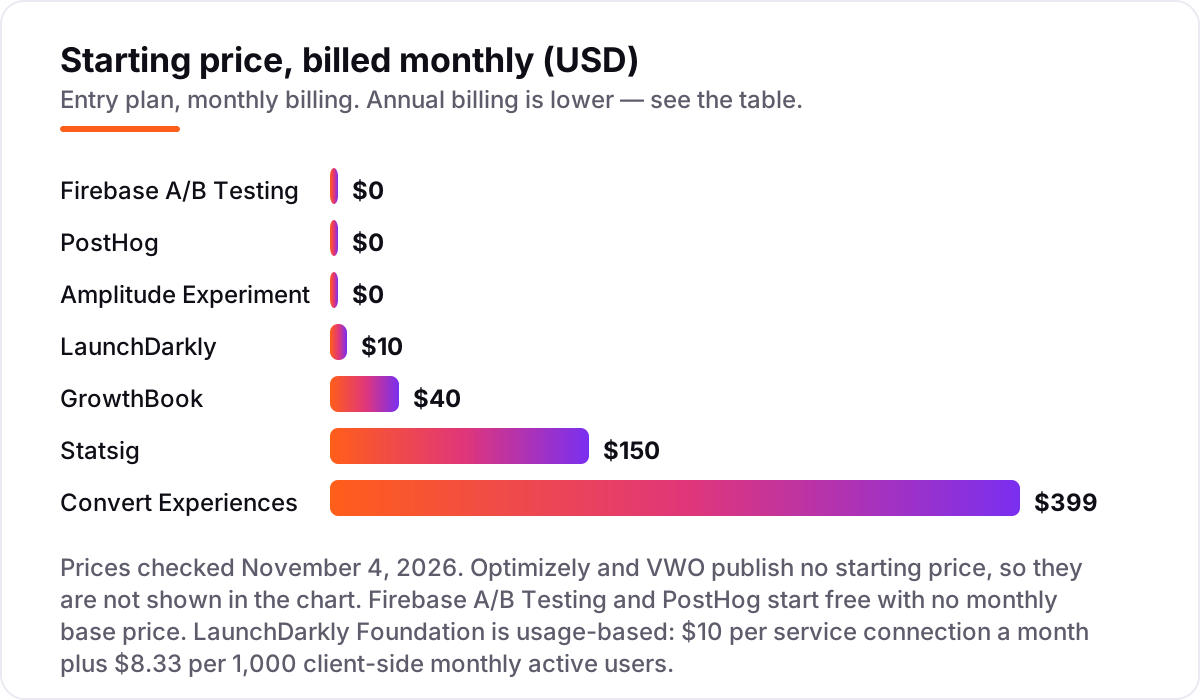
A/B testing software for app developers pricing: what you will actually pay
Take a five-person team with an app at 100,000 monthly active users, running 3 million flag requests a month. On list prices, Firebase A/B Testing costs $0, PostHog costs $145 a month, Statsig Pro costs $150, GrowthBook Pro costs $200 for five seats, Amplitude Plus starts free — the first 2 million events a month are free — and Convert Growth costs $299 a month billed annually. Two of those numbers need adjusting before they are real: PostHog's $145 comes from its per-request rates — the first 1 million requests are free, the next 1 million cost $100 at $0.0001 each, and the third costs $45 at $0.000045 each — and Amplitude's free tier covers the first 2 million events a month, so 100,000 users fit inside free.
Over a year, that is $0 on Firebase and Amplitude Plus, $1,740 on PostHog, $1,800 on Statsig Pro, $2,400 on GrowthBook Pro and $3,588 on Convert Growth. LaunchDarkly is the outlier in this example: 5 service connections at $10 each is $50 a month, but 100,000 client-side monthly active users at $8.33 per 1,000 adds $833 a month, for $883 a month or $10,596 a year — before the separate experimentation charge. Optimizely and VWO are custom quote, so they have no number in this example at all.
Three costs sit outside every number above. First, the usage meters: a chatty app that fires many events per user pays more on Statsig and Amplitude than the headline suggests, and a flag-heavy app pays more on PostHog. Second, the tier jumps: full feature experimentation on Amplitude needs the custom-quoted Growth tier, and full-stack testing on Convert needs Pro at $420 a month billed annually. Third, the delivery meter on Firebase: Remote Config fetches are free to 100,000 a day, then $0.06 per 10,000, so a popular app pays for fetches even though the testing is free.
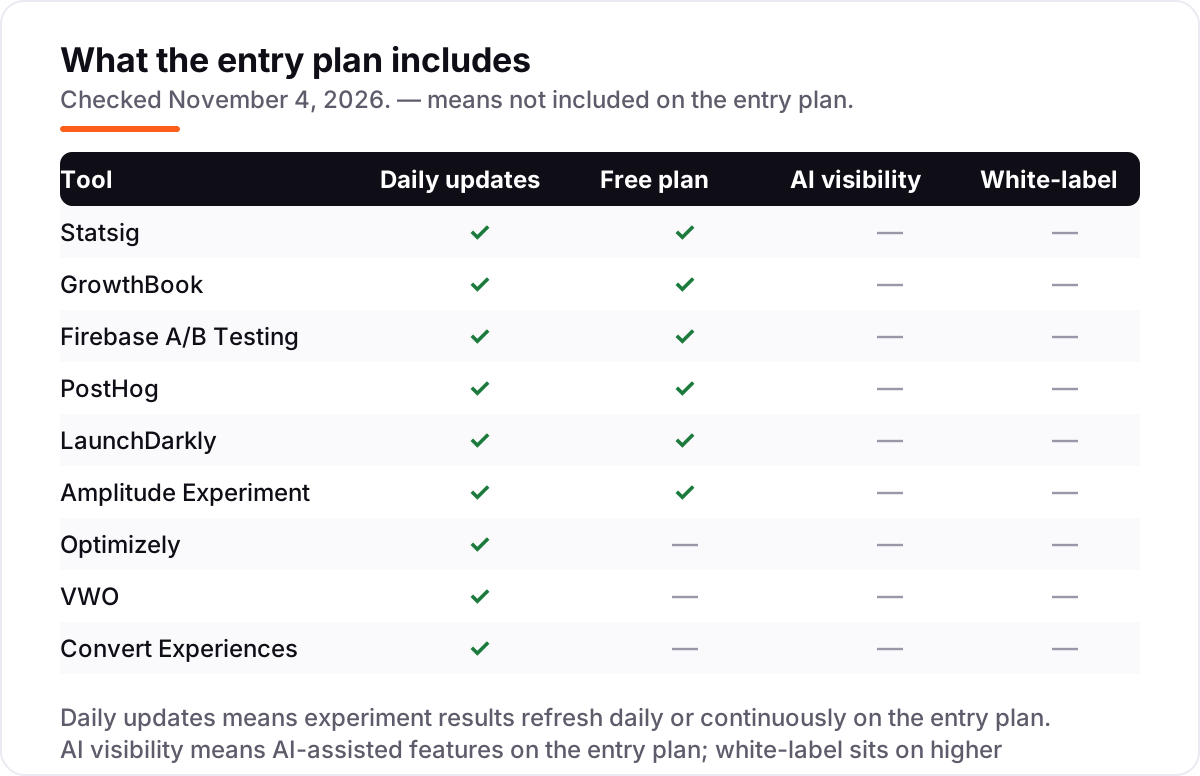
Know the difference: feature flags vs A/B testing
The confusion in this category is between a shipping mechanism and a measurement method. A feature flag controls who sees a change: it lets a team roll a feature out to 1% of users, watch for crashes, and roll it back in seconds. An A/B test measures whether that change worked: it splits users into variants and compares a metric with statistics. A flag without a test is a safe rollout with no learning; a test without a flag needs an app-store release to ship the winner.
There is a second, quieter confusion: remote config is not experimentation. Remote Config changes a value — a price, a string, a layout switch — without a release, but it does not randomize users, hold a control group or compute significance. Firebase pairs Remote Config with A/B Testing for exactly that reason: the config delivers the variants, and the testing layer does the measurement. If a tool only changes values, it belongs in a different list.
A third distinction worth knowing is web testing versus app testing. A visual editor that rewrites a web page cannot test a native screen, and a server-side SDK that serves variants to an app cannot edit a marketing page. Optimizely and VWO sell both as separate products for this reason, and Convert gates full-stack testing to its Pro tier. Buy the surface your users actually touch.
Quick comparison: tool type by need
| Buyer | Best pick | Why |
|---|---|---|
| First experiments, $0 budget | Firebase A/B Testing | No-cost testing inside the Firebase SDK the app already has |
| Most app teams | Statsig | Developer-first SDKs and strong statistics, Pro is $150/month |
| Team that wants to own its data | GrowthBook | Open-source, warehouse-native, Pro is $40/seat/month |
| Analytics plus tests in one tool | PostHog | Experiments measured by the analytics events already collected, free to 1M requests |
| Release safety at scale | LaunchDarkly | Rollouts, targeting and kill switches, from $10 per service connection a month |
| Published price, full-stack tests | Convert Experiences | Growth is $299/month billed annually, with full-stack on Pro |
Mistakes to avoid
- Budgeting on the free tier, then finding the meter. Firebase fetches, Statsig events and PostHog flag requests are all free until they are not. Price the app's real volume, not the trial's.
- Buying on the headline price instead of the meter. A $40 seat plan beats a $150 flat plan for a team of two, and loses to it for a team of ten. Do the maths with your own seats, events and users.
- Treating a flag rollout as a test. Shipping to 1% and watching the crash rate is not an experiment. Without a control group, a metric and a planned sample size, you have a rollout, not a result.
- Ending tests early on a good-looking first day. App usage follows a weekly cycle, so a test that stops on day three has measured the weekend, not the change. Set the sample size first, then let it finish.
- Forgetting the app-store release in the plan. Variants ship without a release, but the SDK and any new code do not. A test that needs code you have not written yet waits for the next release train.
How we chose
We checked each vendor's own pricing page on November 4, 2026 and recorded the starting price exactly as shown, including the annual-billing figure where the page lists one, and we ranked the tools by fit for the most common buyer — a small app team running its first serious experiments — not by brand size. Optimizely and VWO publish no prices, so they are listed as custom quote; the $199 a month VWO figure still quoted in older lists is stale since the Wingify merger, and the near-$36,000 a year Optimizely entry figure is a third-party report, not a vendor price. LaunchDarkly's experimentation charge is billed separately from its flag pricing, and Amplitude's full feature experimentation needs the custom-quoted Growth tier. Ratings come from G2 pages checked on November 4, 2026; Firebase A/B Testing has no G2 rating shown because it has no standalone G2 product page. No vendor paid for a place in this list, and none of the links here are affiliate links.
What to do next
Start with the free tier of your top pick and run one real experiment through it — your users, your metric, your SDK — and check that the results match what your own analytics says before you commit to a year. If the tests are sorted but new users are not finding the app, our monthly SEO service handles the visibility side — or compare analytics platforms in our guide to mobile app analytics. Once your tools are in place, find out what's holding your rankings back.
Your stack only works if people find you
SerpAstra fixes what keeps your site off page one and makes it easy for AI assistants to recommend.
Get a free audit→Sources we checked (18)
- Statsig pricing — statsig.com/pricing (checked November 4, 2026)
- GrowthBook pricing — growthbook.io/pricing (checked November 4, 2026)
- Firebase pricing — firebase.google.com/pricing (checked November 4, 2026)
- PostHog pricing — posthog.com/pricing (checked November 4, 2026)
- LaunchDarkly pricing — launchdarkly.com/pricing (checked November 4, 2026)
- Amplitude pricing — amplitude.com/pricing (checked November 4, 2026)
- Optimizely plans — optimizely.com/plans (checked November 4, 2026)
- VWO pricing — vwo.com/pricing, redirects to Wingify (checked November 4, 2026)
- Convert Experiences pricing — convert.com/pricing (checked November 4, 2026)
- Optimizely cost reports — mida.so/blog/how-much-is-optimizely (third-party reports, checked November 4, 2026)
- Statsig reviews — g2.com/products/statsig (checked November 4, 2026)
- GrowthBook reviews — g2.com/products/growthbook (checked November 4, 2026)
- LaunchDarkly reviews — g2.com/products/launchdarkly (checked November 4, 2026)
- Amplitude Feature Experimentation reviews — g2.com (checked November 4, 2026)
- Optimizely Web Experimentation reviews — g2.com (checked November 4, 2026)
- VWO Testing reviews — g2.com/products/wingify-vwo-testing (checked November 4, 2026)
- PostHog reviews — g2.com (checked November 4, 2026)
- Convert Experiences reviews — g2.com/products/convert-experiences (checked November 4, 2026)
Shamim
Founder of SerpAstra
A full-stack SEO and digital marketer who spends most days on Local SEO for dental practices, AI search visibility and lead generation.
Frequently asked questions
What is the best A/B testing software for app developers?
Statsig is the best fit for most app teams: developer-first SDKs for iOS, Android, React Native and Flutter, strong statistics, and a free Developer tier, with Pro at $150 a month. GrowthBook is the better pick when the team wants open-source code and warehouse-native analysis, and Firebase is the best free start for teams already on Firebase.
How much does A/B testing software for app developers cost?
Entry prices run from $0 to custom quote. Firebase A/B Testing, Statsig Developer, GrowthBook Starter and PostHog all start free. The first paid plans cost $10 to $150 a month, Convert Growth is $299 a month billed annually, and Optimizely and VWO are custom quote only, with enterprise contracts commonly running into five figures a year.
Is there really free A/B testing software for app developers?
Yes, with limits. Firebase A/B Testing is no-cost on the Spark plan, though Remote Config fetches are metered above 100,000 a day. Statsig Developer is free to 2 million events a month, GrowthBook Cloud Starter is free for 3 users, and PostHog is free to 1 million flag requests a month. All four are real products, not trials.
What is the difference between feature flags and A/B testing?
A feature flag controls who sees a change; an A/B test measures whether that change worked. Flags ship code safely with rollouts and kill switches, while tests split users into variants and compare a metric with statistics. Most tools here sell both together: the flag that ships the feature is also the switch that runs the test.
Do I need an app-store release to run an A/B test?
No, not with the tools in this list. Remote Config and feature flags let you change values, copy, layouts and whole features from the server, so variants go live without a new build. You still need a release to add the SDK and to ship code that was never written, but the test itself — and the rollback — happens without the store.
How long should an app A/B test run?
Until it reaches its planned sample size, and at least one full weekly cycle — usually one to two weeks for most apps. Ending a test early because the first days look good is the most common way to ship a false win. Set the metric, the minimum detectable change and the sample size before launch, then let the test finish.
Can I switch A/B testing tools later?
Yes, but the flags need re-instrumentation. The experiment history and results do not move, and every flag in the code has to be rewritten against the new SDK, so plan the move between releases, not during one. Export the experiment list and metric definitions first, then rebuild the live flags in the new tool before turning the old one off.
Free SEO and AI visibility audit
Find out what is holding your rankings back
Send us your site. Within 2 business days you get a written audit, an AI visibility check and a short fix list ranked by impact. Free, with no contract attached.
Request my free audit→Related guides
 SEO & AI Search12 Best Product Analytics Tools for Mobile Apps in 2026, Compared12 best product analytics tools for mobile apps compared on price, free plans, replay and attribution. Prices checked on vendor pages, November 2, 2026.Read guide →
 SEO & AI SearchBest Mobile App Analytics (2026): 12 Apps Worth Downloading12 best mobile app analytics tools compared on price, free plans and attribution, with real starting prices checked on vendor pages, November 2, 2026.Read guide →
 SEO & AI Search8 Best Product Analytics Tools for Startups in 2026, Compared8 best product analytics tools for startups compared on price, free tiers and fit — with starting prices and free tiers checked November 2, 2026.Read guide →