
10 Best Agentic Analytics Platform Data Analytics in 2026, Compared
The 10 best agentic analytics platform data analytics tools for 2026, compared on price, AI agents and governance. Prices checked November 10, 2026.
 Shamim Mia, Founder, SerpAstraLast verified November 10, 202612 min read
We compare pricing pages, documentation and public reviews. We never accept payment for rankings.

Key takeaways
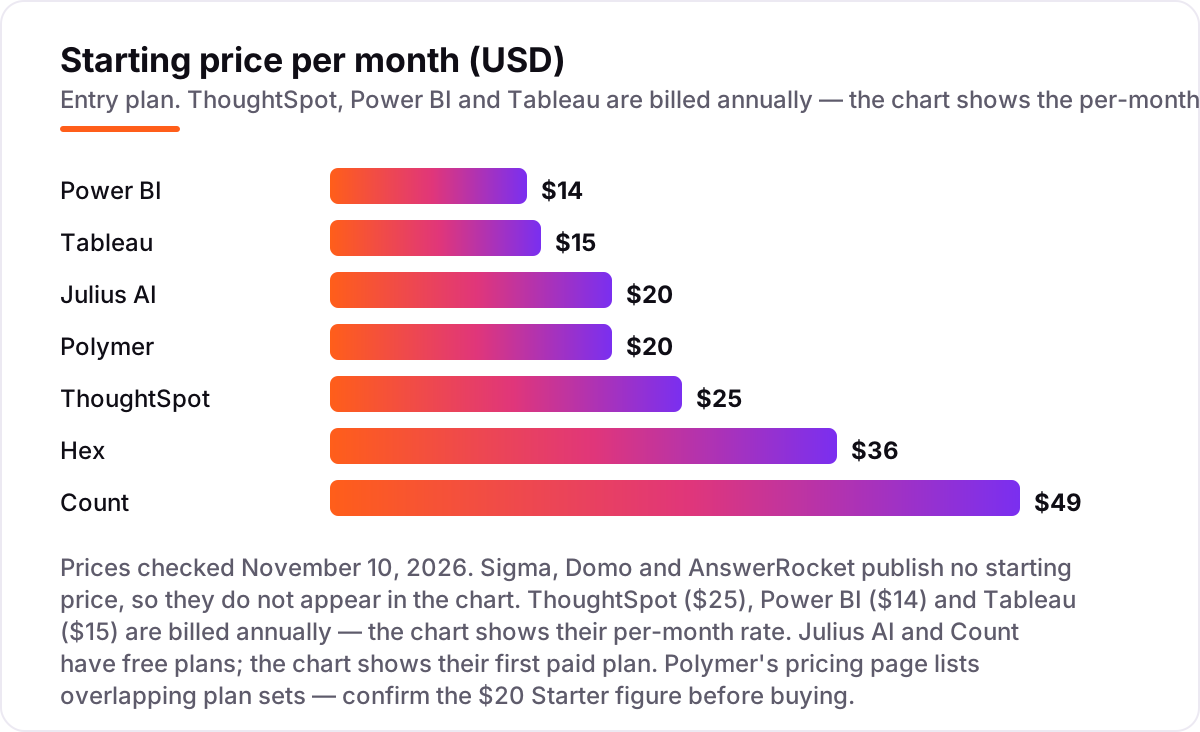
- ThoughtSpot ($25/user/month), Power BI ($14/user/month) and Julius AI ($20/month) lead this list: the first for governed enterprise AI, the second for Microsoft shops, the third for instant answers from a file.
- Three platforms publish no starting price — Sigma, Domo and AnswerRocket are custom quote only — so budget them with a sales call, not a checkout page.
- The single most important buying factor is governance: an agent that answers from a shared, defined metric gives every team the same number; one that reads raw tables does not.
- Every price below was checked on the vendor's own pricing page on November 10, 2026. Ratings are G2, shown only where a fresh rating could be verified today; six tools carry no rating here.
On this page
Quick comparison
| Tool | Best for | Starting price | Free plan |
|---|---|---|---|
| ThoughtSpot | Enterprises adopting agentic BI at scale, with governed data models and a dedicated AI analyst | $25/user/mo (annual) | No (free trial) |
| Power BI | Microsoft shops that already live in Excel, Teams and Azure and want Copilot in their BI | $14/user/mo (annual) | Yes (Desktop free) |
| Julius AI | Individuals and small teams who want answers from a spreadsheet or file in seconds, with no setup | $20/mo | Yes (free plan) |
| Hex | Data teams that want collaborative notebooks, SQL and Python plus AI workflows in one place | $36/editor/mo | Yes (Community) |
| Count | Data teams that think visually and want SQL, Python and AI on one free-form canvas | $49/editor/mo | Yes (free plan) |
| Sigma | Warehouse-native teams on Snowflake, Databricks or BigQuery who think in spreadsheets | Custom quote | No (free trial) |
| Tableau | Salesforce shops and visual analytics teams that want the deepest charting and a path to AI agents | $15/user/mo (annual) | No (14-day trial) |
| Domo | Companies that want data ingestion, prep, visualization and AI in one platform | Custom quote | No (30-day trial) |
| Polymer | Marketing and operations teams whose data lives in spreadsheets and who will never hire a BI developer | $20/mo | No (14-day trial) |
| AnswerRocket | Regulated or complex organizations that want custom AI analysts trained on their own data and vocabulary | Custom quote | No |
Make one of these tools?
We re-check this list every quarter. Send a correction, request a review, or ask about a clearly labeled sponsored spot.
Request a listingThe best agentic analytics platforms

ThoughtSpot
Best for: Enterprises adopting agentic BI at scale, with governed data models and a dedicated AI analyst
ThoughtSpot is the most mature agentic pick in this list because its AI analyst, Spotter, answers from a governed semantic layer instead of guessing across raw tables. A sales manager and a finance analyst asking the same question get the same number, which is the whole point of governed analytics. Essentials starts at $25 per user a month for teams of 5 to 50, with up to 25 million rows.
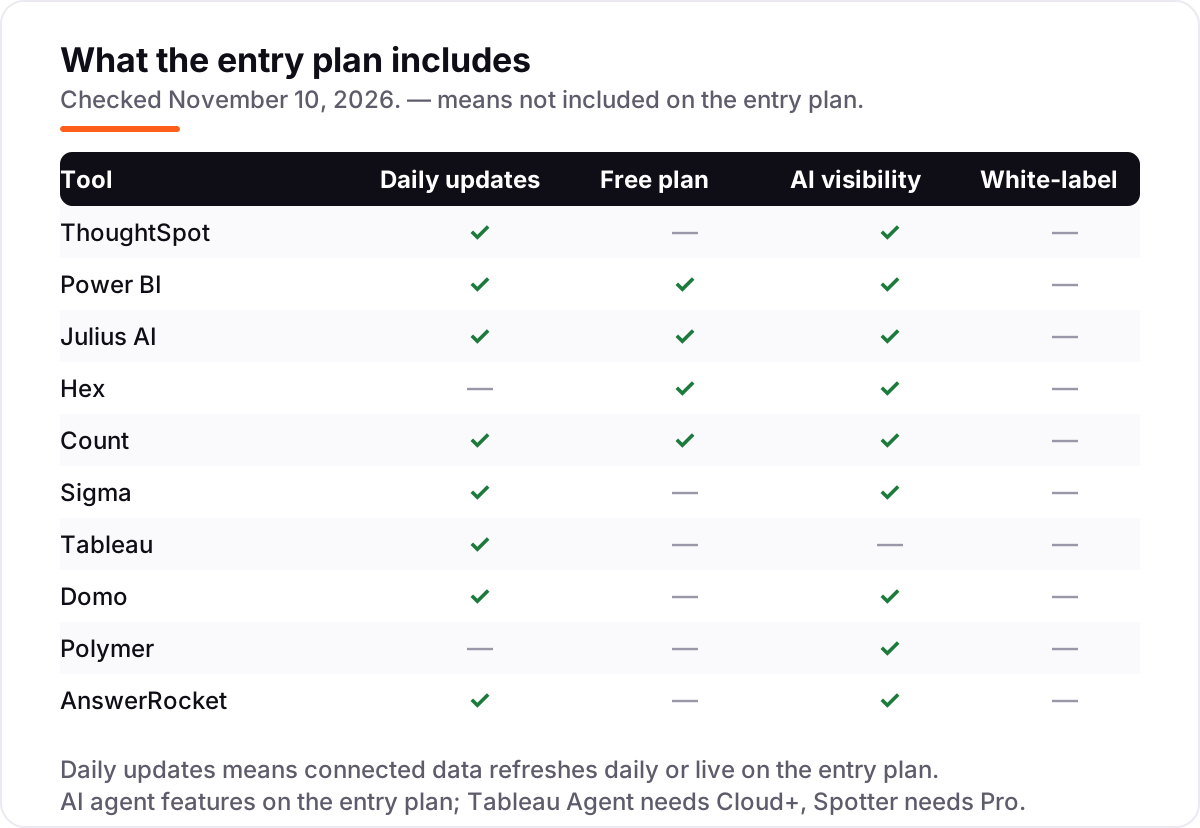
The catch is that Spotter itself is not in Essentials. The agent arrives on Pro at $50 per user a month, where each user gets 25 Spotter queries a month before overage charges. If your team only needs search and dashboards, Essentials is a fair price; if you are buying ThoughtSpot for the agent, budget Pro from the start.
What we like
- Spotter, the conversational AI analyst, answers questions on governed data models rather than raw tables
- Search-driven interface that business users actually adopt, with no SQL needed
- No metering or charge for LLM tokens on the subscription plans — use is governed by the plan
Watch out for
- Spotter, the AI analyst, starts on Pro ($50/user/month) — Essentials has search and insights but not the agent
- All plans are billed annually, so there is no month-to-month option
- Spotter queries are metered on per-user Pro (25 per user a month), with overage charges

Power BI
Best for: Microsoft shops that already live in Excel, Teams and Azure and want Copilot in their BI
Power BI is the obvious pick if your company already runs on Microsoft. Pro costs $14 per user a month on annual billing, the cheapest published entry in this list, and the free Desktop app lets anyone build reports before paying anything. Copilot answers questions and drafts visuals inside the same workspace where your reports already live, and the Microsoft 365 integration is deeper than any rival can match.
Two costs hide behind the headline price. Every viewer needs a paid seat to see shared reports, so a ten-person team pays for ten licenses, not one author. And the serious AI features, including Copilot, need Premium Per User at $24 a month. Power BI still wins on price for Microsoft shops — just price the whole audience, not the authors.
What we like
- The cheapest published entry here at $14/user/month, with a genuinely free Desktop app
- Copilot in Fabric answers questions and builds visuals inside the tool teams already use
- Deep integration with Microsoft 365, Teams and Azure — including OneLake and Fabric
Watch out for
- Pro rose to $14/user/month — the $10 figure in older roundups is stale
- Sharing and publishing need a paid license for every viewer, not just creators
- Copilot and advanced AI features need Premium Per User at $24/user/month

Julius AI
Best for: Individuals and small teams who want answers from a spreadsheet or file in seconds, with no setup
Julius AI is the fastest way to an answer in this list. You upload a spreadsheet, ask a question in plain English, and get charts, statistics and a written explanation back in seconds. There is no warehouse to configure, no schema to define and no dashboard to build first. The free plan covers occasional use, and Plus costs $20 a month for 2,000 credits and frontier models.
The trade-off is governance. Julius works on files, not on a shared company data model, so two people asking the same question about two different spreadsheets can get two different answers. It is the right tool for ad hoc analysis by one person or a small team, and the wrong one for company-wide reporting that needs a single source of truth.
What we like
- Upload a file and ask a question in plain English — charts, statistics and written explanations come back in seconds
- No warehouse to configure and no schema to define, so ad hoc analysis starts immediately
- Plus includes frontier AI models, 2,000 credits a month and 100 daily refresh credits
Watch out for
- The free plan's daily credit allowance is small, so regular use needs a paid plan
- Credit-based pricing makes the monthly bill hard to forecast for heavy users
- Not a governed BI platform — no shared definitions, permissions or audit trails for company reporting

Hex
Best for: Data teams that want collaborative notebooks, SQL and Python plus AI workflows in one place
Hex is the data-team pick: a collaborative notebook where SQL, Python and AI workflows live in one place. Magic AI writes and explains code, the Hex agent runs whole workflows on its own, and published apps turn the analysis into interactive reports that stakeholders can explore without writing code. Professional now publishes a price — $36 per editor a month — with a free Community plan for trying it.
The pricing model needs a calculator. You pay per editor, so a team of five editors on Professional costs $180 a month before compute, and scheduled runs and alerts need the $75 Team plan. Hex is at its best when the people using it are comfortable with data; business users who only want to ask questions will get more from ThoughtSpot or Count.
What we like
- Magic AI assists with SQL and Python inside notebooks, and the Hex agent runs full workflows
- Published apps turn analysis into interactive reports stakeholders can explore without code
- Threads give business users a conversational self-serve layer on governed data
Watch out for
- Per-editor pricing compounds fast — three Professional editors cost $108 a month before compute
- Scheduled runs and alerts need the Team plan ($75/editor/month), not Professional
- Casual business users face a learning curve; Hex rewards people comfortable with data

Count
Best for: Data teams that think visually and want SQL, Python and AI on one free-form canvas
Count replaces the rigid dashboard grid with a free-form canvas, where SQL queries, charts and written notes sit side by side the way a real analysis actually unfolds. Its AI agent traces every claim back to its source, assumption or inference, so a wrong number can be caught instead of trusted. The free plan covers up to five users, and Pro costs $49 per editor a month with viewers free.
Free viewers are the pricing trick that matters: a whole department can read and comment without a seat, so only the people building analyses pay. The limits are real, though — three database connections on Pro and a small ecosystem next to the big vendors. Choose Count when your analysis is collaborative and visual, not when you need an enterprise catalog.
What we like
- Free-form canvas arranges SQL queries, charts and written notes together, mirroring real analysis
- Every AI claim is traced to its source, assumption or inference, so hallucinations get caught
- Viewers are free — only editors are billable seats, which keeps broad rollouts cheap
Watch out for
- Free plan caps at 1 project, 3 canvases and 5 users — growing teams need Pro
- Only 3 database connections on Pro; unlimited connections need Scale ($69/editor/month)
- Smaller ecosystem than the big BI vendors, with fewer public case studies

Sigma
Best for: Warehouse-native teams on Snowflake, Databricks or BigQuery who think in spreadsheets
Sigma looks like a spreadsheet and runs like a BI platform: every cell is a live query against your cloud warehouse, so there are no extracts to refresh and no stale dashboards. Finance and operations teams adopt it fast because the interface is already familiar, and governed metrics plus write-back mean people can act on the numbers instead of just reading them.
The honest cost is that Sigma publishes no price at all — its pricing page routes to a sales conversation, and directories that list a $300-a-month figure are reporting third-party data, not a vendor rate. Warehouse compute is also billed separately, so heavy queries add to your Snowflake or BigQuery bill. Get the quote before you promise a budget.
What we like
- Familiar spreadsheet interface running live queries on cloud warehouses — no extracts to refresh
- Governed metrics and write-back, so teams act on data instead of just reading it
- AI features help users who never write SQL build their own analyses
Watch out for
- No public pricing — every contract is custom, so budgeting needs a quote first
- Heavy queries land on the warehouse bill, not the Sigma contract
- New users need about two weeks to get comfortable with workbooks and governed metrics

Tableau
Best for: Salesforce shops and visual analytics teams that want the deepest charting and a path to AI agents
Tableau still sets the standard for visual analytics: drag-and-drop dashboards, deep charting and an interface that business users actually enjoy. The $15 Viewer seat keeps read-only costs low, and the AI story is real — Tableau Agent answers questions, Pulse flags what changed, and Einstein explains the drivers behind a number.
Read the price carefully, though. Fifteen dollars buys a viewer, not an analyst: authoring needs Creator at $75 per user a month, and every deployment needs at least one. The AI agent features sit in Cloud+, which is custom-quoted rather than listed. Tableau is the right pick for Salesforce shops that value visualization; budget Creator seats, not Viewer seats.
What we like
- The strongest visual analytics in this list, with drag-and-drop dashboards business users learn fast
- Role-based seats keep viewer costs low — Viewers cost $15/user/month on Standard
- Tableau Agent, Tableau Pulse and Einstein explain changes and surface insights automatically
Watch out for
- The $15 starting price is a view-only Viewer seat — authoring needs Creator at $75/user/month
- Tableau Agent and the other Cloud+ AI features are custom-quoted, not on Standard plans
- Every deployment needs at least one Creator license, and all plans are billed annually

Domo
Best for: Companies that want data ingestion, prep, visualization and AI in one platform
Domo is the all-in-one entry in this list: more than 1,000 connectors pull data in, Magic ETL prepares it, and dashboards, alerts and AI agents sit on top of the same platform. There are no per-seat fees, so the whole company can log in; you buy a pool of consumption credits instead, and storage, refreshes, ETL runs and AI chat all draw it down.
That credit model is also the risk. The bill follows usage, so a busy month costs more than a quiet one, and there is no published price to anchor a budget — every contract is a sales quote. Domo also changed hands in September 2026, when Progress Software acquired the platform business. The 30-day trial is the honest way to size it before signing.
What we like
- More than 1,000 connectors pull data from almost any source into one platform
- Unlimited users with no per-seat fees — you pay for credits, not headcount
- AI agents, AI Chat and model management are built across dashboards, alerts and data prep
Watch out for
- Credit-based pricing is quoted, so the bill depends on usage and is hard to predict upfront
- Reviewers cite high cost and a steep learning curve, especially for smaller teams
- Domo became part of Progress Software in September 2026, so packaging and terms may change

Polymer
Best for: Marketing and operations teams whose data lives in spreadsheets and who will never hire a BI developer
Polymer is built for teams whose data lives in spreadsheets and who will never hire a BI developer. Connect a sheet and it builds dashboards and AI apps in about five minutes, with no formulas and no SQL. Conversational follow-ups and auto-generated insights keep the exploration going, and even the entry Starter plan includes unlimited connectors, visualizations and templates.
Two warnings before you buy. The pricing page shows overlapping plan sets with different numbers, so confirm the $20 Starter figure with the vendor — the homepage also advertises $20 a month. And Starter syncs manually, so data that changes hourly needs Pro. Polymer is the cheapest way to no-code AI dashboards, but it is not an enterprise governance tool.
What we like
- Turns a spreadsheet into dashboards and AI apps in about five minutes, with no formulas or SQL
- Conversational follow-ups and auto-generated insights keep exploration going without an analyst
- Unlimited connectors, visualizations and templates even on the entry Starter plan
Watch out for
- The pricing page lists overlapping plan sets — confirm the Starter figure with the vendor before buying
- Manual syncing on Starter; hourly syncing needs Pro and real-time syncing needs Enterprise
- Limited depth for complex enterprise modeling, governance or multi-source warehouse work

AnswerRocket
Best for: Regulated or complex organizations that want custom AI analysts trained on their own data and vocabulary
AnswerRocket builds custom AI analysts trained on your own data, metrics and vocabulary, so the agent learns your team's language instead of guessing at generic definitions. RocketBots automate recurring analyses around the clock — monitoring for changes and running scheduled work like always-on analysts. It fits complex or regulated domains such as CPG, pharma, retail and finance, where off-the-shelf definitions are not enough.
The cost of that fit is a long sales cycle. There is no published price, no free trial and no free plan, so evaluation starts with a conversation and a quote. For a team that just needs a dashboard with a chat box, AnswerRocket is overkill; for a company whose analytics language is genuinely specific, it is the only tool in this list built for that job.
What we like
- Custom AI agents trained on company data, metrics and vocabulary — not a generic chatbot
- RocketBots automate recurring analyses around the clock, like always-on analysts
- Strong fit for complex or regulated domains such as CPG, pharma, retail and finance
Watch out for
- Custom pricing means a long sales cycle and no way to budget before the quote
- No free trial and no free plan — evaluation starts with a sales conversation
- Overkill for teams that just need a dashboard with a chat box on top
The best agentic analytics platform data analytics tools do more than chart your data: an AI agent asks follow-up questions, runs the analysis and explains what changed, without waiting for an analyst. This list compares 10 platforms, sorted by fit for the most common buyer — a team that wants answers from its data today, with governance it can defend tomorrow.
Agentic analytics is still a young category, so the products differ more than the marketing suggests. Some are governed BI platforms with an agent on top, some are notebooks and canvases where the agent writes the code, and two work straight from a spreadsheet with no warehouse at all. The comparison table below sorts them by who they fit, and the cards carry the prices and the catches.
Quick comparison: tool type by need
| Buyer | Best pick | Why |
|---|---|---|
| Enterprise team, governed AI | ThoughtSpot | Spotter answers from defined metrics; Essentials from $25/user/month |
| Microsoft shop on a budget | Power BI | Copilot BI from $14/user/month, free Desktop app |
| One person, one spreadsheet | Julius AI | Upload a file, ask a question, free to start |
| Data team in notebooks | Hex | SQL, Python and an agent in one workspace, $36/editor/month |
| Visual, collaborative analysis | Count | Free-form canvas with sourced AI answers, viewers free |
| Warehouse team that loves spreadsheets | Sigma | Excel-style workbooks on live warehouse data, custom quote |
| Salesforce shop, deep charting | Tableau | Best visuals in the list; viewers from $15/user/month |
| All-in-one, no per-seat fees | Domo | Ingestion, prep, dashboards and AI agents, credit-based quote |
| Spreadsheet team, no developers | Polymer | No-code AI dashboards from a sheet, $20/month |
| Regulated or complex domain | AnswerRocket | Custom AI analysts trained on your vocabulary, custom quote |
How to choose the best agentic analytics platform data analytics tool
- Start with governance, not the demo. Ask whether the agent answers from defined, shared metrics or from raw tables. If two teams can get two different answers to the same question, the tool is a chatbot, not an analytics platform.
- Match the tool to your data's home. Warehouse teams belong on ThoughtSpot, Sigma, Hex or Count. Spreadsheet teams belong on Julius AI or Polymer. Microsoft shops belong on Power BI, Salesforce shops on Tableau.
- Price the whole audience, not the authors. Viewers, editors and credits all cost money. Power BI charges every viewer; Hex charges every editor; Julius AI and Domo charge by credits. Count's free viewers are the exception.
- Check where the agent actually lives. Spotter needs ThoughtSpot Pro, Tableau Agent needs Cloud+, and Copilot's best features need Power BI Premium Per User. The entry price often buys the platform without the agent.
- Try it with your own questions. Every tool here has a free plan or a free trial except AnswerRocket. Ask five questions you already know the answer to, and check whether the agent's numbers match yours before you pay.
Before you build dashboards for the keywords you track, run your titles through the free SERP snippet preview tool — it shows exactly how the title and description will look in Google.
Agentic analytics pricing: what you will actually pay
Take a ten-person team that wants governed AI answers. On ThoughtSpot Essentials, ten users at $25 cost $250 a month billed annually — but Spotter is not included, so the agent version is ten Pro seats at $50, or $500 a month. On Power BI, ten Pro seats at $14 cost $140 a month, and Copilot's full features need Premium Per User at $24, or $240 a month. On Tableau, one Creator at $75 plus nine Viewers at $15 costs $210 a month, before the custom-quoted Cloud+ AI features.
The cheap seats are the data-team tools: three Hex editors on Professional cost $108 a month, and Count charges only its editors at $49 each while viewers read free. Julius AI is the cheapest way to start at all — free for occasional use, then $20 a month for Plus. The three custom-quote platforms — Sigma, Domo and AnswerRocket — need a sales call before any number exists, and Domo's credit pool means the bill moves with usage. None of these figures include warehouse compute, which Snowflake, BigQuery and Databricks bill separately.
Know the difference: agentic analytics vs traditional BI
Traditional BI is a question-and-answer machine with a human in the middle: you build a dashboard, someone asks a question, an analyst writes the query and the dashboard shows the answer. Agentic analytics flips the order. An AI agent takes the question in plain English, decides which data to query, runs the analysis, and explains the result — including follow-ups, comparisons and root causes — without an analyst in the loop.
The difference that matters is not the chat box, it is the grounding. A traditional BI tool with a chatbot bolted on will happily answer from whatever table it finds first. A real agentic platform answers from a governed layer — defined metrics, approved joins, row-level security — so the same question always returns the same number. ThoughtSpot's Spotter, Sigma's governed metrics and Count's sourced answers are built this way; a file-based tool such as Julius AI is not, and that is fine for ad hoc work but not for company reporting.
There is also a second split inside the category: agents that write code and agents that answer questions. Hex and Count agents write SQL and Python, which suits data teams. ThoughtSpot, Power BI, Tableau and Domo agents answer questions for business users, which suits everyone else. Pick the agent type that matches the people who will actually use it.
How we chose
We checked each vendor's own pricing page on November 10, 2026 and recorded the starting price exactly as shown, including the annual-billing figure where the page lists one. Two prices needed extra care: Hex now publishes per-editor prices ($36 Professional, $75 Team), which replaces the custom-quote listing in our earlier November 6 post on the same topic, and Polymer's pricing page shows overlapping plan sets, so its $20 Starter figure is the one the vendor's homepage advertises and should be confirmed before buying. Sigma publishes no price on its own page — the $300-a-month figure in directories is third-party data, not a vendor rate, so Sigma is listed as custom quote. Ratings come from G2 and are shown only where a fresh G2 page could be verified today; Power BI, Domo and Count carry no rating here because their G2 counts could not be confirmed fresh, and Julius AI, Polymer and AnswerRocket have no G2 listing. We ranked the tools by fit for the most common buyer — a team that wants governed AI answers without hiring more analysts — not by brand size. No vendor paid for a place in this list, and none of the links here are affiliate links. If you want help turning this kind of data into search visibility, see our AI search optimization service.
What to do next
Start with the decision path above: check governance first, match the tool to where your data lives, and price the whole audience. Then take the free plan or trial of your top pick and ask it five questions you already know the answer to. If the numbers match and the explanations make sense to a non-analyst, you have your platform. Once your tools are in place, find out what's holding your rankings back.
Your stack only works if people find you
SerpAstra fixes what keeps your site off page one and makes it easy for AI assistants to recommend.
Get a free audit→Sources we checked (14)
- ThoughtSpot pricing — thoughtspot.com/pricing (checked November 10, 2026)
- ThoughtSpot on G2 — 4.4/5, 359 reviews (checked November 10, 2026)
- Power BI pricing — microsoft.com/en-us/power-platform/products/power-bi/pricing (checked November 10, 2026)
- Julius AI pricing — julius.ai/pricing (checked November 10, 2026)
- Hex pricing — hex.tech/pricing (checked November 10, 2026)
- Hex on G2 — 4.5/5, 433 reviews (checked November 10, 2026)
- Count pricing — count.co/pricing (checked November 10, 2026)
- Sigma pricing — sigmacomputing.com/pricing (checked November 10, 2026)
- Sigma on G2 — 4.5/5, 624 reviews (checked November 10, 2026)
- Tableau pricing — tableau.com/pricing (checked November 10, 2026)
- Tableau on G2 — 4.4/5, 4,237 reviews (checked November 10, 2026)
- Domo pricing — domo.com/pricing (checked November 10, 2026)
- Polymer pricing — polymersearch.com/pricing (checked November 10, 2026)
- AnswerRocket pricing — answerrocket.com/pricing (checked November 10, 2026)
Shamim
Founder of SerpAstra
A full-stack SEO and digital marketer who spends most days on Local SEO for dental practices, AI search visibility and lead generation.
Frequently asked questions
What is the best agentic analytics platform in 2026?
ThoughtSpot is the best fit for most buyers: governed data models, a mature AI analyst in Spotter and published pricing from $25 per user a month. Microsoft shops should pick Power BI at $14, and individuals who just need fast answers from a file should start with Julius AI, which is free to try.
How much does an agentic analytics platform cost?
Published prices in this list run from $14 to $49 per user a month, with free plans from Julius AI, Hex and Count. Three platforms — Sigma, Domo and AnswerRocket — publish no price and are custom quote only. Always add the hidden costs: warehouse compute, AI credits and viewer seats.
What is the difference between agentic analytics and traditional BI?
Traditional BI waits for you to build a dashboard and ask the right question. Agentic analytics adds AI agents that answer follow-up questions, run analyses on their own and explain what changed. The best platforms ground those agents in governed metrics, so the answers stay consistent across teams.
Is there a free agentic analytics platform?
Yes, with limits. Julius AI has a free plan with a daily credit allowance, Hex has a free Community plan and Count has a free plan for up to five users. Power BI Desktop is also free. Free plans work for one person or a small team; company-wide reporting needs a paid plan with governance.
Do agentic analytics tools need a data warehouse?
Most of them do, but not all. ThoughtSpot, Sigma, Hex and Count connect to warehouses such as Snowflake, BigQuery and Databricks. Julius AI and Polymer work directly from files and spreadsheets, with no warehouse at all. If you have no warehouse yet, start with one of those two.
Can an AI analytics agent replace a data analyst?
No — it replaces the waiting, not the analyst. Agents answer routine questions and run recurring analyses fast, but someone still has to define the metrics, check the answers and decide what the numbers mean. Teams that treat the agent as a junior analyst with a human reviewer get the best results.
What should I check before paying for an agentic analytics platform?
Four things: whether the agent answers from governed metrics or raw tables, what the AI usage costs once the trial ends, how many seats you actually need, and whether the price is monthly or annual billing. Run your real questions through the free plan or trial first, and check the answers against numbers you already trust.
Free SEO and AI visibility audit
Find out what is holding your rankings back
Send us your site. Within 2 business days you get a written audit, an AI visibility check and a short fix list ranked by impact. Free, with no contract attached.
Request my free audit→Related guides
 IT, Security & DevOps9 Best Agentic Analytics Tools for Data Analysis in 2026, ComparedCompare the 9 best agentic analytics tools for data analysis on price, free plans, governance and AI agents, with every price checked November 6, 2026.Read guide →
 IT, Security & DevOps11 Best AI Data Analytics Tools in 2026 (Free and Paid, Compared)Compare the 11 best ai data analytics tools on price, free plans, credits and AI features, ranked by use case, with every price checked November 6, 2026.Read guide →
 IT, Security & DevOps12 Best Dashboard Software for Data Analytics in 2026, ComparedCompare the 12 best dashboard software for data analytics on price, free plans, AI features and refresh speed, with every price checked November 7, 2026.Read guide →