
12 Best Dashboard Software for Data Analytics in 2026, Compared
Compare the 12 best dashboard software for data analytics on price, free plans, AI features and refresh speed, with every price checked November 7, 2026.
 Shamim Mia, Founder, SerpAstraLast verified November 7, 202614 min read
We compare pricing pages, documentation and public reviews. We never accept payment for rankings.

Key takeaways
- Tableau is the best fit for most buyers at $15/user/month for viewers, Power BI follows at $14/user/month, and Looker Studio is free for unlimited reports and viewers.
- Three tools publish no price at all — Domo, Looker and Sisense are custom-quote enterprise deals, so budget for a sales conversation, not a checkout page.
- The single most important buying factor is the pricing unit: per-user, flat monthly, or custom contract decides what a 10-person team actually pays, not the headline price.
- Free plans are real here: Looker Studio, Metabase, Databox and Zoho Analytics all let you build working dashboards at $0 before you pay anything.
On this page
Quick comparison
| Tool | Best for | Starting price | Free plan |
|---|---|---|---|
| Tableau | Analysts who build polished, presentation-ready dashboards and need the strongest visual toolkit | $15/user/mo | No (14-day trial) |
| Microsoft Power BI | Microsoft 365 shops that want enterprise BI at the lowest per-user price | $14/user/mo | Yes (free account) |
| Looker Studio | Google-centred teams that need free dashboards on Analytics, Ads and Sheets data | Free; Pro $9/user/mo | Yes (free) |
| Qlik Sense | Teams that explore complex, connected datasets and need governed, associative analysis | $300/mo | No (30-day trial) |
| Domo | Enterprises that want ETL, storage and dashboards in one cloud platform | Custom quote | No (30-day trial) |
| Looker | Centralised data teams that define every metric once and share it everywhere | Custom quote | No (sales trial) |
| Sisense | SaaS teams that embed analytics inside their own product, white-labelled | Custom quote | No (free trial) |
| Metabase | Startups and small teams that want open-source BI anyone can use without SQL | Free; Cloud $100/mo | Yes (open source) |
| Databox | Agencies and marketers pulling live metrics from 100+ sources into client dashboards | Free; Analyst $89/mo | Yes (free) |
| Klipfolio | Small businesses that want flat-priced dashboards with unlimited users | $140/mo | No (14-day trial) |
| Zoho Analytics | Small businesses that want a real free plan and the cheapest paid step up | $30/mo | Yes (free) |
| ThoughtSpot | Business teams that want to ask questions in plain language instead of building dashboards | $25/user/mo | No (14-day trial) |
Make one of these tools?
We re-check this list every quarter. Send a correction, request a review, or ask about a clearly labeled sponsored spot.
Request a listingThe best dashboard software for data analytics

Tableau
Best for: Analysts who build polished, presentation-ready dashboards and need the strongest visual toolkit
Tableau is the tool analysts ask for, and the visual quality is why: drag-and-drop building, rich interactivity and charts that look ready for a board meeting. Viewer seats cost $15 a month per user billed annually, Explorer costs $42 and Creator costs $75, and every deployment needs at least one Creator licence. Tableau Agent now adds AI-assisted chart building and natural-language questions on top.
The pricing is the reality check. A team of creators pays five times what a team of viewers pays, and the annual contract means you commit for a year. Performance can also slow on very large datasets without careful extract design. Buy Tableau when dashboard quality is the product — client reporting, executive presentations, data journalism. When it is internal reporting on a budget, Power BI does most of the same job for less.
What we like
- Best-in-class visual design, with drag-and-drop building and deep interactivity
- Tableau Agent adds AI-assisted chart building and natural-language questions
- Enormous community, so almost any problem already has a documented answer
- Viewer seats at $15/user/month keep read-only access affordable
Watch out for
- Creator seats at $75/user/month make a full analyst team expensive
- Annual contracts only — there is no month-to-month billing
- Advanced calculations have a real learning curve for new analysts

Microsoft Power BI
Best for: Microsoft 365 shops that want enterprise BI at the lowest per-user price
Power BI is the value argument in enterprise BI. Pro costs $14 a month per user paid yearly, and Premium Per User costs $24 for larger models and more frequent refreshes. For teams already on Microsoft 365, adoption is nearly frictionless: Excel, Teams and Fabric are built in, and DAX handles modelling that simpler tools cannot touch. The free account is genuinely useful for building and learning.
The catch is licensing for sharing. The moment you publish a report, every consumer needs Pro or you need Premium capacity, so a ten-person team pays for ten licences. Copilot also needs a separate Fabric capacity on top. If your company runs on Microsoft 365, Power BI is almost always the rational default; if it does not, the Microsoft lock-in is a real cost to weigh.
What we like
- Cheapest enterprise-grade BI here at $14/user/month for Pro
- Deep integration with Excel, Teams, Azure and Microsoft Fabric
- DAX handles complex data modelling that simpler tools cannot
- Free account is genuinely useful for building and learning
Watch out for
- Sharing needs a paid licence for every viewer — the free account cannot publish
- Copilot AI needs separate Fabric capacity, so it is not part of the $14 price
- The interface can feel cluttered next to Tableau

Looker Studio
Best for: Google-centred teams that need free dashboards on Analytics, Ads and Sheets data
Looker Studio is the right answer when the question is simple: we need decent dashboards and we will not pay for them. It is free, with unlimited reports and viewers, and the native connectors for Google Analytics, Google Ads, Search Console, Sheets and BigQuery make it the fastest path from Google data to a presentable report. Sharing works like Google Docs, which every team already understands.
The limits show up at scale. Complex joins and large datasets slow down noticeably, and there is no real governance layer: no row-level security, no central metric definitions and no audit trail. Pro costs $9 a month per user per project and adds team controls and support. Agencies and marketing teams on Google data rarely hit those walls; data teams with a warehouse and compliance requirements will.
What we like
- Completely free with no seat limits for the core product
- Native connectors for Google Analytics, Ads, Search Console, Sheets and BigQuery
- Sharing works like Google Docs, so nobody needs training to view a report
- Pro adds team controls and support for $9/user/project/month
Watch out for
- Performance slows on large datasets and complex joins
- No real governance layer: no row-level security or central metric definitions
- Gemini AI features need a paid Pro subscription

Qlik Sense
Best for: Teams that explore complex, connected datasets and need governed, associative analysis
Qlik Sense is built around its associative engine: unlike query-based tools that narrow data with each filter, Qlik shows you what is associated, what is possible and what is excluded as you click through. For exploratory analysis of complex, messy datasets, that interaction model surfaces insights that filter-driven dashboards miss. Starter costs a flat $300 a month for 10 users and 10 GB of data, billed annually.
The platform is mature, with data integration, transformation and governance built in, and Qlik Cloud now hosts the full stack. The learning curve is real for analysts trained on SQL and star schemas, so budget for training, and the 10 GB cap means growing datasets push you to Standard at $825 a month. Qlik suits teams that explore rather than just report.
What we like
- Associative engine shows related, possible and excluded values as you click
- Strong data integration and transformation built into the same platform
- Insight Advisor suggests charts and answers plain-language questions
- Flat $300/month covers 10 users, so the per-seat cost falls as the team grows
Watch out for
- Starter caps data at a fixed 10 GB — growing datasets force the Standard tier
- The associative model has a learning curve for analysts trained on SQL
- No per-user monthly billing; the $300 is a flat monthly charge billed annually

Domo
Best for: Enterprises that want ETL, storage and dashboards in one cloud platform
Domo is the everything-in-one-cloud option. Instead of buying an ETL tool, a warehouse and a dashboard layer separately, Domo bundles connectors, data prep, storage and visualisation into one platform. The connector library is genuinely deep, with more than a thousand prebuilt connectors, and consumption-based credit pricing with unlimited users simplifies the seat maths that plagues Tableau and Power BI.
That simplification comes with opacity. There is no public pricing page, and the credit model is difficult to forecast before you run real workloads, so insist on a usage estimate during the trial. Domo fits enterprises that want one supplier for their whole data stack. For everyone else, assembling best-of-breed tools is cheaper and more flexible.
What we like
- All-in-one cloud: 1,000+ connectors, data prep, storage and dashboards together
- Unlimited users on consumption-based credit pricing
- Magic ETL lets analysts build data pipelines without writing code
- Real-time dashboards and alerts across the whole business
Watch out for
- No public pricing — every deal is a custom contract
- Consumption-based credits are hard to forecast before real workloads run
- Implementation takes real work; this is not a same-day setup

Looker
Best for: Centralised data teams that define every metric once and share it everywhere
Looker, now part of Google Cloud, is the governance pick. Its core idea is LookML, a modelling layer where your data team defines every metric once, and every dashboard, explore and embedded view inherits those definitions. That ends the classic problem of three teams reporting three different versions of revenue. It also makes Looker excellent for embedded analytics inside customer-facing products.
The cost is both money and effort. Pricing is quote-based, with a platform fee plus per-user fees, and Looker only pays off if you have a data team willing to build and maintain the LookML layer. Without that investment, it is an expensive shell. Teams with a warehouse and a modelling practice love it; teams without one should not buy it.
What we like
- LookML gives one governed definition of every metric across all dashboards
- Excellent embedded analytics for customer-facing products
- Runs directly on your warehouse data with no extracts to maintain
- Strong access controls and audit trail for regulated teams
Watch out for
- Quote-based pricing with a platform fee plus per-user fees
- Only pays off if a data team builds and maintains the LookML layer
- Slower to first dashboard than self-serve tools like Looker Studio

Sisense
Best for: SaaS teams that embed analytics inside their own product, white-labelled
Sisense plays a different game from Tableau and Power BI: its core market is analytics embedded inside other software. If you are a SaaS company that wants customers to see dashboards inside your product, with your branding, Sisense's white-labelling and API-first design are built exactly for that. The in-chip engine pushes computation to handle complex queries without choking.
Pricing is quote-based and the sales motion is enterprise, so expect a real negotiation and implementation timeline. Sisense also offers a free trial of its self-service tier, but be honest about the use case: this tool is at its best when analytics is part of your product, not when it is an internal reporting layer.
What we like
- Strongest embedded analytics here, with white-labelling built in
- API-first design fits dashboards inside a product, not beside it
- In-chip engine handles complex queries without choking
- Flexible deployment: cloud, on-premises or embedded
Watch out for
- No public pricing — expect a negotiated enterprise deal
- Self-service story is thinner than the embedded one
- The sales process and implementation timeline suit larger teams

Metabase
Best for: Startups and small teams that want open-source BI anyone can use without SQL
Metabase is the friendliest BI tool here for non-analysts. The open-source version is free to self-host, and its question builder lets anyone with a browser ask questions of a database without writing SQL. For a startup that wants the whole company to self-serve basic questions, nothing else gets there this fast or this cheap. Metabot AI ships in every edition, including the free one.
The business model is honest: self-host free, or pay for Metabase Cloud from $100 a month for the Starter tier, which covers 5 users, with Pro at $575 a month adding single sign-on, sandboxes and embedded analytics for signed-in viewers. The open-source version covers a surprising amount, but performance tuning, high availability and governance are where the paid tiers earn their keep.
What we like
- Open-source core you can self-host free, with unlimited users
- The easiest BI tool here for non-technical users to learn
- Metabot AI and SQL generation ship in every edition, including open source
- Published pricing with no per-viewer licence
Watch out for
- Heavy usage needs paid tiers or real server resources
- Single sign-on and data sandboxes sit on Pro at $575/month
- Dashboard polish lags Tableau and Power BI

Databox
Best for: Agencies and marketers pulling live metrics from 100+ sources into client dashboards
Databox is a reporting tool, not a BI platform, and it is better than the BI platforms at its actual job. With more than a hundred one-click integrations — Google Analytics, HubSpot, Salesforce, Meta Ads, Stripe and dozens more — it pulls live metrics into dashboards in minutes. The free plan covers real use, and Analyst costs $89 a month billed monthly, or $71 billed annually.
The Genie AI analyst, included on every plan, answers performance questions from your connected data and builds dashboards from a prompt. The limits are scope: Analyst covers one user, so a team needs Team Core at $199 a month, and AI usage is metered in credits. Pick Databox when reporting across many sources is the job; pick Tableau or Power BI when deep analysis is.
What we like
- 130+ one-click integrations, so dashboards fill themselves in minutes
- Genie AI analyst answers questions from your data on every plan
- Free plan covers real use, with hourly sync from Analyst
- Flat pricing with no per-seat fees on the Agency plan
Watch out for
- Analyst covers one user — a team needs Team Core at $199/month
- AI usage is metered in credits, so heavy Genie use may need top-ups
- Dashboard design is simpler than Tableau or Power BI

Klipfolio
Best for: Small businesses that want flat-priced dashboards with unlimited users
Klipfolio, now sold as Klips, is built for teams that have outgrown spreadsheets but do not want to hire a data analyst to keep the lights on. It connects to more than 130 data sources and lets you model data with Excel-like formulas your team already knows. Base costs $140 a month billed monthly, or $120 billed annually, and every plan includes unlimited users, so adding viewers never changes the bill.
The flat price is the whole appeal: nine Power BI Pro users already cost more than Klips Base, and there is no per-seat maths to do. The trade-offs are scope — chart options are narrower than Tableau or Power BI, white-labelling waits for the Pro plan, and there is no free plan. Pick Klipfolio when the bill must be predictable and the audience is large.
What we like
- Flat $140/month with unlimited users on every plan
- 130+ connectors included, with Excel-like formulas for modelling
- Klips IQ agents included at Base usage
- Highest-rated support in this list at 9.4/10 on G2
Watch out for
- No free plan — only a 14-day trial
- Chart options are narrower than Tableau or Power BI
- White-labelling needs the Pro plan, not Base

Zoho Analytics
Best for: Small businesses that want a real free plan and the cheapest paid step up
Zoho Analytics is the budget pick in this list because the free plan is a real reporting tool, not a demo: 2 users, 10,000 rows, 5 workspaces and unlimited reports and dashboards at $0. Basic costs $30 a month for 2 users and 500,000 rows, and Standard costs $60 a month for 5 users and 1 million rows. Ask Zia, the AI assistant, is included on every plan.
The catches are the ceilings. The free plan stops at 10,000 rows, Basic syncs business apps only once a day, and white-labelling waits for Premium. But for a small business already in the Zoho ecosystem — CRM, Books, Desk — the connectors and pre-built reports make it the cheapest honest start in this list.
What we like
- A real free plan: 2 users, 10,000 rows and unlimited dashboards at $0
- Ask Zia AI assistant included on every plan, including free
- 50+ business app connectors with 100+ pre-built reports each
- Cheapest paid step up here after the free plan
Watch out for
- Free plan stops at 10,000 rows and 2 users
- Basic syncs business apps once a day — hourly sync needs higher tiers
- White-labelling waits for the Premium plan

ThoughtSpot
Best for: Business teams that want to ask questions in plain language instead of building dashboards
ThoughtSpot delivers an AI-powered, conversational experience that is a long way from the static dashboards of legacy BI. Spotter, its AI agent, answers questions in plain language without a dashboard build, and the plans include unlimited LLM tokens, so AI usage is not a variable line item on top of the subscription. Essentials starts at $25 a month per user for teams of 5 to 50 users.
The catch is data readiness. Spotter only answers well when the underlying data is well-modelled and governed, and reviewers warn that pricing turns opaque when you scale or embed. Pro costs $50 a user a month and Enterprise is custom. Pick ThoughtSpot when business users, not analysts, are the ones asking the questions.
What we like
- Spotter AI agent answers plain-language questions without a dashboard build
- Unlimited LLM tokens included, so AI use is not a variable line item
- Live data with no extracts to maintain
- Strong ease-of-use scores for non-technical business users
Watch out for
- Needs well-modelled, governed data before Spotter answers well
- Reviewers cite high and opaque pricing when scaling or embedding
- Pro at $50/user/month doubles the per-seat cost for advanced features
The best dashboard software for data analytics turns raw numbers into decisions a team can act on the same day: live metrics, clear charts and one shared view of what is happening, without a data analyst in the middle. We ranked the twelve tools below by fit for the most common buyer — a team that needs dashboards people actually read — starting with the two defaults and ending with the AI-first option, and every price was checked on the vendor's own pricing page on November 7, 2026.
How to choose the best dashboard software for data analytics
- Count who builds and who reads. Tableau and Power BI charge per user by role, so a team of ten readers costs far less than a team of ten builders; flat-priced tools like Klipfolio and Qlik charge the same whatever the headcount.
- Check where the data lives. Looker Studio is free and fastest on Google data, Power BI is fastest on Microsoft data, and Databox wins when the data sits in 100+ marketing and sales tools.
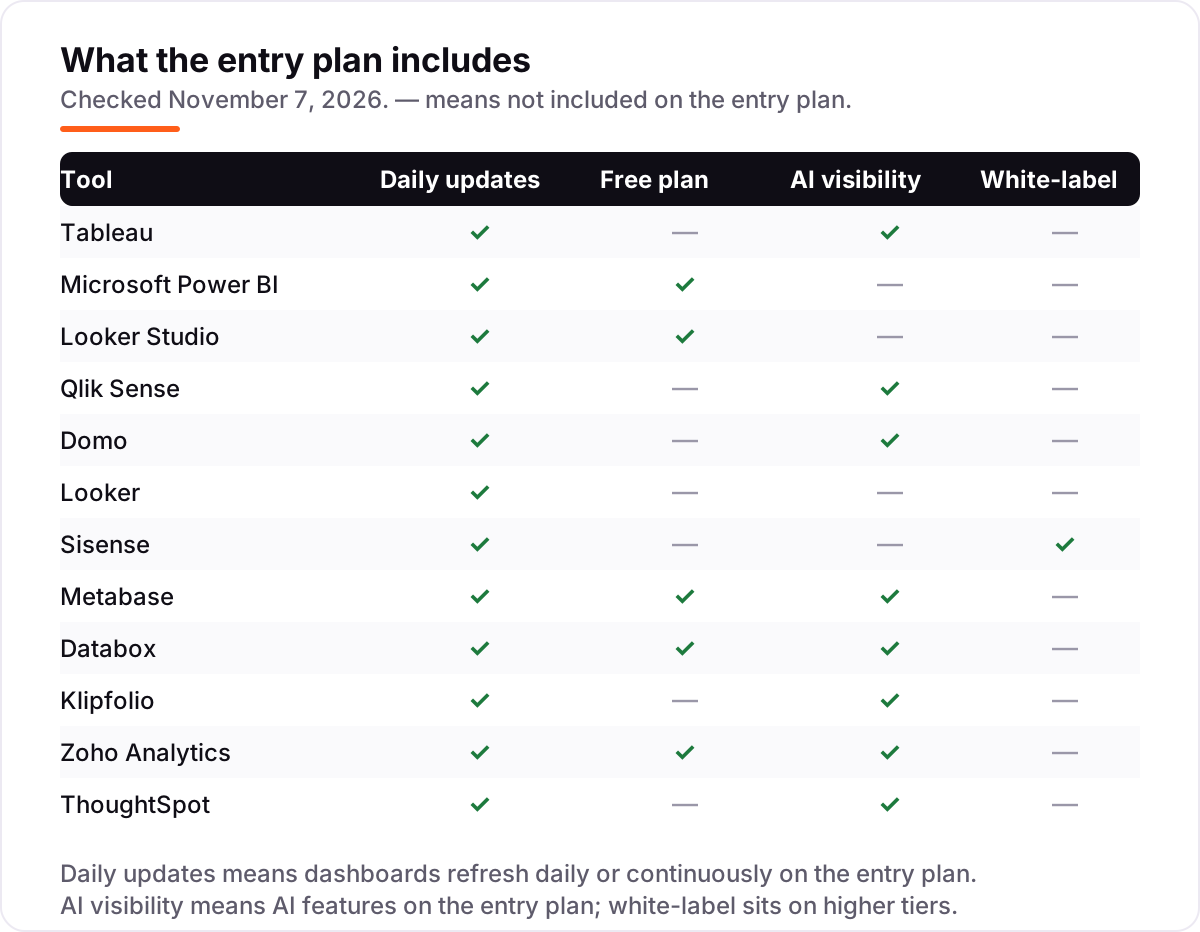
- Decide how fresh the numbers must be. Marketing dashboards need hourly or live refreshes; a monthly board report does not. Every tool here refreshes at least daily on its entry plan, but the speed above that varies by tier.
- Ask who governs the metrics. If three teams must agree on one definition of revenue, you need Looker or a governed Tableau setup, not a free self-serve tool.
- Try the free plan with real data. Four tools here are free to start, and a week with your own numbers tells you more than any review can.
Dashboards are one system in your stack, not the whole stack. If the business also needs to be found online, our guide to BI software for analytics covers the wider analytics side. And before you publish new pages for the services you sell, run your titles through the free SERP snippet preview tool — it shows exactly how the title and description will look in Google.
Whatever you shortlist, try it with real data before you pay. The free plans and trials in this list are long enough to run one genuine week — your sources, your metrics, your readers — and that week tells you more than any review can. Check two things in the trial: that the refresh runs on schedule without manual fixes, and that the people who only read dashboards can actually find them.
Dashboard software for data analytics pricing: what you will actually pay
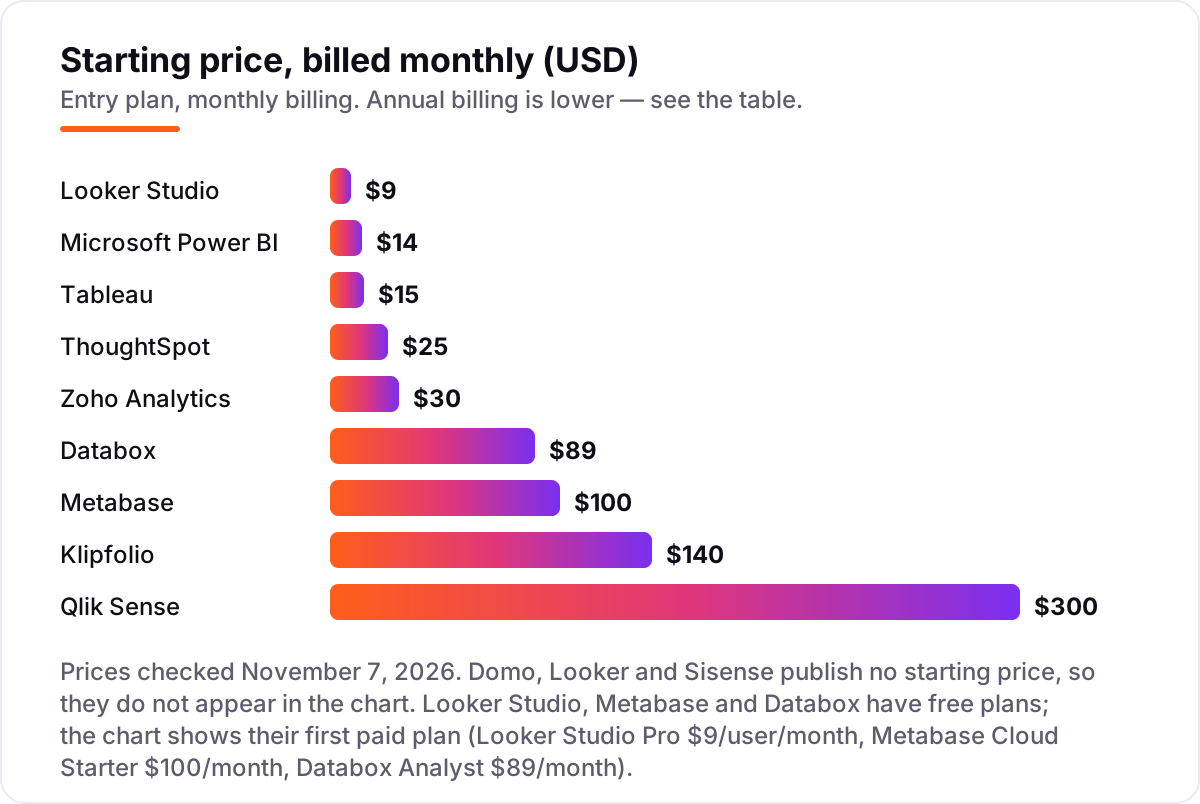
Take a ten-person team: two analysts who build dashboards, three managers who explore them and five executives who only read them. On list prices, Tableau costs $351 a month — two Creators at $75, three Explorers at $42 and five Viewers at $15 — while Power BI Pro costs $140 a month for ten licences at $14 each. Qlik Starter is a flat $300 a month for ten users, Klipfolio Base is a flat $140 a month for unlimited users, and Metabase Cloud Starter is $130 a month — $100 for the first five users plus $6 for each of the five extra users.
Over a year, that is $1,560 on Metabase, $1,680 on Power BI Pro or Klipfolio Base, $3,600 on Qlik Starter and $4,212 on Tableau with that role mix. Looker Studio costs $0 on the free plan, or $1,080 a year if all ten users take Pro at $9 a month. The same ten people and the same dashboards cost $0 at the free end and $4,212 at the dear end — a gap that comes entirely from the pricing unit, not from features.
Three costs sit outside every number above. First, the custom-quote tools — Domo, Looker and Sisense — publish no starting price, so a ten-person team there is a sales conversation, not a checkout; third-party estimates put entry deals well into five figures a year. Second, the AI layer: Power BI Copilot needs Fabric capacity on top of the $14, while ThoughtSpot includes unlimited LLM tokens in its $25 a user. Third, the data itself: connectors are included on most tools here, but premium connectors and extra data capacity are paid add-ons on Qlik and Metabase. If you run a marketing team rather than a general analytics team, the reporting tools differ too — see our guide to the best marketing dashboard software.
Annual billing cuts the bill on most tools here: Databox Analyst drops from $89 to $71 a month, Klipfolio Base from $140 to $120, Metabase Starter from $100 to $90 and Zoho Analytics Basic from $30 to $25. Tableau, Power BI and Qlik publish annual-billed prices only, so the monthly figure is already the annual rate. One more cost to check before you commit: a second workspace or a second client is a second subscription on most tools here, so price the second set of dashboards before you commit to a tool for the first.
Know the difference: dashboard software vs business intelligence platforms
The confusion in this category is between a presentation layer and a full platform. Dashboard software presents metrics in charts and tiles; a business intelligence platform also covers data preparation, modelling and governance underneath. Tableau, Power BI, Qlik and Looker are full platforms, while Databox and Klipfolio are mainly reporting layers that sit on top of data that is already clean. Neither is better in the abstract — the right buy depends on where your data work happens.
There is a second, quieter confusion: a dashboard is not a report. A dashboard is live, interactive and checked daily; a report is a snapshot, usually scheduled and sent. Databox and Klipfolio are built for the daily-check use case, with alerts and scheduled sends, while Looker and Qlik are built for the explore-and-answer use case, where a question leads to a new view rather than a fixed page. If your team checks the same numbers every morning, buy the reporting layer; if your team asks new questions every day, buy the platform.
A third distinction worth knowing is embedded analytics versus internal dashboards. Sisense and Looker exist largely to put analytics inside a product your customers use, white-labelled, while Tableau, Power BI and Looker Studio exist largely for dashboards your own team reads. Buying an embedded tool for internal reporting, or an internal tool for customer-facing analytics, is the most expensive mistake in this category.
Quick comparison: tool type by need
| Buyer | Best pick | Why |
|---|---|---|
| Most teams, polished dashboards | Tableau | The visual standard, viewers from $15/user/month |
| Microsoft 365 shops on a budget | Power BI | Full enterprise BI from $14/user/month |
| Free dashboards on Google data | Looker Studio | Free with unlimited reports and viewers |
| Exploring complex datasets | Qlik Sense | Associative engine, flat $300/month for 10 users |
| Reporting across 100+ sources | Databox | Free plan, Analyst is $89/month |
| Flat price, unlimited users | Klipfolio | $140/month, no per-seat maths |
Mistakes to avoid
- Budgeting on the cheapest seat. Tableau Viewer at $15 is no bargain if your team actually needs Creator seats at $75, and Power BI at $14 is no bargain if every reader needs a licence too. Price the roles you have, not the cheapest role.
- Buying a platform when you need a reporting layer. If the data is already clean and the job is a daily check, Databox or Klipfolio does it for a fraction of a Tableau or Looker contract.
- Ignoring the refresh limit. A dashboard that updates once a day is fine for a board report and useless for a marketing team watching a campaign. Check the refresh rate on the plan you would actually buy, not the top tier.
- Paying for governance before you need it. LookML, row-level security and audit trails are worth real money — but only once several teams share one definition of a metric. A five-person team rarely needs them.
- Forgetting the second workspace. If you run dashboards for two clients or two departments, you usually pay twice. Price the second set before you commit to the first.
How we chose
We checked each vendor's own pricing page on November 7, 2026 and recorded the starting price exactly as shown, including the annual-billing figure where the page lists one, and we ranked the tools by fit for the most common buyer — a team that needs dashboards people actually read — not by brand size. Domo, Looker and Sisense publish no starting price, so they are listed as custom quote rather than estimated. Ratings come from G2 pages and comparison pages crawled within the last five days, with the score and review count shown on the cited page. No vendor paid for a place in this list, and none of the links here are affiliate links.
What to do next
Start with the free plan or trial of your top pick and run one real week of your own data through it. Check that the refresh runs on schedule, the readers can find their dashboards, and the metrics match what your team already reports before you commit to a year. If the dashboards are sorted but new customers are not finding you, our monthly SEO service handles the visibility side — or compare providers in our guide to analytics software. Once your tools are in place, find out what's holding your rankings back.
Your stack only works if people find you
SerpAstra fixes what keeps your site off page one and makes it easy for AI assistants to recommend.
Get a free audit→Sources we checked (26)
- Tableau pricing — tableau.com/pricing/cloud (checked November 7, 2026)
- Power BI pricing — microsoft.com/en-us/power-platform/products/power-bi/pricing (checked November 7, 2026)
- Looker Studio pricing — cloud.google.com/looker-studio (checked November 7, 2026)
- Qlik Cloud Analytics pricing — qlik.com/us/analytics-and-reporting-tools (checked November 7, 2026)
- Domo pricing — domo.com/pricing (checked November 7, 2026)
- Looker pricing — cloud.google.com/looker (checked November 7, 2026)
- Sisense pricing — sisense.com/pricing (checked November 7, 2026)
- Metabase pricing — metabase.com/pricing (checked November 7, 2026)
- Databox pricing — databox.com/pricing (checked November 7, 2026)
- Klipfolio pricing — klipfolio.com/pricing (checked November 7, 2026)
- Zoho Analytics pricing — zoho.com/analytics/pricing.html (checked November 7, 2026)
- ThoughtSpot pricing — thoughtspot.com/pricing (checked November 7, 2026)
- Tableau on G2 — g2.com/products/tableau/reviews (checked November 7, 2026)
- Microsoft Power BI on G2 — g2.com/products/microsoft-microsoft-power-bi/reviews (checked November 7, 2026)
- Looker Studio on G2 — g2.com/compare/data-studio-vs-databox-databox (checked November 7, 2026)
- Qlik Sense on G2 — g2.com/compare/qlik-sense-vs-zapier (checked November 7, 2026)
- Domo on G2 — g2.com/products/sage-ai/competitors/alternatives (checked November 7, 2026)
- Looker on G2 — g2.com/compare/databox-databox-vs-looker (checked November 7, 2026)
- Sisense on G2 — g2.com/compare/sisense-vs-zoho-analytics (checked November 7, 2026)
- Metabase on G2 — g2.com/products/metabase/reviews (checked November 7, 2026)
- Databox on G2 — g2.com/products/databox-databox/reviews (checked November 7, 2026)
- Klipfolio on G2 — g2.com/compare/klipfolio-vs-looker (checked November 7, 2026)
- Zoho Analytics on G2 — g2.com/compare/sisense-vs-zoho-analytics (checked November 7, 2026)
- ThoughtSpot on G2 — g2.com/products/thoughtspot/reviews (checked November 7, 2026)
- Klipfolio vs Qlik Sense — klipfolio.com/compare/klipfolio-vs-qlik-sense (checked November 7, 2026)
- Zoho Analytics vs Power BI vs Tableau — zoho.com/analytics (checked November 7, 2026)
Shamim
Founder of SerpAstra
A full-stack SEO and digital marketer who spends most days on Local SEO for dental practices, AI search visibility and lead generation.
Frequently asked questions
What is the best dashboard software for data analytics?
Tableau is the best fit for most buyers: the strongest visuals, the biggest community and viewer seats from $15/user/month. Power BI is the better pick for Microsoft shops at $14/user/month, and Looker Studio is the best free option. The right choice depends on who builds the dashboards and who reads them.
How much does dashboard software for data analytics cost?
Entry prices run from $0 to $300 a month. Looker Studio, Metabase, Databox and Zoho Analytics all have free plans, and the first paid plans cost $9–$140 a month. A 10-person team typically pays $1,080–$4,212 a year on the published plans, before any custom enterprise contract.
Is there really free dashboard software for data analytics?
Yes, with limits. Looker Studio is free with unlimited reports and viewers, Metabase is free to self-host, Databox is free for one user and three sources, and Zoho Analytics is free for two users and 10,000 rows. All four build real dashboards at $0; the paid plans add refresh speed, users and governance.
What is the difference between dashboard software and a BI platform?
Dashboard software presents metrics in charts and tiles; a BI platform also covers data preparation, modelling and governance underneath. Tableau, Power BI and Looker are full BI platforms, while Databox and Klipfolio are mainly reporting layers. Buy the platform when you need modelling; buy the reporting layer when the data is already clean.
Do I need a data warehouse to use dashboard software?
No, not to start. Most tools here connect directly to spreadsheets, Google Analytics, CRMs and databases. A warehouse matters when data volumes grow or several teams must agree on one definition of a metric — that is when Looker, Qlik or a governed Tableau setup earns its price.
Can I switch dashboard software later?
Yes, but the dashboards do not move with you. Export your metric definitions, data source list and key calculations first, then rebuild the top five dashboards in the new tool before cancelling the old one. The data stays in your sources, so the rebuild is design work, not data migration.
Which dashboard tool is best for small businesses?
Looker Studio for a $0 start on Google data, Zoho Analytics when the budget is tight and the free plan fits, and Klipfolio when the audience is large and the bill must stay flat at $140 a month. All three avoid per-seat pricing traps that make Tableau and Power BI expensive as headcount grows.
Free SEO and AI visibility audit
Find out what is holding your rankings back
Send us your site. Within 2 business days you get a written audit, an AI visibility check and a short fix list ranked by impact. Free, with no contract attached.
Request my free audit→Related guides
 AI, Data & Analytics10 Best BI Software for Analytics in 2026, ComparedThe 10 best BI software for analytics compared on real 2026 prices, free plans and G2 ratings, so you can pick the right dashboard tool for your team.Read guide →
 Digital Marketing & Ads9 Best Marketing Dashboard Software in 2026, ComparedCompare the 9 best marketing dashboard software options on price, free plans, white-label and AI features, with every price checked November 5, 2026.Read guide →
 AI, Data & Analytics12 Best Analytics Software in 2026: Pricing, Features and Pros & ConsThe 12 best analytics software tools for 2026, compared on price, free plans and what each one measures, with every price checked on the pricing page.Read guide →