
9 Best Agentic Analytics Tools for Data Analysis in 2026, Compared
Compare the 9 best agentic analytics tools for data analysis on price, free plans, governance and AI agents, with every price checked November 6, 2026.
 Shamim Mia, Founder, SerpAstraLast verified November 6, 202614 min read
We compare pricing pages, documentation and public reviews. We never accept payment for rankings.

Key takeaways
- ThoughtSpot is the most mature enterprise pick at $25/user/month; Julius AI is the fastest free start, and Power BI is the cheapest published entry at $14/user/month.
- Four of the nine tools publish no starting price — Hex, Sigma, Domo and AnswerRocket are all custom quote, so budget for a sales conversation.
- The single most important buying factor is governance: an agent that answers confidently from bad data is worse than no agent, so check the semantic layer before the demo.
- Count, Julius AI and Hex all offer genuinely free plans, and Power BI's free Desktop app covers building reports — but sharing a report needs a paid license.
On this page
Quick comparison
| Tool | Best for | Starting price | Free plan |
|---|---|---|---|
| ThoughtSpot | Enterprises adopting agentic BI at scale, with governed data models and a dedicated AI analyst | $25/user/mo | No (free trial) |
| Julius AI | Individuals and small teams who want answers from a spreadsheet or file in seconds, with no setup | Free; Plus $20/mo | Yes (free plan) |
| Hex | Data teams that want collaborative notebooks, SQL and Python plus AI workflows in one place | Custom quote | Yes (free plan) |
| Sigma | Warehouse-native teams on Snowflake, Databricks or BigQuery who think in spreadsheets | Custom quote | No (free trial) |
| Power BI | Microsoft shops that already live in Excel, Teams and Azure and want Copilot in their BI | $14/user/mo | Yes (free account) |
| Domo | Companies that want data ingestion, prep, visualization and AI in one platform | Custom quote | No (30-day trial) |
| Count | Data teams that think visually and want SQL, Python and AI on one free-form canvas | Free; Pro $49/mo | Yes (free plan) |
| Polymer | Marketing and operations teams whose data lives in spreadsheets and who will never hire a BI developer | $20/mo | No (14-day trial) |
| AnswerRocket | Regulated or complex organizations that want custom AI analysts trained on their own data and vocabulary | Custom quote | No (no trial) |
Make one of these tools?
We re-check this list every quarter. Send a correction, request a review, or ask about a clearly labeled sponsored spot.
Request a listingThe best agentic analytics tools for data analysis

ThoughtSpot
Best for: Enterprises adopting agentic BI at scale, with governed data models and a dedicated AI analyst
ThoughtSpot built its reputation on search-driven analytics, and its agentic push is the most mature in this lineup. Spotter, its AI analyst, takes a plain-language question and returns an answer with visualizations, working from governed data models rather than raw tables. That design matters: when definitions are approved in advance, the agent's answers stay consistent with what finance and leadership already trust.
Essentials starts at $25 per user per month billed annually, for 5 to 50 users and up to 25 million rows; Pro starts at $50 and adds Spotter AI agents. The bill scales with adoption, which is both the point and the risk, and every plan is billed annually with no monthly option. Buy ThoughtSpot when governed, company-wide answers matter more than the cheapest seat.
What we like
- Spotter, the conversational AI analyst, answers questions on governed data models rather than raw tables
- Search-driven interface that business users actually adopt, with no SQL needed
- No metering or charge for LLM tokens — use is governed by the subscription
- Embedded analytics options for SaaS products through StartupSpot
Watch out for
- Essentials caps at 5–50 users and 25 million rows — wider rollouts need Pro or Enterprise
- Spotter AI queries are metered on Pro (25 per user a month), with overage charges
- All plans are billed annually, so there is no month-to-month option

Julius AI
Best for: Individuals and small teams who want answers from a spreadsheet or file in seconds, with no setup
If your analysis starts with a CSV on your laptop, Julius AI is the shortest path to an answer. You upload a file, ask a question in plain English, and get charts, statistics and written explanations back. There is no warehouse to configure and no schema to define, which makes it ideal for ad hoc work, student projects and quick client analyses.
The free plan covers light usage with a daily credit allowance, and Plus starts at $20 a month billed monthly, or $16 billed annually, with 2,000 credits a month. The trade-off is governance: Julius AI is a personal analysis assistant, not a company reporting layer, so teams that need shared definitions and audit trails should look at the enterprise tools on this list instead.
What we like
- Upload a file and ask a question in plain English — charts, statistics and written explanations come back in seconds
- No warehouse to configure and no schema to define, so ad hoc analysis starts immediately
- Plus includes frontier AI models, 2,000 credits a month and 100 daily refresh credits
- Also builds presentations, reports and dashboards from the same workspace
Watch out for
- The free plan's daily credit allowance is small, so regular use needs a paid plan
- Credit-based pricing makes the monthly bill hard to forecast for heavy users
- Not a governed BI platform — no shared definitions, permissions or audit trails for company reporting

Hex
Best for: Data teams that want collaborative notebooks, SQL and Python plus AI workflows in one place
Hex sits between the analyst's notebook and the business user's dashboard. Data teams write SQL and Python in collaborative notebooks, and Magic AI helps generate and debug code along the way. Finished work can be published as interactive apps, so stakeholders explore results without touching code, and Threads adds a conversational layer for business users.
The free Community plan is enough to learn the product, while Professional and Team tiers add the collaboration and governance features a company needs, plus a 14-day Team trial with no card required. Paid plans are quoted rather than published, so expect a sales conversation before you can budget. Pick Hex when the team does real analysis work and still needs to share it.
What we like
- Magic AI assists with SQL and Python inside notebooks, and the Hex agent runs full workflows
- Published apps turn analysis into interactive reports stakeholders can explore without code
- Threads give business users a conversational self-serve layer on governed data
- Connects to Snowflake, BigQuery, Postgres and the modern data stack
Watch out for
- No published per-seat prices — paid plans are quoted, so budgeting needs a sales conversation
- Scheduled runs and alerts need the Team plan, not the entry Professional plan
- Casual business users face a learning curve; Hex rewards people comfortable with data

Sigma
Best for: Warehouse-native teams on Snowflake, Databricks or BigQuery who think in spreadsheets
Sigma's insight is that most business users already think in spreadsheets, so it puts a spreadsheet interface directly on top of cloud data warehouses. There are no extracts to refresh and no data to move: formulas and pivot-style operations run as warehouse queries. AI features then help users who would never write SQL build their own analyses on governed data.
The vendor offers a free trial but publishes no pricing, which is typical for warehouse-native BI sold to mid-market and enterprise teams. Buyers should also plan for the warehouse bill: because Sigma queries live data, a team that builds expensive queries will see the cost in its warehouse invoice, not just in the Sigma contract.
What we like
- Familiar spreadsheet interface running live queries on cloud warehouses — no extracts to refresh
- Governed metrics and write-back, so teams act on data instead of just reading it
- AI features help users who never write SQL build their own analyses
- Four license tiers (View, Act, Analyze, Build) match permissions to each role
Watch out for
- No public pricing — every contract is custom, so budgeting needs a quote first
- Heavy queries land on the warehouse bill, not the Sigma contract
- New users need about two weeks to get comfortable with workbooks and governed metrics

Power BI
Best for: Microsoft shops that already live in Excel, Teams and Azure and want Copilot in their BI
Power BI is the default choice for Microsoft shops: Pro costs $14 per user per month paid yearly, and the free Desktop app lets anyone build reports locally. Copilot in Fabric answers questions in plain language and builds visuals, while the integration with Microsoft 365, Teams and Azure means reports live where the team already works.
The catch is licensing. Every person who views a shared report needs a paid license, not just the creators, so a five-person team pays for five seats. Advanced AI features sit on Premium Per User at $24 a month. Choose Power BI when the company already runs on Microsoft and the cheapest published entry price matters.
What we like
- The cheapest published entry here at $14/user/month, with a genuinely free Desktop app
- Copilot in Fabric answers questions and builds visuals inside the tool teams already use
- Deep integration with Microsoft 365, Teams and Azure — including OneLake and Fabric
- 8 dataset refreshes a day on Pro, 48 a day on Premium Per User
Watch out for
- Pro rose to $14/user/month — the $10 figure in older roundups is stale
- Sharing and publishing need a paid license for every viewer, not just creators
- Copilot and advanced AI features need Premium Per User at $24/user/month

Domo
Best for: Companies that want data ingestion, prep, visualization and AI in one platform
Domo is the all-in-one option: data ingestion, prep, visualization and AI features in a single platform. Its connector library covers more than a thousand sources, which appeals to companies tired of stitching pipelines together themselves. AI capabilities are spread across the product, from alerting to natural-language querying, rather than living in one agent feature.
Pricing is credit-based and quoted, with a 30-day free trial to evaluate the platform. That model rewards careful scoping: teams should understand which actions consume credits before signing. Domo fits organizations that want one vendor for the whole pipeline, not teams looking for a lightweight question-answering layer.
What we like
- More than 1,000 connectors pull data from almost any source into one platform
- Unlimited users with no per-seat fees — you pay for credits, not headcount
- AI agents, AI Chat and model management are built across dashboards, alerts and data prep
- Full platform access during the 30-day trial, with guided onboarding included
Watch out for
- Credit-based pricing is quoted, so the bill depends on usage and is hard to predict upfront
- Reviewers cite high cost and a steep learning curve, especially for smaller teams
- Enterprise rollouts need careful scoping of which actions consume credits

Count
Best for: Data teams that think visually and want SQL, Python and AI on one free-form canvas
Count takes a different visual approach from the dashboard grid. Its canvas lets analysts lay out SQL queries, visualizations and written notes on one free-form surface, which mirrors how analysis actually happens: messy, iterative and full of context. For teams that find traditional BI rigid, that freedom is the appeal.
The free plan covers 1 project, 3 canvases and up to 5 users, while Pro costs $49 per editor per month with viewers free — so a team with two editors and ten viewers pays for two seats. Every AI claim is traced to its source, so hallucinations get caught before anyone acts on them. Pick Count when the work is collaborative and visual.
What we like
- Free-form canvas arranges SQL queries, charts and written notes together, mirroring real analysis
- Every AI claim is traced to its source, assumption or inference, so hallucinations get caught
- Viewers are free — only editors are billable seats, which keeps broad rollouts cheap
- Unlimited AI credits on Pro, with shared agent skills and context for the whole team
Watch out for
- Free plan caps at 1 project, 3 canvases and 5 users — growing teams need Pro
- Performance can dip on large datasets and heavy queries, reviewers report
- Smaller ecosystem than the big BI vendors, with fewer public case studies

Polymer
Best for: Marketing and operations teams whose data lives in spreadsheets and who will never hire a BI developer
Polymer targets the huge middle of the market: teams whose data lives in spreadsheets and who will never hire a BI developer. You connect a sheet, and Polymer builds dashboards and AI-powered data apps around it, with a chat interface for follow-up questions. For a marketing or operations team that needs answers this week, that speed is hard to beat.
Starter costs $20 a month billed monthly, or $10 billed annually, with a 14-day free trial on Pro. The honest limit is complexity: Polymer is excellent at spreadsheet-scale problems and less suited to companies with strict governance needs or multi-source warehouse architectures. Confirm the price with the vendor first — its pricing page lists overlapping plan sets.
What we like
- Turns a spreadsheet into dashboards and AI apps in about five minutes, with no formulas or SQL
- Conversational follow-ups and auto-generated insights keep exploration going without an analyst
- Unlimited connectors, visualizations and templates even on the entry Starter plan
- Embeds and custom branding available from Pro, for sharing dashboards outside the team
Watch out for
- The pricing page lists overlapping plan sets — confirm the Starter figure with the vendor before buying
- Manual syncing on Starter; hourly syncing needs Pro and real-time syncing needs Enterprise
- Limited depth for complex enterprise modeling, governance or multi-source warehouse work

AnswerRocket
Best for: Regulated or complex organizations that want custom AI analysts trained on their own data and vocabulary
AnswerRocket does not sell a generic chatbot. It builds custom AI analysts trained on a company's own data, metrics and vocabulary, so answers reflect how the business actually talks about itself. That customization is the reason regulated and complex organizations consider it: a generic agent guesses at terminology, while AnswerRocket's agents are taught it.
Everything about the product is enterprise-shaped, from the onboarding to the pricing, which is quoted per deployment — there is no free trial and no free plan. RocketBots automate recurring analyses around the clock, acting as always-on analysts. Smaller teams should be realistic about fit: if the need is a dashboard with a chat box on top, the lighter tools here will get there faster and cheaper.
What we like
- Custom AI agents trained on company data, metrics and vocabulary — not a generic chatbot
- RocketBots automate recurring analyses around the clock, like always-on analysts
- Strong fit for complex or regulated domains such as CPG, pharma, retail and finance
- Conversational NLP learns the team's language over time and adapts to it
Watch out for
- Custom pricing means a long sales cycle and no way to budget before the quote
- No free trial and no free plan — evaluation starts with a sales conversation
- Overkill for teams that just need a dashboard with a chat box on top
The best agentic analytics tools for data analysis do more than draw charts: an AI agent reads your question, queries the data, picks the visualization and explains the result. We ranked the nine tools below by fit for the most common buyer — a team that wants business users to get answers without waiting on analysts — and every price was checked on the vendor's own pricing page on November 6, 2026.
How to choose the best agentic analytics tools for data analysis
- Start with governance, not the demo. Ask how each tool defines metrics, who approves those definitions, and whether the AI can show its work. Tools with a semantic layer or governed models earn trust faster than tools that query raw tables.
- Match the tool to who asks the questions. Analysts want notebooks and SQL control; business users want to type a question and get a chart; executives want a number they can quote. The best tool is the one your least technical user will open twice a week.
- Count the seats you actually pay for. ThoughtSpot and Power BI charge per user, Count charges per editor with viewers free, and Polymer charges per license. A five-person team with two editors pays for two Count seats, not five.
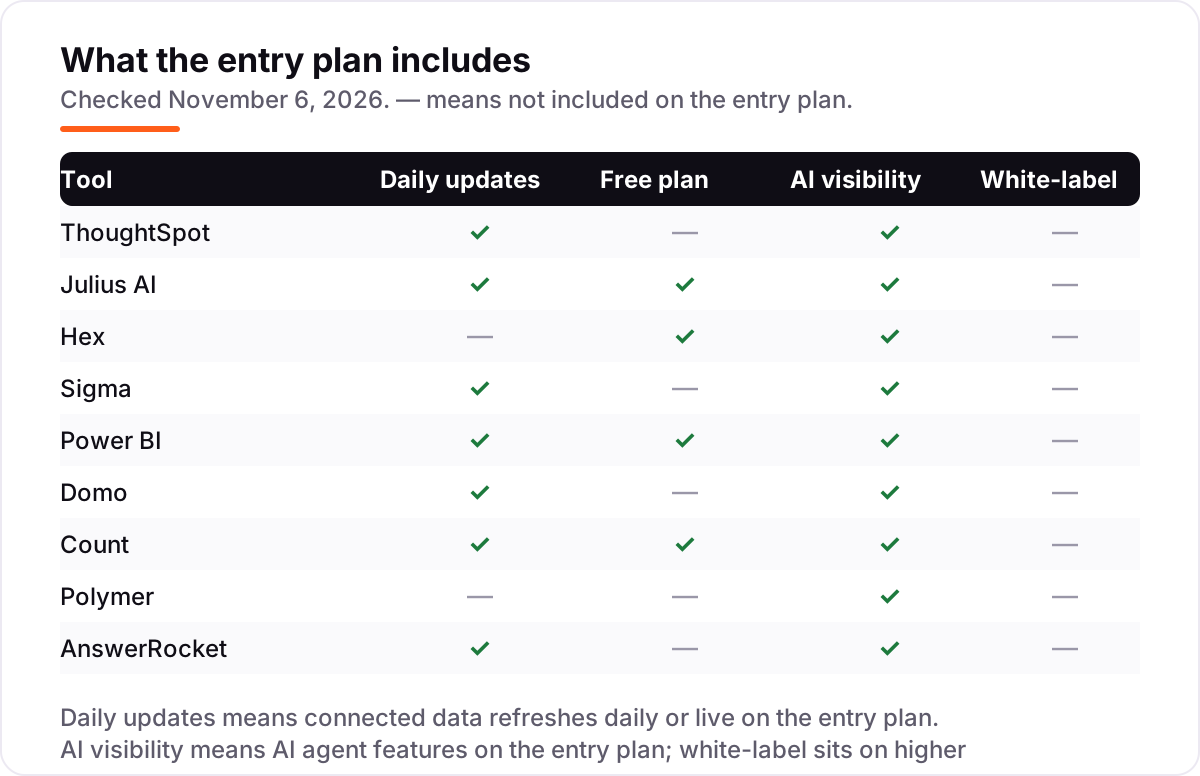
- Check what the entry plan really includes. Spotter AI arrives on ThoughtSpot Pro, not Essentials; scheduled runs need Hex Team, not Professional; Copilot needs Power BI Premium Per User. The agent feature in the demo may sit a tier above the starting price.
- Plan for the second bill. Warehouse-native tools move cost into your cloud bill, credit-based tools bill by usage, and per-user tools multiply with headcount. Model the total cost for your actual users and questions per month, not the starting tier.
Analytics is one system in your stack, not the whole stack. If the business also needs to be found online, our AI search optimization service covers the visibility side. And before you publish new pages for the services you sell, run your titles through the free SERP snippet preview tool — it shows exactly how the title and description will look in Google.
Whatever you shortlist, try it with real data before you pay. The free plans and trials in this list are long enough to run one genuine question — your spreadsheet, your warehouse, your metrics — and that test tells you more than any review can. Check two things in the trial: that the agent's answers match numbers you already trust, and that your least technical user can get an answer without help. If either fails, the tool is not ready for your team, however good the demo looked.
Agentic analytics tools for data analysis pricing: what you will actually pay
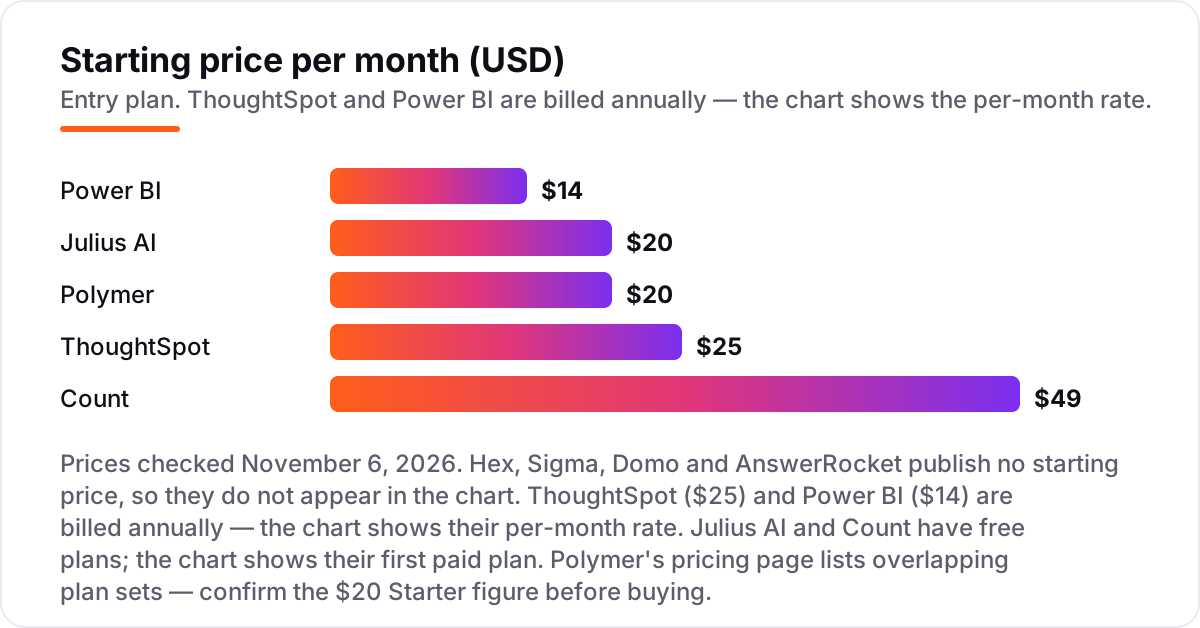
Take a five-person team — one analyst and four business users — that needs governed answers every week. On list prices, the subscription costs $70 a month on Power BI Pro (5 seats at $14), $125 a month on ThoughtSpot Essentials (5 seats at $25, which is also its minimum), $98 a month on Count Pro if two people edit and three only view (2 editors at $49, viewers free), $20 a month on Polymer Starter for one license, and $20 a month on Julius AI Plus for one user. Hex, Sigma, Domo and AnswerRocket publish no price, so their cost is a quote, not a number you can budget from this page.
Over a year, that is $840 on Power BI Pro, $1,500 on ThoughtSpot Essentials, $1,176 on Count Pro with two editors, $240 on Polymer Starter billed monthly ($120 billed annually), and $240 on Julius AI Plus billed monthly ($192 billed annually). The same five people cost $120 a year at the cheap end and $1,500 at the dear end — and the dear end is the only one of the five that includes a governed semantic layer and an AI analyst on every seat.
Three costs sit outside every number above. First, the warehouse bill: Sigma and ThoughtSpot query live data, so heavy queries show up in your Snowflake or Databricks invoice. Second, the credit meter: Domo bills by usage, and Julius AI bills by credits, so a busy month costs more than a quiet one. Third, the step-up: the agent feature you saw in the demo — Spotter on ThoughtSpot Pro, Copilot on Power BI Premium Per User, scheduled runs on Hex Team — sits above the starting price on most tools here. If you run a finance team rather than a general business team, the visibility tools differ too — see our guide to the best analytics software.
Annual billing cuts the bill on the tools that offer it: Julius AI Plus drops from $240 to $192 a year, and Polymer Starter from $240 to $120. ThoughtSpot and Power BI publish annual-only prices, so the monthly figure is already the annual rate, and there is no further discount for paying yearly. One more cost to check before you commit: a second workspace or a second team is a second subscription on most tools here, so price the second team before you commit to a tool for the first.
Know the difference: agentic analytics vs a chatbot on top of a dashboard
The confusion in this category is between an agent and a chatbot. A chatbot answers questions from a language model: it is fluent, confident and often wrong about your numbers, because it never touched your data. An agentic analytics tool plans the work itself — it reads the question, writes the query, runs it against your data, picks the visualization and explains what it found — and it can show its work, so you can check the query behind the answer.
There is a second, quieter confusion: a dashboard with a chat box is not agentic analytics. Many BI tools now let you type a question over a dashboard, but the answers come from the charts someone already built. A real agent goes further: it monitors a metric, spots a change, runs the next analysis on its own and tells you what moved. That follow-through is what the word "agentic" means here, and it is the feature to test in a trial.
A third distinction worth knowing is governed versus ungoverned. An agent that queries raw tables will happily answer from the wrong column, the wrong join or a stale extract — confidently. Tools with a semantic layer (ThoughtSpot, Sigma, Hex) define each metric once, get it approved, and make the agent use that definition. If a tool cannot show you how it defines revenue, do not let its agent near the board deck.
Quick comparison: tool type by need
| Buyer | Best pick | Why |
|---|---|---|
| Individual with a spreadsheet | Julius AI | Free plan, answers in seconds, Plus is $20/month |
| Enterprise adopting agentic BI | ThoughtSpot | Most mature agent on governed data, from $25/user/month |
| Data team that codes | Hex | Notebooks plus AI workflows, free Community plan |
| Warehouse-native team | Sigma | Spreadsheet interface on live warehouse data, custom quote |
| Microsoft shop | Power BI | Copilot in the tool you already use, Pro is $14/user/month |
| One platform for everything | Domo | Ingestion, prep, dashboards and AI agents, custom quote |
| Visual, canvas-style team | Count | Free-form canvas with sourced AI answers, Pro is $49/editor/month |
| Spreadsheet team, no code | Polymer | No-code AI dashboards from a sheet, Starter is $20/month |
| Regulated, custom analysts | AnswerRocket | AI analysts trained on your own data, custom quote |
Mistakes to avoid
- Buying on the demo's agent, then finding it sits a tier higher. Spotter arrives on ThoughtSpot Pro, Copilot on Power BI Premium Per User, scheduled runs on Hex Team. Check which tier the demoed feature lives on before you budget.
- Trusting an agent you cannot audit. If the tool cannot show the query behind an answer, you cannot check it — and an agent that answers confidently from bad data is worse than no agent at all.
- Budgeting on the starting price when the model is per-user. Five viewers on Power BI Pro cost five seats, while the same five people on Count cost two editor seats. Count the seats you pay for, not the people who look.
- Forgetting the warehouse and credit bills. Sigma and ThoughtSpot push query cost into your cloud bill, Domo bills by credit and Julius AI by credits. A busy month costs more than a quiet one on all four.
- Skipping the governance question. If nobody owns the definitions, every team gets a different answer to the same question. Settle who approves metrics before you roll the agent out, not after.
How we chose
We checked each vendor's own pricing page on November 6, 2026 and recorded the starting price exactly as shown, including the annual-billing figure where the page lists one, and we ranked the tools by fit for the most common buyer — a team that wants business users to get answers without waiting on analysts — not by brand size. Four tools publish no starting price, so they are listed as custom quote rather than estimated. Three tools carry no review rating: Julius AI has no G2 listing of its own (the G2 "Julius" page covers a different product, an influencer marketing platform), Polymer Search has no G2 listing, and AnswerRocket has no G2 listing — we would rather show no rating than attach the wrong product's score. One caution: Polymer's pricing page lists overlapping plan sets, so confirm its $20 Starter figure with the vendor before buying. No vendor paid for a place in this list, and none of the links here are affiliate links.
What to do next
Start with the free plan or trial of your top pick and run one real question through it — your spreadsheet, your warehouse, your metrics. Check that the agent's answer matches a number you already trust, and that your least technical user can get an answer without help. If the data side is sorted but new customers are not finding you, our monthly SEO service handles the visibility side — or compare providers in our guide to the best BI software for analytics. Once your tools are in place, find out what's holding your rankings back.
Your stack only works if people find you
SerpAstra fixes what keeps your site off page one and makes it easy for AI assistants to recommend.
Get a free audit→Sources we checked (15)
- ThoughtSpot pricing — thoughtspot.com/pricing (checked November 6, 2026)
- Julius AI pricing — julius.ai/pricing (checked November 6, 2026)
- Hex pricing — hex.tech/pricing (checked November 6, 2026)
- Sigma pricing — sigmacomputing.com/pricing (checked November 6, 2026)
- Power BI pricing — microsoft.com Power BI pricing (checked November 6, 2026)
- Domo pricing — domo.com/pricing (checked November 6, 2026)
- Count pricing — count.co/pricing (checked November 6, 2026)
- Polymer pricing — polymersearch.com/pricing (checked November 6, 2026)
- AnswerRocket pricing — answerrocket.com/pricing (checked November 6, 2026)
- ThoughtSpot reviews — g2.com/products/thoughtspot/reviews (checked November 6, 2026)
- Hex reviews — g2.com/products/hex-tech-hex/reviews (checked November 6, 2026)
- Sigma reviews — g2.com/products/sigma-computing-sigma/reviews (checked November 6, 2026)
- Power BI reviews — g2.com/products/microsoft-microsoft-power-bi/reviews (checked November 6, 2026)
- Domo reviews — g2.com/products/domo/reviews (checked November 6, 2026)
- Count reviews — g2.com/products/count/reviews (checked November 6, 2026)
Shamim
Founder of SerpAstra
A full-stack SEO and digital marketer who spends most days on Local SEO for dental practices, AI search visibility and lead generation.
Frequently asked questions
What is agentic analytics?
Agentic analytics refers to AI agents that carry out analysis tasks on their own: interpreting a question, querying data, choosing a visualization, and explaining the result. Unlike a static dashboard, the agent decides the steps. Unlike a general chatbot, it works against your company's data with guardrails.
How much do agentic analytics tools cost?
Published entry prices run from free to $49 a month per user or editor. Power BI Pro is $14/user/month, ThoughtSpot Essentials is $25/user/month, and Count Pro is $49/editor/month. Four tools in this list — Hex, Sigma, Domo and AnswerRocket — publish no price and are custom quote only.
Is there a free agentic analytics tool?
Yes. Julius AI, Hex and Count all offer genuinely free plans, and Power BI's Desktop app is free for building reports. Julius AI's free plan covers light analysis with a daily credit allowance, Hex's free Community plan covers notebooks, and Count's free plan covers up to 5 users.
What is the difference between agentic analytics and regular BI dashboards?
A regular BI dashboard shows the charts someone built in advance. An agentic analytics tool plans the analysis itself: it reads the question, writes the query, picks the chart and explains what it found. The agent also follows up — it can monitor a metric, spot a change and run the next analysis without being asked.
Which agentic analytics tool is best for a small team?
For a team of five, Julius AI or Count is the cheapest way in: both have free plans, and Count Pro is $49 per editor with viewers free. If the team already uses Microsoft 365, Power BI Pro at $14/user/month is the cheapest published entry. ThoughtSpot Essentials fits once the team needs governed, company-wide answers.
Do I need a data warehouse to use these tools?
No, not for all of them. Julius AI and Polymer work directly on uploaded spreadsheets, and Count accepts file uploads alongside database connections. Hex, Sigma, ThoughtSpot and Domo are built for warehouse data — Sigma and ThoughtSpot connect live to Snowflake, Databricks and BigQuery, so a warehouse is part of the setup.
Free SEO and AI visibility audit
Find out what is holding your rankings back
Send us your site. Within 2 business days you get a written audit, an AI visibility check and a short fix list ranked by impact. Free, with no contract attached.
Request my free audit→Related guides
 AI, Data & Analytics12 Best Analytics Software in 2026: Pricing, Features and Pros & ConsThe 12 best analytics software tools for 2026, compared on price, free plans and what each one measures, with every price checked on the pricing page.Read guide →
 AI, Data & Analytics10 Best BI Software for Analytics in 2026, ComparedThe 10 best BI software for analytics compared on real 2026 prices, free plans and G2 ratings, so you can pick the right dashboard tool for your team.Read guide →
 SEO & AI Search10 Best Product Analytics Tools in 2026 (Free and Paid, Compared)10 best product analytics tools compared on price, free plans and fit, from Mixpanel and Amplitude to free GA4. Priced from vendor pages, November 2026.Read guide →