
10 Best BI Software for Analytics in 2026, Compared
The 10 best BI software for analytics compared on real 2026 prices, free plans and G2 ratings, so you can pick the right dashboard tool for your team.
 Shamim Mia, Founder, SerpAstraLast verified November 2, 202612 min read
We compare pricing pages, documentation and public reviews. We never accept payment for rankings.

Key takeaways
- Microsoft Power BI is the best value for most teams: full BI from $14/user/month, with Tableau from $15/user/month for viewers and Looker Studio free for Google teams.
- Free plans exist — Looker Studio is free, Zoho Analytics has a free plan for 2 users, Databox has a free plan for 1 user, and Metabase is free self-hosted — but serious team analytics starts around $24–$100/month.
- The single most important buying factor is who needs to view the dashboards: per-seat pricing punishes wide sharing, while flat or unlimited-user plans (Qlik, Klipfolio, Domo) make company-wide rollout cheap.
- Every price below was checked on November 2, 2026. Ratings are G2, with review counts shown. Three prices could not be verified on the vendor's own page that day — see How we chose.
On this page
Quick comparison
| Tool | Best for | Starting price | Free plan |
|---|---|---|---|
| Microsoft Power BI | Small and mid-size teams already on Microsoft 365 who want full BI from $14 per user a month | $14/user/mo (annual) | Yes (no sharing) |
| Tableau | Teams that need the deepest visual analysis and polished dashboards, with cheap Viewer access | $15/user/mo (Viewer, annual) | No (14-day trial) |
| Looker Studio | Small teams and marketers inside the Google stack who want free dashboards | Free (Pro $9/user/mo) | Yes (free) |
| Zoho Analytics | Small businesses already using Zoho apps who want a low-cost BI suite | $24/mo (Basic, annual) | Yes (2 users) |
| Qlik Sense | Mid-size teams that need governed self-service and an AI assistant without per-seat billing | $300/mo (Starter, annual) | No (30-day trial) |
| Metabase | Technical teams who want open-source BI they can self-host for free | $100/mo (Starter, annual) | Yes (open source) |
| Databox | Marketing and sales teams who want KPI dashboards and an AI analyst | $71/mo (Analyst, annual) | Yes (1 user) |
| Klipfolio | Small teams and agencies that want unlimited users on one flat dashboard subscription | $120/mo (Base, annual) | No (14-day trial) |
| Domo | Larger teams that want an all-in-one platform with unlimited users | Custom quote | No (30-day trial) |
| Sisense | SaaS companies embedding analytics in their own product | Custom quote | No (free trial) |
Make one of these tools?
We re-check this list every quarter. Send a correction, request a review, or ask about a clearly labeled sponsored spot.
Request a listingThe best bi software for analytics

Microsoft Power BI
Best for: Small and mid-size teams already on Microsoft 365 who want full BI from $14 per user a month
Microsoft Power BI is the value pick in this list because the entry Pro plan does not feel like an entry plan: a 1 GB data model per user, 8 data refreshes a day, and sharing and collaboration for $14 per user a month, paid yearly. For a team already on Microsoft 365, that is the whole BI workflow in one subscription, and the per-user cost is the lowest of any full BI suite here.
The trade-off is sharing and AI. Every viewer needs a Pro licence, so a company-wide rollout costs $14 per person, and the Copilot AI assistant needs Fabric capacity or Premium — Pro alone has none. If you want the cheapest route to real BI at team scale, start here; if you need AI built in, look at Qlik or Databox instead.
What we like
- Lowest entry price of any full BI suite here — $14 per user a month, with a free account for building reports
- Native Excel, Teams and SharePoint integration — dashboards live where Microsoft teams already work
- Pro refreshes data 8 times a day and handles a 1 GB model per user
Watch out for
- Copilot AI needs Fabric capacity or Premium — Pro alone has no AI assistant
- Every viewer needs a Pro licence, so company-wide sharing costs $14 per person

Tableau
Best for: Teams that need the deepest visual analysis and polished dashboards, with cheap Viewer access
Tableau is the deepest visual tool in this list. The Standard plan pairs a drag-and-drop analysis canvas with the strongest charting here, and Viewer licences at $15 per user a month make read-only access cheap for a large team. If your analysts live in charts and your executives just need to see them, Tableau is the natural fit.
The price structure needs care. Every deployment needs at least one Creator licence at $75 a month, there is no monthly billing, and the Tableau Agent AI assistant is only on Cloud+, which is priced on application. Buy Tableau when visual depth is the job; buy Power BI when per-seat cost is the deciding factor.
What we like
- Best-in-class visual exploration — the strongest charting and drag-and-drop analysis in this list
- Viewer licences at $15 a month make read-only access cheap for large teams
- Tableau Pulse gives AI-generated insights on the Standard plan
Watch out for
- Every deployment needs at least one Creator licence at $75 a month, and there is no monthly billing
- Tableau Agent, the AI assistant, is only on Cloud+, which is priced on application

Looker Studio
Best for: Small teams and marketers inside the Google stack who want free dashboards
Looker Studio is the only free full BI tool in this list: creators and viewers both pay nothing, and the native connections to Google Analytics, Google Ads, Sheets and BigQuery work with no setup. For a small team or a marketer inside the Google stack, it is the fastest way to a working dashboard — and it costs nothing to try.
Two things to know before you commit. Google renamed the product Data Studio in April 2026 — same tool, same free tier — and the Gemini AI features need the $9 Pro plan, which is billed per user per Google Cloud project. Pro is worth it for team content management; for a single free dashboard, the free tier is enough.
What we like
- Core product is free for creators and viewers — the only $0 full BI tool here
- Native Google Analytics, Ads, Sheets and BigQuery connections with no setup
- Pro at $9 per user per project adds team content management and Google Cloud support
Watch out for
- Gemini AI features need Pro, and the free tier has no SLA or organisation-owned content
- Pro is billed per user per project, so people working across several projects pay multiple times

Zoho Analytics
Best for: Small businesses already using Zoho apps who want a low-cost BI suite
Zoho Analytics is the cheapest paid route into real BI after Power BI and Tableau Viewer: Basic costs $24 a month billed annually, covers 2 users and 0.5 million rows, and the free plan covers 2 users and 10,000 rows. For a small business already using Zoho CRM or Zoho Books, it is the obvious companion — the data is already there.
The limits are the row caps and the AI tiers. Basic caps at 0.5 million rows, Standard at 1 million, and the full Ask Zia AI agent features sit on Premium at $115 a month billed annually — though basic Ask Zia is included on every plan. Live connections are Enterprise-only, so Basic and Standard sync on a schedule instead.
What we like
- Basic at $24 a month billed annually is one of the cheapest paid entries here, and the free plan covers 2 users
- 250+ data connectors on Basic, including Zoho CRM, Salesforce and Google Analytics
- Daily data sync and scheduled email reports on Basic
Watch out for
- Full Ask Zia AI agent features sit on Premium at $115 a month billed annually
- Live data connections are Enterprise-only; Basic and Standard sync on a schedule

Qlik Sense
Best for: Mid-size teams that need governed self-service and an AI assistant without per-seat billing
Qlik Sense is the mid-market pick for teams that want governed self-service without per-seat maths: Starter costs $300 a month flat for 10 users and 10 GB of data, billed annually, and it includes Answers Agents, Qlik's AI assistant. The associative engine lets anyone explore freely instead of waiting for a pre-built report.
The jump from the sub-$100 tools is real, and Standard costs $825 a month for 25 GB. Anonymous and public sharing need Premium, so sharing dashboards outside the team costs more. Buy Qlik when ten people need to explore the same governed data; buy Power BI when the budget is under $100 a month.
What we like
- Answers Agents, the AI assistant, is included on the $300 Starter plan
- Flat $300 a month covers 10 users — no per-seat maths
- Associative engine lets users explore freely without pre-built queries
Watch out for
- $300 a month is a big jump from the sub-$100 tools here, and Standard is $825
- Anonymous and public sharing need Premium, so sharing outside the team costs more

Metabase
Best for: Technical teams who want open-source BI they can self-host for free
Metabase is the open-source route: the self-hosted version is free with unlimited users, and the hosted Cloud Starter plan costs $100 a month for 5 users, with extra users at $6 each. The interface is the cleanest here — a non-analyst can build a first dashboard in an afternoon, and the question builder needs no SQL.
The trade-offs are hosting and AI. Self-hosting means you run the server, upgrades and backups yourself, and Metabot, the AI assistant, is a paid add-on rather than part of Starter. White-label branding needs Pro at $575 a month. Choose Metabase when your team is technical and wants to own the stack; choose a hosted suite when you want support included.
What we like
- Open-source version is free and self-hosted with unlimited users
- Cloud Starter at $100 a month includes 5 users — the cheapest hosted route for a small technical team
- Question builder needs no SQL, so non-analysts can build dashboards
Watch out for
- Metabot, the AI assistant, is a paid add-on — not included on Starter
- Self-hosting means you run the server, upgrades and backups yourself

Databox
Best for: Marketing and sales teams who want KPI dashboards and an AI analyst
Databox is the KPI-dashboard pick for marketing and sales teams: the free plan covers 1 user, 3 data sources and 50 AI credits a month, and Analyst costs $71 a month billed annually for 1 user, 5 data sources and 150 AI credits. Genie, the AI analyst, is included even on the free plan — ask a question in plain language and it builds the answer.
The catch is team size. Analyst covers one person, so a 10-person team needs Team Scale at $319 a month billed annually, and white-label reports are an $80-a-month add-on. Databox is built for KPI dashboards, not deep analysis — for complex modeling, Power BI or Tableau are the better tools.
What we like
- Genie AI analyst is included even on the free plan — ask questions in plain language
- 130+ native integrations with no warehouse required
- Hourly data sync on Analyst and unlimited dashboards
Watch out for
- Analyst covers only 1 user and 5 data sources — teams need Team Core at $199 a month billed annually
- White-label reports are an $80-a-month add-on

Klipfolio
Best for: Small teams and agencies that want unlimited users on one flat dashboard subscription
Klipfolio's Klips is the unlimited-users pick: Base costs $120 a month billed annually, covers 3 dashboards, and every user is included at no extra cost. For a small team or an agency that shares dashboards with clients, that flat price beats per-seat billing fast — ten viewers cost the same as one.
The limits are dashboards and AI. Base allows only 3 dashboards — more need Grow at $190 a month — and the AI features live in Klipfolio's separate PowerMetrics product, not in Klips. There is no free plan, only a 14-day trial. Pick Klips when everyone needs a seat; pick Databox when the AI analyst matters more.
What we like
- Unlimited users on every plan — the only tool here where seats cost nothing extra
- Add your logo to dashboards from the $120 Base plan
- 130+ integrations and a 4-hour data refresh on Base
Watch out for
- Only 3 dashboards on Base — more need Grow at $190 a month
- AI features live in the separate PowerMetrics product, not in Klips

Domo is the all-in-one platform for larger teams: one system pulls data from 1,000-plus connectors into live dashboards, with no per-seat fees — the bill follows consumption credits instead. AI chat is included in the contract, and the 30-day free trial needs no credit card. For a company that wants everyone on the same numbers, Domo removes the seat-counting problem entirely.
The catch is pricing transparency. Domo publishes no price — every deal is a custom quote, and the credit model is hard to forecast, since data work, storage and AI all draw from the same pool. Domo's AI and data platform business was acquired by Progress Software in September 2026, so pricing and roadmap may change. Budget for a sales call, not a checkout page.
What we like
- Unlimited users with no per-seat fees — pricing follows consumption credits
- Real-time data and 1,000-plus connectors in one platform
- AI chat is included in the contract, with a 30-day free trial and no credit card
Watch out for
- No published price — every deal is a custom quote, so budgeting needs a sales call
- Credit-based pricing is hard to forecast; data work, storage and AI all draw from one pool

Sisense is the embedded-analytics pick for software companies: dashboards ship inside your own product, white-labeled, with multi-tenant security so each customer sees only their data. The governed semantic layer keeps metrics consistent across tenants, and a Self-Serve free trial lets you test the builder before talking to sales.
The cost is opacity. Sisense publishes no price — Enterprise is a custom quote, and full white-labeling and multi-tenancy sit on Enterprise, so the complete embedding story is the most expensive tier. Managed AI features run on credits in 2026, so heavy AI use adds cost. Buy Sisense when you sell analytics inside a product; buy a dashboard tool when the audience is internal.
What we like
- Built for embedded analytics — white-label dashboards and multi-tenancy for SaaS products
- Governed semantic layer keeps metrics consistent across tenants
- Self-Serve free trial lets you test the builder before talking to sales
Watch out for
- No published price — Enterprise is a custom quote
- White-label and multi-tenancy sit on Enterprise, so the full embedding story costs the most
The best BI software for analytics turns scattered data into dashboards your team actually uses — sales figures, marketing results and operations in one place, updated on a schedule. This guide compares 10 tools on real 2026 prices, free plans and G2 ratings, so you can pick the right one for your team instead of the one with the loudest marketing.
How to choose the best bi software for analytics
Start with the people, not the features. Count who will build dashboards, who will only view them, and whether viewers sit inside your company or outside it — that split decides whether per-seat pricing, flat pricing or unlimited users is cheapest. Then check where your data lives: if it is in Excel, Google Sheets and Salesforce, any tool here connects in minutes; if it is in a warehouse or a custom database, you need native connectors or a SQL layer.
Then look at the pricing model, not just the sticker price. Per-seat tools look cheap at $14 or $15 a user until 40 people need access; flat plans look expensive at $120 or $300 a month until you count the same 40 people. Credit-based tools like Domo charge for the work the platform does, which suits heavy users and punishes experimentation. Always price the team you will have in a year, not the team you have today.
Five checks before you pay:
- Count the viewers first. A tool that charges $14 per viewer is cheap for 5 people and expensive for 50 — flat and unlimited-user plans win at scale.
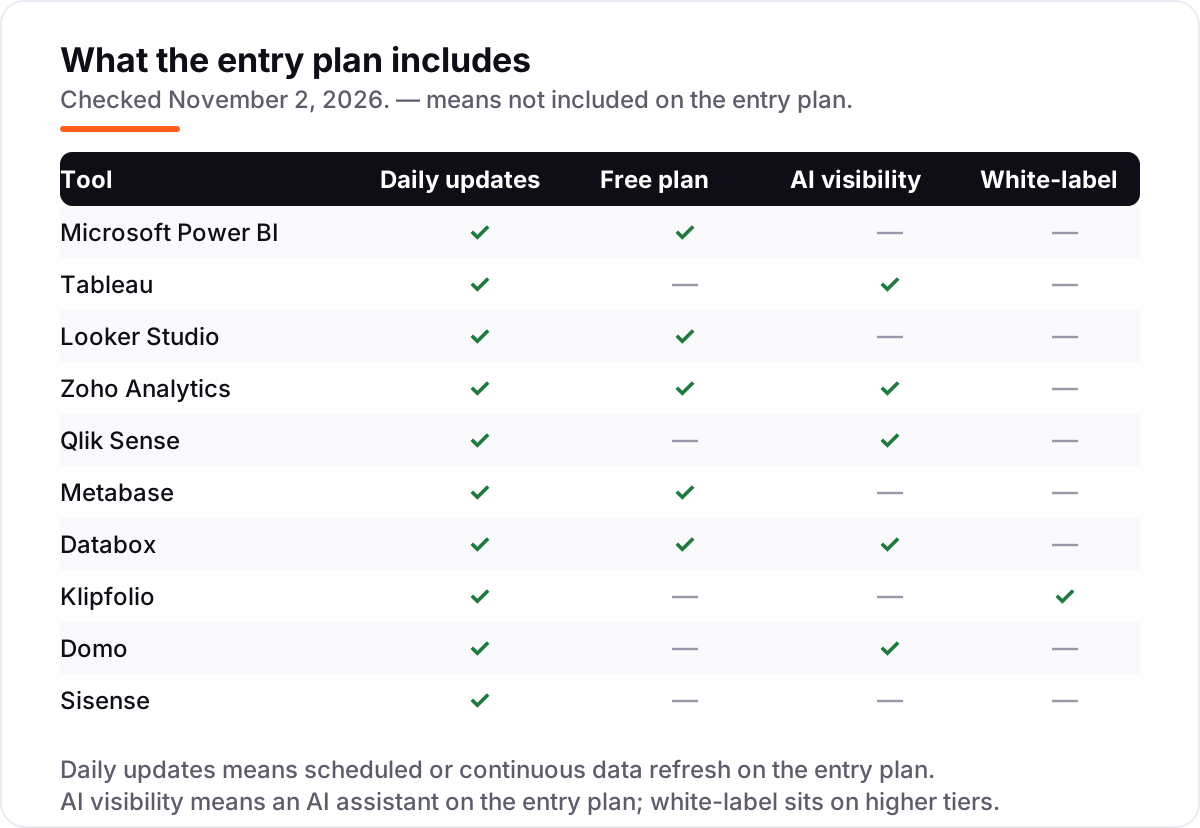
- Check the refresh rate. Scheduled refresh on the entry plan is enough for weekly reporting; live or hourly refresh matters for sales and operations dashboards.
- Ask where the AI lives. Some tools include an AI assistant on the entry plan (Qlik, Databox, Zoho), others charge extra or reserve it for enterprise tiers.
- Check the sharing model. Sharing inside the team is standard; sharing with clients or the public often needs a higher tier or a paid add-on.
- Try the free plan or trial first. Every tool in this list has a free plan or a free trial — connect your real data and build one real dashboard before paying.
Before you publish dashboards publicly, run the page title through the free SERP snippet preview tool — it shows exactly how the title and description will look in Google.
Quick comparison: tool type by need
| Buyer | Best pick | Why |
|---|---|---|
| Solo marketer in the Google stack | Looker Studio | Free, native Google connectors |
| Small team, best value | Microsoft Power BI | Full BI from $14/user/month |
| Deepest visual analysis | Tableau | Strongest charting; viewers from $15 |
| Small business on a budget | Zoho Analytics | $24/month for 2 users, free plan |
| Mid-size team, governed self-service | Qlik Sense | Flat $300 for 10 users, AI included |
| Technical team, open source | Metabase | Free self-hosted, hosted from $100 |
| Marketing KPI dashboards | Databox | Free plan with AI analyst, from $71 |
| Unlimited users, flat price | Klipfolio | $120/month, every user included |
| Large team, all-in-one platform | Domo | Unlimited users, credit-based, custom quote |
| SaaS embedding analytics | Sisense | White-label, multi-tenant, custom quote |
BI software pricing: what you will actually pay
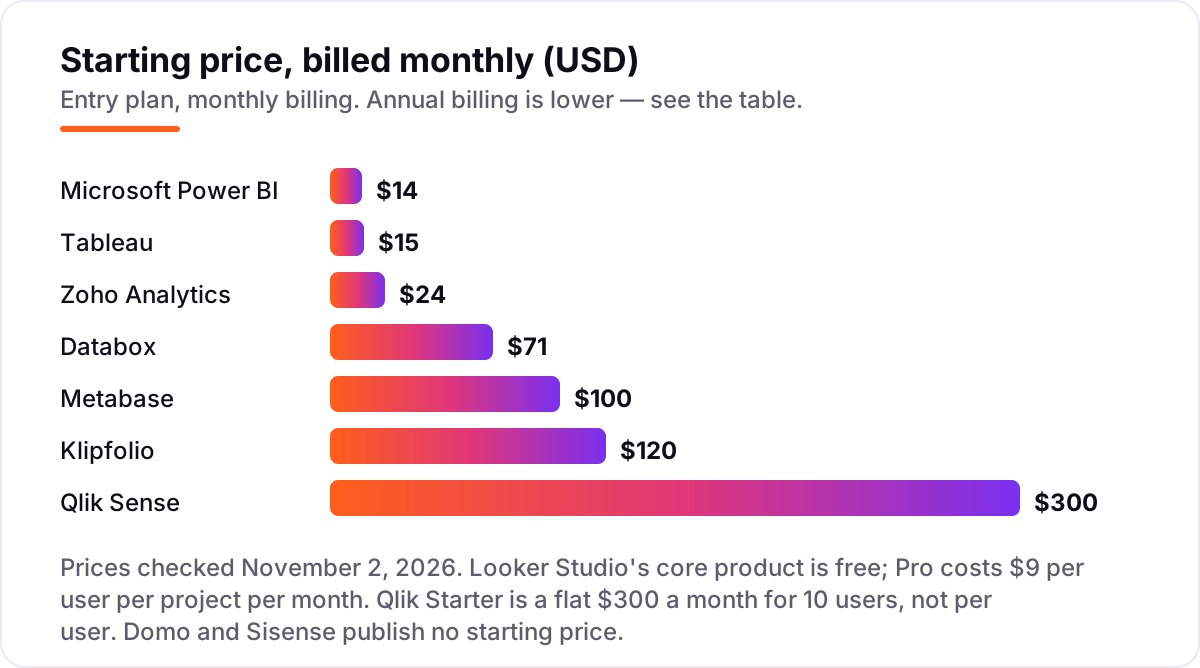
The sticker price is only the start. Annual billing cuts most tools by 15–20% — Power BI Pro is $14 a month paid yearly with no monthly option, Tableau is annual-only too, and Klipfolio Base is $120 billed annually against $140 billed monthly. The second cost is seats: a per-seat tool multiplies by every viewer, while flat plans stay fixed. The third cost is the tier above: AI assistants, white-label reports and live connections usually sit one or two plans up from the entry price.
A 10-person team, all viewing dashboards, pays very different amounts. On Power BI, 10 Pro licences cost $140 a month. On Tableau, one Creator at $75 plus 9 Viewers at $15 costs $210 a month. Qlik Starter is a flat $300 a month for 10 users. Zoho Premium at $115 a month billed annually covers 15 users. Metabase Starter is $100 for 5 users plus 5 extra at $6, so $130 a month. Klipfolio Base is a flat $120 a month with unlimited users. Databox needs Team Scale at $319 a month billed annually for 10 users. Looker Studio costs nothing for all 10. Domo and Sisense need a quote, so budget a sales call.
The pattern is clear: under 10 users, per-seat tools are cheapest; over 10, flat and unlimited-user plans win. Count the viewers before you count the features.
BI software vs. dashboard tools: know the difference
A dashboard tool shows numbers; BI software explains them. Dashboard tools — and most free chart builders — connect to a source and draw a chart. BI software adds a data model underneath: it joins tables, defines metrics once, governs who sees what, and lets anyone explore without writing SQL. That model is what you pay for.
The test is what happens when someone asks a follow-up question. With a dashboard tool, the answer needs a new chart built by whoever owns the dashboard. With BI software, the viewer filters, drills down and asks the AI assistant, and the answer comes from the same governed metrics. If your team only needs a chart on a screen, a dashboard tool is enough — Databox or Klipfolio will do it for less. If people need to explore the data themselves, you need BI.
The tools in this list sit on the BI side of that line, with different depths. Power BI, Tableau, Qlik and Sisense are full BI platforms with data modeling. Looker Studio, Databox and Klipfolio are lighter — strong at dashboards, thinner at modeling — which is why they cost less. Match the depth to the questions your team actually asks.
How we chose
We checked each vendor's own pricing page on November 2, 2026 and recorded the starting price exactly as shown, including the annual-billing figure where the page lists one. Ratings come from G2 pages opened the same day, with review counts shown. We ranked the tools by fit for the most common buyer — a small or mid-size team buying its first BI tool — not by brand size. No vendor paid for a place in this list, and none of the links here are affiliate links.
Three prices need a note. Zoho's pricing page could not be opened on the day, so the $24 Basic figure comes from Zoho's own October 28, 2026 announcement and Zoho's published plan comparison, which lists the same $24 annual and $30 monthly figures. Metabase's pricing page opened but its plan cards did not render, so the $100 Starter figure comes from October 2026 reads of that same vendor page by two independent directories. Databox's own blog lists Analyst at $64 a month, but the vendor pricing page — confirmed by G2's vendor-supplied pricing and three independent checks — lists $71 a month billed annually, and $71 is the figure used here. Several directories still show older prices for Qlik ($30 per user), Klipfolio ($90) and Metabase ($85); the figures here are the current vendor prices.
What to do next
Start with the decision path above: count your viewers, check the refresh rate, and decide whether you need full BI or a dashboard tool. Then take the free plan or trial of your top pick, connect your real data, and build one dashboard your team will actually use for a week. If the numbers match your source systems and people keep opening it, you have your tool. If you want the setup and the reporting read for you, our AI search optimization service can help you get the data and the dashboards in place. Once your tools are in place, find out what's holding your rankings back.
Your stack only works if people find you
SerpAstra fixes what keeps your site off page one and makes it easy for AI assistants to recommend.
Get a free audit→Sources we checked (21)
- Microsoft Power BI pricing — microsoft.com (checked November 2, 2026)
- Microsoft Power BI on G2 — 4.5/5, 1,662 reviews (checked November 2, 2026)
- Tableau pricing — tableau.com/pricing (checked November 2, 2026)
- Tableau on G2 — 4.4/5, 4,235 reviews (checked November 2, 2026)
- Looker Studio pricing — cloud.google.com/data-studio (checked November 2, 2026)
- Looker Studio on G2 — 4.4/5, 477 reviews (checked November 2, 2026)
- Zoho Analytics pricing — zoho.com/analytics/pricing-comparison.html (checked November 2, 2026)
- Zoho Analytics on G2 — 4.2/5, 290 reviews (checked November 2, 2026)
- Zoho Analytics Basic pricing — Zoho press release, October 28, 2026 (Basic from $24/month billed annually)
- Qlik Sense pricing — qlik.com/us/pricing (checked November 2, 2026)
- Qlik Sense on G2 — 4.4/5, 929 reviews (checked November 2, 2026)
- Metabase pricing — metabase.com/pricing (checked November 2, 2026)
- Metabase on G2 — 4.4/5, 147 reviews (checked November 2, 2026)
- Databox pricing — databox.com/pricing (checked November 2, 2026)
- Databox on G2 — 4.4/5, 194 reviews (checked November 2, 2026)
- Klipfolio pricing — klipfolio.com/pricing (checked November 2, 2026)
- Klipfolio on G2 — 4.5/5, 257 reviews (checked November 2, 2026)
- Domo pricing — domo.com (checked November 2, 2026)
- Domo on G2 — 4.3/5, 1,085 reviews (checked November 2, 2026)
- Sisense pricing — sisense.com (checked November 2, 2026)
- Sisense on G2 — 4.2/5, 1,063 reviews (checked November 2, 2026)
Shamim
Founder of SerpAstra
A full-stack SEO and digital marketer who spends most days on Local SEO for dental practices, AI search visibility and lead generation.
Frequently asked questions
What is the best BI software for analytics in 2026?
Microsoft Power BI is the best value for most teams: full BI from $14 per user a month, with a free account for building reports. Tableau is the pick for the deepest visual analysis, and Looker Studio is free for Google teams. If you need governed self-service with AI included, Qlik Sense at $300 a month for 10 users is the mid-market pick.
How much does BI software cost?
Between free and a custom quote. Looker Studio is free, Zoho Analytics starts at $24 a month and Power BI at $14 per user a month. Mid-range tools run $71 to $300 a month — Databox at $71, Metabase at $100, Klipfolio at $120 and Qlik at $300. Domo and Sisense publish no price, so budget a sales call and expect enterprise-level contracts.
Is there a free BI software?
Yes, with limits. Looker Studio is free for creators and viewers, Zoho Analytics has a free plan for 2 users and 10,000 rows, Databox has a free plan for 1 user and 3 data sources, and Metabase is free and open source if you self-host. Free plans work for a single dashboard; once you need sharing or governance, a paid plan is cheaper than the workarounds.
What is the difference between BI software and a dashboard tool?
A dashboard tool shows numbers; BI software explains them. Dashboard tools connect to a source and draw a chart. BI software adds a data model underneath: it joins tables, defines metrics once, governs who sees what, and lets anyone explore without writing SQL. If your team only needs a chart on a screen, a dashboard tool is enough; if people need to explore the data, you need BI.
Do I need Power BI or Tableau?
Choose Power BI if cost and the Microsoft stack decide it: $14 per user a month, native Excel and Teams integration, and the cheapest full BI in this list. Choose Tableau if visual analysis is the job: the strongest charting here, Viewer licences at $15 a month, and Tableau Pulse AI insights on Standard. Both are strong; the deciding factor is usually what your team already uses.
Does BI software include AI features?
Some of it does on the entry plan, and some of it does not. Qlik includes Answers Agents on Starter, Databox includes the Genie AI analyst on its free plan, Tableau includes Pulse insights on Standard, and Zoho includes basic Ask Zia on every plan. Power BI needs Fabric capacity for Copilot, Tableau Agent is Cloud-only, and Metabot is a paid add-on for Metabase; check before you buy.
What should I check before paying for BI software?
Four things: how many people need to view the dashboards and what each viewer costs, whether data refreshes on a schedule that fits your reporting, whether the AI assistant and white-label reports are on the plan you are buying or a higher tier, and whether the price is monthly or annual billing. All four vary. The comparison table shows the starting price and free plan for each tool.
Free SEO and AI visibility audit
Find out what is holding your rankings back
Send us your site. Within 2 business days you get a written audit, an AI visibility check and a short fix list ranked by impact. Free, with no contract attached.
Request my free audit→Related guides
 AI, Data & Analytics10 Best Digital Analytics Software in 2026, Compared10 best digital analytics software options compared on price, free plans and AI features, with every starting price checked on November 2, 2026.Read guide →
 AI, Data & Analytics9 Best BI Software for Small Business in 2026, Compared9 best bi software for small business compared on price, free plans and G2 ratings — find the cheapest dashboard, from free tools to quote-only platforms.Read guide →
 SEO & AI Search10 Best AI Search Visibility Optimization Tools in 2026, Compared10 best AI search visibility optimization tools compared on price, engines and prompt limits, with free plans and G2 ratings. Prices checked October 31, 2026.Read guide →