
10 Best AI Tools for Creating YouTube Videos in 2026, Compared
Compare the 10 best ai tools for creating youtube videos in 2026 on price, free plans and AI features, with every price checked November 5, 2026.
 Shamim Mia, Founder, SerpAstraLast verified November 5, 202613 min read
We compare pricing pages, documentation and public reviews. We never accept payment for rankings.

Key takeaways
- Descript is the best fit for most YouTubers at $24/month; Pictory follows at $29/month for faceless channels, and InVideo at $20/month for prompt-built videos.
- Nine of the ten tools offer a free plan — Pictory is the only one with a trial instead — so test the workflow before paying for a year.
- The meter that decides your real bill is credits, not the seat price: minutes, generations and exports all draw from a monthly allowance that resets.
On this page
Quick comparison
| Tool | Best for | Starting price | Free plan |
|---|---|---|---|
| Descript | YouTubers who film talking-head videos and want to edit by deleting words from a transcript | $24/mo | Yes (free plan) |
| Pictory | Faceless channels that turn scripts, blog posts or articles into narrated videos | $29/mo | No (14-day trial) |
| InVideo | Creators who want an AI agent to build a finished video from a prompt, image or URL | $20/mo | Yes (free plan) |
| Synthesia | Channels that need a professional on-camera presenter without filming anyone | $19/mo | Yes (Basic plan) |
| HeyGen | Creators who want the most lifelike avatar presenter and lip-synced translation | $29/mo | Yes (free plan) |
| CapCut | Short-form creators who edit on their phone and want AI captions, effects and templates fast | $19.99/mo | Yes (free plan) |
| Runway | Creators who need AI-generated B-roll, intros and visual shots no camera can get | $15/mo | Yes (free plan) |
| Animoto | Small businesses and creators who want quick template videos from photos and clips | $19/mo | Yes (free plan) |
| Opus Clip | Podcasters and talkers who turn long recordings into scored vertical clips | $15/mo | Yes (free plan) |
| Vizard | Creators who clip a lot of long video and want the most source minutes per dollar | $29/mo | Yes (free plan) |
Make one of these tools?
We re-check this list every quarter. Send a correction, request a review, or ask about a clearly labeled sponsored spot.
Request a listingThe best AI tools for creating YouTube videos

Descript
Best for: YouTubers who film talking-head videos and want to edit by deleting words from a transcript
Descript is the strongest all-round editor for a YouTuber who films themselves talking. You edit the transcript like a document — cut a sentence and the video follows — and Studio Sound plus filler-word removal turn a rough take into a publishable one. Hobbyist costs $24 a month, or $16 billed annually, and covers 10 media hours, 400 AI credits and watermark-free 1080p export.
The catch is the double meter. Media hours pay for the footage you upload and AI credits pay for the AI work, and both reset monthly without rolling over, so a long interview week can burn through both. Creator at $24 a month billed annually adds 30 media hours, 800 credits and 4K export. Buy Descript when you record real footage and hate timelines; buy Pictory or InVideo when there is no footage to edit.
What we like
- Edit video by editing the transcript: delete a sentence and the video cut follows
- Studio Sound and filler-word removal clean up a rough recording in one click
- AI captions, eye-contact correction and green-screen tools are built into the editor
- Exports an editable timeline to Premiere Pro and Final Cut Pro when you outgrow it
Watch out for
- Paid plans are priced per editor, so a second editor doubles the bill
- Media hours and AI credits are separate meters, and both run out on long projects
- Learning the text-based workflow takes a few videos before it feels fast

Pictory
Best for: Faceless channels that turn scripts, blog posts or articles into narrated videos
Pictory is built for faceless channels: paste a script, a blog post or a URL and it returns a captioned, narrated video built from licensed stock footage, with no camera and no editing skill involved. Starter costs $29 a month, or $25 billed annually, and covers 2,000 credits a month — up to 30 minutes of video — plus a brand kit and watermark-free export.
The weakness is the footage matching. The AI picks clips by keyword, so a script about a specific idea often gets generic footage that only loosely fits, and fixing that means swapping clips by hand. The standard voices also sound flat next to a real narrator. Buy Pictory when you publish script-led videos at volume; buy Descript when you appear on camera yourself.
What we like
- Paste a script, article or URL and get a captioned, narrated video back in minutes
- Millions of licensed Getty and Storyblocks clips are bundled into the price
- Auto-captions and AI voices in many languages, with no editing skill needed
- One seat covers the whole workflow: script, visuals, voiceover and captions
Watch out for
- The AI matches keywords to stock clips, so footage often misses the script's intent
- Standard voices sound flat; natural voices sit on higher plans
- No free plan, only a 14-day trial, and all fees are non-refundable

InVideo
Best for: Creators who want an AI agent to build a finished video from a prompt, image or URL
InVideo rebuilt its plans in October 2026 around an AI agent: describe the video you want, or paste a script, image or URL, and it writes the script, picks the visuals, adds a voiceover and music, then hands back a finished draft you can revise by chatting with it. Starter costs $20 a month, or $10 billed annually, for 400 credits a month, and every paid plan removes the watermark.
The meter is the whole story. Credits pay for generations, and a render that fails or freezes still spends them, while unused credits expire at month end. Plus at $60 a month, or $30 billed annually, raises the allowance to 2,000 credits and unlocks the stronger models. Buy InVideo when you want a draft fast; buy Pictory when the script already exists and only needs visuals.
What we like
- One prompt produces a complete video: script, visuals, voiceover, music and captions
- Access to modern generative models including Seedance for AI video clips
- A huge template and stock library for intros, ads and faceless channel videos
- Chat-based editing lets you revise a video by describing the change
Watch out for
- Credits pay for every generation, and a failed or frozen render still costs credits
- Unused credits do not roll over, so heavy months punish light months
- The credit meter makes the real cost per video hard to predict before you start

Synthesia
Best for: Channels that need a professional on-camera presenter without filming anyone
Synthesia is the enterprise standard for avatar video: type a script, pick one of 125+ stock avatars or build a personal avatar, and get a clean presenter-led video in 140+ languages, with one-click translation for a second market. Starter costs $19 a month for US visitors, or $14 billed annually, and covers 1,250 credits a month plus downloads with the logo removed.
Two things to know before buying. The free Basic plan gives 10 minutes a month but stamps a logo on the video and blocks downloads, so it is a preview, not a tool. And Synthesia shows different prices by region — the standard card lists Starter at $29 a month — so confirm the figure on your own screen. Buy Synthesia for polished explainer and training videos; buy HeyGen when realism matters more than polish.
What we like
- 125+ stock avatars and personal avatars that present your script in 140+ languages
- One-click translation and dubbing for reaching viewers outside your home market
- PowerPoint import and screen recording fit tutorials and explainer channels
- The most-reviewed avatar tool here, with 2,800+ G2 reviews behind it
Watch out for
- The free Basic plan stamps a logo on videos and will not let you download them
- Avatar delivery can feel stiff next to a real presenter, especially for casual content
- The page shows different prices by region, so the US price is not universal

HeyGen
Best for: Creators who want the most lifelike avatar presenter and lip-synced translation
HeyGen makes the most lifelike avatars you can buy without a studio: a digital twin built from a 15-second recording delivers your script with convincing lip-sync and gestures, and the same editor translates the finished video into 175+ languages with the lips re-synced. Creator costs $29 a month, or $24 billed annually, for 600 credits a month, 1080p export and no HeyGen branding.
The credit math is the limit. The newest avatar models burn credits far faster than the older ones, so 600 credits can mean 150 minutes on one model and barely 12 on another, and there are no one-time top-ups on Creator — a big month means Pro from $49 a month. Buy HeyGen when the presenter has to look real; buy Synthesia when you need scale, training features and the deeper review record.
What we like
- The most lifelike avatars in this list, with the highest G2 score here at 4.8/5
- Lip-synced translation into 175+ languages from the same credit balance
- Build a digital twin from a 15-second recording and reuse it across videos
- Generates B-roll scenes, captions and cutdowns in the same editor
Watch out for
- Creator's 600 credits run out fast on the newest avatar models
- No one-time credit packs on Creator, so a big month forces the Pro plan
- Billing complaints are the most common theme in its lower-star reviews

CapCut
Best for: Short-form creators who edit on their phone and want AI captions, effects and templates fast
CapCut is the fastest way to cut a Short: auto-captions, background removal, motion tracking and a template library that follows short-form trends, all in an editor that runs on phone, desktop and web. The free plan covers editing, and Pro costs $19.99 a month, or $179.99 yearly, for 4K export, the full AI toolkit, 1,200 AI credits a month and 1TB of cloud storage.
The honest caveat is pricing. CapCut publishes no price list: the figure above comes from its own plan-comparison page and US app-store listings, and what you see depends on region, device and store. A cheaper Standard tier at about $9.99 a month exists, but it is mobile-only, capped at 1080p and lacks the full AI toolkit. Buy CapCut for Shorts speed; buy Descript when the video is long-form and the edit needs precision.
What we like
- The fastest mobile editor here: auto-captions, background removal and motion tracking
- Huge template, effect and music library that tracks short-form trends
- Same project opens on phone, desktop and web, so editing continues anywhere
- Free plan covers real editing; you pay only when Pro assets or 4K matter
Watch out for
- CapCut publishes no price list, and the price varies by region, device and store
- Pro-tagged templates, effects and music watermark the export on the free plan
- 4K export and the full AI toolkit sit behind Pro, not the cheaper Standard tier

Runway
Best for: Creators who need AI-generated B-roll, intros and visual shots no camera can get
Runway is the tool for the shots you cannot film: type a prompt or upload an image and Gen-4.5 generates cinematic B-roll, product shots and transitions, with partner models like Kling in the same subscription. Standard costs $15 a month, or $12 billed annually, for 625 credits a month, 4K upscaling, no watermarks and an editing studio to cut the clips into your video.
The meter is brutal at this price. Those 625 credits buy about 52 seconds of Gen-4.5, and a generation that misses the prompt costs the same as one that lands, so expect several tries per usable shot. Pro at $35 a month, or $28 billed annually, raises the allowance to 2,250 credits. Buy Runway for B-roll and visual effects; buy Pictory or InVideo when the whole video needs generating, not just the shots.
What we like
- Its own Gen-4.5 model plus resold models like Kling in one subscription
- Generates cinematic B-roll, product shots and transitions from text or images
- 4K upscaling and no watermarks from the Standard plan upward
- A real editing studio sits next to generation, so clips go straight into the cut
Watch out for
- 625 credits buy only about 52 seconds of Gen-4.5 video, so the meter runs out fast
- A generation that misses the prompt costs exactly the same as one that lands
- Credits reset monthly with no rollover on Standard, so unused credits vanish

Animoto
Best for: Small businesses and creators who want quick template videos from photos and clips
Animoto is the simplest tool in this list: pick a template, drop in photos and clips, add music, and publish a clean slideshow-style video in minutes, with no timeline and nothing to learn. Basic costs $19 a month, or $9 billed annually, for watermark-free 1080p downloads, and the free plan already allows unlimited video creation at 720p with a watermark.
The trade-off is control. Templates decide the look, so two channels using the same template end up with similar videos, and 4K export, voice-over and branding wait for Professional at $19 a month billed annually. Reviewers also call it pricey for what it does. Buy Animoto when speed beats originality; buy CapCut when you want the same speed with a real timeline underneath.
What we like
- The simplest tool here: pick a template, drop in photos and clips, publish
- Drag-and-drop editing with licensed music and 1 million+ Getty assets on Professional
- Unlimited video creation even on the free plan, at 720p with a watermark
- Professional adds 4K, voice-over, branding and saved templates for $19/month
Watch out for
- Template-only design with limited control over the finished look
- No 4K export and no voice-over on the entry plan
- Reviewers call it pricey for the feature set, and templates can look dated

Opus Clip
Best for: Podcasters and talkers who turn long recordings into scored vertical clips
Opus Clip does one job: feed it a long video or podcast and it finds the moments worth clipping, scores each one for viral potential, reframes the speakers vertically and burns in animated captions. Starter costs $15 a month, monthly billing only, for 150 credits — one credit per minute of source video — plus auto-posting to YouTube Shorts, TikTok and Instagram Reels.
The limits are the shape of the output. Starter exports vertical 9:16 clips only, with no scheduler and no square or landscape formats, and there is no annual price, so the $15 never drops. Pro at $29 a month, or $14.50 billed annually, adds the scheduler and 300 credits. Buy Opus Clip when the virality score helps you choose; buy Vizard when you clip more minutes and want 4K.
What we like
- Finds the best moments in a long video and scores each clip for viral potential
- Animated captions, auto-reframe and filler removal come with every clip
- Auto-posts finished clips to YouTube Shorts, TikTok and Instagram Reels
- One credit equals one minute of source video, so the cost is easy to predict
Watch out for
- Starter exports 9:16 clips only, with no scheduler and no square or landscape output
- Starter has no annual billing option, so the $15 price never drops
- Billing and cancellation complaints are the most common theme in its reviews

Vizard
Best for: Creators who clip a lot of long video and want the most source minutes per dollar
Vizard is the value clipper: Creator costs $29 a month, or $14.50 billed annually, for 600 source minutes a month — four times what Opus Clip Starter gives at the same monthly price — with 4K export, no watermark, no length limit and scheduling to six social accounts built in. The free plan covers 60 credits a month at 720p with a watermark.
The catch is the same as every clipper: the AI finds usable moments, not necessarily the best ones, and its virality score is a rough guide rather than a prediction, so a joke can still get cut before the punchline. Business at $39 a month, or $19.50 billed annually, adds a shared workspace and brand kit. Buy Vizard when you clip in volume; buy Opus Clip when the per-clip virality score is the feature you actually use.
What we like
- 600 source minutes a month on Creator, four times Opus Clip Starter at the same price
- 4K export with no watermark and no length limit from the entry paid plan
- Built-in scheduling posts clips to six social accounts without a second tool
- The highest-rated clipper here at 4.7/5 on G2 across 434 reviews
Watch out for
- The free plan caps exports at 10 minutes and keeps clips only 3 days
- Its virality score is directional, not a prediction you should trust blindly
- The AI can cut a joke before the punchline, so every clip still needs a review
The best ai tools for creating youtube videos fall into four jobs: editing footage you shot, generating video from a script, putting an AI presenter on screen, and cutting long videos into Shorts. We ranked the ten tools below by fit for the most common buyer — a solo creator publishing weekly — starting with the all-round editor and ending with the two clippers, and every price was checked on the vendor's own pricing page on November 5, 2026.
How to choose the best ai tools for creating youtube videos
- Start with the job, not the tool. Editing footage needs Descript or CapCut; a script with no footage needs Pictory or InVideo; a presenter needs Synthesia or HeyGen; Shorts from a long video need Opus Clip or Vizard.
- Read the credit meter before the price. Minutes, generations and exports all draw from a monthly allowance: Runway's 625 credits buy about 52 seconds of Gen-4.5, and HeyGen's 600 credits last 150 minutes on one avatar model and 12 on another.
- Check what the free plan actually exports. Nine tools here have one, but most watermark the video, cap it at 720p or block downloads — Synthesia Basic will not let you download at all.
- Count the seats. Descript charges per editor and HeyGen charges per avatar slot, so a team pays multiples of the headline price.
- Try the workflow on a real video first. A free plan is enough to cut one full video end to end, and that video tells you more than any review can.
The tool is only half the job: the video still has to be found. Our guide to the best YouTube SEO tools covers titles, tags and ranking, and before you publish, run your title through the free SERP snippet preview tool to see exactly how it will look in Google search results.
Whatever you shortlist, test it with a real upload before you pay for a year. The free plans in this list cover one genuine video — your footage, your script, your voice — and that video shows you the two things that matter: whether the output looks like your channel, and whether the credit allowance survives a normal week. Check the export too: resolution, watermark and whether the file downloads cleanly.
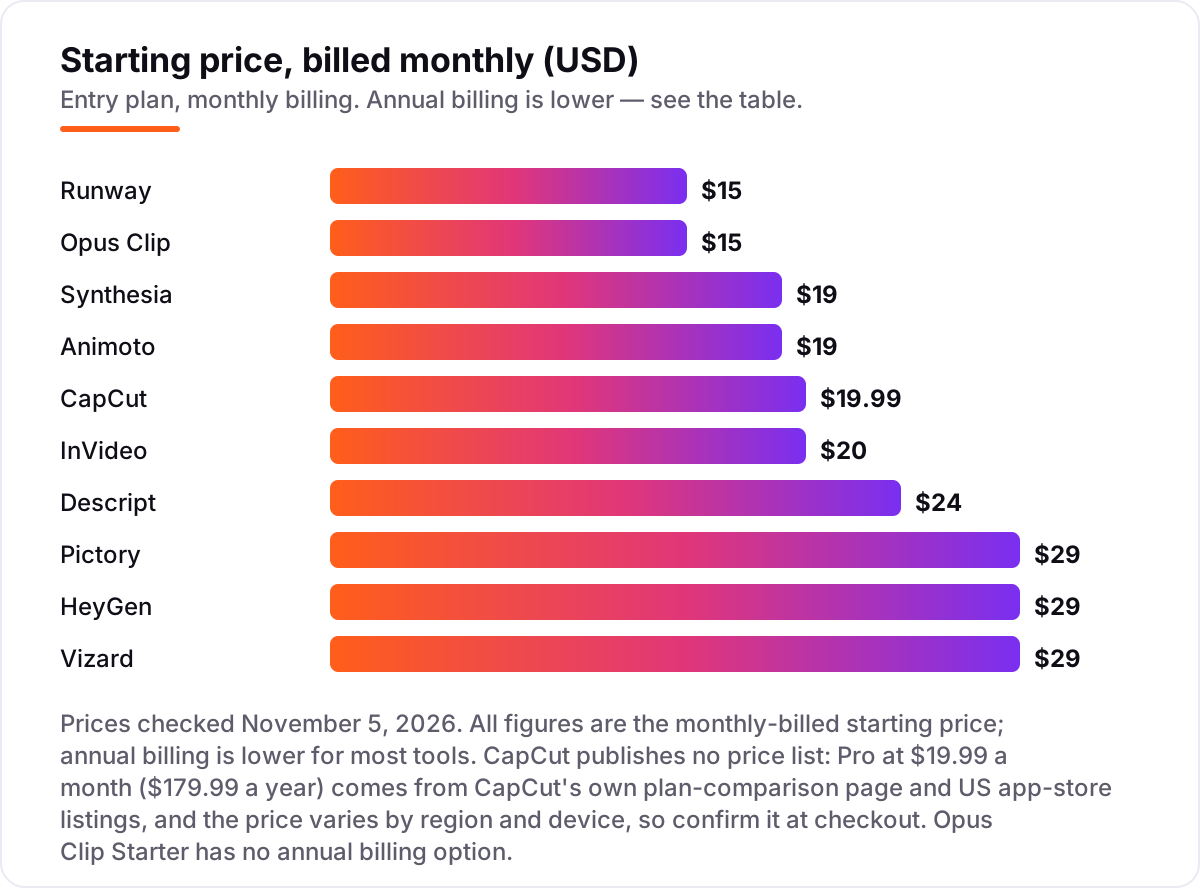
AI tools for creating YouTube videos pricing: what you will actually pay
Take a solo creator who publishes one long video a week and cuts Shorts from it. The long video gets edited in Descript Hobbyist: $16 a month billed annually, or $192 a year, against $24 a month, or $288 a year, paid monthly. The Shorts get clipped in Vizard Creator: $14.50 a month billed annually, or $174 a year, against $29 a month, or $348 a year, paid monthly. That two-tool stack costs $366 a year on annual billing and $636 a year on monthly billing — a $270 gap for the same videos.
A faceless channel has a cheaper stack. Pictory Starter at $25 a month billed annually is $300 a year, against $348 paid monthly, and InVideo Starter at $10 a month billed annually is $120 a year, against $240 paid monthly. The cheapest paid start in this list is Animoto Basic at $9 a month billed annually, or $108 a year, and the dearest single tool is Pictory or HeyGen at $29 a month on monthly billing.
Three costs sit outside every number above. First, the credit meter: Runway Standard's 625 credits buy about 52 seconds of Gen-4.5, so a creator who wants five minutes of generated B-roll a month needs Pro at $35 a month, or $28 billed annually. Second, the seat: a second Descript editor doubles the bill, and a second HeyGen avatar slot costs $29 a month. Third, CapCut's price itself: Pro is $19.99 a month at US web checkout, but a cheaper Standard tier at about $9.99 a month is mobile-only, capped at 1080p and lacks the full AI toolkit.
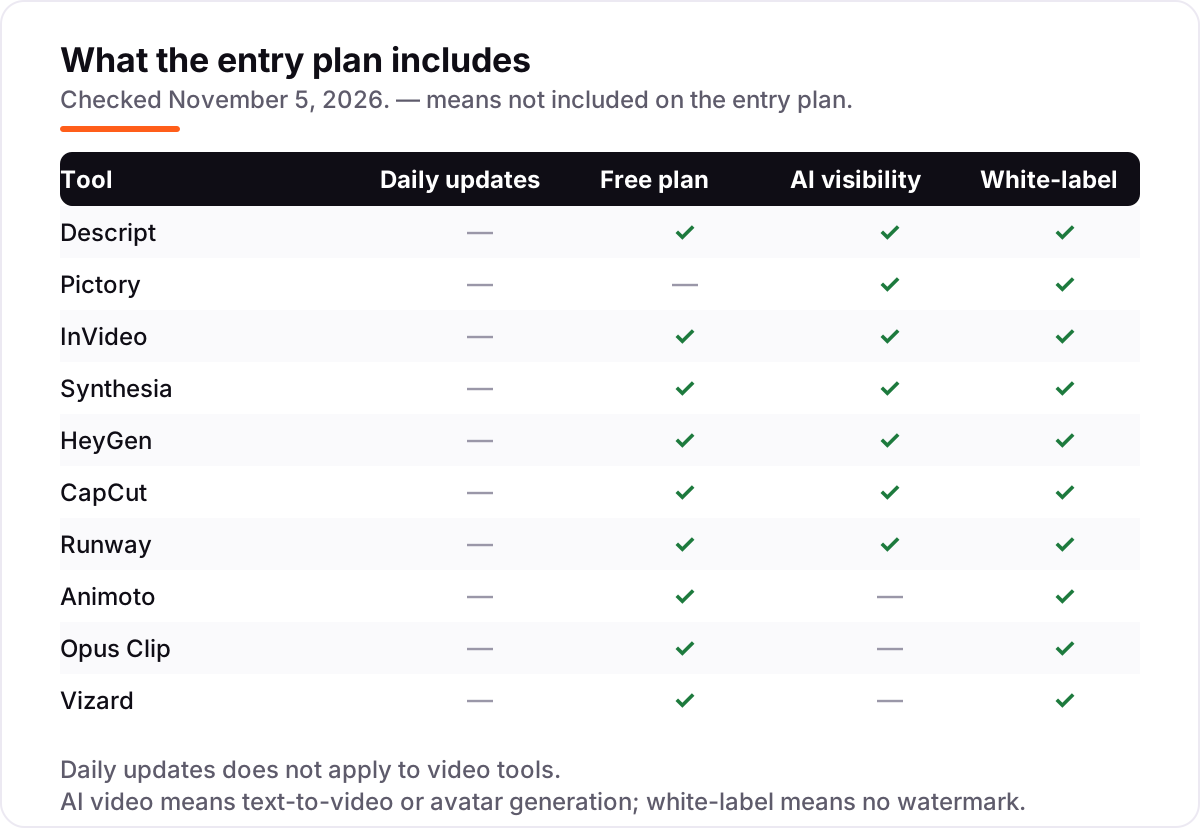
Know the difference: AI video generation vs AI video editing
The confusion in this category is between three different jobs that all get called "AI video". Generation creates footage that did not exist: Synthesia and HeyGen make an avatar presenter say your script, Pictory and InVideo assemble a video from text, and Runway generates B-roll from a prompt. Editing cuts footage you already shot: Descript edits it through the transcript and CapCut cuts it on a timeline, with AI doing the captions, cleanup and effects. Clipping sits between the two: Opus Clip and Vizard take a long video you recorded and cut it into vertical Shorts.
Buying the wrong job is the expensive mistake. A generation tool cannot fix a badly shot interview, and an editor cannot conjure a presenter you never filmed. Animoto is a fourth job — template assembly from photos and clips — which suits quick promo videos but not a channel that needs original footage. If you are unsure which job you have, look at your last three videos: if all three started as footage, you need an editor or a clipper; if all three started as a script, you need a generator.
A second distinction worth knowing is credits versus seats. Descript and HeyGen charge by seat — an editor, an avatar slot — while InVideo, Runway, Pictory, Opus Clip and Vizard charge by usage: credits that pay for minutes, generations or exports. A seat price is predictable; a credit price depends on how much you make. Heavy creators should price the credit meter first and the seat second, because the meter is what runs out mid-month.
Quick comparison: tool type by need
| Buyer | Best pick | Why |
|---|---|---|
| Talking-head YouTuber who films weekly | Descript | Edit the transcript, not the timeline, from $24/month |
| Faceless channel from scripts | Pictory | Script in, captioned video out, from $29/month |
| Video from a single prompt | InVideo | AI agent builds the whole video, from $20/month |
| Presenter without filming | HeyGen | Most lifelike avatars, 4.8/5 on G2, from $29/month |
| Shorts on a phone | CapCut | Fastest mobile editor with AI captions, Pro from $19.99/month |
| AI B-roll and visual shots | Runway | Gen-4.5 generation, from $15/month |
| Shorts from long videos | Vizard | 600 source minutes a month, from $29/month |
Mistakes to avoid
- Budgeting on the annual price while paying monthly. The gap is large: Descript is $16 a month billed annually but $24 monthly, and Vizard is $14.50 against $29. Compare tools on the billing cycle you will actually use.
- Ignoring the credit meter. The seat price is the smallest part of the bill on InVideo, Runway, HeyGen and Pictory. Check how many minutes or generations the plan includes, and what a second batch costs.
- Buying a generator when you need an editor. Synthesia cannot fix your footage and Descript cannot invent a presenter. Match the tool to the job your last three videos actually were.
- Trusting the free plan to cover publishing. Most free plans watermark the export, cap it at 720p or block downloads, and Synthesia Basic will not let you download at all. Budget for the first paid plan from the month you publish.
- Forgetting that CapCut's price moves. It publishes no price list, and the figure varies by region, device and store. Check the in-app Upgrade screen before you buy, and remember Pro jumped from about $9.99 to $19.99 a month in early 2026.
How we chose
We checked each vendor's own pricing page on November 5, 2026, using fresh crawls of the vendors' own pages read between October 29 and November 4, 2026 and cross-checked against our verified price facts, and recorded the starting price exactly as shown, including the annual-billing figure where the page lists one. One exception: CapCut publishes no price list, so its Pro price of $19.99 a month comes from CapCut's own plan-comparison page and US app-store listings, and it varies by region and device. We ranked the tools by fit for the most common buyer — a solo creator publishing weekly — not by brand size. Ratings are shown only where a fresh G2 page crawl confirmed the score and review count; CapCut has no G2 listing, so it carries no rating here. No vendor paid for a place in this list, and none of the links here are affiliate links.
What to do next
Start with the free plan or trial of your top pick and cut one real video end to end — your footage, your script, your channel's style — before you pay for a year. Check that the export is clean, the credits survive a normal week, and the finished video looks like your channel. If the videos are sorted but new viewers are not finding them, our monthly SEO service handles the visibility side — or compare the wider field in our guide to the best AI tools for video content creation. Once your tools are in place, find out what's holding your rankings back.
Your stack only works if people find you
SerpAstra fixes what keeps your site off page one and makes it easy for AI assistants to recommend.
Get a free audit→Sources we checked (19)
- Descript pricing — descript.com/pricing (checked November 5, 2026)
- Pictory pricing — pictory.ai/pricing (checked November 5, 2026)
- InVideo pricing — invideo.io/pricing (checked November 5, 2026)
- Synthesia pricing — synthesia.io/pricing (checked November 5, 2026)
- HeyGen pricing — heygen.com/pricing (checked November 5, 2026)
- CapCut pricing — capcut.com/pricing (checked November 5, 2026; no published price list, see How we chose)
- Runway pricing — runwayml.com/pricing (checked November 5, 2026)
- Animoto pricing — animoto.com/pricing (checked November 5, 2026)
- Opus Clip pricing — opus.pro/pricing (checked November 5, 2026)
- Vizard pricing — vizard.ai/pricing (checked November 5, 2026)
- Descript reviews — g2.com/products/descript/reviews (checked November 5, 2026)
- Pictory AI reviews — g2.com/products/pictory-ai/reviews (checked November 5, 2026)
- InVideo reviews — g2.com/products/invideo/reviews (checked November 5, 2026)
- Synthesia reviews — g2.com/products/synthesia/reviews (checked November 5, 2026)
- HeyGen reviews — g2.com/products/heygen/reviews (checked November 5, 2026)
- Runway reviews — g2.com/products/runway-2022-01-04/reviews (checked November 5, 2026)
- Animoto reviews — g2.com/compare/animoto-vs-wave-video (checked November 5, 2026)
- OpusClip reviews — g2.com/products/opusclip/reviews (checked November 5, 2026)
- Vizard reviews — g2.com/products/vizard-corp-vizard/reviews (checked November 5, 2026)
Shamim
Founder of SerpAstra
A full-stack SEO and digital marketer who spends most days on Local SEO for dental practices, AI search visibility and lead generation.
Frequently asked questions
What is the best AI tool for creating YouTube videos?
Descript is the best fit for most YouTubers: transcript-based editing, Studio Sound and captions from $24/month. Pictory is the better pick for faceless channels at $29/month, and InVideo is best when you want a finished video from a single prompt at $20/month.
How much do AI tools for creating YouTube videos cost?
Entry prices run from $15 to $29 a month on monthly billing, or $9 to $25 a month billed annually. Nine of the ten tools have a free plan, and a solo creator publishing weekly typically pays $120 to $360 a year for one tool, before credit top-ups.
Is there a free AI tool for creating YouTube videos?
Yes, with limits. Descript, InVideo, Synthesia, HeyGen, CapCut, Runway, Animoto, Opus Clip and Vizard all have free plans, but exports are usually watermarked, capped at 720p or limited to a small monthly credit allowance. Pictory is the only tool here with a trial instead of a free plan.
What is the difference between AI video generation and AI video editing?
Generation creates footage that did not exist: Synthesia and HeyGen make avatar presenters, Pictory and InVideo assemble videos from scripts, and Runway generates B-roll. Editing tools like Descript and CapCut cut footage you already shot. Clippers like Opus Clip and Vizard sit between the two.
Do I still need to film anything to use an AI YouTube tool?
Not with the generation tools. Pictory, InVideo, Synthesia and HeyGen build videos from a script alone, and Runway generates the visuals from a prompt. Descript, CapCut, Opus Clip and Vizard all need footage you recorded first, since they edit or clip rather than create.
Can I use these AI tools for YouTube Shorts?
Yes. Opus Clip and Vizard are built for it: they cut long videos into vertical clips with captions and post straight to Shorts. CapCut is the fastest phone editor for Shorts, and Runway generates the vertical B-roll. Descript and Pictory export in vertical formats too.
What should I check before paying for an AI video tool?
Check the credit meter first: how many minutes, generations or exports the plan includes and what happens when it runs out. Then check the export limits — resolution, watermark and download rights — and whether the plan you want is the one with the feature you need, since several tools hold 4K or scheduling back.
Free SEO and AI visibility audit
Find out what is holding your rankings back
Send us your site. Within 2 business days you get a written audit, an AI visibility check and a short fix list ranked by impact. Free, with no contract attached.
Request my free audit→Related guides
 AI, Data & Analytics12 Best AI Tools for Video Content Creation in 2026, Compared12 best AI tools for video content creation compared with real prices, free plans and G2 ratings, so you can pick the right video maker without overpaying.Read guide →
 SEO & AI Search7 Best YouTube SEO Tools in 2026 (Free and Paid, Compared)7 best YouTube SEO tools compared on price, keyword research and rank tracking, from free to $29 per month. Prices checked November 2, 2026.Read guide →
 Design, Video & Creative10 Best Video Editing Software for Small Business in 2026, ComparedCompare the 10 best video editing software for small business tools on price, free plans and AI features, with prices checked November 4, 2026.Read guide →