
10 Best AI Tools for YouTube Automation in 2026, Compared
Compare the 10 best ai tools for youtube automation on price, free plans and AI features, with every starting price checked November 5, 2026.
 Shamim Mia, Founder, SerpAstraLast verified November 5, 202614 min read
We compare pricing pages, documentation and public reviews. We never accept payment for rankings.

Key takeaways
- vidIQ is the best starting point at $19/month for keyword research and AI video ideas; InVideo follows at $20/month for full AI video creation, and OpusClip at $15/month for turning long videos into Shorts.
- Nine of the ten tools have a free plan — Pictory is the exception, with a 14-day trial instead — so you can test the whole pipeline before paying.
- The single most important buying factor is the meter that caps your month: credits, video minutes or media hours decide what you actually pay, not the headline price.
- No tool here runs a channel on its own. The best setups pair one research tool, one video maker and one clipper, for about $55–$75 a month.
On this page
Quick comparison
| Tool | Best for | Starting price | Free plan |
|---|---|---|---|
| vidIQ | YouTube creators who want keyword research, AI video ideas and channel optimization in one tool | $19/mo | Yes (free plan) |
| Pictory | Faceless channels that turn scripts, blog posts and URLs into narrated videos from stock footage | $29/mo | No (14-day trial) |
| InVideo | Creators who want AI-generated footage, voiceover and editing in one browser tool | $20/mo per seat | Yes (free plan) |
| Synthesia | Channels that need a presenter on screen without filming — training, explainers and faceless narration | $19/mo | Yes (Basic plan) |
| Descript | Creators who edit by transcript and want filler-word removal, captions and clip-finding in one editor | $24/mo per person | Yes (free plan) |
| OpusClip | Podcasters and talking-head creators who turn each long video into a stack of Shorts | $15/mo | Yes (free plan) |
| Vizard | Creators who want the most clip minutes per dollar, with a scheduler included | $29/mo | Yes (free plan) |
| TubeBuddy | Creators who do their SEO inside YouTube Studio and manage a large back catalogue | $15/mo | Yes (free plan) |
| CapCut | Short-form creators who edit on their phone and want fast auto-captions and templates | $19.99/mo | Yes (free plan) |
| Runway | Creators who generate B-roll, intros and visual ideas with AI instead of filming them | $15/mo per editor | Yes (free plan) |
Make one of these tools?
We re-check this list every quarter. Send a correction, request a review, or ask about a clearly labeled sponsored spot.
Request a listingThe best ai tools for youtube automation

vidIQ
Best for: YouTube creators who want keyword research, AI video ideas and channel optimization in one tool
vidIQ is the closest thing to a control room for a YouTube channel. It lives inside YouTube Studio as a browser extension, and it answers the questions that decide whether a video gets found: which keywords have real search volume, what the competition ranks for, and whether a title and thumbnail are strong enough to earn the click. Boost costs $19 a month, or $16.58 a month billed annually, and adds 2,000 AI credits a month, unlimited trend research and an AI Coach that turns your channel data into daily video ideas.
Plan around the credit meter. The free plan's 150 AI credits a month are enough to test the keyword tools, but a daily channel will burn through Boost's 2,000 credits on ideas, thumbnails and coaching. Buy vidIQ when search is your growth channel.
What we like
- Keyword research, trend alerts and competitor tracking built specifically for YouTube search
- AI Coach and daily video ideas turn channel data into a publishing plan
- Browser extension scores titles and thumbnails inside YouTube Studio
- Free plan is genuinely usable, with 150 AI credits a month
Watch out for
- Boost caps AI credits at 2,000 a month — heavy AI users hit the ceiling before the month ends
- No native A/B thumbnail testing; that job still needs a separate tool
- Annual plans are non-refundable, including unused credits

Pictory
Best for: Faceless channels that turn scripts, blog posts and URLs into narrated videos from stock footage
Pictory is built for the faceless channel: paste in a script, a blog URL, a PDF or a slide deck, and it assembles a finished video around the text — stock footage matched to each scene, an AI voiceover, captions and music. Starter costs $29 a month, or $25 a month billed annually, and covers 2,000 credits a month, which Pictory puts at up to 30 minutes of video.
The maths to check before you buy is minutes per month. Thirty minutes covers about four 7-minute videos, so a daily channel outgrows Starter quickly and needs Professional at $35 a month billed annually. There is no free plan, only a 14-day trial with watermarked 720p exports. Choose Pictory when your channel runs on scripts and stock footage.
What we like
- Script, URL, PDF or slides in — a captioned, voiced video out in minutes
- Stock library from Getty Images and Storyblocks is included, with no extra royalties
- AI video agent drafts the script, scenes and preview, then you refine by chat
- Every plan exports without a Pictory watermark at up to 1080p
Watch out for
- No free plan — only a 14-day trial, and trial exports are watermarked at 720p
- Starter's 30 video minutes a month run out fast on a daily publishing schedule
- Subscriptions are non-refundable, and cancelling deletes your projects

InVideo
Best for: Creators who want AI-generated footage, voiceover and editing in one browser tool
InVideo is the all-in-one option in this list: type a prompt and it generates the footage, voiceover, music and captions, then hands you a timeline editor to fix what the AI got wrong. Starter costs $20 a month per seat, or $10 a month per seat billed annually, and includes 400 credits a month, Agent Two Lite and up to five seats.
The catch is that InVideo sells credits, not minutes. The newer generation models — Seedance 2.5 at 1080p and Seedance 2.0 at 4K — start on Plus at $60 a month, so Starter is a stock-and-basic-generation plan, not a full AI studio. G2 reviewers also flag the credit system as confusing and refunds as hard to get.
What we like
- Generates footage, voiceover, music and captions from a single text prompt
- Timeline editor and multiplayer editing included on the entry plan
- 400 credits a month on Starter covers roughly 15 short generated clips
- Annual billing halves the price, to $10 a month
Watch out for
- Starter only gets Seedance 2.0 Fast and Mini — the newer models start on Plus at $60/month
- Credits are the real budget: 400 a month buys only a few minutes of generated footage
- Reviewers report frustration with the credit system and refund disputes

Synthesia
Best for: Channels that need a presenter on screen without filming — training, explainers and faceless narration
Synthesia puts a presenter on screen without a camera, a studio or a filming day: pick one of 125+ avatars, paste a script, and it renders a talking-head video in 160+ languages. Starter costs $19 a month, or $14 a month billed annually, and buys about 22 minutes of video a month — a free 10-minute allowance every plan gets, plus roughly 12 more from Starter's 1,250 credits.
The minute allowance is the whole decision. A channel posting one 10-minute explainer a week uses about 40 minutes a month, which already pushes past Starter into Pro at $89 a month. The free Basic plan gives 10 watermarked minutes a month with no download — enough to test whether your audience accepts an avatar presenter.
What we like
- 125+ stock avatars and 160+ languages, so one script becomes many localised videos
- Downloads and logo removal start on Starter, not a higher tier
- AI dubbing and a screen recorder are included for tutorial-style videos
- Highest review count in this list, at 4.6/5 from 2,857 G2 reviews
Watch out for
- Starter buys about 22 minutes of video a month — a weekly 10-minute show already needs Pro
- Avatar voices can sound robotic on longer scripts, reviewers note
- Every small edit needs a full re-render, which burns credits

Descript
Best for: Creators who edit by transcript and want filler-word removal, captions and clip-finding in one editor
Descript changes the editing job itself: it transcribes your video, and you cut it by deleting words in the transcript. Filler words, retakes and dead air come out with a keystroke, Studio Sound cleans up the audio, and captions are generated automatically. Hobbyist costs $24 a month per person, or $16 a month per person billed annually, and covers 10 media hours and 400 AI credits a month.
Two meters run at once, and both can stop you. Media hours count everything you upload or record; AI credits pay for Studio Sound, captions and Underlord's clip-finding. Hobbyist also allows one seat only, so a second editor doubles the bill. Buy Descript when editing is the bottleneck — talking-head videos, interviews and podcasts.
What we like
- Edit video by editing the transcript — delete a word, delete the clip
- Studio Sound, filler-word removal and captions are built in, not add-ons
- Underlord AI finds clips and drafts social posts from your long videos
- 4K export starts on Creator, but Hobbyist already exports watermark-free 1080p
Watch out for
- Priced per person, and every plan meters both media hours and AI credits
- Hobbyist allows 1 seat only — a second editor means a second subscription
- Can feel slow or glitchy on large projects, reviewers report

OpusClip
Best for: Podcasters and talking-head creators who turn each long video into a stack of Shorts
OpusClip does one job and does it fast: feed it a long video and it finds the moments worth clipping, cuts them into vertical Shorts, adds captions and scores each clip for virality. Starter costs $15 a month, sold monthly only, and buys 150 credits — one credit processes one minute of source video, so a 60-minute podcast costs 60 credits and returns a stack of clips.
The pricing is honest but the meter is unforgiving: credits expire after 60 days, and a month with no long video still costs $15. Pro at $29 a month doubles the credits to 300 and adds the social scheduler — and on annual billing Pro costs $14.50 a month, less than Starter. Start on the free plan's 60 credits to test clip quality first.
What we like
- One credit is one minute of source video, so the cost of a clip run is easy to predict
- Virality score ranks every clip before you publish it
- Auto-posts clips to Shorts, TikTok and Reels from the Starter plan
- Exports to Premiere Pro and DaVinci Resolve on Pro for a final polish pass
Watch out for
- Starter is monthly-only and has no social scheduler — scheduling starts on Pro
- Credits expire after 60 days, so a quiet month wastes paid minutes
- Trustpilot reviewers report difficult cancellations and refund disputes

Vizard
Best for: Creators who want the most clip minutes per dollar, with a scheduler included
Vizard is OpusClip's closest rival and the better value on minutes: Creator costs $29 a month, or $14.50 a month billed annually, and includes 600 credits a month — one credit per minute of uploaded video — against OpusClip Pro's 300 at the same price. It adds text-based editing, 4K export, a social scheduler and six connected accounts, and holds the highest G2 score in this list at 4.7/5 from 434 reviews.
The same meter warning applies: every uploaded minute costs a credit, whether it produces three clips or thirty, so a two-hour livestream eats 120 credits before you see a single Short. The free plan's 60 credits a month are enough to judge clip quality on one real video. Pick Vizard when you clip a lot of long video.
What we like
- 600 credits a month for $29 — twice OpusClip Pro's minutes at the same price
- Text-based editing and 4K export included on the Creator plan
- Social scheduler and 6 connected accounts on the entry paid plan
- Highest G2 score in this list, at 4.7/5 from 434 reviews
Watch out for
- Credit use is hard to predict on long uploads — one minute of source costs one credit whether it yields clips or not
- Free plan exports cap at 720p with a watermark and a 10-minute length limit
- No virality scoring on the free plan, and the editor is the main way to fix bad cuts

TubeBuddy
Best for: Creators who do their SEO inside YouTube Studio and manage a large back catalogue
TubeBuddy is the workhorse alternative to vidIQ: a browser extension that lives inside YouTube Studio and adds keyword research, tag suggestions, thumbnail checks and bulk editing to the upload flow you already use. Pro costs $15 a month, or $12 a month billed annually, and unlocks Keyword Explorer and SEO Studio.
Its best trick is bulk processing — retitle, retag and rewrite descriptions across dozens of old videos in one pass, which is where a neglected back catalogue starts earning views again. The limits are real: A/B thumbnail testing needs Legend at $32.99 a month, and paid plans stop being available past 50,000 subscribers or a third channel manager.
What we like
- Lives inside YouTube Studio, so tags, titles and bulk edits happen where you already work
- Keyword Explorer and SEO Studio on the entry paid plan
- Bulk processing fixes metadata across a whole back catalogue at once
- Cheapest useful paid plan here for catalogue work, at $12 a month billed annually
Watch out for
- A/B thumbnail testing and bulk tools wait for Legend at $32.99/month
- Paid plans are unavailable once you pass 50,000 subscribers or add a third channel manager
- The SEO scores are TubeBuddy's own model, not YouTube's ranking signal

CapCut
Best for: Short-form creators who edit on their phone and want fast auto-captions and templates
CapCut is the phone-first editor in this list, and the fastest way to finish a Short: auto-captions, background removal, templates and effects, with the same project open on mobile, desktop and web. The free plan is genuinely usable — full timeline, 1080p export, free assets — and Pro costs $19.99 a month or $179.99 a year, adding 4K export, the full AI toolkit and 1 TB of storage.
Two warnings before you pay. First, Pro doubled in price during 2026, from $89.99 to $179.99 a year, with no announcement — and CapCut says prices vary by region, device and promotion, so confirm the number at your own checkout. Second, CapCut has no G2 review page, so this card carries no rating.
What we like
- The fastest free editor here for vertical video, with auto-captions and background removal
- 1,200 AI credits a month on Pro for generative features inside the timeline
- 4K export, premium templates and 1 TB of cloud storage on Pro
- Works on mobile, desktop and web with the same project
Watch out for
- Pro doubled in price in 2026, from $89.99 to $179.99 a year, with no announcement
- Prices vary by region, device and promotion — the checkout price is the real one
- ByteDance ownership raises data questions, and the app is banned in India

Runway
Best for: Creators who generate B-roll, intros and visual ideas with AI instead of filming them
Runway is the generative half of a YouTube automation stack: it creates the B-roll, intros and visual cutaways you would otherwise have to film or buy. Standard costs $15 a month per editor, or $12 a month per editor billed annually, and includes 625 credits a month — about 52 seconds of Gen-4.5 video — plus 4K upscaling and no watermark.
The credit maths is brutal at this price. A single 5-second Gen-4.5 clip costs 60 credits, so Standard buys about ten usable clips a month before retakes — and a generation that misses costs the same as one that lands. Credits also expire on your billing date, with no rollover. Buy Runway when a few seconds of generated footage per video is enough.
What we like
- Gen-4.5 text-to-video and image-to-video in the same workspace as editing
- 4K upscaling and no watermark from the Standard plan
- Third-party models such as Veo 3.1 and Kling run inside the same subscription
- Unlimited 4K upscaling starts on Pro, for channels that generate a lot of B-roll
Watch out for
- 625 credits buy about 52 seconds of flagship-model video a month — retakes eat the budget fast
- Credits expire on your billing date, with no rollover on Standard
- Priced per editor, so a three-person team pays three times the headline price
The best ai tools for youtube automation do three jobs at once: they find what to make, they make the video, and they cut it into Shorts — with a human checking the result at each step. We ranked the ten tools below by fit for the most common buyer, a solo creator publishing weekly who wants less editing time without handing the channel to a black box, and every price was checked on the vendor's own pricing page on November 5, 2026.
How to choose the best ai tools for youtube automation
- Map the tool to the job, not the other way round. Research (vidIQ, TubeBuddy), video creation (Pictory, InVideo, Synthesia), editing (Descript, CapCut), clipping (OpusClip, Vizard) and generated footage (Runway) are five different jobs — one tool rarely does two of them well.
- Read the meter before the price. Credits, video minutes and media hours cap your month: OpusClip charges one credit per source minute, Pictory caps Starter at 30 video minutes, and Descript meters media hours and AI credits at once.
- Check the free plan's export rules. Most free plans here watermark exports or cap resolution at 720p, so a free plan is for testing, not publishing.
- Count seats and channels. Descript and Runway charge per person or per editor, and vidIQ's Boost covers one channel — a team or a second channel multiplies the bill.
- Keep the human in the loop. AI drafts, you decide: check facts, watch the finished video once, and reply to comments yourself. YouTube's disclosure rule for realistic AI content applies to most of what these tools produce.
YouTube is a search engine as much as a video platform, so the visibility side of automation matters as much as the editing side — our AI search optimization service covers how search and AI answers find your content. Before you publish, run your titles through the free title tag checker — a title that reads well in Studio is not always the title that wins the click.
Whatever you shortlist, test it on one real video before you pay for a year. The free plans and trials in this list are long enough to run one genuine upload — your script, your footage, your channel — and that video tells you more than any review can. Check three things in the test: that the output looks like your channel, that the export has no watermark, and that the credit or minute cost of that one video fits your monthly budget.
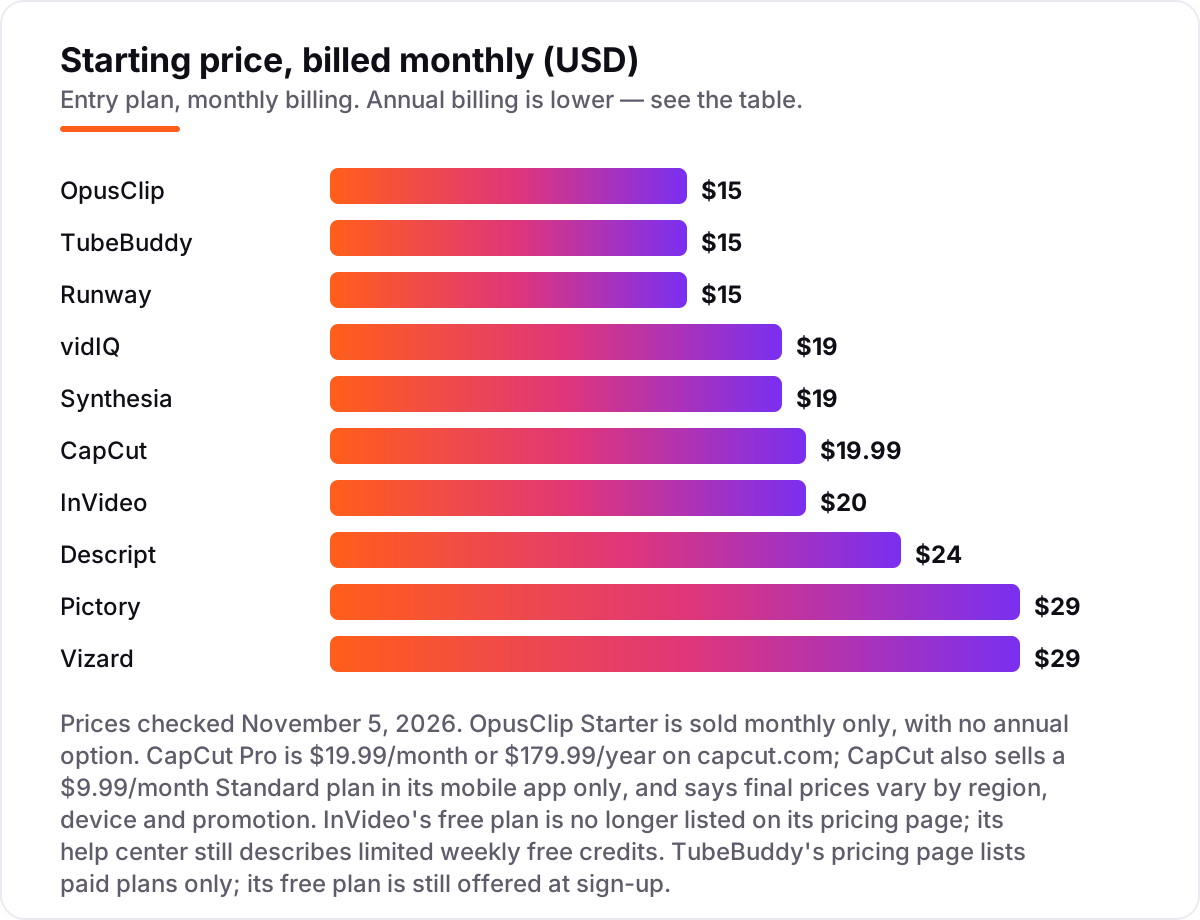
YouTube automation pricing: what you will actually pay
Take a solo creator publishing four long videos and eight Shorts a month. A three-tool stack covers the whole workflow: vidIQ Boost at $19 a month for research and ideas, Pictory Starter at $29 a month for the four long videos, and OpusClip Starter at $15 a month for the Shorts. On monthly billing that is $63 a month, or $756 a year. Switch vidIQ and Pictory to annual billing and the same stack costs $16.58 plus $25 plus $15 — $56.58 a month, or about $679 a year.
The cheapest working stack is smaller. InVideo Starter at $10 a month billed annually makes the long videos, OpusClip Starter at $15 a month cuts the Shorts, and vidIQ's free plan covers basic keyword checks — $25 a month, or $300 a year, with no research subscription at all. The trade-off is real: InVideo Starter only gets the basic generation models, and vidIQ's free plan caps AI credits at 150 a month, so the research stays manual.
Two costs sit outside every number above. First, the meters: Pictory Starter's 30 video minutes cover about four 7-minute videos, so a fifth long video means Professional at $35 a month billed annually. OpusClip's 150 credits cover 150 minutes of source video, so a two-hour livestream costs 120 credits before a single clip exists. Second, the seats: Descript Hobbyist at $24 a month and Runway Standard at $15 a month are both priced per person, so a second editor doubles both bills. If your channel also needs full video editing rather than just automation, see our guide to the best AI tools for video content creation.
Annual billing cuts the bill on most tools here: vidIQ Boost drops from $228 to $199 a year, Pictory Starter from $348 to $300, InVideo Starter from $240 to $120, Synthesia Starter from $228 to $168, and Descript Hobbyist from $288 to $192 a year. OpusClip Starter has no annual option, so $15 a month is the whole story — and on annual billing its Pro plan at $14.50 a month is actually cheaper than Starter. One more cost to check before you commit: a second channel is a second subscription on vidIQ and TubeBuddy, which both price per channel.
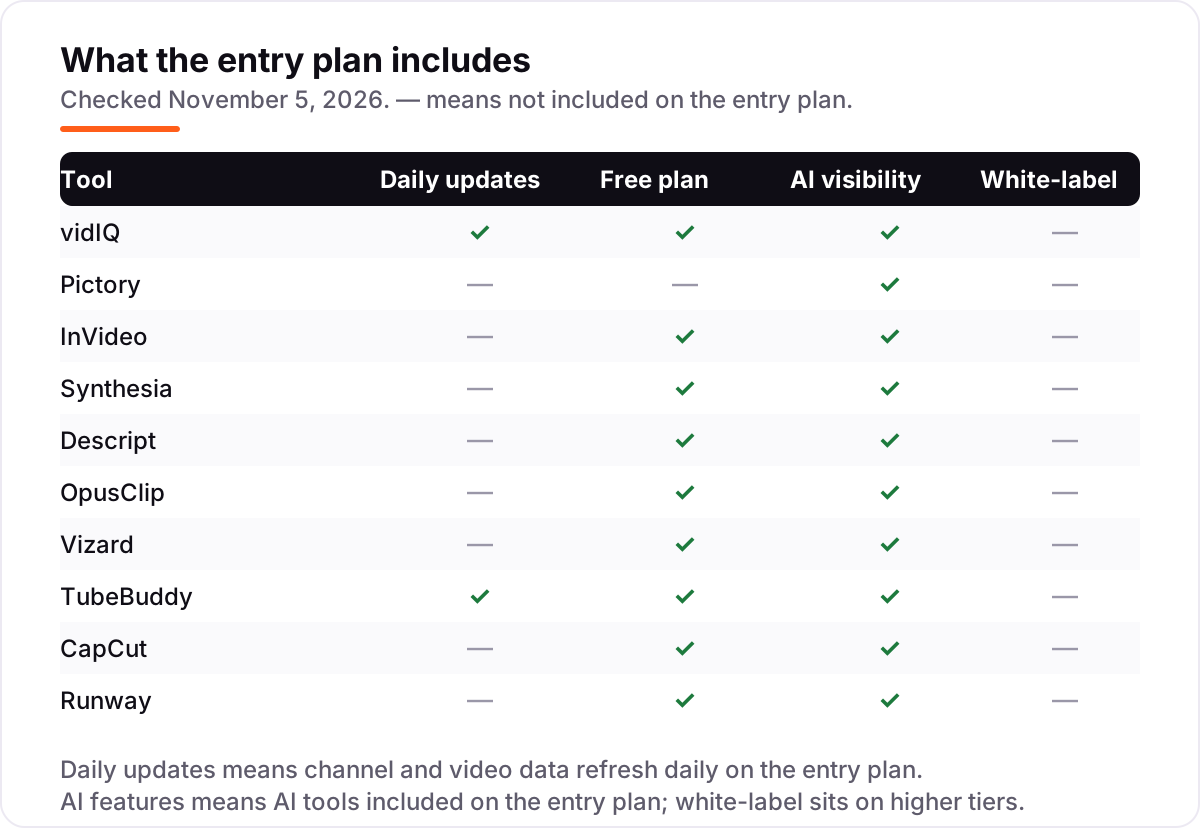
Know the difference: automation vs autopilot
The confusion in this category is between automating tasks and automating a channel. These tools automate tasks — research, drafting, editing, captioning, clipping, scheduling — and they do those tasks well. They do not automate judgement: which topic deserves a video, whether a claim is true, whether a clip is funny or embarrassing, or whether a comment deserves a reply. A channel that publishes AI output without a human watching it first is not automated; it is unattended, and YouTube's audience can tell the difference within seconds.
There is a second, quieter confusion: AI-generated footage is not the same as a video. Runway and InVideo generate seconds of footage at a time, and every second costs credits — Runway Standard buys about 52 seconds of flagship-model video a month. A 10-minute video made entirely of generated footage would cost several hundred dollars in credits on any plan here. The tools that make full videos cheaply, Pictory and Synthesia, do it with stock footage and avatars, not generation.
A third distinction worth knowing is disclosure. YouTube requires creators to label videos containing realistic AI-generated or altered content, using the disclosure option in YouTube Studio. A faceless explainer with a stock avatar or a generated establishing shot counts; a clearly animated explainer generally does not. The label is a checkbox, not a penalty — but skipping it on realistic content is a policy problem, not a shortcut.
Quick comparison: tool type by need
| Buyer | Best pick | Why |
|---|---|---|
| Creator who needs ideas and keywords | vidIQ | AI Coach and daily video ideas, Boost is $19/month |
| Faceless channel from scripts | Pictory | Script to finished video, Starter is $29/month |
| One tool for the whole video | InVideo | Prompt to finished video, Starter is $20/month |
| Presenter videos without filming | Synthesia | 125+ avatars, Starter is $19/month |
| Editing by transcript | Descript | Cut video like a document, Hobbyist is $24/month |
| Long video to Shorts, cheapest | OpusClip | Virality-scored clips, Starter is $15/month |
| Most clip minutes per dollar | Vizard | 600 credits a month, Creator is $29/month |
| Back catalogue SEO inside Studio | TubeBuddy | Bulk metadata edits, Pro is $15/month |
| Fast Shorts edits on the phone | CapCut | Auto-captions and templates, Pro is $19.99/month |
| Generated B-roll and intros | Runway | Gen-4.5 video generation, Standard is $15/month |
Mistakes to avoid
- Budgeting on the headline price, not the meter. A $15 plan that buys 150 source minutes is not cheap if your videos run two hours; a $29 plan with 600 credits is cheaper per minute than a $15 plan with 150.
- Buying an annual plan before testing the free tier. Every tool here has a free plan or trial — run one real video through it first. Annual plans are non-refundable on vidIQ and Pictory, so a year-long mistake costs a year.
- Publishing AI output without watching it. Generated footage, avatars and auto-cuts all make mistakes: wrong facts, clipped punchlines, robotic phrasing. Watch the finished video once before it goes live.
- Skipping the disclosure. Realistic AI-generated content needs YouTube's disclosure label. It is a checkbox in Studio, and forgetting it is a policy risk, not a growth hack.
- Paying for two tools that do the same job. vidIQ and TubeBuddy overlap heavily, and so do OpusClip and Vizard. Pick one per job — research, video making, clipping — and spend the saving on the tool that covers a job you have not filled yet.
How we chose
We checked each vendor's own pricing page on November 5, 2026 and recorded the starting price exactly as shown, including the annual-billing figure where the page lists one, and we ranked the tools by fit for the most common buyer — a solo creator publishing weekly — not by brand size. vidIQ's pricing page was opened directly; the other prices were verified against fresh search-index copies of the vendors' own pricing pages, crawled within the last few days. Ratings come from fresh copies of each tool's G2 review page. CapCut carries no rating because it has no G2 review page. Two free plans need a note: InVideo's free plan is no longer listed on its pricing page, and TubeBuddy's pricing page lists paid plans only — both free plans are still offered at sign-up, per the vendors' help pages. No vendor paid for a place in this list, and none of the links here are affiliate links.
What to do next
Start with the free plan or trial of your top pick and run one real video through it — your script, your footage, your channel. Check that the export has no watermark, that the credit or minute cost fits your monthly budget, and that the finished video still sounds like you. If the video side is sorted but new viewers are not finding the channel, our monthly SEO service handles the visibility side — or compare editors in our guide to the best video editing software for small business. Once your tools are in place, find out what's holding your rankings back.
Your stack only works if people find you
SerpAstra fixes what keeps your site off page one and makes it easy for AI assistants to recommend.
Get a free audit→Sources we checked (19)
- vidIQ pricing — vidiq.com/pricing (checked November 5, 2026)
- Pictory pricing — pictory.ai/pricing (checked November 5, 2026)
- InVideo pricing — invideo.io/pricing (checked November 5, 2026)
- Synthesia pricing — synthesia.io/pricing (checked November 5, 2026)
- Descript pricing — descript.com/pricing (checked November 5, 2026)
- OpusClip pricing — opus.pro/pricing (checked November 5, 2026)
- Vizard pricing — vizard.ai/pricing (checked November 5, 2026)
- TubeBuddy pricing — tubebuddy.com/pricing (checked November 5, 2026)
- CapCut pricing — capcut.com/pricing (checked November 5, 2026)
- Runway pricing — runway.com/pricing (checked November 5, 2026)
- vidIQ reviews — g2.com/products/vidiq/reviews (checked November 5, 2026)
- Pictory reviews — g2.com/products/pictory-ai/reviews (checked November 5, 2026)
- InVideo reviews — g2.com/products/invideo/reviews (checked November 5, 2026)
- Synthesia reviews — g2.com/products/synthesia/reviews (checked November 5, 2026)
- Descript reviews — g2.com/products/descript/reviews (checked November 5, 2026)
- OpusClip reviews — g2.com/products/opusclip/reviews (checked November 5, 2026)
- Vizard reviews — g2.com/products/vizard-corp-vizard/reviews (checked November 5, 2026)
- TubeBuddy reviews — g2.com/products/tubebuddy/reviews (checked November 5, 2026)
- Runway reviews — g2.com/products/runway-2022-01-04/reviews (checked November 5, 2026)
Shamim
Founder of SerpAstra
A full-stack SEO and digital marketer who spends most days on Local SEO for dental practices, AI search visibility and lead generation.
Frequently asked questions
What is the best AI tool for YouTube automation?
vidIQ is the best starting point at $19/month, because keyword research and AI video ideas decide whether a video gets found at all. Pair it with Pictory at $29/month for faceless video creation and OpusClip at $15/month for Shorts, and the three together automate research, production and clipping.
How much does YouTube automation cost per month?
A workable stack costs $55–$75 a month: vidIQ at $19, a video maker such as InVideo at $20 or Pictory at $29, and a clipper such as OpusClip at $15. A single tool costs $15–$29 a month, but no single tool covers research, video creation and clipping on its own.
Can AI fully automate a YouTube channel?
No. AI can draft scripts, generate footage, edit, caption and schedule, but a human still has to pick the topic, check the facts, review the output and reply to comments. YouTube also requires creators to disclose realistic AI-generated content, so a fully hands-off channel risks both quality and policy problems.
Is there a free AI tool for YouTube automation?
Yes, nine of the ten tools here have free plans. vidIQ, Descript, OpusClip, Vizard, TubeBuddy, CapCut, Runway, Synthesia and InVideo all offer a free tier, though exports are usually watermarked or capped. Pictory is the only one with no free plan — it offers a 14-day trial instead.
vidIQ or TubeBuddy — which is better for YouTube automation?
vidIQ is better for research and ideas: AI Coach, daily video ideas and trend alerts, from $19/month. TubeBuddy is better for managing a back catalogue: bulk metadata edits inside YouTube Studio, from $15/month. Most creators pick one; the two overlap enough that paying for both is rarely worth it.
Do I need to disclose AI-generated videos on YouTube?
Yes, when the content is realistic. YouTube requires creators to label videos that contain realistic AI-generated or altered content, using the disclosure option in YouTube Studio. Clearly synthetic or animated content generally does not need the label, but when in doubt, disclose — the label is a checkbox, not a penalty.
What is the cheapest way to automate YouTube Shorts?
Start free: OpusClip and Vizard both give 60 free credits a month, and CapCut's free plan edits vertical video with auto-captions. When you outgrow the free tiers, OpusClip Starter at $15/month is the cheapest paid clipper, and Vizard Creator at $14.50/month billed annually is the cheapest per minute.
Free SEO and AI visibility audit
Find out what is holding your rankings back
Send us your site. Within 2 business days you get a written audit, an AI visibility check and a short fix list ranked by impact. Free, with no contract attached.
Request my free audit→Related guides
 AI, Data & Analytics12 Best AI Tools for Video Content Creation in 2026, Compared12 best AI tools for video content creation compared with real prices, free plans and G2 ratings, so you can pick the right video maker without overpaying.Read guide →
 AI, Data & Analytics8 Best AI Tools for Content Creators in 2026 (Free and Paid, Compared)The 8 best ai tools for content creators, compared on price, free plans and strengths — writing, design, video. Prices checked on vendor sites, Nov 2, 2026.Read guide →
 Design, Video & Creative10 Best Video Editing Software for Small Business in 2026, ComparedCompare the 10 best video editing software for small business tools on price, free plans and AI features, with prices checked November 4, 2026.Read guide →