
8 Best AI Tools for YouTube Content Creation in 2026, Compared
Compare the 8 best ai tools for youtube content creation in 2026 on price, free plans and AI features, with every price checked November 5, 2026.
 Shamim Mia, Founder, SerpAstraLast verified November 5, 202612 min read
We compare pricing pages, documentation and public reviews. We never accept payment for rankings.

Key takeaways
- Pictory leads for faceless videos at $29/month, Descript leads for transcript editing at $24/month, and InVideo leads for prompt-to-video at $20/month — OpusClip is the cheapest paid entry at $15/month.
- Seven of the eight tools have a genuinely free plan; Pictory is the exception, with a 14-day trial instead.
- The limit that decides your bill is credits or minutes, not the headline price: OpusClip counts source minutes, Descript counts media hours and AI credits, and vidIQ counts AI credits.
- Video makers and YouTube growth tools do different jobs — pair a maker like Pictory or Descript with vidIQ or TubeBuddy for research, titles and thumbnails.
On this page
Quick comparison
| Tool | Best for | Starting price | Free plan |
|---|---|---|---|
| Pictory | Creators who turn scripts, blog posts and long recordings into captioned faceless YouTube videos without filming or editing | $29/mo | No (14-day trial) |
| Descript | Creators who record first and edit by cutting words in a transcript, with AI cleanup and voice cloning | $24/mo | Yes (free plan) |
| InVideo | Creators who want to type a prompt and get a drafted YouTube video, then finish it in a timeline editor | $20/mo | Yes (free plan) |
| Synthesia | Creators who need a talking-head presenter on camera without filming, in many languages | $19/mo | Yes (free plan) |
| OpusClip | Channels that already publish long videos and want Shorts cut from them without a manual re-edit | $15/mo | Yes (free plan) |
| vidIQ | Creators who want AI keyword research, video ideas and channel audits before they film | $19/mo | Yes (free plan) |
| TubeBuddy | Creators who optimize inside YouTube Studio and want title and thumbnail A/B testing on their back catalog | $15/mo | Yes (free plan) |
| Creatify | Creators and small brands that turn a product link or script into short YouTube ads and promos | $15/mo | Yes (free plan) |
Make one of these tools?
We re-check this list every quarter. Send a correction, request a review, or ask about a clearly labeled sponsored spot.
Request a listingThe best AI tools for YouTube content creation

Pictory
Best for: Creators who turn scripts, blog posts and long recordings into captioned faceless YouTube videos without filming or editing
Pictory is the quickest way to run a faceless YouTube channel: paste a script, a blog post or a URL and it builds a captioned video from stock footage, with an AI voiceover and music, in minutes. Starter costs $29 a month, or $25 a month billed annually, and covers 200 video minutes a month with 100 AI credits, 5 GB of storage and one brand kit.
The trade-off is originality. Stock footage can look generic, so plan to swap in your own clips, hooks and branding on every video. Annual plans are prepaid in full and non-refundable, and there is no avatar presenter on Starter. Buy Pictory when the script already exists and speed matters more than a filmed presenter.
What we like
- Turns a script, blog post, URL or long recording into a captioned video in minutes
- Millions of licensed Getty and Storyblocks clips bundled into the price
- AI voiceover in many languages, with ElevenLabs voices on paid plans
- No filming or editing skill needed — the fastest route to a faceless channel
Watch out for
- Stock-footage videos can look generic unless you swap in your own clips and branding
- Annual plans are prepaid in full and fees are non-refundable
- No avatar presenter on Starter, and exports top out at 1080p

Descript
Best for: Creators who record first and edit by cutting words in a transcript, with AI cleanup and voice cloning
Descript turns editing into word processing: record your video, get a transcript, and cut the video by deleting words from the text. Hobbyist costs $24 a month, or $16 a month billed annually, per editor, and covers 10 media hours a month, 400 AI credits, 1080p watermark-free export and 100 GB of storage.
The limits to watch are the two meters. Media hours count what you upload and AI credits count features like Studio Sound and voice generation, so a busy month can hit either cap. Creator costs $35 a month and triples the hours to 30 with 4K export. Choose Descript when you record first and want the edit to feel like rewriting a document.
What we like
- Edit video by editing its transcript — delete a word and the clip is gone
- Studio Sound, filler-word removal and captions built into the same editor
- Overdub voice cloning and AI avatars on the higher plans
- 4K export and 30 media hours a month on Creator for serious uploaders
Watch out for
- Hobbyist covers 10 media hours a month — heavy uploaders need Creator at $35/month
- Two meters to watch: media hours and AI credits both cap the month
- Desktop app can feel heavy on older machines

InVideo
Best for: Creators who want to type a prompt and get a drafted YouTube video, then finish it in a timeline editor
InVideo pairs AI agents with a real editor: type a prompt and the agents draft a video from stock footage, generated clips, voice and music, then you finish it on the timeline. Starter costs $20 a month per seat, or $10 a month billed annually, and covers 400 credits a month, 100 premium stock assets and 200 GB of storage.
The credit meter is the thing to size. Starter's 400 credits cover short drafts and light edits, but a full generated video can cost a large share of the month, and the newest models start on Plus at $60 a month. Buy InVideo when you want AI to do the first draft and a timeline to do the finishing.
What we like
- Prompt-to-video agents draft a whole video, then a real timeline editor finishes it
- Access to many image, video, voice and music models in one subscription
- Multiplayer editing for up to 5 seats on Starter
- Annual billing halves the price, to $10 a month per seat
Watch out for
- AI work runs on credits, so a video-heavy month can burn through Starter's 400 credits
- Starter limits AI models to Seedance 2.0 Fast and Mini — newer models need Plus
- Credit costs can change without notice, so check the meter before a big job

Synthesia
Best for: Creators who need a talking-head presenter on camera without filming, in many languages
Synthesia puts a presenter on screen without a camera: type a script, pick an avatar, and get a talking-head video with AI dubbing in more than 140 languages. Starter costs $19 a month, or $14 a month billed annually, and covers 1,250 credits a month — about 12 extra minutes of video beyond the free 10 — plus 125 stock avatars and 3 personal avatars.
The meter is minutes, not videos. Starter suits a channel that publishes a few short presenter-led videos a month; a daily explainer channel will outgrow it and need Pro at $89 a month. Pick Synthesia when the video needs a face and a voice but you have no filming setup.
What we like
- 125+ stock avatars and 3 personal avatars on Starter, with AI dubbing in 140+ languages
- Type a script and get a presenter-led video — no camera, studio or filming day
- Downloads with the logo removed start on Starter
- Largest verified review sample in this list, at 4.6 out of 5 across 2,857 G2 reviews
Watch out for
- Avatars can still look slightly unnatural, especially in facial expressions
- Starter's credits buy only about 12 extra minutes of video a month beyond the free allowance
- Brand kits, SCORM and single sign-on wait for the custom Enterprise plan

OpusClip
Best for: Channels that already publish long videos and want Shorts cut from them without a manual re-edit
OpusClip exists for one job: turning a long YouTube video into Shorts. Upload the recording and its AI finds the strongest moments, cuts them into captioned vertical clips and scores each one for virality, so you post the best cut first. Starter costs $15 a month, monthly billing only, and covers 150 credits a month — 150 minutes of source video — with no watermark.
The math is simple and unforgiving: one credit is one minute of video you feed in, so a two-hour podcast costs 120 of your 150 credits. Starter also exports 9:16 only and has no scheduler; Pro at $29 a month adds both. Buy OpusClip when long videos already exist and Shorts are the missing format.
What we like
- AI finds the best moments in a long video and cuts them into captioned Shorts
- Every clip gets a virality score, so you know which cut to post first
- Auto-posts to YouTube Shorts, TikTok and Instagram Reels from Starter
- Cheapest paid entry in this list at $15 a month
Watch out for
- Starter exports vertical 9:16 clips only — square and landscape need Pro
- No social scheduler on Starter, and no annual billing option for the entry plan
- One credit buys one minute of source video, so long uploads eat the allowance fast

vidIQ
Best for: Creators who want AI keyword research, video ideas and channel audits before they film
vidIQ is the research tool in this list: before you film, it shows which keywords have search volume and how strong the competition is, then suggests daily video ideas matched to your channel and audits the videos you already have. Boost costs $19 a month for one channel, or $16.58 a month billed annually, and covers 2,000 AI credits a month with unlimited trends research and audits.
The credit pool is the limit. Every AI tool spends credits, heavy users report emptying Boost's 2,000 well before the month ends, and there are no top-ups — the tools pause until the next billing cycle. Max at $49 a month triples the credits. Choose vidIQ when topic choice, not editing, is what holds the channel back.
What we like
- AI keyword research shows search volume and competition before you film
- Unlimited trends research, outliers and channel audits on Boost
- AI Coach with deeper thinking plus Best Time to Post guidance
- AI thumbnails and creator masterclasses included on Boost
Watch out for
- Every AI tool spends credits, and Boost's 2,000 credits can run out before the month ends
- Prices are per channel — a second channel means a second subscription
- No credit top-ups, so AI tools pause when the pool runs out until next month

TubeBuddy
Best for: Creators who optimize inside YouTube Studio and want title and thumbnail A/B testing on their back catalog
TubeBuddy is a browser extension that lives inside YouTube Studio, so the optimization happens where you already publish. Pro costs $15 a month, or $12 a month billed annually, and unlocks Keyword Explorer, SEO Studio with search positions, Tag Lists, the Best Practice Audit and the thumbnail generator for one channel.
The features most creators ask about first — title and thumbnail A/B testing and bulk edits across the back catalog — wait for Legend at $32.99 a month. Pro is the minimum useful tier, and the free Starter plan covers only basic tools. Pick TubeBuddy when the channel already has videos and the job is making each one rank better.
What we like
- Lives inside YouTube Studio, so optimization happens where you already work
- Keyword Explorer and SEO Studio with search positions on Pro
- Thumbnail generator, upload checklists and Best Practice Audit included
- Next Video Ideas suggests topics from your own channel data and comments
Watch out for
- A/B testing and bulk processing wait for Legend at $32.99/month
- Paid plans are per channel, and prices vary by region at checkout
- The pricing page lists paid plans only, so the free tier is easy to miss

Creatify
Best for: Creators and small brands that turn a product link or script into short YouTube ads and promos
Creatify turns a product link, a script or a few brand assets into a short video ad, with 300 AI actors and more than 200 templates to start from. Standard costs $15 a month, or $10 a month billed annually, and covers 55 credits a month, one seat, watermark removal and 50 premium models.
The credit system needs watching. Credits expire after two months, the cost of a video is not fixed — one reviewer reported a 15-second video costing 89 credits — and a bad lip-sync re-render spends credits again. Buy Creatify when the job is short promo ads, not long-form YouTube videos.
What we like
- Turns a product URL, script or assets into a finished video ad in minutes
- 300 AI actors and 200+ templates, with watermark removal on Standard
- Highest G2 score in this list at 4.8 out of 5 across 1,804 reviews
- Annual billing cuts Standard to $10 a month, a 30% saving
Watch out for
- Credits expire after two months, and re-renders after lip-sync errors spend credits again
- The credit system is opaque — one reviewer reported a 15-second video costing 89 credits
- Annual plans are prepaid in full, and reviewers report a strict no-refund policy
The best ai tools for youtube content creation split into two jobs: making the video and getting it found. The makers in this list turn a script, a recording or a prompt into a finished video, while the growth tools research keywords, suggest titles and test thumbnails. We ranked the eight tools below by fit for the most common buyer — a solo creator publishing weekly — and every price was checked on the vendor's own pricing page on November 5, 2026.
How to choose the best ai tools for youtube content creation
- Start from the footage you already have. If the script exists but no footage does, Pictory or InVideo builds the video from text. If you already recorded, Descript edits it by transcript and OpusClip cuts Shorts from it.
- Count the meter, not the price. OpusClip charges one credit per minute of source video, Descript counts media hours and AI credits, and vidIQ counts AI credits — the cap you hit first is your real starting price.
- Decide whether the video needs a face. A talking-head video needs Synthesia or Creatify's AI actors; a faceless explainer is cheaper on Pictory, and a recorded host belongs in Descript.
- Pair a maker with a growth tool. Making the video is half the job; vidIQ or TubeBuddy covers keywords, titles and thumbnails, which is what gets the video watched.
- Try the free plan with a real video first. Seven of the eight tools have one, and a single real upload shows you the watermark, the export quality and the credit burn before you pay.
YouTube is one system in your stack, not the whole stack. If the channel also needs to be found in search beyond YouTube, our guide to YouTube SEO tools covers the research side in depth, and our AI video content creation tools roundup covers the wider maker category. And before you publish a new video page on your site, run your titles through the free SERP snippet preview tool — it shows exactly how the title and description will look in Google.
Whatever you shortlist, test it with one real video before you pay. The free plans in this list are long enough to make a genuine upload — your script, your footage, your channel — and that upload tells you more than any review can. Check two things in the test: that the export looks clean at full screen, and that the credits or minutes left at the end of the month match the volume you actually publish.
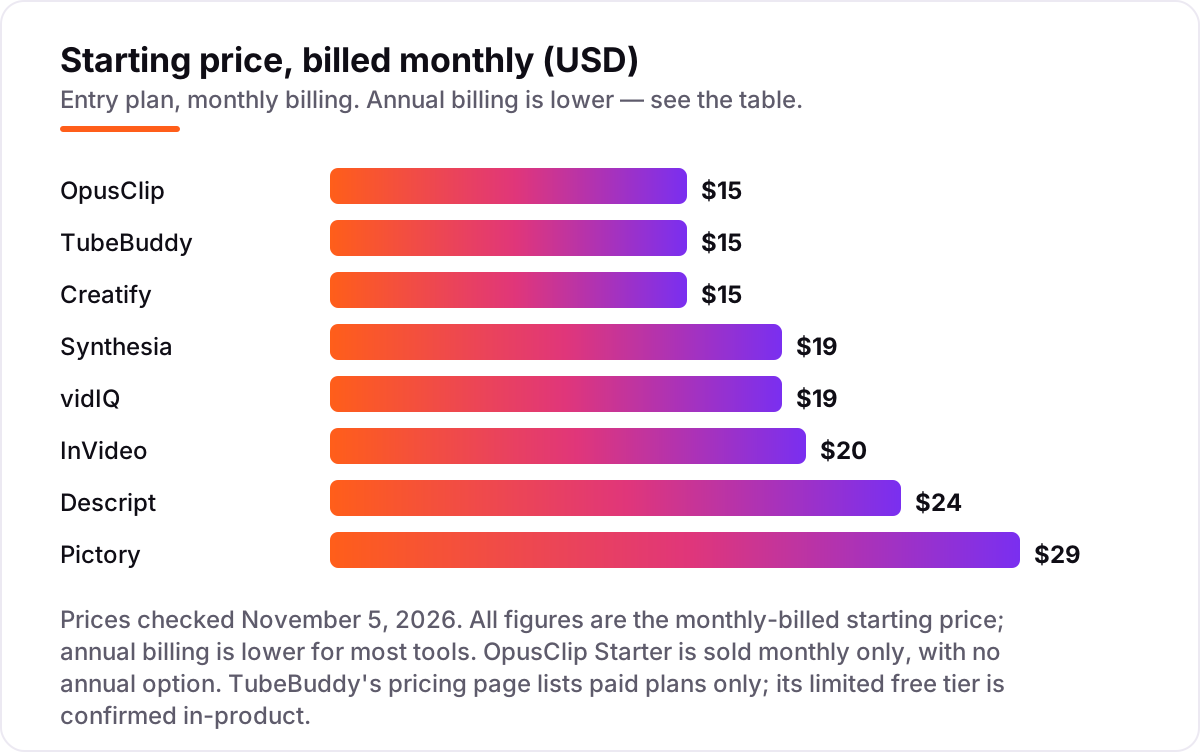
AI tools for YouTube content creation pricing: what you will actually pay
Take a solo creator who publishes four long videos a month and cuts eight Shorts from them. On monthly billing, the production stack is Pictory Starter at $29 plus OpusClip Starter at $15, which is $44 a month, and adding vidIQ Boost at $19 for research brings it to $63 a month. On annual billing the same three tools cost $25 plus $15 plus $16.58, which is $56.58 a month — $679 a year against $756 on monthly billing, a saving of about $77.
Two numbers need adjusting before they are real. First, OpusClip has no annual option, so its $15 never drops — the saving above comes entirely from Pictory and vidIQ. Second, the credit meters cap the volume: OpusClip Starter covers 150 source minutes a month, so four 20-minute videos use 80 credits and leave room for the Shorts, but a two-hour podcast would eat 120 credits on its own.
A cheaper pairing works for a channel that records first: Descript Hobbyist at $24 plus TubeBuddy Pro at $15 is $39 a month on monthly billing, or $28 a month on annual billing ($16 plus $12), which is $336 a year. The dearest single tool here is Pictory at $29 a month, and the cheapest way in is OpusClip, TubeBuddy or Creatify at $15. If the budget is $0, start on the free plans — Descript's 60 media minutes and OpusClip's 60 credits cover a first month of short videos — and pay only when the watermark or the cap starts costing you uploads.
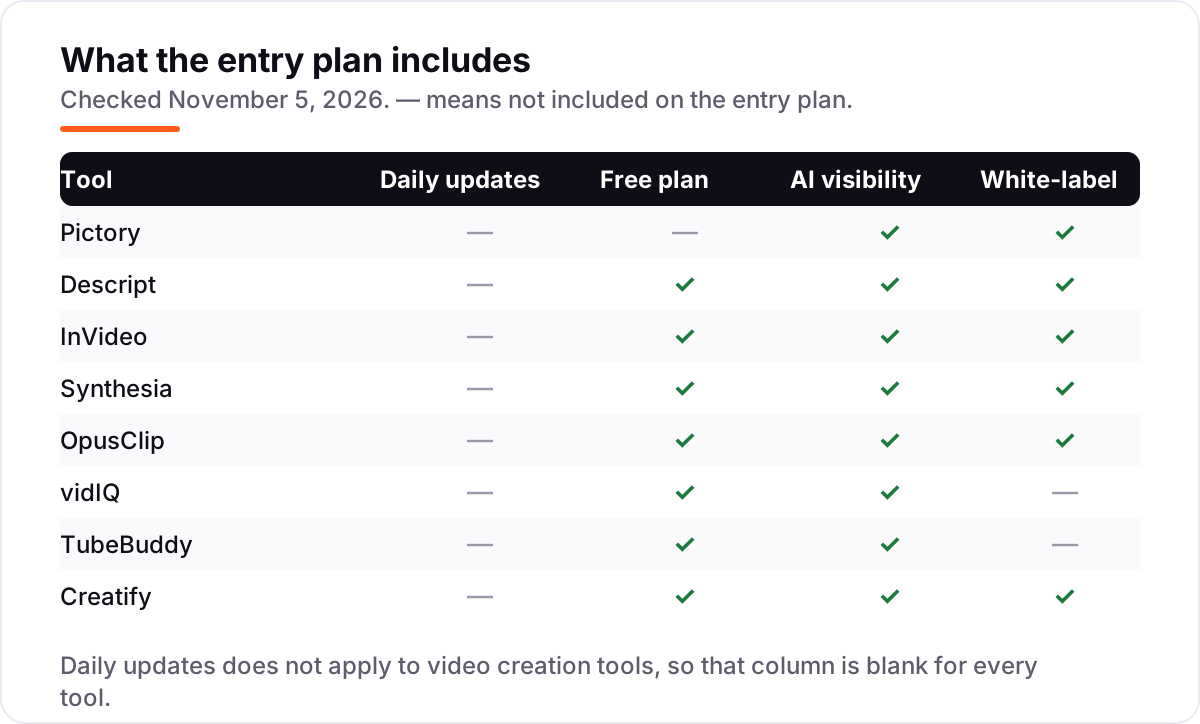
Know the difference: video makers vs YouTube growth tools
The confusion in this category is between tools that make the video and tools that get it watched. Pictory, Descript, InVideo, Synthesia, OpusClip and Creatify make videos — they generate, edit or cut footage. vidIQ and TubeBuddy do not make videos at all: they research keywords, suggest titles, audit your channel and test thumbnails. Buying a growth tool expecting it to edit, or a maker expecting it to rank, is the most common wasted subscription in this category.
There is a second, quieter confusion: credits are not interchangeable between tools. One OpusClip credit is one minute of source video, one Descript AI credit is one AI action like Studio Sound, and one vidIQ AI credit is one AI research call. A plan that looks cheap per credit can still be expensive per finished video, so always convert the allowance into finished videos per month before comparing prices.
A third distinction worth knowing is free plan versus free trial. Seven tools here have a free plan that lasts until you choose to pay, with caps on minutes, credits or quality. Pictory has only a 14-day trial — after it ends there is no free tier to fall back on, so test it inside the two weeks or not at all.
Quick comparison: tool type by need
| Buyer | Best pick | Why |
|---|---|---|
| Faceless channel from scripts | Pictory | Script to captioned video in minutes, from $29/month |
| Record first, edit by transcript | Descript | Cut words to cut video, from $24/month |
| Prompt to finished video | InVideo | AI agents draft, timeline finishes, from $20/month |
| Presenter without filming | Synthesia | Avatar talks your script, from $19/month |
| Long videos into Shorts | OpusClip | AI clipping with virality scores, from $15/month |
| Rank and research first | vidIQ | Keyword research and audits, from $19/month |
Mistakes to avoid
- Budgeting on the annual price while paying monthly. The $10 InVideo and $14 Synthesia figures need a full year paid up front. If you pay month to month, the price is $20 and $19 — compare tools on the billing you will actually use.
- Buying on credits you cannot convert. Before you pay, work out how many finished videos the allowance buys: 150 OpusClip credits is 150 source minutes, and 400 InVideo credits is a few short drafts, not a month of long videos.
- Expecting a maker to rank your video. Pictory and Descript make the video; they do not research keywords or test thumbnails. Pair one with vidIQ or TubeBuddy instead of expecting one tool to do both jobs.
- Publishing the free-plan export as the real video. Free exports are watermarked or capped at 720p on most tools here. The free plan is for testing, not for the video your audience judges you on.
- Forgetting the second channel. vidIQ and TubeBuddy charge per channel, and Descript charges per editor. Price the second channel or the second seat before you commit to a tool for the first.
How we chose
We checked each vendor's own pricing page on November 5, 2026, using fresh crawls of the vendors' own pages read between October 29 and November 4, 2026 and cross-checked against our verified price facts, and recorded the starting price exactly as shown, including the annual-billing figure where the page lists one. We ranked the tools by fit for the most common buyer — a solo creator publishing weekly — not by brand size. Ratings are shown only where a fresh G2 page crawl confirmed the score and review count: Pictory, Descript, InVideo, Synthesia and Creatify. OpusClip, vidIQ and TubeBuddy carry no rating here because the G2 figures we found conflicted or could not be verified on a fresh crawl, and we would rather show no rating than a stale or estimated one. TubeBuddy's pricing page lists paid plans only; its limited free tier is confirmed in-product. No vendor paid for a place in this list, and none of the links here are affiliate links.
What to do next
Start with the free plan or trial of your top pick and make one real video with it — your script, your footage, your channel — then check the export at full screen and the credits left at the end of the week. If the video looks clean and the allowance covers your publishing pace, pay for the annual plan; if the credits run out in days, step up a tier before you commit to a year. If the videos are sorted but new viewers are not finding you, our AI search optimization service handles the visibility side — or compare makers in our guide to video content creation software. Once your tools are in place, find out what's holding your rankings back.
Your stack only works if people find you
SerpAstra fixes what keeps your site off page one and makes it easy for AI assistants to recommend.
Get a free audit→Sources we checked (13)
- Pictory pricing — pictory.ai/pricing (checked November 5, 2026)
- Descript pricing — descript.com/pricing (checked November 5, 2026)
- InVideo pricing — invideo.io/pricing (checked November 5, 2026)
- Synthesia pricing — synthesia.io/pricing (checked November 5, 2026)
- OpusClip pricing — opus.pro/pricing (checked November 5, 2026)
- vidIQ pricing — vidiq.com/pricing (checked November 5, 2026)
- TubeBuddy pricing — tubebuddy.com/pricing (checked November 5, 2026)
- Creatify pricing — creatify.ai/pricing (checked November 5, 2026)
- Pictory AI reviews — g2.com/products/pictory-ai/reviews (checked November 5, 2026)
- Descript reviews — g2.com/products/descript/reviews (checked November 5, 2026)
- InVideo reviews — g2.com/products/invideo/reviews (checked November 5, 2026)
- Synthesia reviews — g2.com/products/synthesia/reviews (checked November 5, 2026)
- Creatify AI reviews — g2.com/products/creatify-labs-inc-creatify-ai/reviews (checked November 5, 2026)
Shamim
Founder of SerpAstra
A full-stack SEO and digital marketer who spends most days on Local SEO for dental practices, AI search visibility and lead generation.
Frequently asked questions
What is the best AI tool for YouTube content creation?
Pictory is the best fit for most creators: it turns scripts and articles into captioned videos from $29/month with no filming needed. Descript is better when you record first and edit by transcript, and Synthesia is the pick when the video needs a presenter without a camera.
How much do AI tools for YouTube content creation cost?
Entry prices run from $15 to $29 a month. OpusClip, TubeBuddy and Creatify all start at $15, Synthesia and vidIQ at $19, InVideo at $20, Descript at $24 and Pictory at $29. Annual billing cuts most of them by 14–50%, and seven of the eight have a free plan.
Is there a free AI tool for YouTube videos?
Yes, with limits. Descript, InVideo, Synthesia, OpusClip, vidIQ, TubeBuddy and Creatify all have free plans, but free exports are usually watermarked or capped — Descript gives 60 media minutes a month, OpusClip 60 credits, and vidIQ 150 AI credits. Pictory offers only a 14-day trial.
Can AI tools replace a video editor?
Not fully. AI tools do the first draft well — Pictory assembles the video, Descript cuts the transcript, OpusClip finds the best moments — but pacing, story and brand still need a human pass. Treat them as a fast first cut, then finish the video yourself before publishing.
What is the difference between Pictory and Descript?
Pictory builds a video from text: you give it a script or article and it assembles stock footage, voiceover and captions. Descript edits video you already recorded: you cut the transcript and the video follows. Use Pictory when there is no footage yet, and Descript when the footage already exists.
Do I need vidIQ or TubeBuddy as well as a video maker?
Yes, they do different jobs. Pictory, Descript and InVideo make the video; vidIQ and TubeBuddy get it found, with keyword research, title ideas, audits and A/B testing. A maker plus one growth tool is the usual pairing — budget about $34–$48 a month for the two together.
Free SEO and AI visibility audit
Find out what is holding your rankings back
Send us your site. Within 2 business days you get a written audit, an AI visibility check and a short fix list ranked by impact. Free, with no contract attached.
Request my free audit→Related guides
 SEO & AI Search7 Best YouTube SEO Tools in 2026 (Free and Paid, Compared)7 best YouTube SEO tools compared on price, keyword research and rank tracking, from free to $29 per month. Prices checked November 2, 2026.Read guide →
 AI, Data & Analytics12 Best AI Tools for Video Content Creation in 2026, Compared12 best AI tools for video content creation compared with real prices, free plans and G2 ratings, so you can pick the right video maker without overpaying.Read guide →
 Design, Video & Creative10 Best Video Content Creation Software in 2026, ComparedCompare the 10 best video content creation software tools of 2026 on price, free plans and AI features, with every price checked November 4, 2026.Read guide →