
10 Best AI YouTube Thumbnail Generator Tools in 2026, Compared
Compare the 10 best ai youtube thumbnail generator tools on price, free plans, AI generation and A/B testing, with every price checked November 5, 2026.
 Shamim Mia, Founder, SerpAstraLast verified November 5, 202613 min read
We compare pricing pages, documentation and public reviews. We never accept payment for rankings.

Key takeaways
- Canva is the best fit for most creators at $18/month; vidIQ follows at $19/month with YouTube-native AI thumbnails, and Adobe Express is the cheapest big-name option at $9.99/month.
- The single most important buying factor is whether the AI actually generates the image or only decorates one — Snappa and TubeBuddy edit templates, while Canva, Adobe Express and Fotor create new art from a prompt.
- Only TubeBuddy A/B tests thumbnails on live videos, and only on Legend at $32.99/month — every other tool here makes the image and stops there.
- Nine of the ten tools have genuinely free plans, so you can make real thumbnails at $0 before paying for AI generation or unlimited downloads.
On this page
Quick comparison
| Tool | Best for | Starting price | Free plan |
|---|---|---|---|
| Canva | Creators who want AI thumbnails inside the design tool they already use for everything else | $18/mo | Yes (free plan) |
| vidIQ | YouTubers who want AI thumbnails plus the research data that tells them what to put on the thumbnail | $19/mo | Yes (free plan) |
| TubeBuddy | Creators who test thumbnails with real viewer data instead of guessing which one wins | $15/mo | Yes (free plan) |
| Adobe Express | Creators who want Adobe's Firefly AI images and stock photos in a simple thumbnail workflow | $9.99/mo | Yes (free plan) |
| Fotor | Creators who want cheap AI image generation and photo editing in one thumbnail tool | $8.99/mo | Yes (free plan) |
| Snappa | Beginners who want a fast template editor with no learning curve | $15/mo | Yes (free plan) |
| Creatify | Sellers and affiliates who turn a product page into a thumbnail and a video ad in one pass | $15/mo | Yes (free plan) |
| CapCut | Creators who edit the video and make its thumbnail in the same app | $19.99/mo | Yes (free plan) |
| Predis.ai | Social teams who generate thumbnails, captions and scheduled posts from one prompt | $32/mo | No (3-day trial) |
| Filmora | Editors who want the thumbnail made inside their desktop video editor | $19.99/mo | Yes (free plan) |
Make one of these tools?
We re-check this list every quarter. Send a correction, request a review, or ask about a clearly labeled sponsored spot.
Request a listingThe best ai youtube thumbnail generator tools

Canva
Best for: Creators who want AI thumbnails inside the design tool they already use for everything else
Canva is the easiest recommendation in this list because most creators already have an account. Magic Media and Dream Lab turn a text prompt into thumbnail art, Magic Design lays out the whole 1,280x720 canvas, and the template library covers every common YouTube style — reaction faces, list videos, tutorials and gaming. Pro costs $18 a month, or $144 a year, and the free plan still handles basic thumbnails.
The catch is the AI credit allowance on the free plan, which runs out fast if you generate art every day, and generated faces and hands still need a human eye before upload. Buy Canva when you want one tool for thumbnails, channel art and social posts; buy vidIQ when the thumbnail needs to be planned from search data first.
What we like
- Magic Media and Dream Lab generate thumbnail art from a text prompt, and Magic Design lays out the whole thumbnail
- The largest thumbnail template library here, with 1,280x720 YouTube sizes built in
- Brand kits keep fonts, colors and logos consistent across every thumbnail
- The free plan covers basic thumbnails, so you can test the workflow before paying
Watch out for
- AI image generation on the free plan is capped at a small monthly allowance, so regular use needs Pro
- Generated faces and hands can look off, and every AI image needs a human check before upload
- Pro is priced per person, so a small team pays $18 a month each

vidIQ
Best for: YouTubers who want AI thumbnails plus the research data that tells them what to put on the thumbnail
vidIQ is the only tool here that starts with the data instead of the design. Boost reads your channel's search traffic, trending topics and competitor thumbnails, then its AI generator turns that brief into thumbnail options. It costs $19 a month, or $199 a year, and the 2,000 monthly AI credits cover regular generation for a weekly uploader. The free plan includes 150 credits a month to try the AI tools.
The limit is the credit pool: heavy AI users burn through 2,000 credits before the month ends, and there are no top-ups, so the tool simply pauses. AI thumbnails are also a Boost feature, not a free-plan one. Choose vidIQ when your thumbnails need to match what viewers are already searching for; choose TubeBuddy when you want to test the finished thumbnail against the old one.
What we like
- The only tool here that generates thumbnails from your channel's own search and trend data
- AI thumbnails come with the full research toolkit, so the image and the title are planned together
- 2,000 AI credits a month on Boost covers regular thumbnail generation for weekly uploaders
- The free plan includes 150 AI credits a month to try the AI tools
Watch out for
- AI thumbnails are listed as a Boost feature, so free-plan users cannot rely on them
- Credits run out mid-month for heavy AI users, and there are no top-ups
- Prices are shown in local currency, so the US figure is not what every creator pays

TubeBuddy
Best for: Creators who test thumbnails with real viewer data instead of guessing which one wins
TubeBuddy is the only tool in this list that answers the question every creator actually asks: did the new thumbnail beat the old one? Its A/B testing swaps two thumbnails on a live video and reports which one earns more clicks, while the thumbnail generator builds overlays and bold text on your own screenshots inside YouTube Studio. Pro costs $15 a month, or $144 a year.
The catch is the tiering: A/B testing lives on Legend at $32.99 a month, more than double Pro, and the thumbnail generator itself is template-based — it decorates your screenshots rather than generating new images. Pick TubeBuddy when testing matters more than generation; pick vidIQ or Canva when you need the AI to create the image in the first place.
What we like
- The only tool here that A/B tests thumbnails on live videos with real click data
- Thumbnail generator builds overlays and text on your own screenshots inside YouTube Studio
- Bulk tools update thumbnails across a whole back catalog in one pass on Legend
- Pro is the cheapest paid entry among the YouTube-native tools here
Watch out for
- Real A/B testing needs Legend at $32.99 a month, more than double the Pro price
- The free Starter plan is easy to miss on the pricing page next to the paid tiers
- The thumbnail generator is template-based — it does not generate new images from a prompt

Adobe Express
Best for: Creators who want Adobe's Firefly AI images and stock photos in a simple thumbnail workflow
Adobe Express is the cheapest way into a big-name design tool, and Firefly is the reason to pick it over a generic editor. Premium costs $9.99 a month, billed monthly, and gives you 250 generative credits a month plus Adobe Stock photos, premium templates and brand kits. The free plan covers simple thumbnails, and a 30-day trial unlocks the full Premium feature set.
The limits are the credit cap and the billing: 250 credits a month is tight for a daily uploader, and Adobe publishes no annual rate for individuals, so there is no yearly discount to take. Premium is also included with Creative Cloud, so check that first — you may already be paying for it. Choose Adobe Express when Firefly images and stock photos matter more than a template library.
What we like
- Firefly AI generates thumbnail art from a prompt, with commercial-use clearance on generated images
- Adobe Stock photos are built in, so you are not hunting for licensed images elsewhere
- Cheapest paid plan among the big design tools here at $9.99 a month
- Premium is included free with a Creative Cloud subscription you may already pay for
Watch out for
- Only 250 generative credits a month on Premium — heavy AI use runs out fast
- No annual rate is published for individuals, so there is no discount for paying yearly
- AI-generated text inside images can misspell words, so check every word before export

Fotor
Best for: Creators who want cheap AI image generation and photo editing in one thumbnail tool
Fotor is the cheapest paid plan in this list, and that is the whole pitch. Pro costs $8.99 a month, or $39.99 a year, and buys AI image generation, background removal, photo enhancement and premium templates in one editor. The free Basic plan covers casual thumbnails at $0, and batch editing re-sizes a finished design for every platform instead of just YouTube.
The trade-off is the meter: Pro includes only 100 AI credits a month, so a channel that generates art daily will need top-ups, and there is no YouTube analytics or thumbnail testing — Fotor makes the image and stops there. Pick Fotor when the budget is the deciding factor and you already know what the thumbnail should say; pick vidIQ when you need the data behind it.
What we like
- The cheapest paid plan in this list, and annual billing drops it to $3.33 a month
- AI image generation, background removal and photo enhancement in one editor
- Batch editing re-sizes one design for every platform, not just YouTube
- The free Basic plan covers casual thumbnail work at $0
Watch out for
- Only 100 AI credits a month on Pro, so a busy channel burns through them quickly
- No dedicated YouTube analytics or thumbnail testing — it makes the image and stops there
- Extra AI credits are sold as top-ups, so heavy months cost more than the plan price

Snappa
Best for: Beginners who want a fast template editor with no learning curve
Snappa is the fastest tool in this list for a creator who hates design software. Pick a YouTube thumbnail template, swap in your photo and text, and export — the whole job takes minutes, and the editor never asks you to learn layers or masks. Pro costs $15 a month, or $120 a year, and removes the download cap entirely. The free Starter plan allows 3 downloads a month.
The simplicity has a ceiling: Snappa has no AI image generation, so it edits your photos and templates rather than creating new art, and there is no video editing or analytics anywhere in the tool. That is fine when you already have the photo and the idea. Choose Snappa when speed beats cleverness; choose Canva when you want the AI to invent the image.
What we like
- The simplest editor here — pick a YouTube thumbnail template, swap the text and export
- Unlimited downloads on Pro, so there is no per-thumbnail meter to watch
- Background removal and one-click resize are included on Pro
- The free Starter plan lets you make 3 thumbnails a month at $0
Watch out for
- No AI image generation — Snappa edits templates and photos, it does not create art from a prompt
- The free plan stops at 3 downloads a month, so weekly uploaders need Pro
- No video or analytics features, so thumbnails are the whole job here

Creatify
Best for: Sellers and affiliates who turn a product page into a thumbnail and a video ad in one pass
Creatify is built for sellers, not for general YouTubers, and that focus shows. Paste a product URL and it generates ad creative — thumbnail-style images and short video ads — from the page's own photos and copy, with 300 AI actors and more than 200 templates to choose from. Standard costs $15 a month, or $10 a month billed annually, and includes 55 credits a month with watermark removal.
The meter is the limit: 55 credits buys about eleven 15-second ads a month, so a busy seller outgrows Standard quickly, and there is no keyword research or thumbnail testing for YouTube packaging. Payments are also non-refundable. Pick Creatify when the thumbnail is really a product ad; pick Canva or Fotor when it is a video cover.
What we like
- Turns a product URL into finished ad creative, including thumbnail-style images, in minutes
- The free plan includes 10 credits a month, so you can test a real ad before paying
- Watermark removal on every paid plan, including entry-level Standard
- Credits stay valid for two months, so a quiet month is not wasted
Watch out for
- 55 credits a month on Standard makes about eleven 15-second ads — heavy users outgrow it fast
- Built for ads, not for YouTube packaging: no keyword research or thumbnail testing
- Payments are non-refundable, so a bad first month is money spent

CapCut
Best for: Creators who edit the video and make its thumbnail in the same app
CapCut is the only tool here where the thumbnail and the video live in the same project. Its AI cover feature pulls frames and faces from your edit, and Pro adds AI image generation, auto captions, background removal and premium templates in the same subscription. Pro costs $19.99 a month, or $179.99 a year, and the free Standard plan covers basic editing and covers at $0.
The price is the awkward part: CapCut says its prices vary by region, device and promotion, so the US list price is not what every creator pays, and AI features draw on a monthly credit allowance. Thumbnails are also a side feature of a video editor, with no A/B testing or click data. Choose CapCut when you edit in it already; choose a dedicated tool when the thumbnail is the job.
What we like
- Makes the thumbnail from the video itself — AI cover images pull frames and faces from your edit
- AI image generation, auto captions and background removal in one subscription
- The free Standard plan covers basic editing and covers, so the workflow costs $0 to try
- Mobile, desktop and web apps share the same projects
Watch out for
- The price varies by region, device and promotion — the US list price is not what every creator pays
- AI features draw on a monthly credit allowance, so heavy generation runs out
- Thumbnail tools are a side feature of a video editor, with no A/B testing or click data

Predis.ai
Best for: Social teams who generate thumbnails, captions and scheduled posts from one prompt
Predis.ai treats the thumbnail as one piece of a social post, not as a standalone job. Give it a prompt and it generates the image, writes the caption and hashtags, and schedules the post across 5 channels, with competitor analysis showing which posts work in your niche. Core costs $32 a month, or $19 a month billed annually — the most expensive entry price in this list.
The price is the problem for most creators: $32 a month buys a social scheduling suite when you may only want thumbnails, and there is no free plan — only a 3-day trial that needs a card. Predis also renamed its plans in 2026, so older reviews quoting Lite at $27 are out of date. Pick Predis when you run several social channels; skip it when YouTube is the only one.
What we like
- Generates the image, caption and hashtags from one prompt, then schedules the post
- Competitor analysis shows which thumbnails and posts work in your niche
- Publishes to 5 channels from one dashboard, so YouTube is not a separate workflow
- Annual billing cuts the price to $19 a month, the biggest percentage saving here
Watch out for
- The most expensive entry price in this list at $32 a month
- Predis renamed its plans in 2026 — older reviews quote Lite at $27, which no longer exists
- No free plan, only a 3-day trial that needs a card

Filmora
Best for: Editors who want the thumbnail made inside their desktop video editor
Filmora is the desktop option: a full video editor with an AI Thumbnail Generator that builds covers from your footage, so the thumbnail never leaves the editing timeline. Basic costs $19.99 a month billed monthly, or $49.99 a year billed annually, with watermark-free 4K export and version upgrades included. The free plan includes the full editor with watermarked exports, and a one-time perpetual license costs $79.99.
The catches are the billing and the credits: the $49.99 annual payment is due up front, and Basic includes no monthly AI credit allowance, so AI generation costs extra. There is also no thumbnail testing or YouTube analytics. Choose Filmora when you already edit desktop video; choose Canva or CapCut when you want the thumbnail in a browser.
What we like
- AI Thumbnail Generator builds covers from your footage without leaving the editor
- The one-time perpetual license at $79.99 is the only buy-once option in this list
- The free plan includes the full editor, so you can learn it before paying
- The annual plan includes every major version upgrade while you subscribe
Watch out for
- Basic includes no monthly AI credit allowance, so AI generation costs extra
- The $49.99 annual payment is due up front
- No thumbnail testing or YouTube analytics; it makes the image and stops there
The best ai youtube thumbnail generator tools turn a blank canvas into a thumbnail viewers actually click — and they do it in minutes, not in Photoshop. We ranked the ten tools below by fit for the most common buyer, a YouTube creator publishing weekly, and every price was checked on the vendor's own pricing page on November 5, 2026.
How to choose the best ai youtube thumbnail generator tools
- Decide what the AI should do. Some tools generate new art from a prompt (Canva, Adobe Express, Fotor); others only decorate your own photo (Snappa, TubeBuddy). Generation and decoration are different jobs, and the price follows.
- Count the credits, not just the price. Fotor Pro gives 100 AI credits a month, Creatify Standard gives 55, Adobe Express Premium gives 250. A plan that looks cheap can run dry by the second week.
- Check the free plan's real limits. Snappa stops at 3 downloads a month, TubeBuddy's free Starter plan is easy to miss on the pricing page, and several free plans watermark exports. Make one real thumbnail on the free plan before you pay.
- Match the tool to the workflow. vidIQ and TubeBuddy live inside YouTube; CapCut and Filmora live inside the video edit; Predis.ai lives inside social scheduling. The thumbnail tool should sit where the video already is.
- Ask how you will know it worked. Only TubeBuddy tests thumbnails against real clicks. Every other tool here makes the image and leaves the measuring to YouTube Studio.
Thumbnails are one part of getting found on YouTube. If the channel itself needs more visibility, our guide to the best YouTube SEO tools covers the research side, and our monthly SEO service handles the visibility work for you. Before you publish, run your video titles through the free SERP snippet preview tool — it shows exactly how the title and description will look in Google.
Whatever you shortlist, make one real thumbnail with your own footage before you pay. The free plans in this list are long enough to test a full upload cycle — generate the art, export at 1,280x720, upload it, and watch the click-through rate in YouTube Studio for a week. That week tells you more than any review can, including whether the AI's faces, hands and text hold up at thumbnail size.
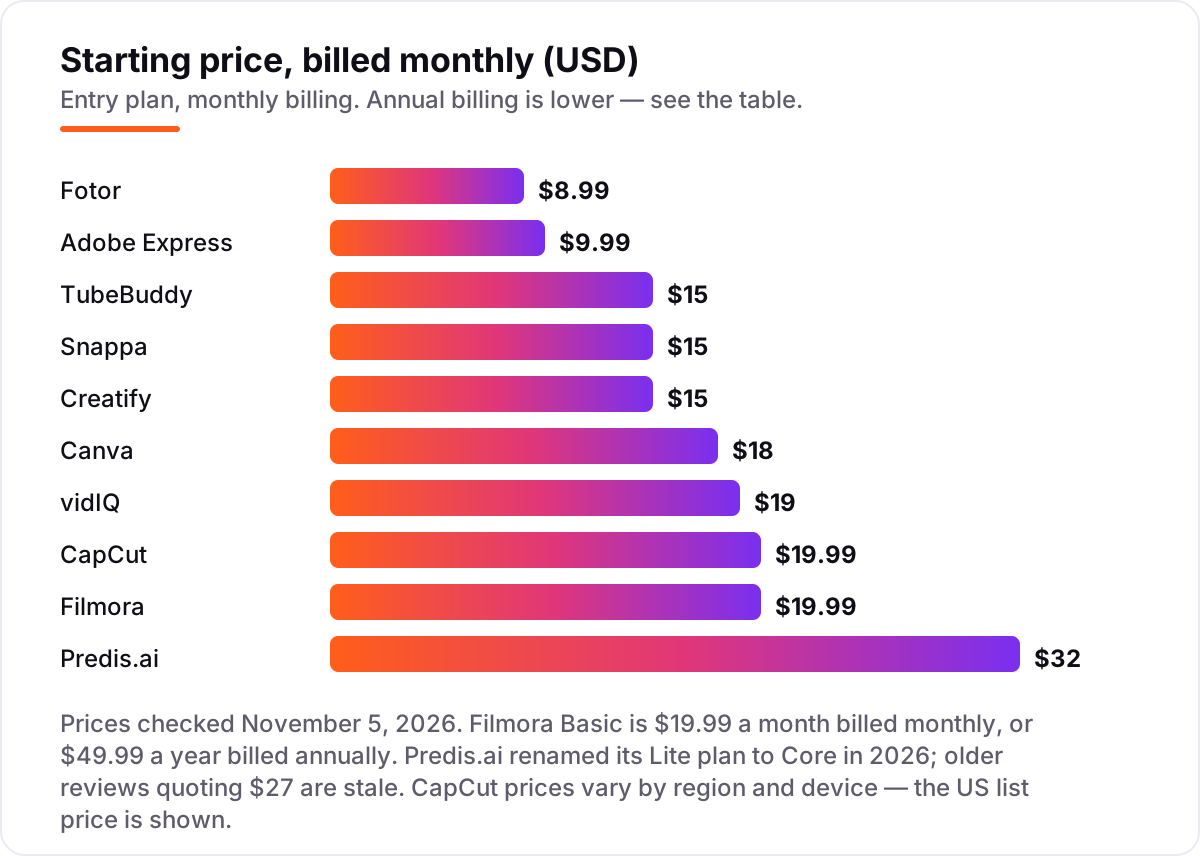
AI YouTube thumbnail generator tools pricing: what you will actually pay
Take a creator who publishes 4 videos a month and makes 3 thumbnail variants for each — 12 thumbnails a month. On annual billing, the subscription costs $39.99 a year on Fotor Pro, $49.99 on Filmora Basic, $120 on Snappa Pro or Creatify Standard, $144 on Canva Pro or TubeBuddy Pro, $179.99 on CapCut Pro, $199 on vidIQ Boost and $230 on Predis.ai Core. Adobe Express has no annual rate, so twelve monthly payments come to $119.88 a year.
Two costs sit outside those numbers. First, the credit meters: Fotor Pro's 100 credits, Creatify Standard's 55 and Adobe Express Premium's 250 generative credits are monthly allowances, and a month of heavy generation means top-ups or a higher tier. Second, the testing gap: only TubeBuddy measures which thumbnail wins, and that needs Legend at $32.99 a month, or $316.68 a year — nearly double the Pro price. If you run a channel rather than a single video, the visibility tools matter too — see our guide to the best AI tools for content creators.
The cheapest honest way in is the free plans. Nine of the ten tools here make real thumbnails at $0, and the one that does not — Predis.ai — are the two whose value is data and scheduling, not the image itself. Start free, pay when the credit meter or the download cap starts costing you uploads.
Know the difference: AI generation vs AI testing
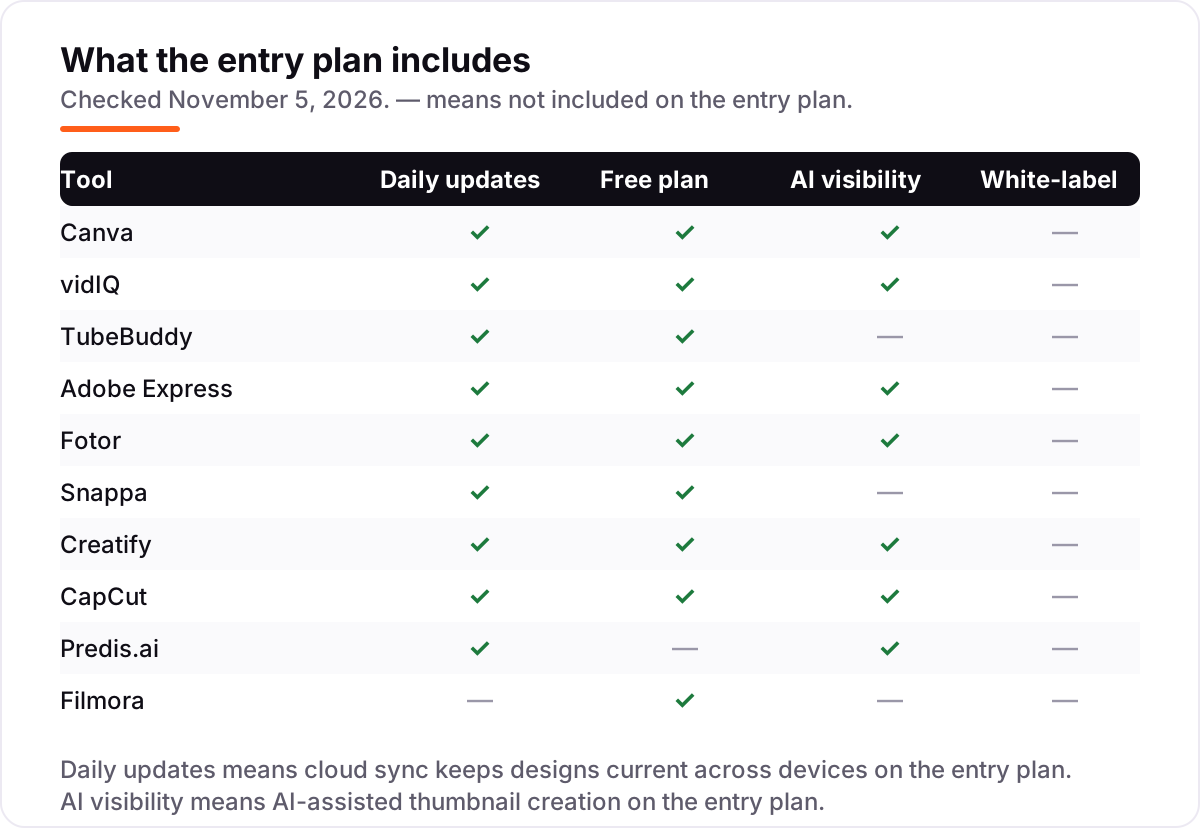
The confusion in this category is between making a thumbnail and proving it works. AI generation creates the image — Canva's Magic Media, Adobe's Firefly, Fotor's AI generator and vidIQ's thumbnail AI all produce new art from a prompt or from your video data. AI testing measures the image — TubeBuddy's A/B testing swaps two thumbnails on a live video and reports which one earns more clicks. Generation and testing are different jobs, and no tool in this list does both well.
There is a second, quieter confusion: template editing is not AI generation. Snappa and TubeBuddy's thumbnail generator decorate your own photo with text, overlays and backgrounds; they do not invent new art. That is a strength when you already have a strong photo — a template keeps the face real and the text readable — and a weakness when you have no usable frame. If the tool cannot generate, it cannot rescue a video with no good still.
A third distinction is the credit meter. AI generation is sold by the credit on Fotor, Creatify, Adobe Express, vidIQ and CapCut, so the plan price is not the whole cost — the allowance is. Template tools like Snappa sell by the download instead, and TubeBuddy sells by the feature tier. Read the meter before you read the price.
Quick comparison: tool type by need
| Buyer | Best pick | Why |
|---|---|---|
| Solo creator on a budget | Fotor | Free Basic plan, Pro is $8.99/month when you want AI generation |
| Most creators | Canva | AI generation plus the biggest template library, from $18/month |
| YouTuber who wants data | vidIQ | AI thumbnails built on search and trend data, Boost is $19/month |
| Creator who tests thumbnails | TubeBuddy | The only A/B testing here, on Legend at $32.99/month |
| Fastest template workflow | Snappa | Three free downloads a month, Pro is $15/month for unlimited |
| Editor who wants it all in one app | CapCut | Video editing plus AI covers, Pro is $19.99/month |
Mistakes to avoid
- Paying for AI generation you could get free. Canva, Fotor, Adobe Express, Snappa, Creatify, CapCut and Filmora all make real thumbnails at $0. Generate a month of thumbnails on the free plan before you pay for credits.
- Buying on the headline price and ignoring the credit meter. Fotor Pro's 100 credits and Creatify Standard's 55 credits run out fast on a daily channel. The allowance, not the sticker price, decides what a month costs.
- Uploading AI art without checking it at thumbnail size. Generated faces, hands and text break at small sizes, and YouTube shows thumbnails tiny on mobile. Zoom out to 10% before you export — if you cannot read it there, viewers cannot either.
- Expecting the tool to tell you which thumbnail won. Only TubeBuddy A/B tests thumbnails, and only on Legend. Every other tool here makes the image and leaves the verdict to YouTube Studio's click-through rate.
- Picking a video tool for a thumbnail job. CapCut and Filmora make thumbnails as a side feature of editing. That is convenient when you already edit there, and a poor reason to buy an editor you do not need.
How we chose
We checked each vendor's own pricing page in October and November 2026 and recorded the starting price exactly as shown, including the annual-billing figure where the page lists one, and we ranked the tools by fit for the most common buyer — a YouTube creator publishing weekly — not by brand size. Three prices need a note: Predis.ai renamed its Lite plan to Core in 2026, so older reviews quoting $27 are stale; TubeBuddy's free Starter plan is listed on its pricing page, though it is easy to miss next to the paid tiers; and CapCut's own help center says prices vary by region, device and promotion, so the US list price is shown. Filmora Basic is $19.99 a month billed monthly, or $49.99 a year billed annually, as published on its pricing page. This list carries no review ratings because no G2 or Capterra page for these tools had a fresh, verifiable read on November 5, 2026, and we would rather show no rating than a stale one. No vendor paid for a place in this list, and none of the links here are affiliate links.
What to do next
Start with the free plan or trial of your top pick and make one real thumbnail with your own footage. Upload it, watch the click-through rate in YouTube Studio for a week, and compare it with your last three thumbnails before you commit to a year. If the thumbnails are sorted but new viewers are not finding the channel, our video content creation guide covers the wider toolkit. Once your tools are in place, find out what's holding your rankings back.
Your stack only works if people find you
SerpAstra fixes what keeps your site off page one and makes it easy for AI assistants to recommend.
Get a free audit→Sources we checked (10)
- Canva pricing — canva.com/pricing (checked November 5, 2026)
- vidIQ pricing — vidiq.com/pricing (checked November 5, 2026)
- TubeBuddy pricing — tubebuddy.com/pricing (checked November 5, 2026)
- Adobe Express pricing — adobe.com/express/pricing (checked November 5, 2026)
- Fotor pricing — fotor.com/pricing (checked November 5, 2026)
- Snappa pricing — snappa.com/pricing (checked November 5, 2026)
- Creatify pricing — creatify.ai/pricing (checked November 5, 2026)
- CapCut pricing — capcut.com/resource/capcut-standard-vs-pro (checked November 5, 2026)
- Predis.ai pricing — predis.ai/pricing (checked November 5, 2026)
- Filmora pricing — filmora.wondershare.com (checked November 5, 2026)
Shamim
Founder of SerpAstra
A full-stack SEO and digital marketer who spends most days on Local SEO for dental practices, AI search visibility and lead generation.
Frequently asked questions
What is the best AI YouTube thumbnail generator?
Canva is the best fit for most creators: AI image generation, the largest template library and a real free plan, from $18/month. vidIQ is the better pick when thumbnails need search data behind them, at $19/month. Adobe Express is the cheapest big-name option at $9.99/month.
How much does an AI YouTube thumbnail generator cost?
Entry prices run from $0 to $32 a month. Nine of the ten tools here have free plans, and the first paid plans cost $8.99–$19.99 a month. A weekly creator typically pays $40–$230 a year for the subscription alone, before AI credit top-ups.
Is there a free AI YouTube thumbnail generator?
Yes, with limits. Canva, Fotor, Adobe Express, Snappa, Creatify, CapCut, vidIQ, TubeBuddy and Filmora all have free plans that make real thumbnails at $0. The limits are AI credits, download caps and watermarks — Snappa stops at 3 downloads a month, and Creatify's free exports are watermarked.
Can AI thumbnails really increase clicks?
No tool can promise more clicks — the thumbnail is one factor, and the title, topic and audience matter as much. What AI does is speed up the variations: more options to test in the same afternoon. The only honest way to know a thumbnail works is to test it, and TubeBuddy's A/B testing on Legend is the only test in this list.
vidIQ vs TubeBuddy for thumbnails — which is better?
vidIQ is better for making the thumbnail: its AI generator works from your channel's search and trend data. TubeBuddy is better for judging it: its A/B testing shows which thumbnail earns more clicks on a live video. Many creators use both — vidIQ to generate, TubeBuddy to test — but that means two subscriptions.
Do AI-generated thumbnails break YouTube's rules?
No, as long as the thumbnail honestly represents the video. YouTube requires creators to disclose realistic AI-generated content, and thumbnails that mislead viewers about what the video contains can be removed. Generate the art with AI, but keep the face, the text and the promise true to the video itself.
What size should a YouTube thumbnail be?
YouTube recommends 1,280×720 pixels at a 16:9 aspect ratio, under 2 MB, in JPG, GIF or PNG format. Every tool in this list exports at that size, but check the export settings before you pay — some free plans cap resolution or add a watermark that survives the upload.
Free SEO and AI visibility audit
Find out what is holding your rankings back
Send us your site. Within 2 business days you get a written audit, an AI visibility check and a short fix list ranked by impact. Free, with no contract attached.
Request my free audit→Related guides
 SEO & AI Search7 Best YouTube SEO Tools in 2026 (Free and Paid, Compared)7 best YouTube SEO tools compared on price, keyword research and rank tracking, from free to $29 per month. Prices checked November 2, 2026.Read guide →
 AI, Data & Analytics8 Best AI Tools for Content Creators in 2026 (Free and Paid, Compared)The 8 best ai tools for content creators, compared on price, free plans and strengths — writing, design, video. Prices checked on vendor sites, Nov 2, 2026.Read guide →
 Design, Video & Creative10 Best Video Content Creation Software in 2026, ComparedCompare the 10 best video content creation software tools of 2026 on price, free plans and AI features, with every price checked November 4, 2026.Read guide →