
Best Anti Spam Software for 2026: 10 Options Compared by Use Case
Compare the best anti spam software for 2026: 10 tools with real prices, free plans and G2 ratings, sorted by use case — from $2/user/month to custom quote.
 Shamim Mia, Founder, SerpAstraLast verified November 6, 202612 min read
We compare pricing pages, documentation and public reviews. We never accept payment for rankings.

Key takeaways
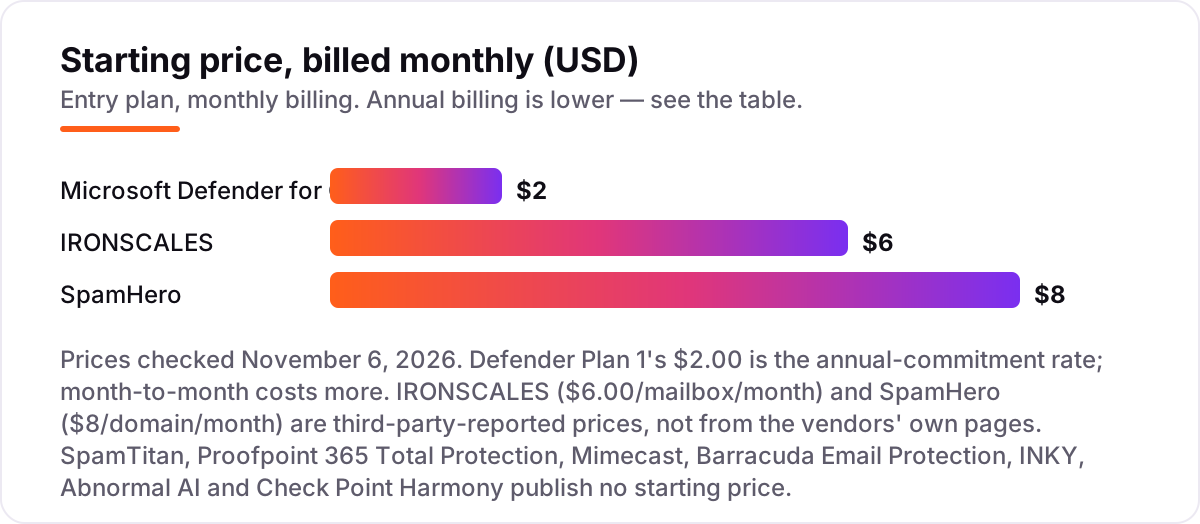
- Microsoft Defender for Office 365 is the cheapest published price at $2.00/user/month; IRONSCALES follows at $6.00/mailbox/month with a free Starter plan, and SpamHero at $8/domain/month — while seven of the ten tools publish no price at all.
- Only three tools publish a starting price, so the real buying decision is deployment type: API tools connect in minutes, gateways need mail-record changes.
- The single most important buying factor is what you already run: Microsoft 365 shops get the most from Defender or Proofpoint, while Google Workspace shops should skip both.
- Per-user pricing punishes growth and per-domain pricing does not — a 50-person team pays $100 a month for Defender Plan 1 but $8 for SpamHero's Basic plan.
On this page
Quick comparison
| Tool | Best for | Starting price | Free plan |
|---|---|---|---|
| Microsoft Defender for Office 365 | Microsoft 365 shops that want spam and phishing protection built into the platform they already pay for | $2/mo | No (free trial) |
| SpamTitan | MSPs and IT admins who want a classic email gateway with per-user and per-domain controls | Custom quote | No (free trial) |
| Proofpoint 365 Total Protection | Microsoft 365 shops that want spam filtering, backup, archiving and security training in one suite | Custom quote | No (free trial) |
| Mimecast | Companies that want a long-established email security brand with deep threat protection | Custom quote | No (free trial) |
| Barracuda Email Protection | Lean IT teams that want email security plus backup and archiving without a security department | Custom quote | No (free trial) |
| IRONSCALES | Companies that want fast API deployment, a free starting tier and published per-mailbox pricing | $6/mo | Yes (free Starter) |
| INKY | Teams that want visible phishing warnings coaching their users inside real email | Custom quote | No (free trial) |
| Abnormal AI | Larger companies focused on business email compromise, vendor fraud and account takeover | Custom quote | No (demo only) |
| SpamHero | Small businesses that want simple per-domain pricing that does not punish growth | $8/mo | No (30-day trial) |
| Check Point Harmony Email & Collaboration | Companies that want email plus Teams, Slack and file-sharing protection in one product | Custom quote | No (free trial) |
Make one of these tools?
We re-check this list every quarter. Send a correction, request a review, or ask about a clearly labeled sponsored spot.
Request a listingThe best anti spam software

Microsoft Defender for Office 365
Best for: Microsoft 365 shops that want spam and phishing protection built into the platform they already pay for
Microsoft Defender for Office 365 is the only tool here you may already own: Plan 1 is bundled into Microsoft 365 E3 and Business Premium, and everyone else can add it for $2.00 per user per month on an annual commitment. It adds Safe Links, Safe Attachments and anti-phishing policies on top of the basic Exchange Online Protection every Microsoft 365 mailbox already has, and covers Teams, SharePoint and OneDrive too.
The catch is the ecosystem lock-in. It protects Microsoft 365 and nothing else, so a Google Workspace shop gets zero value from it, and the settings live across several Microsoft portals that take time to learn. Buy it when your company already lives in Microsoft 365; the $2.00 add-on is the cheapest published price in this list, and E3 and Business Premium tenants pay nothing extra at all.
What we like
- Cheapest published price here at $2.00/user/month, and free inside Microsoft 365 E3 and Business Premium
- Safe Links and Safe Attachments check links and files at click time, not just at delivery
- Managed from the same Microsoft 365 Defender portal as the rest of the tenant
- Plan 2 at $5.00/user/month adds threat hunting, automated investigation and attack simulation
Watch out for
- Microsoft 365 only — Google Workspace shops get nothing from it
- Configuration is spread across several Microsoft portals and takes time to learn
- The $2.00 rate needs an annual commitment; month-to-month costs about 20% more

SpamTitan
Best for: MSPs and IT admins who want a classic email gateway with per-user and per-domain controls
SpamTitan is the old-school workhorse of this list. It sits in front of your mail server as a gateway, scanning inbound and outbound mail with real-time blocklists, Bayesian filtering, dual antivirus engines and sandboxing. Setup typically takes under an hour, and the policy controls are granular enough for demanding admins: allowlists, blocklists and greylisting work per user, per domain or system-wide.
The honest catch is that SpamTitan sells through IT channels, and TitanHQ publishes no single starting price — its own pages quote about $1.69 to $1.95 per user per month depending on volume, so expect a quote conversation. It suits managed service providers and in-house IT teams, not owners shopping alone. If someone technical minds your email, it is dependable and fairly priced; if not, an API-based tool below will be easier to live with.
What we like
- Dual antivirus engines plus sandboxing catch malware the single-engine filters miss
- Granular policies per user, per domain or whole system, with allowlists, blocklists and greylisting
- Cloud or on-premise deployment, and setup typically takes under an hour
- TitanHQ quotes about $1.69–$1.95 per user per month depending on volume — among the lowest per-user rates here
Watch out for
- No single published starting price — you need a quote, and the per-user figure moves with volume
- Built for IT administrators, not for owners shopping without technical help
- No backup or archiving included; those are separate TitanHQ products

Proofpoint 365 Total Protection
Best for: Microsoft 365 shops that want spam filtering, backup, archiving and security training in one suite
Proofpoint 365 Total Protection is the suite for Microsoft 365 shops that would rather buy once than manage four subscriptions. It combines spam and malware filtering, AI-based threat protection, email archiving, automated backup with unlimited retention, and security awareness training in a single console, with centralized DMARC, DKIM and SPF management on top.
The trade-off is the familiar enterprise habit of hiding prices behind a sales call — there is no published price, so budget only after a quote. The suite is also unapologetically Microsoft-centric: Google Workspace shops should look elsewhere. Buy it when you run Microsoft 365 and want filtering, backup, archiving and training from one vendor; buy a single-purpose filter when you only need the spam stopped.
What we like
- One purchase replaces separate filtering, backup, archiving and training subscriptions
- Centralized DMARC, DKIM and SPF management from a single console
- Packages sized for small and mid-size businesses, not just enterprises
Watch out for
- No public pricing — every deal goes through a sales conversation
- Built specifically for Microsoft 365, so Google Workspace shops should look elsewhere
- No G2 rating for this bundle itself; the closest listing covers a different Proofpoint product

Mimecast
Best for: Companies that want a long-established email security brand with deep threat protection
Mimecast has done nothing but email security for more than twenty years, and the depth shows. Its Targeted Threat Protection scans every email, attachment and URL for phishing, spear phishing, ransomware and impersonation, and its detection models have been trained on an enormous volume of real mail, which helps with the novel attacks that slip past simpler filters.
For a mid-size company that wants a safe, well-known choice, Mimecast is easy to defend to a boss or a board. The trade-offs are the lack of published pricing and a platform designed with larger security teams in mind — smaller companies may pay for depth they never configure. Still, if email is central to how your business runs, that depth is the point.
What we like
- More than two decades focused only on email security, with detection models trained on huge mail volumes
- Scans every attachment and URL for impersonation, ransomware and spear phishing
- Easy to defend to a boss or a board — the best-known name in this list
Watch out for
- No public pricing — expect a quote and an enterprise-style sales process
- The platform's breadth can be more than a small team will ever configure
- Awareness training and archiving sit in separate bundles, not the base product

Barracuda Email Protection
Best for: Lean IT teams that want email security plus backup and archiving without a security department
Barracuda pitches itself as the practical choice for teams without a security department, and the product backs that up. It connects to Microsoft 365 or Google Workspace through an API, with no mail record changes, and starts working in minutes. Beyond filtering, it includes backup, tamper-proof archiving and phishing simulation training, so one purchase covers several checkboxes.
What stands out is the emphasis on doing the work for you: threats get pulled back from mailboxes automatically, and bulk actions let a single admin manage thousands of mailboxes. The catch is pricing, which Barracuda keeps behind a quote, and the fact that you are buying into a wider platform story. If you only want a spam filter and nothing else, simpler tools on this list will get you there faster.
What we like
- Deploys through an API with no mail record changes, working in minutes
- Backup and tamper-proof archiving included, so one purchase covers several checkboxes
- Threats are pulled back from mailboxes automatically, with bulk actions for thousands of mailboxes
Watch out for
- No public pricing — Barracuda keeps prices behind a quote
- The full platform story can feel like overkill if you only need a spam filter
- Reviewers report legitimate mail occasionally flagged as spam, needing manual release

IRONSCALES
Best for: Companies that want fast API deployment, a free starting tier and published per-mailbox pricing
IRONSCALES is the easiest tool on this list to evaluate honestly, because it tells you the shape of the price upfront: a free Starter plan for Microsoft 365, then Email Protect from $6.00 per mailbox per month. It connects through an API, learns how your organization normally communicates, and removes threats after delivery — including the business email compromise and account takeover attempts that gateways miss.
The platform also bundles the human side: phishing simulations, a virtual security assistant and one-click reporting turn employees into part of the defense. The main limitation is arithmetic. Per-mailbox pricing is fair at small scale but becomes a real line item at a few hundred seats, so model the cost at your actual headcount before committing — and note the $6.00 figure is third-party reported, not from the vendor's own page.
What we like
- Free Starter plan for Microsoft 365 covers phishing simulation and a threat dashboard at $0
- Deploys in minutes through an API with no mail record changes
- Learns how your organization normally communicates and removes threats after delivery
- Phishing simulation and awareness training included, not sold separately
Watch out for
- Per-mailbox pricing adds up as headcount grows — model the cost at your real headcount
- The free Starter plan covers basics only and works with Microsoft 365 alone
- The $6.00 figure is third-party reported; IRONSCALES lists its plans without prices on its own site

INKY
Best for: Teams that want visible phishing warnings coaching their users inside real email
INKY takes a different angle from most tools on this list. Instead of filtering silently in the background, it stamps every email with a banner: gray for safe, yellow for caution, red for danger, each with an explanation of what it found. Users learn to spot phishing because the coaching happens inside real mail, not in a once-a-year training module.
The technology behind the banners is serious. Computer vision and generative AI models examine each message the way a person would, catching brand forgery and lookalike domains that signature-based filters miss. INKY says setup takes about half an hour, and managing a thousand mailboxes takes less than an hour a month. Pricing is quote-based, and if you also need backup or archiving you will need a second product.
What we like
- Color-coded banners explain each email's risk to the recipient, turning every message into training
- Generative AI analysis looks at intent and visual cues, catching brand forgery and lookalike domains
- Installs in about 30 minutes with minimal ongoing management
Watch out for
- No public pricing — you need a quote before you can budget it
- Focused on phishing rather than full-suite features like backup or archiving
- Reviewers report occasional false positives that need tuning

Abnormal AI
Best for: Larger companies focused on business email compromise, vendor fraud and account takeover
Abnormal AI is the heavyweight pick for stopping the attacks that cost real money: business email compromise, vendor fraud and account takeover. Its behavioral AI builds a profile of how each person and organization normally communicates, then flags the anomalies. Because it looks at behavior rather than known-bad signatures, it catches the novel, payload-free attacks that traditional filters wave through.
Integration is a one-click API connection to Microsoft 365 or Google Workspace, with no mail record changes and no impact on mail flow. The honest catch is that everything about Abnormal AI, from pricing to packaging, is aimed at larger organizations. No public price, no free trial — demos only. If you run a fifty-person company, the tools above will serve you well for less money; if you run five hundred, this is the product class your peers buy.
What we like
- Behavioral AI baselines normal communication to catch novel, payload-free attacks
- One-click API connection with no mail flow changes and no impact on delivery
- Covers inbound threats, account takeover and internal mail in one platform
Watch out for
- No public pricing and no free trial — demos only, aimed at larger organizations
- Enterprise positioning makes it a stretch for very small firms
- Premium pricing is the trade-off for the deepest BEC protection here

SpamHero
Best for: Small businesses that want simple per-domain pricing that does not punish growth
SpamHero is the budget pick that refuses to punish you for growing. Instead of charging per user, it charges per domain: $8 a month on the Basic plan covers every address on that domain, whether you have five employees or five hundred. A 30-day trial with no credit card required means you can prove it works before spending anything.
The filtering itself is rule-based, maintained by a human team around the clock rather than pure machine learning, and everything caught lands in a searchable quarantine you can review and release. That simplicity is the appeal and the limit. You point your mail records at SpamHero, which takes a few minutes but is a bigger change than the API tools, and there is no AI detection on the entry plan.
What we like
- Per-domain pricing covers every address on the domain, whether you have 5 employees or 500
- 30-day free trial with no credit card required, and setup takes about five minutes
- Rules maintained by a human team around the clock, updated several times a day
Watch out for
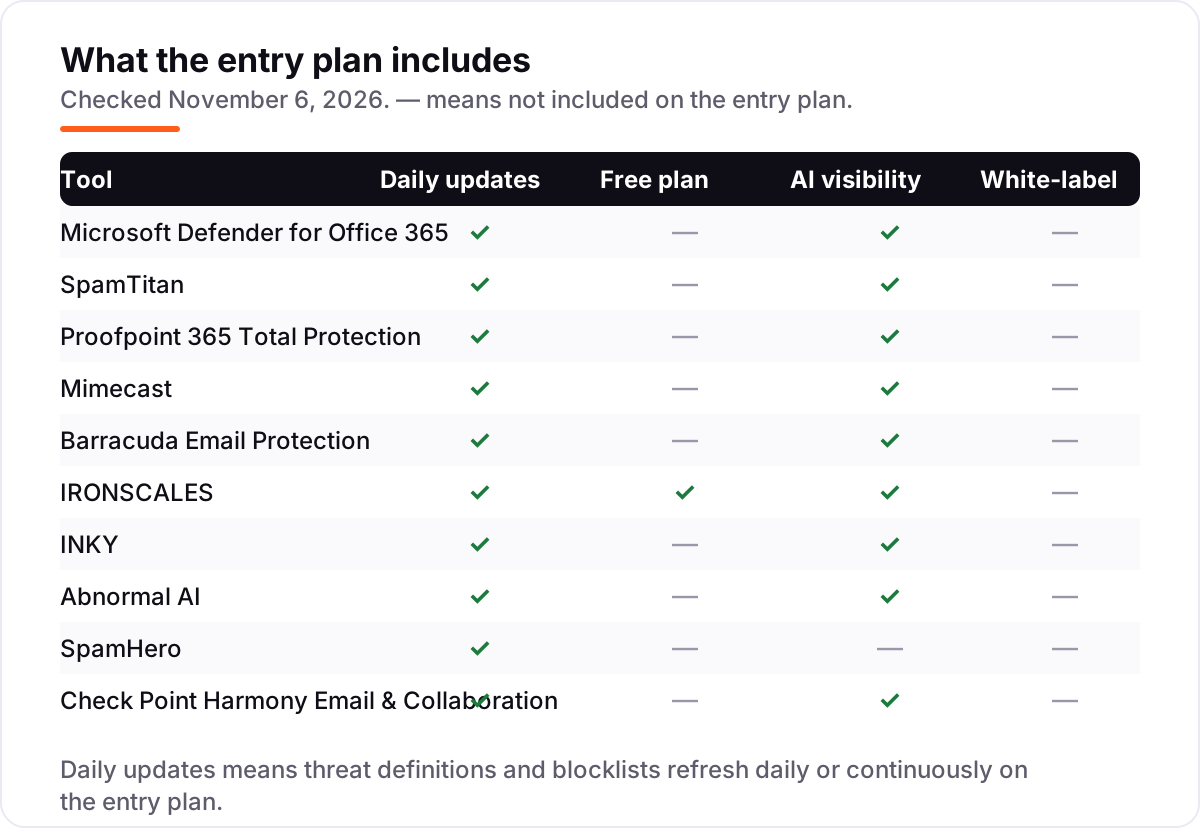
- Rule-based filtering only — no AI or machine-learning detection on the entry plan
- You point your mail records at SpamHero, which is a bigger change than API-based tools
- The $8 figure comes from TrustRadius, not the vendor's own page, and other directories quote $5–$7

Check Point Harmony Email & Collaboration
Best for: Companies that want email plus Teams, Slack and file-sharing protection in one product
Check Point Harmony Email & Collaboration protects more than the inbox: the same product covers Microsoft 365 and Google Workspace email, plus Teams, Slack and SharePoint files. Its AI-powered engine blocks phishing, malware and account takeover attempts, and Check Point cites a 99.91% malware catch rate validated by NSS Labs.
Deployment is by API, so there are no mail flow changes and minimal impact on productivity, and the console gives one view across email and collaboration apps. The catch is the enterprise shape of the deal: no published pricing, an evaluation process rather than a quick signup, and a console that takes time to learn. Buy it when your team lives in Teams and Slack as much as in email; buy a simpler filter when the inbox is the whole job.
What we like
- Protects email plus Teams, Slack and file-sharing, not just the inbox
- API deployment with no mail flow changes and minimal impact on productivity
- Check Point cites a 99.91% malware catch rate validated by NSS Labs
Watch out for
- No public pricing — expect a quote and an enterprise-style evaluation
- The breadth across collaboration apps can be more than a small team needs
- Some reviewers report the console takes time to learn
The best anti spam software for 2026 does more than delete junk mail: it stops phishing, business email compromise and malware before they reach an inbox, and it does it without drowning the IT admin in false positives. We ranked the ten tools below by fit for the most common buyer — a small or mid-size business running Microsoft 365 or Google Workspace — starting with the cheapest published price and ending with the budget per-domain pick, and every price and rating was checked on November 6, 2026.
How to choose the best anti spam software
- Start with your mail platform. Microsoft 365 shops get the most from Defender or Proofpoint; Google Workspace shops should skip both and look at Barracuda, IRONSCALES or Abnormal AI.
- Pick a deployment type. API tools connect to mailboxes in minutes with no mail changes; gateways need MX record changes and filter mail in transit.
- Count the billing unit. Per-user pricing grows with headcount; per-domain pricing like SpamHero's does not. Model the cost at your real headcount, not your current one.
- Check what else is bundled. Proofpoint and Barracuda include backup and archiving; Defender, IRONSCALES and INKY do not. One bundle can replace two or three subscriptions.
- Ask about the free tier. Only IRONSCALES offers a genuinely free plan; the rest offer trials, and Abnormal AI offers demos only.
- Weigh AI against rules. Behavioral AI catches payload-free impersonation attacks; rule-based filters like SpamHero are cheaper and simpler but miss novel attacks.
Whatever you shortlist, try it with real mail before you pay. The trials in this list are long enough to run one genuine month — your mailboxes, your senders, your false positives — and that month tells you more than any review can. Check two things in the trial: that legitimate mail is not quarantined daily, and that the admin console is one your team will actually open. Before you publish new pages for the services you sell, run your titles through the free SERP snippet preview tool — it shows exactly how the title and description will look in Google.
Anti spam software pricing: what you will actually pay
Take a 25-person business on Microsoft 365. On published prices, the subscription costs $8 a month on SpamHero Basic, $50 on Microsoft Defender for Office 365 Plan 1, and $150 on IRONSCALES Email Protect. The seven custom-quote tools cannot be priced without a sales conversation, so budget them as unknown until you have a number in writing — and get that number for 25 seats, not for the 250-seat tier the vendor quotes in marketing pages.
Over a year, that is $96 on SpamHero, $600 on Defender Plan 1 and $1,800 on IRONSCALES Email Protect — a $1,704 gap between the cheapest and dearest published prices for the same 25 mailboxes. The gap is mostly the billing unit: SpamHero charges per domain, so the 26th hire costs nothing extra, while Defender and IRONSCALES charge per user or per mailbox. At 50 mailboxes the picture widens further: Defender costs $100 a month, IRONSCALES $300, and SpamHero still $8.
Two costs sit outside every number above. First, Defender Plan 1's $2.00 rate needs an annual commitment — month-to-month billing costs about 20% more. Second, the bundles: Proofpoint 365 Total Protection and Barracuda Email Protection include backup, archiving and training that would cost extra alongside a bare filter, so a custom quote that looks expensive may replace two or three subscriptions. If you run Microsoft 365, check whether Plan 1 is already included in your license — E3 and Business Premium tenants pay nothing extra for it.
Know the difference: email gateway vs API-based protection
The confusion in this category is between two deployment models that look identical on a feature list. A gateway sits in front of your mail server: you point your MX records at it, and it filters mail in transit, before delivery. SpamTitan, SpamHero and Mimecast work this way. An API-based tool connects to your mailboxes instead: it scans mail after delivery and pulls threats out of inboxes, with no mail record changes at all. Defender, IRONSCALES, INKY, Abnormal AI, Barracuda and Check Point work this way, and Proofpoint 365 Total Protection connects through the Microsoft Graph API.
The difference matters most at setup and at incident time. A gateway stops bad mail before it arrives, but changing MX records is a bigger step, and a misconfigured gateway can delay all mail. An API tool deploys in minutes and cannot break mail flow, but there is a short window in which a message sits in the inbox before it is removed. Neither model is better in general: gateways suit IT teams that want pre-delivery control, API tools suit teams that want a five-minute install with no DNS risk.
There is a second, quieter confusion: spam filtering is not the same as email security. A spam filter blocks bulk junk; email security also covers phishing, business email compromise, malware and account takeover. All ten tools in this list do both, which is what the phrase "anti spam software" means here. If a tool only blocks bulk mail, it belongs in a different list.
Quick comparison: tool type by need
| Buyer | Best pick | Why |
|---|---|---|
| Small business on Microsoft 365 | Microsoft Defender for Office 365 | Plan 1 is $2.00/user/month and already inside the platform |
| MSP managing many tenants | SpamTitan | Gateway with per-user and per-domain policies, priced by quote |
| Microsoft 365 shop wanting one suite | Proofpoint 365 Total Protection | Filtering, backup, archiving and training in one console |
| Company wanting the established brand | Mimecast | Twenty years of email security, rated 4.4/5 on G2 |
| Team that wants a free start | IRONSCALES | Free Starter plan, then $6.00/mailbox/month |
| Tiny team on a tight budget | SpamHero | $8/domain/month covers every address on the domain |
Mistakes to avoid
- Budgeting on a quote you do not have. Seven of the ten tools publish no price. A shortlist built on assumed prices falls apart at the first sales call — get written quotes for your exact seat count before ranking.
- Buying per-user pricing without modeling growth. A $2 per-user tool is cheap at 10 seats and a real line item at 200. SpamHero's $8 per domain is the only price here that does not grow with headcount.
- Assuming your license already covers it. Defender Plan 1 is bundled into E3 and Business Premium but not into Business Standard — check your actual license before paying for an add-on or a third-party tool.
- Changing MX records on a Friday. Gateway tools need mail record changes; a mistake delays all mail. Make the change on a quiet morning, keep the old records noted down, and run the trial domain first.
- Judging a filter by the spam it catches. The expensive failures are the false positives — legitimate mail quarantined daily — and the impersonation attacks that carry no payload. Trial with real mail and count both.
How we chose
We checked every price against the vendor's own published pricing where it exists, on November 6, 2026, and recorded the starting price exactly as shown — or "Custom quote" where the vendor publishes none. Three prices needed extra care. Microsoft Defender for Office 365 Plan 1's $2.00 rate comes from Microsoft's published price list, confirmed by G2's vendor-provided pricing and independent October 2026 price-list reads, because Microsoft's own pricing page could not be opened directly from our network today. IRONSCALES ($6.00 per mailbox per month) and SpamHero ($8 per domain per month) come from TrustRadius pricing pages crawled within the last five days, corroborated by independent sources; both are disclosed as third-party-reported, not vendor-verified, and SpamHero's figure conflicts with older directory listings of $5–$7. Ratings come from fresh search-index copies of the exact G2 pages, crawled within the last four days. Two ratings are omitted on purpose: Proofpoint 365 Total Protection has no G2 listing of its own — the closest listing covers a different Proofpoint product — and SpamHero's only review page is a Capterra copy last crawled 232 days ago. No vendor paid for a place in this list, and none of the links here are affiliate links.
What to do next
Start with the free plan or trial of your top pick and run one real month of mail through it. Check that legitimate mail is not quarantined daily and that the admin console is one your team will actually open before you commit to a year. If your mail is sorted but new customers are not finding you, our monthly SEO service handles the visibility side — or compare providers in our guide to email archiving software. Once your tools are in place, find out what's holding your rankings back.
Your stack only works if people find you
SerpAstra fixes what keeps your site off page one and makes it easy for AI assistants to recommend.
Get a free audit→Sources we checked (20)
- Microsoft Defender for Office 365 pricing, vendor-provided — g2.com (checked November 6, 2026)
- Microsoft 365 price list, October 2026 — o365hq.com (checked November 6, 2026)
- SpamTitan pricing guide — titanhq.com (checked November 6, 2026)
- Proofpoint 365 Total Protection — proofpoint.com (checked November 6, 2026)
- Mimecast — mimecast.com (checked November 6, 2026)
- Barracuda Email Protection — barracuda.com (checked November 6, 2026)
- IRONSCALES pricing — trustradius.com (checked November 6, 2026)
- INKY — inky.com (checked November 6, 2026)
- Abnormal AI — abnormal.ai (checked November 6, 2026)
- Check Point Harmony Email & Collaboration — checkpoint.com (checked November 6, 2026)
- SpamHero pricing — trustradius.com (checked November 6, 2026)
- SpamHero plans — spamhero.com (checked November 6, 2026)
- SpamTitan G2 reviews — g2.com (checked November 6, 2026)
- Mimecast G2 reviews — g2.com (checked November 6, 2026)
- Barracuda Email Protection G2 reviews — g2.com (checked November 6, 2026)
- IRONSCALES G2 reviews — g2.com (checked November 6, 2026)
- INKY G2 reviews — g2.com (checked November 6, 2026)
- Abnormal AI G2 reviews — g2.com (checked November 6, 2026)
- Check Point Harmony Email & Collaboration G2 reviews — g2.com (checked November 6, 2026)
- Check Point Email Security — marketplace.microsoft.com (checked November 6, 2026)
Shamim
Founder of SerpAstra
A full-stack SEO and digital marketer who spends most days on Local SEO for dental practices, AI search visibility and lead generation.
Frequently asked questions
What is the best anti spam software?
Microsoft Defender for Office 365 is the best fit for most businesses: it costs $2.00 per user per month for Plan 1, is free inside Microsoft 365 E3 and Business Premium, and needs no new vendor. SpamTitan is the better pick for MSPs that want a classic gateway, and IRONSCALES is the best choice when you want a free plan to start with.
How much does anti spam software cost?
Published prices run from $2.00 per user per month for Defender Plan 1 to $6.00 per mailbox per month for IRONSCALES Email Protect, while SpamHero charges $8 per domain per month however many users you have. Seven of the ten tools in this list publish no price at all, so expect a quote — and budget per-user tools at your real headcount, not your current one.
Is there really free anti spam software?
Only one tool here is genuinely free: IRONSCALES Starter costs $0 for Microsoft 365, covers up to 500 mailboxes and includes phishing simulation, though paid features need Email Protect at $6.00 per mailbox per month. Every other tool offers a free trial instead — SpamHero's runs 30 days with no credit card — and Abnormal AI offers demos only.
What is the difference between a spam filter and email security?
A spam filter blocks bulk junk mail. Email security also stops phishing, business email compromise, malware and account takeover — attacks that often carry no payload and no obvious spam markers. All ten tools in this list do both. If a product only blocks bulk mail, it is a filter, not email security, and it will miss the impersonation attacks that cost real money.
Do I need anti spam software if I use Microsoft 365?
Microsoft 365 already includes Exchange Online Protection, which filters bulk spam and known malware. What it does not include is Safe Links, Safe Attachments and advanced anti-phishing — those need Defender for Office 365 Plan 1 at $2.00 per user per month, or a third-party tool. E3 and Business Premium tenants already have Plan 1 included.
Can I switch anti spam software later?
Yes, and switching is easier with API-based tools, which disconnect without touching mail flow. Gateway tools need a mail record change, so plan the move for a quiet morning and keep the old records noted down. Either way, run the new tool alongside the old one for a week first, compare what each quarantines, and only then cut over.
Free SEO and AI visibility audit
Find out what is holding your rankings back
Send us your site. Within 2 business days you get a written audit, an AI visibility check and a short fix list ranked by impact. Free, with no contract attached.
Request my free audit→Related guides
 Digital Marketing & Ads10 Best Email Archiving Software in 2026, ComparedCompare the 10 best email archiving software tools on price, retention, legal hold and eDiscovery, with every price checked November 5, 2026.Read guide →
 Digital Marketing & AdsBest Email Backup Software for 2026: 9 Options Compared by Use CaseCompare the 9 best email backup software options for Microsoft 365 and Google Workspace on price and storage, with every price checked November 5, 2026.Read guide →
 Digital Marketing & Ads7 Best Email Deliverability Services in 2026Compare the 7 best email deliverability services on real prices, inbox testing, warmup and monitoring, with every price checked November 5, 2026.Read guide →