
8 Best Apps for Digital Painting in 2026: Free and Paid Apps Ranked
Compare the 8 best apps for digital painting on price, brushes and platform, with every price checked November 7, 2026 — free and paid picks ranked.
 Shamim Mia, Founder, SerpAstraLast verified November 7, 202613 min read
We compare pricing pages, documentation and public reviews. We never accept payment for rankings.
Key takeaways
- Procreate is the best iPad painting app at $12.99 one-time, and Krita is the best free painting app at $0 — between them they cover most painters without a subscription.
- Four of the eight apps are free — Krita, Adobe Fresco, MediBang Paint and Sketchbook — while the paid ones are mostly one-time purchases, not subscriptions.
- The dearest tool here is Corel Painter at $429 one-time or $199 a year; buy it only if realistic traditional media is your actual work.
- Match the app to your device first: Procreate is iPad only, Corel Painter and Rebelle are desktop only, and the rest run on several platforms.
On this page
Quick comparison
| Tool | Best for | Starting price | Free plan |
|---|---|---|---|
| Procreate | iPad artists who want a complete, intuitive art studio with the best brush engine on a tablet | $12.99 once | No |
| Clip Studio Paint | Illustrators, manga artists and animators who want professional brush, 3D-model and panel tools | $63 once | No (free trial) |
| Krita | Digital painters and animators who want a free, open-source studio with no paywall | Free | Yes (free) |
| Corel Painter | Desktop artists who want the deepest traditional-media simulation — oils, watercolors and pastels that behave like the real thing | $199/yr | No (15-day trial) |
| Adobe Fresco | Artists already in the Adobe ecosystem who want realistic live watercolor and oil brushes for free | Free | Yes (free) |
| Rebelle | Painters who judge an app by how real the paint feels — hyper-realistic oils and watercolors on desktop | $89.99 once | No (30-day trial) |
| MediBang Paint | Manga and comic beginners who want free panel tools and cloud sync across devices | Free | Yes (free) |
| Sketchbook | Artists who want fast, clean line art and a paper-like sketching feel without a full painting app's clutter | Free | Yes (free) |
Make one of these tools?
We re-check this list every quarter. Send a correction, request a review, or ask about a clearly labeled sponsored spot.
Request a listingThe best apps for digital painting
Procreate
Best for: iPad artists who want a complete, intuitive art studio with the best brush engine on a tablet
Procreate is the reason many illustrators bought an iPad. It is a complete art studio for $12.99 paid once, with more than 200 brushes, Brush Studio, layers and blend modes, Animation Assist and time-lapse recording — and no subscription. The brush engine is fast: strokes render instantly at large canvas sizes, and the touch-first interface stays out of the way so you can focus on drawing.
The limit is the platform. Procreate runs on iPad only, so desktop artists need a second tool, and the separate Pocket for iPhone costs $5.99 while Dreams for animation costs $19.99. There is no free plan or trial, so the $12.99 is a blind buy — though at that price it is the cheapest paid professional tool here. Buy it when you paint on an iPad and want the best brush feel per dollar.
What we like
- One-time $12.99 purchase with no subscription and free updates for life
- More than 200 brushes plus Brush Studio for building your own
- Animation Assist and time-lapse recording are built in
- Fast, touch-first interface built around the Apple Pencil
Watch out for
- iPad only — there is no Mac, Windows or Android version
- Raster only, so logos and icons cannot scale like vector art
- No free plan and no free trial — the $12.99 purchase is the only way in
Clip Studio Paint
Best for: Illustrators, manga artists and animators who want professional brush, 3D-model and panel tools
Clip Studio Paint is the drawing app professional illustrators and manga artists reach for when work has to be finished, not just sketched. Its brushes feel like real art materials, with watercolor, oil and pen textures, and more than 40,000 free brushes plus 100,000 free materials from the Assets community expand what you can do. Manga panels, speech balloons, tones and multi-page management sit beside animation with sound and camera work.
PRO costs $63 as a one-time purchase for Ver. 5.0 on Windows or Mac, or from $0.99 a month on subscription, which is the only option on iPad and Android. The perpetual licence locks to Ver. 5.0, so new features need the $10.99 a year Update Pass, and multi-page manga waits for EX at $277. Pick it when illustration, manga or animation is the job.
What we like
- Deepest brush and 3D-model tools in this list, with posable models and photo-to-pose import
- Huge Clip Studio Assets library of brushes, tones and materials from other artists
- Vector layers let you correct lines after drawing without redrawing
- Perpetual licence option — pay once and keep the version
Watch out for
- A perpetual licence locks to Ver. 5.0 — new features need the $10.99/year Update Pass
- Subscription is the only option on iPad and Android
- Multi-page manga tools wait for EX at $277 one-time
Krita
Best for: Digital painters and animators who want a free, open-source studio with no paywall
Krita is a professional free and open source painting program, made by artists who want affordable art tools for everyone, and it is free forever under the GNU GPL. The feature set is serious: multiple brush types for different art styles, layers, drawing assistants, stabilizers and animation tools, plus brushes, patterns, vector libraries, texture packs and plugins that expand what it can do. A supportive online community shares artwork, tips and feedback.
The trade-offs are polish and learning curve. Krita's interface is denser than Procreate's, and performance depends on your hardware, so a low-end machine can feel it on large canvases. Animation export needs FFmpeg downloaded separately, and support comes from the community rather than a help desk. For artists who want professional painting tools without paying anything, Krita is unmatched.
What we like
- Free and open source, with every feature included at $0
- Wide brush library with customizable brush engines for painting and inking
- Animation tools and HDR painting built in
- Runs on Windows, Mac and Linux, and works well on modest hardware
Watch out for
- Raster-first: vector layers exist but are basic next to a dedicated vector editor
- Animation export needs FFmpeg downloaded separately
- Support comes from the community, not a help desk

Corel Painter
Best for: Desktop artists who want the deepest traditional-media simulation — oils, watercolors and pastels that behave like the real thing
Corel Painter is for painters, not illustrators: its brushes simulate real oil, watercolor, chalk and pastel with a fidelity nothing else matches. Traditional artists moving to digital feel at home fastest here, because the tools behave like the physical media they know — bristle behavior, paint mixing, canvas texture and watercolor bleeding are all modeled. The brush customization goes deeper than any competitor, so you can build brushes that match your exact stroke.
The price is the barrier: $429 as a one-time purchase or $199 for a 365-day subscription, with a 15-day free trial to test the brushes first. That only makes sense if natural-media painting is your actual work, and the interface feels dated next to newer rivals. Buy Corel Painter when realistic traditional media is the specialty; buy Rebelle at $89.99 when the budget is tighter.
What we like
- 900+ brushes that simulate oils, watercolors, pastels and charcoal with physics-based mixing
- The most realistic traditional-media feel of any desktop painting app
- Deep brush customization — build brushes that match your exact stroke
- One-time purchase still offered alongside the yearly subscription
Watch out for
- The dearest tool here by far: $429 one-time or $199 a year, and the 15-day trial is short
- Desktop only — there is no iPad or Android version
- Interface feels dated next to newer rivals, and the brush library takes time to learn

Adobe Fresco
Best for: Artists already in the Adobe ecosystem who want realistic live watercolor and oil brushes for free
Adobe Fresco is Adobe's painting and drawing app, and it is now completely free — Adobe cancelled the $9.99 a month Premium subscription in October 2024, so every brush, font and feature is included at $0. Its live brushes simulate watercolor and oil with realistic blending, while vector brushes keep lines crisp, and work syncs across devices through Creative Cloud. Thousands of brushes and Adobe Fonts come with it.
The ecosystem is Fresco's biggest advantage. Artwork moves easily into Photoshop for finishing or Illustrator for vector work, and Creative Cloud libraries, fonts and storage tie everything together. The gaps are platform and scope: no Mac version, and vector tools weaker than Illustrator's, so it is a painting app first. Pick Fresco when you already live in Adobe's world and want real paint feel for free.
What we like
- Completely free since Adobe cancelled the $9.99/month Premium subscription
- Live brushes simulate watercolor and oil paint on textured canvas
- Vector and pixel brushes in one app, with animation tools
- Thousands of brushes and Adobe Fonts included
Watch out for
- No Mac version — iPad, iPhone and Windows only
- Vector tools are weaker than Illustrator, so it is a painting app first
- Small review base: 36 G2 reviews, so ratings are thin
Rebelle
Best for: Painters who judge an app by how real the paint feels — hyper-realistic oils and watercolors on desktop
Rebelle 8 is the hyper-realistic painting software from Escape Motions, where technology meets the timeless beauty of traditional media. Its oils and watercolors use real physical pigment color mixing, so colors blend the way they do on a real palette, and the watercolor and paper interactions are widely praised as the closest digital emulation of real watercolor available. It is also the highest-rated tool in this list at 4.8 out of 5 on G2.
Rebelle 8 costs $89.99 one-time for the standard edition, or $149.99 for Pro, with a year of updates included and a 30-day free trial. The standard licence leaves out bristle brushes and NanoPixel export, which wait for Pro, and there is no iPad or Android version. Choose Rebelle when how real the paint feels matters more than anything else.
What we like
- Hyper-realistic oils and watercolors with real pigment color mixing
- Watercolor and paper interaction widely praised as the closest digital emulation available
- One-time purchase with a year of updates included — no subscription
- Highest-rated tool in this list at 4.8 out of 5 on G2
Watch out for
- Desktop-focused — there is no iPad or Android version
- The Pro edition costs $149.99, and the standard $89.99 licence leaves out bristle brushes and NanoPixel export
- Smaller community than Procreate or Krita, so tutorials are scarcer
MediBang Paint
Best for: Manga and comic beginners who want free panel tools and cloud sync across devices
MediBang Paint is a free illustration and manga app from MediBang, offering a wide range of brushes, comic tools and cloud features for artists on iPad, mobile and desktop. Its brushes cover pencil, ink, paint and more, all customizable, and its comic features support panel creation, tones and text for manga and webtoon work. Cloud storage syncs projects between desktop and mobile, so a page started at home can be finished on the train.
The trade-offs are depth and focus: MediBang Paint is simpler than Clip Studio Paint for professional manga production, and the free mobile app shows ads. Some brushes and materials sit behind the optional MediBang Premium subscription, from ¥300 a month. For a free, capable painting and manga app that runs everywhere, MediBang Paint is an excellent choice.
What we like
- Free on every platform, with cloud sync across devices
- Comic panel tools, screentones and speech-bubble tools built in
- Large free brush library with a manga-focused community
- Runs on Windows, Mac, iPad, iPhone and Android
Watch out for
- The free mobile app shows ads, which some users find intrusive
- Fewer brushes than Procreate or Krita
- Some brushes and materials sit behind the optional MediBang Premium subscription
Sketchbook
Best for: Artists who want fast, clean line art and a paper-like sketching feel without a full painting app's clutter
Sketchbook is for everyone who loves to draw, from quick sketches to fully finished artwork, and its core promise is natural drawing. Working in Sketchbook feels like drawing on paper: brushes and pens behave like their physical counterparts, the predictive stroke smooths shaky lines, and the interface is clean and unobtrusive, with tools tucked out of sight until you need them. The mobile app is free on Android and iOS.
The feature set covers professional needs too: a wide variety of highly customizable brushes supported by guides, rulers and stroke tools, plus layers with a full complement of blend modes. Sketchbook Pro serves macOS and Windows as a $24.99 one-time purchase, while the mobile Premium Bundle costs $2.99 once. Pick Sketchbook when clean, fast sketching matters more than a deep painting toolkit.
What we like
- Feels like drawing on paper — predictive stroke smooths shaky lines
- Clean, unobtrusive interface with tools that tuck away until needed
- Highly customizable brushes with guides, rulers and stroke tools
- Free mobile app on Android and iOS; desktop Pro is a $24.99 one-time purchase
Watch out for
- Fewer painting and manga features than Clip Studio Paint or Krita
- The desktop Pro edition is a separate $24.99 one-time purchase
- No built-in cloud service — artwork is stored locally
The best apps for digital painting split into two camps: free apps that cost nothing and do serious work, and one-time purchases that you pay for once and keep. Four of the eight apps below are free — Krita, Adobe Fresco, MediBang Paint and Sketchbook — and the paid ones are mostly one-time buys, from Procreate at $12.99 to Corel Painter at $429. Every price was checked on the vendor's own pricing page or official store on November 7, 2026.
How to choose the best apps for digital painting
- Start with your device. Procreate runs on iPad only, Corel Painter and Rebelle are desktop only, and the rest run on several platforms. An app you cannot install is not a bargain at any price.
- Decide what you draw. Manga and comics point to Clip Studio Paint or MediBang Paint, realistic watercolor points to Rebelle or Adobe Fresco, and quick sketches point to Sketchbook. A painting app bought for the wrong job is money spent twice.
- Check the licence, not just the price. Procreate, Rebelle and Sketchbook Pro are one-time purchases with no subscription; Clip Studio Paint and Corel Painter offer both, and the one-time licence is usually cheaper after a year.
- Try the free ones first. Krita, Adobe Fresco, MediBang Paint and Sketchbook cost nothing, and Corel Painter, Rebelle and Clip Studio Paint all offer free trials. A week of real painting tells you more than any review.
- Count the hidden costs. A stylus and a pen tablet are real purchases if you paint on desktop, and Clip Studio Paint's Update Pass at $10.99 a year buys new features after the perpetual licence locks to a version.
Painting is one tool in a creative stack, not the whole stack. If you also need vector work alongside painting, our guide to the best tools for digital illustration covers the apps that handle both. And before you publish a portfolio page for the work you make, run your titles through the free SERP snippet preview tool — it shows exactly how the title and description will look in Google.
Whatever you shortlist, paint with it before you pay. The free apps and trials in this list are long enough to finish one genuine piece — your brushes, your canvas size, your workflow — and that piece tells you more than any review can. Check two things in the trial: that the brush engine keeps up with fast strokes at your usual canvas size, and that your files export cleanly to the format your clients or printers need.
Apps for digital painting pricing: what you will actually pay
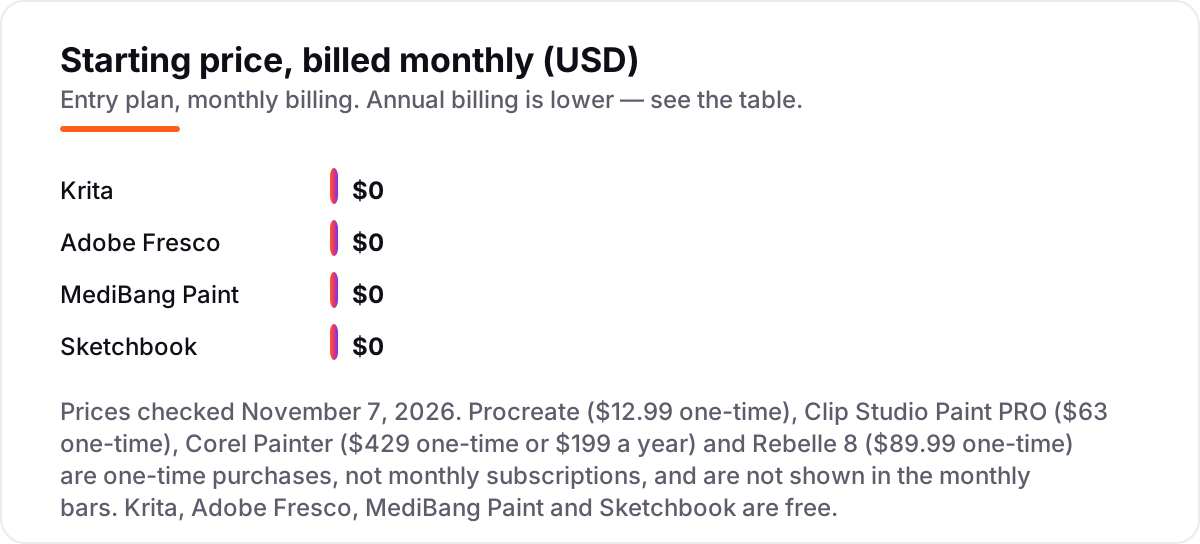
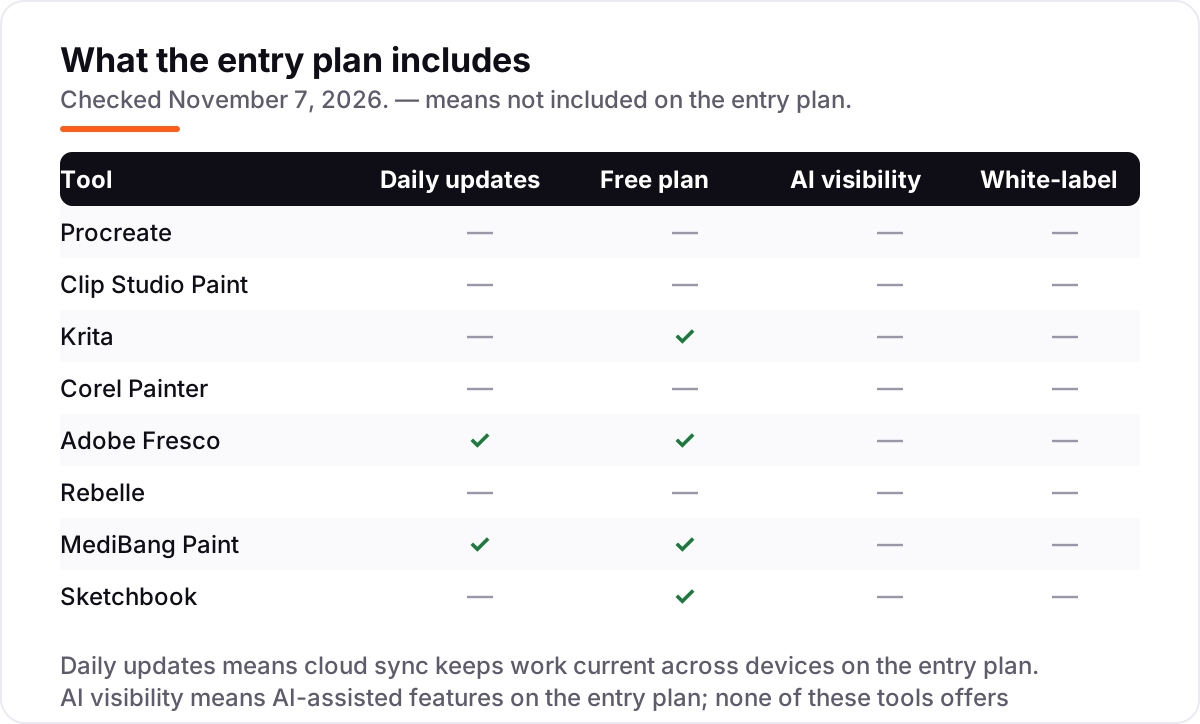
Take a painter starting from scratch on an iPad. The software costs $12.99 once on Procreate, or $0 on Krita, Adobe Fresco, MediBang Paint or Sketchbook — and that $0 is the whole software bill, not a trial. On desktop, the same painter pays $63 once for Clip Studio Paint PRO, $89.99 once for Rebelle 8, or $199 a year for a Corel Painter subscription, with the $429 one-time licence as the alternative.
Over three years, the picture barely changes, because most of these apps are not subscriptions. Procreate still costs $12.99 in year three, Rebelle $89.99, and Clip Studio Paint $63 — plus $10.99 a year if you buy the Update Pass for new features, which adds $21.98 over two years. Corel Painter is the exception: three years of subscription cost $597, while the $429 one-time licence costs $429 and keeps working after that. The free apps cost $0 in year three too, which is why Krita and Fresco are the best value in this list by a wide margin.
Two costs sit outside every number above. First, the hardware: an iPad and Apple Pencil for Procreate and Fresco, or a pen tablet for desktop apps, which can cost more than every app in this list combined. Second, the upgrades: Clip Studio Paint's Update Pass and Corel Painter's version upgrades are optional, but a painter who wants new features pays for them. If you want the illustration side of the toolkit too, see our guide to the best CAD design software for the precision-drawing end of the spectrum.
The cheapest serious setup here costs nothing in software: Krita on a Windows laptop you already own, with a pen tablet. The dearest, Corel Painter at $429 one-time, costs more than all seven other apps combined — Procreate, Clip Studio Paint, Rebelle and Sketchbook Pro together come to $189.97. Pay the $429 only when realistic traditional media is the work itself, not a hobby.
Know the difference: digital painting apps vs photo editors
The confusion in this category is between painting and editing. A digital painting app builds an image from nothing — brushes, canvas texture, pigment mixing — while a photo editor starts with a photograph and adjusts it. Photoshop is a photo editor with painting tools bolted on; Procreate, Krita and Rebelle are painting apps first. If you start with a blank canvas, you want a painting app; if you start with a photo, you want an editor.
There is a second, quieter confusion: illustration apps are not painting apps. An illustration app like Adobe Illustrator draws with vectors — clean, scalable lines for logos and icons — while a painting app draws with pixels, which is what makes a watercolor wash or an oil stroke look real. Vector work scales forever; painted work does not. All eight apps in this list are raster painting apps, including the ones with vector brushes, which is what the phrase "digital painting" means here.
A third distinction worth knowing is a free app versus a free trial. Krita, Adobe Fresco, MediBang Paint and Sketchbook are free to keep, with no expiry date and no payment at the end. Corel Painter, Rebelle and Clip Studio Paint offer trials — 15 days, 30 days and up to 3 months — after which the app stops working unless you pay. A trial is a test drive; a free app is a tool you own.
Quick comparison: tool type by need
| Buyer | Best pick | Why |
|---|---|---|
| iPad artist on a budget | Procreate | $12.99 once, no subscription, the best brush engine on a tablet |
| Illustrator or manga artist | Clip Studio Paint | PRO from $63 once, with panel tools, 3D models and vector layers |
| Free, no paywall | Krita | Free and open source, with professional brushes and animation |
| Realistic traditional media | Rebelle | $89.99 once, the highest-rated tool here at 4.8 out of 5 |
| Adobe user who wants free brushes | Adobe Fresco | Free, with live watercolor and oil brushes |
| Free manga and comics | MediBang Paint | Free, with panel tools, tones and cloud sync |
| Quick sketches on the go | Sketchbook | Free mobile app, with a paper-like sketching feel |
Mistakes to avoid
- Buying before checking your device. Procreate is iPad only and Corel Painter and Rebelle are desktop only. A $12.99 app you cannot install is still $12.99 wasted.
- Budgeting on the subscription when the one-time licence is cheaper. Clip Studio Paint PRO costs $63 once, and Corel Painter's $429 licence beats three years of subscription at $199 a year. Do the three-year math before you pick a billing plan.
- Confusing a trial with a free plan. Corel Painter, Rebelle and Clip Studio Paint stop working when the trial ends. Krita, Adobe Fresco, MediBang Paint and Sketchbook are free to keep — that is a different promise.
- Paying for brushes you already own. The free apps here ship with large brush libraries, and Clip Studio Assets adds thousands more. Buy a brush pack only after you have tried the ones included.
- Ignoring the export format. A painting that cannot leave the app in PSD or PNG at full resolution is a painting you cannot print or hand to a client. Test the export in the trial, not after you have paid.
How we chose
We checked each vendor's own pricing page or official store on November 7, 2026 and recorded the starting price exactly as shown, including the one-time purchase where the vendor sells one. Ratings come from fresh search-index copies of the exact G2 review pages, crawled within the last four days, because the G2 pages would not open directly today; MediBang Paint has no G2 listing, so it carries no rating rather than an estimated one. Clip Studio Paint's $63 is the Ver. 5.0 perpetual licence price — the older $49.99 figure was for earlier versions. Corel Painter's $199 a year subscription and $429 one-time licence are both listed, and Sketchbook's free mobile app is the starting point, with the desktop Pro edition at $24.99 one-time. No vendor paid for a place in this list, and none of the links here are affiliate links.
What to do next
Start with the free app that matches your device — Krita on desktop, Fresco or Sketchbook on a tablet — and finish one genuine piece in it before you spend anything. If the free app keeps up with your strokes and exports cleanly, you may never need to pay. If it does not, the trial of your top paid pick is the next step: run the same piece through it and compare the brush feel side by side. If your art is sorted but new customers are not finding you, our monthly SEO service handles the visibility side — or compare design tools in our guide to email design software. Once your tools are in place, find out what's holding your rankings back.
Your stack only works if people find you
SerpAstra fixes what keeps your site off page one and makes it easy for AI assistants to recommend.
Get a free audit→Sources we checked (15)
- Procreate — procreate.com (checked November 7, 2026)
- Clip Studio Paint lineup — clipstudio.net/en/lineup (checked November 7, 2026)
- Krita — krita.org/en (checked November 7, 2026)
- Corel Painter — corel.com/en/product/painter (checked November 7, 2026)
- Adobe Fresco — adobe.com/products/fresco.html (checked November 7, 2026)
- Rebelle — escapemotions.com/products/rebelle (checked November 7, 2026)
- MediBang Paint — medibangpaint.com/en (checked November 7, 2026)
- Sketchbook — sketchbook.com (checked November 7, 2026)
- Procreate reviews — g2.com/products/procreate/reviews (checked November 7, 2026)
- Clip Studio Paint reviews — g2.com/products/clip-studio-paint/reviews (checked November 7, 2026)
- Krita reviews — g2.com/products/krita/reviews (checked November 7, 2026)
- Painter reviews — g2.com/products/painter/reviews (checked November 7, 2026)
- Adobe Fresco reviews — g2.com/products/adobe-fresco/reviews (checked November 7, 2026)
- Rebelle reviews — g2.com/products/rebelle/reviews (checked November 7, 2026)
- Sketchbook reviews — g2.com/products/sketchbook/reviews (checked November 7, 2026)
Shamim
Founder of SerpAstra
A full-stack SEO and digital marketer who spends most days on Local SEO for dental practices, AI search visibility and lead generation.
Frequently asked questions
What is the best app for digital painting?
Procreate is the best pick for most painters: a $12.99 one-time purchase on iPad with the best brush engine on a tablet and no subscription. Krita is the best free alternative on desktop, and Clip Studio Paint is the better pick for illustrators and manga artists who need panel and animation tools.
What is the best free app for digital painting?
Krita is the best free app: a full open-source painting and animation studio at $0, with professional brushes, layers and animation on Windows, Mac and Linux. Adobe Fresco is the best free pick for realistic watercolor and oil brushes, and MediBang Paint is the best free pick for manga and comics.
How much do digital painting apps cost?
Four of the eight apps here are free: Krita, Adobe Fresco, MediBang Paint and Sketchbook. The paid ones are mostly one-time purchases — Procreate $12.99, Clip Studio Paint PRO $63, Rebelle 8 $89.99 — and the dearest is Corel Painter at $429 one-time or $199 a year.
Is Procreate better than Clip Studio Paint?
It depends on the work. Procreate wins for pure painting on iPad: faster, simpler and $12.99 once. Clip Studio Paint wins for illustration, manga and animation, with panel tools, 3D models and vector layers Procreate lacks. If you draw comics or animate, buy Clip Studio Paint; if you paint on iPad, buy Procreate.
Can I paint digitally without an iPad?
Yes. Krita, Clip Studio Paint, Corel Painter and Rebelle all run on Windows and Mac, and MediBang Paint and Sketchbook run on Android too. Only Procreate is iPad-only. A Windows laptop with a pen tablet and Krita costs nothing in software, which is the cheapest serious setup here.
Do I need a subscription for digital painting apps?
Mostly no. Procreate, Clip Studio Paint, Corel Painter, Rebelle and Sketchbook Pro are all one-time purchases, and four apps here are free. Clip Studio Paint and Corel Painter also sell subscriptions, but the one-time licence is the cheaper route if you keep the same version for a year or more.
What is the best app for realistic watercolor?
Rebelle is the best app for realistic watercolor: its oils and watercolors use real pigment color mixing, and its paper interaction is widely praised as the closest digital emulation available. It costs $89.99 one-time and is the highest-rated tool here at 4.8 out of 5 on G2.
Free SEO and AI visibility audit
Find out what is holding your rankings back
Send us your site. Within 2 business days you get a written audit, an AI visibility check and a short fix list ranked by impact. Free, with no contract attached.
Request my free audit→Related guides
 Design, Video & Creative10 Best Tools for Digital Illustration in 2026, ComparedCompare the 10 best tools for digital illustration on price, free plans, vector vs raster and AI features, with every price checked November 4, 2026.Read guide →
 Design, Video & Creative8 Best CAD Design Software in 2026: Pricing, Features and Pros & ConsCompare the 8 best cad design software options on price, free plans and 3D modeling strengths for US buyers, with every price checked on November 4, 2026.Read guide →
 Email, SMS & Social MediaBest Email Design Software for 2026: 12 Options Compared by Use CaseCompare the 12 best email design software options for marketers on price, free plans and editor type, with every price checked November 6, 2026.Read guide →