
10 Best Big Data Analytics Software in 2026, Compared
Compare the 10 best big data analytics software platforms on price, free tiers and AI features, with every price checked on November 6, 2026.
 Shamim Mia, Founder, SerpAstraLast verified November 6, 202612 min read
We compare pricing pages, documentation and public reviews. We never accept payment for rankings.

Key takeaways
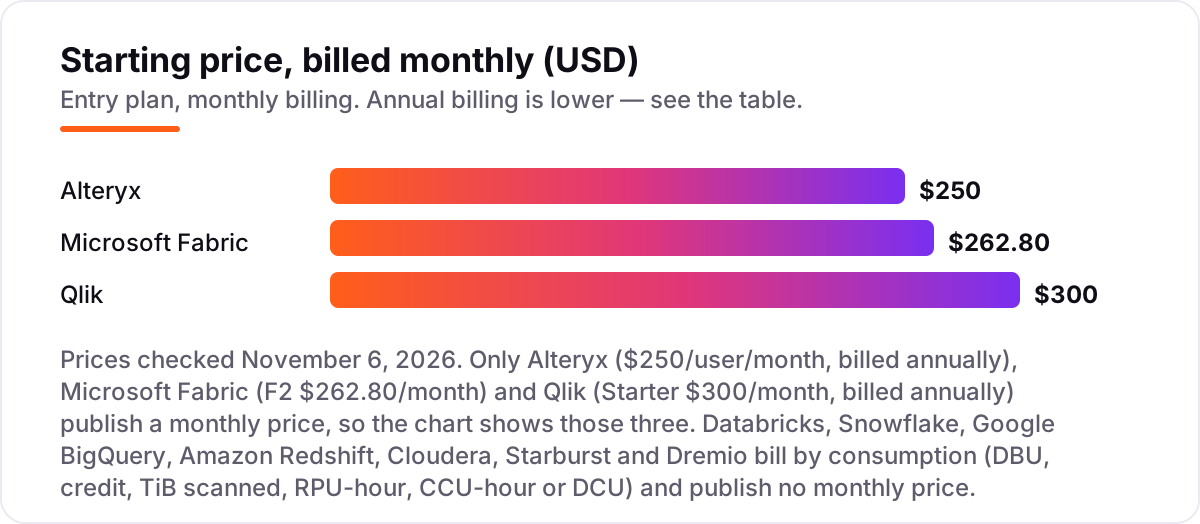
- Databricks leads at $0.15/DBU for Jobs Compute, Snowflake follows at $2/credit, and BigQuery starts free with 1 TiB of queries a month — but only Alteryx ($250/user/month), Fabric ($262.80/month) and Qlik ($300/month) publish a monthly price at all.
- The single most important buying factor is the pricing unit: DBU, credit, TiB scanned, RPU-hour or capacity — pick the tool whose unit matches how your team actually works, or the bill will surprise you.
- Free ways in exist for most tools: Databricks Free Edition, BigQuery's free tier, Starburst's free plan and Dremio Community Edition all cost $0, and the Snowflake, Redshift and Dremio trials add $300–$400 in credits.
- Seven of the ten tools publish no monthly price — budget on the consumption rate, set alerts on day one, and run a proof of concept with real workloads before committing.
On this page
Quick comparison
| Tool | Best for | Starting price | Free plan |
|---|---|---|---|
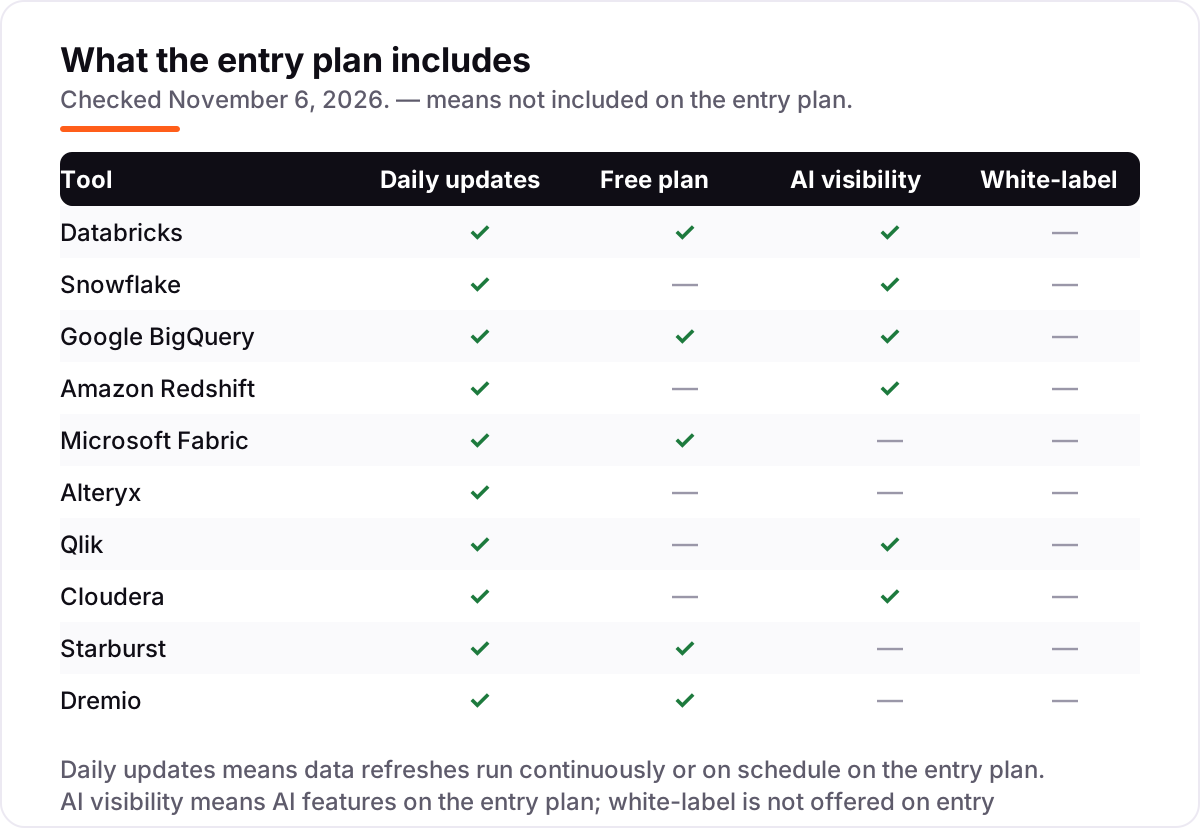
| Databricks | Data teams unifying warehousing, engineering and AI on one lakehouse | Custom quote | Yes (free plan) |
| Snowflake | Teams that want cloud warehousing that just works, with SQL and no servers to manage | Custom quote | No (trial only) |
| Google BigQuery | Google Cloud teams that want serverless SQL analytics with no infrastructure to manage | Custom quote | Yes (free plan) |
| Amazon Redshift | AWS teams that want a fast warehouse tightly integrated with S3 and the AWS stack | Custom quote | No (trial only) |
| Microsoft Fabric | Microsoft shops that want lakehouse, pipelines, Power BI and AI in one capacity | $262.80/mo | Yes (free plan) |
| Alteryx | Analysts who prep, blend and automate data with drag-and-drop workflows and no code | $250/mo | No (trial only) |
| Qlik | Business teams that explore data visually and want associative analytics without per-user fees | $300/mo | No (trial only) |
| Cloudera | Regulated enterprises that need a hybrid data platform spanning cloud and on-premises | Custom quote | No |
| Starburst | Teams with data spread across lakes, warehouses and systems they cannot move | Custom quote | Yes (free plan) |
| Dremio | Teams running self-service SQL on open Iceberg tables in their own lake | Custom quote | Yes (free plan) |
Make one of these tools?
We re-check this list every quarter. Send a correction, request a review, or ask about a clearly labeled sponsored spot.
Request a listingThe best big data analytics software

Databricks
Best for: Data teams unifying warehousing, engineering and AI on one lakehouse
Databricks built the lakehouse: one platform where data engineering, warehousing and machine learning run on the same open formats, with Apache Spark underneath and Unity Catalog governing every asset. Engineers, analysts and data scientists share one environment instead of passing files between three systems, and the platform scales from a single notebook to petabyte workloads without re-platforming.
Pricing is consumption-based, so there is no monthly bill to quote: Jobs Compute starts at $0.15 per DBU on the Premium tier in AWS US East, while interactive all-purpose compute costs $0.55, and the cloud infrastructure underneath is billed separately on classic compute. The free edition covers learning and small experiments. Choose Databricks when analytics and AI share the same data and the same team.
What we like
- One platform for warehousing, engineering and machine learning on open formats, with Apache Spark underneath
- Unity Catalog governs data and AI assets in one place, from tables to models
- Serverless compute removes cluster management, and the ecosystem spans ingestion to BI
- Free Edition covers learning and small experiments at $0
Watch out for
- Consumption pricing needs active cost management, or bills climb fast
- Classic compute bills cloud infrastructure separately, on top of the DBU rate
- Rewards Spark and Python skills; pure SQL teams face a learning curve

Snowflake
Best for: Teams that want cloud warehousing that just works, with SQL and no servers to manage
Snowflake rebuilt the warehouse for the cloud: storage and compute scale independently, warehouses start and stop in seconds, and analysts write plain SQL while the platform handles the infrastructure. Data sharing is the standout: organizations share live tables with partners without copying data, and the Marketplace adds third-party datasets to the same queries.
The bill is consumption-based, priced in credits: Standard costs $2 per credit on demand in AWS US East, Enterprise $3 and Business Critical $4, with storage billed separately at about $40 per TB a month. A 30-day trial includes $400 in credits. Pick Snowflake when the team wants warehousing that just works and cost control through warehouse sizing, not engineering.
What we like
- Storage and compute scale separately, and warehouses start and stop in seconds
- Data sharing lets partners query live tables without copying data
- Analysts write plain SQL while the platform handles all infrastructure
- Marketplace adds third-party datasets to the same queries
Watch out for
- Costs can surprise without governance: every credit burns at the edition rate
- Needing one Enterprise feature reprices every credit in the account to $3
- Streaming and machine learning are less central than on Databricks
Google BigQuery
Best for: Google Cloud teams that want serverless SQL analytics with no infrastructure to manage
Google BigQuery is serverless warehousing: load data, write SQL, and Google runs the infrastructure, scaling automatically from a single query to petabytes. There are no clusters to size and no servers to patch, and the integration with Google Cloud runs deep — BigQuery ML brings machine learning to SQL users, and Gemini helps write and explain queries.
On-demand queries cost $6.25 per TiB scanned, with the first 1 TiB free every month and the first 10 GiB of storage free, so small workloads often cost nothing at all. Heavy users switch to capacity editions billed per slot-hour. Choose BigQuery when the team already lives in Google Cloud and wants analytics without operating a warehouse.
What we like
- Fully serverless: no clusters to size, no servers to patch, automatic scaling
- Generous free tier: 1 TiB of queries and 10 GiB of storage free every month
- BigQuery ML brings machine learning to SQL users, with Gemini help for queries
- Deep Google Cloud integration, from Vertex AI to Looker Studio
Watch out for
- Query costs need monitoring: one unfiltered scan of a large table burns the free tier
- GCP-centric, so multi-cloud strategies get complicated
- Capacity editions add a second pricing model to learn

Amazon Redshift
Best for: AWS teams that want a fast warehouse tightly integrated with S3 and the AWS stack
Amazon Redshift is the warehouse for AWS shops: a fast columnar engine that queries data in S3 directly, scales from a single node to petabyte clusters, and plugs into the services the team already uses — Glue, Athena, SageMaker and QuickSight. Serverless mode removes capacity planning entirely, scaling compute up and down with the query queue.
Serverless starts at $1.50 an hour for the 4-RPU minimum, at $0.375 per RPU-hour in US East, and pauses billing when idle; provisioned RA3 nodes start at $0.543 an hour, with managed storage at $0.024 per GB a month. A $300 trial credit lasts 90 days. Pick Redshift when the data and the team already live on AWS.
What we like
- Fast columnar engine that queries data in S3 directly, with no loading step
- Serverless mode scales with the query queue and pauses billing when idle
- Deep AWS integration: Glue, Athena, SageMaker and QuickSight in the same stack
- Reserved capacity and Serverless Reservations cut the on-demand rate
Watch out for
- Pricing is complex: RPU-hours, node-hours, storage and Spectrum all bill separately
- Best inside AWS; the value fades for teams on other clouds
- Concurrency scaling and Spectrum charges can push the bill past the estimate

Microsoft Fabric
Best for: Microsoft shops that want lakehouse, pipelines, Power BI and AI in one capacity
Microsoft Fabric puts the whole data estate in one place: lakehouse storage in OneLake, pipelines, notebooks, real-time analytics and Power BI share a single capacity, so a dataset built once serves every workload. For Microsoft shops the fit is obvious — the same identity, the same governance, and Power BI reports that read the lake directly.
Capacity is the bill: the smallest F2 runs $262.80 a month pay-as-you-go in East US, or about $156.33 on a one-year reservation, and OneLake storage is billed separately. Below F64 every report viewer still needs a Power BI Pro licence at $14 a month, which changes the maths for large audiences. Choose Fabric when one Microsoft capacity can replace several separate tools.
What we like
- One capacity covers lakehouse, pipelines, notebooks, real-time analytics and Power BI
- OneLake means a dataset built once serves every workload, with no copies
- Fits Microsoft shops: same identity, same governance, Power BI reads the lake directly
- Capacity can be paused, and reservations cut the pay-as-you-go rate by about 40%
Watch out for
- Below F64 every report viewer still needs a Power BI Pro licence at $14 a month
- Copilot features need larger capacities, so the entry F2 misses the AI headline
- Consumption billing is hard to predict until real workloads have run for a month

Alteryx
Best for: Analysts who prep, blend and automate data with drag-and-drop workflows and no code
Alteryx turns data preparation into drag-and-drop work: analysts blend, clean and join data in visual workflows, then schedule and share them, without writing code. It is the prep layer in this list rather than a warehouse — it sits in front of the database or BI tool and makes the data trustworthy before anyone analyses it.
The entry price is Starter at $250 per user per month, billed annually, for up to 10 seats on Designer Cloud with flat files only and no automation runs; Professional and Enterprise are quote-only and add desktop Designer, more sources and automation. A 30-day trial covers both. Pick Alteryx when analysts, not engineers, own the prep work.
What we like
- Drag-and-drop workflows let analysts prep and blend data without writing code
- Repeatable, scheduled workflows replace one-off spreadsheet work
- Strongest fit for finance, operations and consulting teams with governed prep needs
- Desktop Designer and cloud execution cover both local and shared work
Watch out for
- Starter is cloud-only and flat-file-only, with no automation runs included
- Professional and Enterprise are quote-only, so the real price needs a sales call
- Per-seat pricing gets expensive fast as the analyst team grows

Qlik
Best for: Business teams that explore data visually and want associative analytics without per-user fees
Qlik Cloud Analytics is built on the associative engine: click any value and every chart, table and filter updates to show what is related, what is excluded and what is possible, which makes exploration fast for people who do not write SQL. Qlik Answers adds an AI assistant that answers questions in plain language against governed data.
Pricing is capacity-based, not per user: Starter costs $300 a month billed annually for 10 users and 10 GB, Standard $825 for 25 GB with unlimited users, and Premium $2,750 for 50 GB. The catch is the data cap — a large model pushes you up a tier. Choose Qlik when many people need to explore the same governed data.
What we like
- Associative engine: click any value and every chart updates to show what is related
- Capacity pricing means Standard has unlimited users — viewers cost nothing extra
- Qlik Answers lets people ask questions in plain language against governed data
- Strong data visualization and exploration for people who do not write SQL
Watch out for
- The data cap decides the tier: a large model pushes you from Starter to Standard fast
- Qlik Answers is limited to 200 questions on Standard for a whole organization
- Reviewers cite high cost and rigid pricing for large deployments

Cloudera
Best for: Regulated enterprises that need a hybrid data platform spanning cloud and on-premises
Cloudera Data Platform is the hybrid option: the same platform runs data engineering, warehousing, machine learning and governance across public cloud, private cloud and on-premises, so regulated organizations keep sensitive data where the law requires while bursting the rest to the cloud. It carries the Hadoop lineage and the governance to match.
Pricing is quote-led: public-cloud services bill per CCU-hour, from $0.04 for Data Hub to $0.17 for machine learning, while private cloud is an annual subscription per node. There is no published free tier or trial, so budgeting starts with a sales conversation. Pick Cloudera when data sovereignty and hybrid deployment are requirements, not preferences.
What we like
- One platform spans public cloud, private cloud and on-premises for hybrid estates
- Strong governance and security for regulated industries and data sovereignty
- Covers the full lifecycle: engineering, warehousing, machine learning and streaming
- Built on open source, with Spark and Airflow at the core
Watch out for
- No published prices and no free trial — budgeting starts with a sales conversation
- Reviewers cite high cost and complexity more than for any other tool here
- The Hadoop legacy lingers in perception, and setup takes longer than cloud-native rivals

Starburst
Best for: Teams with data spread across lakes, warehouses and systems they cannot move
Starburst Galaxy is federated analytics: a managed Trino engine that runs fast SQL across data lakes, warehouses and operational systems without moving the data first. Analysts join a table in S3 to a table in Snowflake in one query, and the data stays under its existing governance instead of being copied into yet another store.
Galaxy has a free plan for exploring without running clusters, and a 30-day Enterprise trial with $500 in credits; paid pricing is pay-as-you-go and quote-led, with no published monthly rate. The trade-off is scope: it queries data brilliantly but does not store or transform it. Choose Starburst when the data cannot move and migration is the project you want to avoid.
What we like
- Queries data where it lives — lakes, warehouses and operational systems in one SQL query
- Avoids costly migrations and keeps data under its existing governance
- Built on open-source Trino, with fast query performance reviewers praise
- Free plan and a $500-credit trial make evaluation cheap
Watch out for
- No published monthly price — paid pricing is pay-as-you-go and quote-led
- Narrower than full lakehouse platforms: it queries data but does not store or transform it
- Setup can be complex for teams new to federated querying

Dremio
Best for: Teams running self-service SQL on open Iceberg tables in their own lake
Dremio is the self-service lakehouse for open formats: analysts run fast SQL directly on Apache Iceberg tables in the lake, with a semantic layer that governs metrics and access, and reflections that accelerate repeat queries automatically. There is no ETL pipeline to build and no warehouse copy to keep in sync.
Community Edition is free and self-managed; Dremio Cloud costs $0.20 per Dremio Compute Unit, so an XSmall engine runs $6.40 an hour, and a 30-day trial includes $400 in credits. Enterprise is quote-only. The ecosystem is smaller than Databricks or Snowflake. Pick Dremio when the lake is already on Iceberg and analysts need warehouse speed without a warehouse.
What we like
- Fast SQL directly on Apache Iceberg tables, with no ETL pipeline to build
- Semantic layer governs metrics and access for self-service analysts
- Reflections accelerate repeat queries automatically
- Free Community Edition and a $400-credit trial make it cheap to evaluate
Watch out for
- Cloud runs on AWS only, so Azure and Google Cloud teams take the self-managed path
- Smaller ecosystem than Databricks or Snowflake, with fewer integrations
- Community Edition omits enterprise security, governance and support
The best big data analytics software is the platform that fits your data where it already lives, not the one with the longest feature list. We ranked the ten tools below by fit for the most common buyer — a team with data spread across a lake, a warehouse and a few SaaS apps — starting with the lakehouse and warehouse leaders and ending with the federated engines that query data without moving it. Every price below was checked on November 6, 2026, and seven of the ten tools publish no monthly price at all, so we show the consumption rate you will actually be billed on.
How to choose the best big data analytics software
- Start with where the data lives. Data already in S3 points to Redshift or Dremio; data in Google Cloud points to BigQuery; data spread across many systems points to Starburst.
- Match the pricing unit to your workload. Spiky, occasional queries suit per-TiB or per-RPU billing; steady, all-day use suits a fixed capacity like Fabric F2.
- Check the free way in. Databricks Free Edition, BigQuery's free tier, Starburst's free plan and Dremio Community Edition all cost $0 — use them for the proof of concept.
- Count the people who will touch it. Alteryx charges per seat, Qlik Standard charges for data instead of people, and Fabric below F64 still needs a Power BI Pro licence per viewer.
- Ask who governs it. Unity Catalog, Snowflake's sharing controls and Cloudera's hybrid governance matter once the data estate grows past one team.
Analytics is one system in your stack, not the whole stack. If the business also needs to be found online, our guide to analytics software covers the measurement side, and our AI search optimization service handles visibility in AI answers. And before you publish new pages for the services you sell, run your titles through the free SERP snippet preview tool — it shows exactly how the title and description will look in Google.
Whatever you shortlist, try it with real data before you pay. The free tiers and trial credits in this list are enough to run a genuine proof of concept — your tables, your queries, your dashboards — and that test tells you more than any review can. Check two things in the trial: that the bill for a normal week matches the estimate, and that your analysts can actually answer a question end to end without engineering help.
Big data analytics software pricing: what you will actually pay
Take a team that scans 10 TiB a month on BigQuery, runs a small Snowflake warehouse 8 hours a day, and keeps 5 TB of data. On list rates, BigQuery costs $56.25 a month — 9 TiB beyond the free 1 TiB at $6.25 — plus about $118 for 5 TB of active storage at $0.023 per GiB. Snowflake costs $352 for the warehouse: an X-Small burns 1 credit an hour, so 8 hours a day for 22 working days is 176 credits at $2, plus $200 for 5 TB of storage at about $40 per TB.
The same team on fixed capacity pays $262.80 a month for a Fabric F2 whether they query or not, and $300 for Qlik Starter for the whole team. The lesson is the pricing unit: usage-priced tools win for spiky work, capacity-priced tools win for steady, all-day use, and the free tiers — BigQuery's 1 TiB, Databricks Free Edition — make the first month nearly free either way.
Three costs sit outside every number above. First, the licence the capacity does not include: Power BI Pro at $14 a month per viewer below Fabric F64, and Alteryx Professional seats above the Starter tier. Second, the discount for committing: Fabric's one-year reservation cuts F2 from $262.80 to about $156.33 a month, and Redshift Serverless Reservations cut the RPU rate by 20% on a one-year term. Third, the data itself: storage, egress and the connectors that move data between systems all bill separately on every consumption-priced tool here.
Know the difference: lakehouse vs warehouse vs federated query
Three architectures compete in this list, and the choice is really about your data reality. Lakehouses — Databricks and Dremio — unify lakes and warehouses on open formats, so one copy of the data serves engineering, analytics and AI. Cloud warehouses — Snowflake, BigQuery and Redshift — optimize SQL analytics on managed infrastructure, and you pay for the compute you use. Federated engines — Starburst — query data where it lives, joining sources without moving anything.
Cloudera spans hybrid estates, Fabric bundles everything into one Microsoft capacity, and Alteryx and Qlik sit at the edges: Alteryx prepares the data before analysis, Qlik explores it after. Be honest about which description matches your estate: centralized data with heavy SQL points to Snowflake or BigQuery, mixed workloads including machine learning point to Databricks, and distributed data you cannot move points to Starburst. Aspirational architecture choices lead to shelfware.
Quick comparison: tool type by need
| Buyer | Best pick | Why |
|---|---|---|
| Team unifying analytics and AI | Databricks | One lakehouse for engineering, warehousing and ML, from $0.15/DBU |
| Pure SQL warehousing, no servers | Snowflake | Storage and compute scale separately, from $2/credit |
| Google Cloud team, spiky queries | Google BigQuery | Serverless SQL with a free tier, then $6.25/TiB scanned |
| AWS team with data in S3 | Amazon Redshift | Serverless from $1.50 an hour, with a $300 trial credit |
| Microsoft shop, one capacity | Microsoft Fabric | Every workload on one capacity, F2 from $262.80/month |
| Analysts prepping data without code | Alteryx | Drag-and-drop workflows, Starter from $250/user/month |
| Data stuck in many systems | Starburst | Federated SQL across every source, with a free plan |
Mistakes to avoid
- Budgeting on the monthly price when there is not one. Seven tools here bill by consumption, so a $0 starting price means nothing without a usage estimate — model a real week of queries first.
- Running one unfiltered query on BigQuery. A single scan of a multi-terabyte table burns the whole monthly free tier; partition tables and preview with a limit that actually reduces scanned bytes.
- Forgetting the licence the capacity does not include. Fabric below F64 still needs Power BI Pro per viewer, and Alteryx Starter covers flat files only — both change the real bill.
- Choosing the architecture before the workload. A lakehouse rewards Spark and Python skills; a federated engine rewards SQL analysts; buying the wrong one for your team produces worse results than a simpler platform the team masters.
- Skipping cost alerts on day one. Set budgets and alerts before the proof of concept, not after the first bill — unmonitored consumption is the top budget risk in this category.
How we chose
We checked each vendor's own pricing page on November 6, 2026 and recorded the starting price exactly as shown; where a vendor publishes no monthly price, we show the consumption rate instead and say so, rather than inventing a monthly figure. Ratings come from G2 review pages, verified from fresh search-index copies of the exact G2 pages crawled within the last few days. Two prices need a note: Alteryx publishes only one price, Starter at $250 per user per month billed annually — the $5,195-a-year Designer figure still circulating in roundups is the retired desktop list price, not the current entry price — and Qlik's Starter price of $300 a month billed annually was confirmed against Qlik's own pricing page. Cloudera publishes no prices and no trial, so its entry is a custom quote. No vendor paid for a place in this list, and none of the links here are affiliate links.
What to do next
Start with the free tier or trial of your top pick and run one real workload through it — your tables, your queries, your dashboards. Check that the week's bill matches the estimate and that your analysts can answer a question end to end without engineering help. If the data side is sorted but new customers are not finding you, our monthly SEO service handles the visibility side — or compare measurement tools in our guide to analytics software. Once your tools are in place, find out what's holding your rankings back.
Your stack only works if people find you
SerpAstra fixes what keeps your site off page one and makes it easy for AI assistants to recommend.
Get a free audit→Sources we checked (20)
- Databricks pricing — databricks.com (checked November 6, 2026)
- Snowflake pricing — snowflake.com (checked November 6, 2026)
- Google BigQuery pricing — cloud.google.com (checked November 6, 2026)
- Amazon Redshift pricing — aws.amazon.com (checked November 6, 2026)
- Microsoft Fabric pricing — microsoft.com (checked November 6, 2026)
- Alteryx pricing — alteryx.com (checked November 6, 2026)
- Qlik pricing — qlik.com (checked November 6, 2026)
- Cloudera pricing — cloudera.com (checked November 6, 2026)
- Starburst pricing — starburst.io (checked November 6, 2026)
- Dremio pricing — dremio.com (checked November 6, 2026)
- Databricks reviews on G2 — g2.com (checked November 6, 2026)
- Snowflake reviews on G2 — g2.com (checked November 6, 2026)
- Google BigQuery reviews on G2 — g2.com (checked November 6, 2026)
- Amazon Redshift reviews on G2 — g2.com (checked November 6, 2026)
- Microsoft Fabric reviews on G2 — g2.com (checked November 6, 2026)
- Alteryx reviews on G2 — g2.com (checked November 6, 2026)
- Qlik reviews on G2 — g2.com (checked November 6, 2026)
- Cloudera reviews on G2 — g2.com (checked November 6, 2026)
- Starburst reviews on G2 — g2.com (checked November 6, 2026)
- Dremio reviews on G2 — g2.com (checked November 6, 2026)
Shamim
Founder of SerpAstra
A full-stack SEO and digital marketer who spends most days on Local SEO for dental practices, AI search visibility and lead generation.
Frequently asked questions
What is the best big data analytics software?
Databricks is the best fit for most teams: one lakehouse for warehousing, engineering and AI, from $0.15 per DBU. Snowflake is the better pick for pure SQL warehousing with no servers to manage, from $2 a credit. Google BigQuery wins for Google Cloud teams and light workloads, since the first 1 TiB of queries each month is free.
How much does big data analytics software cost?
Only three tools here publish a monthly price: Alteryx Starter at $250 per user per month, Microsoft Fabric F2 at $262.80, and Qlik Starter at $300, all billed annually. The rest bill by consumption — Databricks per DBU, Snowflake per credit, BigQuery per TiB scanned — so a small team can spend under $100 a month while a heavy estate runs into thousands.
Databricks vs Snowflake: which should I choose?
Choose Databricks when analytics, engineering and machine learning share the same data, especially with Spark or Python skills in-house. Choose Snowflake for pure SQL warehousing with maximum simplicity, where analysts just want to query. Many organizations run both: Databricks for engineering and AI, Snowflake for governed reporting.
Is there a free big data analytics platform?
Yes, with limits. Databricks Free Edition, BigQuery's free tier and Dremio Community Edition all cost $0, and Starburst has a free plan without running clusters. Snowflake, Redshift and Dremio also offer trials with $300 to $400 in credits. Free tiers suit learning and small workloads; production volumes need a paid plan.
What is a data lakehouse?
A lakehouse combines a data lake's flexibility — open formats, cheap storage, many workload types — with warehouse features such as transactions, governance and fast SQL. Databricks pioneered the idea, and Dremio builds on the same pattern with Apache Iceberg. The point is one copy of the data serving engineering, analytics and AI, instead of three copies in three systems.
Do I need to move my data to use these tools?
Not always. Starburst and Dremio query data where it lives, so a table in S3 can join a table in Snowflake without copying either. Databricks, Snowflake and BigQuery work best with data in their own storage, though all support external tables. Federated tools suit estates where migration is too slow or too expensive to attempt.
Free SEO and AI visibility audit
Find out what is holding your rankings back
Send us your site. Within 2 business days you get a written audit, an AI visibility check and a short fix list ranked by impact. Free, with no contract attached.
Request my free audit→Related guides
 AI, Data & Analytics12 Best Analytics Software in 2026: Pricing, Features and Pros & ConsThe 12 best analytics software tools for 2026, compared on price, free plans and what each one measures, with every price checked on the pricing page.Read guide →
 AI, Data & Analytics10 Best BI Software for Analytics in 2026, ComparedThe 10 best BI software for analytics compared on real 2026 prices, free plans and G2 ratings, so you can pick the right dashboard tool for your team.Read guide →
 SEO & AI Search10 Best Product Analytics Tools in 2026 (Free and Paid, Compared)10 best product analytics tools compared on price, free plans and fit, from Mixpanel and Amplitude to free GA4. Priced from vendor pages, November 2026.Read guide →