
8 Best Business Analytics Tools Data Analytics in 2026, Compared
Compare the 8 best business analytics tools data analytics buyers pick in 2026 on price, free plans and AI features, with prices checked November 6, 2026.
 Shamim Mia, Founder, SerpAstraLast verified November 6, 202613 min read
We compare pricing pages, documentation and public reviews. We never accept payment for rankings.

Key takeaways
- Power BI is the cheapest paid start at $14/user/month, Looker Studio is free, and Tableau starts at $15/user/month for viewers — the three short-list picks for most teams.
- Domo and Sisense publish no price at all, so budget them as custom quotes and expect five-figure annual contracts, not per-user fees.
- The single most important buying factor is who pays: per-user tools punish wide sharing, while flat-priced tools punish small teams.
- Free plans are real but narrow — Looker Studio is the only free plan with unlimited viewers, and every other free tier caps users, sources or sharing.
On this page
Quick comparison
| Tool | Best for | Starting price | Free plan |
|---|---|---|---|
| Microsoft Power BI | Teams already on Microsoft 365 that want the cheapest per-user BI with strong Excel and Teams integration | $14/user/mo | Yes (free account) |
| Google Looker Studio | Google-stack teams that want free dashboards on Sheets, Analytics and Ads data | Free; Pro $9/user/mo | Yes (free) |
| Tableau | Analysts who need the deepest visualization toolkit and live in dashboards all day | $15/user/mo | No (14-day trial) |
| Databox | Marketing, sales and ops teams that want plug-and-play KPI dashboards without a data engineer | Free; Analyst $71/mo | Yes (free plan) |
| Klipfolio | Growing firms that want flat-priced dashboards with unlimited users and spreadsheet-like formulas | $140/mo | No (14-day trial) |
| Qlik Sense | Mid-size and enterprise teams that need governed, associative analytics on large, messy datasets | $300/mo | No (free trial) |
| Domo | Enterprises that want one platform for ETL, dashboards, AI chat and apps with unlimited seats | Custom quote | No (free trial) |
| Sisense | SaaS product teams that embed analytics inside their own app with full white-label control | Custom quote | No (free trial) |
Make one of these tools?
We re-check this list every quarter. Send a correction, request a review, or ask about a clearly labeled sponsored spot.
Request a listingThe best business analytics tools

Microsoft Power BI
Best for: Teams already on Microsoft 365 that want the cheapest per-user BI with strong Excel and Teams integration
Power BI is the default pick for any team that already lives in Microsoft 365. Pro costs $14 per user per month when paid yearly, and the free account lets anyone build reports with Power BI Desktop before spending anything. Sharing is where the money starts: every person who publishes or views shared reports needs a Pro licence, so a ten-person team pays $140 a month before any premium capacity.
The trade-off is the learning curve. DAX, the formula language behind Power BI measures, is powerful but unforgiving for beginners, and the Copilot AI features need a separate Fabric capacity licence rather than arriving with Pro. Buy Power BI when your data already sits in Excel, SharePoint or SQL Server and your team is comfortable in Microsoft tools.
What we like
- Cheapest per-user entry here at $14/user/month, with a genuinely free account for building reports
- Deep integration with Excel, Teams, SharePoint and the rest of Microsoft 365
- Huge template and community library, so most common dashboards already exist
- 8 refreshes a day and 10 GB of storage per Pro licence cover most small teams
Watch out for
- Every viewer who shares reports needs a paid Pro licence, so the bill scales with headcount
- DAX and data modelling have a steep learning curve for non-technical users
- Copilot AI needs separate Microsoft Fabric capacity, not the Pro licence

Google Looker Studio
Best for: Google-stack teams that want free dashboards on Sheets, Analytics and Ads data
Looker Studio is the only tool here that is genuinely free at full strength: unlimited reports, unlimited viewers and more than 1,400 data source connections at $0. It is the natural home for Google data — Sheets, Analytics, Ads and BigQuery connect natively — and Pro costs $9 per user per Google Cloud project per month for teams that need shared ownership, version history and support.
The limits show up outside Google. Facebook and LinkedIn Ads need paid third-party connectors, heavy blends can load slowly, and there is no white-label option, so agency client reports always look like Google made them. Pick Looker Studio when your data is already in Google tools and the budget is zero.
What we like
- The core product is free with no user, report or viewer limits
- Native connectors for Google Sheets, Analytics, Ads and BigQuery work out of the box
- Pro adds team workspaces, version history and Google Cloud support for $9/user/month
- Viewers never need a paid licence, even on Pro reports
Watch out for
- No native connectors for Facebook or LinkedIn Ads — third-party connectors cost extra
- Performance slows on large or heavily blended datasets, reviewers report
- No white-label option at any price, so client-facing reports carry Google branding

Tableau
Best for: Analysts who need the deepest visualization toolkit and live in dashboards all day
Tableau is the analyst's tool: the deepest charting, the most formatting control and the strongest community in business analytics. The headline price is $15 per user per month for a Viewer licence, billed annually, but that figure misleads on its own — every deployment needs at least one Creator licence at $75 per user per month, and only Creators can build and publish new workbooks.
The Standard edition also includes Tableau Pulse metrics and Tableau Agent for AI-assisted preparation and analysis, which narrows the gap with newer AI-first tools. Buy Tableau when visualization quality is the job and a dedicated analyst will own the dashboards; buy Power BI or Looker Studio when occasional users just need to read them.
What we like
- The strongest visualization toolkit in this list, with the most chart types and formatting control
- Tableau Pulse and Tableau Agent bring AI summaries and assisted analysis to Standard plans
- Huge community and template library, plus certified training and support options
- Handles very large datasets well, with live connections and extracts to match
Watch out for
- Every deployment needs at least one Creator licence at $75/user/month, billed annually
- No monthly billing — all licences are annual contracts paid up front
- Viewer at $15 is read-only, so a team of editors pays Creator prices

Databox
Best for: Marketing, sales and ops teams that want plug-and-play KPI dashboards without a data engineer
Databox is built for teams that want answers, not a data project: more than 4,000 prebuilt metrics across 130-plus integrations, a Genie AI Analyst that explains changes in plain language, and goals with forecasting built in. The free plan covers one user and three data sources, and Analyst costs $71 a month billed annually, or $89 billed monthly, for one user and five sources.
The catch is sharing. Analyst is a single-user plan, so scheduled reports and team notifications wait for Team at $199 a month, and white-label costs $200 a month on top. Pick Databox when marketing, sales or ops need live KPI dashboards without hiring a data engineer or writing SQL.
What we like
- Free plan includes the Genie AI Analyst, goals and 130+ native integrations
- 4,000+ prebuilt metrics, so most dashboards are ready in minutes, not days
- Hourly sync on paid plans, with goals, forecasting and alerts built in
- No per-seat fees on Team plans, so adding viewers never changes the bill
Watch out for
- Analyst is a single-user plan — sharing and scheduled notifications need Team at $199/month
- White-label is a $200/month add-on, not included on any standard plan
- Pricing scales with data sources, so a sprawling stack costs more than a focused one

Klipfolio
Best for: Growing firms that want flat-priced dashboards with unlimited users and spreadsheet-like formulas
Klipfolio charges one flat price and stops counting heads: Base costs $140 a month billed monthly, or $120 billed annually, with unlimited users, unlimited dashboards and all 130-plus connectors included. Its spreadsheet-like formulas are the real draw — anyone who can write an Excel formula can model data, build calculated metrics and shape dashboards without touching SQL.
The trade-offs are scope and polish. There is no free plan, only a 14-day trial, white-label waits for the Pro and Premier tiers, and the chart library is narrower than Tableau or Power BI for advanced visuals. Choose Klipfolio when the whole company should see the dashboards and per-seat pricing would punish that.
What we like
- Flat $140/month with unlimited users — adding viewers never changes the bill
- Excel-like formulas let spreadsheet users model data without learning SQL
- All 130+ connectors are included on every plan, with no per-connector fees
- Rated the best-supported tool here, with reviewers praising fast, helpful support
Watch out for
- No free plan, only a 14-day trial — every user starts on a paid clock
- White-label bundle waits for Pro and Premier, not the Base plan
- Chart options are narrower than Tableau or Power BI for advanced visuals

Qlik Sense
Best for: Mid-size and enterprise teams that need governed, associative analytics on large, messy datasets
Qlik Sense is the governed enterprise pick. Its associative engine indexes relationships between data points, so exploring one metric surfaces connected ones without pre-built queries — a genuinely different way to analyse messy data. Cloud Analytics Starter costs $300 a month billed annually for 10 users and 10 GB of data for analysis, with AI-powered analytics included from the first paid tier.
The pricing is capacity-based, not per-user, which cuts both ways: ten users share one $300 bill, but Starter capacity cannot be expanded, so more data forces Standard at $825 a month. Buy Qlik Sense when governance, security and large datasets matter more than a low entry price.
What we like
- Associative engine surfaces relationships other BI tools miss, with strong data integration
- AI-powered analytics and augmented insights included from the Starter plan
- Handles large, messy datasets well, with governed shared spaces from Standard
- Strongest governance and security story in this list for regulated teams
Watch out for
- Starter is a flat $300/month for 10 users and 10 GB — small teams pay enterprise-style money
- Starter capacity cannot be expanded; more data means Standard at $825/month
- Client-managed Qlik Sense is quote-only, so on-premises buyers get no published price

Domo
Best for: Enterprises that want one platform for ETL, dashboards, AI chat and apps with unlimited seats
Domo is the all-in-one enterprise platform: more than 1,000 connectors, built-in ETL, real-time dashboards, workflow automation and Domo AI chat in a single cloud service. User seats are unlimited, so the whole company can view dashboards without per-seat fees — instead, the contract buys consumption credits that are spent on data rows, executions and AI operations.
The price is the problem for smaller buyers: Domo publishes no starting price, and its own pricing pages describe a credit-based model with no dollar figures, while reported mid-market deployments run $20,000 to $50,000 a year. Shortlist Domo when one platform must replace several tools; skip it when the budget needs a number before a sales call.
What we like
- 1,000+ connectors with built-in ETL, so data prep and dashboards live in one place
- Unlimited user seats — the whole company can view dashboards at no extra seat cost
- Real-time dashboards with alerts, plus Domo AI chat for natural-language questions
- Strongest all-in-one scope here: dashboards, apps, workflows and embedded analytics
Watch out for
- No published price — every number comes from a sales conversation
- Consumption credits make the bill hard to forecast until usage patterns settle
- Reported mid-market deployments run $20,000–$50,000 a year, far above the tools here

Sisense
Best for: SaaS product teams that embed analytics inside their own app with full white-label control
Sisense is the embedded-analytics specialist: its Compose SDK lets SaaS teams put dashboards, charts and governed data models directly inside their own product, fully white-labelled, with multi-tenant support for customer-facing analytics. A Self-Serve track with a free trial exists for startups, while larger deployments run on custom Enterprise contracts with cloud, dedicated-cloud or on-premises hosting.
The price is opaque by design — Sisense publishes no figures, and third-party reports put entry contracts near $25,000 a year, with enterprise and embedded deals running well into six figures. Pick Sisense when analytics is a feature of your product; pick a dashboard tool instead when analytics is only for your own team.
What we like
- Best embedded analytics here: Compose SDK puts dashboards inside your product UI
- Full white-label on Enterprise, with multi-tenant support for SaaS products
- Flexible deployment — cloud, dedicated cloud or on-premises — suits regulated teams
- Strong customization: dashboards, data models and APIs bend to the product, not the reverse
Watch out for
- No published price — entry contracts are reported around $25,000 a year and up
- White-label and premium support sit on Enterprise, not the Self-Serve track
- Dashboard performance can lag on very large datasets, reviewers report
The best business analytics tools data analytics buyers actually use in 2026 split into two camps: free or cheap dashboards for small teams, and governed enterprise platforms that charge flat fees or custom quotes. We ranked the eight tools below by fit for the most common buyer — a business team that needs reliable dashboards without hiring a data engineer — starting with the cheapest per-user options and ending with the quote-only enterprise platforms, and every price was checked on the vendor's own pricing page on November 6, 2026.
How to choose the best business analytics tools data analytics
- Count who pays, not just what it costs. Per-user tools like Power BI and Tableau charge for every viewer, while flat tools like Klipfolio and Qlik Sense charge one price no matter how many people look.
- Check where your data already lives. Power BI fits Microsoft shops, Looker Studio fits Google shops, and Databox fits marketing and sales stacks — the wrong fit means paid connectors or manual exports.
- Count the data sources, not the dashboards. Databox prices by source, Qlik Sense prices by data volume, and Domo prices by consumption — the source count decides the real bill.
- Test the free plan with real data. A free plan that only covers three sources tells you little; connect your busiest source and build one real dashboard before you pay.
- Ask who builds and who reads. One analyst building for fifty readers needs a cheap viewer tier; fifty people building needs a tool anyone can use.
Analytics is one system in your stack, not the whole stack. If the business also needs to be found online, our monthly SEO service turns dashboard insights into traffic that shows up in the dashboards themselves. And before you publish new pages for the services you sell, run your titles through the free SERP snippet preview tool — it shows exactly how the title and description will look in Google.
Whatever you shortlist, try it with real data before you pay. The free plans and trials in this list are long enough to run one genuine month — your sources, your metrics, your dashboards — and that month tells you more than any review can. Check two things in the trial: that the data refreshes on schedule without daily fixing, and that the people who need to read the dashboards can actually get in. Every tool here lets viewers in somehow, but the price of that access varies from $0 to $75 a user.
Business analytics tools data analytics pricing: what you will actually pay
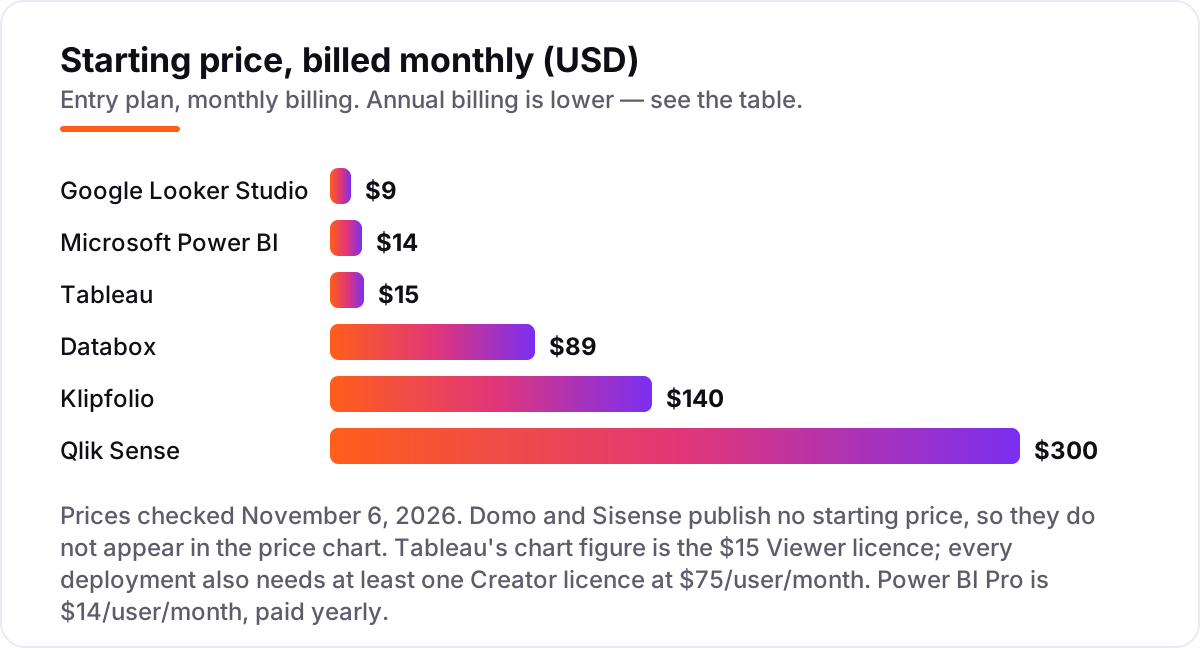
Take a ten-person team where two people build dashboards and eight people only read them. On list prices, the monthly bill is $0 on Looker Studio, $71 on Databox Analyst billed annually, $120 on Klipfolio Base billed annually, $140 on Power BI Pro for all ten users, $210 on Tableau with one Creator at $75 and nine Viewers at $15, and $300 on Qlik Sense Starter. Domo and Sisense have no published price, so they sit outside this comparison until a sales quote arrives.
Over a year, that is $0 on Looker Studio, $852 on Databox Analyst, $1,440 on Klipfolio Base, $1,680 on Power BI Pro, $2,520 on Tableau and $3,600 on Qlik Sense Starter. The same ten people and the same dashboards cost $0 at the free end and $3,600 at the dear end — a gap that comes entirely from the pricing model, not from features. Two of those numbers need adjusting before they are real: Databox Analyst covers one user, so a second builder needs Team at $199 a month, and Tableau requires an annual contract, so the $210 a month is $2,520 paid up front.
Three costs sit outside every number above. First, connectors: Looker Studio needs paid third-party connectors for Facebook and LinkedIn Ads, and those typically add $20–$50 a month per source. Second, white-label: Databox charges $200 a month for it, and Klipfolio and Sisense hold it for higher tiers. Third, AI: Power BI Copilot needs separate Fabric capacity, and Domo AI Pro consumes credits on top of the base contract. If the team also needs to report on search visibility, see our guide to the best SEO reporting software for the reporting side of the same stack.
Annual billing cuts the bill on most tools here: Databox Analyst drops from $89 to $71 a month, Klipfolio Base from $140 to $120, and Power BI Pro is priced as $14 a month paid yearly. Tableau publishes no monthly-billing option at all, and Qlik Sense Starter is annual-only too. One more cost to check before you commit: a second workspace or site is often a second subscription — Tableau Standard covers up to 3 sites, while Looker Studio Pro is priced per Google Cloud project, so several projects mean several subscriptions.
Know the difference: business analytics vs business intelligence vs dashboard tools
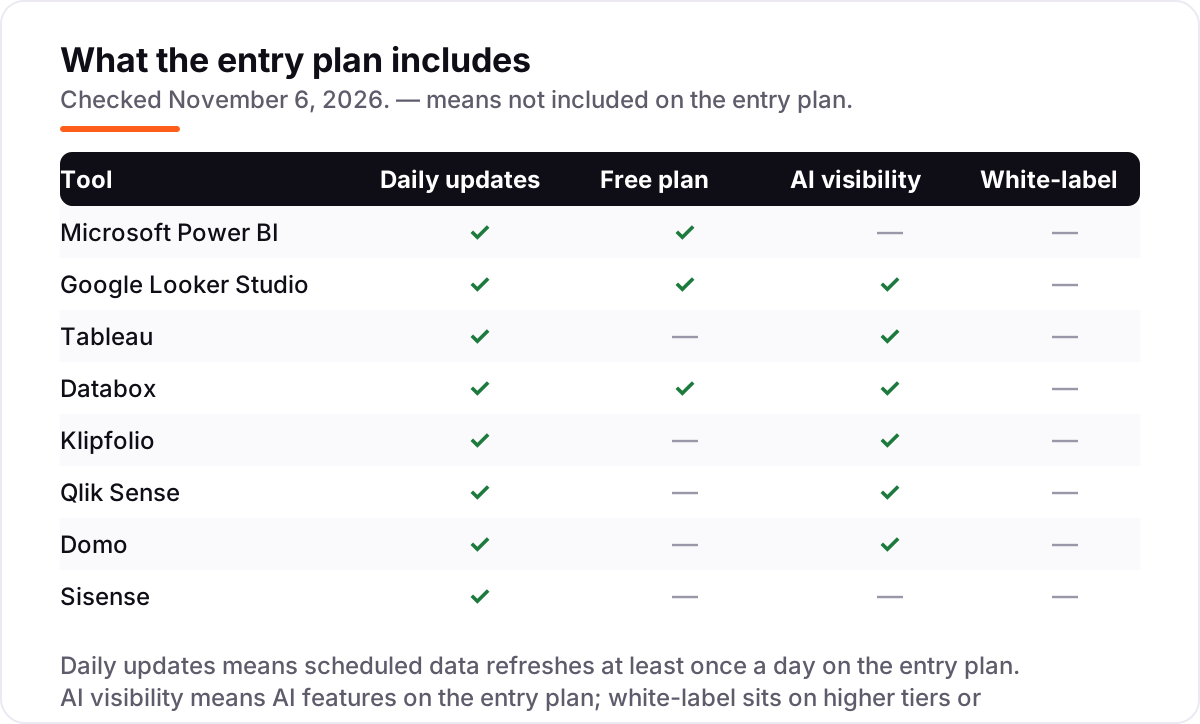
The confusion in this category is between three labels that vendors use interchangeably. Business analytics is the work — asking questions of data, finding patterns and forecasting what happens next. Business intelligence is the platform that does that work at scale, with governed data models, scheduled refreshes and shared definitions. A dashboard tool is the thinnest slice: it draws charts from connected sources and stops there. Every tool in this list does all three to some degree, but they lean differently — Databox and Klipfolio lean dashboard, Tableau and Qlik Sense lean BI platform, and Domo and Sisense try to cover the whole stack.
There is a second, quieter confusion: Looker Studio is not Looker. Looker Studio is Google's free dashboard tool, with a $9 per user Pro add-on. Looker is a separate enterprise BI platform with a governed semantic layer, quote-based pricing and a different buyer entirely. They share a name and a vendor, not a price or a purpose — and several roundups mix them up, so check which one a review is actually describing before trusting its price.
A third distinction worth knowing is per-user pricing versus capacity pricing. Per-user tools charge for every person, so sharing is the cost driver. Capacity tools charge for data volume or consumption, so usage is the cost driver. Qlik Sense Starter at $300 a month covers ten users for one flat fee, while Power BI Pro at $14 a user costs $140 for the same ten — the cheaper model depends entirely on how many people read the dashboards and how much data they chew through.
Quick comparison: tool type by need
| Buyer | Best pick | Why |
|---|---|---|
| Microsoft 365 team on a budget | Microsoft Power BI | Pro is $14/user/month, free account for building, deep Excel and Teams integration |
| Google-stack team, zero budget | Google Looker Studio | Free with unlimited viewers, Pro is $9/user/month when teams need governance |
| Analyst who lives in dashboards | Tableau | Deepest visualization toolkit, from $15/user/month for viewers |
| Marketing or ops team, no data engineer | Databox | Prebuilt metrics and an AI analyst, free plan, Analyst is $71/month billed annually |
| Whole company should see the numbers | Klipfolio | Flat $140/month, unlimited users, all 130+ connectors included |
| Governed analytics on big datasets | Qlik Sense | Associative engine and AI from $300/month for 10 users and 10 GB |
| One platform for ETL and dashboards | Domo | 1,000+ connectors and unlimited seats, custom quote |
| Analytics embedded in your product | Sisense | Compose SDK and full white-label, custom quote |
Mistakes to avoid
- Budgeting on the cheapest licence, not the licence you need. Tableau's $15 Viewer cannot build anything, and Databox Analyst covers one user — the build licence is the real starting price.
- Buying per-user pricing for a company-wide audience. Fifty viewers on Power BI Pro cost $700 a month; a flat tool like Klipfolio costs $140 for the same fifty.
- Ignoring the connector bill. Looker Studio is free until Facebook and LinkedIn Ads need paid third-party connectors, and Domo's credits are spent on every data row and execution.
- Assuming AI is included. Power BI Copilot needs Fabric capacity, Domo AI Pro consumes credits, and Sisense AI features sit on higher tiers — the AI in the marketing page is rarely the AI in the entry plan.
- Signing an annual contract before the trial proves the refresh works. Tableau and Qlik Sense are annual-only, so a bad fit costs a full year. Run one real month of your busiest data through the trial first.
How we chose
We checked each vendor's own pricing page on November 6, 2026 and recorded the starting price exactly as shown, including the annual-billing figure where the page lists one, and we ranked the tools by fit for the most common buyer — a business team that needs reliable dashboards without hiring a data engineer — not by brand size. Domo and Sisense publish no starting price, so they are listed as custom quote and excluded from the price chart rather than estimated. This list carries no review rating for Looker Studio or Domo because the G2 review pages for those two had no fresh, consistent copy to verify on November 6, 2026, and we would rather show no rating than a stale or estimated one. No vendor paid for a place in this list, and none of the links here are affiliate links.
What to do next
Start with the free plan or trial of your top pick and run one real month of dashboards through it. Check that the data refreshes on schedule, the metrics match what your team expects, and the people who need to read the dashboards can get in at a price you can defend. If the dashboards are sorted but new customers are not finding you, our monthly SEO service handles the visibility side — or compare reporting options in our guide to the best marketing dashboard software. Once your tools are in place, find out what's holding your rankings back.
Your stack only works if people find you
SerpAstra fixes what keeps your site off page one and makes it easy for AI assistants to recommend.
Get a free audit→Sources we checked (14)
- Microsoft Power BI pricing — powerbi.microsoft.com/en-us/pricing (checked November 6, 2026)
- Google Looker Studio pricing — cloud.google.com/looker-studio/pricing (checked November 6, 2026)
- Tableau Cloud pricing — tableau.com/pricing/cloud (checked November 6, 2026)
- Databox pricing — databox.com/pricing (checked November 6, 2026)
- Klipfolio pricing — klipfolio.com/pricing (checked November 6, 2026)
- Qlik Cloud Analytics pricing — qlik.com/us/pricing (checked November 6, 2026)
- Domo pricing factors — domo.com/pricing/factors (checked November 6, 2026)
- Sisense pricing — sisense.com/pricing (checked November 6, 2026)
- Microsoft Power BI reviews — g2.com/products/microsoft-microsoft-power-bi/reviews (checked November 6, 2026)
- Tableau reviews — g2.com/products/tableau/reviews (checked November 6, 2026)
- Databox reviews — g2.com/products/databox-databox/reviews (checked November 6, 2026)
- Klipfolio reviews — g2.com/products/klipfolio/reviews (checked November 6, 2026)
- Qlik Sense reviews — g2.com/products/qlik-sense/reviews (checked November 6, 2026)
- Sisense reviews — g2.com/products/sisense/reviews (checked November 6, 2026)
Shamim
Founder of SerpAstra
A full-stack SEO and digital marketer who spends most days on Local SEO for dental practices, AI search visibility and lead generation.
Frequently asked questions
What is the best business analytics tool?
Power BI is the best fit for most teams at $14/user/month, with a free account for building reports. Looker Studio is the best free option, Tableau is the best for deep visualization, and Databox is the best for teams that want KPI dashboards without a data engineer.
How much do business analytics tools cost?
Entry prices run from $0 to $300 a month here. Looker Studio and Databox have free plans, Power BI Pro costs $14/user/month, Tableau starts at $15/user/month for viewers, Klipfolio is $140/month flat, and Qlik Sense is $300/month. Domo and Sisense are custom quotes.
Is there a free business analytics tool?
Yes. Looker Studio is free with unlimited reports and viewers, and Databox has a free plan for one user and three data sources. Power BI also has a free account for building reports, though sharing needs a paid Pro licence. The other tools here offer trials only.
Should I choose Power BI or Tableau?
Choose Power BI when your team lives in Microsoft 365 and wants the cheapest per-user BI, at $14/user/month. Choose Tableau when visualization depth matters most and a dedicated analyst will build the dashboards, keeping in mind every deployment needs a $75/month Creator licence.
What is the difference between Looker Studio and Looker?
Looker Studio is Google's free dashboard tool for building and sharing reports, with a $9/user/month Pro add-on. Looker is a separate enterprise BI platform with a governed semantic layer and quote-based pricing. They share a name, not a price or a buyer.
Can I switch business analytics tools later?
Yes, but plan the move around your data connections, not the dashboards. Rebuilding dashboards is the easy part; reconnecting sources, remodelling metrics and retraining users takes the time. Export your metric definitions first, then rebuild one dashboard end to end before migrating the rest.
Do I need a data warehouse to use these tools?
No. Every tool here connects directly to spreadsheets, CRMs, ad platforms and databases, and Looker Studio and Databox work well with no warehouse at all. A warehouse helps when data is large, messy or spread across many systems, but it is an upgrade, not a requirement.
Free SEO and AI visibility audit
Find out what is holding your rankings back
Send us your site. Within 2 business days you get a written audit, an AI visibility check and a short fix list ranked by impact. Free, with no contract attached.
Request my free audit→Related guides
 AI, Data & Analytics10 Best BI Software for Analytics in 2026, ComparedThe 10 best BI software for analytics compared on real 2026 prices, free plans and G2 ratings, so you can pick the right dashboard tool for your team.Read guide →
 Digital Marketing & Ads9 Best Marketing Dashboard Software in 2026, ComparedCompare the 9 best marketing dashboard software options on price, free plans, white-label and AI features, with every price checked November 5, 2026.Read guide →
 SEO & AI SearchBest SEO Reporting Software for 2026: 11 Options Compared by Use Case11 best seo reporting software options compared on price, white-label reports and AI visibility, with real prices checked on vendor pages on November 2, 2026.Read guide →