
9 Best Marketing Dashboard Software in 2026, Compared
Compare the 9 best marketing dashboard software options on price, free plans, white-label and AI features, with every price checked November 5, 2026.
 Shamim Mia, Founder, SerpAstraLast verified November 5, 202613 min read
We compare pricing pages, documentation and public reviews. We never accept payment for rankings.

Key takeaways
- Looker Studio is free and the best fit for most solo marketers; AgencyAnalytics follows at $25/month per client for agencies, and Databox at $71/month billed annually for teams that want an AI analyst.
- The pricing model matters more than the headline price: per-client, per-dashboard, per-source and flat plans punish different kinds of growth.
- White-labeling is included on AgencyAnalytics, DashThis, Swydo and Whatagraph, but costs extra on Databox and Klipfolio — check before you promise clients branded reports.
- Supermetrics is a data pipeline, not a dashboard: pair its $55/month Starter with free Looker Studio and you have a full reporting stack for $55 a month.
On this page
Quick comparison
| Tool | Best for | Starting price | Free plan |
|---|---|---|---|
| Looker Studio | Solo marketers and small teams already in Google who want a capable dashboard for $0 | Free | Yes (free) |
| AgencyAnalytics | Marketing agencies that report to clients every month and want white-label dashboards included | $25/mo per client | No (14-day trial) |
| Databox | Marketing teams that want an AI analyst to explain the numbers, not just chart them | $71/mo (annual) | Yes (free plan) |
| DashThis | Marketers who want a client-ready dashboard live within an hour, with no learning curve | $54/mo | No (free trial) |
| Supermetrics | Teams that already love Looker Studio or Sheets and just need the data to arrive reliably | $55/mo | No (14-day trial) |
| Cyfe | Small agencies and freelancers who want every feature at the cheapest paid price | $29/mo | No (14-day trial) |
| Klipfolio | Analysts who think in spreadsheets and want formula-level control over every metric | $140/mo | No (14-day trial) |
| Swydo | Agencies that bill by data source and want unlimited clients, users and dashboards on one plan | €69/mo | No (14-day trial) |
| Whatagraph | Large agencies that need governed, blended cross-channel reporting at scale | €699/mo | No (demo only) |
Make one of these tools?
We re-check this list every quarter. Send a correction, request a review, or ask about a clearly labeled sponsored spot.
Request a listingThe best marketing dashboard software

Looker Studio
Best for: Solo marketers and small teams already in Google who want a capable dashboard for $0
Looker Studio is the only tool in this list that costs nothing, and for a solo marketer or a small team already living in Google's tools, that is hard to argue with. It connects to more than 1,400 data sources, including Google Ads, Analytics 4, Search Console and BigQuery, and turns them into interactive reports with filters, date controls and calculated fields. Sharing is a link, embedding is a snippet, and collaboration happens in real time.
The limits are the ones you would expect at $0. Non-Google sources need a paid pipeline such as Supermetrics, there is no white-labeling or client portal, and support is community-only unless you pay for Pro. Pick Looker Studio when the budget is $0 and your stack is mostly Google; pick a paid tool when clients need branded reports.
What we like
- Free for creators and viewers, with no dashboard or report limit
- Connects to more than 1,400 data sources including Google Ads, GA4 and BigQuery
- Real-time collaboration and embedding, so reports live on any page
- Pro at $9 per user per project per month adds team management and support
Watch out for
- No native connectors beyond Google's ecosystem without a paid pipeline like Supermetrics
- No white-labeling, client portals or scheduled PDF reports on the free plan
- Support is community and documentation only unless you pay for Pro

AgencyAnalytics
Best for: Marketing agencies that report to clients every month and want white-label dashboards included
AgencyAnalytics is built for one job: monthly client reporting, done well. At $25 a month per client you get more than 90 integrations, unlimited reports, goal tracking and automated scheduling, with white-label dashboards included rather than sold as an add-on. It holds the highest G2 rating in this list at 4.7 out of 5 from 463 reviews, with reviewers praising ease of use and support.
The catch is the billing model. Five clients cost $125 a month, ten cost $250, and twenty cost $500, so the invoice grows with the roster — annual billing is discounted, but there is no volume break until 25 clients. Rank tracking and AI visibility tracking are paid add-ons on top. Choose AgencyAnalytics when client reporting is the business; choose DashThis or Databox when the bill should not scale with headcount.
What we like
- White-label dashboards and reports included, not an add-on
- More than 90 integrations per client, with multi-account connections on higher plans
- Highest G2 rating here at 4.7/5 from 463 reviews
- Unlimited dashboards on Agency plans and a 30-day money-back guarantee
Watch out for
- Per-client billing means the invoice grows with every new client you sign
- AI Tracker and Rank Tracker are paid add-ons, not part of the base price
- No free plan — only a 14-day trial before the first invoice

Databox
Best for: Marketing teams that want an AI analyst to explain the numbers, not just chart them
Databox is the only tool here with an AI analyst on every plan, including the free one. Genie answers questions about your metrics, flags anomalies and writes performance summaries, on top of more than 130 native integrations and governed, prebuilt metrics that keep every dashboard honest. Analyst costs $71 a month billed annually, or $89 billed monthly, for one user, five data sources and unlimited dashboards and reports.
The trap is the single seat. The moment a second person needs a login, the price jumps to Team Core at $249 a month, and Team prices moved up sharply in the 2026 restructure. White-labeling is a paid add-on too. Buy Databox when one person owns reporting and wants AI to do the explaining; buy AgencyAnalytics when the whole team and the clients need in.
What we like
- Genie, the AI analyst, answers questions on every plan including Free
- More than 130 native integrations with governed, prebuilt metrics
- Hourly sync and unlimited dashboards and reports on Analyst
- No per-seat pricing on Team and Agency plans
Watch out for
- Analyst is a single-user plan — a second login means Team Core at $249/month
- The pricing page was restructured in 2026 and Team prices moved up sharply
- White-labeling is a paid add-on, not included on the entry plan

DashThis
Best for: Marketers who want a client-ready dashboard live within an hour, with no learning curve
DashThis is the fastest tool in this list to set up: pick a preset template for the channel, connect the account, and the dashboard is live within an hour. Individual costs $54 a month, or $44 billed annually, for 3 dashboards and 15 sources, with unlimited users, white-labeled dashboards, a custom domain and AI Insights summaries on every plan. It shares the highest G2 rating here at 4.7 out of 5.
The ceiling arrives fast. Three dashboards means three clients, and the fourth pushes you to Professional at $139 a month. There is no free plan, only a trial, and the chat-mode AI Insights Pro costs $19 a month extra. Pick DashThis when speed and simplicity matter most; pick AgencyAnalytics when the client count keeps growing.
What we like
- Preset templates for every channel, so a dashboard is live within an hour
- White-labeled dashboards, custom domain and custom email on every plan
- Unlimited users on every plan, including Individual
- AI Insights summaries included on every plan, with 35+ integrations
Watch out for
- Individual covers only 3 dashboards and 15 sources — a fourth client means Professional at $139/month
- No free plan, only a trial
- AI Insights Pro with chat mode is a $19/month add-on, not included

Supermetrics
Best for: Teams that already love Looker Studio or Sheets and just need the data to arrive reliably
Supermetrics is the plumber of this list: it moves marketing data from more than 150 sources into Looker Studio, Google Sheets, Excel or Power BI, on a schedule, without manual exports. Starter costs $55 a month, or $44 billed annually, for one destination, one user and three data sources. It is the most-reviewed tool here at 4.4 out of 5 from 827 G2 reviews.
Remember what it is not: a dashboard. You still need somewhere for the data to land, which is why the natural pairing is free Looker Studio — the two together cost $55 a month and cover most small teams. The bill climbs with every extra source, user and account, so count connections before you commit. Buy Supermetrics when the dashboard exists and the data does not arrive on its own.
What we like
- The widest connector library here, feeding Looker Studio, Sheets, Excel and Power BI
- Scheduled refreshes keep dashboards current without manual exports
- Most-reviewed tool in this list at 4.4/5 from 827 G2 reviews
- Extras let you add users, sources and destinations instead of jumping a tier
Watch out for
- It moves data, it does not draw the dashboard — you still need Looker Studio, Sheets or Power BI
- Starter covers only 1 user, 3 data sources and 1 destination
- Reviewers note the price climbs fast once you add sources, users and accounts

Cyfe
Best for: Small agencies and freelancers who want every feature at the cheapest paid price
Cyfe is the cheapest paid dashboard in this list, and it does not hide features behind higher tiers: Starter costs $29 a month and includes everything — unlimited history, TV mode, public URLs, custom logo and themes, a custom SSL domain and unlimited data exports. Dashboards are built from widgets, so setup is the simplest here and a first dashboard takes minutes.
The limits are size, not features. Starter covers 2 dashboards and 1 user, so a team needs Standard at $39 a month, and the integration list is shorter than AgencyAnalytics or Databox. There are no native AI features. Pick Cyfe when the budget is tight and the client list is short; pick DashThis when templates and polish matter more.
What we like
- Cheapest paid plan here at $29/month, with every feature included
- Custom logo, custom themes and custom SSL domain on every plan
- TV mode, public URLs and unlimited data exports at no extra cost
- Simplest setup in this list — dashboards are widgets, not formulas
Watch out for
- Starter covers only 2 dashboards and 1 user — a team needs Standard at $39/month
- No native AI features and a smaller integration list than the agency tools
- G2's listing still shows older plan details, so check the current page before buying

Klipfolio
Best for: Analysts who think in spreadsheets and want formula-level control over every metric
Klipfolio is a dashboard tool for people who think in spreadsheets. Every metric is a Klip built from formulas, so you can blend, calculate and reshape data exactly the way you want, across more than 130 integrations plus a REST connector for anything else. Base costs $140 a month, or $120 billed annually, for 3 dashboards, unlimited users and a 4-hour refresh.
The trade-offs are speed and polish. Hourly refresh waits for Grow at $190 a month, white-labeling is a $299-a-month bundle, and the learning curve is the steepest here. Pick Klipfolio when you want formula-level control and your team already speaks spreadsheet; pick DashThis when you want a finished dashboard today.
What we like
- Formula-based Klips give spreadsheet users full control over calculations
- Unlimited users on every plan, including Base
- More than 130 integrations plus a REST connector for anything else
- Template gallery and data modelling with joins included from Base
Watch out for
- Base refreshes data every 4 hours — hourly refresh needs Grow at $190/month
- White-labeling is a $299/month bundle, not part of any plan
- Steepest learning curve here; reviewers call chart options limited next to Power BI

Swydo
Best for: Agencies that bill by data source and want unlimited clients, users and dashboards on one plan
Swydo sells one plan and nothing else: €69 a month, or €62 billed annually, with the first 10 data sources included and every feature switched on — unlimited clients, users, dashboards and reports, full white-labeling, custom domain, client portals and an AI report builder. Extra sources cost €4.50 each up to 100, so the bill tracks the size of your stack, not your headcount.
The model suits agencies with many small clients and few sources each, and punishes the opposite: ten clients on two sources each is 20 sources and roughly €114 a month. Prices are in euros, so the dollar cost moves with the exchange rate, and there is no free plan. Pick Swydo when your clients are many and your sources are few.
What we like
- One plan with every feature: unlimited clients, users, dashboards and reports
- Full white-labeling, custom domain and client portals included
- AI report builder and insights, plus an MCP connector for Claude and ChatGPT
- Highest ease-of-use scores here, with live human support and onboarding
Watch out for
- Priced in euros, so the dollar cost moves with the exchange rate
- One flat fee covers only 10 data sources — the 11th costs extra
- No free plan, only a 14-day trial, and no per-client pricing option

Whatagraph
Best for: Large agencies that need governed, blended cross-channel reporting at scale
Whatagraph is the enterprise end of this list, rebuilt in 2026 around IQ Agents that set up sources, build data blends and ship reports for you. Max starts at €699 a month billed annually, with at least 50 source credits, unlimited users and reports, white-label reports and a dedicated success manager on every plan. It is the only tool here where the platform does the reporting work, not just the charting.
The price is the story: €699 a month is more than the other eight tools combined, there is no self-serve signup or trial, and reviewers flag slow loading and occasional connector disconnects. Pick Whatagraph when reporting is a team-sized operation with dozens of clients; pick Swydo or AgencyAnalytics for anything smaller.
What we like
- IQ Agents set up sources, build blends and ship reports for you
- Data groups and blends combine channels into single governed metrics
- White-label reports and a dedicated success manager on every plan
- Unlimited users and reports, with KPI overviews and alerts built in
Watch out for
- From €699 a month, it costs more than the other eight tools combined
- No self-serve signup — both plans start with a demo and a sales call
- Reviewers flag slow loading and occasional connector disconnects
The best marketing dashboard software turns the numbers scattered across Google Ads, Meta, Analytics and email into one screen you can read in a minute. We ranked the nine tools below by fit for the most common buyer — a marketer or small agency that needs live numbers and client-ready reports — starting with the free option and ending with the enterprise one, and every price was checked on the vendor's own pricing page on November 5, 2026.
How to choose the best marketing dashboard software
- Count what you are billed for. AgencyAnalytics charges per client, DashThis and Klipfolio per dashboard, Swydo per data source, and Databox per user tier. The model that fits a 5-client agency punishes a 50-client one.
- Check the connectors before the charts. A dashboard is only as good as its sources: confirm Google Ads, Meta, GA4 and your email tool all connect natively, or budget for a pipeline like Supermetrics.
- Decide how often the numbers must refresh. Klipfolio Base refreshes every 4 hours, Databox Analyst hourly, and Looker Studio live — a daily check-in tolerates 4 hours, a live campaign wall does not.
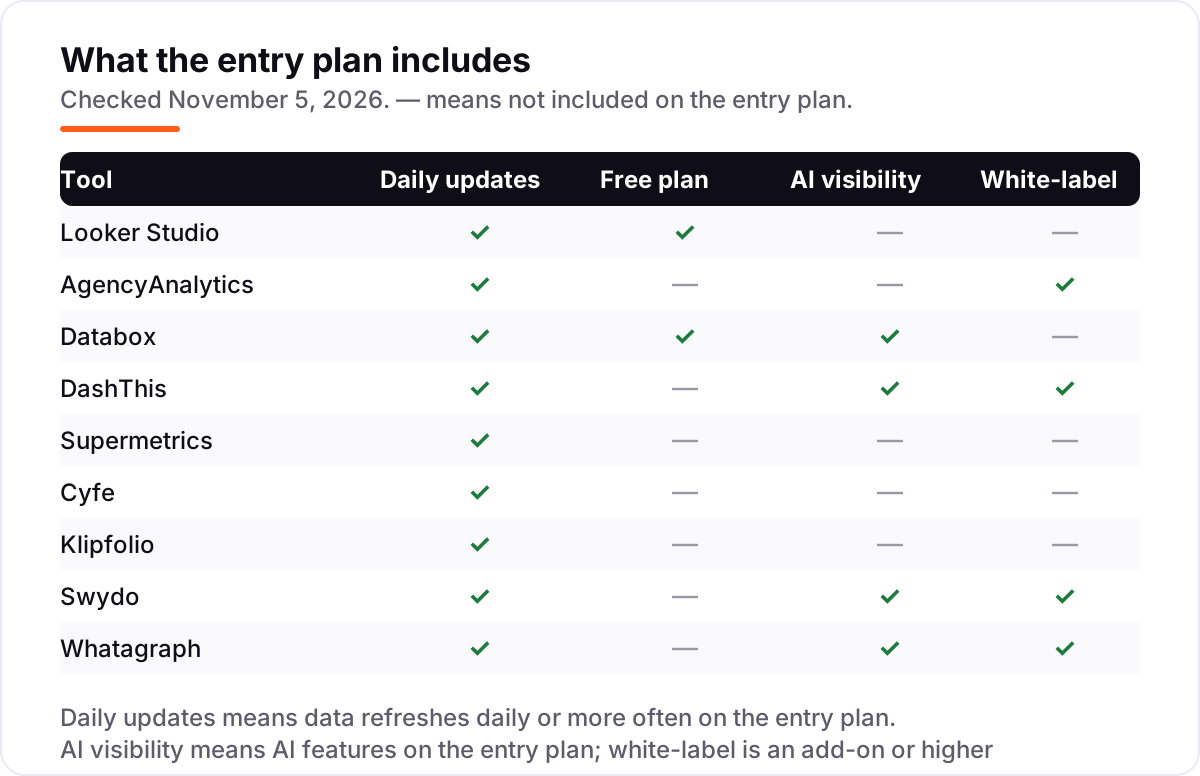
- Settle white-labeling up front. AgencyAnalytics, DashThis, Swydo and Whatagraph include it; Databox and Klipfolio charge extra. If clients see the dashboard, this decides the shortlist.
- Try it with your own accounts. Every paid tool here offers a trial, and Looker Studio and Databox have free plans. Connect your real ad accounts before you pay — connector quirks only show up on live data.
A dashboard is one system in your stack, not the whole stack. If your dashboards mix paid and organic traffic, build clean links with the free UTM builder so every channel reports correctly, and compare the wider analytics market in our guide to the best marketing analytics platforms.
Whatever you shortlist, run it with real data before you pay. The trials in this list are long enough to build one genuine client report — your accounts, your metrics, your branding — and that report tells you more than any review can. Check two things in the trial: that every source refreshes without daily fixing, and that the exported report looks like something you would send a client. Every tool here lets you test that before the first invoice.
Marketing dashboard software pricing: what you will actually pay
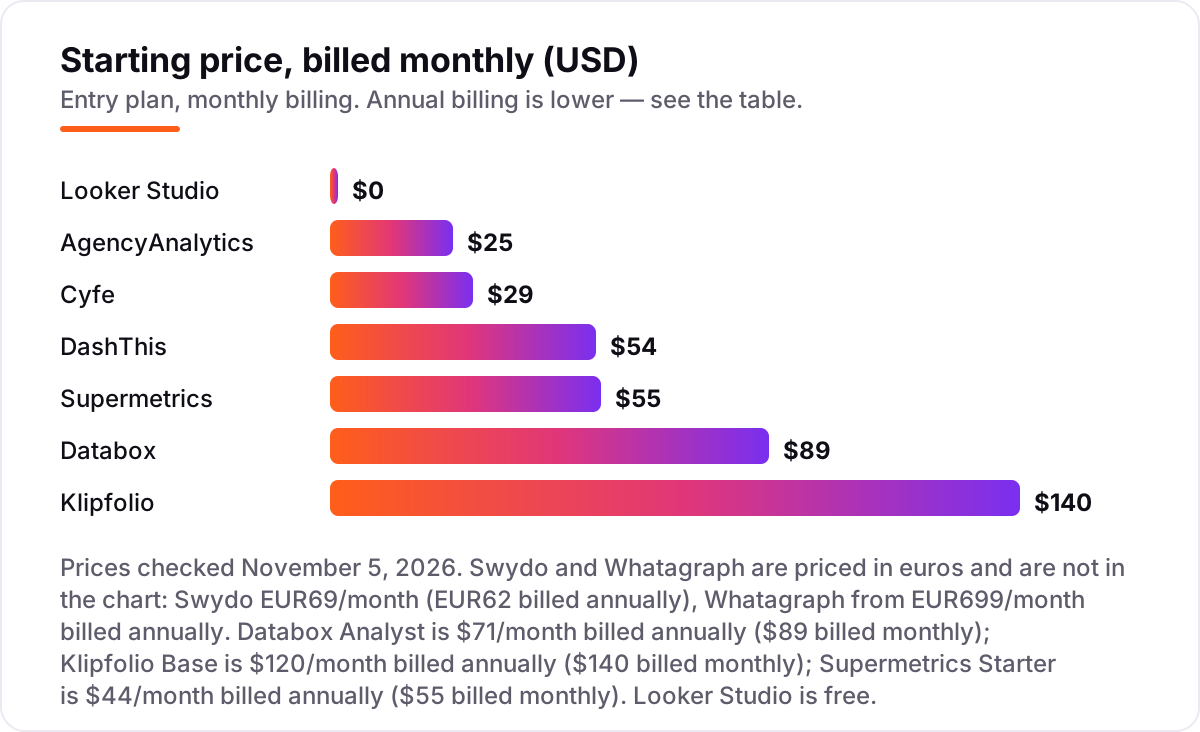
Take a three-person marketing team tracking one brand across Google Ads, Meta, GA4 and email — four sources, one dashboard each for the team and the client. On list prices, the subscription costs $0 a month on Looker Studio, $25 on AgencyAnalytics for the single client, $29 on Cyfe Starter, $54 on DashThis Individual, $44 on Supermetrics Starter billed annually, $71 on Databox Analyst billed annually, and $120 on Klipfolio Base billed annually. Swydo is €62 a month billed annually for its first 10 sources, and Whatagraph starts at €699 a month billed annually.
Over a year, that is $0 on Looker Studio alone, $300 on AgencyAnalytics, $348 on Cyfe, $408 on DashThis billed annually or $528 on Supermetrics billed annually, $852 on Databox billed annually, and $1,440 on Klipfolio billed annually. The same three people and the same four sources cost $0 at the cheap end and $1,440 at the dear end — before you count the pairing most teams actually buy: Looker Studio plus Supermetrics Starter is $528 a year billed annually, which buys the free dashboard and the pipeline that feeds it.
Three costs sit outside every number above. First, the seat and client jumps: Databox Analyst covers one user, so a second login means Team Core at $249 a month, and AgencyAnalytics adds $25 a month per client. Second, the source limits: DashThis Individual stops at 15 sources and Swydo's flat fee covers 10, so a growing stack pushes you up a tier or into per-source fees. Third, white-labeling: free on AgencyAnalytics, DashThis, Swydo and Whatagraph, but a paid add-on on Databox and a $299-a-month bundle on Klipfolio — budget for it if clients ever see the dashboard. If reporting is the job rather than live monitoring, our guide to the best SEO reporting software covers the report-first tools.
Annual billing cuts the bill on most tools here: DashThis Individual drops from $528 to $408 a year, Supermetrics Starter from $660 to $528, Databox Analyst from $1,068 to $852, and Klipfolio Base from $1,680 to $1,440. AgencyAnalytics discounts annual billing too, though it does not publish the per-client annual rate. One more cost to check before you commit: a second brand is a second dashboard, a second client or a second set of sources on every tool in this list, so price the second brand before you commit to a tool for the first.
Know the difference: dashboard software vs reporting software
The confusion in this category is between a screen you watch and a report you send. A marketing dashboard is a live view — numbers that refresh, filters you can change, a wall you glance at during the day. Reporting software produces a finished document on a schedule: a PDF in the client's inbox on the first of the month, with commentary and branding. Most tools in this list do both, but the emphasis differs.
Looker Studio and Klipfolio are dashboards first: they are built for exploring live numbers, and the report is an export of the screen. AgencyAnalytics, DashThis and Whatagraph are reporting tools first: the dashboard exists, but the product is the scheduled, white-labeled report the client receives. Supermetrics is neither — it is the pipeline that moves data into a dashboard or a spreadsheet. If you check numbers daily and rarely send anything, buy the dashboard. If the client expects a report on the first of the month, buy the reporting tool.
There is a second, quieter confusion: dashboard software versus business intelligence tools such as Power BI and Tableau. BI tools are built for analysts who model data and write queries; marketing dashboards are built for marketers who want connected numbers without a data team. If your team writes SQL, BI is the right category. If your team runs campaigns, this list is.
Quick comparison: tool type by need
| Buyer | Best pick | Why |
|---|---|---|
| Solo marketer on a $0 budget | Looker Studio | Free, connects 1,400+ sources, Pro is $9/user/project/month |
| Agency reporting to clients | AgencyAnalytics | $25/month per client, white-label included, 90+ integrations |
| Team that wants AI summaries | Databox | Genie AI analyst on every plan, Analyst is $71/month billed annually |
| Fastest setup | DashThis | Individual is $54/month, preset templates, dashboards live in an hour |
| Feeding Looker Studio or Sheets | Supermetrics | Starter is $55/month, 150+ connectors, 3 data sources |
| Cheapest paid dashboard | Cyfe | Starter is $29/month with all features included |
| Spreadsheet-style BI | Klipfolio | Base is $140/month, formula-based Klips, unlimited users |
Mistakes to avoid
- Buying on the headline price instead of the billing model. A $25-per-client tool is cheap at one client and expensive at twenty; a $140 flat tool is the opposite. Model the price at your client count a year from now, not today.
- Assuming every source connects. Check your exact ad accounts, email tool and CRM against the connector list before the trial ends — a missing native connector means a paid pipeline or manual exports.
- Forgetting white-label costs. Branded client reports are included on four tools here and cost extra on two. If clients see the dashboard, add the add-on price to the comparison from day one.
- Buying a pipeline when you need a dashboard. Supermetrics moves data; it draws nothing. Pair it with Looker Studio or Sheets, or pick a tool that draws the dashboard itself.
- Ignoring refresh frequency. A dashboard that refreshes every 4 hours cannot run a live campaign wall. Match the refresh rate — live, hourly or 4-hourly — to how often anyone actually looks at the screen.
How we chose
We checked each vendor's own pricing page on November 5, 2026 and recorded the starting price exactly as shown, including the annual-billing figure where the page lists one, and we ranked the tools by fit for the most common buyer — a marketer or small agency that needs live numbers and client-ready reports — not by brand size. One figure needs a note: Databox's Analyst price of $71 a month billed annually is the figure shown on its pricing page as read on November 4, 2026; the live page we opened on November 5 did not expose the Analyst price in its text, and the same page showed Team prices had moved up, so we kept the November 4 figure and flag it here. Ratings are G2 scores from fresh crawls of each product's G2 page in early November 2026. No vendor paid for a place in this list, and none of the links here are affiliate links.
What to do next
Start with the free plan or trial of your top pick and build one real dashboard with your own accounts before you pay. Check that every source refreshes on schedule and the exported report looks like something you would send a client. If the dashboards are sorted but new customers are not finding you, our monthly SEO service handles the visibility side — or compare providers in our guide to SEO companies for small business. Once your tools are in place, find out what's holding your rankings back.
Your stack only works if people find you
SerpAstra fixes what keeps your site off page one and makes it easy for AI assistants to recommend.
Get a free audit→Sources we checked (18)
- Looker Studio pricing — cloud.google.com/looker-studio (checked November 5, 2026)
- AgencyAnalytics pricing — agencyanalytics.com/pricing (checked November 5, 2026)
- Databox pricing — databox.com/pricing (checked November 5, 2026)
- DashThis pricing — dashthis.com/pricing (checked November 5, 2026)
- Supermetrics pricing — supermetrics.com/pricing (checked November 5, 2026)
- Cyfe pricing — cyfe.com/pricing (checked November 5, 2026)
- Klipfolio pricing — klipfolio.com/pricing (checked November 5, 2026)
- Swydo pricing — swydo.com/pricing (checked November 5, 2026)
- Whatagraph pricing — whatagraph.com/pricing (checked November 5, 2026)
- Looker Studio (Data Studio) reviews — g2.com/products/data-studio/reviews (checked November 5, 2026)
- AgencyAnalytics reviews — g2.com/products/agencyanalytics/reviews (checked November 5, 2026)
- Databox reviews — g2.com/products/databox-databox/reviews (checked November 5, 2026)
- DashThis reviews — g2.com/products/dashthis/reviews (checked November 5, 2026)
- Supermetrics reviews — g2.com/products/supermetrics/reviews (checked November 5, 2026)
- Cyfe reviews — g2.com/products/cyfe/reviews (checked November 5, 2026)
- Klipfolio reviews — g2.com/products/klipfolio/reviews (checked November 5, 2026)
- Swydo reviews — g2.com/products/swydo/reviews (checked November 5, 2026)
- Whatagraph reviews — g2.com/products/whatagraph/reviews (checked November 5, 2026)
Shamim
Founder of SerpAstra
A full-stack SEO and digital marketer who spends most days on Local SEO for dental practices, AI search visibility and lead generation.
Frequently asked questions
What is the best marketing dashboard software?
Looker Studio is the best fit for most solo marketers because it is free and connects to more than 1,400 sources. AgencyAnalytics is the best pick for agencies at $25/month per client, with white-labeling included. Databox is the best pick when you want an AI analyst to explain the numbers.
How much does marketing dashboard software cost?
Entry prices run from $0 to €699 a month. Looker Studio is free, Cyfe is $29/month, AgencyAnalytics is $25/month per client, DashThis is $54/month, and Databox is $71/month billed annually. A three-person team tracking one brand pays $348–$1,440 a year depending on the tool.
Is there really free marketing dashboard software?
Yes. Looker Studio is free for creators and viewers with no dashboard limit, and Databox has a free plan with 1 user, 3 data sources and 1 dashboard. Both are real products, not trials. The catch is connectors: non-Google sources in Looker Studio usually need a paid pipeline like Supermetrics.
What is the difference between a marketing dashboard and marketing reporting software?
A dashboard is a live screen you check every day; reporting software produces scheduled client-ready reports, usually as PDFs or emails. Most tools here do both, but the emphasis differs: Looker Studio and Klipfolio are dashboards first, while AgencyAnalytics, DashThis and Whatagraph are built around reports clients receive.
Do I need Supermetrics if I use Looker Studio?
Only for non-Google data. Looker Studio connects natively to Google Ads, Analytics and Search Console, so a Google-only stack needs nothing else. Supermetrics earns its $55/month when you add Meta, LinkedIn, TikTok, HubSpot or Shopify data — it moves that data into Looker Studio on a schedule.
Can I white-label marketing dashboards for clients?
Yes, on four tools here it is included: AgencyAnalytics, DashThis, Swydo and Whatagraph all ship white-label dashboards on their entry plans. On Databox it is a paid add-on, and on Klipfolio it is a $299/month bundle. Looker Studio, Supermetrics and Cyfe offer no full white-label option.
Can I switch marketing dashboard software later?
Yes, but budget a rebuild, not a migration. Dashboards do not export between tools, so you rebuild each one by hand and reconnect every source. Keep the old tool running for one reporting cycle while the new dashboards go live, and export historical data first — most tools only sync recent history on a new connection.
Free SEO and AI visibility audit
Find out what is holding your rankings back
Send us your site. Within 2 business days you get a written audit, an AI visibility check and a short fix list ranked by impact. Free, with no contract attached.
Request my free audit→Related guides
 Digital Marketing & Ads11 Best Marketing Analytics Platforms in 2026, ComparedCompare the 11 best marketing analytics platforms in 2026 on price, free plans and reporting, with every price checked November 4, 2026 for US teams.Read guide →
 SEO & AI SearchBest SEO Reporting Software for 2026: 11 Options Compared by Use Case11 best seo reporting software options compared on price, white-label reports and AI visibility, with real prices checked on vendor pages on November 2, 2026.Read guide →
 SEO & AI Search12 Best Marketing Platforms for Small Business SEO in 2026, ComparedThe 12 best marketing platforms for small business SEO, compared on real prices, SEO tools and AI visibility. Every price checked November 1, 2026.Read guide →