
10 Best CAD Software (2026): Top Picks, Real Pricing and Who Each Fits
Compare the 10 best cad software tools on price, free plans and fit — from AutoCAD at $2,095 a year to FreeCAD at $0 — every price checked November 4, 2026.
 Shamim Mia, Founder, SerpAstraLast verified November 4, 202613 min read
We compare pricing pages, documentation and public reviews. We never accept payment for rankings.
Key takeaways
- AutoCAD is the best fit for most buyers at $2,095 a year; Autodesk Fusion follows at $680 a year with CAM included, and SOLIDWORKS at $2,820 a year for mechanical design.
- FreeCAD costs $0 with no paid plan at all, and Rhino is the only perpetual licence here at $995 one-time.
- The single most important buying factor is the work you actually do: 2D drafting, parametric parts, freeform surfaces and BIM are different tools, not different prices.
- Subscription, annual and one-time prices are not comparable head-to-head — this list shows the annual starting price for every tool so the bars compare like with like.
On this page
Quick comparison
| Tool | Best for | Starting price | Free plan |
|---|---|---|---|
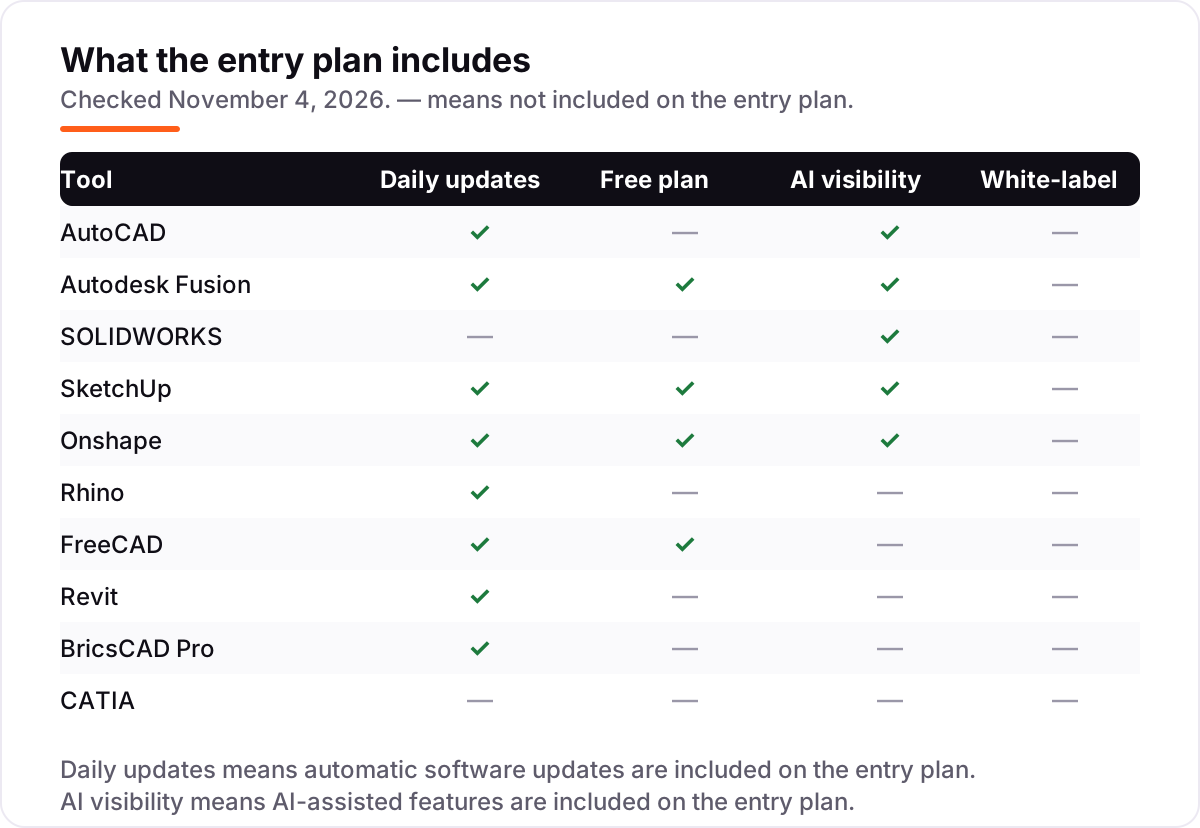
| AutoCAD | Architects, engineers and drafters who need the industry-standard 2D drafting tool with seven specialist toolsets | $2,095/yr | No (30-day trial) |
| Autodesk Fusion | Product designers and small engineering teams who want CAD, CAM, simulation and PCB in one cloud tool | $680/yr | Yes (personal use) |
| SOLIDWORKS | Mechanical engineers and product teams who design machined parts, assemblies and sheet metal | $2,820/yr | No |
| SketchUp | Architects, interior designers and woodworkers who want fast, intuitive 3D modeling | $129/yr | Yes (Free plan) |
| Onshape | Distributed engineering teams who want CAD in a browser with built-in version control | $1,500/yr | Yes (Free plan) |
| Rhino | Designers who model freeform, organic shapes — jewelry, footwear, architecture and marine design | $995 one-time | No (90-day trial) |
| FreeCAD | Hobbyists, makers and budget-conscious engineers who want parametric CAD at $0 | Free | Yes (free) |
| Revit | Architects, structural and MEP engineers who deliver buildings as coordinated BIM models | $3,005/yr | No (30-day trial) |
| BricsCAD Pro | AutoCAD users who want the same DWG workflow for less, with a perpetual licence option | $780/yr | No (30-day trial) |
| CATIA | Aerospace and automotive engineering teams who design complex surfaces and huge assemblies | $7,229/yr | No (trial available) |
Make one of these tools?
We re-check this list every quarter. Send a correction, request a review, or ask about a clearly labeled sponsored spot.
Request a listingThe best CAD software

AutoCAD
Best for: Architects, engineers and drafters who need the industry-standard 2D drafting tool with seven specialist toolsets
AutoCAD is the drafting tool most of the industry already runs on, and that is its biggest advantage: DWG files open everywhere, clients expect them, and hiring a drafter who knows AutoCAD takes no training. The subscription costs $260 a month or $2,095 a year, and it includes seven industry-specific toolsets — architecture, mechanical, electrical, plant, MEP, mapping and raster conversion — plus web and mobile versions and Autodesk AI features such as Markup Assist.
The trade-off is the price and the model. There is no perpetual licence and no free plan beyond a 30-day trial, so $2,095 a year recurs, and paying monthly costs $3,120 over a full year. 3D work is capable but less fluid than in parametric tools. Buy AutoCAD when precise 2D drafting and DWG exchange are the job; buy Fusion for parametric 3D parts.
What we like
- The drafting standard: DWG files open everywhere, and most firms, clients and contractors already use it
- Seven industry-specific toolsets included — architecture, mechanical, electrical, plant, MEP, mapping and raster conversion
- Autodesk AI features (Markup Assist and My Insights) are included on the standard subscription
- Runs on Windows and Mac, with web and mobile versions included in the same subscription
Watch out for
- Subscription-only: there is no perpetual licence, and no free plan beyond the 30-day trial
- 3D modeling is workable but less fluid than parametric 3D tools such as Fusion or SOLIDWORKS
- Reviewers report lag and freezing on large, complex projects

Autodesk Fusion
Best for: Product designers and small engineering teams who want CAD, CAM, simulation and PCB in one cloud tool
Fusion is the best value in this list for product design: one subscription covers parametric CAD, CAM, simulation, PCB design and data management, where other tools charge separately for CAM alone. It costs $85 a month or $680 a year, and hobbyists get a free personal-use plan, while students, educators and qualifying startups pay nothing. Cloud collaboration with version history is built in, so a team shares one live model.
The catch is the cloud. Fusion needs an internet connection to sign in and sync, so offline work is limited, and the advanced CAM, simulation and design tools sit behind paid extensions. Heavy meshes and large assemblies can also slow the viewport on mid-range hardware. Buy Fusion when one tool must carry a product from sketch to machined part; buy SOLIDWORKS for larger teams and heavier assemblies.
What we like
- CAD, CAM, simulation and PCB in one subscription — no separate CAM package to buy
- Free personal-use plan for hobbyists, plus free access for students, educators and qualifying startups
- Cloud collaboration with version history built in, so teams share one live model
- Generative design and automated drawings included, with paid extensions for advanced CAM and simulation
Watch out for
- Needs an internet connection for sign-in and cloud features; offline work is limited
- Advanced CAM, simulation and design tools sit behind paid extensions
- Heavy meshes and large assemblies can slow the viewport on mid-range hardware

SOLIDWORKS
Best for: Mechanical engineers and product teams who design machined parts, assemblies and sheet metal
SOLIDWORKS is the mechanical CAD standard: parametric parts, assemblies and drawings with weldments, sheet metal and mold tools, a large library of standard components, and cloud file management included in the price. Design Standard with Cloud Services costs $2,820 a year, with Professional at $3,456 and Premium at $4,716. AI Virtual Companions for mechanical design are included on Standard, and support comes with the subscription.
The limits are the platform and the trial. SOLIDWORKS runs on Windows only, large assemblies need strong hardware, and there is no free trial — only a 15-day money-back policy. Rendering, tolerance analysis and cost estimation wait for Professional. A low-cost Makers edition exists for hobbyists but bars commercial use. Buy SOLIDWORKS when mechanical design is the core business; buy Fusion when the budget is tighter and CAM must be included.
What we like
- The most widely used mechanical CAD package, so skills, files and suppliers transfer easily
- Deep parametric modeling with weldments, sheet metal, mold tools and a large standard-parts library
- AI Virtual Companions for mechanical design are included on the Standard plan
- Cloud file and revision management included, with technical support in the price
Watch out for
- No free trial — only a 15-day money-back policy — and no free plan for commercial use
- Windows only, and large assemblies demand strong hardware
- Rendering, tolerance analysis and cost estimation wait for Professional at $3,456 a year

SketchUp
Best for: Architects, interior designers and woodworkers who want fast, intuitive 3D modeling
SketchUp is the fastest tool here to learn and the easiest way to get a building, room or piece of furniture into 3D. Go costs $129 a year and runs in a browser and on iPad, with unlimited cloud storage and a huge library of free models in 3D Warehouse. Pro costs $399 a year and adds the desktop app, LayOut documentation and extensions, while a free web version covers personal projects.
The catch is what Go leaves out: no desktop app, no extensions and no LayOut, so serious documentation needs Pro. SketchUp is not a parametric modeler either — changing a dimension means remodeling, not editing a feature tree — and photorealistic rendering needs Studio at $859 a year. Buy SketchUp when speed and simplicity matter most; buy Revit when the deliverable is a coordinated BIM model.
What we like
- The fastest tool here to pick up, with a huge library of free models in 3D Warehouse
- Go runs in a browser and on iPad, so no install and no powerful workstation is needed
- Pro adds the desktop app, LayOut documentation and extensions for $399 a year
- The free web version is genuinely usable for personal projects
Watch out for
- Go has no desktop app and no extensions — serious documentation needs Pro at $399 a year
- Not a parametric modeler: changing a dimension means remodeling, not editing a feature tree
- Photorealistic rendering needs Studio at $859 a year (V-Ray) or a third-party renderer

Onshape
Best for: Distributed engineering teams who want CAD in a browser with built-in version control
Onshape is the only full professional CAD tool here that runs entirely in a browser, with no install, no workstation and no licence server. Standard costs $1,500 per user a year and adds private documents to the free plan, plus in-product support. Version control with branching and merging is built in, and several engineers can edit the same model together — a combination no desktop tool here matches.
The catches are the connection and the tiers. Onshape needs reliable internet, since there is no offline mode, and the free plan makes every document public. Simulation, rendering and CAM wait for Professional at $2,500 a user a year, though qualifying startups and students get Professional free. Buy Onshape when the team is distributed and version control matters; buy SOLIDWORKS when the work is offline and the assemblies are large.
What we like
- Runs entirely in a browser — no install, no workstation, and it works on any device
- Built-in version control with branching and merging, like Git for CAD
- Real-time multi-user editing: several engineers work on the same model at once
- Free plan for personal projects, and qualifying startups and students get Professional free
Watch out for
- Free plan makes every document public — private files need Standard at $1,500 a year
- Needs a reliable internet connection; there is no offline mode
- Simulation, rendering and CAM wait for Professional at $2,500 a user a year

Rhino
Best for: Designers who model freeform, organic shapes — jewelry, footwear, architecture and marine design
Rhino is the only tool here you can still buy outright: $995 once for a perpetual commercial licence, with no subscription and no maintenance fees, and a 90-day free trial that is the longest in this list. It is the best freeform NURBS modeler here, built for organic, curved shapes in jewelry, footwear, architecture and marine design, with Grasshopper visual programming built in and a huge plugin ecosystem.
The trade-off is the modeling style. Rhino has no parametric feature history, so editing an early step means rebuilding rather than rolling back, and there is no built-in CAM or sheet-metal tooling — manufacturing needs plugins. The workflow also takes longer to learn than SketchUp or Fusion. Buy Rhino when freeform shapes are the job and you want to own the licence; buy Fusion when parametric history and CAM matter more.
What we like
- One payment, no subscription: the licence is permanent, with no maintenance fees
- The best freeform NURBS modeler here for organic, curved shapes
- Grasshopper visual programming is built in, for parametric and generative design
- A huge plugin ecosystem (rendering, CAM, analysis) extends it in every direction
Watch out for
- No parametric feature history: editing an early step means rebuilding, not rolling back
- No built-in CAM or sheet-metal tools — manufacturing needs plugins
- The interface and workflow take longer to learn than SketchUp or Fusion

FreeCAD
Best for: Hobbyists, makers and budget-conscious engineers who want parametric CAD at $0
FreeCAD is the only tool here that costs nothing at all: free to download, free to use commercially, and with no paid tier, no licence checks and no feature paywall. It is a real parametric modeler with a feature tree, plus workbenches for FEA, CAM, BIM and robot simulation, Python scripting, and import and export for STEP, IGES, STL, DXF and IFC files.
The price of free is polish. The interface is rougher than paid tools, the learning curve is steeper, and there is no commercial support — help comes from the community and the documentation. Large assemblies can also run slower than in SOLIDWORKS or Fusion. Start on FreeCAD when the budget is $0 and the work is parametric; move to Fusion or SOLIDWORKS when support, speed and polish start paying for themselves.
What we like
- Completely free with no paid tier, no licence checks and no feature paywall
- Real parametric modeling with a feature tree, plus FEA, CAM and BIM workbenches
- Python scripting and a large add-on ecosystem for custom workflows
- Reads and writes STEP, IGES, STL, DXF and IFC, so files move between tools
Watch out for
- The interface is rougher and less polished than paid tools, with a steeper learning curve
- No commercial support — help comes from the community and documentation
- Large assemblies and complex models can run slower than in SOLIDWORKS or Fusion

Revit
Best for: Architects, structural and MEP engineers who deliver buildings as coordinated BIM models
Revit is the BIM standard for buildings: one coordinated model drives the plans, sections, schedules and quantities, so a change to a wall updates every drawing at once. It costs $380 a month or $3,005 a year, covers architecture, structure and MEP in one tool, and includes Generative Design plus cloud worksharing so whole project teams edit the same model together.
The cost is the barrier. At $3,005 a year it is the second-dearest seat here, it runs on Windows only, and large models demand a strong workstation with plenty of RAM. The learning curve is steep, and small firms may find the BIM workflow heavy for simple jobs. Buy Revit when the deliverable is a coordinated building model; buy AutoCAD or SketchUp when the job is drawings or quick 3D concepts.
What we like
- The BIM standard: one coordinated model drives plans, sections, schedules and quantities
- Generative Design is included, for exploring design options against set goals
- Cloud worksharing lets whole project teams edit the same model at once
- Deep interoperability with AutoCAD, Navisworks and the wider Autodesk construction tools
Watch out for
- $3,005 a year is the second-dearest seat here, and it is Windows-only
- Demanding on hardware: large models need a strong workstation and plenty of RAM
- The learning curve is steep, and small firms may find the BIM workflow heavy for simple jobs

BricsCAD Pro
Best for: AutoCAD users who want the same DWG workflow for less, with a perpetual licence option
BricsCAD Pro is the value alternative to AutoCAD: native DWG files that open and save without conversion, LISP routines, point-cloud tools and 3D modeling, for $780 a year in the US — far less than AutoCAD's $2,095. Perpetual licences are still sold for buyers who refuse subscriptions, and BricsCAD Shape is free for basic 3D modeling while the 30-day trial covers the full top-tier edition.
The compromises are the ecosystem and the currency. The third-party app library is smaller than AutoCAD's, training resources are thinner, and prices vary by store: the vendor's own store quotes €710 a year, the US list price is $780. BIM and Mechanical toolsets cost extra — €1,060 and €998 a year (EU store). Buy BricsCAD when DWG compatibility and a lower bill matter most; buy AutoCAD when the team needs the widest app ecosystem.
What we like
- Native DWG compatibility — opens and saves AutoCAD files without conversion
- Perpetual licences are still sold, for buyers who refuse subscriptions
- Pro is far cheaper than AutoCAD for comparable 2D and 3D work
- BricsCAD Shape is free for basic 3D modeling, and the 30-day trial covers the full top-tier edition
Watch out for
- The $780 US price is a reseller list price; the vendor's own store quotes €710 a year
- Smaller third-party app ecosystem than AutoCAD, and fewer training resources
- BIM and Mechanical toolsets cost extra — BIM is €1,060 a year and Mechanical €998

CATIA
Best for: Aerospace and automotive engineering teams who design complex surfaces and huge assemblies
CATIA is the enterprise end of this list: the tool behind Class A car bodies, aircraft structures and complex consumer products, built to handle assemblies of thousands of parts and to cover design, simulation, manufacturing and composites in one platform. Design Engineering Essential costs $7,229 a year, with Master at $9,230 and Elite at $14,926, and it is the expected standard across aerospace and automotive supply chains.
The cost is the filter. At $7,229 a year it is the dearest starting price here, new users need training and time to become productive, and the power is wasted on simple parts and small assemblies. There is no cheap tier and no free plan. Buy CATIA when clients require it or the work is genuinely complex — huge assemblies, Class A surfaces, integrated disciplines; buy SOLIDWORKS for everything short of that.
What we like
- The most capable surfacing tool here — Class A surfaces for cars, aircraft and consumer products
- Handles assemblies of thousands of parts that choke lighter tools
- Covers design, simulation, manufacturing and composites in one platform
- The standard in aerospace and automotive, so suppliers and clients expect it
Watch out for
- $7,229 a year is the dearest starting price here, and Master and Elite tiers cost more
- Steep learning curve — new users need training and time to become productive
- Overkill for small teams: the power is wasted on simple parts and small assemblies
The best cad software is not one tool but the right tool for the work in front of you: precise 2D drafting, parametric parts, freeform surfaces or a coordinated building model are four different jobs, and the tools below are ranked by fit for the most common buyer — a designer or small engineering team choosing one seat. Prices run from $0 to $7,229 a year, and every price was checked on the vendor's own pricing page on November 4, 2026.
How to choose the best cad software
- Match the tool to the job first. 2D drafting points to AutoCAD or BricsCAD, parametric parts to Fusion or SOLIDWORKS, freeform shapes to Rhino, buildings to Revit, and quick 3D concepts to SketchUp. No single tool wins all five.
- Count the real cost per seat, per year. Monthly rates cost far more than annual ones — AutoCAD is $3,120 a year monthly but $2,095 annually — so compare tools on the annual figure, which is what the chart below shows.
- Check the free tier honestly. FreeCAD is free outright, Fusion and SketchUp have usable free plans, and Onshape's free plan makes every document public. A free tier that exposes your work is not free for commercial use.
- Test the trial with a real file. Run one genuine project — your part, your drawing, your client format — through the trial before paying. The 90-day Rhino trial and the 30-day trials here are long enough to learn whether the workflow fits.
- Check the file formats your clients demand. DWG is the drafting standard, STEP and IGES carry parts between tools, and IFC matters for building work. A tool that cannot hand files back cleanly will cost more than its subscription.
- Think about who else touches the file. If clients, contractors or suppliers already run AutoCAD or Revit, matching them saves more in rework than any cheaper licence saves in subscription fees.
Before you buy, check the architecture angle too: our guide to CAD software for architecture covers the BIM and building-specific tools in depth. And if the shortlist feeds a website or a product page, run the title through the free SERP snippet preview tool — it shows exactly how the title and description will look in Google.
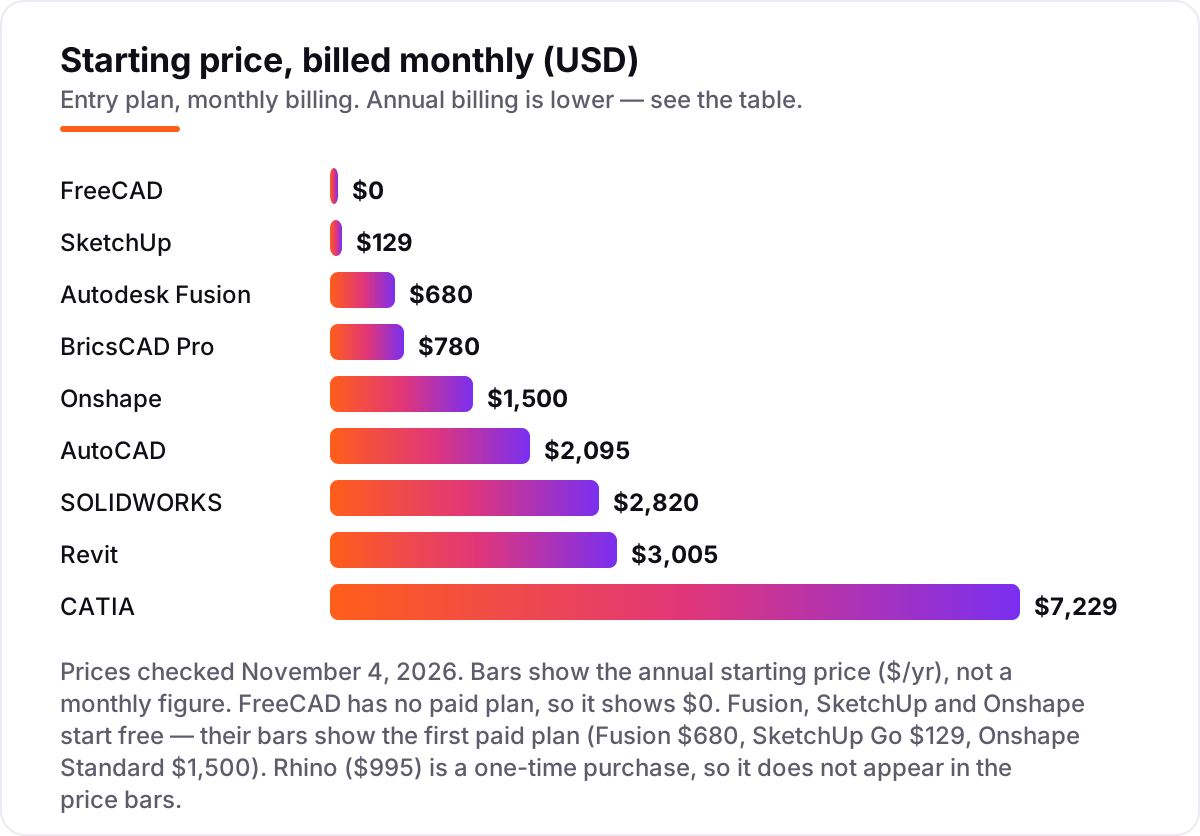
CAD software pricing: what you will actually pay
Take a three-person product-design team that needs CAD and CAM for a year. On list prices, the subscription costs $0 on FreeCAD, $2,040 on Fusion (3 × $680), $3,591 on SketchUp Pro (3 × $399), $4,500 on Onshape Standard (3 × $1,500), $6,285 on AutoCAD (3 × $2,095), $8,460 on SOLIDWORKS Standard (3 × $2,820) and $9,015 on Revit (3 × $3,005). Rhino is different: three perpetual licences cost $2,985 once, with no annual bill, and CATIA Essential costs $21,687 a year for the same three seats.
Two of those numbers need adjusting before they are real. First, SketchUp Pro has no CAM, so a team that machines parts must buy a CAM tool on top of the $3,591 — Fusion includes CAM in its $2,040, which is why it is the value pick here. Second, BricsCAD Pro is $780 a year, so three seats cost $2,340 a year.
Annual billing is where the savings sit. AutoCAD paid monthly costs $3,120 a year against $2,095 annually — a $1,025 saving. Fusion paid monthly costs $1,020 against $680 annually — a $340 saving. Revit paid monthly costs $4,560 against $3,005 annually — a $1,555 saving. Nobody in this list should pay monthly for a full year unless the seat is genuinely temporary. For the automotive side of the same question — where the tool choice changes with the industry — see our guide to CAD software for automotive design.
Know the difference: 2D drafting, 3D modeling and BIM
The confusion in this category is the word "CAD" itself, which covers three different jobs. 2D drafting is precise technical drawing: plans, sections and details on a flat sheet, measured to the millimetre. AutoCAD and BricsCAD are drafting tools first, and they are judged on how fast and accurately a drawing set comes together. 3D modeling is the shape itself: a parametric part, a freeform surface or a quick concept model. Fusion, SOLIDWORKS, Rhino, SketchUp and FreeCAD are modelers, and they are judged on how the shape is built and changed.
BIM is a third job again: a building as a coordinated database, where one model drives the plans, the sections, the schedules and the quantities, and where architecture, structure and MEP stay in sync. Revit is a BIM tool, and buying it for 2D drafting is like buying a crane to hang a picture — it will do the job, but the workflow, the price and the learning curve are all wrong for it. The reverse is just as true: no drafting tool can produce a coordinated BIM model.
There is one more distinction worth knowing: parametric history versus direct modeling. Parametric tools (Fusion, SOLIDWORKS, FreeCAD, Onshape) keep a feature tree, so changing an early dimension rebuilds the part. Direct tools (SketchUp, Rhino) let you push and pull the shape itself, which is faster for concepts but means rebuilding when a dimension changes late. Neither is better in general — the right one follows from whether your work changes by numbers or by feel.
Quick comparison: tool type by need
| Buyer | Best pick | Why |
|---|---|---|
| Most buyers, general CAD work | AutoCAD | The drafting standard everyone already uses, from $2,095/year |
| Product design on a budget | Autodesk Fusion | CAD, CAM and simulation in one subscription, $680/year |
| Mechanical engineering team | SOLIDWORKS | The parametric standard for parts and assemblies, $2,820/year |
| Fast 3D concepts | SketchUp | Easiest to learn, Go is $129/year with a free web version |
| Distributed engineering team | Onshape | Browser CAD with version control, $1,500/user/year |
| Freeform, organic shapes | Rhino | Best NURBS modeler here, $995 once, no subscription |
| Zero budget | FreeCAD | Full parametric CAD at $0, no paid plan at all |
| Building design (BIM) | Revit | Coordinated building models, $3,005/year |
| AutoCAD files, lower bill | BricsCAD Pro | Native DWG compatibility, $780/year, perpetual option |
| Aerospace and automotive | CATIA | Class A surfaces and huge assemblies, $7,229/year |
Mistakes to avoid
- Budgeting on the monthly price. The monthly rate is the most expensive way to buy every subscription here — AutoCAD costs $1,025 more a year monthly than annually. Compare tools on the annual figure and only pay monthly for a genuinely temporary seat.
- Buying a subscription when a perpetual licence fits. Rhino's $995 licence pays for itself in under six months against AutoCAD's annual price. If the work is stable and the tool is settled, owning the licence beats renting it.
- Choosing on brand instead of file format. A tool that cannot hand DWG, STEP or IFC files back cleanly will cost more in rework than its subscription saves. Check the export list before the price list.
- Ignoring the hardware. Revit and SOLIDWORKS need a strong Windows workstation with plenty of RAM; Onshape and SketchUp Go run in a browser on modest machines. The wrong tool on the wrong hardware is a slow tool at any price.
- Skipping the trial. Every paid tool here offers a trial or a money-back window. Run one real project through it first — a trial with your own files tells you more than any review, including this one.
How we chose
We checked each vendor's own pricing page on November 4, 2026 and recorded the starting price exactly as shown, using the annual figure where the page lists one so the tools compare like with like. Revit's $380 monthly figure comes from Autodesk's published pricing confirmed the same day; the $3,005 annual figure was read from Autodesk's buy page directly. BricsCAD Pro is $780 a year on the US store (the vendor's own store quotes €710), and CATIA's $7,229 figure comes from Dassault's own online store. Ratings are the G2 scores and review counts checked on November 4, 2026. We ranked the tools by fit for the most common buyer — a designer or small engineering team choosing one seat — not by brand size. No vendor paid for a place in this list, and none of the links here are affiliate links.
What to do next
Start with the free plan or trial of your top pick and run one real project through it — your part, your drawing, your client format — before paying for a year. Check that the files export cleanly and the workflow feels fast on your own hardware. If the tools are sorted but new customers are not finding you, our monthly SEO service handles the visibility side — or compare the beginner options in our guide to CAD software for 3D printing beginners. Once your tools are in place, find out what's holding your rankings back.
Your stack only works if people find you
SerpAstra fixes what keeps your site off page one and makes it easy for AI assistants to recommend.
Get a free audit→Sources we checked (20)
- AutoCAD pricing — autodesk.com/products/autocad/buy (checked November 4, 2026)
- Autodesk Fusion pricing — autodesk.com/products/fusion-360/pricing (checked November 4, 2026)
- SOLIDWORKS pricing — solidworks.com/how-to-buy/solidworks-design-cloud-services-plans-pricing (checked November 4, 2026)
- SketchUp pricing — sketchup.com/plans-and-pricing (checked November 4, 2026)
- Onshape pricing — onshape.com/en/pricing (checked November 4, 2026)
- Rhino pricing — rhino3d.com/buy (checked November 4, 2026)
- FreeCAD — freecad.org (checked November 4, 2026)
- Revit pricing — autodesk.com/products/revit/buy (checked November 4, 2026)
- BricsCAD store — bricscad.octave.com/store/bricscad (checked November 4, 2026)
- CATIA pricing — 3ds.com/store/what-price-catia (checked November 4, 2026)
- AutoCAD reviews — g2.com/products/autocad/reviews (checked November 4, 2026)
- Autodesk Fusion reviews — g2.com/products/autodesk-fusion/reviews (checked November 4, 2026)
- SOLIDWORKS reviews — g2.com/products/solidworks/reviews (checked November 4, 2026)
- SketchUp reviews — g2.com/products/sketchup/reviews (checked November 4, 2026)
- Onshape reviews — g2.com/products/onshape/reviews (checked November 4, 2026)
- Rhino reviews — g2.com/products/rhinoceros/reviews (checked November 4, 2026)
- FreeCAD reviews — g2.com/products/freecad/reviews (checked November 4, 2026)
- Revit reviews — g2.com/products/revit/reviews (checked November 4, 2026)
- BricsCAD reviews — g2.com/products/octave-bricscad/reviews (checked November 4, 2026)
- CATIA reviews — g2.com/products/catia/reviews (checked November 4, 2026)
Shamim
Founder of SerpAstra
A full-stack SEO and digital marketer who spends most days on Local SEO for dental practices, AI search visibility and lead generation.
Frequently asked questions
What is the best CAD software?
AutoCAD is the best fit for most buyers: the drafting standard, with DWG exchange everywhere, from $260 a month. Autodesk Fusion is the best value, with CAD, CAM and simulation for $680 a year. FreeCAD is the best free option at $0. The right pick depends on the work — 2D drafting, parametric parts, freeform shapes and BIM are different tools, not different prices.
How much does CAD software cost?
Entry prices run from $0 to $7,229 a year. FreeCAD is free, SketchUp Go is $129 a year, Fusion is $680, Onshape is $1,500, AutoCAD is $2,095, SOLIDWORKS is $2,820 and Revit is $3,005. Rhino is a $995 one-time purchase and CATIA starts at $7,229 a year. Annual billing is cheaper than monthly on every subscription tool here.
Is there really free CAD software?
Yes. FreeCAD is completely free with no paid plan at all. SketchUp Free is a usable web version for personal projects, Fusion has a free personal-use plan for hobbyists, and Onshape has a free plan — though every document on it is public. BricsCAD Shape is also free for basic 3D modeling. Paid tools add support, CAM and collaboration.
What is the difference between AutoCAD and SOLIDWORKS?
AutoCAD is a 2D drafting tool built for precise technical drawings, with 3D added on; it is the standard for architects and drafters. SOLIDWORKS is a parametric 3D modeler built for machined parts, assemblies and sheet metal. Drafting and documentation point to AutoCAD; product and mechanical design point to SOLIDWORKS.
Do I need BIM software like Revit, or is CAD enough?
It depends on the deliverable. If the job is drawings, concepts or single parts, CAD is enough — AutoCAD or SketchUp will do. If the deliverable is a building with coordinated plans, schedules and quantities across architecture, structure and MEP, that is BIM, and Revit is the standard tool for it.
Can I switch CAD software later?
Yes, but plan the move between projects, not mid-project. Export parts as STEP or IGES and drawings as DWG or DXF, then rebuild the parametric history in the new tool — feature trees do not transfer. Keep the old licence for a month so old files stay open while the team relearns the new workflow.
What is the difference between a subscription and a perpetual licence?
A subscription rents the software: stop paying and it stops working, but updates are included. A perpetual licence is bought once and keeps working — Rhino's $995 licence is the only one here. Subscriptions suit teams that always want the latest version; a perpetual licence suits buyers who want a fixed, one-time cost.
Free SEO and AI visibility audit
Find out what is holding your rankings back
Send us your site. Within 2 business days you get a written audit, an AI visibility check and a short fix list ranked by impact. Free, with no contract attached.
Request my free audit→Related guides
 Design, Video & Creative9 Best CAD Software for Architecture in 2026, ComparedCompare the 9 best cad software for architecture in 2026 on price, BIM, drafting and free plans, with prices checked November 4, 2026 for US firms.Read guide →
 Design, Video & Creative11 Best CAD Software for Automotive Design in 2026, ComparedCompare the 11 best cad software for automotive design on price, Class A surfacing and assembly size, with every price checked November 4, 2026.Read guide →
 Design, Video & Creative8 Best Beginner CAD Software for 3D Printing in 2026, ComparedCompare the 8 best beginner cad software for 3d printing on price, free plans and learning curve, with every price checked November 4, 2026.Read guide →