
Best Mechanical CAD Software for 2026: 7 Options Compared by Use Case
Compare the 7 best mechanical cad software options on price, free plans, simulation and sheet metal, with every price checked November 4, 2026.
 Shamim Mia, Founder, SerpAstraLast verified November 4, 202612 min read
We compare pricing pages, documentation and public reviews. We never accept payment for rankings.

Key takeaways
- Autodesk Fusion is the best fit for most buyers at $680/year; SOLIDWORKS follows at $2,820/year for teams whose suppliers already use it, and Onshape at $1,500/user/year for distributed teams.
- FreeCAD is genuinely free with no licence to renew, and Fusion and Onshape both offer free plans — Fusion for personal use, Onshape for public, non-commercial documents.
- The single most important buying factor is where the work happens: browser or desktop, Windows-only or cross-platform, and whether the team edits imported files or builds everything from scratch.
- PTC Creo publishes no price, so budget on a written quote, and Solid Edge's cheaper $1,196.88/year plan is 2D drafting only — 3D starts at $2,809.80/year.
On this page
Quick comparison
| Tool | Best for | Starting price | Free plan |
|---|---|---|---|
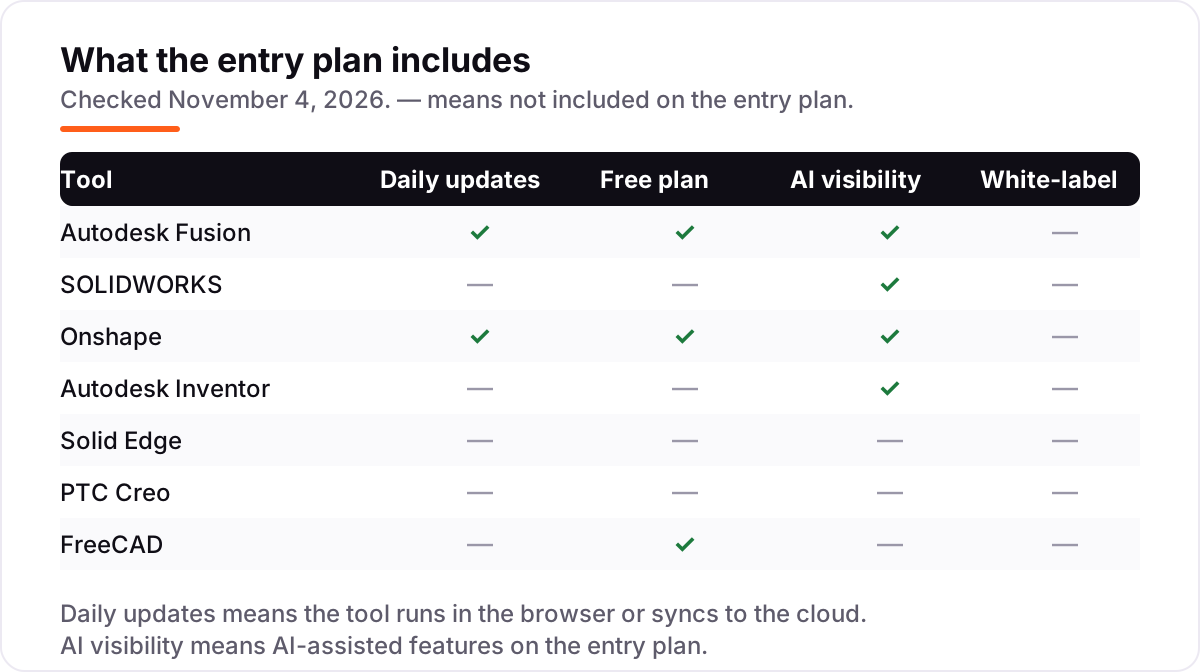
| Autodesk Fusion | Small teams and solo engineers who want CAD, CAM and simulation in one low-cost subscription | $680/yr | Yes (personal use) |
| SOLIDWORKS | Established engineering teams that want the industry-standard desktop CAD their suppliers already use | $2,820/yr | No (15-day refund) |
| Onshape | Distributed teams that want browser-based CAD with built-in version control and no installs | $1,500/yr | Yes (free plan) |
| Autodesk Inventor | Machine and product designers who need automated frame, sheet metal and iLogic configuration tools | $2,585/yr | No (30-day trial) |
| Solid Edge | Siemens-oriented shops that want synchronous modeling for fast edits to imported parts | $2,809.80/yr | No (30-day trial) |
| PTC Creo | Large engineering organizations that need deep parametric control and PTC's PLM ecosystem | Custom quote | No (free trial) |
| FreeCAD | Hobbyists, students and small shops that want capable parametric CAD at no cost | Free | Yes (free) |
Make one of these tools?
We re-check this list every quarter. Send a correction, request a review, or ask about a clearly labeled sponsored spot.
Request a listingThe best mechanical CAD software

Autodesk Fusion
Best for: Small teams and solo engineers who want CAD, CAM and simulation in one low-cost subscription
Autodesk Fusion is the cheapest way into professional mechanical CAD, bundling CAD, CAM, simulation, PCB design and data management in one subscription. The commercial plan costs $85 a month billed monthly, or $680 a year billed annually, and a free personal use plan covers non-commercial work under $1,000 of annual revenue. The parametric timeline makes late changes cheap: edit a sketch dimension and the whole part, assembly and drawing update.
The trade-off is the cloud. Fusion needs an internet connection for sign-in and saving, and large assemblies or dense meshes can slow the viewport. Advanced simulation and generative design sit behind the Fusion for Design edition at $2,190 a year. Buy Fusion when one subscription should carry a part from sketch to machined prototype; buy SOLIDWORKS or Inventor when the work is heavy assemblies or machine design.
What we like
- The lowest-cost professional entry here: CAD, CAM, CAE, PCB and data management in one subscription
- Parametric timeline makes late dimension changes cheap — edits flow through the whole model
- Free personal use plan for hobbyists and free education licences for students and teachers
- Strong cloud collaboration: version history, comments and shared links with no file juggling
Watch out for
- Cloud-first design means an internet connection matters for sign-in and saving work
- Large assemblies and dense mesh models can slow the viewport noticeably
- Advanced simulation and generative design need the Design extension or the Design edition at $2,190/year

SOLIDWORKS
Best for: Established engineering teams that want the industry-standard desktop CAD their suppliers already use
SOLIDWORKS is the industry standard for mechanical design, and that matters more than any feature list: suppliers, machine shops and new hires already know it, so file exchange is easy and training is short. Design Standard costs $2,820 a year with cloud services, including part and assembly modeling, drawings, sheet metal, weldments and 3DEXPERIENCE cloud PDM. Professional adds rendering and cost estimation at $3,456 a year, and Premium adds simulation at $4,716.
The price is the catch. SOLIDWORKS is a Windows desktop install that wants a capable workstation, and large assemblies can slow rebuilds. Files made in a newer version do not open in older ones, so a team must upgrade together. Buy SOLIDWORKS when the shop, the suppliers and the hires already speak it; buy Fusion or Onshape when the budget or the remote team points elsewhere.
What we like
- The mechanical CAD most suppliers, shops and engineers already know, so file exchange is easy
- Deep part, assembly, drawing, weldment and sheet metal toolsets in the Standard plan
- 3DEXPERIENCE cloud PDM and collaboration included with the yearly term licence
- More than 8 million design and engineering professionals use SOLIDWORKS, per Dassault Systemes
Watch out for
- The highest entry price among the published-price tools here at $2,820/year
- Desktop install needs capable Windows hardware and local file management
- Large assemblies can slow rebuilds, and files from a newer version do not open in older ones

Onshape
Best for: Distributed teams that want browser-based CAD with built-in version control and no installs
Onshape is the only professional CAD here that runs entirely in a browser, and that changes the daily routine: nothing to install, nothing to save, and several engineers can edit the same model at once. Standard costs $1,500 per user a year and adds private documents and direct support to the free plan. Version control is built in, so a design change never overwrites a colleague's work and every revision can be traced.
The catch is the connection and the tiers. Onshape needs reliable internet, and simulation, CAM, release management and company admin wait for Professional at $2,500 per user a year. The free plan is non-commercial only, with public documents. Choose Onshape when the team is distributed and version chaos is the real problem; choose SOLIDWORKS when the work stays on powerful desktops.
What we like
- Runs in any browser with nothing to install, so a new engineer is working in minutes
- Built-in version control with branching and merging — no checked-out files or lost work
- Real-time multi-user editing lets several engineers work on the same model at once
- New updates arrive about every 3 weeks with no upgrade project for IT
Watch out for
- Needs a reliable internet connection — there is no offline desktop mode
- Simulation and CAM wait for Professional at $2,500/user/year
- Release management and company admin tools are Professional features, not Standard ones

Autodesk Inventor
Best for: Machine and product designers who need automated frame, sheet metal and iLogic configuration tools
Autodesk Inventor is built for machine design, and its specialist tools show it: automated frame generation, tube and pipe runs, cable and harness routing, and sheet metal with flat patterns. Inventor Professional costs $320 a month billed monthly, or $2,585 a year billed annually, with a 30-day trial and free education access. iLogic rules turn one model into a whole family of configured variants.
The limits are platform and simulation depth. Inventor runs on Windows only, and the deepest simulation — Inventor Nastran — needs the Product Design and Manufacturing Collection at $3,375 a year. There is no free plan beyond the trial. Pick Inventor when frames, sheet metal and configured machine variants are the daily work; pick Fusion when CAM and PCB share the same subscription, or SOLIDWORKS when suppliers already use it.
What we like
- Purpose-built mechanical tools: frame generator, tube and pipe, cable and harness, sheet metal
- iLogic rules automate configured variants, so one model produces a whole product family
- Model-based definition puts dimensions and tolerances directly on the 3D model
- Content Center supplies standard fasteners, gears, belts and springs without modeling them
Watch out for
- No free plan — only a 30-day trial and free education access
- Advanced simulation (Inventor Nastran) needs the Product Design & Manufacturing Collection at $3,375/year
- Windows only, and large assemblies can tax performance without strong hardware

Solid Edge
Best for: Siemens-oriented shops that want synchronous modeling for fast edits to imported parts
Solid Edge earns its place with synchronous modeling: direct edits to imported parts work without rebuilding a feature tree, which saves real time on supplier STEP files. The Standard plan costs $2,809.80 a year and covers professional 3D CAD for parts, assemblies and drawings, plus sheet metal. Note the cheaper $1,196.88 a year Design and Drafting plan is 2D only, so it is not a mechanical 3D starting price.
The trade-offs are learning time and tiering. The interface and advanced workflows take longer to learn than Fusion or Onshape, and advanced simulation and data management sit on the Advanced and Premium tiers at $3,490.20 and $5,002.20 a year. New customers get the first month for $1. Choose Solid Edge when the team works in the Siemens world and edits imported geometry daily; choose Onshape when browser access matters more.
What we like
- Synchronous technology edits imported geometry directly, without rebuilding a feature tree
- Strong sheet metal, weldment and drafting toolsets aimed at real manufacturing output
- Connects to Siemens Teamcenter for data management when the team outgrows folders
- First month costs $1 for new customers, per the Siemens pricing page
Watch out for
- The cheaper $1,196.88/year Design and Drafting plan is 2D only — 3D starts at Standard
- Interface and advanced workflows take longer to learn than Fusion or Onshape
- Advanced simulation and data management sit on the Advanced and Premium tiers

PTC Creo
Best for: Large engineering organizations that need deep parametric control and PTC's PLM ecosystem
PTC Creo is the deep parametric choice for large engineering organizations, with strong surfacing, assembly management and mechanism design, and tight integration with PTC's Windchill PLM. Five packages run from Design Essentials to Design Premium Plus, so a team buys the capability it needs rather than one fixed bundle. Creo+ adds a cloud version with collaboration and access from anywhere.
The problem is price transparency. PTC publishes no starting price, so every buyer must request a quote from sales or a reseller, and third-party guides disagree widely, from about $2,480 to $3,190 a year. Budget on a written quote, and check which package the quote covers, since key assembly and simulation features sit behind higher packages. Shortlist Creo for large, regulated engineering work; shortlist Fusion or SOLIDWORKS when the price must be known before the first call.
What we like
- Deep parametric modeling with strong surfacing, assembly management and mechanism design
- Five packages from Design Essentials to Design Premium Plus scale with the team's needs
- Creo+ cloud version adds collaboration and access from anywhere
- Tight integration with PTC's Windchill PLM for large regulated engineering teams
Watch out for
- PTC publishes no starting price — every buyer must request a quote from sales or a reseller
- Third-party price guides disagree widely, from about $2,480 to $3,190 a year, so budget on a quote
- Key assembly and simulation features sit behind higher packages and extensions

FreeCAD
Best for: Hobbyists, students and small shops that want capable parametric CAD at no cost
FreeCAD is the only tool here with no price at all: free and open source under the LGPL licence, with no subscription, account or usage cap, even for commercial work. Version 1.1 brings parametric modeling with workbenches for PartDesign, TechDraw, CAM, FEM and sheet metal. It runs on Windows, macOS and Linux, and reads and writes STEP and DXF, so it exchanges files with the paid tools.
The cost is time, not money. The interface is technical and the learning curve is steeper than Fusion or Onshape, large models can run slowly, and some complex edits need workarounds. There is no vendor support; help comes from forums and documentation. Start with FreeCAD when the budget is zero and the parts are straightforward; move to Fusion when CAM and support matter, or to Onshape when the team needs version control.
What we like
- Completely free with no paywall, subscription, account or usage cap, even for commercial work
- Parametric modeling with workbenches for PartDesign, TechDraw, CAM, FEM and sheet metal
- Python scripting and macros let advanced users automate repetitive modeling tasks
- Runs on Windows, macOS and Linux, and reads and writes common formats including STEP and DXF
Watch out for
- Interface is technical and the learning curve is steeper than Fusion or Onshape
- Large models can run slowly, and some fillets and B-spline edits fail or need workarounds
- No vendor support — help comes from community forums and documentation
The best mechanical cad software for a team depends less on the feature list than on where the work happens: in a browser or on a desktop, on Windows or on a Mac, alone or with a distributed team. We ranked the seven tools below by fit for the most common buyer — a small engineering team designing parts for manufacture — starting with the lowest-cost professional option and ending with the free one, and every price was checked on the vendor's own pricing page on November 4, 2026.
How to choose the best mechanical cad software
- Decide browser or desktop first. Onshape runs in any browser with nothing to install; SOLIDWORKS, Inventor, Solid Edge and Creo are Windows desktop tools, while Fusion runs on Windows and Mac and FreeCAD runs on all three.
- Match the tool to the work. Frame, tube and pipe and sheet metal point to Inventor or Solid Edge; CAM and PCB in the same subscription point to Fusion; deep assemblies and supplier file exchange point to SOLIDWORKS.
- Check the free route before you pay. FreeCAD costs nothing at all, Fusion has a free personal use plan, and Onshape has a free plan for public, non-commercial documents — each one is enough to learn the tool properly.
- Read the tier, not the headline. Simulation, CAM, release management and data management often sit one or two tiers above the entry price, so check which plan your work actually needs.
- Count the seats, not the users. Every paid tool here is priced per user per year, so a three-person team pays three times the headline price — work the maths in the pricing section below before you shortlist.
Mechanical CAD is one system in your stack, not the whole stack. If the business also needs to be found online, our monthly SEO service covers the visibility side, and our guide to beginner CAD software for 3D printing covers the simpler tools for first models. Before you publish new pages for the services you sell, run your titles through the free SERP snippet preview tool — it shows exactly how the title and description will look in Google.
Whatever you shortlist, try it with a real part before you pay. The free plans and trials in this list are long enough to model one genuine component — your dimensions, your tolerances, your drawing standard — and that part tells you more than any review can. Check two things in the trial: that the drawing output matches what your shop expects, and that files open cleanly in the tools your suppliers use.
Mechanical CAD software pricing: what you will actually pay
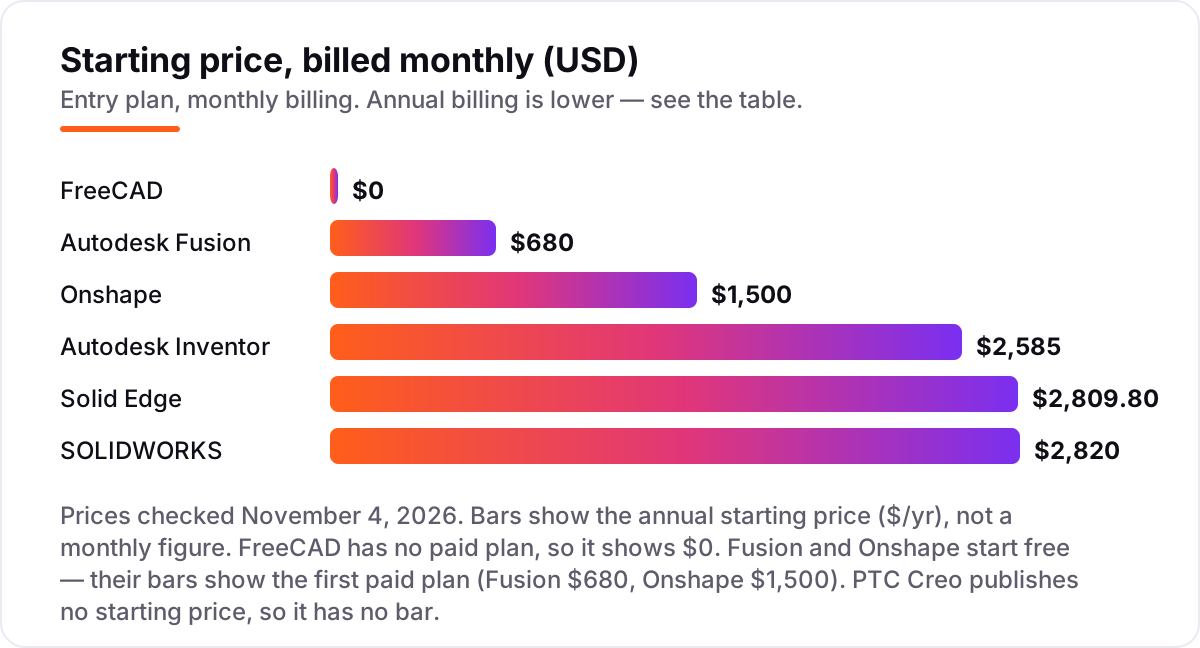
Take a three-person engineering team buying one seat each for a year, on annual billing. The subscription costs $0 on FreeCAD, $2,040 on Autodesk Fusion, $4,500 on Onshape Standard, $7,755 on Autodesk Inventor, $8,429.40 on Solid Edge Standard and $8,460 on SOLIDWORKS Standard. PTC Creo has no published price, so it cannot join the maths — budget on a written quote from PTC or a reseller.
Two of those numbers need adjusting before they are real. First, monthly billing costs far more than annual billing on the Autodesk tools: three Fusion seats billed monthly cost $3,060 a year instead of $2,040, and three Inventor seats billed monthly cost $11,520 instead of $7,755. Second, the entry tier is not always the working tier: a team that needs simulation and CAM on Onshape pays Professional at $2,500 per user a year, or $7,500 for three seats, and a team that needs Inventor Nastran pays for the Product Design and Manufacturing Collection at $3,375 a year per user.
Over a year, the same three engineers and the same parts cost $0 at the free end and $8,460 at the dear end — an $8,460 gap that comes from brand, platform and tier choices, not from the parts themselves. One more cost to check before you commit: a second seat is a second subscription on every paid tool in this list, and training time is real — budget a week for Fusion or Onshape, and longer for SOLIDWORKS, Inventor or Creo.
Know the difference: parametric modeling vs direct modeling
The confusion in this category is between two ways of building a model. Parametric modeling builds a feature tree — sketches, extrusions, cuts and fillets in order — so changing one dimension updates the whole part, assembly and drawing. Every tool in this list is parametric at heart, and that history is what makes a design easy to revise and easy to audit.
Direct modeling skips the history: you push, pull and edit faces on the finished solid, with no feature tree to rebuild. It suits imported files, where there is no tree to edit in the first place, and quick changes to a supplier's STEP file. Solid Edge's synchronous technology is the clearest example here, and Fusion and Onshape both offer direct editing alongside their parametric tools.
A third distinction worth knowing is subscription versus perpetual licence. All seven tools here are sold as subscriptions or free software — none offers a perpetual licence you buy once and keep — except BricsCAD-style alternatives outside this list. That means the annual price is a recurring cost, not a one-off, and the price you pay in year three is the renewal price, so check whether the vendor locks the price for multi-year terms before you commit.
Quick comparison: tool type by need
| Buyer | Best pick | Why |
|---|---|---|
| Solo engineer on a budget | FreeCAD | Free, open source, no licence to renew |
| Most small teams | Autodesk Fusion | CAD, CAM and simulation in one subscription, $680/year |
| Distributed team | Onshape | Browser CAD with built-in version control, $1,500/user/year |
| Machine and frame design | Autodesk Inventor | Automated frames, sheet metal and iLogic, $2,585/year |
| Industry-standard shop | SOLIDWORKS | The CAD suppliers already use, $2,820/year |
| Large regulated engineering | PTC Creo | Deep parametric control, priced by quote |
Mistakes to avoid
- Budgeting on the monthly price. Fusion at $85 a month costs $1,020 a year if billed monthly, against $680 billed annually; Inventor at $320 a month costs $3,840 against $2,585. Annual billing is the real price.
- Buying on the cheapest tier, then finding the work needs the next one. Solid Edge's $1,196.88/year plan is 2D drafting only, Onshape's simulation and CAM need Professional, and Inventor's deepest simulation needs the Collection — check the tier before you buy.
- Ignoring the operating system. SOLIDWORKS, Inventor, Solid Edge and Creo are Windows tools. If the team includes Mac or Linux users, the shortlist is Fusion, Onshape or FreeCAD.
- Comparing a quote with a list price. PTC Creo has no published price, so a Creo quote and a Fusion list price are not the same kind of number — get the Creo quote in writing, for the same package, before you compare.
- Forgetting the second seat. Every paid tool here is priced per user per year. Price the whole team, not one licence, and remember that training time is a cost too.
How we chose
We checked each vendor's own pricing page on November 4, 2026 and recorded the starting price exactly as shown, including the annual-billing figure where the page lists one, and we ranked the tools by fit for the most common buyer — a small engineering team designing parts for manufacture — not by brand size. PTC Creo publishes no starting price, so we list it as a custom quote and do not assert any third-party figure as its price; the $2,480 to $3,190 range in its card comes from third-party guides and is shown only to explain why a quote is needed. Solid Edge is listed at its Standard plan because the cheaper Design and Drafting plan is 2D drafting only. G2 ratings were checked on November 4, 2026 for six tools; PTC Creo has no rating here because its G2 page returned a 429 error when we tried to open it, and we would rather show no rating than a stale or estimated one. The price bars show annual starting prices, not monthly equivalents. No vendor paid for a place in this list, and none of the links here are affiliate links.
What to do next
Start with the free plan or trial of your top pick and model one real part through to a drawing. Check that the drawing matches your shop's standard and that the file opens in your suppliers' tools before you commit to a year. If the tools are sorted but new customers are not finding you, our monthly SEO service handles the visibility side — or compare design tools in our guide to AI tools for video content creation. Once your tools are in place, find out what's holding your rankings back.
Your stack only works if people find you
SerpAstra fixes what keeps your site off page one and makes it easy for AI assistants to recommend.
Get a free audit→Sources we checked (13)
- Autodesk Fusion pricing — autodesk.com/products/fusion-360/overview (checked November 4, 2026)
- SOLIDWORKS pricing — solidworks.com/how-to-buy/solidworks-design-cloud-services-plans-pricing (checked November 4, 2026)
- Onshape pricing — onshape.com/en/pricing (checked November 4, 2026)
- Autodesk Inventor pricing — autodesk.com/products/inventor/overview (checked November 4, 2026)
- Solid Edge pricing — siemens.com/en-us/products/designcenter/solid-edge/pricing (checked November 4, 2026)
- PTC Creo product page — ptc.com/en/products/creo (checked November 4, 2026; no published price)
- FreeCAD — freecad.org (checked November 4, 2026; free and open source)
- Autodesk Fusion on G2 — g2.com/products/autodesk-fusion/reviews (checked November 4, 2026)
- SOLIDWORKS on G2 — g2.com/products/solidworks/reviews (checked November 4, 2026)
- Onshape on G2 — g2.com/products/onshape/reviews (checked November 4, 2026)
- Autodesk Inventor on G2 — g2.com/products/inventor/reviews (checked November 4, 2026)
- Solid Edge on G2 — g2.com/products/designcenter-solid-edge/reviews (checked November 4, 2026)
- FreeCAD on G2 — g2.com/products/freecad/reviews (checked November 4, 2026)
Shamim
Founder of SerpAstra
A full-stack SEO and digital marketer who spends most days on Local SEO for dental practices, AI search visibility and lead generation.
Frequently asked questions
What is the best mechanical CAD software?
Autodesk Fusion is the best fit for most buyers: CAD, CAM, simulation and PCB in one subscription from $680/year, with a free personal use plan. SOLIDWORKS is the better pick when suppliers and machine shops already use it, and Onshape when the team is distributed and needs browser-based version control.
How much does mechanical CAD software cost?
Entry prices run from $0 to $2,820 a year. FreeCAD is free, Fusion starts at $680/year, Onshape at $1,500/user/year, Inventor at $2,585/year, Solid Edge Standard at $2,809.80/year and SOLIDWORKS Standard at $2,820/year. PTC Creo publishes no price, so budget on a written quote.
Is there free mechanical CAD software?
Yes. FreeCAD is completely free and open source, with no usage cap even for commercial work. Autodesk Fusion has a free personal use plan for non-commercial work under $1,000 of annual revenue, and Onshape has a free plan for public, non-commercial documents. Students and educators get Fusion and Onshape free.
Should I choose SOLIDWORKS or Fusion?
Choose SOLIDWORKS when suppliers, machine shops and new hires already use it — file exchange and hiring are easier, and the toolset is deeper for large assemblies. Choose Fusion when the budget matters, when CAM and PCB should share one subscription, or when the team works across Windows and Mac.
Do I need Windows for mechanical CAD?
For most of these tools, yes. SOLIDWORKS, Inventor, Solid Edge and Creo run on Windows, while Onshape runs in any browser on any operating system. Fusion runs on Windows and macOS, and FreeCAD runs on Windows, macOS and Linux. Check the operating system before you buy, not after.
Can I switch mechanical CAD software later?
Yes, but the model history does not travel. Export parts and assemblies as STEP or IGES files, which carry the finished geometry, and keep the drawings as PDF or DXF. You will rebuild the parametric feature tree in the new tool, so plan the move between projects, not in the middle of one.
What is the difference between parametric and direct modeling?
Parametric modeling builds a feature tree — sketches, extrusions and cuts — so changing one dimension updates the whole part. Direct modeling pushes, pulls and edits faces without a history tree, which suits imported files. Most tools here mix both; Solid Edge's synchronous technology is the clearest direct-modeling example.
Free SEO and AI visibility audit
Find out what is holding your rankings back
Send us your site. Within 2 business days you get a written audit, an AI visibility check and a short fix list ranked by impact. Free, with no contract attached.
Request my free audit→Related guides
 Design, Video & Creative8 Best Beginner CAD Software for 3D Printing in 2026, ComparedCompare the 8 best beginner cad software for 3d printing on price, free plans and learning curve, with every price checked November 4, 2026.Read guide →
 AI, Data & Analytics12 Best AI Tools for Video Content Creation in 2026, Compared12 best AI tools for video content creation compared with real prices, free plans and G2 ratings, so you can pick the right video maker without overpaying.Read guide →
 SEO & AI SearchBest Video Analytics Software for 2026: 9 Options Compared by Use Case9 best video analytics software tools compared on price, engagement analytics and free plans. Prices checked on the vendor pricing page, November 2, 2026.Read guide →