
7 Best Code Review Tools for Distributed Teams in 2026, Compared
Compare the 7 best code review tools for distributed teams on price, free plans and review workflows, with every price checked November 7, 2026.
 Shamim Mia, Founder, SerpAstraLast verified November 7, 202613 min read
We compare pricing pages, documentation and public reviews. We never accept payment for rankings.

Key takeaways
- GitHub is the best fit for most distributed teams at $4/user a month for Team; GitLab follows at $29/user a month for teams that want review, CI/CD and security in one place, and Bitbucket at $3.65/user a month for Jira shops.
- Gerrit and Review Board are free open source, and GitHub, GitLab, Bitbucket, Graphite and SonarQube all offer free plans — so a small team can start reviewing for $0.
- The single most important buying factor is where your code already lives: a tool that matches your host wins over a better tool that fights it.
- Per-seat pricing is the trap — a $4 seat and a $29 seat look close until you multiply by 20 developers across three time zones.
On this page
Quick comparison
| Tool | Best for | Starting price | Free plan |
|---|---|---|---|
| GitHub | Distributed teams that want the standard pull request workflow most developers already know | $4/user/mo | Yes (Free plan) |
| GitLab | Teams that want code review, CI/CD, planning and security scanning in one platform | $29/user/mo | Yes (Free plan) |
| Bitbucket | Teams already running Jira and Confluence that want review tied to their tickets | $3.65/user/mo | Yes (Free plan) |
| Graphite | Fast-moving GitHub teams that stack dependent pull requests to stay unblocked | $20/user/mo | Yes (Hobby plan) |
| SonarQube | Distributed teams that want automated quality and security gates on every pull request | $34/mo | Yes (free tier) |
| Gerrit | Very large or regulated teams that need patch-based review with strict access control | Free | Yes (free) |
| Review Board | Teams that must keep code review on-premises or air-gapped, behind their own firewall | Free; Plus $12/user/mo | Yes (Community) |
Make one of these tools?
We re-check this list every quarter. Send a correction, request a review, or ask about a clearly labeled sponsored spot.
Request a listingThe best code review tools for distributed teams

GitHub
Best for: Distributed teams that want the standard pull request workflow most developers already know
GitHub is the default for a reason: pull requests are the review unit almost every developer already knows, so a team spread across time zones needs no training to start reviewing. Team costs $4 per user a month and adds the controls distributed teams need — code owners, required reviewers, protected branches and repository rules — while the Free plan covers unlimited public and private repositories.
The catch is the fine print. GitHub labels Team and Enterprise as first-12-months prices, and it publishes no renewal price, so a multi-year budget needs a quote. Single sign-on and advanced security sit on Enterprise from $21 per user a month, and Copilot review is a separate add-on. Buy GitHub when you want the workflow your next hire already knows.
What we like
- Pull requests keep the discussion, the diff and the decision in one place, next to the code
- Code owners, required reviewers and branch rules on Team give async teams a clear approval path
- The largest ecosystem here: Actions runs CI on every pull request, and most developers already know the workflow
- The Free plan covers unlimited public and private repositories, so small teams start at $0
Watch out for
- Team and Enterprise prices are labelled "first 12 months" on GitHub's pricing page, with no published renewal price
- Single sign-on and advanced security wait for Enterprise from $21/user/month
- Review automation beyond the basics needs Actions or third-party apps

GitLab
Best for: Teams that want code review, CI/CD, planning and security scanning in one platform
GitLab is the all-in-one answer to distributed review: merge requests combine the diff with CI pipelines, security scanning and issue tracking, so a reviewer in one time zone sees the same verdict as the author in another. Premium costs $29 per user a month billed annually and includes 10,000 CI minutes a month, 500 GiB of storage and $12 of GitLab Credits for Duo agent features.
The price is the decision. At $29 a seat, a 20-developer team pays $580 a month before any add-on, roughly seven times GitHub Team — and that buys the whole platform, not just review. The top tier is now quote-only, so enterprises budget by conversation. Pick GitLab when one platform matters more than the cheapest seat.
What we like
- Merge requests show pipeline results and security findings next to the diff, so reviewers judge a change in one place
- One platform replaces separate CI, planning and scanning tools, which cuts tool sprawl for distributed teams
- Self-managed option for teams that must host their own code
- Premium includes $12 of GitLab Credits a month for Duo agent features
Watch out for
- $29/user/month is roughly seven times GitHub Team, so seat count dominates the bill
- The top tier is now quote-only, with no published price
- Platform breadth can feel heavy for a team that only needs code review

Bitbucket
Best for: Teams already running Jira and Confluence that want review tied to their tickets
Bitbucket is the natural pick for teams that already live in Jira: issue keys in commits move tickets automatically, reviewers can open Jira tickets from the pull request, and Pipelines runs CI in the same place as the code. The Free plan covers up to 5 users, and Standard costs $3.65 per user a month with merge checks, unlimited users and 2,500 build minutes a month.
Watch the tier boundaries. The AI code reviewer sits on Premium at $8 per user a month, not Standard, and Premium rose from $7.25 in Atlassian's October 13, 2026 price change — older roundups still list the old figures. Pick Bitbucket when Jira is already the system of record; pick GitHub when the team wants the bigger ecosystem.
What we like
- Jira issue keys in commits update ticket status automatically from the pull request
- The cheapest paid plan here at $3.65/user/month for Standard
- Merge checks enforce review and build rules before code lands
- Pipelines CI runs in the same place as the code, with 2,500 build minutes a month on Standard
Watch out for
- The AI code reviewer needs Premium at $8/user/month, not Standard
- Smaller third-party ecosystem than GitHub
- Data Center self-hosting is a separate product with its own pricing

Graphite
Best for: Fast-moving GitHub teams that stack dependent pull requests to stay unblocked
Graphite is built for one problem: waiting. Its stacking workflow lets a developer open a chain of dependent pull requests and keep building while the first one is still under review, instead of stalling between merges. Starter costs $20 per user a month billed annually, or $25 billed monthly, and adds a unified pull request inbox, a merge queue and Slack notifications.
Two limits matter. Graphite only works on GitHub, so it is an add-on to a GitHub bill rather than a replacement — a team pays for both. And stacking only helps when stacks stay small; a ten-deep chain is harder to review than the single large pull request it replaced. Buy it when review wait time is the bottleneck.
What we like
- Stacking lets developers build on changes still under review instead of waiting for a merge
- A unified pull request inbox and merge queue cut review cycle time across time zones
- Charges only active users who create, review or merge pull requests
- CLI and VS Code extension fit the GitHub habits developers already have
Watch out for
- Works only on GitHub, so GitLab and Bitbucket teams cannot use it
- Diamond AI reviewer is a separate $15–$20 add-on per contributor
- Stacking takes discipline — large stacks become hard to review

SonarQube
Best for: Distributed teams that want automated quality and security gates on every pull request
SonarQube is the quality gate, not the review room: it runs static analysis on every pull request and blocks merges that fail the team's own bar on bugs, vulnerabilities and code smells. The Team plan costs $34 a month flat for up to 100,000 lines of code, and the free tier covers up to 50,000 — so a small codebase can run the full gate for $0.
Price it by code, not by people. Because the bill follows lines of code, a growing codebase raises the price without adding a single developer, and dependency scanning costs extra through the Advanced Security add-on. Use SonarQube beside GitHub or GitLab, not instead of them — it checks the code, humans still judge the design.
What we like
- Quality gates block merges that fail the team's own bar, across 35 or more languages
- Flat monthly price scales with lines of code, not seats, so reviewers and managers cost nothing extra
- Community Build self-hosted edition is free with no contributor limits
- Pull request decoration puts findings where reviewers already work
Watch out for
- Priced by lines of code, so a growing codebase raises the bill without adding seats
- Dependency scanning needs the separate Advanced Security add-on
- Automation checks quality — it does not judge design or business logic

Gerrit
Best for: Very large or regulated teams that need patch-based review with strict access control
Gerrit is the heavy-duty option: a patch-based review system that keeps every revision of a change reviewable before it lands, with fine-grained permissions over who can review, approve and submit. It is free open source with no paid plan at all, it scales to thousands of developers, and it runs in under two minutes from a Java archive or a Docker container.
The cost is operational, not financial. Your team runs the servers, the upgrades and the backups, and new developers must learn a workflow that differs from the pull requests they already know. Pick Gerrit for kernel-style projects and regulated teams that need strict control; most product teams will move faster on GitHub or GitLab.
What we like
- Patchset workflow keeps every revision of a change reviewable before it lands
- Fine-grained permissions control who can review, approve and submit
- Scales to thousands of developers and enormous repositories
- No licence cost at any team size
Watch out for
- Patch-based workflow differs from pull requests, so onboarding takes time
- Self-hosting needs operations effort — servers, upgrades and backups are yours
- Interface and setup feel dated next to hosted pull request tools

Review Board
Best for: Teams that must keep code review on-premises or air-gapped, behind their own firewall
Review Board is the pick when the code cannot leave the building: a self-hosted review tool with a free open source Community Edition under the MIT licence, Docker installers, and RBTools on the command line to post, check and land reviews. It also reviews images, not just code, with colour diff and onion-skin views that suit design and media teams.
The paid plans buy support and extras, not the core product. Plus costs $12 per user a month billed annually — $15 billed monthly — and adds document review, reports, user roles and basic support; Enterprise adds premium support. Choose Review Board when on-premises or air-gapped deployment is a requirement, not a preference.
What we like
- Community Edition is free open source under the MIT licence, with Docker installers
- RBTools command line posts, checks and lands reviews from the terminal
- Image review with colour diff and onion-skin views suits design work
- RBCommons offers managed cloud hosting for teams that prefer it
Watch out for
- Interface feels dated next to modern pull request tools
- Document review, reports and user roles need Plus at $12/user/month billed annually
- Smaller community than GitHub or GitLab, so fewer integrations
The best code review tools for distributed teams share one trait: they make async review feel normal, not like a workaround. A reviewer in Dhaka, a developer in Berlin and a maintainer in San Francisco should all see the same diff, the same checks and the same decision — without a meeting. We ranked the seven tools below by fit for the most common buyer — a remote team that reviews code every day — starting with the standard pull request workflow and ending with the free self-hosted options, and every price was checked on the vendor's own pricing page on November 7, 2026.
How to choose the best code review tools for distributed teams
- Start with where your code already lives. A GitHub team should compare GitHub, Graphite and SonarQube; a GitLab team should compare GitLab and SonarQube; a Jira shop should look at Bitbucket first. Switching hosts to get a review tool is rarely worth it.
- Decide pull requests or patchsets. Most distributed product teams move fastest on pull requests or merge requests. Patch-based review, as in Gerrit, suits very large teams and kernel-style projects that need strict, revision-by-revision control.
- Set a review response-time target across time zones. Agree on a first-review target — one business day is a common one — and on who reviews what, before you buy. Tools enforce standards; they cannot create them.
- Check what the free plan actually covers. GitHub Free is generous, GitLab Free stops at 5 users per group, Bitbucket Free stops at 5 users, and SonarQube's free tier stops at 50,000 lines of code. The cap you hit first is your real starting price.
- Count seats, not features. Per-seat pricing is where the bill is decided: GitHub Team at $4 and GitLab Premium at $29 look like a small gap until you multiply by 20 developers. SonarQube is the exception — it charges by lines of code, not seats.
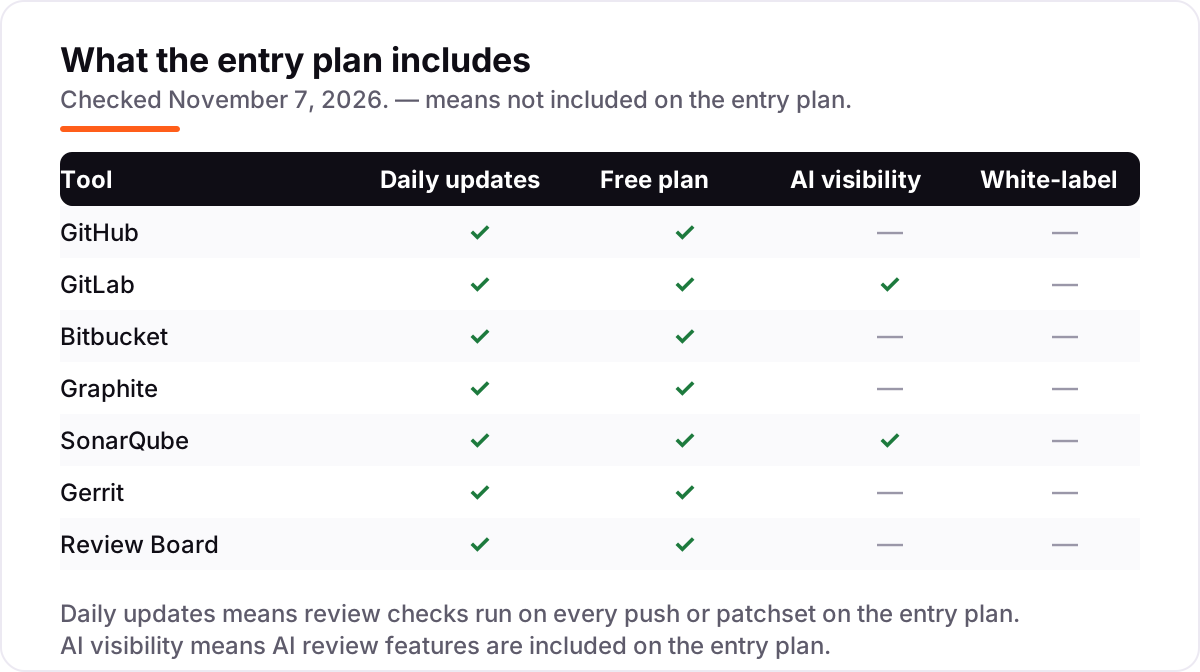
- Check the AI story before you pay for it. GitLab Premium includes Duo credits and SonarQube Team includes AI CodeFix, but GitHub's Copilot review and Graphite's Diamond reviewer are paid add-ons. Decide whether you need AI review at all before paying for it.
A review tool is one system in the stack, not the whole stack. If the team also ships a public site, our monthly SEO service handles the visibility side, and before you publish new pages for the product, run your titles through the free SERP snippet preview tool — it shows exactly how the title and description will look in Google. If you want AI help on the review itself rather than the workflow, see our guide to the best AI code review tools, which covers the automated reviewers that sit on top of the tools in this list.
Whatever you shortlist, trial it with a real pull request before you pay. The free plans and trials in this list are long enough to run one genuine review cycle — a real change, real reviewers, real CI — and that cycle tells you more than any review can. Check two things in the trial: that a reviewer in another time zone can approve without a meeting, and that the checks you care about actually block a bad merge.
Code review tools for distributed teams pricing: what you will actually pay
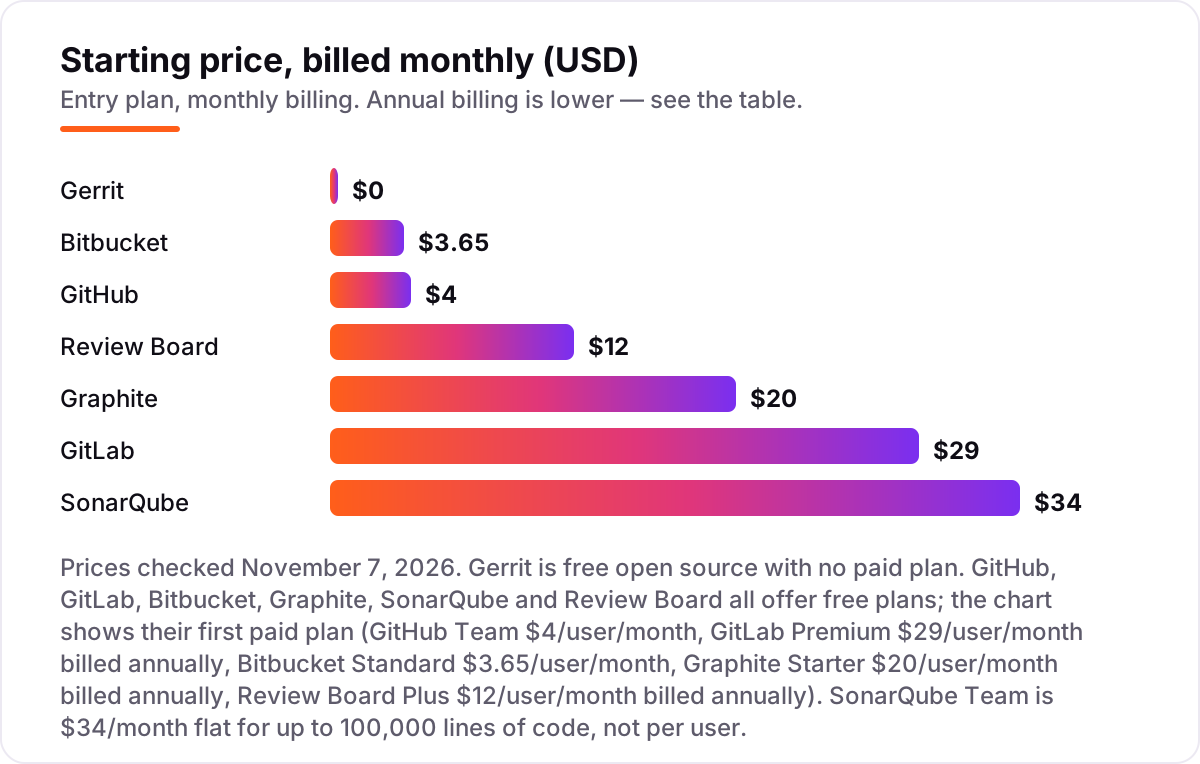
Take a 20-developer team spread across three time zones, reviewing code every day. On list prices, the subscription costs $0 a month on Gerrit or Review Board Community, $34 on SonarQube Team, $73 on Bitbucket Standard, $80 on GitHub Team, $240 on Review Board Plus billed annually, $400 on Graphite Starter billed annually, and $580 on GitLab Premium billed annually.
Two of those numbers need adjusting before they are real. First, Graphite sits on top of GitHub rather than replacing it, so a Graphite team also pays GitHub Team — $400 plus $80 is $480 a month, or $5,760 a year. Second, SonarQube Team at $34 a month is a flat price for up to 100,000 lines of code, so it stays $34 whether the team is 5 developers or 50 — but it grows as the codebase grows, and dependency scanning costs extra.
Over a year, that is $0 on Gerrit or Review Board Community (before hosting and operations time), $408 on SonarQube Team, $876 on Bitbucket Standard, $960 on GitHub Team, $2,880 on Review Board Plus billed annually, $5,760 on GitHub Team plus Graphite Starter, and $6,960 on GitLab Premium. The same 20 developers and the same review load cost $0 at the free end and $6,960 at the dear end — a gap that comes entirely from the pricing model, not from review quality.
Three costs sit outside every number above. First, the introductory labels — GitHub marks Team and Enterprise as first-12-months prices with no published renewal figure, so budget for a conversation in year two. Second, the AI add-ons: GitHub Copilot review and Graphite Diamond are separate purchases, while GitLab Duo credits and SonarQube AI CodeFix are already in the entry price. Third, the operations cost of the free self-hosted tools: Gerrit and Review Board charge no licence fee, but somebody runs the servers, the upgrades and the backups, and that time is the real price.
Know the difference: pull requests vs patch-based review
The confusion in this category is between two review models that look alike on the surface. In the pull request model — GitHub, GitLab, Bitbucket and Graphite — a developer opens a branch, pushes commits, and reviewers comment on the diff, request changes and approve. The branch is the unit of review, and the conversation lives on it. In the patch-based model — Gerrit — a developer uploads a change as a patchset, reviewers comment on each revision, and the change lands only when the patchset is approved. The patchset is the unit of review, and every revision stays reviewable.
For most distributed product teams, pull requests are the faster buy: every developer already knows them, onboarding is near zero, and the whole ecosystem — CI, bots, AI reviewers — is built around them. Patch-based review earns its keep where control matters more than speed: very large teams, kernel-style projects and regulated codebases where fine-grained permissions and revision-by-revision approval are requirements, not preferences. SonarQube and Review Board sit outside this split — SonarQube checks code quality automatically on either model, and Review Board is its own self-hosted review system that works with many hosts.
A second, quieter confusion is between a review tool and a review add-on. Graphite and SonarQube do not host your code: Graphite stacks pull requests on GitHub, and SonarQube gates merges on GitHub, GitLab or Bitbucket. Buying either without the host underneath it buys nothing. Pick the host first, then decide whether you need stacking or quality gates on top of it.
Quick comparison: tool type by need
| Buyer | Best pick | Why |
|---|---|---|
| Most distributed teams | GitHub | The standard pull request workflow, from $4/user a month |
| Team that wants one platform | GitLab | Review, CI/CD and security in one place, $29/user a month |
| Jira shop | Bitbucket | Tickets update from pull requests, $3.65/user a month |
| Fast-moving GitHub team | Graphite | Stacked pull requests keep developers unblocked, $20/user a month |
| Team gating on quality | SonarQube | Quality gates on every pull request, $34 a month flat |
| Large team needing strict control | Gerrit | Patch-based review with fine-grained permissions, free |
| On-prem or air-gapped team | Review Board | Review behind your own firewall, free Community Edition |
Mistakes to avoid
- Budgeting on the free plan, then finding the cap. GitLab Free stops at 5 users per group, Bitbucket Free at 5 users, and SonarQube's free tier at 50,000 lines of code. Price the team you will have in six months, not the team you have today.
- Buying a review add-on without the host. Graphite needs GitHub and SonarQube needs a host underneath it. Price the pair, not the add-on alone — GitHub Team plus Graphite Starter is $480 a month for 20 developers, not $400.
- Budgeting on the first-year price. GitHub labels Team and Enterprise as first-12-months prices with no published renewal figure. Ask what year two costs before you sign year one.
- Letting pull requests grow too large. A 2,000-line pull request gets skimmed, not reviewed, in any time zone. Keep changes small enough for one sitting — that rule matters more than any tool choice.
- Adding AI review before setting review standards. An AI reviewer that comments on everything trains the team to ignore comments. Agree on response-time targets, required reviewers and size limits first, then let automation enforce them.
How we chose
We checked each vendor's own pricing page on November 7, 2026 and recorded the starting price exactly as shown, including the annual-billing figure where the page lists one, and we ranked the tools by fit for the most common buyer — a distributed team that reviews code every day — not by brand size. Ratings come from G2 review pages crawled within the last few days and checked November 7, 2026. Graphite carries no rating because its G2 profile has no reviews — the similarly named Graphite Connect and Hosted Graphite are different products, so we show no rating rather than the wrong one. Two prices carry a warning worth repeating: GitHub labels its paid plans as first-12-months prices with no published renewal, and Review Board Plus is $12/user a month billed annually or $15 billed monthly. No vendor paid for a place in this list, and none of the links here are affiliate links.
What to do next
Start with the free plan or trial of your top pick and run one real review cycle through it — a genuine change, real reviewers in different time zones, real CI. Check that a reviewer can approve without a meeting and that a failing check actually blocks the merge. If the workflow holds up for a week, roll it out to the whole team; if it does not, the free tier has cost you nothing but an afternoon. Once your tools are in place, find out what's holding your rankings back.
Your stack only works if people find you
SerpAstra fixes what keeps your site off page one and makes it easy for AI assistants to recommend.
Get a free audit→Sources we checked (13)
- GitHub pricing — github.com/pricing (checked November 7, 2026)
- GitLab pricing — about.gitlab.com/pricing (checked November 7, 2026)
- Bitbucket pricing — atlassian.com/software/bitbucket/pricing (checked November 7, 2026)
- Graphite pricing — graphite.dev/pricing (checked November 7, 2026)
- SonarQube pricing — sonarsource.com/plans-and-pricing (checked November 7, 2026)
- Gerrit — gerritcodereview.com, free open source (checked November 7, 2026)
- Review Board pricing — reviewboard.org/get (checked November 7, 2026)
- GitHub reviews — g2.com/products/github/reviews (checked November 7, 2026)
- GitLab reviews — g2.com/products/gitlab/reviews (checked November 7, 2026)
- Bitbucket reviews — g2.com/products/bitbucket/reviews (checked November 7, 2026)
- SonarQube reviews — g2.com/products/sonarqube/reviews (checked November 7, 2026)
- Gerrit reviews — g2.com/products/gerrit/reviews (checked November 7, 2026)
- Review Board reviews — g2.com/products/review-board/reviews (checked November 7, 2026)
Shamim
Founder of SerpAstra
A full-stack SEO and digital marketer who spends most days on Local SEO for dental practices, AI search visibility and lead generation.
Frequently asked questions
What is the best code review tool for distributed teams?
GitHub is the best fit for most distributed teams: the pull request workflow most developers already know, from $4/user a month for Team, with a free plan for small teams. GitLab is the better pick when the team wants review, CI/CD and security in one platform. Bitbucket wins for teams already running Jira.
How much do code review tools for distributed teams cost?
Entry prices run from $0 to $29/user a month. Gerrit and Review Board Community are free open source, GitHub Team is $4/user a month, Bitbucket Standard is $3.65, Graphite Starter is $20, and GitLab Premium is $29. SonarQube Team is different: $34 a month flat, priced by lines of code rather than seats.
Is there a free code review tool for distributed teams?
Yes. Gerrit is completely free open source with no paid plan, and Review Board Community is free under the MIT licence. GitHub, GitLab, Bitbucket, Graphite and SonarQube all offer free plans too, though the free tiers cap users, repositories or lines of code — check the cap before you commit.
GitHub vs GitLab for code review: which is better for a distributed team?
GitHub is better for most teams: cheaper seats at $4/user a month, the workflow developers already know, and the largest ecosystem. GitLab is better when the team wants review, CI/CD, planning and security scanning in one platform and is willing to pay $29/user a month for it. The deciding factor is usually what the team already runs.
What are stacked pull requests, and do distributed teams need them?
Stacked pull requests break one large change into a chain of small, dependent pull requests, so developers keep building while earlier pieces are under review. They help fast-moving teams that would otherwise stall between merges. Graphite is the main tool for stacking on GitHub, from $20/user a month, but stacks need discipline to stay reviewable.
Can automated tools replace human code review?
No. Tools like SonarQube catch bugs, security issues and quality drift on every pull request, and AI reviewers can summarise changes and suggest fixes — but humans must still judge design, business logic and readability. Use automation to clear the routine checks so reviewers spend their time on what only a person can judge.
Do code review tools work across time zones?
Yes — async review is the point. Pull requests, merge requests and patchsets all let reviewers comment, request changes and approve on their own schedule, with CI status and quality gates visible to everyone. Set a response-time target, such as first review within one business day, and keep pull requests small so a reviewer can finish in one sitting.
Free SEO and AI visibility audit
Find out what is holding your rankings back
Send us your site. Within 2 business days you get a written audit, an AI visibility check and a short fix list ranked by impact. Free, with no contract attached.
Request my free audit→Related guides
 IT, Security & DevOpsBest AI Code Review Tools for 2026: 12 Picks Ranked by What You NeedCompare the 12 best ai code review tools on price, free plans, Git platforms and AI review depth, with every price checked November 6, 2026.Read guide →
 Digital Marketing & Ads9 Best A/B Testing Software for App Developers in 2026, ComparedCompare the 9 best A/B testing software for app developers on price, free tiers, SDKs and stats, with every price checked today, November 4, 2026.Read guide →
 Communication & Customer Support7 Best Communication Software for Small Business in 2026, ComparedCompare the 7 best communication software for small business on price, free plans, AI features and phone systems, with every price checked November 4, 2026.Read guide →