
10 Best Collaboration Software for Small Business in 2026, Compared
Compare the 10 best collaboration software for small business options on price, free plans, chat and project tools, with every price checked November 10, 2026.
 Shamim Mia, Founder, SerpAstraLast verified November 10, 202613 min read
We compare pricing pages, documentation and public reviews. We never accept payment for rankings.

Key takeaways
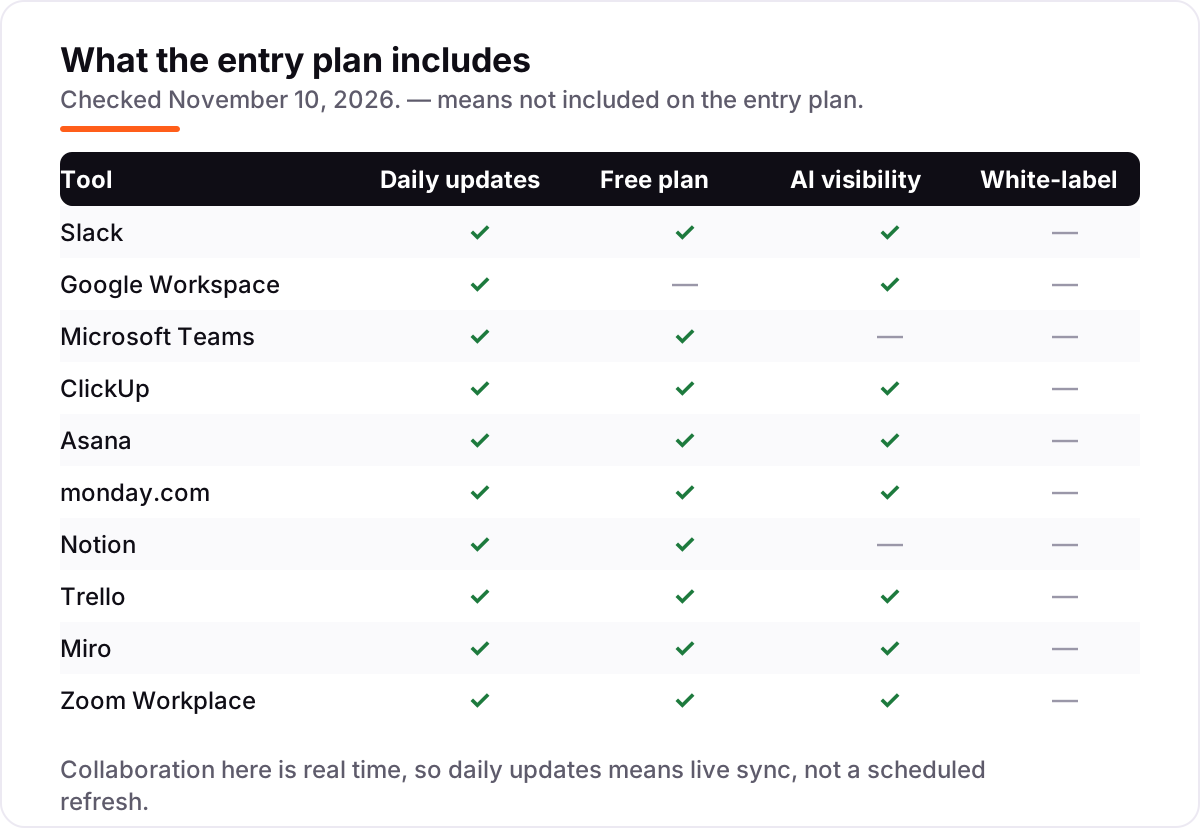
- Slack leads for most small teams at $8.75 a user a month, with Google Workspace from $8.40 and Microsoft Teams Essentials from $4 a user a month.
- The single most important buying factor is where the work already lives: pick the tool your team already opens every day, not the one with the longest feature list.
- Free plans are real here — Slack, Teams, ClickUp, Notion and Trello all have one — but paid plans run $4 to $16.99 a user a month.
- Every price below was checked on the vendor's own pricing page on November 10, 2026, except where noted in How we chose. No ratings are shown because the G2 page we opened did not expose a score and review count.
On this page
Quick comparison
| Tool | Best for | Starting price | Free plan |
|---|---|---|---|
| Slack | Small teams that live in chat and want one hub for messages, files and apps | $8.75/mo | Yes (free plan) |
| Google Workspace | Small businesses that want email, docs and meetings in one Google account | $8.40/mo | No (14-day trial) |
| Microsoft Teams | Small businesses already on Microsoft 365 that want chat and meetings included | $4/mo (annual) | Yes (free plan) |
| ClickUp | Small teams that want tasks, docs and chat in one workspace instead of three subscriptions | $12/mo | Yes (free plan) |
| Asana | Cross-functional teams that need clear task ownership, timelines and dashboards | $13.49/mo | Yes (2 users) |
| monday.com | Small teams that think in visual boards and want workflows they can build without code | $12/mo | Yes (2 seats) |
| Notion | Small teams that want docs, wikis and tasks in one flexible workspace | $12/mo | Yes (free plan) |
| Trello | Small teams that want simple Kanban boards with the cheapest paid upgrade | $6/mo | Yes (free plan) |
| Miro | Remote teams that plan, brainstorm and run workshops on a shared whiteboard | $10/mo | Yes (free plan) |
| Zoom Workplace | Small teams that need reliable video meetings with no other tool in the mix | $16.99/mo | Yes (free plan) |
Make one of these tools?
We re-check this list every quarter. Send a correction, request a review, or ask about a clearly labeled sponsored spot.
Request a listingThe best collaboration software for small business

Slack
Best for: Small teams that live in chat and want one hub for messages, files and apps
Slack is the chat hub most small teams already know: channels keep each project or client in its own thread, direct messages replace internal email, and more than 2,600 apps connect the tools a team already uses. Pro removes the free plan's 90-day message history limit, so nothing a client said in March is gone by June, and it adds group huddles, unlimited apps and basic Slack AI summaries.
The price is per active user, and Slack only bills for people who actually use it, which softens the bill for teams with part-timers. The catch is the jump to Business+ at $15 a user a month billed annually for full AI, SSO and data loss prevention. Buy Slack when chat is the work; pair it with a project tool when tasks need owners and dates.
What we like
- Channels keep every project and client in its own thread, so nothing gets buried in email
- More than 2,600 apps connect the tools a team already uses, from Google Drive to Salesforce
- Pro removes the 90-day history limit and adds group huddles, unlimited apps and basic Slack AI summaries
- Slack Connect lets the team message clients and vendors in shared channels without extra seats for 1:1 chats
Watch out for
- Every paid seat costs the same, so a team of 20 pays for 20 even if only half post daily
- The free plan deletes searchable history after 90 days, which hurts teams that need a record
- Channel sprawl is real: without naming rules, teams end up with dozens of half-dead channels

Google Workspace
Best for: Small businesses that want email, docs and meetings in one Google account
Google Workspace is the suite play: one login gives the team business Gmail on its own domain, Drive storage, Docs and Sheets that several people can edit at once, Calendar and Meet. Business Starter costs $7 a user a month on an annual commitment, or $8.40 on the flexible month-to-month plan, and Gemini is now built into Gmail and the Gemini app on every Business plan.
The trade-off is depth. Workspace has no real task manager and no Kanban board, so teams that run projects inside it end up tracking work in a spreadsheet. It is the right buy when email and documents are the collaboration, and the wrong buy as a standalone project tool.
What we like
- One subscription covers business Gmail, Drive, Docs, Sheets, Meet and Calendar
- Gemini is built into Gmail and the Gemini app on every Business plan, with no AI add-on to buy
- Real-time co-editing in Docs and Sheets is the smoothest in this list, with comments and version history included
- Meet runs up to 100 participants on Starter, so most small teams never need a separate video tool
Watch out for
- No free plan — only a 14-day trial before the subscription starts
- Business plans stop at 300 users, so a growing company eventually moves to Enterprise pricing
- Storage is 30 GB pooled per user on Starter, which fills fast for teams that share large files

Microsoft Teams
Best for: Small businesses already on Microsoft 365 that want chat and meetings included
Microsoft Teams is the cheapest way into paid collaboration here: Teams Essentials costs $4 a user a month on annual billing, with chat, calls and meetings up to 30 hours for 300 people, plus 10 GB of cloud storage per user. For teams that also need email and Office apps, Microsoft 365 Business Basic costs $7 a user a month and bundles Teams with Outlook, OneDrive and the web versions of Word, Excel and PowerPoint.
The catch is that Essentials is Teams alone — no business email, no desktop Office apps, and Copilot costs extra. Teams is the obvious pick for a business already paying for Microsoft 365; a team with no Microsoft footprint will find Slack or Google Workspace simpler to start.
What we like
- The cheapest paid start in this list at $4 a user a month on annual billing
- Comes with Microsoft 365 Business Basic at $7 a user a month, adding business email, 1 TB of storage and web Office apps
- Group meetings run up to 30 hours for 300 people on Essentials, with recordings and transcripts
- The free plan covers unlimited chat and 60-minute group meetings, so a team can try it for real before paying
Watch out for
- Teams Essentials has no business email — that needs the $7 Business Basic bundle
- Copilot AI is a paid add-on, not included in Essentials or Business Basic
- The interface packs chat, files, apps and meetings into one window, and new users take time to find things

ClickUp
Best for: Small teams that want tasks, docs and chat in one workspace instead of three subscriptions
ClickUp is the all-in-one bet: tasks, docs, whiteboards, goals, chat and dashboards live in one workspace, and the Free Forever plan allows unlimited members at $0. Core costs $9 a user a month billed annually, or $12 month to month, and adds unlimited storage, Gantt charts, custom fields, 1,000 automation runs a month and a monthly allowance of AI credits.
The honest limit is complexity. ClickUp can do almost everything, which means a new team spends its first week configuring views instead of doing work. It earns its place when a small team wants one subscription to replace a task tool, a docs tool and a chat tool; it is overkill for a team that only needs a shared to-do list.
What we like
- One workspace holds tasks, docs, whiteboards, goals, chat and dashboards, so small teams can cancel two or three other tools
- The Free Forever plan allows unlimited members, which no other tool here matches
- Core adds unlimited storage, Gantt charts, custom fields and 1,000 automation runs a month
- AI credits are included on every plan, with 1,000 per seat a month on Core
Watch out for
- ClickUp replaced its old Unlimited $7 plan with Core at $9 billed annually, so older comparisons understate the price
- Every member of a workspace is billed, including people who only read tasks
- The depth of views and settings overwhelms new users, and setup takes longer than Asana or Trello

Asana
Best for: Cross-functional teams that need clear task ownership, timelines and dashboards
Asana is the easiest work-management tool in this list to adopt: tasks sit in projects, every task has one owner and a due date, and timelines, Gantt views and dashboards show where the work stands. Starter costs $10.99 a user a month billed annually, or $13.49 month to month, and adds unlimited automations, forms, custom fields and AI Studio Basic.
The free plan is the catch. Personal now covers only two users, so a team of three pays from day one, and the features teams assume are standard — portfolios, workload and time tracking — wait for Advanced at more than double the price. Pick Asana when clear ownership matters most; pick ClickUp when budget matters more.
What we like
- One assignee per task makes ownership unambiguous, and timelines and Gantt views show dependencies clearly
- Starter includes unlimited automations, forms, custom fields and reporting dashboards
- Unlimited free guests let clients and contractors collaborate without using a paid seat
- AI Studio Basic is included on Starter, with 50,000 AI credits per billing account a month
Watch out for
- The free Personal plan now caps at 2 users, so almost any real team starts on paid Starter
- Portfolios, workload and native time tracking wait for Advanced at $24.99 a user a month billed annually
- Starter is the dearest entry price among the work-management tools here at $10.99 billed annually

monday.com
Best for: Small teams that think in visual boards and want workflows they can build without code
monday.com turns work into visual boards: status columns, drag-and-drop cards and dashboards that non-technical teams can build themselves, with more than 200 templates for sales, marketing and operations. Basic costs $9 a seat a month billed annually, or $12 month to month, with unlimited items, unlimited free viewers and 1,000 AI credits a month.
Two rules change the bill. Paid plans start at three seats, and seats are sold in buckets, so a four-person team buys five seats. And Basic has no automations or integrations at all — the features that make monday.com more than a spreadsheet start on Standard at $12 a seat a month billed annually. Price the tier the team will actually need, not the cheapest one.
What we like
- Color-coded boards show status at a glance, and teams can shape columns, views and dashboards without code
- Unlimited items and unlimited free viewers on Basic, so stakeholders can watch progress without a seat
- More than 200 templates cover sales, marketing, HR and operations out of the box
- Basic includes 1,000 AI credits a month, so small teams get AI features on the cheapest paid plan
Watch out for
- Paid plans start at 3 seats, so a solo user pays for three seats from day one
- Basic has no automations or integrations — those start on Standard at $12 a seat a month billed annually
- Seats are sold in buckets, so a four-person team buys five seats and a six-person team can be moved to ten
Notion
Best for: Small teams that want docs, wikis and tasks in one flexible workspace
Notion is where documentation and task tracking merge: project pages, task databases, meeting notes and a team wiki in one workspace the team shapes itself, with the same work shown as a Kanban board, a calendar or a table. Plus costs $10 a user a month billed annually, or $12 month to month, and removes the free plan's limits with unlimited file uploads, 30-day page history and unlimited guests.
The price moved: Plus was $8 a user a month billed annually until 2024, and older guides still print that figure. Full Notion AI also waits for Business at $20. Notion fits teams that plan inside their wiki; teams that need workload views and approvals should look at Asana or monday.com instead.
What we like
- Docs, wikis, meeting notes and task databases live in one workspace that the team shapes itself
- Plus removes the meaningful limits: unlimited file uploads, 30-day page history and unlimited guests
- Databases with custom views turn the same work into a Kanban board, a calendar or a table
- The free plan is genuinely usable for solo work, with unlimited pages and blocks
Watch out for
- Plus rose from $8 to $10 a user a month billed annually, so older guides understate the price by 25%
- Full Notion AI waits for Business at $20 a user a month billed annually; Plus includes only a trial
- There is no built-in workload view or resource planning, so managers track capacity elsewhere

Trello
Best for: Small teams that want simple Kanban boards with the cheapest paid upgrade
Trello is the simplest tool in this list, and the cheapest to upgrade: Standard costs $5 a user a month billed annually, or $6 month to month, and adds unlimited boards, custom fields, card mirroring, advanced checklists and 1,000 automation runs a month. A board is lists and cards, and a new team member understands it in minutes.
The simplicity is also the ceiling. Trello has no native time tracking, no workload view and no reporting dashboard, even on Premium at $10 a user a month billed annually. It is the right buy for a small team that wants a shared board and nothing else; a team that outgrows boards will move to Asana or ClickUp.
What we like
- The cheapest paid upgrade here at $5 a user a month billed annually
- Boards are the simplest in this list to learn: lists and cards, with no setup week
- Standard adds unlimited boards, custom fields, card mirroring and 1,000 automation runs a month
- AI features are included on Standard, including AI summaries and AI board creation
Watch out for
- The free plan stops at 10 boards and 10 collaborators per workspace
- No native time tracking, workload views or reporting dashboards, even on Premium
- Billing counts every workspace member plus guests on two or more boards, so the seat count creeps up

Miro
Best for: Remote teams that plan, brainstorm and run workshops on a shared whiteboard
Miro is the whiteboard of this list: an infinite canvas where remote teams brainstorm, map customer journeys, plan sprints and run retrospectives with sticky notes, diagrams and voting. Starter costs $8 a member a month billed annually, or $10 month to month, and unlocks unlimited boards, private boards, visitor editing, high-resolution exports and 25 AI credits per member a month.
The free plan is the try-out, not the workspace: it stops at three editable boards. Miro is not a task manager either — work planned on a board still needs owners and dates in another tool. Buy it when visual planning is the job; skip it when the team only needs a task list.
What we like
- The deepest template library for retrospectives, journey maps, sprint planning and workshops
- Starter unlocks unlimited boards, private boards, visitor editing and high-resolution exports
- Thousands of integrations connect Miro to Jira, Asana, Slack, Zoom and more
- Timer, voting and Talktracks turn a board into a run workshop, not just a drawing
Watch out for
- The free plan stops at 3 editable boards, so active teams hit the limit fast
- Business costs $20 a member a month billed annually, two and a half times Starter, for SSO and deeper integrations
- Boards get messy at scale without a facilitator, and finding one sticky note in a huge board is slow

Zoom Workplace
Best for: Small teams that need reliable video meetings with no other tool in the mix
Zoom Workplace is the meetings specialist: Pro costs $16.99 a user a month billed monthly, or $14.16 billed annually, and lifts the free plan's 40-minute group limit to 30-hour meetings for 100 participants, with unlimited meeting summaries, unlimited AI document creation and 10 GB of cloud recording per user. Team Chat, whiteboard, scheduler and mail sit in the same app.
It is the dearest entry price in this list, and it buys only meetings — there is no task manager, no docs and no project board. Most small teams already get meetings inside Slack, Teams or Google Workspace, so Zoom earns its fee when video is the product: client calls, interviews and workshops where reliability matters most.
What we like
- The most reliable video in this list, with 30-hour meetings for 100 participants on Pro
- Pro adds unlimited meeting summaries, unlimited AI document creation and 10 GB of cloud recording per user
- Team Chat, whiteboard, scheduler and mail sit in the same app, so meetings need no second tool
- The free Basic plan covers 100 participants, so a team can test real meetings before paying
Watch out for
- Pro is the dearest entry price in this list at $16.99 a user a month billed monthly
- Zoom raised Pro from $14.99 to $16.99 a month, so older guides understate the price
- Only hosts need a Pro licence, but every host on the team needs one, so the bill grows with every meeting organiser
The best collaboration software for small business is the tool your team already opens every day — not the one with the longest feature list. The ten tools below are ranked by fit for the most common buyer, a small US business with under 20 people, and every price was checked against the vendor's own pricing page on November 10, 2026, except where How we chose says otherwise.
How to choose the best collaboration software for small business
- Start with where the work already lives. A team on Gmail picks Google Workspace; a team on Microsoft 365 picks Teams; a team with no suite picks Slack plus a project tool.
- Count the seats you will actually pay for. ClickUp bills every workspace member, monday.com sells seats in threes and buckets, and Asana's free plan stops at two users. Price the team you will have next year.
- Check what the free plan caps. Slack hides history after 90 days, Miro stops at three boards, Trello at ten boards. If the cap hits in week two, the free plan is a trial, not a plan.
- Decide whether one tool must do both jobs. Chat tools run conversation; project tools run ownership and deadlines. One all-in-one subscription saves money only if the team actually uses both halves.
- Test with real work, not a demo. Run one real project in the trial: a real meeting, real tasks, real files. If nobody opens the tool without being reminded, it is the wrong tool.
Chat tools keep a team talking, but they do not bring in customers on their own. If the business is not showing up when people nearby search, our local SEO service covers that side. And before the team publishes its first shared doc, the free SERP snippet preview tool shows exactly how its pages will look in Google.
Collaboration software pricing: what you will actually pay
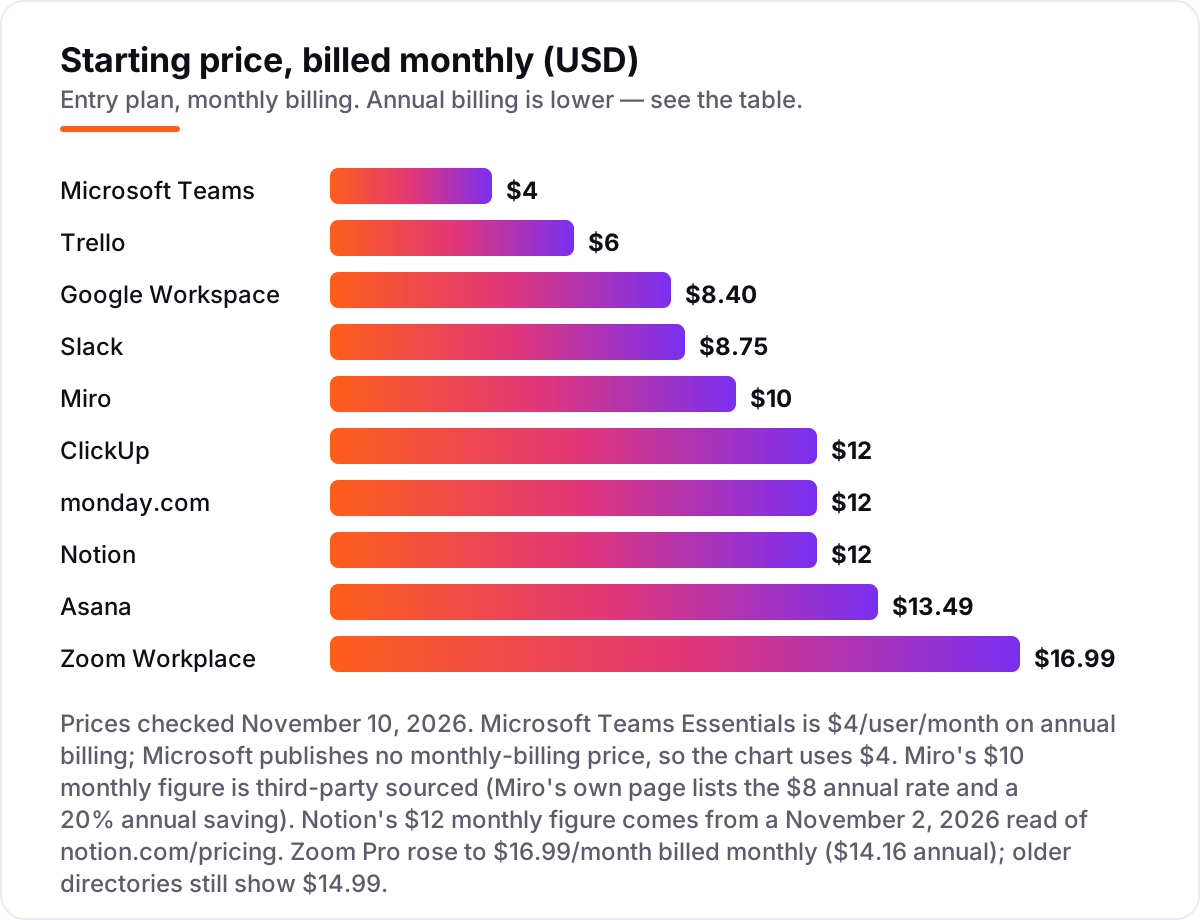
Take a 10-person team on annual billing. The subscription costs $480 a year for Microsoft Teams Essentials, $600 for Trello Standard, $840 for Google Workspace Business Starter, $870 for Slack Pro, $960 for Miro Starter, $1,080 for ClickUp Core, $1,080 for monday.com Basic, $1,200 for Notion Plus, $1,318.80 for Asana Starter and $1,699.20 for Zoom Workplace Pro. The same ten people cost $480 at the cheap end and $1,699.20 at the dear end — a gap that comes from what each tool includes, not from team size.
Pay month to month instead and the same team costs $720 on Trello Standard, $1,008 on Google Workspace Starter, $1,050 on Slack Pro, $1,200 on Miro Starter, $1,440 on ClickUp Core, $1,440 on monday.com Basic, $1,440 on Notion Plus, $1,618.80 on Asana Starter and $2,038.80 on Zoom Workplace Pro. Teams Essentials has no monthly-billing price published, so there is no month-to-month figure for it. Annual billing saves roughly 17 to 20 percent on most tools here, which is $180 a year on Slack Pro alone for ten people.
Three costs sit outside every number above. First, seat rules: monday.com sells seats in buckets, so a four-person team buys five seats, and ClickUp bills every workspace member, including people who only read tasks. Second, AI add-ons: full AI costs extra on Teams through Copilot, on Notion above Plus, and on Slack above Pro. Third, the second tool: a team that buys Slack for chat usually buys Asana or Trello for tasks too, so budget for the pair, not the single subscription.
Know the difference: chat-first tools vs project-based tools
The confusion in this category is the job the tool is built for, not the feature list. Chat-first tools — Slack, Microsoft Teams, Google Chat inside Workspace, Zoom Team Chat — are built for conversation: messages, channels, huddles and meetings, with files attached to the talk. Project-based tools — Asana, monday.com, ClickUp, Notion and Trello — are built for work with owners and dates: tasks, boards, timelines and dashboards, with chat attached to the task.
The two kinds fail differently. A team that buys only a chat tool ends up tracking deadlines in a channel that scrolls away, and nobody knows who owns what. A team that buys only a project tool ends up holding its conversations in task comments, where quick questions go to die. Most small teams need one of each, and the cheapest honest setup is a free chat plan plus a paid project tool — or one all-in-one such as ClickUp, which does both but takes longer to set up.
There is a second, quieter confusion: a suite is not a project tool. Google Workspace and Microsoft 365 bundle chat, meetings, email and documents, which covers most collaboration, but neither ships a real task manager with owners, dependencies and workload views. If the team runs projects, the suite still needs Asana, monday.com or Trello beside it.
Quick comparison: tool type by need
| Buyer | Best pick | Why |
|---|---|---|
| Small team that lives in chat | Slack | Best channels and app integrations, Pro is $8.75 a user a month |
| Business that wants one suite | Google Workspace | Email, docs and Meet in one account from $8.40 a user a month |
| Business already on Microsoft 365 | Microsoft Teams | Essentials is $4 a user a month, and Basic bundles email for $7 |
| Team that needs tasks and docs together | ClickUp | One workspace from $12 a user a month, free plan for unlimited members |
| Team that wants simple boards | Trello | Cheapest paid upgrade at $6 a user a month, learned in minutes |
| Remote team that plans visually | Miro | Shared whiteboard with workshops, Starter is $10 a member a month |
Mistakes to avoid
- Buying on the headline price without counting seats. monday.com starts at three seats and sells in buckets, ClickUp bills every member, and Asana's free plan stops at two users. A four-person team can pay for five seats on monday.com before it does any work.
- Trusting an old price from a directory. Zoom Pro rose from $14.99 to $16.99 a month, Notion Plus from $8 to $10 billed annually, and ClickUp's old $7 Unlimited plan is now Core at $9. Always check the vendor's own page.
- Paying for a suite and expecting a project tool. Google Workspace and Microsoft 365 cover chat, meetings, email and docs, but neither tracks task ownership, dependencies or workload. Budget for Asana, monday.com or Trello beside the suite.
- Choosing the all-in-one before the team is ready. ClickUp replaces three subscriptions, but only if the team configures it. A team that will not spend a week on setup gets more from Slack plus Trello than from a half-configured ClickUp.
- Forgetting the free plan's cap. Slack hides messages after 90 days, Miro stops at three boards and Trello at ten. If the team hits the cap in the first month, the free plan was a trial, and the paid price should have been in the budget from day one.
How we chose
We checked each vendor's own pricing page on November 10, 2026 and recorded the starting price exactly as shown, including the annual-billing figure where the page lists one. Slack, ClickUp, Asana, Trello and Zoom were read directly from the vendor's page today; Notion and Miro render their prices client-side, so their figures come from fresh reads of the vendor pages dated November 2, 2026 for Notion and October 21, 2026 for Miro, and monday.com and Google Workspace from fresh reads dated October 16 to 17, 2026. Microsoft Teams Essentials at $4 a user a month comes from Microsoft's Teams plans page, read October 28, 2026; Microsoft publishes no monthly-billing price for Essentials. Miro's $10 monthly figure is third-party sourced — Miro's own page lists the $8 annual rate and a 20 percent annual saving. No ratings are shown: the G2 page we opened today did not expose a score and review count, and we do not print review scores from second-hand summaries. We ranked the tools by fit for the most common buyer — a small US business with under 20 people — not by brand size. No vendor paid for a place in this list, and none of the links here are affiliate links.
What to do next
Start with the tool your team already opens: if that is Gmail, take Google Workspace; if it is Outlook, take Teams; if it is neither, trial Slack plus Trello for one real week. Run one real project through the trial — a real meeting, real tasks and real files — and check the bill for the team you will have next year, not the team you have today. Once your tools are in place, find out what's holding your rankings back.
Your stack only works if people find you
SerpAstra fixes what keeps your site off page one and makes it easy for AI assistants to recommend.
Get a free audit→Sources we checked (12)
- Slack pricing — slack.com/pricing (checked November 10, 2026)
- Google Workspace pricing — workspace.google.com/pricing (checked November 10, 2026)
- Microsoft Teams pricing — microsoft.com/en-us/microsoft-teams (checked November 10, 2026)
- ClickUp pricing — clickup.com/pricing (checked November 10, 2026)
- Asana pricing — asana.com/pricing (checked November 10, 2026)
- monday.com pricing — monday.com/pricing (checked November 10, 2026)
- Notion pricing — notion.com/pricing (checked November 10, 2026)
- Trello pricing — trello.com/pricing (checked November 10, 2026)
- Miro pricing — miro.com/pricing (checked November 10, 2026)
- Zoom Workplace pricing — zoom.us/pricing (checked November 10, 2026)
- Notion Plus monthly price — toolgpa.com read of notion.com/pricing, November 2, 2026
- Miro Starter monthly price — theproofdesk.com read of miro.com/pricing, October 21, 2026
Shamim
Founder of SerpAstra
A full-stack SEO and digital marketer who spends most days on Local SEO for dental practices, AI search visibility and lead generation.
Frequently asked questions
What is the best collaboration software for small business?
Slack is the best fit for most small teams at $8.75 a user a month, with Google Workspace the best suite buy from $8.40 and Microsoft Teams Essentials the cheapest paid start at $4. Teams that run projects should add Asana, monday.com or ClickUp, since chat tools alone do not track ownership or deadlines.
How much does collaboration software cost per month?
Paid plans in this list run $4 to $16.99 a user a month. A 10-person team pays $480 a year for Teams Essentials, $600 for Trello Standard, $840 for Google Workspace Starter and $870 for Slack Pro on annual billing. Monthly billing adds roughly 17 to 20 percent on most tools, so annual billing is the cheaper route.
Is there free collaboration software for small business?
Yes, with limits. Slack, Teams, ClickUp, Notion, Trello and Miro all have free plans, and Asana and monday.com are free for up to two users. Free plans cap history, boards or seats, and the features that protect work — unlimited history, automations and admin controls — sit on paid plans.
Slack vs Microsoft Teams: which is better for a small business?
Slack wins for teams that want the best chat experience and the widest app integrations, at $8.75 a user a month. Teams wins on price at $4, and it is the obvious pick for a business already paying for Microsoft 365. If the team already uses Outlook and OneDrive, Teams costs less; otherwise Slack is simpler to start.
Do I need a chat tool and a project tool, or one tool that does both?
Most small teams end up with both, because chat and task tracking are different jobs. Slack and Teams handle conversation; Asana, monday.com and ClickUp handle ownership and deadlines. ClickUp is the closest to one tool for both, but its setup takes longer than a dedicated chat tool plus a dedicated project tool.
Can I switch collaboration software later?
Yes, but move in a quiet week. Export the message history, task lists and files the current tool allows, then import them into the new tool and test it with one real project before moving the team. Keep the old workspace open until the new one is proven, because a mid-week switch is how decisions get lost.
What should I check before paying for collaboration software?
Check who counts as a paid seat, whether the price is monthly or annual billing, and what the free plan actually caps. Then run the trial with real work: hold a real meeting, assign real tasks and share real files. If the team does not open the tool without being reminded, it is the wrong tool.
Free SEO and AI visibility audit
Find out what is holding your rankings back
Send us your site. Within 2 business days you get a written audit, an AI visibility check and a short fix list ranked by impact. Free, with no contract attached.
Request my free audit→Related guides
 Local Business & Vertical Software10 Best Project Management Software for Contractors in 2026, ComparedCompare the 10 best project management software for contractors on price, free plans, field tools and AI features, with every price checked November 8, 2026.Read guide →
 Digital Marketing & Ads11 Best Marketing Calendar Software in 2026, ComparedCompare the 11 best marketing calendar software tools in 2026 on price, calendar views and free plans, with prices checked November 4, 2026 for US teams.Read guide →
 Email, SMS & Social Media9 Best Tools for Content Creation and Social Media Management in 2026, ComparedCompare the 9 best tools for content creation and social media management on price, free plans and AI features, with every price checked November 6, 2026.Read guide →