
11 Best Content Calendar Software in 2026, Compared
11 best content calendar software options compared on price, free plans, approvals and publishing, with every price checked November 10, 2026.
 Shamim Mia, Founder, SerpAstraLast verified November 10, 202612 min read
We compare pricing pages, documentation and public reviews. We never accept payment for rankings.

Key takeaways
- CoSchedule leads for most small teams at $39 a month, with Loomly next at $65 and Later the cheapest visual planner at $25 a month.
- The single most important buying factor is the pricing unit: per-user, per-channel, per-workspace and per-seat pricing turn the same 3-person team into a $27 bill or a $237 one.
- Free plans exist — Buffer, CoSchedule, Monday.com and Notion all start at $0 — but only the schedulers publish for you; Monday.com and Notion plan content, they do not post it. Later has no free plan any more, only a 14-day trial.
- Every price below was verified from the vendor's own pricing page on November 10, 2026, and every rating is G2, with the review count shown.
On this page
Quick comparison
| Tool | Best for | Starting price | Free plan |
|---|---|---|---|
| CoSchedule | Small marketing teams that plan blog and social together and want one calendar for both | $39/mo | Yes (free plan) |
| Loomly | Small teams that need approvals and post ideas built into the calendar | $65/mo | Yes (limited) |
| Later | Visual-first brands that plan Instagram, TikTok and Pinterest by drag and drop | $25/mo | No (14-day trial) |
| Buffer | Solo creators and small teams posting to a few channels who want the simplest scheduler | $6/mo per channel | Yes (3 channels) |
| Planable | Teams and agencies that need clients to approve every post before it goes out | $39/mo per workspace | No (50-post trial) |
| SocialPilot | Small teams managing many social accounts on a tight budget | $30/mo | No (14-day trial) |
| Sendible | Agencies and multi-brand teams that want unlimited users for one flat price | $35/mo | No (14-day trial) |
| Agorapulse | Small teams that want a shared inbox next to the calendar | $99/mo per user | No (30-day trial) |
| Sprout Social | Growing teams that want polished reporting with the calendar | $99/mo per seat | No (30-day trial) |
| Monday.com | Teams already running work on Monday.com that want content dates on the same boards | $12/mo per seat | Yes (up to 2 users) |
| Notion | Solo creators and small teams that want a free, flexible editorial calendar they build themselves | $12/mo per member | Yes (free plan) |
Make one of these tools?
We re-check this list every quarter. Send a correction, request a review, or ask about a clearly labeled sponsored spot.
Request a listingThe best content calendar software

CoSchedule
Best for: Small marketing teams that plan blog and social together and want one calendar for both
CoSchedule is the only tool here built as a marketing calendar first and a scheduler second. Blog drafts, social posts, email sends and campaigns sit on one calendar, so a small team sees the whole month instead of one network at a time. The $39 Starter plan covers one user and three social profiles, with unlimited scheduling and ReQueue evergreen reposting.
The catch is the seat math. Starter is one person, so a three-person team needs Professional at $49 a month billed annually, plus $29 a month for the third seat. Posting to X costs another $16 per profile a month on every paid plan. If the team plans blog and social together, CoSchedule is the most complete calendar here; if it only schedules social, Loomly or Buffer cost less.
What we like
- The only purpose-built marketing calendar here: blog posts, social posts, email and campaigns share one calendar view
- ReQueue reposts evergreen content automatically, so the calendar stays full without new writing
- Free plan covers 1 user and 15 scheduled posts, so a solo marketer can try the real calendar before paying
- WordPress integration puts blog drafts straight onto the calendar
Watch out for
- Starter covers 1 user only, so a team of three needs Professional plus a $29-a-month extra seat
- Posting to X costs $16 per profile a month extra on every paid plan
- Reviewers note a learning curve and an interface that feels dated next to newer tools

Loomly
Best for: Small teams that need approvals and post ideas built into the calendar
Loomly is the calendar-first scheduler for teams that review posts before they go out. The Starter plan covers three users and twelve social accounts for one flat price, with approval workflows, post ideas and a visual calendar included from day one. That flat price is the appeal: adding a teammate does not raise the bill the way per-seat tools do.
The price itself is the warning. Loomly replaced its old Base plan in 2026, so the $42 figure still quoted in directories is out of date — Starter is $65 a month billed monthly, or $49 billed annually. Analytics stay basic on Starter, and there is no listening. For a small team that plans together and approves together, it is still the strongest social calendar here after CoSchedule.
What we like
- Flat price covers 3 users and 12 social accounts, so a small team pays one bill, not one per person
- Approval workflows and post ideas sit on the entry plan, not a higher tier
- Post preview and optimization tips catch formatting mistakes before a post goes out
- The highest G2 score in this list alongside Planable, at 4.6 from 1,796 reviews
Watch out for
- Repriced in 2026: the old $42 Base plan is gone, and Starter now costs $65 a month billed monthly
- Analytics are basic on Starter, and there is no social listening at any tier
- No free plan is listed on the pricing page, so the free option is easy to miss

Later
Best for: Visual-first brands that plan Instagram, TikTok and Pinterest by drag and drop
Later is the visual planner in this list: drag posts onto a calendar, see the grid as followers will see it, and send traffic through a Link in Bio page. Starter costs $25 a month billed monthly, or $18.75 billed annually, and covers one social set of up to eight profiles with 30 scheduled posts per profile each month.
The limits are the shape of the plan. Starter is one person and one brand — there are no add-ons, so a second social set or a second user means Growth at $50 a month billed monthly. Later also dropped X in August 2025, so teams that still post there need a second tool. For a visual brand planning one set of accounts, Later is the cheapest way into a real calendar.
What we like
- Visual planner and Link in Bio page are built for Instagram, TikTok and Pinterest first
- Starter covers 8 profiles in one social set for $25 a month, the cheapest visual planner here
- 30 scheduled posts per profile a month on Starter, with 5 AI credits included
- Rated 4.5 on G2, with reviewers praising ease of setup above all
Watch out for
- Starter is 1 user and 1 social set with no add-ons, so a second brand means upgrading to Growth
- No X support since August 2025, so X planning needs another tool
- Analytics history is only 3 months on Starter

Buffer
Best for: Solo creators and small teams posting to a few channels who want the simplest scheduler
Buffer is the simplest scheduler here, and it prices like it: $6 per connected channel a month on Essentials, or $5 billed annually, with unlimited scheduled posts and an AI assistant in the price. The free plan connects three channels at $0, so a solo creator can run a small presence without paying anything at all.
The model cuts both ways. One user is the limit on Essentials, so a team that needs approvals pays double per channel on Team, and every new account adds $6 a month. Buffer is the right buy for one person posting to a handful of channels; a team with many accounts and reviewers will find Loomly or Planable cheaper once the channel count climbs.
What we like
- The cheapest paid start here: $6 per channel a month, with a real free plan below it
- Unlimited scheduled posts on Essentials, with an AI assistant included
- Per-channel pricing is easy to work out in your head, with no seat math
- Free plan connects 3 channels at $0, enough to run a small presence
Watch out for
- Essentials allows 1 user only, so approvals need Team at $12 per channel a month
- The bill grows with every channel, so ten channels cost $60 a month billed monthly
- Analytics are basic, and the engagement inbox is not part of Essentials

Planable
Best for: Teams and agencies that need clients to approve every post before it goes out
Planable is built around one job: getting posts approved. Writers draft, team leads and clients approve in the order the team sets, and nothing publishes until everyone has signed off. Basic costs $39 per workspace a month billed monthly, or $33 billed annually, with unlimited users, 60 posts a month and 4 social pages per workspace.
The workspace is also the catch. Every brand needs its own workspace at $39 a month, so three clients cost $117 before add-ons, and analytics costs another $12 per workspace. There is no free plan — only a trial of 50 created posts. For a team whose bottleneck is client sign-off rather than scheduling, Planable is the best approval tool here; for pure scheduling, Buffer or Later cost less.
What we like
- Unlimited users on every plan, so reviewers and clients never raise the bill
- Multi-level approvals are the core of the product, not an add-on
- Calendar and feed views show exactly how posts will look before they publish
- Rated 4.6 on G2 from 1,085 reviews, the joint-highest score here
Watch out for
- Priced per workspace, so each brand costs $39 a month billed monthly
- Analytics and the social inbox are paid add-ons, at $12 and $9 a workspace a month
- Basic caps at 4 social pages and 60 posts a month per workspace

SocialPilot
Best for: Small teams managing many social accounts on a tight budget
SocialPilot is the value pick for account-heavy teams: Essentials costs $30 a month billed monthly, or $25.50 billed annually, and covers seven social accounts with 500 AI credits, a content library and tags. The price is a flat bundle, so the bill does not grow with every seat the way per-user tools do.
Essentials is publishing only. There is no analytics, no inbox and no approval step, so a team that needs any of those moves to Standard at $50 a month billed monthly — and Essentials covers one seat, so a second teammate forces the same upgrade. Buy SocialPilot when the job is scheduling many accounts cheaply; buy Sendible or Agorapulse when the inbox and approvals matter from day one.
What we like
- 7 social accounts for $30 a month, the most accounts per dollar on the entry plan here
- Flat bundle pricing: the price covers accounts and seats together, not one per person
- 500 AI credits, a content library and tags are included on Essentials
- Rated 4.5 on G2, with reviewers praising value for money most
Watch out for
- Essentials has no analytics, inbox or approvals, so most teams need Standard at $50 a month
- Essentials covers 1 seat only, so a second teammate means upgrading
- White-label reports need Premium at $100 a month

Sendible
Best for: Agencies and multi-brand teams that want unlimited users for one flat price
Sendible is the flat-price tool for teams with many hands: every plan includes unlimited users, so adding a teammate or a client login never raises the bill. Core costs $35 a month billed monthly, or $29.75 billed annually, for one workspace, six profiles, an inbox, unlimited AI Assist and bulk scheduling.
The trade is features for seats. Core has no approval workflow and no content library, so a team that needs sign-off pays $99 a month for Plus, and white-label reports cost extra on top of that. Sendible suits an agency or a multi-brand team where ten people touch the calendar; a solo publisher gets the same scheduling cheaper from Buffer or SocialPilot.
What we like
- Unlimited users on every plan, so the whole team and every client can log in free
- Inbox, AI Assist and bulk scheduling are included on the $35 Core plan
- One workspace with 6 profiles for $35 a month, with pre-built reports included
- Rated 4.5 on G2, with reviewers praising customer support most
Watch out for
- Core has no approvals or content library, so sign-off needs Plus at $99 a month
- Core caps at 100 sends a day per workspace
- White label is a paid add-on on the top tiers, not included in the plan price

Agorapulse
Best for: Small teams that want a shared inbox next to the calendar
Agorapulse pairs the calendar with the strongest inbox in this list: every comment and message lands in one shared queue next to the scheduled posts. Standard costs $99 per user a month billed monthly, or $79 billed annually, and includes ten social profiles, basic reports and the AI Sidekick.
The bill is the honest problem. Per-user pricing means a three-person team pays $237 a month billed annually, and the old free plan ended on July 6, 2026 — the only free option now is Archie, which only publishes AI-created posts. Agorapulse earns its price when the inbox is half the job; when the job is scheduling alone, Loomly or SocialPilot do it for a third of the cost.
What we like
- Unified inbox on Standard, so replies and scheduled posts live in one place
- 10 social profiles included on every paid plan, shared across the account
- White-label reporting is included on Standard, so client reports carry your branding
- AI Sidekick is included on every paid plan
Watch out for
- Per-user pricing: three people cost $237 a month billed annually
- The old free plan ended on July 6, 2026; only the Archie AI plan is free now
- Extra profiles cost $15 a month each on monthly billing

Sprout Social
Best for: Growing teams that want polished reporting with the calendar
Sprout Social is the polished end of this list. Essentials costs $99 per seat a month billed monthly, or $79 billed annually, and covers five social profiles with a visual calendar, optimal send times and profile and post reporting. The reports are the reason teams pay more: they are client-ready without extra work.
Essentials is publishing and reporting only. There is no inbox, no approvals and no listening — those start at Standard, $199 a seat a month billed annually — and every extra person costs another full seat. A three-person team pays $237 a month billed annually for Essentials alone. Buy Sprout when reporting justifies the price; buy Loomly when the calendar itself is the job.
What we like
- The strongest reporting in this list, with profile and post performance on Essentials
- Optimal send times and a visual content calendar are included from the entry plan
- Canva, Google Drive and Dropbox integrations sit on Essentials
- The largest review base here: 4.4 on G2 from 6,873 reviews
Watch out for
- Per-seat pricing: three seats cost $237 a month billed annually
- Essentials has no Smart Inbox, approvals, listening or review management
- Annual contracts do not refund, so a wrong tier costs a full year

Monday.com
Best for: Teams already running work on Monday.com that want content dates on the same boards
Monday.com is the general work tool in this list, and it earns its place because many teams already live on it. Content ideas become board items with owners, due dates and statuses, and calendar and timeline views show the month at a glance. Basic costs $12 a seat a month billed monthly, or $9 billed annually, and the free plan covers up to two users.
The limit is absolute: Monday.com publishes nothing, so the team still needs a scheduler for the actual posting. Paid plans also carry a three-seat minimum, so a two-person team pays $27 a month billed annually for Basic, not $18. Pick Monday.com when content planning already happens on its boards; pick a scheduler when the calendar must also do the posting.
What we like
- Calendar, timeline and Gantt views turn content dates into a plan the whole team can see
- Free plan covers up to 2 users at $0, and Basic is $9 a seat a month billed annually
- The highest G2 score here, 4.7 from 17,144 reviews
- Automations and integrations start on Standard, at $12 a seat a month billed annually
Watch out for
- Plans content but publishes nothing: every post must be scheduled in another tool
- Paid plans have a 3-seat minimum, so a 2-person team pays for a seat it does not use
- Basic has no automations, integrations or timeline view

Notion
Best for: Solo creators and small teams that want a free, flexible editorial calendar they build themselves
Notion is the build-it-yourself calendar: a database with calendar, board and timeline views, templates for editorial planning, and briefs, drafts and publish dates linked in one workspace. It is free for one person with unlimited pages, and Plus costs $12 a member a month billed monthly, or $10 billed annually, for a team.
It is a planner, not a publisher. Nothing in Notion posts to social, so every scheduled post has to be copied into another tool by hand, and the free plan caps at 1,000 blocks once a second member joins. Notion is the right start for a solo creator planning blog content on $0; a team that needs posts to go out on their own should start with Buffer or Later instead.
What we like
- Free for one person with unlimited pages, and Plus is $10 a member a month billed annually
- Calendar, board and timeline views, with templates for editorial calendars
- Databases link briefs, drafts and publish dates in one workspace
- Guests are free, so reviewers can read without a paid seat
Watch out for
- No social publishing at all: posts must be copied out and scheduled elsewhere
- Free workspaces cap at 1,000 blocks once a second member joins
- Full AI needs Business at $20 a member a month; Plus only gets a limited trial
The best content calendar software for a small marketing team is the one the whole team actually opens every morning. The 11 tools below are ranked by fit for that buyer — a small team planning blog posts and social posts together — and every price was verified from the vendor's own pricing page on November 10, 2026.
How to choose the best content calendar software
- Count people, profiles and brands first. CoSchedule charges per user, Buffer per channel, Planable per workspace and Sprout Social per seat. The pricing unit decides what a growing team pays, not the headline price.
- Check whether it publishes or only plans. CoSchedule, Loomly, Later and Buffer post for you; Monday.com and Notion only plan, so the team still needs a scheduler for the actual posting.
- Check approvals before you buy. If a client or manager must sign off every post, that workflow needs to be on the plan you buy — it is on Loomly Starter and Planable Basic, but not on Sendible Core or SocialPilot Essentials.
- Check the profile and post caps. Starter plans cap profiles at 3 to 12 and posts per month at 30 to 60, so a team with many accounts outgrows the cheapest tier fast.
- Try the free plan or trial with real work. Every tool here offers a free plan or a trial, so run one real week of planning and publishing before paying. A calendar only earns its keep if the team keeps it up to date.
A calendar plans the work, but it does not bring readers to it on its own. If the content is not showing up when people search, our local SEO service covers that side. And before a new post goes live, the free SERP snippet preview tool shows exactly how its title and description will look in Google.
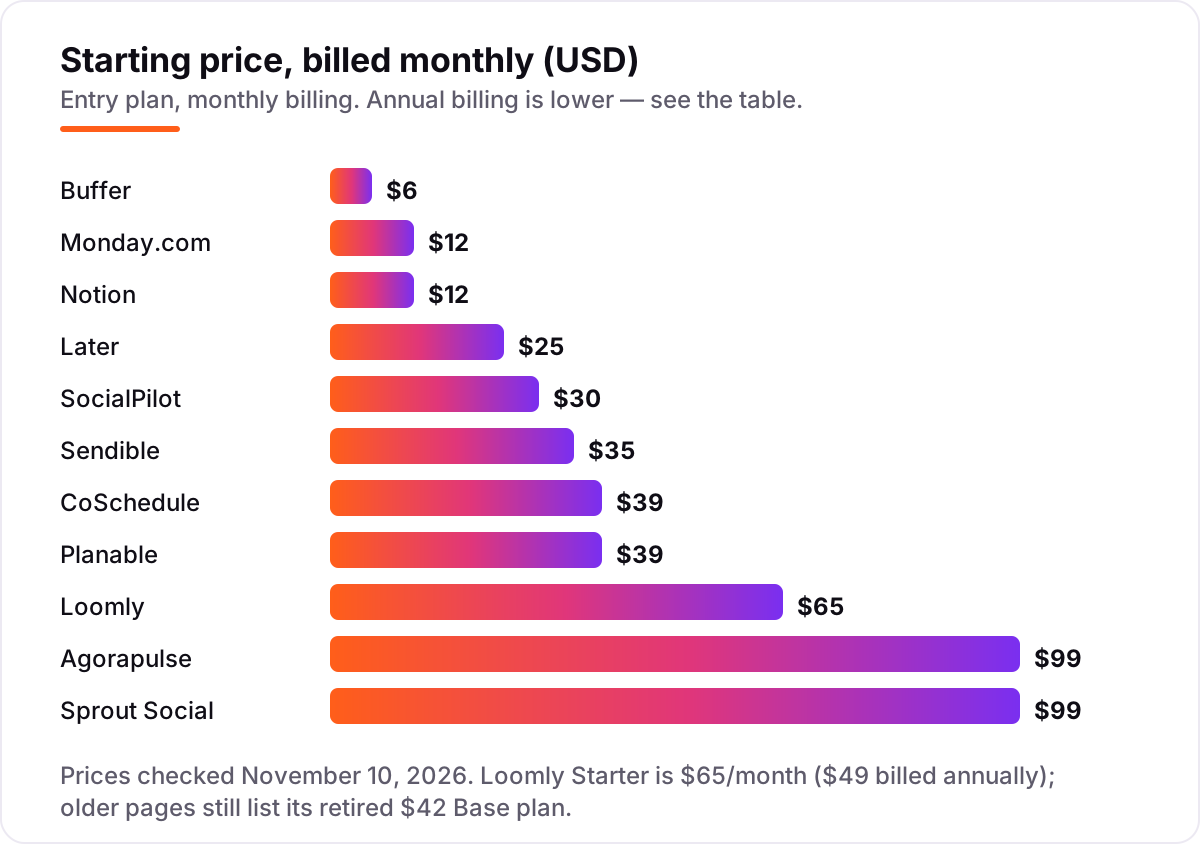
Content calendar software pricing: what you will actually pay
Take a 3-person team planning blog and social for 5 social profiles, on annual billing. On list prices, the subscription costs $27 a month on Monday.com Basic, $29.75 on Sendible Core, $30 on Notion Plus, $33 on Planable Basic for 4 pages — a 5-page team needs Pro at $49 — $42.50 on SocialPilot Standard, $49 on Loomly Starter, $50 on Buffer Team for 5 channels, $78 on CoSchedule Professional with the third seat, and $237 on Agorapulse Standard and Sprout Social Essentials alike.
Over a year, that is $324 on Monday.com, $357 on Sendible, $360 on Notion, $510 on SocialPilot, $588 on Loomly, $588 on Planable Pro, $600 on Buffer Team, $936 on CoSchedule Professional, and $2,844 each on Agorapulse and Sprout Social. The same three people and the same five profiles cost $324 at the cheap end and $2,844 at the dear end — a gap that comes entirely from pricing units and tiers, not from features.
Two costs sit outside every number above. First, the extras: CoSchedule charges $16 a month per X profile, Agorapulse $15 a month per extra profile on monthly billing, and Planable $12 a month for analytics and $9 for the inbox per workspace. Second, the second tool: Monday.com and Notion publish nothing, so a team that plans there still pays for a scheduler — Buffer Essentials for 5 channels costs $25 a month billed annually on top of the plan.
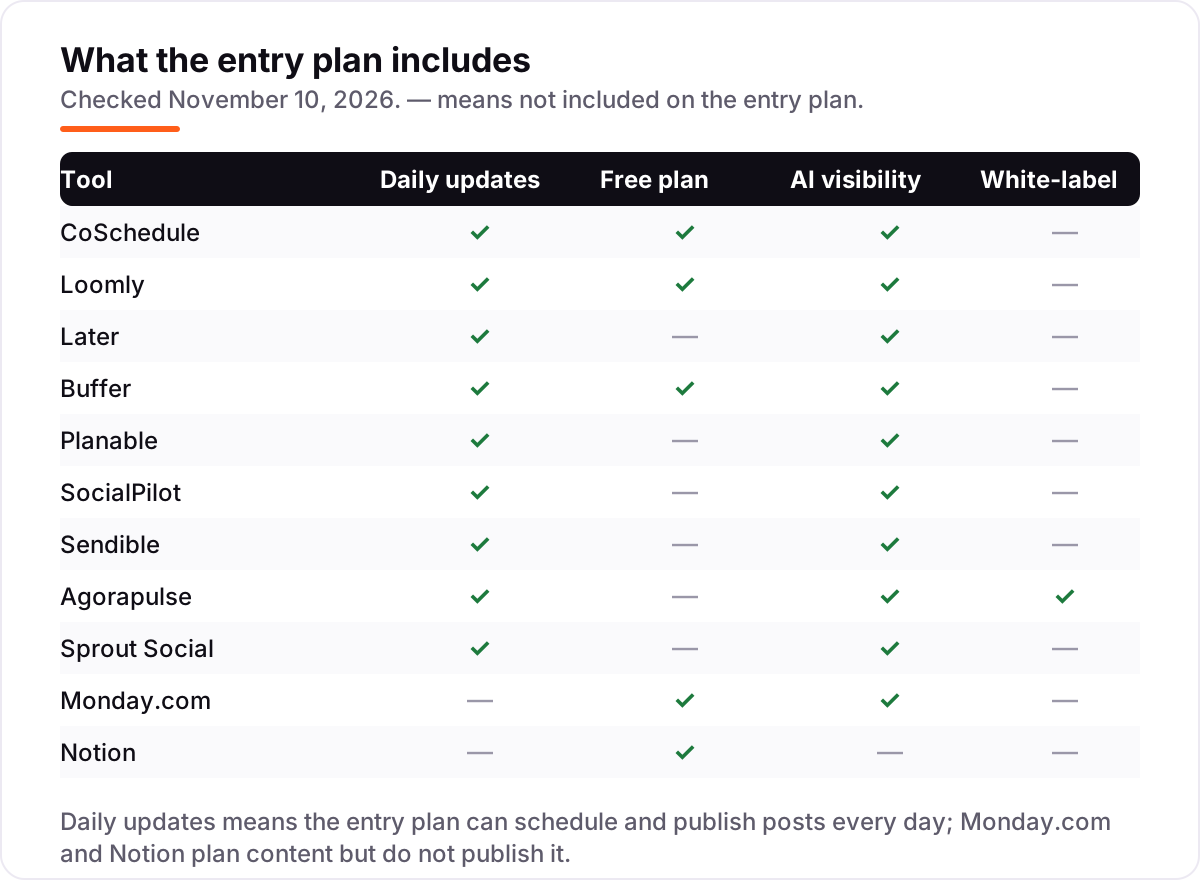
Know the difference: content calendar vs social scheduler vs project manager
The confusion in this category is that three different tools all call themselves a calendar. A content calendar plans what goes out and when, across blog, email and social: CoSchedule is the clearest example, with blog drafts and social posts on one view. A social scheduler publishes the posts for you: Buffer, Later, Loomly, SocialPilot, Sendible, Agorapulse, Sprout Social and Planable all schedule and post, and most of them also show a calendar. A project manager plans the work around the content — owners, due dates, statuses — but publishes nothing: Monday.com and Notion sit here.
The practical test is one question: does the tool post for you? If it does, it is a scheduler with a calendar. If it does not, it is a planner, and the team still needs a scheduler beside it. Most small teams need both jobs done, which is why the top of this list is tools that plan and publish in one place. Teams that already run their work on Monday.com or Notion can keep planning there and add Buffer or Later for the posting — that combination costs less than a per-seat suite. Our guide to marketing calendar software covers the calendar-only side in more depth.
Quick comparison: tool type by need
| Buyer | Best pick | Why |
|---|---|---|
| Small team, blog and social together | CoSchedule | One calendar for blog and social from $39/month |
| Small team, approvals matter most | Loomly or Planable | Approvals built in from $65 or $39 a month |
| Solo creator on a budget | Buffer | Free plan, then $6 a channel a month |
| Visual brand, Instagram-first | Later | Visual planner from $25 a month |
| Many accounts, tight budget | SocialPilot | 7 accounts for $30 a month |
| Team already on boards and docs | Monday.com or Notion | Calendar views from $9 or $10 a seat, free to start |
Mistakes to avoid
- Comparing headline prices without checking the unit. The same 3-person team pays $27 a month on Monday.com Basic and $237 on Agorapulse Standard. Per-user, per-channel, per-workspace and per-seat pricing are different bills wearing similar numbers.
- Buying a planner that cannot publish. Monday.com and Notion are excellent calendars, but neither posts anything. Budget for a scheduler beside them, or the calendar becomes a second job instead of a shortcut.
- Ignoring profile and post caps. Later Starter holds 30 posts per profile a month, Planable Basic 60 posts and 4 pages per workspace, Sendible Core 6 profiles. A team that outgrows a cap mid-month pays for the next tier or stops posting.
- Paying per seat for people who only approve. A client who only reviews posts should not cost a full seat. Planable and Sendible give reviewers free logins; Agorapulse and Sprout Social charge the full seat price for every person.
- Trusting a directory price. Loomly's old $42 Base plan is gone — Starter is $65 a month billed monthly — and G2 still lists $32. SocialPilot's own pages disagree too: its plans page lists Essentials at $30, its pricing page at $20. Always check the vendor's own page.
How we chose
We verified each vendor's own pricing page on November 10, 2026 and recorded the starting price exactly as shown, including the annual-billing figure where the page lists one, and we ranked the tools by fit for the most common buyer — a small marketing team planning blog and social together — not by brand size. Direct page reads were unavailable on November 10, 2026, so prices were verified from fresh search-index crawls of the vendors' own pricing pages dated November 5 to 10, 2026, plus independent reads of those pages dated October 2026; Loomly's $65 Starter price comes from two independent reads of its pricing page dated October 7 and October 15, 2026. Ratings come from G2 pages opened on November 10, 2026. Two conflicts are worth knowing: Loomly's old $42 Base plan was retired in 2026 and G2 still lists $32, and SocialPilot's plans page lists Essentials at $30 a month while its pricing page shows a cheaper $20 ladder — this post uses the $30 plans-page figure. Later has no free plan any more, only a 14-day trial, and Agorapulse's old free plan ended on July 6, 2026. No vendor paid for a place in this list, and none of the links here are affiliate links.
What to do next
Start with the shortlist above: pick the tool that matches the team's bottleneck — approvals, visual planning, many accounts or a tight budget — and run one real week on its free plan or trial. Check that the calendar stays up to date without nagging, that approvals do not slow posting down, and that the bill for the team you will have next year still makes sense. If the content is sorted but new readers are not finding it, our monthly SEO service handles the visibility side. Once your tools are in place, find out what's holding your rankings back.
Your stack only works if people find you
SerpAstra fixes what keeps your site off page one and makes it easy for AI assistants to recommend.
Get a free audit→Sources we checked (22)
- CoSchedule pricing — coschedule.com/pricing (checked November 10, 2026)
- CoSchedule on G2 — 4.4/5, 226 reviews (checked November 10, 2026)
- Loomly pricing — loomly.com/pricing (checked November 10, 2026)
- Loomly on G2 — 4.6/5, 1,796 reviews (checked November 10, 2026)
- Later pricing — later.com/pricing (checked November 10, 2026)
- Later on G2 — 4.5/5, 384 reviews (checked November 10, 2026)
- Buffer pricing — buffer.com/pricing (checked November 10, 2026)
- Buffer on G2 — 4.3/5, 1,039 reviews (checked November 10, 2026)
- Planable pricing — planable.io/pricing (checked November 10, 2026)
- Planable on G2 — 4.6/5, 1,085 reviews (checked November 10, 2026)
- SocialPilot pricing — socialpilot.co/plans (checked November 10, 2026)
- SocialPilot on G2 — 4.5/5, 847 reviews (checked November 10, 2026)
- Sendible pricing — sendible.com/pricing (checked November 10, 2026)
- Sendible on G2 — 4.5/5, 905 reviews (checked November 10, 2026)
- Agorapulse pricing — agorapulse.com/pricing (checked November 10, 2026)
- Agorapulse on G2 — 4.5/5, 973 reviews (checked November 10, 2026)
- Sprout Social pricing — sproutsocial.com/pricing (checked November 10, 2026)
- Sprout Social on G2 — 4.4/5, 6,873 reviews (checked November 10, 2026)
- Monday.com pricing — monday.com/pricing (checked November 10, 2026)
- Monday.com on G2 — 4.7/5, 17,144 reviews (checked November 10, 2026)
- Notion pricing — notion.com/pricing (checked November 10, 2026)
- Notion on G2 — 4.6/5, 13,767 reviews (checked November 10, 2026)
Shamim
Founder of SerpAstra
A full-stack SEO and digital marketer who spends most days on Local SEO for dental practices, AI search visibility and lead generation.
Frequently asked questions
What is the best content calendar software?
CoSchedule is the best fit for most small teams: one calendar for blog and social, with ReQueue and a WordPress integration, from $39 a month. Loomly is the best social-only calendar at $65 a month, and Later is the cheapest visual planner at $25. Teams that only need planning, not publishing, should look at Monday.com or Notion instead.
How much does content calendar software cost?
Between $0 and $99 a month at the entry level. Buffer starts at $6 per channel, Later at $25, SocialPilot at $30 and CoSchedule at $39, while Agorapulse and Sprout Social start at $99 per user or seat. The headline price hides the unit, though: a 3-person team pays $27 a month on Monday.com Basic and $237 on Agorapulse Standard.
Is there free content calendar software?
Yes, with limits. Buffer is free for 3 channels, CoSchedule has a limited free plan, and Monday.com and Notion are free for up to 2 users and one person respectively. Later has no free plan any more, only a 14-day trial. Free plans work for a solo creator; a team that needs approvals, analytics or publishing at scale will need a paid plan.
What is the difference between a content calendar and a social media scheduler?
A content calendar plans what goes out and when, across blog, email and social. A social scheduler also publishes the posts for you. CoSchedule does both, Monday.com and Notion only plan, and Buffer, Later and Loomly do both for social only. Buy a calendar when planning is the bottleneck, and a scheduler when posting is.
Can I use Monday.com or Notion as a content calendar?
Yes, for planning. Both give you calendar, board and timeline views, owners and due dates, and both start free. Neither publishes anything, so every post still has to be scheduled in Buffer, Later or another scheduler. They work best for teams that already run their work on Monday.com or Notion and only need dates in one place.
What should I check before paying for content calendar software?
Check four things: what the price is attached to — user, channel, workspace or seat — how many profiles and posts the plan includes, whether approvals and analytics are included or extra, and whether the price is monthly or annual billing. All four vary widely, and the comparison table at the top of this guide shows the starting price and free plan for each tool.
Can I switch content calendar software later?
Yes, but move in a quiet week. Export the scheduled posts, the content library and the approval history, then rebuild the calendar in the new tool and test one full week of publishing before going live. Keep the old calendar open until the new one is proven, because a mid-switch gap is how posts go out late or twice.
Free SEO and AI visibility audit
Find out what is holding your rankings back
Send us your site. Within 2 business days you get a written audit, an AI visibility check and a short fix list ranked by impact. Free, with no contract attached.
Request my free audit→Related guides
 Digital Marketing & Ads11 Best Marketing Calendar Software in 2026, ComparedCompare the 11 best marketing calendar software tools in 2026 on price, calendar views and free plans, with prices checked November 4, 2026 for US teams.Read guide →
 Digital Marketing & Ads10 Best Content Marketing Software in 2026, Compared10 best content marketing software tools compared on price, planning, optimization and publishing, with starting prices and the right pick for every team size.Read guide →
 Email, SMS & Social Media9 Best Tools for Content Creation and Social Media Management in 2026, ComparedCompare the 9 best tools for content creation and social media management on price, free plans and AI features, with every price checked November 6, 2026.Read guide →