
10 Best Content Planning Tools in 2026 (Free and Paid, Compared)
Compare the 10 best content planning tools for small marketing teams on price, free plans, calendars and approvals, with every price checked November 10, 2026.
 Shamim Mia, Founder, SerpAstraLast verified November 10, 202612 min read
We compare pricing pages, documentation and public reviews. We never accept payment for rankings.

Key takeaways
- ClickUp leads for most small teams at $9 a user a month billed annually, with Notion Plus at $10 and Asana Starter at $10.99 close behind.
- The single most important buying factor is the pricing unit: per user, per channel, per workspace and per social set turn the same team into very different bills.
- Free plans cover real work at ClickUp, Notion, Trello, Monday.com, Airtable, CoSchedule and Buffer; Later and Planable offer trials only.
- Every price below was checked on November 10, 2026; ClickUp, Buffer and Later were read directly from the vendor pricing pages, the rest from fresh crawls of the vendors' own pages.
On this page
Quick comparison
| Tool | Best for | Starting price | Free plan |
|---|---|---|---|
| ClickUp | Small marketing teams that want docs, tasks, calendar and Gantt views in one workspace | $9/mo (annual) | Yes (free plan) |
| Notion | Small teams that want the plan, the brief and the archive in one docs workspace | $10/mo (annual) | Yes (free plan) |
| Asana | Cross-functional marketing teams running campaigns on a fixed schedule | $10.99/mo (annual) | Yes (up to 2 users) |
| Trello | Small teams that want the cheapest simple board for planning blog and social content | $5/mo (annual) | Yes (free plan) |
| Monday.com | Visual teams of three or more who want colour-coded boards and dashboards | $9/mo (annual) | Yes (up to 2 seats) |
| Airtable | Marketing teams that plan content as a database of assets, owners and deadlines | $20/mo (annual) | Yes (free plan) |
| CoSchedule | Solo marketers and small teams that live by a shared marketing calendar | $29/mo (annual) | Yes (free plan) |
| Buffer | Solo creators and small teams that want simple per-channel social scheduling | $5/channel/mo (annual) | Yes (free plan) |
| Later | Visual-first teams planning Instagram, TikTok and Pinterest content | $18.75/mo (annual) | No (14-day trial) |
| Planable | Agencies and marketing teams whose bottleneck is client sign-off on social posts | $33/workspace/mo (annual) | No (50-post trial) |
Make one of these tools?
We re-check this list every quarter. Send a correction, request a review, or ask about a clearly labeled sponsored spot.
Request a listingThe best content planning tools

ClickUp
Best for: Small marketing teams that want docs, tasks, calendar and Gantt views in one workspace
ClickUp is the strongest all-rounder in this list because one workspace covers the whole content workflow: briefs in Docs, tasks with custom fields for owner, status and publish date, a calendar view for the month ahead and Gantt charts for campaigns. The free plan is genuinely usable, with unlimited members and tasks, and Core at $9 a user a month billed annually removes the 60 MB storage cap and adds 1,000 automation actions a month.
The catch is setup time. ClickUp is so configurable that a team can spend its first week building the perfect workspace instead of planning content, and the interface can feel busy on large boards. Start with one of its content calendar templates, keep custom fields to five or fewer, and add automations only once the workflow is settled.
What we like
- One workspace covers briefs in Docs, tasks with custom fields, a calendar view and Gantt charts
- Free Forever plan includes unlimited members and tasks, with a 60 MB storage cap
- Core adds unlimited storage, 1,000 automation actions a month and 1,000 AI credits per user a month
Watch out for
- Setup takes time: the workspace is so configurable that teams can spend a week building it instead of planning content
- The interface can feel busy on large boards, and full AI features need Business or above

Notion
Best for: Small teams that want the plan, the brief and the archive in one docs workspace
Notion is the best fit when planning lives inside documentation: the content calendar is one view of a database that also holds briefs, brand guidelines, research notes and published-post records. Plus at $10 a member a month billed annually removes the free plan's block limit for teams, adds unlimited file uploads, 30-day page history and charts, and guests stay free.
The trade-off is that Notion is a workspace you build, not a calendar you open. There is no native social scheduling, so publishing still needs Buffer, Later or a similar tool, and full AI features wait for Business at $20 a member a month. Buy Notion when the plan, the brief and the archive should live in one place.
What we like
- The content calendar is one view of a database that also holds briefs, guidelines and published-post records
- Plus adds unlimited file uploads, 30-day page history, charts and unlimited guests
- Guests are free, so reviewers and clients never consume a paid seat
Watch out for
- No native social scheduling, so publishing still needs Buffer, Later or a similar tool
- Full Notion AI waits for Business at $20 a member a month; Plus gets a trial only

Asana
Best for: Cross-functional marketing teams running campaigns on a fixed schedule
Asana is the most structured way to run a content calendar for a team that ships on a schedule. Starter at $10.99 a user a month billed annually adds timeline and Gantt views, dashboards, forms, custom fields and unlimited automations to the free Personal plan, and every task can carry a due date, an owner and subtasks for drafting, editing and publishing.
The limits are the free plan and the tier jump. Personal stops at two users, so any real team pays from day one, and portfolios, workload views and native time tracking wait for Advanced at $24.99 a user a month. Asana suits teams that want a clear, repeatable process; looser teams will find Notion or Trello faster to start.
What we like
- Starter adds timeline and Gantt views, dashboards, forms, custom fields and unlimited automations
- Every task carries a due date, an owner and subtasks for drafting, editing and publishing
- AI Studio Basic is included on Starter, with 50,000 AI credits per billing account a month
Watch out for
- The free Personal plan stops at 2 users, so any real team pays from day one
- Portfolios, workload views and native time tracking wait for Advanced at $24.99 a user a month

Trello
Best for: Small teams that want the cheapest simple board for planning blog and social content
Trello is the simplest planning board here: cards in lists on a board, with due dates, checklists, attachments and a calendar view that shows the month at a glance. Standard at $5 a user a month billed annually removes the free plan's 10-board cap, adds custom fields, advanced checklists, card mirroring and 1,000 automation runs a month, and the whole team learns it in an afternoon.
Simplicity is also the ceiling. Trello has no built-in docs, no approval workflow and no social scheduling, so a growing team ends up bolting on other tools, and the calendar view needs Premium at $10 a user a month. Pick Trello when the plan is a board and a deadline; pick ClickUp or Asana when the plan needs briefs, approvals and reporting too.
What we like
- The cheapest paid step here: Standard is $5 a user a month billed annually
- Standard removes the board cap and adds custom fields, advanced checklists and 1,000 automation runs a month
- AI features and the full Planner are included on Standard
Watch out for
- No built-in docs, approval workflow or social scheduling, so growing teams bolt on other tools
- The calendar view needs Premium at $10 a user a month, not Standard

Monday.com
Best for: Visual teams of three or more who want colour-coded boards and dashboards
Monday.com is the most visual planner in this list: colour-coded boards, timelines and dashboards that make the month's content obvious at a glance, even to people who never open project software. Basic at $9 a seat a month billed annually buys unlimited boards and items, 5 GB of storage and 1,000 AI credits a month, with a free plan for up to two seats.
The catch is the seat rule and the tier gap. Paid plans start at three seats, so a one-person team pays $27 a month at minimum, and Basic has no automations or integrations — those start on Standard at $12 a seat a month. Monday.com suits visual teams of three or more; a solo planner pays less on Trello or Notion.
What we like
- Colour-coded boards, timelines and dashboards make the month's content obvious at a glance
- Basic includes unlimited boards and items, 5 GB of storage and 1,000 AI credits a month
- Unlimited free viewers on every plan, so stakeholders can watch without a seat
Watch out for
- Paid plans start at 3 seats, so a one-person team pays $27 a month at minimum on Basic
- Basic has no automations or integrations; those start on Standard at $12 a seat a month

Airtable
Best for: Marketing teams that plan content as a database of assets, owners and deadlines
Airtable is a database dressed as a content calendar, and that is its strength: one base holds the editorial calendar, the asset library, the author list and the publish log, with kanban, calendar, gallery and timeline views over the same records. Team at $20 a user a month billed annually lifts the free plan's 1,000-record cap to 50,000 records per base, with 20 GB of storage and 25,000 automation runs a month.
It is the priciest per-seat tool here, and the price only makes sense if the team actually uses the database. A team that just needs cards and dates pays four times Trello's price for features it never opens, and two-way sync waits for Business at $45 a user a month. Choose Airtable when content planning is really content operations, with assets, owners and deadlines in one system.
What we like
- One base holds the calendar, asset library, author list and publish log, with kanban, calendar, gallery and timeline views
- Team lifts the record cap to 50,000 per base, with 20 GB of storage and 25,000 automation runs a month
- Read-only collaborators are free; only editors consume a paid seat
Watch out for
- The priciest per-seat tool here at $20 a user a month billed annually
- Two-way sync waits for Business at $45 a user a month, and Team charges for Commenters

CoSchedule
Best for: Solo marketers and small teams that live by a shared marketing calendar
CoSchedule is the only tool here built around the marketing calendar itself: blog posts, social posts, campaigns and tasks all sit on one shared calendar, with colour-coded labels and a ReQueue feature that refills empty slots with evergreen posts. The free plan schedules 15 posts on one profile, and Starter at $29 a month billed annually covers one user and three social profiles.
The pricing unit is the catch. Starter covers a single user, so a three-person team needs Professional at $49 a month billed annually plus $29 for the third seat, and X profiles cost $16 a month each on top. CoSchedule fits a solo marketer or a small team that lives by the calendar; larger teams should price the seats before they commit.
What we like
- Blog posts, social posts, campaigns and tasks all sit on one shared calendar
- ReQueue refills empty calendar slots with evergreen posts automatically
- The free plan schedules 15 posts on one profile, so the calendar can be tried before paying
Watch out for
- Starter covers 1 user, so a 3-person team needs Professional plus a $29 extra seat
- X profiles cost $16 a month each on top, and extra social profiles cost $5 a month each

Buffer
Best for: Solo creators and small teams that want simple per-channel social scheduling
Buffer is the simplest way to turn a plan into published posts: connect a channel, queue the week's content on a visual calendar and let it publish, with analytics and an AI assistant included on every plan. The free plan connects three channels with 10 scheduled posts each, and Essentials at $6 a channel a month billed monthly, or $5 billed annually, adds unlimited posts and advanced analytics.
Buffer charges per channel, not per person, so the bill grows with every account you add — four channels cost $24 a month — and Essentials covers one user only, so approvals and extra seats need Team at $12 a channel a month. Buffer is a scheduler with a calendar, not a full planner: briefs and approvals live elsewhere. Use it when publishing is the bottleneck.
What we like
- The free plan connects 3 channels with 10 scheduled posts each, and the AI Assistant is included on every plan
- Essentials adds unlimited scheduled posts, advanced analytics and first-comment scheduling
- Per-channel pricing is easy to predict when the team posts to only a few accounts
Watch out for
- Charges per channel, so the bill grows with every account added; 4 channels cost $24 a month
- Essentials covers 1 user only; approvals and extra seats need Team at $12 a channel a month

Later
Best for: Visual-first teams planning Instagram, TikTok and Pinterest content
Later is built for visual social planning: drag posts onto a calendar, preview the Instagram grid before publishing, find the best time to post and keep a Link in Bio page in the same account. Starter at $18.75 a month billed annually covers one social set — one profile on each of eight networks — with 30 posts per profile, five AI credits and Link in Bio included.
Two changes matter for buyers. Later has no free plan any more — only a 14-day trial — and it ended X support in August 2025, so teams that still post to X need another tool for that channel. Starter is also a one-user plan, with extra users at $5 a month each. Later suits visual-first teams planning Instagram, TikTok and Pinterest; blog-led teams should pair it with Notion or Trello.
What we like
- Drag posts onto a visual calendar and preview the Instagram grid before publishing
- Starter covers 1 social set: one profile on each of 8 networks, with 30 posts per profile a month
- Link in Bio, best-time-to-post data and 5 AI credits a month are included on Starter
Watch out for
- No free plan any more, only a 14-day trial, and X support ended in August 2025
- Starter is a 1-user plan, with extra users at $5 a month each

Planable
Best for: Agencies and marketing teams whose bottleneck is client sign-off on social posts
Planable is the approval tool in this list: draft posts in a feed or calendar view, collect comments and annotations in place, and get client or manager sign-off before anything publishes. Basic at $39 a workspace a month billed monthly, or $33 billed annually, covers 60 created posts and four social pages a month, with unlimited users on every plan.
The price is per workspace, so each client or brand needs its own $39 workspace, and required approval — not just optional — waits for Pro at $59 a month, while analytics costs $14 and the social inbox $9 a month extra. Planable fits agencies and teams whose bottleneck is sign-off; a team that approves its own work gets the same calendar cheaper elsewhere.
What we like
- Drafts, comments and approvals live in one place, in feed or calendar view
- Unlimited users on every plan, so reviewers and clients never raise the bill
- The 50-post free trial has no time limit and needs no credit card
Watch out for
- Priced per workspace, so each client or brand needs its own $39 workspace
- Required approval waits for Pro at $59 a month, and analytics costs $14 a month extra
The best content planning tools turn a scattered list of ideas into a calendar the whole team can see: who owns each piece, when it is due and where it publishes. The ten tools below are ranked by fit for the most common buyer, a small marketing team planning blog posts and social content together, and every price was checked on November 10, 2026.
How to choose the best content planning tools
- Count the pricing unit first. Per-user tools charge for every seat, Buffer charges per channel, Planable charges per workspace and Later charges per social set. The unit decides the bill more than the headline price does.
- Check what the free plan actually covers. ClickUp, Notion and Trello give a team real room to work for free; Asana's free plan stops at two users and Airtable's stops at 1,000 records per base.
- Match the tool to the content. Blog-led teams need briefs and docs, so Notion or ClickUp fit; visual social teams need a grid preview and scheduling, so Later or Buffer fit.
- Check approvals before you buy. If a client or manager must sign off, Planable and CoSchedule build approval into the workflow; the other tools need a workaround.
- Check the calendar view. Trello's calendar needs Premium, Monday.com's Basic has no automations, and Notion's calendar is one view of a database — try the view you will actually use.
Planning only works if people find the content once it is published. Our local SEO service covers that side, and before a new post goes live, the free SERP snippet preview tool shows exactly how its title and description will look in Google.
Whatever you shortlist, run one real week of planning in it before you pay. Put the next two weeks of blog and social posts on the calendar, assign every owner and deadline, and publish at least one post from it. If the team updates the calendar without being chased, the tool fits; if the plan drifts back to a spreadsheet, it does not.
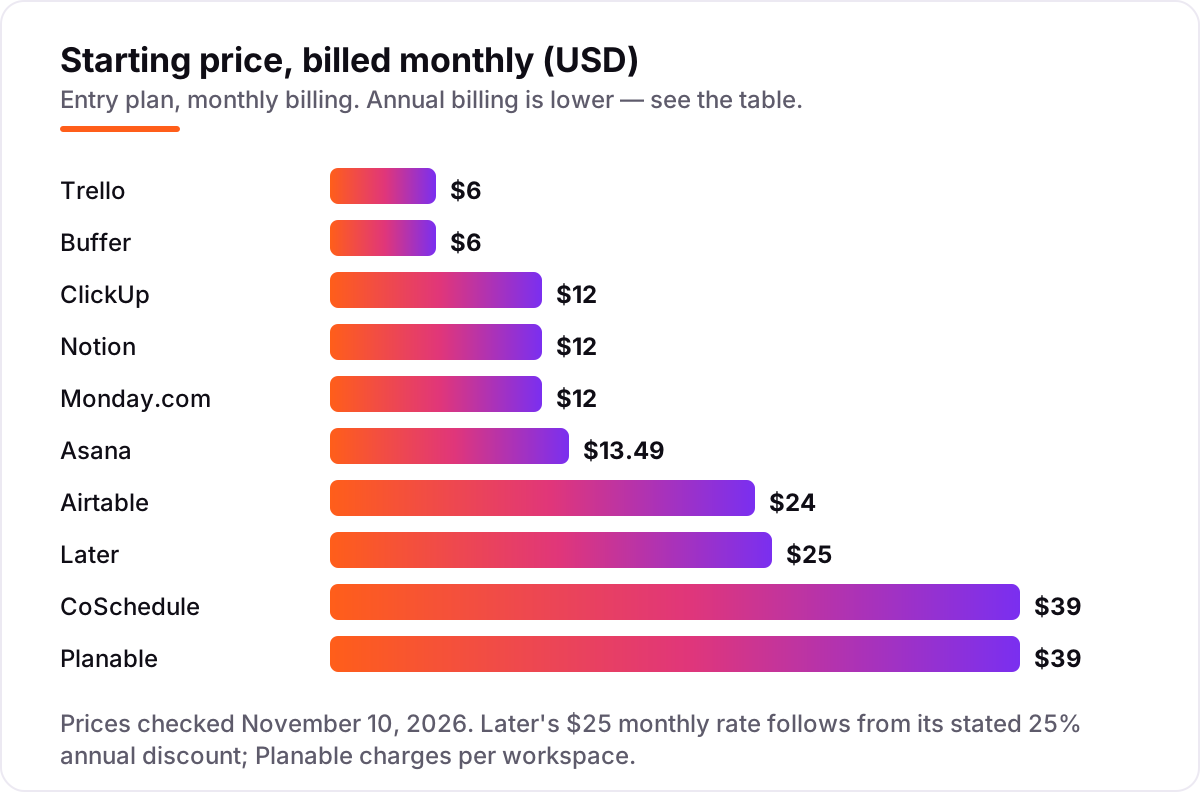
Content planning tool pricing: what you will actually pay
Take a three-person team planning blog posts and four social channels. On monthly billing, the subscription costs $18 on Trello Standard, $24 on Buffer Essentials, $25 on Later Starter, $36 on ClickUp Core, Notion Plus and Monday.com Basic, $39 on Planable Basic, $40.47 on Asana Starter and $72 on Airtable Team. CoSchedule Starter is $39 a month but covers only one user, so a three-person team needs Professional at $49 a month billed annually plus $29 for the third seat.
Two catches sit inside those numbers. Buffer Essentials covers one user only, so a three-person team that needs approvals pays Team at $12 a channel a month — $48 a month for four channels. Later Starter is also a one-user plan, with extra users at $5 a month each. Planable is the exception in the other direction: $39 a month covers unlimited users, so the third person costs nothing extra.
Over a year on annual billing, the same three people cost $180 on Trello, $225 on Later, $240 on Buffer Essentials for four channels, $324 on ClickUp Core and Monday.com Basic, $360 on Notion Plus, $396 on Planable Basic, $395.64 on Asana Starter, $720 on Airtable Team and $936 on CoSchedule Professional with the third seat. The gap from $180 to $936 comes entirely from pricing units and seat rules, not from the calendar itself — so price the team you will have, in the unit the tool charges, before you compare headline prices.
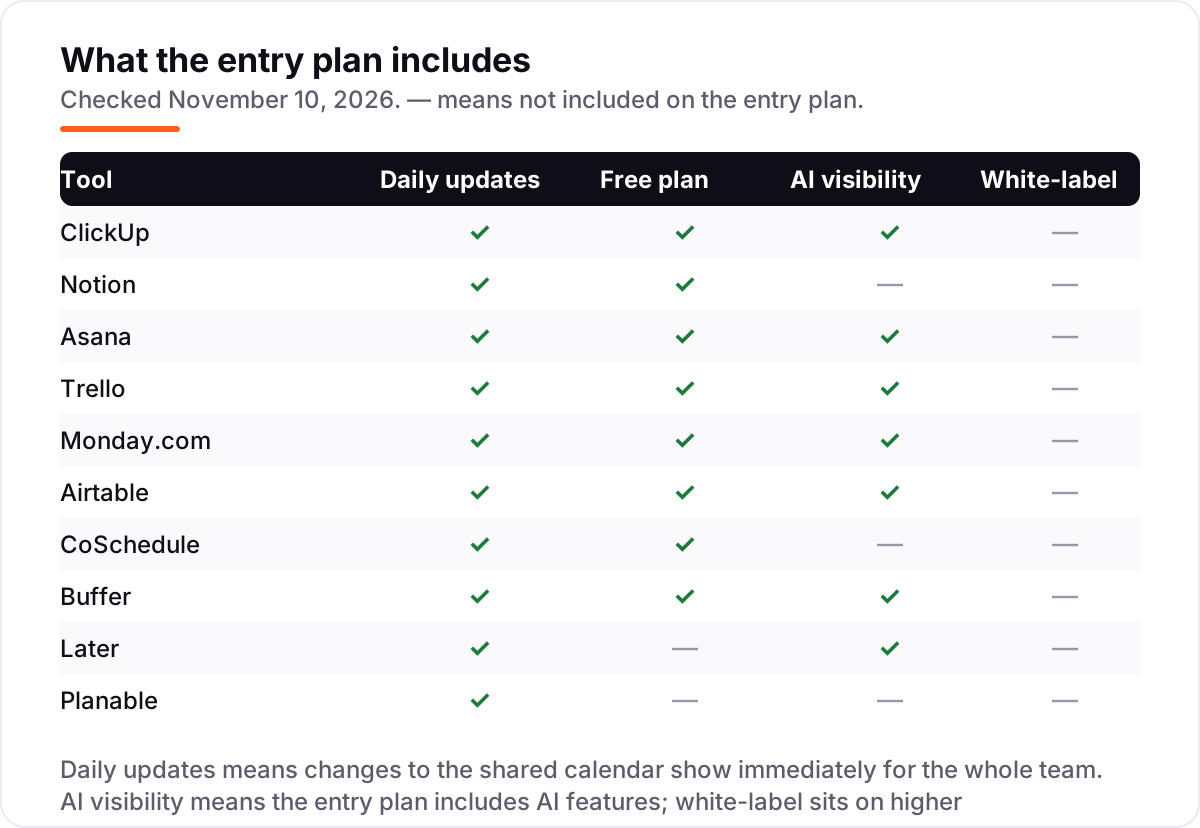
Know the difference: planning vs scheduling vs project management
The confusion in this category is that three different jobs share one calendar. Planning is deciding what to publish, who owns it and when it is due. Scheduling is putting the finished post on the calendar and publishing it at the right time. Project management is running the work around the content — briefs, reviews, deadlines and dependencies.
ClickUp, Notion, Asana, Trello, Monday.com and Airtable are planners and project tools first: they organise the work, and publishing happens elsewhere. Buffer and Later are schedulers first: they publish well, but briefs and approvals live outside them. CoSchedule and Planable try to do both, which is why they charge per user or per workspace rather than per seat — and why they are the right buy only when the team genuinely needs both sides in one place.
The practical test is simple: if the team already has a publishing tool it likes, buy a planner. If the plan already lives in a spreadsheet that works, buy a scheduler. Only buy a tool that does both when both jobs are currently painful.
Quick comparison: tool type by need
| Buyer | Best pick | Why |
|---|---|---|
| Small marketing team, best all-round | ClickUp | Docs, tasks, calendar and Gantt from $9 a user a month billed annually |
| Blog-led team that plans in docs | Notion | Calendar, briefs and archive in one database from $10 a member a month |
| Team that ships on a fixed schedule | Asana | Timelines, dashboards and automations from $10.99 a user a month |
| Team on the tightest budget | Trello | Unlimited boards from $5 a user a month billed annually |
| Visual social team | Later | Grid preview and visual calendar from $18.75 a month billed annually |
| Team whose bottleneck is sign-off | Planable | Approvals in one place, $33 a workspace a month billed annually |
Mistakes to avoid
- Comparing headline prices across different units. $6 a channel, $39 a workspace and $25 a social set are not comparable numbers. Price the same team, the same channels and the same brands in each tool before you choose.
- Buying a one-user plan for a three-person team. Buffer Essentials, CoSchedule Starter and Later Starter each cover one user. The second and third people double the bill or force a tier jump.
- Paying for a database when you need a board. Airtable at $20 a user a month is wasted on a team that only needs cards and dates; Trello at $5 does that job for a quarter of the price.
- Assuming the calendar view is included. Trello's calendar needs Premium, and the free plans at several tools hide the views a team actually uses. Open the calendar view in the trial, not just the board.
- Forgetting the publishing step. A planner with no scheduler still needs Buffer, Later or CoSchedule to publish. Budget for both tools if the plan and the publishing live in different products.
How we chose
We checked each vendor's own pricing page on November 10, 2026 and recorded the starting price exactly as shown, including the annual-billing figure where the page lists one. ClickUp, Buffer and Later were read directly from the vendor pricing pages today; the other seven prices were verified from fresh crawls of the vendors' own pricing pages dated October 28 to November 9, 2026. Later's page lists only the annual rate of $18.75 a month, so the $25 monthly figure follows from Later's own stated 25% annual discount. Planable's old $11-a-user figures still shown in some directories are stale: Planable now charges per workspace, $39 a month billed monthly or $33 billed annually. Ratings are shown only for ClickUp and Asana, whose G2 pages we opened today; the other eight tools carry no rating here because their review pages could not be opened today. We ranked the tools by fit for the most common buyer — a small marketing team planning blog and social content together — not by brand size. No vendor paid for a place in this list, and none of the links here are affiliate links.
What to do next
Start with the free plan or trial of your top pick and plan one real fortnight of blog and social content in it. Check that every post has an owner, a deadline and a publish slot, and that the calendar view shows the whole month at a glance. If the team keeps the calendar current without reminders, you have your tool. Once your tools are in place, find out what's holding your rankings back.
Your stack only works if people find you
SerpAstra fixes what keeps your site off page one and makes it easy for AI assistants to recommend.
Get a free audit→Sources we checked (12)
- ClickUp pricing — clickup.com/pricing (checked November 10, 2026)
- ClickUp on G2 — 4.6/5, 15,432 reviews (checked November 10, 2026)
- Notion pricing — notion.com/pricing (checked November 10, 2026)
- Asana pricing — asana.com/pricing (checked November 10, 2026)
- Asana on G2 — 4.4/5, 14,112 reviews (checked November 10, 2026)
- Trello pricing — trello.com/pricing (checked November 10, 2026)
- Monday.com pricing — monday.com/pricing (checked November 10, 2026)
- Airtable pricing — airtable.com/pricing (checked November 10, 2026)
- CoSchedule pricing — coschedule.com/pricing (checked November 10, 2026)
- Buffer pricing — buffer.com/pricing (checked November 10, 2026)
- Later pricing — later.com/pricing (checked November 10, 2026)
- Planable pricing — planable.io/pricing (checked November 10, 2026)
Shamim
Founder of SerpAstra
A full-stack SEO and digital marketer who spends most days on Local SEO for dental practices, AI search visibility and lead generation.
Frequently asked questions
What is the best content planning tool?
ClickUp is the best fit for most small teams: docs, tasks, calendar and Gantt views in one workspace from $9 a user a month billed annually, with a free plan for unlimited members. Notion is better when planning lives inside documentation, and Trello is better when the team wants the simplest possible board.
How much do content planning tools cost?
Between $0 and $39 a month at the entry level on monthly billing. Trello Standard is $6 a user a month, Buffer Essentials is $6 a channel a month, and ClickUp Core, Notion Plus and Monday.com Basic are $12. Airtable Team is $24, Later Starter is $25, and CoSchedule Starter and Planable Basic are both $39.
Is there a free content planning tool?
Yes, eight tools in this list have free plans: ClickUp, Notion, Asana, Trello, Monday.com, Airtable, CoSchedule and Buffer all cost $0 to start, with limits on boards, records or scheduled posts. Later has no free plan any more, only a 14-day trial, and Planable offers a 50-post free trial instead.
What is the difference between content planning and content scheduling?
Planning is deciding what to publish, who owns it and when it is due; scheduling is putting the finished post on the calendar and publishing it. ClickUp, Notion, Asana and Trello plan; Buffer, Later and CoSchedule schedule. CoSchedule and Planable do both, which is why they cost more per seat or workspace.
Can I plan blog and social content in one tool?
Yes. ClickUp, Notion, Asana and CoSchedule all hold blog briefs and social posts on one calendar, and Airtable can do the same with its database views. Buffer and Later handle social only, so a blog-led team should pair them with Notion or Trello for the editorial side.
What should I check before paying for a content planning tool?
Check the pricing unit first: per user, per channel, per workspace or per social set, and whether the entry plan covers your whole team or only one person. Then check the free plan's limits, whether the calendar view or approvals need a higher tier, and whether publishing to X is included.
Free SEO and AI visibility audit
Find out what is holding your rankings back
Send us your site. Within 2 business days you get a written audit, an AI visibility check and a short fix list ranked by impact. Free, with no contract attached.
Request my free audit→Related guides
 Digital Marketing & Ads11 Best Marketing Calendar Software in 2026, ComparedCompare the 11 best marketing calendar software tools in 2026 on price, calendar views and free plans, with prices checked November 4, 2026 for US teams.Read guide →
 Digital Marketing & Ads10 Best Content Marketing Software in 2026, Compared10 best content marketing software tools compared on price, planning, optimization and publishing, with starting prices and the right pick for every team size.Read guide →
 Email, SMS & Social Media9 Best Tools for Content Creation and Social Media Management in 2026, ComparedCompare the 9 best tools for content creation and social media management on price, free plans and AI features, with every price checked November 6, 2026.Read guide →