
12 Best Cross-Platform Development Frameworks in 2026, Compared
Compare the 12 best cross-platform development frameworks for 2026: free open-source options, prices, hot reload and platform reach, checked November 10, 2026.
 Shamim Mia, Founder, SerpAstraLast verified November 10, 202614 min read
We compare pricing pages, documentation and public reviews. We never accept payment for rankings.

Key takeaways
- Flutter leads for most teams at $0, with React Native also $0 and Expo free for the framework — all 12 frameworks here are free and open source.
- The single most important buying factor is the rendering model: native-compiled, native UI or web view decides how the app feels and performs.
- The real bill is not the framework: budget Apple's $99 a year, Google Play's $25 one-time fee, and optional services such as Expo EAS from $19 a month.
- Every price below was checked on the vendor's own page on November 10, 2026, except Uno Studio Pro, which is third-party sourced; only Flutter carries a G2 rating.
On this page
Quick comparison
| Tool | Best for | Starting price | Free plan |
|---|---|---|---|
| Flutter | Teams shipping a polished app to iOS, Android, web and desktop from one Dart codebase | Free ($0/yr) | Yes (free) |
| React Native | JavaScript teams that want truly native UI on iOS and Android and the largest hiring pool | Free ($0/yr) | Yes (free) |
| Expo | Small React Native teams that want to ship to the stores without managing Xcode and Android Studio | Free; EAS from $19/mo | Yes (free EAS plan) |
| .NET MAUI | C# and .NET shops that want native iOS, Android, Windows and macOS apps from one codebase | Free ($0/yr) | Yes (free) |
| Kotlin Multiplatform | Android-first teams that want to share business logic with iOS while keeping native UI on each platform | Free ($0/yr) | Yes (free) |
| Ionic | Web teams that want to ship iOS, Android and web apps with HTML, CSS and JavaScript | Free ($0/yr) | Yes (free) |
| Capacitor | Teams with an existing web app that want a native iOS and Android shell without rewriting it | Free ($0/yr) | Yes (free) |
| Tauri | Web teams building a small, fast desktop app for Windows, macOS and Linux | Free ($0/yr) | Yes (free) |
| Electron | Web teams building a full-featured desktop app where bundle size does not matter | Free ($0/yr) | Yes (free) |
| Qt | C++ teams building performance-critical desktop or embedded apps with native controls | Free; commercial by quote | Yes (open source) |
| Avalonia | .NET teams building a desktop-first app that must run well on Linux as well as Windows and macOS | Free; Plus from €299/yr | Yes (free) |
| Uno Platform | WinUI and UWP teams that want one XAML codebase for Windows, mobile and web | Free; Studio Pro $39.99/mo | Yes (Community tier) |
Make one of these tools?
We re-check this list every quarter. Send a correction, request a review, or ask about a clearly labeled sponsored spot.
Request a listingThe best cross-platform development frameworks

Flutter
Best for: Teams shipping a polished app to iOS, Android, web and desktop from one Dart codebase
Flutter is the safest default in this list for a team that wants one codebase and one look everywhere. Google's UI toolkit compiles Dart to native ARM code for iOS and Android, and the same code also builds web, Windows, macOS and Linux apps. Its own rendering engine draws every pixel, so the app looks identical on each platform instead of borrowing each platform's native controls.
The price is $0: the SDK, engine and DevTools are free under the BSD 3-Clause licence, with no paid edition. The real costs are the people and the store fees — Apple's $99 a year and Google Play's $25 one-time registration. Pick Flutter when a consistent, custom-designed UI matters more than matching each platform's native controls exactly.
What we like
- One Dart codebase ships to iOS, Android, web, Windows, macOS and Linux, with the same UI on every platform
- Hot reload and a widget for almost everything make UI work fast, with a large package ecosystem on pub.dev
- Compiles to native ARM code, so animations stay smooth without a JavaScript bridge
- Backed by Google and used in production by large apps, with frequent stable releases
Watch out for
- Apps ship larger than native ones, and Dart is a less common language, so hiring takes longer
- Platform-specific features still need native code or community plugins of varying quality
- Material and Cupertino widget sets now ship as separate packages, so upgrades need attention

React Native
Best for: JavaScript teams that want truly native UI on iOS and Android and the largest hiring pool
React Native is the pragmatic pick for a JavaScript team. It is Meta's open-source framework for building iOS and Android apps with React, and it renders real native UI components rather than a web view, so the result feels like a native app. Because it runs on the JavaScript ecosystem, the team can reuse its existing skills and most of its npm libraries.
The framework is free under the MIT licence, with no paid tier from Meta. The official guidance is to start new apps with Expo, which handles the native toolchain. The catch is the native edge: some features need Swift, Kotlin or Objective-C, and upgrades can break third-party libraries. Choose React Native when hiring speed and native feel matter most.
What we like
- Renders real native components, so apps feel like native apps instead of a web page in a shell
- The largest talent pool here: most JavaScript and React developers can start without learning a new language
- Huge npm ecosystem, with a library for almost every integration, plus Meta, Microsoft and Shopify shipping it
- Fast Refresh shows code changes in seconds without losing the app's state
Watch out for
- Needs native code for some features, so the team still needs Xcode and Android Studio skills
- Upgrades between versions can break third-party libraries, and the bridge adds debugging work
- No desktop or web target in the core framework — web needs React Native for Web, desktop needs a separate wrapper

Expo
Best for: Small React Native teams that want to ship to the stores without managing Xcode and Android Studio
Expo is React Native with the sharp edges filed off. The framework itself is free and open source under the MIT licence, and its optional cloud services, Expo Application Services, handle builds, store submissions and over-the-air updates. A small team can ship to both stores without owning a Mac or maintaining a local native toolchain.
The free EAS plan covers 15 Android and 15 iOS builds a month and updates for 1,000 monthly active users. Starter costs $19 a month plus usage, with $45 of build credit, and Production is $199 a month plus usage. Pick Expo when the team wants to ship fast and can live inside its managed workflow; pick bare React Native when custom native modules are essential.
What we like
- The fastest route from a React Native idea to a store build, with managed builds, submissions and over-the-air updates
- EAS Build compiles iOS and Android binaries in the cloud, so the team needs no Mac for most builds
- The free EAS plan covers 15 Android and 15 iOS builds a month, enough for a side project
- Over-the-air updates push JavaScript fixes to users without a store review
Watch out for
- Paid plans start at $19 a month plus usage, and heavy build volume pushes the bill up fast
- The managed workflow limits native modules; ejecting to bare React Native is a real migration
- Desktop is not a first-class target, so a desktop app needs another framework

.NET MAUI
Best for: C# and .NET shops that want native iOS, Android, Windows and macOS apps from one codebase
.NET MAUI is the successor to Xamarin.Forms, and it is the natural choice for a team that already builds in C#. A single C# and XAML codebase compiles to native apps on Android, iOS, macOS and Windows, with one project structure and direct access to each platform's native APIs. It is part of .NET, so the team keeps its language, libraries and tooling.
The framework is free and open source under the MIT licence, with no separate mobile licence fee from Microsoft. Visual Studio Community is free for individuals and small teams, though larger organisations need a paid Visual Studio subscription. The trade-off is ecosystem size: fewer third-party controls and a smaller community than Flutter or React Native. Pick MAUI when the team already speaks C#.
What we like
- One C# and XAML codebase compiles to native UI on iOS, Android, macOS and Windows
- Free and open source under the MIT licence, with Visual Studio Community free for individuals and small teams
- Full access to each platform's native APIs from C#, with no separate mobile licence fee
- Long-term support releases give roughly three years of support, which suits enterprise planning
Watch out for
- The release train has lagged behind core .NET releases, and some controls arrive later than on other frameworks
- Smaller community and fewer third-party UI controls than Flutter or React Native
- iOS and macOS builds still need a Mac

Kotlin Multiplatform
Best for: Android-first teams that want to share business logic with iOS while keeping native UI on each platform
Kotlin Multiplatform takes a different deal from the rest of this list: share the logic, keep the native UI. JetBrains' open-source technology lets a team write networking, storage and business rules once in Kotlin and use them on Android, iOS, desktop, web and server, while each platform's interface stays genuinely native. Google announced official support for sharing business logic between Android and iOS in May 2024.
It is free under the Apache 2.0 licence, and JetBrains' own survey found 55% of users reporting better collaboration after adopting it and 65% reporting better performance and quality. The catch is that the team still writes two UIs and still needs iOS skills. Pick it when native feel on each platform matters more than a single shared interface.
What we like
- Shares business logic across Android, iOS, desktop, web and server while each platform keeps its native UI
- Free and open source under the Apache 2.0 licence, and stable since November 2023
- Adopt it gradually: share one module first, such as networking, and expand from there
- Compose Multiplatform lets teams share UI code too, with stable support for Android, iOS and desktop
Watch out for
- Sharing UI is still maturing: Compose Multiplatform for web (WebAssembly) is in beta
- iOS work needs Swift and Xcode skills, so the team is not free of native development
- A smaller hiring pool than Flutter or React Native, and fewer ready-made UI libraries

Ionic
Best for: Web teams that want to ship iOS, Android and web apps with HTML, CSS and JavaScript
Ionic is the framework for a team that already builds for the web. Its open-source UI toolkit turns HTML, CSS and JavaScript into high-quality mobile and desktop apps, with components that adapt to iOS and Android design patterns. Paired with Capacitor, the same codebase reaches native device features and ships to the stores, and it also runs as a plain web app.
The framework itself is free and open source. The trade-off is the web view: apps render in a web view rather than native controls, so heavy animations need care, and the team should budget for performance tuning. Ionic's Appflow cloud service stopped new sales in February 2025 and ends on December 31, 2027, so new teams should plan builds and updates elsewhere. Pick Ionic when web skills are the team's strength.
What we like
- Builds with the web skills the team already has: HTML, CSS and JavaScript, with Angular, React or Vue
- Free and open-source UI toolkit with mobile and desktop components that adapt to each platform's design
- Pairs with Capacitor to reach native device features from one TypeScript API
- One codebase also ships as a web app, so the team maintains a single product
Watch out for
- Apps run in a web view, so heavy animations and complex screens can feel slower than native
- Complex apps need extra performance tuning, which eats into the time the web approach saves
- Appflow, Ionic's build and update service, stopped new sales in February 2025 and ends December 31, 2027

Capacitor
Best for: Teams with an existing web app that want a native iOS and Android shell without rewriting it
Capacitor is the lightest lift in this list for a team that already has a web app. It is a free, open-source native runtime from the Ionic team that wraps a standard web codebase and runs it natively on iOS, Android and the web, with a consistent TypeScript API for device features such as the camera, file system and location.
There is no licence fee: Capacitor is MIT-licensed and free for commercial use. Because it is a runtime rather than a UI framework, the team brings its own interface — React, Vue, Angular or plain HTML — and the app's performance depends on how well that web app is built. Pick Capacitor when the web app already exists and the job is to get it into the stores.
What we like
- Wraps any existing web app — React, Vue, Angular or plain JavaScript — in a native iOS and Android shell
- Free and open source under the MIT licence, maintained by the Ionic team
- A single TypeScript API reaches native features such as the camera, file system and location
- Works with existing Cordova plugins, so older projects can migrate gradually
Watch out for
- It is a runtime, not a UI framework: the team still needs a web UI and its own design system
- Apps run in a web view, so performance depends on how well the web app is built
- Native features beyond the core plugins need custom plugin code in Swift or Kotlin

Tauri
Best for: Web teams building a small, fast desktop app for Windows, macOS and Linux
Tauri is the answer to Electron's size. It builds desktop and mobile apps from a web frontend with a Rust backend, but instead of bundling Chromium it uses the web renderer the operating system already has — WebView2 on Windows, WKWebView on macOS. A minimal app can come in under 600KB, and memory use stays far below an Electron app.
The framework is free under MIT or Apache 2.0, with no paid tier, and version 2 is the stable line, covering Windows, macOS, Linux, iOS and Android. The catch is Rust: any real backend work needs a Rust-capable developer, and the ecosystem is smaller than Electron's. Pick Tauri when a small, fast desktop download matters more than the biggest plugin library.
What we like
- Tiny apps: a minimal app can come in under 600KB, against 100MB-plus for Electron
- Free under MIT or Apache 2.0, with no paid tier for the framework itself
- Uses the operating system's own web view, so there is no bundled Chromium to ship or patch
- A Rust backend gives native speed and a security-first design, with desktop and mobile targets in v2
Watch out for
- The backend is Rust, so the team needs Rust skills for anything beyond the web frontend
- A younger ecosystem than Electron, with fewer ready-made plugins and examples
- Mobile targets are newer than desktop, so iOS and Android support is less proven

Electron
Best for: Web teams building a full-featured desktop app where bundle size does not matter
Electron is the veteran of desktop cross-platform development. It combines Chromium, Node.js and native code so a team can build Windows, macOS and Linux apps with the web technologies it already knows. It is maintained by the OpenJS Foundation with backing from Microsoft, Slack and Notion, and it releases a new major version in step with Chromium.
Electron is free and open source under the MIT licence, with no licence fee for commercial or personal use. The price is size and memory: every app bundles Chromium, so a simple app ships at 100MB or more and uses far more RAM than a Tauri app. Pick Electron when the team wants the biggest ecosystem and the most proven path, and can accept the download size.
What we like
- The most proven desktop framework here, maintained by the OpenJS Foundation with backing from Microsoft, Slack and Notion
- Free and open source under the MIT licence, with no licence fee for any use
- Bundles Chromium and Node.js, so the app behaves identically on Windows, macOS and Linux
- The largest desktop plugin and tooling ecosystem of any framework in this list
Watch out for
- Large downloads: a simple app ships 100MB or more because Chromium is bundled
- High memory use — each window is effectively a browser tab
- Security needs active care: bundled Chromium must be kept patched, and the main process needs hardening

Qt
Best for: C++ teams building performance-critical desktop or embedded apps with native controls
Qt is the old hand in this list: a C++ framework for building desktop, mobile and embedded apps from one codebase, with native performance and a mature set of widgets and QML tools. It has shipped in cars, medical devices and industrial systems for decades, and its module library covers everything from 3D graphics to Bluetooth.
Qt is free under the LGPL or GPL for open-source projects; a commercial licence is needed for proprietary apps that cannot meet the LGPL terms, and commercial pricing is quote-based with no published list price. The team should check the licence before shipping a closed app. Pick Qt when native performance and embedded targets matter more than a low licence cost.
What we like
- Native C++ performance with a mature widget and QML toolkit, proven over decades
- Free under LGPL or GPL for open-source projects, with a commercial licence for proprietary apps
- Covers desktop, mobile and embedded from one codebase, including automotive and medical devices
- Strong tooling with Qt Creator, Qt Design Studio and a large module library
Watch out for
- Commercial licences are quote-based with no published list price, so budgeting needs a sales conversation
- The free LGPL edition carries open-source obligations that need a licence check before shipping a closed app
- A steeper learning curve than web-based frameworks, and C++ hiring is slower than JavaScript hiring

Avalonia
Best for: .NET teams building a desktop-first app that must run well on Linux as well as Windows and macOS
Avalonia is the .NET framework for teams that care about Linux. It is a free, open-source UI framework in C# and XAML that ships one codebase to Windows, macOS, Linux, iOS, Android and the browser, drawing its own interface so the app looks the same everywhere. It is used in production by teams at Autodesk and JetBrains, and it is commercially backed by the engineers who build it.
The framework is MIT-licensed and free for commercial work, with no seat fees or per-device royalties. Optional Plus tooling starts at €299 a year per seat, and Pro at €899. The trade-off is ecosystem size: fewer third-party controls than .NET MAUI and a smaller community. Pick Avalonia when Linux is a first-class target, not an afterthought.
What we like
- Free and open source under the MIT licence, with no seat fees or per-device royalties
- One C# and XAML codebase ships to Windows, macOS, Linux, iOS, Android and the browser
- Draws its own UI like Flutter, so the app looks the same on every platform, including Linux
- Used in production by teams at Autodesk and JetBrains, and commercially backed by its own engineers
Watch out for
- A smaller community than .NET MAUI, with fewer third-party controls and examples
- Optional Plus tooling costs from €299 a year per seat, so the free framework is not the whole story for some teams
- Mobile and web targets are less mature than the desktop experience

Uno Platform
Best for: WinUI and UWP teams that want one XAML codebase for Windows, mobile and web
Uno Platform is the choice for a team that already builds with Microsoft's XAML stack. Its free, open-source framework lets one C# and XAML codebase target Windows, macOS, Linux, iOS, Android and WebAssembly, built on WinUI so Windows apps use Microsoft's current native UI. The same code can also become a web app through WebAssembly.
The platform itself is free under Apache 2.0, and its Studio tooling has a free Community tier. Paid Studio plans add AI credits and design control, with Pro reported at $39.99 a month per developer by third-party directories — check the vendor's own page before budgeting. The trade-off is community size: smaller than Flutter or .NET MAUI. Pick Uno when the team already lives in WinUI and XAML.
What we like
- One C# and XAML codebase targets Windows, macOS, Linux, iOS, Android and WebAssembly
- Free and open source under Apache 2.0, with a free Community tier for its Studio tooling
- Built on WinUI, so Windows apps use Microsoft's current native UI framework
- Hot reload and AI-assisted screen work in Uno Platform Studio speed up the design loop
Watch out for
- A smaller community than Flutter or .NET MAUI, so answers and libraries take longer to find
- The paid Studio tooling is where the AI and design features live, so the free framework alone is plainer
- WebAssembly apps ship large downloads, which suits internal tools better than public sites
The best cross-platform development framework lets one team ship one app to iOS, Android, web and desktop without writing it four times. The 12 frameworks below are ranked by fit for the most common buyer: a small team shipping one product to phones first, then web and desktop. Every framework here is free and open source, so the choice is about the rendering model, the language and the ecosystem — not the licence fee.
How to choose the best cross-platform development framework
- Start with the rendering model. Native-compiled frameworks draw their own UI, native-UI frameworks use each platform's controls, and web-view frameworks run the app in a browser shell. The model decides how the app feels more than any feature list does.
- Match the language to the team you have. A JavaScript team ships fastest on React Native or Expo, a C# team on .NET MAUI, Avalonia or Uno Platform, and a Dart team on Flutter. A new language costs months; a familiar one ships in weeks.
- Count the platforms you actually need. Mobile plus web is covered by Flutter, React Native and Ionic; desktop as well points to Flutter, Tauri, Electron or Qt. Do not pay in complexity for a platform you will never ship.
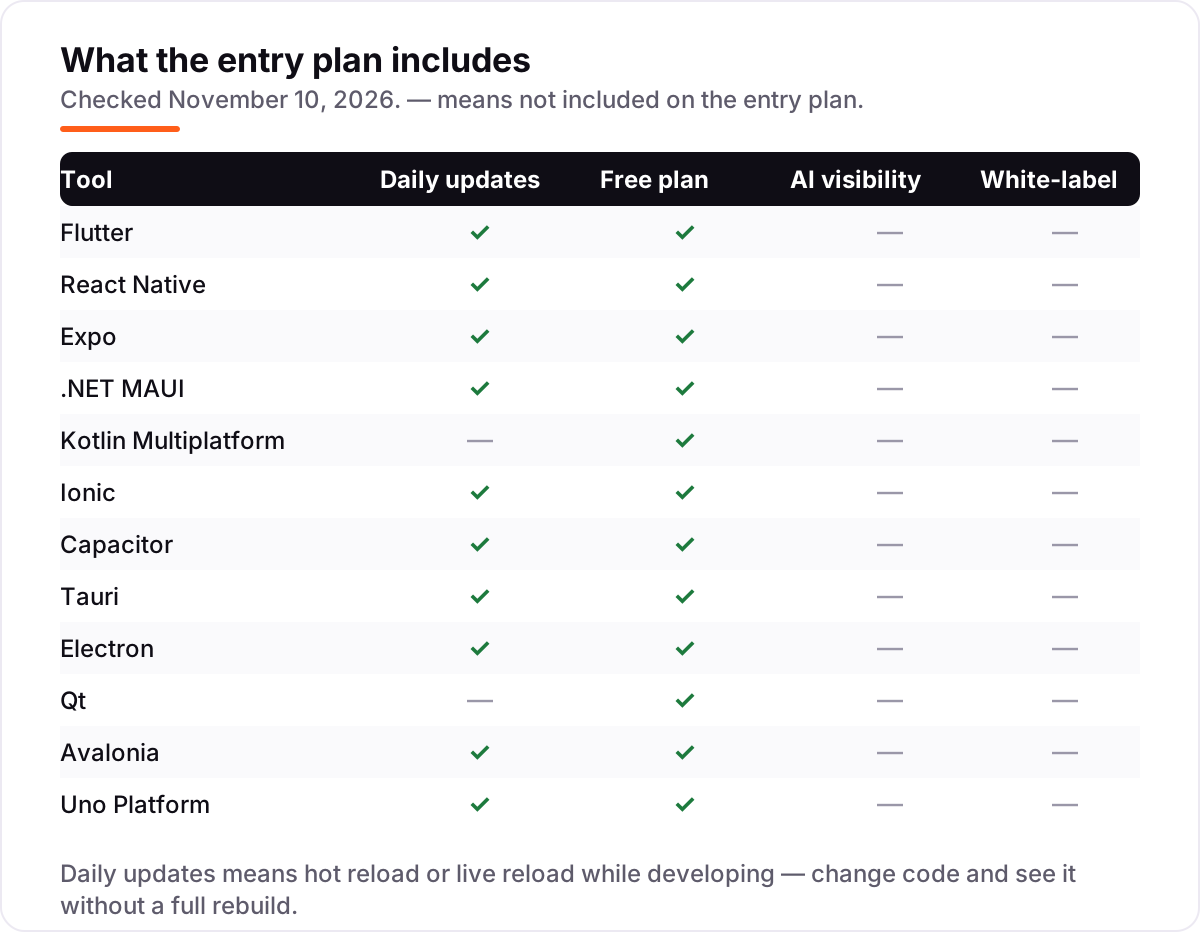
- Check hot reload and the debug loop. The matrix below shows which frameworks offer hot reload: changing code and seeing it without a full rebuild is the difference between a fast week and a slow one.
- Price the services around the framework, not the framework. Every framework here is $0, but Expo's cloud builds, Avalonia's Plus tooling and the store fees are real money — the pricing section works it out for a three-developer team.
- Check the maintenance record. Xamarin ended support in May 2024 and Cordova is in maintenance mode, so both are left out of this list. Every framework here shipped a stable release in 2026 and is actively maintained.
Cross-platform development framework pricing: what you will actually pay
Take a three-developer team shipping one app to iOS and Android in its first year. The framework licence costs $0 on all 12 frameworks — Flutter, React Native, Expo, .NET MAUI, Kotlin Multiplatform, Ionic, Capacitor, Tauri, Electron, Qt, Avalonia and Uno Platform are all free and open source. The unavoidable bill is the stores: Apple's Developer Program at $99 a year plus Google Play's $25 one-time registration fee, which is $124 in the first year and $99 a year after that.
The optional services are where the numbers move. On Expo, the free EAS plan covers 15 Android and 15 iOS builds a month; Starter costs $19 a month plus usage, with $45 of build credit, and Production is $199 a month plus usage, with $225 of credit. EAS is priced per account, not per seat, so a three-developer team on Production pays $2,388 a year before usage — $2,512 including the store fees. On Avalonia, Plus tooling costs €299 a year per seat, so three developers pay €897 a year on top of the $124 in store fees. On Uno Platform, Studio Pro is reported at $39.99 a month per developer by third-party directories, which would be $1,439.64 a year for three developers — check the vendor's own page before budgeting, because that figure is not vendor-verified.
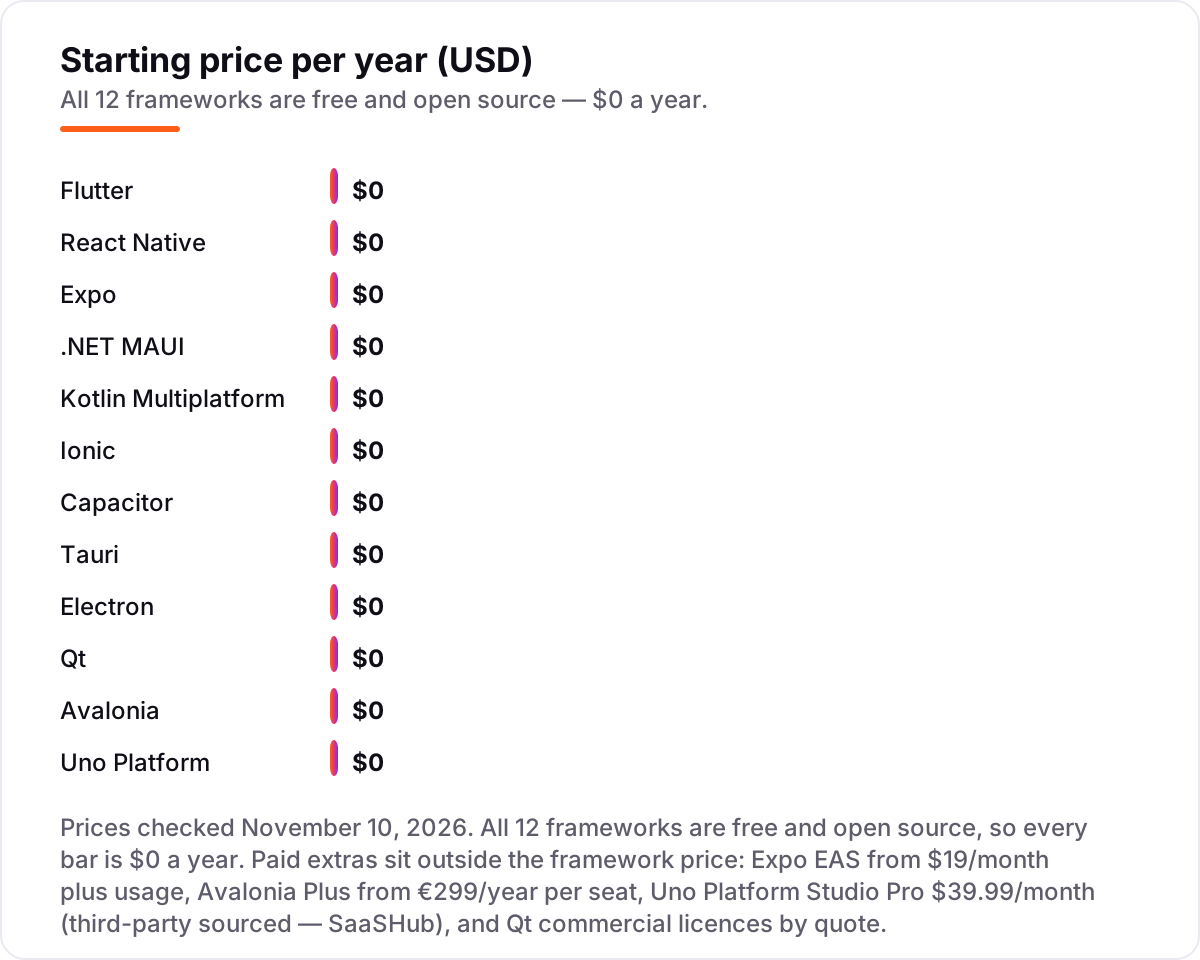
That leaves the Qt question. Qt's open-source edition is free, but a commercial licence is quote-based with no published list price, so a team that needs one cannot budget it from this page — it needs a sales conversation. Third-party analysts report small-business licences in the range of $4,000 to $6,000 per developer per year, which would be $12,000 to $18,000 for three developers before any discount. The honest summary for a three-developer team is: $124 in year one with any framework and no paid services, $2,512 on Expo Production, €897 plus $124 on Avalonia Plus, and a sales call for Qt commercial.
Know the difference: native-compiled vs native UI vs web view frameworks
The confusion in this category is the rendering model, not the feature list. Native-compiled frameworks — Flutter, and Qt in C++ — draw the interface with their own engine and compile to machine code, so the app looks identical everywhere and animations stay smooth. Native-UI frameworks — React Native, .NET MAUI and Kotlin Multiplatform — call each platform's real controls, so the app feels at home on each device but looks slightly different on each one. Web-view frameworks — Ionic, Capacitor, Tauri and Electron — run web code inside a browser shell, so the team ships with web skills but pays in app size or speed.
Kotlin Multiplatform is the odd one out: it shares business logic, not the UI, so each platform keeps a fully native interface built in Swift or Kotlin. That is a strength when native feel matters most and a cost when the team hoped to write one interface. And two familiar names are missing on purpose: Unity and Godot are game engines, not app frameworks — a game team should look at them, but a business-app team should not. Xamarin is missing because Microsoft ended support in May 2024, and Cordova because it is in maintenance mode.
Quick comparison: tool type by need
| Buyer | Best pick | Why |
|---|---|---|
| Small team, one app everywhere | Flutter | One Dart codebase, one identical UI, $0 on every platform |
| JavaScript team, native feel | React Native or Expo | Real native controls, biggest hiring pool, Expo ships fastest |
| C# or .NET shop | .NET MAUI | Native apps on four platforms, no licence fee, long-term support |
| Android-first, native UI per platform | Kotlin Multiplatform | Share the logic, keep the native interface on each platform |
| Web team shipping to the stores | Ionic or Capacitor | HTML, CSS and JavaScript, with Capacitor wrapping an existing web app |
| Desktop app, small download | Tauri | Sub-megabyte apps from web skills, against 100MB-plus for Electron |
Mistakes to avoid
- Choosing by the licence fee. All 12 frameworks are $0, so the fee tells you nothing. Choose by the rendering model, the language and the ecosystem — and price the services and store fees instead.
- Ignoring the store fees and the services. Apple's $99 a year and Google Play's $25 are unavoidable, and Expo Production at $199 a month plus usage is a real budget line. A $0 framework with a $2,388-a-year build service is not a $0 stack.
- Picking a web view for a gesture-heavy app. Ionic and Capacitor are fast to build, but complex animations and lists need native-compiled or native-UI frameworks. Test the heaviest screen in the trial build, not the login screen.
- Assuming one codebase means one UI. Kotlin Multiplatform shares logic, not the interface — the team still builds two UIs. Budget the second UI before you commit, or pick Flutter and accept one shared look.
- Committing before a two-framework spike. Build the same small feature — a list, a form and a native call such as the camera — in your top two frameworks. The one with the faster debug loop and the smaller app is usually the right one.
How we chose
We checked each vendor's own site on November 10, 2026 and recorded the starting price exactly as shown; every framework here is free and open source, so every price is $0 and the chart shows annual prices of $0. Two figures are not vendor-verified: Uno Platform Studio Pro at $39.99 a month comes from third-party directories, because the vendor's own subscription page lists its tiers without showing the price in the copy we could read; and Qt's commercial pricing is quote-based, with the small-business range reported by third-party analysts. Only Flutter carries a G2 rating here, 4.6 from 73 reviews: G2 returned a 403 access error for Qt's review page, the React Native page failed to load, and the other frameworks have no usable G2 review base, so no other rating is shown. We ranked the tools by fit for the most common buyer — a small team shipping one app to iOS, Android, web and desktop — not by brand size. No vendor paid for a place in this list, and none of the links here are affiliate links.
What to do next
Start with the rendering model: pick native-compiled if the UI must be identical everywhere, native UI if each platform should feel at home, or a web view if the team already ships on the web. Then build the same small feature in your top two frameworks and compare the debug loop, the build time and the app size before you commit. Before you publish the store listing, check the title with the free SERP snippet preview tool, and measure what happens after launch with our guide to mobile app analytics. If the app serves customers in one city or region, our local SEO service covers the discovery side while the framework covers the product. Once your tools are in place, find out what's holding your rankings back.
Your stack only works if people find you
SerpAstra fixes what keeps your site off page one and makes it easy for AI assistants to recommend.
Get a free audit→Sources we checked (17)
- Flutter — flutter.dev (checked November 10, 2026)
- Flutter on G2 — 4.6/5, 73 reviews (checked November 10, 2026)
- React Native — reactnative.dev (checked November 10, 2026)
- Expo EAS pricing — expo.dev/blog/best-ci-cd-for-mobile-apps (checked November 10, 2026)
- .NET is free — dotnet.microsoft.com/en-us/platform/free (checked November 10, 2026)
- Kotlin FAQ — kotlinlang.org/docs/faq.html (checked November 10, 2026)
- Kotlin Multiplatform overview and survey — kotlinlang.org/docs/multiplatform/kmp-overview.html (checked November 10, 2026)
- Ionic Framework — ionicframework.com (checked November 10, 2026)
- Capacitor — capacitorjs.com (checked November 10, 2026)
- Tauri — tauri.app (checked November 10, 2026)
- Electron — electronjs.org/docs/latest/why-electron (checked November 10, 2026)
- Qt — qt.io (checked November 10, 2026)
- Qt commercial pricing, third-party — vendr.com/marketplace/qt (checked November 10, 2026)
- Avalonia Plus pricing — avaloniaui.net/accelerate (checked November 10, 2026)
- Uno Platform subscription — platform.uno/select-subscription/ (checked November 10, 2026)
- Uno Platform Studio Pro price, third-party — saashub.com (checked November 10, 2026)
- Ionic Appflow end of sales — capgo.app (checked November 10, 2026)
Shamim
Founder of SerpAstra
A full-stack SEO and digital marketer who spends most days on Local SEO for dental practices, AI search visibility and lead generation.
Frequently asked questions
What is the best cross-platform development framework in 2026?
Flutter is the best fit for most teams: one Dart codebase ships a consistent UI to iOS, Android, web and desktop for $0. JavaScript teams should pick React Native or Expo instead, and C# teams should pick .NET MAUI. The right answer depends on the language the team already knows and the platforms the app must reach.
How much does a cross-platform development framework cost?
The framework itself costs $0: all 12 in this list are free and open source. The real first-year bill for a team is Apple's $99 a year developer membership plus Google Play's $25 one-time fee — $124 in total. Optional services add more: Expo EAS starts at $19 a month plus usage, and Avalonia Plus starts at €299 a year per seat.
Is Flutter or React Native better?
Flutter wins when the UI must look identical everywhere, because it draws every pixel itself and compiles to native code. React Native wins when the team already knows JavaScript and wants truly native controls plus the largest hiring pool. Both are free, so build the same small feature in each and compare the debug loop before you commit.
Can I build iOS apps without a Mac?
Partly. Expo's cloud builds compile iOS apps without a local Mac, and Flutter and React Native can use cloud CI for iOS builds too. But .NET MAUI and Kotlin Multiplatform still need a Mac for iOS builds, and every route to the App Store needs an Apple Developer membership at $99 a year, plus a Mac or a cloud Mac for signing.
What is the difference between Flutter and React Native?
Flutter draws its own UI with a rendering engine, so the app looks the same on every platform but does not use native controls. React Native renders real native components, so the app feels like a native app on each platform. Flutter uses Dart; React Native uses JavaScript and React. The trade-off is visual consistency against native feel.
Is Xamarin still a good choice for new apps?
No. Microsoft ended support for Xamarin in May 2024, and its successor is .NET MAUI, which is free and open source. Do not start a new app on Xamarin: existing Xamarin apps should migrate to .NET MAUI, which keeps the C# and XAML skills but adds desktop targets and a single project structure.
Do cross-platform apps perform as well as native apps?
Close enough for most apps, with exceptions. Flutter and React Native compile to native code and feel native for typical business apps. Web-view frameworks such as Ionic and Capacitor depend on the web app's quality, so heavy animations need tuning. For games, 3D or real-time media, a native app or a game engine will still beat a general app framework.
Free SEO and AI visibility audit
Find out what is holding your rankings back
Send us your site. Within 2 business days you get a written audit, an AI visibility check and a short fix list ranked by impact. Free, with no contract attached.
Request my free audit→Related guides
 Digital Marketing & Ads9 Best A/B Testing Software for App Developers in 2026, ComparedCompare the 9 best A/B testing software for app developers on price, free tiers, SDKs and stats, with every price checked today, November 4, 2026.Read guide →
 SEO & AI SearchBest Mobile App Analytics (2026): 12 Apps Worth Downloading12 best mobile app analytics tools compared on price, free plans and attribution, with real starting prices checked on vendor pages, November 2, 2026.Read guide →
 SEO & AI Search12 Best Product Analytics Tools for Mobile Apps in 2026, Compared12 best product analytics tools for mobile apps compared on price, free plans, replay and attribution. Prices checked on vendor pages, November 2, 2026.Read guide →