
8 Best Cross-Platform Mobile App Development in 2026, Compared
8 best cross-platform mobile app development options compared on price, type and fit for teams shipping to iOS and Android, checked November 10, 2026.
 Shamim Mia, Founder, SerpAstraLast verified November 10, 202614 min read
We compare pricing pages, documentation and public reviews. We never accept payment for rankings.

Key takeaways
- Flutter leads for most teams at $0, with React Native also free at $0 and Expo free to start with a free EAS tier.
- The single most important buying factor is your team's existing skill: Dart, JavaScript, C#, Kotlin or web skills decide the framework before any feature list does.
- Six of the eight options are free and open source, so the real first-year cost is the $99 Apple Developer fee plus the $25 Google Play fee.
- Low-code builders are the exception: FlutterFlow starts at $39 a month and Adalo at $65 a month, and both charge for the plan that can actually publish to the stores.
On this page
Quick comparison
| Tool | Best for | Starting price | Free plan |
|---|---|---|---|
| Flutter | Teams that want one codebase, a large package library and the most polished shared UI on iOS and Android | $0 | Yes (open source) |
| React Native | Web teams that already write React and want native apps without learning a new language | $0 | Yes (open source) |
| Expo | Small React Native teams that want managed builds, over-the-air updates and store submission without native tooling | $0 | Yes (free tier) |
| .NET MAUI | C# and .NET teams, especially Xamarin teams migrating to Microsoft's supported successor | $0 | Yes (open source) |
| Kotlin Multiplatform | Teams with existing native Android and iOS apps that want to share logic without rewriting either UI | $0 | Yes (open source) |
| Ionic | Web teams that want to ship a mobile app from the HTML, CSS and JavaScript they already write | $0 | Yes (open source) |
| FlutterFlow | Non-developers and small teams that want a visual Flutter builder with code export | $351/yr | Yes (free plan) |
| Adalo | Founders with no coding background who want a database-driven app published to both stores | $624/yr | Yes (free plan) |
Make one of these tools?
We re-check this list every quarter. Send a correction, request a review, or ask about a clearly labeled sponsored spot.
Request a listingThe best cross-platform mobile app development

Flutter
Best for: Teams that want one codebase, a large package library and the most polished shared UI on iOS and Android
Flutter is Google's open-source framework for building apps from one Dart codebase, and it is the default pick in this list because it asks the least of a team that wants a polished app on both stores. The widgets render the same on iOS and Android, hot reload keeps UI work fast, and pub.dev covers payments, maps, analytics and other common needs without custom native work.
The price is $0 for the framework itself, and the costs that do appear are the store fees every option in this list shares: $99 a year for Apple Developer and a $25 one-time Google Play fee. The honest trade-offs are a smaller Dart hiring pool than JavaScript and larger app bundles than a native build. Pick Flutter when the team can learn Dart and the app needs a custom, animated interface.
What we like
- One Dart codebase ships to iOS and Android, with the same widgets rendering on both stores
- Hot reload shows code changes in under a second, so UI iteration stays fast
- pub.dev carries thousands of packages, and Google ships first-party Firebase and ads packages
- Compiles to native ARM code, so animation-heavy apps stay smooth without a JavaScript bridge
Watch out for
- Dart is a smaller hiring pool than JavaScript, so new teams take longer to staff
- App bundles run larger than native apps, which matters on low-storage phones
- Platform-specific features still need plugins or native code, and plugin quality varies

React Native
Best for: Web teams that already write React and want native apps without learning a new language
React Native is Meta's open-source framework for building mobile apps in JavaScript and React, and it is the right pick for any team that already ships web products. The same developers who build the website can build the app, the components render as real native views, and the hiring pool is the largest in this list by a wide margin.
Like Flutter it costs $0, with the same $99 Apple and $25 Google Play store fees on top. The price you pay instead is maintenance: version upgrades can break third-party libraries, and the most demanding features still need native modules. Pick React Native when the team already knows React and the app is a normal product app, not a graphics-heavy one.
What we like
- JavaScript and React skills transfer directly, so web teams ship mobile apps faster
- Renders real native components, not a web view, so apps feel like native apps
- The largest hiring pool in this list, with Meta maintaining the framework since 2015
- Expo, the most common React Native toolchain, adds managed builds and over-the-air updates
Watch out for
- Upgrades between versions can break third-party libraries, so budget time for maintenance
- Complex animations and heavy native features still need custom native modules
- Debugging across the JavaScript bridge is harder than debugging a web app

Expo
Best for: Small React Native teams that want managed builds, over-the-air updates and store submission without native tooling
Expo is the toolchain most React Native teams actually use: the framework itself is free and open source, and its cloud service, EAS, handles the parts of shipping that usually need a Mac and native tooling. EAS Build compiles store-ready binaries in the cloud, EAS Update ships JavaScript fixes without a store review, and the free tier covers 15 iOS and 15 Android builds a month.
The first paid step is EAS Starter at $19 a month, which adds $45 of build credit and a high-priority queue, and Production is $199 a month with $225 of credit. Both are usage-based, so a month of heavy building costs more than the headline price. Pick Expo when the team is small and wants to ship without managing native builds.
What we like
- EAS Build compiles store-ready iOS and Android binaries in the cloud, with no Mac needed for Android builds
- EAS Update ships JavaScript fixes over the air without a full store review
- The free EAS tier covers 15 iOS and 15 Android builds a month, enough for most solo launches
- Ejects cleanly to bare React Native when a project outgrows the managed workflow
Watch out for
- Paid EAS plans are usage-based, so heavy build months cost more than the $19 Starter price
- Some native modules need a custom development build, which adds setup back
- Teams already on bare React Native gain little from switching to Expo

.NET MAUI
Best for: C# and .NET teams, especially Xamarin teams migrating to Microsoft's supported successor
.NET MAUI is Microsoft's open-source framework for building apps in C# and XAML, and it is the only sensible pick for a team that already lives in .NET. One project targets iOS, Android, macOS and Windows with native controls on each platform, and Visual Studio, Hot Reload and the .NET libraries come with it at no extra cost.
It is also the official successor to Xamarin, whose support ended in May 2024, and Microsoft publishes migration guides for Xamarin.Forms apps. The framework is free, so the first-year cost is again just the store fees. Pick MAUI when the team writes C#, and pick it soon if the app still runs on Xamarin.
What we like
- One C# and XAML codebase targets iOS, Android, macOS and Windows from a single project
- The official Xamarin successor, with migration guides from Microsoft for Xamarin.Forms apps
- Native controls on each platform, plus Blazor Hybrid for teams that want web UI inside the app
- Visual Studio tooling, Hot Reload and the full .NET library ecosystem come with the framework
Watch out for
- A smaller mobile community than Flutter or React Native, so fewer third-party controls
- Xamarin support ended in May 2024, so old Xamarin apps must migrate rather than stay put
- UI polish lags the two leaders, and some controls still need platform-specific work

Kotlin Multiplatform
Best for: Teams with existing native Android and iOS apps that want to share logic without rewriting either UI
Kotlin Multiplatform is JetBrains' open-source technology for sharing code across platforms while keeping native development, and it takes a different bet from the rest of this list: share the business logic in Kotlin, and let each platform keep its own native interface. That makes it the best fit for a team that already has native apps and wants to stop writing the same logic twice.
It has been stable since November 2023, Google officially supports it for sharing logic between Android and iOS, and Compose Multiplatform is stable on iOS for teams that also want a shared UI. The framework is free. Pick it when native quality matters most and the team already knows Kotlin.
What we like
- Shares business logic in Kotlin while each platform keeps its native SwiftUI or Jetpack Compose UI
- Stable since November 2023, with Google officially supporting it for sharing Android and iOS logic
- Compose Multiplatform is stable on iOS, so teams can also share the UI when they choose to
- Fits brownfield apps: add shared code to an existing native app instead of rebuilding it
Watch out for
- Fewer ready-made multiplatform libraries than Flutter's pub.dev or React Native's npm
- No true hot reload on the Kotlin/Native side yet, so UI iteration is slower than Flutter
- Needs developers who know both Kotlin and the native platforms, a rarer combination

Ionic
Best for: Web teams that want to ship a mobile app from the HTML, CSS and JavaScript they already write
Ionic is an open-source UI toolkit for building cross-platform apps with web technologies, and it is the lowest-friction route in this list for a front-end team. Any developer who writes HTML, CSS and JavaScript can contribute, it works with Angular, React and Vue, and Capacitor bridges to native device features when the web view is not enough.
The same codebase can also ship as a web app and a desktop app, which no compiled framework here matches. The framework is free, so the cost is again the store fees. The trade-off is performance: apps run in a web view, so animation-heavy screens can feel slower. Pick Ionic for content and form-driven apps, not for games.
What we like
- Builds apps with web technologies, so any front-end developer can contribute from day one
- Works with Angular, React and Vue, and Capacitor gives access to native device features
- One codebase also ships as a web app and desktop app, not only to the two stores
- A large component library covers the standard mobile patterns without custom styling
Watch out for
- Apps run in a web view, so animation-heavy screens can feel slower than compiled frameworks
- Ionic stopped selling Appflow to new customers in February 2025, so cloud builds need another service
- Native plugins vary in quality, and some device features need custom Capacitor work

FlutterFlow
Best for: Non-developers and small teams that want a visual Flutter builder with code export
FlutterFlow is a low-code visual builder for Flutter apps, and it is the builder in this list that a developer can respect: the visual canvas produces real Flutter code, and the Basic plan at $39 a month unlocks code download, APK download and one-click deployment to both stores. Firebase and Supabase connect without backend code, and designs import from Figma.
The free plan covers 2 projects but cannot deploy to the stores, so $39 a month is the real starting price for a shipped app, or $351 a year billed annually. Teams pay per seat above that: Growth is $80 a month for the first seat, and Business is $150. Pick FlutterFlow when speed matters more than hand-written code.
What we like
- A visual builder produces real Flutter code, and Basic unlocks code download and store deployment
- Firebase and Supabase connect without writing backend code, with push notifications on paid plans
- One subscription covers the visual builder and FlutterFlow Studio, with GitHub sync on Growth
- Designs import from Figma, and the builder handles localization and app-store screenshots
Watch out for
- Store publishing starts at $39 a month; the free plan cannot deploy to the stores
- Complex logic still needs custom Dart, so it is low-code rather than no-code at scale
- Per-seat pricing means a three-editor team pays $320 a month on Business, not $39
Adalo
Best for: Founders with no coding background who want a database-driven app published to both stores
Adalo is a no-code builder for database-driven apps, and it is the simplest route in this list for a founder with no developers: a visual canvas, a built-in database and true native iOS and Android builds from a single version, with flat monthly pricing and no per-action charges. The Builder plan at $65 a month publishes to both stores, and new Builders get the first month for $30.
The catch is the exit: Adalo does not export source code, so leaving means rebuilding the app, and reviewers report performance problems once an app passes a few thousand users. The free plan builds and tests only. Pick Adalo to validate an idea fast, and plan the rebuild before the app gets big.
What we like
- A visual canvas with a built-in database publishes true native iOS and Android builds from one version
- Flat monthly pricing with no per-action or usage charges, so the bill does not grow with users
- Ada, the AI assistant, builds screens from a description, and the free plan includes 5 prompts a month
- Stripe, Maps, push notifications and custom actions are included on the Builder plan
Watch out for
- Store publishing starts at $65 a month; the free plan cannot publish anywhere
- You cannot export the source code, so leaving Adalo means rebuilding the app
- Reviewers report performance problems once an app passes a few thousand users
The best cross-platform mobile app development options let one team ship a single app to iOS and Android without building it twice, and this list is ranked by fit for the most common buyer: a team shipping one app to both stores. Six of the eight options are free and open-source frameworks, and the other two are low-code builders for teams without developers. Every price below was checked on the vendor's own page on November 10, 2026.
How to choose the best cross-platform mobile app development
- Start with the team's skills, not the feature list. Dart points to Flutter, JavaScript and React point to React Native and Expo, C# points to .NET MAUI, Kotlin points to Kotlin Multiplatform, and web skills point to Ionic. A framework the team already knows beats a better framework they have to learn.
- Decide how native the app must feel. Flutter compiles to native code and renders its own widgets, React Native and .NET MAUI use real native controls, and Ionic runs in a web view. Content apps are fine in a web view; animation-heavy apps are not.
- Check the publishing route before you commit. Every option needs the $99 a year Apple Developer account and the $25 one-time Google Play fee. Expo, FlutterFlow and Adalo build iOS binaries in the cloud, so a team without a Mac can still ship to the App Store.
- Ask who owns the code. Frameworks leave the code in your repository, and FlutterFlow exports real Flutter code. Adalo does not export source code at all, so leaving it means rebuilding the app from scratch.
- Count the seats, not just the headline price. The frameworks cost $0 no matter how many developers use them. FlutterFlow charges per editor and Adalo charges per published app, so a growing team pays more than the starting price suggests.
- Check the ecosystem for your features. Payments, maps, push notifications and offline storage all need packages or plugins. Flutter's pub.dev and React Native's npm are the deepest libraries here; Kotlin Multiplatform's is the thinnest, so check it before you commit.
Choosing a framework is only half the launch: the app still has to be found in the stores and on the web, and our local SEO service covers the search side once the app is live. Before you publish the store listing, run the title and description through the free SERP snippet preview tool to see exactly how they will look in Google.
Whatever you shortlist, build a small real screen before you commit: a login form, a list with images and one payment or notification flow. That prototype shows whether the framework's widgets, plugins and debugging fit your team, and it takes a day or two on any option here. A framework that feels fast in a demo can still be slow when the app has real data, real users and a deadline.
Cross-platform mobile app development pricing: what you will actually pay
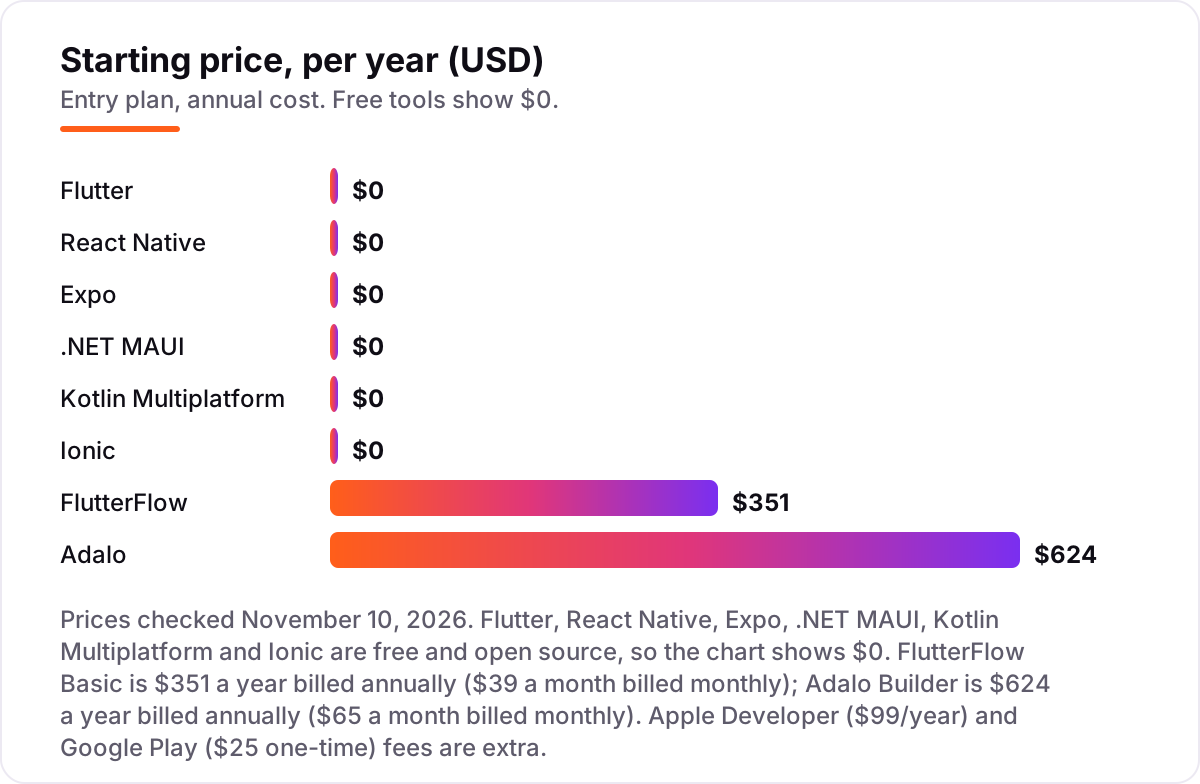
Take a three-developer team shipping one app to both stores for a year. On the six free frameworks — Flutter, React Native, Expo on its free EAS tier, .NET MAUI, Kotlin Multiplatform and Ionic — the framework licences cost $0, so the whole first-year bill is the store fees: $99 for the Apple Developer account plus the $25 one-time Google Play fee, a total of $124. That is the honest number for most teams in this list, and it is why the framework choice should be made on skills, not on licence cost.
The paid steps up from there are small until they are not. Expo's EAS Starter is $19 a month, or $228 a year, which takes the same team to $352 for the year including store fees; Production at $199 a month is $2,388 a year, or $2,512 with the store fees, and both plans add usage charges on top once the included build credit runs out. A team that builds rarely stays on the free tier and pays $124; a team that builds every day should budget for Starter at least.
The low-code builders change the maths entirely. One editor on FlutterFlow Basic costs $351 a year billed annually, or $475 with the store fees, but a three-editor team cannot use Basic: it covers one editor, so the team needs Business at $150 a month for the first seat plus $85 a month for each of the other two, which is $320 a month or $3,840 a year, plus $124 in store fees, for a total of $3,964. Adalo is simpler and cheaper for the same team: the Builder plan at $624 a year billed annually covers 5 app editors and 2 published apps, so the total is $624 plus $124 in store fees, or $748 for the year.
Three costs sit outside every number above. First, the backend: Firebase or Supabase usage beyond their free tiers, which both FlutterFlow and Adalo rely on, is billed separately. Second, developer time, which dwarfs every licence here: a framework that the team has to learn costs weeks of salary, far more than any subscription in this list. Third, the Apple Developer fee renews every year, so the $124 first-year total becomes $99 a year from year two onward for the free frameworks.
Know the difference: framework vs low-code mobile builder
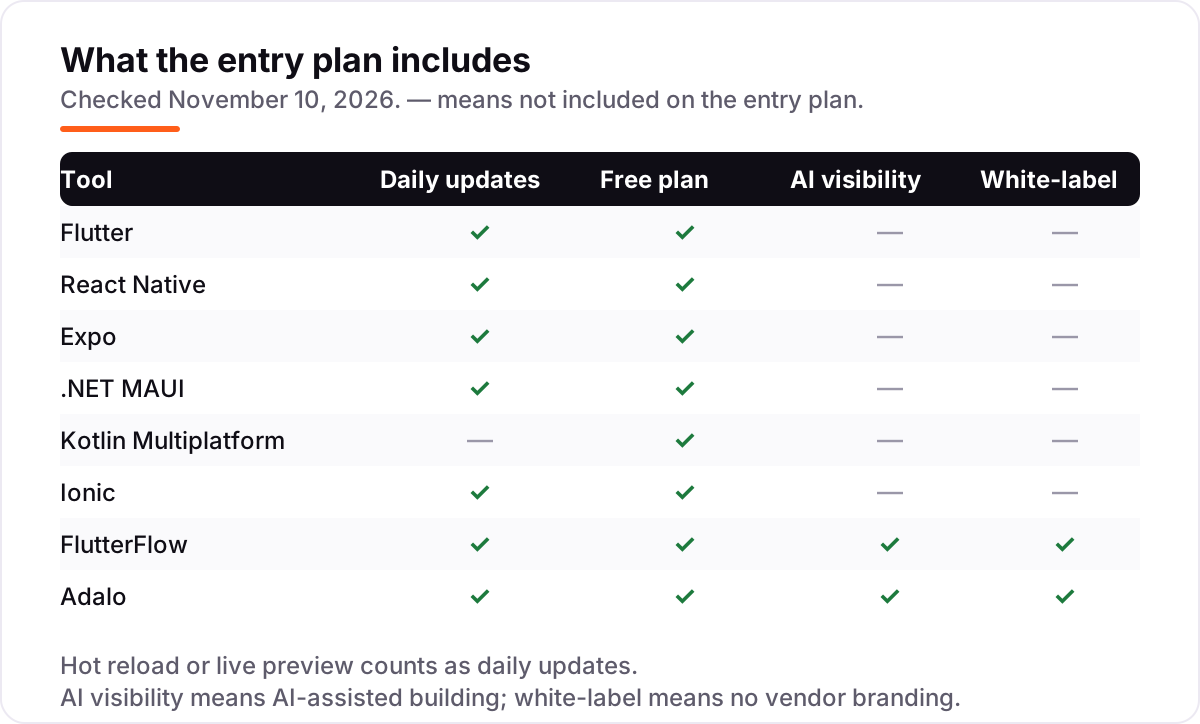
The confusion in this category is the word "platform": a framework and a low-code builder both promise one app for two stores, but they sell opposite things. A framework — Flutter, React Native, Expo, .NET MAUI, Kotlin Multiplatform, Ionic — is a code library. Your developers write the app in Dart, JavaScript, C#, Kotlin or web code, the code lives in your repository, and you can hire for it, test it and keep it forever. A low-code builder — FlutterFlow and Adalo here — is a visual tool. You drag screens together in a browser, the tool generates the app, and a non-developer can ship without writing code.
The trade is speed now against control later. A builder gets a working app in front of users in days, which is exactly what a founder validating an idea needs. But the builder owns the build: FlutterFlow softens this by exporting real Flutter code, so a team can leave and keep working in Flutter, while Adalo does not export source code at all, so leaving means rebuilding. A framework is slower to start — someone has to write the code — but there is no ceiling and no exit cost.
The pricing follows the same split. Frameworks in this list cost $0, and the bill grows only with developers' salaries. Builders charge monthly, and the price that matters is the plan that can publish: $39 a month for FlutterFlow Basic and $65 a month for Adalo Builder, with per-seat and per-app limits above that. If the team has developers, buy a framework; if it does not, buy a builder — and check the export story before the app gets big.
Quick comparison: tool type by need
| Buyer | Best pick | Why |
|---|---|---|
| Team that wants the best all-round framework | Flutter | Free, one Dart codebase, largest package library |
| Web team that already writes React | React Native | Free, JavaScript skills transfer directly |
| Small team that wants managed builds | Expo | Free to start, EAS builds and updates in the cloud |
| C# team, or a Xamarin app to migrate | .NET MAUI | Free, official Xamarin successor from Microsoft |
| Team with native apps to keep | Kotlin Multiplatform | Free, shared logic under native UIs |
| Founder with no developers | FlutterFlow or Adalo | Visual building, from $39 or $65 a month to publish |
Mistakes to avoid
- Picking on brand size instead of team skills. Flutter is the most popular framework here, but a React team will ship faster on React Native, and a C# team will ship faster on .NET MAUI. The team's existing language is worth more than any feature list.
- Budgeting on the framework price alone. Six frameworks cost $0, but every shipped app still needs the $99 Apple fee and the $25 Google Play fee, plus backend usage and developer time. The licence is the cheapest part of shipping an app.
- Ignoring the publishing plan on a builder. FlutterFlow's free plan and Adalo's free plan cannot publish to the stores at all. The real starting price is the first paid plan: $39 a month for FlutterFlow and $65 a month for Adalo.
- Forgetting the exit cost. Adalo does not export source code, so a successful app built on it has to be rebuilt to leave. Check code export before the app grows, not after it has users.
- Choosing a framework that is no longer supported. Xamarin support ended in May 2024, and Ionic stopped selling Appflow to new customers in February 2025. Both still appear in older guides, so check the vendor's current status before building on either.
How we chose
We checked each vendor's own page on November 10, 2026 and recorded the starting price exactly as shown. The six frameworks are free and open source, so their price is $0; FlutterFlow's Basic plan is $39 a month billed monthly, or $351 a year billed annually, and Adalo's Builder plan is $65 a month billed monthly, or $624 a year billed annually, both read from the vendors' own pricing pages today. One figure is second-hand: Expo's own pricing page returned a garbled extract, so the $19 a month EAS Starter figure comes from a November 9, 2026 re-check of expo.dev/pricing rather than a clean read today. Adalo's plans changed since older guides were written: the old Starter and Professional tiers are gone, replaced by Builder and Business. Ratings come from G2 pages opened on November 10, 2026. Expo has no G2 rating because G2 lists no review page for the Expo framework, and .NET MAUI and Kotlin Multiplatform have none either, so those cards show no rating rather than a borrowed one. Adalo's G2 base is only 7 reviews, too thin to print, so its card shows no rating. We ranked the tools by fit for the most common buyer — a team shipping one app to iOS and Android — not by brand size. No vendor paid for a place in this list, and none of the links here are affiliate links.
What to do next
Start with your team's skills: pick the framework that matches the language they already write, then build one real screen — a login, a list and a payment or notification flow — and run it on both a phone and a simulator. If it feels fast and the plugins cover your features, you have your framework. If the team has no developers, try FlutterFlow's or Adalo's free plan the same way, and check the publishing price before you commit. Once your tools are in place, find out what's holding your rankings back.
Your stack only works if people find you
SerpAstra fixes what keeps your site off page one and makes it easy for AI assistants to recommend.
Get a free audit→Sources we checked (13)
- Flutter — flutter.dev (checked November 10, 2026)
- Flutter on G2 — 4.6/5, 73 reviews (checked November 10, 2026)
- React Native — reactnative.dev (checked November 10, 2026)
- React Native on G2 — 4.5/5, 144 reviews (checked November 10, 2026)
- Expo pricing — expo.dev/pricing (checked November 10, 2026)
- FlutterFlow pricing — flutterflow.io/pricing (checked November 10, 2026)
- FlutterFlow on G2 — 4.5/5, 30 reviews (checked November 10, 2026)
- Adalo pricing — adalo.com/pricing (checked November 10, 2026)
- .NET MAUI — dotnet.microsoft.com/en-us/apps/maui (checked November 10, 2026)
- Kotlin Multiplatform — kotlinlang.org/multiplatform (checked November 10, 2026)
- Ionic — ionicframework.com (checked November 10, 2026)
- Ionic on G2 — 4.4/5, 154 reviews (checked November 10, 2026)
- Ionic Appflow wind-down — capgo.app/alternatives/ionic-appflow (checked November 10, 2026)
Shamim
Founder of SerpAstra
A full-stack SEO and digital marketer who spends most days on Local SEO for dental practices, AI search visibility and lead generation.
Frequently asked questions
What is the best cross-platform mobile app development option in 2026?
Flutter is the best fit for most teams: free, one Dart codebase, the largest package library and the most polished shared UI. React Native is the better pick for teams that already write React, and Expo is the fastest route to the stores for small React Native teams. Non-developers should look at FlutterFlow or Adalo instead.
How much does cross-platform mobile app development cost?
The frameworks are free: Flutter, React Native, Expo, .NET MAUI, Kotlin Multiplatform and Ionic all cost $0. The first-year bill is the store fees, $99 for Apple Developer and $25 once for Google Play. The low-code builders are the paid options: FlutterFlow from $351 a year and Adalo from $624 a year.
Is there a free cross-platform mobile app development option?
Yes, six of the eight options here are free and open source, including Flutter, React Native and .NET MAUI. The free plans on the low-code builders are for building and testing only: FlutterFlow's free plan cannot deploy to the stores, and neither can Adalo's. A free framework plus the store fees is the cheapest real route.
What is the difference between a framework and a low-code mobile builder?
A framework is a code library your developers build with, so you own the code and can hire for it. A low-code builder is a visual tool that generates the app for you, so a non-developer can ship without writing code. Frameworks cost $0 and scale with hiring; builders charge monthly and trade speed now for less control later.
Should I use Flutter or React Native?
Use Flutter if the team can learn Dart and the app needs a custom, animated interface with one shared UI. Use React Native if the team already writes React, since the same developers can build the app and the hiring pool is larger. Both are free, both ship native apps, and both have large communities, so the team's skills decide.
Do I need a Mac to publish an iOS app?
Apple requires an iOS build on Apple hardware or a cloud service that runs it. Expo's EAS Build compiles iOS binaries in the cloud, and FlutterFlow and Adalo also build for iOS without a Mac of your own. You still need the $99 a year Apple Developer account, whichever route you take, and a Mac helps for debugging.
Can I switch frameworks later?
Yes, but treat it as a rebuild, not a migration: the UI and much of the app logic are written in the framework's language, so moving from Flutter to React Native means rewriting the app. FlutterFlow is the exception, since it exports real Flutter code. Pick on the team's skills first, because switching later is the most expensive option.
Free SEO and AI visibility audit
Find out what is holding your rankings back
Send us your site. Within 2 business days you get a written audit, an AI visibility check and a short fix list ranked by impact. Free, with no contract attached.
Request my free audit→Related guides
 Digital Marketing & Ads9 Best A/B Testing Software for App Developers in 2026, ComparedCompare the 9 best A/B testing software for app developers on price, free tiers, SDKs and stats, with every price checked today, November 4, 2026.Read guide →
 SEO & AI SearchBest Mobile App Analytics (2026): 12 Apps Worth Downloading12 best mobile app analytics tools compared on price, free plans and attribution, with real starting prices checked on vendor pages, November 2, 2026.Read guide →
 SEO & AI Search12 Best Product Analytics Tools for Mobile Apps in 2026, Compared12 best product analytics tools for mobile apps compared on price, free plans, replay and attribution. Prices checked on vendor pages, November 2, 2026.Read guide →