
Best Digital Art Software for 2026: 11 Options Compared by Use Case
Compare the 11 best digital art software options for 2026 by use case, with real prices — from free open-source tools to Photoshop at $22.99 a month.
 Shamim Mia, Founder, SerpAstraLast verified November 4, 202614 min read
We compare pricing pages, documentation and public reviews. We never accept payment for rankings.
Key takeaways
- Photoshop and Illustrator lead for professional work at $22.99 a month each; Procreate costs $12.99 once on iPad, and Krita, GIMP, Inkscape, Affinity and MediBang Paint are free.
- The single most important buying factor is raster versus vector: painting and photo work needs a raster editor, while logos and print need vector tools that stay sharp at any size.
- Five of the eleven tools are free and three more are one-time purchases, so a complete setup can cost $0 — subscriptions only make sense when you need Photoshop, Illustrator or CorelDRAW specifically.
- Check your device before you buy: Procreate runs only on iPad, Clip Studio Paint's one-time license covers Windows and macOS only, and Affinity's unified iPad app is still on its way.
On this page
Quick comparison
| Tool | Best for | Starting price | Free plan |
|---|---|---|---|
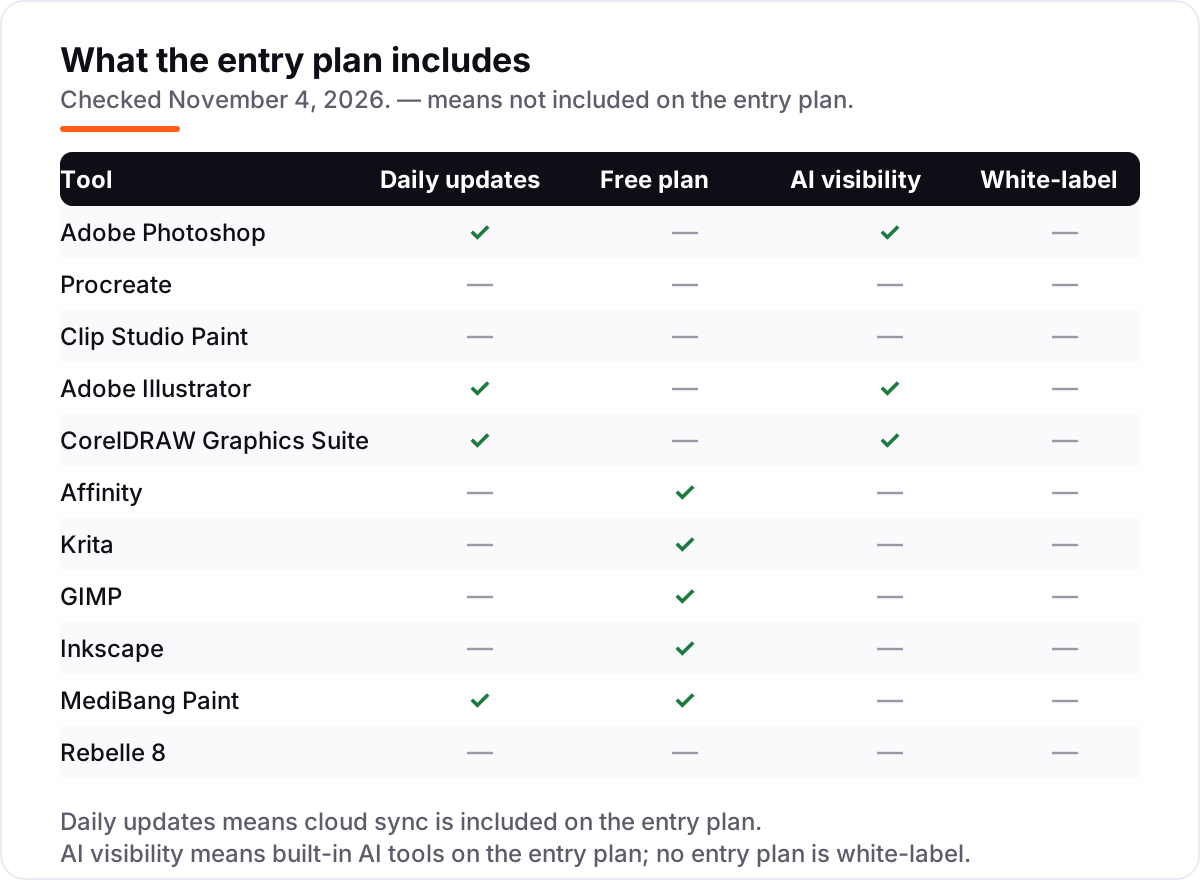
| Adobe Photoshop | Photographers, retouchers and digital painters who need the industry-standard raster editor | $22.99/mo | No (7-day trial) |
| Procreate | iPad illustrators and digital painters who want a professional brush engine for one flat price | $12.99 once | No |
| Clip Studio Paint | Comic, manga and webtoon artists who need panel tools, screen tones and animation in one app | $63 once | No (trial) |
| Adobe Illustrator | Logo, icon and print designers who need vector artwork that scales without losing quality | $22.99/mo | No (7-day trial) |
| CorelDRAW Graphics Suite | Print shops and vector designers who want a perpetual license option and a full suite in one buy | $269/yr | No (15-day trial) |
| Affinity | Designers who want professional vector, pixel and layout tools for $0 | Free | Yes (free) |
| Krita | Digital painters and illustrators who want a serious painting app for $0 | Free | Yes (free) |
| GIMP | Photo editors and retouchers who need Photoshop-style editing for $0 | Free | Yes (free) |
| Inkscape | Logo and icon designers who need vector tools for $0 | Free | Yes (free) |
| MediBang Paint | Manga and webtoon beginners who want a free, simple comic app on any device | Free | Yes (free) |
| Rebelle 8 | Traditional-media painters who want watercolor and oil that behave like the real thing | $89.99 once | No (30-day trial) |
Make one of these tools?
We re-check this list every quarter. Send a correction, request a review, or ask about a clearly labeled sponsored spot.
Request a listingThe best digital art software
Adobe Photoshop
Best for: Photographers, retouchers and digital painters who need the industry-standard raster editor
Adobe Photoshop is the reference point for raster art: photo editing, digital painting, compositing and retouching in one program, with the layer, masking and brush tools that studios already know. The single-app plan costs $22.99 a month on an annual plan billed monthly, and includes Photoshop on desktop, web and mobile, 100GB of cloud storage and Adobe Express Premium. A 7-day free trial lets you test it before paying.
The subscription is the catch: stop paying and you lose access, and at $275.88 a year it costs more than every other tool in this list combined except CorelDRAW. Generative Fill and the other Firefly tools are genuinely useful, with 25 generative credits a month on the single-app plan. Buy Photoshop when your work must open in the program clients and printers expect; buy Krita or Procreate when it does not.
What we like
- The raster editor most studios, clients and printers expect, with the deepest layer, masking and brush tools here
- Generative Fill and other Firefly AI tools are built in, not a paid extra
- Works on desktop, web and mobile with 100GB of cloud storage and files that sync
- The largest tutorial and plug-in ecosystem of any tool in this list
Watch out for
- Subscription only — stop paying and you lose access, at $275.88 a year
- No free plan, only a 7-day trial, and the full app has a steep learning curve
- Single-app plan includes only 25 generative credits a month
Procreate
Best for: iPad illustrators and digital painters who want a professional brush engine for one flat price
Procreate is the iPad painting app that most digital illustrators actually use, built around Apple Pencil with low latency, pressure and tilt support, and a brush engine with more than 200 included brushes. It costs $12.99 once on the App Store, with free updates and no subscription, and includes Animation Assist, time-lapse recording of every canvas, and PSD import and export. There is no desktop version and no free trial.
The price is the whole story: $12.99 buys the full app forever, which is less than one month of Photoshop. The limits are hardware, not features — you need an iPad and, for the full pressure-sensitive experience, an Apple Pencil, and your files live on that device. Pick Procreate when you draw on iPad; pick Clip Studio Paint when you need the same work on a desktop or Android tablet.
What we like
- One-time $12.99 purchase with free updates and no subscription, ever
- More than 200 included brushes with low-latency Apple Pencil support
- Animation Assist and time-lapse recording of every canvas are built in
- PSD import and export, so files move to Photoshop when a client needs it
Watch out for
- iPad only — there is no Windows, Mac or Android version
- No free plan and no free trial; you pay before you can try it
- Files live on the iPad, with no built-in cloud sync or desktop companion app
Clip Studio Paint
Best for: Comic, manga and webtoon artists who need panel tools, screen tones and animation in one app
Clip Studio Paint PRO is the working standard for comics, manga and illustration, with vector layers, panel tools, screen tones, 3D models for posing reference, and a brush engine built for line art. The Ver. 5.0 perpetual license costs $63 once for Windows or macOS, and monthly plans start at about $0.99 a month for a single device. The EX edition at $277 adds multi-page management and full animation.
The licensing is the part to read twice: the one-time license covers Ver. 5.0 and does not include later feature updates, which come through the $10.99-a-year Update Pass, and iPad and Android users can only subscribe. A free trial of up to three months comes with a first monthly plan. Choose Clip Studio Paint when comics, manga or animation are the job; choose Procreate when you only draw on iPad.
What we like
- The working standard for comics and manga: panels, tones, balloons and 3D posing models
- PRO perpetual license is $63 once, with monthly plans from about $0.99 a month
- Vector layers keep line art sharp at any size, and brushes are built for inking
- Runs on Windows, macOS, iPad, iPhone, Android and Chromebook
Watch out for
- One-time license covers Ver. 5.0 only — later features need the $10.99/year Update Pass
- iPad and Android users can only subscribe; the one-time license is Windows/macOS only
- EX edition at $277 is needed for multi-page management and full animation
Adobe Illustrator
Best for: Logo, icon and print designers who need vector artwork that scales without losing quality
Adobe Illustrator is the professional vector editor: logos, icons, typography, packaging and illustrations that must scale from a business card to a billboard without losing quality. The single-app plan costs $22.99 a month on an annual plan billed monthly, with Illustrator on desktop and iPad, Adobe Express Premium, Adobe Fonts and 100GB of cloud storage. A 7-day free trial is included.
Vector work is a different skill from painting, and Illustrator assumes you know the pen tool, paths and anchor points — beginners face a steep first month. Text to Vector Graphic and Generative Recolor add Firefly tools, with 25 generative credits a month. Buy Illustrator when your deliverable is a logo or print file; buy Inkscape or Affinity when the budget is $0 and the work is the same shape.
What we like
- The professional vector editor: logos, icons, type, packaging and print in one program
- Text to Vector Graphic and Generative Recolor add Firefly AI to vector work
- Works on desktop and iPad with 100GB of cloud storage and Adobe Fonts included
- Files open everywhere in the print and branding world, with no conversion worries
Watch out for
- Subscription only — no perpetual license, and access ends when you stop paying
- The pen tool and path workflow take real practice; beginners face a steep first month
- No free plan, only a 7-day trial

CorelDRAW Graphics Suite
Best for: Print shops and vector designers who want a perpetual license option and a full suite in one buy
CorelDRAW Graphics Suite is the long-running alternative to Illustrator for vector illustration, page layout and typography, bundled with PHOTO-PAINT for pixel editing, a font manager and CAPTURE for screen capture. The subscription costs $269 a year, and a one-time purchase of the 2026 version costs $549. A 15-day free trial needs no card.
Two years on the $269 subscription costs $538, which is $11 less than the $549 one-time license — so the subscription only makes sense if you want each new version and CorelDRAW Web, the browser version reserved for subscribers. One-time buyers get 2,000 AI credits once; subscribers get 2,000 a month. Pick CorelDRAW when you want a perpetual license option and a print-shop workflow; pick Illustrator when clients send you .ai files.
What we like
- A full suite in one price: CorelDRAW, PHOTO-PAINT, Font Manager and CAPTURE
- Subscription is $269 a year, or buy the 2026 version once for $549
- Subscribers get 2,000 AI credits a month plus CorelDRAW Web in the browser
- Strong print-shop workflow with Pantone support and page layout built in
Watch out for
- No free plan beyond a 15-day trial, and the subscription renews at the full rate after year one
- The interface feels dated next to Illustrator, and the macOS version trails Windows
- One-time buyers get 2,000 AI credits once, not monthly, and no CorelDRAW Web
Affinity
Best for: Designers who want professional vector, pixel and layout tools for $0
Affinity is the free unified app from Canva that replaced Affinity Designer, Photo and Publisher in October 2025, combining vector design, pixel editing and page layout for Windows and macOS. Every design feature is free — you sign in with a free Canva account — and only the AI tools, such as background removal and generative fill, need a paid Canva plan. There is no subscription for the design tools themselves.
The catch is the account: you must create a Canva account to sign in, and the unified iPad app is still on its way — the separate iPad apps are free in the meantime. Affinity opens PSD, AI and PDF files, so switching costs little. Choose Affinity when you want professional vector and layout tools for $0; choose Illustrator when you need the program your clients already use.
What we like
- Vector, pixel and page-layout studios in one free app for Windows and macOS
- Every design feature is free — no subscription, no watermark, no locked tools
- Opens PSD, AI and PDF files, so switching from Adobe costs little
- Version 3.3 added more than 60 features, including a Blend Tool and scripting
Watch out for
- Requires a free Canva account to download and sign in
- AI tools such as background removal need a paid Canva plan
- The unified iPad app is still on its way; iPad users use the separate free apps for now
Krita
Best for: Digital painters and illustrators who want a serious painting app for $0
Krita is a free and open-source painting program made by artists, with a brush engine that rivals paid apps, stabilizers for smooth lines, animation tools, and color management for print work. It runs on Windows, macOS, Linux, Android and ChromeOS, opens and saves PSD files, and costs nothing — the paid store editions are the same program, sold to fund development. There are no locked features and no account.
Krita is built for painting, not photo editing: its photo tools are thinner than GIMP's, and its vector tools are basic next to Inkscape or Illustrator. The interface is dense, so expect a weekend of learning before it feels fast. Pick Krita when you want a serious painting app for $0; pick GIMP when the job is retouching photos rather than painting them.
What we like
- Free and open source, with no locked features, no account and no ads
- A brush engine that rivals paid apps, with stabilizers for smooth lines
- Animation tools and color management for print work are built in
- Runs on Windows, macOS, Linux, Android and ChromeOS, and opens PSD files
Watch out for
- Built for painting, not photo editing — its photo tools are thinner than GIMP's
- Vector tools are basic next to Inkscape or Illustrator
- The dense interface takes a weekend to learn

GIMP
Best for: Photo editors and retouchers who need Photoshop-style editing for $0
GIMP is the free and open-source image editor that has served as the no-cost Photoshop alternative since 1995, covering photo retouching, compositing, image authoring and batch work through Script-Fu. It runs on Windows, macOS and Linux, supports PSD files, and is extended by a large library of community plug-ins. There is no paid tier, no account and no trial because the whole program is free.
The trade-off is polish: the interface is less refined than Photoshop's, some workflows take more clicks, and features such as non-destructive adjustment layers arrived later than in paid rivals. GIMP is also an editor first, not a painting app — Krita's brushes are better for illustration. Choose GIMP when you need Photoshop-style editing for $0; choose Krita when you are painting from a blank canvas.
What we like
- Free and open source, with no paid tier, no account and no trial because it is all free
- Deep photo retouching, compositing and batch work through Script-Fu
- A large library of community plug-ins extends it for free
- Runs on Windows, macOS and Linux and supports PSD files
Watch out for
- The interface is less polished than Photoshop's, and some jobs take more clicks
- Non-destructive editing arrived later than in paid rivals
- A photo editor first, not a painting app — Krita's brushes are better for illustration
Inkscape is a free and open-source vector graphics editor for Windows, macOS and Linux, built around SVG as its native format. It covers bezier and spiro curves, path operations, text on paths, cloning and tracing bitmaps into vectors, which is enough for logos, icons, diagrams and print layouts. There is no paid version, no account and no feature lock.
Inkscape is slower than Illustrator on very complex files, and its CMYK support for print is a known weak spot — work that must go to a commercial printer needs a careful export check. It also has no photo editing to speak of, so it pairs with GIMP rather than replacing it. Pick Inkscape when you need vector tools for $0; pick Illustrator when print color accuracy is a paying client's requirement.
What we like
- Free and open source, with no paid version, no account and no feature lock
- SVG is the native format, with bezier and spiro curves, path operations and tracing
- Covers logos, icons, diagrams and print layouts in one program
- A large extension library adds features for free
Watch out for
- Slower than Illustrator on very complex files
- CMYK support for print is a known weak spot — check exports before sending to a printer
- No photo editing to speak of; it pairs with GIMP rather than replacing it
MediBang Paint
Best for: Manga and webtoon beginners who want a free, simple comic app on any device
MediBang Paint is a free drawing and comic app for Windows, macOS, iOS and Android, with more than 180 free brushes, screen tones, comic panel tools and cloud saving through a free MediBang account. It is light, quick to learn and built for manga and webtoons, with templates and practice materials in the free MediBang Library. Optional MediBang Premium adds 700 more brushes and extra cloud storage.
The free version shows ads, and some brushes and materials that used to be free now sit behind the Premium subscription or require watching an ad — the most common complaint in user reviews. It is also a lighter tool than Clip Studio Paint, with fewer professional features. Choose MediBang Paint when you want a free, simple comic app on any device; choose Clip Studio Paint when comics are your income.
What we like
- Free on Windows, macOS, iOS and Android, with cloud saving through a free account
- More than 180 free brushes plus screen tones, panel tools and comic templates
- Light and quick to learn, with free tutorials and practice materials in the Library
- PSD and CMYK support for files that move to print or Photoshop
Watch out for
- The free version shows ads, and some brushes now sit behind Premium or an ad view
- Lighter than Clip Studio Paint, with fewer professional features
- Cloud storage on the free plan is limited; heavy users need Premium

Rebelle 8
Best for: Traditional-media painters who want watercolor and oil that behave like the real thing
Rebelle 8 simulates traditional media — watercolor that bleeds and dries, oils with impasto, acrylics and pastels — more convincingly than any other tool in this list, with realistic paper textures and pigment behavior. It costs $89.99 once for the standard edition, or $149.99 for Pro with bristle brushes and advanced PSD handling, and includes a year of free updates. A 30-day free trial is available.
Rebelle is a painting simulator, not a general editor: it has no vector tools, no photo retouching depth and no comic panel features, so most artists pair it with another app. After the first year, further feature updates need a paid renewal at about half price. Pick Rebelle when watercolor and oil effects are the point; pick Krita or Procreate when you need one app that does everything.
What we like
- Watercolor that bleeds and dries, oils with impasto and realistic paper textures
- One-time $89.99 purchase with a year of free updates — no subscription
- Pro at $149.99 adds bristle brushes and advanced PSD handling
- 30-day free trial, plus a 30-day money-back guarantee
Watch out for
- A painting simulator, not a general editor — no vector tools and no comic panels
- No photo retouching depth, so most artists pair it with another app
- After the first year, further feature updates need a paid renewal at about half price
The best digital art software depends on what you draw, not on which app has the longest feature list. A comic artist needs panel tools, a logo designer needs vectors that scale, and a painter needs brushes that feel right — and the price ranges from $0 to $22.99 a month. We ranked the eleven tools below by fit for the most common buyer, from the professional standards to the free open-source options, and every price was checked on the vendor's own pricing page on November 4, 2026.
How to choose the best digital art software
- Decide raster or vector first. Painting, photo editing and textured illustration need a raster editor such as Photoshop, Procreate or Krita. Logos, icons and print need a vector editor such as Illustrator, Inkscape or Affinity's vector studio.
- Match the tool to your device. Procreate runs only on iPad, Clip Studio Paint's one-time license covers Windows and macOS only, and Affinity runs on Windows and macOS. Krita, GIMP, Inkscape and MediBang Paint run almost everywhere.
- Count the real cost over three years, not the headline. A $22.99 monthly subscription costs $827.64 over three years, while a $12.99 one-time app costs $12.99. Subscriptions only win when the app itself is the requirement.
- Check the file formats your clients send. If clients send layered PSD or .ai files, you need an app that opens them cleanly — Photoshop and Illustrator do, and Affinity, Krita and GIMP open PSD files too.
- Try the free version before you pay. Five tools here are free and three more offer trials, so there is no reason to buy before you have drawn with the brushes for a week.
Digital art is one part of a creator's toolkit, not the whole business. If you also publish videos, our guide to AI tools for video content creation covers the editing side. And before you publish a portfolio page for the work you make, run your titles through the free SERP snippet preview tool — it shows exactly how the title and description will look in Google.
Whatever you shortlist, draw with it before you commit. The free tools and trials in this list are enough to finish a real piece — a portrait, a logo, a comic page — and that piece tells you more than any review can. Check two things in the trial: that the brushes feel right under your hand, and that your files open cleanly in the apps your clients use. Every tool here exports PSD, PNG or SVG, so switching later costs an afternoon, not a career.
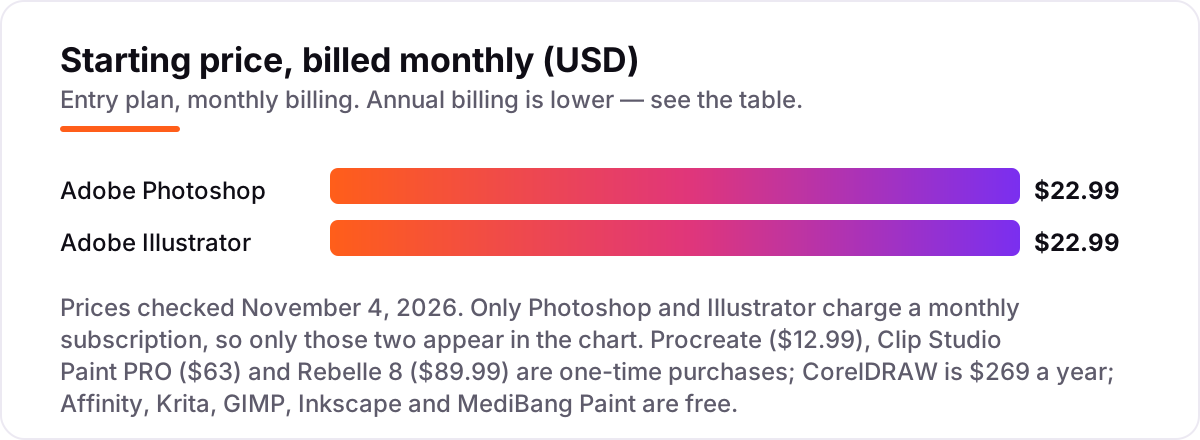
Digital art software pricing: what you will actually pay
Take a solo illustrator who draws on iPad. Procreate costs $12.99 once, and three years later the total is still $12.99. The same three years of Photoshop cost $827.64, and Photoshop plus Illustrator together cost $1,655.28. That gap is the whole buying decision for most illustrators: the subscription apps must earn their keep every month, while the one-time apps are paid for on day one and forgotten.
A comic artist has a different sum. Clip Studio Paint PRO costs $63 once, and the Update Pass adds $10.99 a year if you want new features, so three years cost about $85. MediBang Paint costs $0 for the same three years, with ads and a smaller feature set. A traditional-media painter pays $89.99 once for Rebelle 8, with a renewal at about half price if they want feature updates after the first year.
A designer who needs the Adobe pair should check the bundle math before buying two single apps. Photoshop and Illustrator together cost $45.98 a month, or $551.76 a year. Creative Cloud Pro, which includes both plus 20 more apps, costs $69.99 a month — and three single apps cost $68.97 a month, a dollar less than the bundle. The bundle only pays off once you regularly use four or more Adobe apps.
CorelDRAW buyers face the same subscription-versus-ownership question. Two years on the $269 annual plan costs $538, which is $11 less than the $549 one-time license for the 2026 version — so the subscription only wins if you want every new version, CorelDRAW Web and the monthly AI credit refill. And a designer starting from $0 can assemble a complete setup for nothing: Krita for painting, Inkscape for vectors and MediBang Paint for comics, all free, all open source except MediBang Paint. If you also create content around your art, see our guide to the best AI tools for content creators for the writing and video side.
Know the difference: raster vs vector art software
The confusion in this category is between two kinds of image. Raster software paints with pixels: every brush stroke is a grid of colored squares, which is why it suits painting, texture and photo work, and why a raster image loses quality when you enlarge it. Photoshop, Procreate, Krita, GIMP, MediBang Paint and Rebelle are raster tools. Vector software draws with math — paths, anchor points and curves — so a logo stays perfectly sharp from a favicon to a billboard. Illustrator, Inkscape and Affinity's vector studio are vector tools.
Most working artists need both, which is why the pairings matter more than any single app. A common setup is Krita or Procreate for painting plus Inkscape or Affinity for logos, at $0 to $12.99 total. Clip Studio Paint is the exception that spans both: it paints in raster and draws line art on vector layers, which is why comic artists can ink, tone and letter in one program.
A second confusion is between a painting app and a photo editor. GIMP and Photoshop edit existing images; Krita, Procreate and Rebelle create new ones from a blank canvas. Buying GIMP to paint with is as wrong as buying Rebelle to retouch a photo — both are free or cheap, but neither does the other's job well.
Quick comparison: tool type by need
| Buyer | Best pick | Why |
|---|---|---|
| Solo illustrator on iPad | Procreate | $12.99 once, the best brushes on iPad, no subscription |
| Professional photo and raster work | Adobe Photoshop | The industry standard, $22.99/month, with AI tools built in |
| Comics, manga and webtoons | Clip Studio Paint | Panel and tone tools, PRO is $63 once |
| Logos, icons and print | Adobe Illustrator | Vector standard, $22.99/month, files open everywhere |
| Free vector, pixel and layout | Affinity | Full professional suite for $0 with a Canva account |
| Free painting or free vector | Krita / Inkscape | Open source, $0, no locked features, no account |
Mistakes to avoid
- Buying a subscription before checking the free tools. Krita, GIMP, Inkscape and Affinity cover painting, photo editing, vectors and layout for $0. Pay $22.99 a month only when a client or a file format forces you to.
- Buying Procreate for a Windows or Mac workflow. Procreate runs only on iPad. If you draw on a computer, the $12.99 buys you nothing — Clip Studio Paint or Krita are the desktop picks.
- Ignoring the license type on Clip Studio Paint. The $63 one-time license covers Ver. 5.0 and stops there; new features come through the $10.99-a-year Update Pass. If you want every update, the subscription is the honest price.
- Budgeting on the first-year price. CorelDRAW's subscription is $269 a year, and Adobe's single apps are $22.99 a month with no discount after year one. The price you pay in year three is the price that matters.
- Choosing a raster tool for a logo. A logo drawn in pixels will blur on a large sign or a small favicon. Logos belong in a vector tool — Illustrator, Inkscape or Affinity — even when the drawing itself starts as a sketch.
How we chose
We checked each vendor's own pricing page on November 4, 2026 and recorded the starting price exactly as shown. Two prices need a note. Adobe's plans page renders its prices by script, so the $22.99 single-app figure is taken from Adobe's own checkout page, which lists Illustrator at $22.99 a month, and it matches every independent read of Adobe's plans page in October and November 2026. CorelDRAW's $269-a-year subscription comes from Corel's own press release of September 15, 2026, because the CorelDRAW storefront shows promotion-dependent figures that change by region and sale. Rebelle's $89.99 comes from the vendor's launch announcement and vendor-supplied G2 pricing. This list carries no review ratings because we could not open a G2 or Capterra review page showing both a score and a review count for every tool on November 4, 2026, and we would rather show no rating than a partial or stale one. No vendor paid for a place in this list, and none of the links here are affiliate links.
What to do next
Start with the free tool that matches your work — Krita for painting, Inkscape for vectors, MediBang Paint for comics — and finish one real piece in it this week. If the free tool cannot open your clients' files or lacks a feature you need daily, move up to the paid pick for that job, not to the most expensive app on the list. If the art is sorted but new customers are not finding you, our monthly SEO service handles the visibility side. Once your tools are in place, find out what's holding your rankings back.
Your stack only works if people find you
SerpAstra fixes what keeps your site off page one and makes it easy for AI assistants to recommend.
Get a free audit→Sources we checked (12)
- Adobe Creative Cloud plans — adobe.com/creativecloud/plans.html (checked November 4, 2026)
- Adobe checkout — commerce.adobe.com (Illustrator $22.99/month shown, checked November 4, 2026)
- Procreate — procreate.com (App Store price $12.99 one-time, checked November 4, 2026)
- Clip Studio Paint product lineup — clipstudio.net/en/lineup (checked November 4, 2026)
- CorelDRAW Graphics Suite 2026 pricing, Corel press release — corel.com (checked November 4, 2026)
- Affinity — affinity.studio (free download, checked November 4, 2026)
- Krita download — krita.org (checked November 4, 2026)
- GIMP — gimp.org (checked November 4, 2026)
- Inkscape — inkscape.org (checked November 4, 2026)
- MediBang Paint — medibangpaint.com (checked November 4, 2026)
- Rebelle pricing, vendor-supplied — g2.com (checked November 4, 2026)
- Rebelle 8 launch, Escape Motions — escapemotions.com (checked November 4, 2026)
Shamim
Founder of SerpAstra
A full-stack SEO and digital marketer who spends most days on Local SEO for dental practices, AI search visibility and lead generation.
Frequently asked questions
What is the best digital art software?
Adobe Photoshop is the best fit for most professional work: the deepest raster tools, the widest client acceptance, and AI features built in, from $22.99 a month. Procreate is the better pick for iPad illustrators at $12.99 once, and Krita is the best free option for painters. The right answer depends on whether you paint, draw vectors, or make comics.
How much does digital art software cost?
Entry prices run from $0 to $22.99 a month. Affinity, Krita, GIMP, Inkscape and MediBang Paint are free, Procreate costs $12.99 once, Clip Studio Paint PRO costs $63 once, and Rebelle 8 costs $89.99 once. Only Photoshop, Illustrator and CorelDRAW charge a subscription, at $22.99 a month, $22.99 a month and $269 a year.
Is there really free digital art software?
Yes, with no catch on the open-source tools. Krita, GIMP and Inkscape are free forever with every feature included, and Affinity's full design suite is free with a Canva account. MediBang Paint is free with ads and an optional Premium subscription. Free here means the whole program, not a trial.
What is the difference between raster and vector art software?
Raster software paints with pixels, so it suits painting, photo editing and textured work, but the image loses quality when enlarged. Vector software draws with math-based paths, so logos and icons stay sharp at any size. Photoshop, Procreate and Krita are raster tools; Illustrator, Inkscape and Affinity's vector studio are vector tools.
Can I use Procreate on Windows or Mac?
No. Procreate runs only on iPad, with a separate iPhone app called Procreate Pocket at $5.99. There is no Windows, Mac or Android version, and a desktop version is in development with no release date announced. If you draw on a computer, Clip Studio Paint or Krita are the closest matches.
Do I need Photoshop if I already have Procreate?
Not necessarily. Procreate covers illustration and painting on iPad, and it exports PSD files that Photoshop can open. You need Photoshop when clients send layered PSD or smart-object files, when you retouch photos professionally, or when you need its AI tools. Many illustrators use Procreate to draw and Photoshop only to finish files for clients.
Which digital art software is best for comics and manga?
Clip Studio Paint PRO is the standard: panel layout, screen tones, balloons, 3D posing models and vector inking for $63 once. MediBang Paint is the free alternative with panel tools and cloud saving, and it runs on every device. Both are built for comics; Clip Studio Paint adds the professional depth that working manga artists need.
Free SEO and AI visibility audit
Find out what is holding your rankings back
Send us your site. Within 2 business days you get a written audit, an AI visibility check and a short fix list ranked by impact. Free, with no contract attached.
Request my free audit→Related guides
 AI, Data & Analytics8 Best AI Tools for Content Creators in 2026 (Free and Paid, Compared)The 8 best ai tools for content creators, compared on price, free plans and strengths — writing, design, video. Prices checked on vendor sites, Nov 2, 2026.Read guide →
 AI, Data & Analytics12 Best AI Tools for Video Content Creation in 2026, Compared12 best AI tools for video content creation compared with real prices, free plans and G2 ratings, so you can pick the right video maker without overpaying.Read guide →
 Design, Video & Creative8 Best Beginner CAD Software for 3D Printing in 2026, ComparedCompare the 8 best beginner cad software for 3d printing on price, free plans and learning curve, with every price checked November 4, 2026.Read guide →