
11 Best Digital Publishing Platforms for 2026 (Pros, Cons and Pricing)
Compare the 11 best digital publishing platforms on price, free plans and features, with every price checked on the vendor's pricing page on November 12, 2026.
 Shamim Mia, Founder, SerpAstraLast verified November 12, 202614 min read
We compare pricing pages, documentation and public reviews. We never accept payment for rankings.

Key takeaways
- Publuu leads on value at $7 a month billed annually, FlippingBook is the best all-rounder from $20 a month billed annually, and Issuu has the biggest built-in audience from $21 a month billed annually.
- The single most important buying factor is where the publication lives: a flipbook host, a design tool or a print-layout app solve different problems, and most publishers end up using two of them.
- Five of the 11 tools have a genuinely free plan — Issuu, FlipHTML5, AnyFlip, Yumpu and Canva — but ads, watermarks and branding removal usually need a paid plan.
- Every price below was checked on the vendor's own pricing page on November 12, 2026. Ratings are G2, with review counts shown.
On this page
Quick comparison
| Tool | Best for | Starting price | Free plan |
|---|---|---|---|
| Issuu | Small publishers and marketers who want the biggest built-in audience for magazines and catalogs | $31/mo | Yes (free plan) |
| FlippingBook | Sales and marketing teams turning PDFs into trackable, lead-generating flipbooks | $26/mo | No (14-day trial) |
| Publuu | Solo creators and small teams who want the cheapest paid flipbook with unlimited pages | $14/mo | No (14-day trial) |
| Joomag | Content and marketing teams publishing branded magazines, catalogs and reports at volume | Custom quote | No (14-day trial) |
| FlipHTML5 | Budget-conscious creators who want a free plan plus AI tools and offline export | $15/mo | Yes (free plan) |
| AnyFlip | Individuals and small teams who want a cheap flipbook with a desktop app and offline export | $16/mo | Yes (free plan) |
| Yumpu | Small publishers who want their flipbooks indexed by Google and found in search | €19.95/mo | Yes (free plan) |
| Paperturn | Publishers and regulated teams who need accessible, GDPR-compliant flipbooks with strong support | $39/mo | No (14-day trial) |
| Canva | Non-designers who want to design and publish magazines, ebooks and brochures in one place | $18/mo | Yes (free plan) |
| Adobe InDesign | Professional design teams producing print-ready magazines and books with precise layout control | $34.49/mo | No (7-day trial) |
| Maglr | Design-led brands publishing interactive annual reports, magazines and brochures at a premium | €400/mo | No (14-day trial) |
Make one of these tools?
We re-check this list every quarter. Send a correction, request a review, or ask about a clearly labeled sponsored spot.
Request a listingThe best digital publishing platform

Issuu
Best for: Small publishers and marketers who want the biggest built-in audience for magazines and catalogs
Issuu is the biggest name in digital publishing for a reason: it is the only platform here with a built-in audience. Publishing a magazine or catalog on Issuu puts it in front of readers who browse the platform itself, not just the people you send the link to. The free Basic plan publishes real flipbooks with embeds and mobile apps, so a small publisher can test the format without paying anything.
The catch is that the features that make a publication feel professional sit on the expensive tiers. The free plan caps at five documents and ten pages per upload and shows third-party ads, and full analytics and lead capture wait for Unlimited at $188 a month billed annually. Pick Issuu when discovery matters most; pick Publuu or FlipHTML5 when the budget is tight.
What we like
- The largest discovery network in this list — publications can be found by readers browsing Issuu itself
- Free Basic plan publishes real flipbooks with embeds and mobile apps, so testing costs nothing
- Unlimited published documents from Starter, with 500 pages and 100 MB per file
Watch out for
- The free Basic plan caps at 5 documents and 10 pages per upload, and shows third-party ads to readers
- Full analytics, lead capture and branding removal wait for Unlimited at $188/month billed annually
- Starter still shows third-party ads, so the cheapest paid plan does not fully clean up the reader experience

FlippingBook
Best for: Sales and marketing teams turning PDFs into trackable, lead-generating flipbooks
FlippingBook is the most complete flipbook tool in this list for teams that sell. Upload a PDF and it becomes a realistic page-flip publication with trackable links, per-page analytics and, from the Optimal plan, lead forms and quizzes built into the reader. A catalog can collect contact details while a prospect is still reading it, which is why sales teams choose it over cheaper hosts.
The entry Lite plan is deliberately small: three flipbooks of up to 100 pages each, with 50 MB PDF uploads. Custom branding, digital bookshelves and lead generation all wait for higher tiers, so the price that feels right for a growing team is closer to $96 a month billed annually. Buy FlippingBook when tracking and leads matter; buy Publuu when the budget is the constraint.
What we like
- The strongest tracking here: per-link and per-page analytics, plus Google Analytics integration from Optimal
- Realistic page-flip reader that works on any device, with video, audio and pop-up galleries on higher plans
- Lead generation forms and quizzes built into the reader, so a catalog can collect contacts as it is read
Watch out for
- No free plan — only a 14-day trial before the subscription starts
- Custom branding, bookshelves and lead forms wait for Optimal at $96/month billed annually
- Built around PDFs, so there is no from-scratch design editor — the layout must exist before upload

Publuu
Best for: Solo creators and small teams who want the cheapest paid flipbook with unlimited pages
Publuu is the value pick in this list. Basic costs $7 a month billed annually, and every plan includes unlimited pages with no ads on the reader — the two things that matter most for a small publisher. It also carries the highest G2 rating here, 4.8 out of 5 from 565 reviews, with ease of use the most-cited strength. Hotspots, shoppable links and 3D virtual tours make a plain PDF feel interactive.
The trade-offs are about branding and measurement. Basic has no custom logo, no custom domain and no lead forms — those start on Optimum at $24 a month billed annually — and it reports total views only, with page-level statistics held for the same tier. There is no free plan, only a 14-day trial. Pick Publuu when the budget is tight and the publication speaks for itself.
What we like
- The cheapest paid start here at $7/month billed annually, with unlimited pages and no ads on every plan
- The highest G2 rating in this list at 4.8/5 from 565 reviews, with ease of use the most-cited strength
- Hotspots, shoppable links and 3D virtual tours turn a static PDF into an interactive publication
Watch out for
- No free plan — only a 14-day trial, and flipbooks go inactive when a paid period ends
- Custom logo, custom domain, lead forms and password protection all wait for Optimum at $24/month billed annually
- Basic reports total views only — page-level and interaction statistics need Optimum

Joomag
Best for: Content and marketing teams publishing branded magazines, catalogs and reports at volume
Joomag aims higher than a simple flipbook: it is a content experience platform with AI-powered content generation, automation fed from a CRM or digital asset manager, and granular reader analytics. A marketing team can publish a branded magazine, see exactly which articles hold readers, and run re-engagement campaigns against the people who dropped off. That is a different job from hosting a PDF, and the price reflects it.
Joomag publishes no prices: every tier on its pricing page says 'Let's Talk', and directory figures conflict — $39 a month in some listings, $50 per user a month in others. There is no free tier, only a 14-day trial, so expect a quote and an annual contract. Pick Joomag when publishing is a recurring team workflow with a CRM behind it; pick a flipbook host when one person publishes occasionally.
What we like
- A full content experience platform, not just a flipbook: AI content generation, CRM-driven automation and reader analytics
- Branded publications with granular reader analytics and personalized re-engagement campaigns
- Built for teams, not solo creators: content automation, re-engagement campaigns and multi-user workflows
Watch out for
- No free plan — only a 14-day trial before paying
- Some G2 reviewers report unexpected charges and slow refunds when cancelling
- No published prices: every tier on the pricing page says "Let's Talk", so budgeting needs a sales call

FlipHTML5
Best for: Budget-conscious creators who want a free plan plus AI tools and offline export
FlipHTML5 is the cheapest way to publish without a watermark hanging over the work. Pro costs $12 a month billed annually and removes the ads and logo, adds a custom logo, and allows unlimited flipbooks of up to 1,000 pages each. Paid plans also include AI points for assisted ebook creation and an animation editor that no other budget tool here offers, plus offline export for readers without a connection.
The free plan is genuinely usable — five flipbooks a day — but every page carries ads and a FlipHTML5 watermark, so it is a trial. A custom domain, lead forms and full white-label wait for Platinum at $25 a month billed annually. Pick FlipHTML5 when the budget is small and the publication count is high; pick Publuu when the cheapest paid plan matters more than the feature count.
What we like
- Unlimited flipbooks from Pro, with 1,000 pages and 300 MB per upload for $12/month billed annually
- AI points included on paid plans (5,000 a month on Pro) for AI-assisted ebook creation
- Multi-format downloads and offline export, plus an animation editor no other budget tool here has
Watch out for
- The free plan shows ads and a FlipHTML5 watermark on every publication
- A custom domain, lead capture forms and full white-label need Platinum at $25/month billed annually
- G2 reviewers note the interface feels limited next to pricier tools, especially for language customization

AnyFlip
Best for: Individuals and small teams who want a cheap flipbook with a desktop app and offline export
AnyFlip is the quiet budget option in this list. Pro costs $13.08 a month billed annually and covers 2,000 uploads a month with 55,000 daily opens, password protection and a custom logo. Unlike most rivals it also ships desktop apps for Windows and Mac, so a flipbook can be built and published offline, and the free plan is there for anyone who wants to try the format first.
The limits are honest ones. The 4.4 out of 5 G2 rating rests on only 15 reviews, far fewer than the hundreds behind Issuu or Publuu, and there are no lead capture forms or page heatmaps — analytics run through Google Analytics. A custom domain waits for Platinum. Pick AnyFlip for cheap, simple publishing with a desktop app; pick FlipHTML5 for more features at a similar price.
What we like
- One of the cheapest paid entries here at $13.08/month billed annually, with a free plan to start
- Desktop apps for Windows and Mac as well as the web, with offline publishing to a local computer
- Paid plans add password protection, downloads and a custom logo, plus a 7-day money-back guarantee
Watch out for
- Only 15 G2 reviews, so the 4.4/5 rating rests on a much smaller base than the leaders here
- A custom domain waits for Platinum at $26.17/month billed annually
- No lead capture forms or page heatmaps on the pricing page — analytics are Google Analytics only

Yumpu
Best for: Small publishers who want their flipbooks indexed by Google and found in search
Yumpu's pitch is simple: publish a flipbook and let Google find it. The platform indexes flipbook content, so a magazine or catalog can rank in search results and bring readers back to the publisher instead of sitting behind a link nobody clicks. The adFREE plan costs €14.95 a month billed annually, covers unlimited uploads, and removes the ads while adding the publisher's own logo and SEO backlinks.
The rating is the warning sign. At 3.5 out of 5 on G2 from 15 reviews, Yumpu is the lowest-rated tool here, with reviewers citing high cost and slow support, and one reviewer reports being charged $250 for a year without warning. The free plan shows ads and recommendations for other magazines. Pick Yumpu for the search visibility; check the billing terms twice before paying.
What we like
- Flipbook content gets indexed by Google, so publications can rank in search and drive traffic back
- The adFREE plan covers unlimited uploads with an ad-free reader, your own logo and SEO backlinks
- A genuinely usable free plan with 3 uploads, embeds and social sharing at no cost
Watch out for
- The lowest G2 rating in this list at 3.5/5, with reviewers citing high cost and slow support
- The free plan shows ads and recommendations for other magazines inside the reader
- A branded kiosk on a subdomain needs WEBKiosk at $85.50/month billed annually, and readers must sign in to download

Paperturn
Best for: Publishers and regulated teams who need accessible, GDPR-compliant flipbooks with strong support
Paperturn is the platform for publishers who have to get accessibility and privacy right. It is built for accessible reading from the ground up and is fully GDPR compliant, which matters for public-sector bodies, schools and EU publishers in a way a cheap flipbook host cannot match. Every plan includes an ad-free reader with two years of analytics and CSV or PDF export, and G2 reviewers rate its ease of administration highest in this list.
Starter costs $24 a month billed annually, but it covers only ten publications and has no password protection, lead form or custom domain. A custom domain needs Growth at $112 a month billed annually, and lead capture waits for Business at $384. Pick Paperturn when accessibility and compliance are requirements, not preferences; pick Publuu when they are not.
What we like
- Built for accessibility from the ground up, and fully GDPR compliant — a real differentiator for public-sector and EU publishers
- Ad-free reader with two years of analytics and CSV/PDF export on every plan
- G2 reviewers rate its ease of administration highest in this list, with responsive support
Watch out for
- Starter covers only 10 publications, with no password protection, lead form or custom domain
- A custom domain needs Growth at $112/month billed annually, and lead capture waits for Business at $384/month
- No free plan — only a 14-day trial before the subscription starts

Canva
Best for: Non-designers who want to design and publish magazines, ebooks and brochures in one place
Canva belongs in this list because most small publishers do not start with a finished PDF — they start with a blank page. Its magazine, ebook and brochure templates, drag-and-drop editing and Magic Studio AI tools let a non-designer build a professional-looking publication in an afternoon, and Pro adds the Brand Kit so a team stays consistent. Publish as a website link that updates when the design changes, or export a print-ready PDF.
What Canva does not do is host a flipbook. The output is a PDF or a website link, not a page-turning reader, and there is no analytics layer to show how far readers get. That is why it sits here as a companion: design in Canva, then publish the PDF on Issuu, Publuu or FlipHTML5. Pro costs $18 a month, or $144 a year billed annually.
What we like
- The easiest way to design a publication from scratch: thousands of magazine and ebook templates with drag-and-drop editing
- Magic Studio AI tools and Brand Kit come with Pro, so a small team can stay on-brand without a designer
- Publish as a website link that updates when the design changes, or export a print-ready PDF for the flipbook tools above
Watch out for
- It designs publications but does not produce a page-flip reader — the output is a PDF or a website link, not a flipbook
- Brand Kit, background remover and Magic Resize all need Pro, so the free plan is template-only for branding
- No reader analytics: there is no way to see how far readers get through a published document

Adobe InDesign
Best for: Professional design teams producing print-ready magazines and books with precise layout control
Adobe InDesign is the professional standard for multi-page layout, and it has been for decades. No other tool here matches its typography, grid and long-document control, which is why magazines and books are still laid out in it before they are published anywhere else. The single-app plan costs $22.99 a month billed annually, includes 25 monthly generative credits and the full Adobe Fonts library, and exports print-ready PDFs.
InDesign is a design tool, not a publishing host: it produces a PDF and stops there, so distribution needs a flipbook platform on top. It is subscription-only, with no perpetual licence, and the price is per seat, so five designers cost about $1,380 a year. Pick InDesign when layout quality is the product; pick Canva when the team has no designers at all.
What we like
- The print-industry standard for multi-page layout, with unmatched typography and grid control
- 25 monthly generative credits and the full Adobe Fonts library included in the single-app plan
- Exports print-ready PDFs that feed straight into every flipbook tool in this list
Watch out for
- Subscription only — stop paying and the software stops working, with no perpetual licence
- The $22.99 annual rate is per seat, so a five-person team pays about $1,380 a year before any other Adobe app
- Steep learning curve, and it publishes PDFs rather than hosting flipbooks — distribution needs another tool

Maglr
Best for: Design-led brands publishing interactive annual reports, magazines and brochures at a premium
Maglr is the premium end of this list. It is a design platform for interactive publications — annual reports, magazines and brochures built on a freeform canvas with animations, video and interactivity, closer to a website than a page-flip PDF. The Advanced plan costs €400 a month before VAT and includes five users, content gates, personalization, SEO and WCAG settings, and publishing to the brand's own domain.
That price puts it in a different league: €4,800 a year before VAT, against $84 a year for Publuu Basic. The cheaper Basic plan is listed as available soon, there is no free plan, and the 4.8 out of 5 G2 rating rests on only six reviews. Pick Maglr when a flagship interactive report justifies the budget; for anything routine, the flipbook tools above do the job for a fraction of the price.
What we like
- Pixel-perfect freeform design with animations, video and interactivity — closer to a website than a PDF flipbook
- Content gates, personalization and WCAG settings built into the Advanced plan
- Publishes to your own domain with 500GB of monthly data traffic included
Watch out for
- The most expensive entry in this list by a wide margin at €400/month before VAT
- No free plan, and the cheaper Basic plan is listed as available soon, not buyable today
- G2's 4.8/5 rating rests on only 6 reviews, and reviewers note desktop and mobile versions must be built separately
The best digital publishing platform turns a finished PDF into a publication people can read, share and measure — and the right one depends on whether you need an audience, a sales tool or a design studio. The 11 tools below are ranked by fit for the most common buyer, a small team publishing magazines, catalogs, brochures or reports a few times a month, and every price was checked on the vendor's own pricing page on November 12, 2026.
How to choose the best digital publishing platform
- Decide what the tool must do first. A flipbook host publishes a finished PDF; a design tool creates the document; a content platform manages the whole workflow. Buying a host when you need a designer wastes the subscription.
- Check the publication limit. Issuu Basic stops at 5 documents, Paperturn Starter at 10 publications, FlipHTML5 Pro is unlimited. Count the issues, catalogs and reports you will publish in a year, not in a month.
- Check what happens to your branding. Ads and watermarks sit on the free plans, and a custom logo or domain often needs the second tier — Publuu Basic has no custom logo, and it starts on Optimum.
- Check the analytics depth. Total views tell you almost nothing; page-level reading, per-link clicks and lead forms tell you whether anyone finished the document.
- Check who reads it. Issuu brings its own audience, Yumpu gets indexed by Google, and a flipbook on your own domain gets neither — the distribution model is part of the price.
- Think about the next year, not the next issue. A monthly magazine is 12 publications a year; a tool that caps at 10 a month is fine, one that caps at 10 total is not.
A publishing platform gets the document in front of readers, but it does not bring the readers on its own. If the site the publication links back to is not showing up in search, our monthly SEO service covers that side. And before you publish, run the title and description through the free SERP snippet preview tool so the link looks right when it is shared.
Whatever you shortlist, try it with a real document before you pay. The trials in this list run 7 to 14 days, and five tools have free plans, which is long enough to upload a real magazine, share the link with a few readers and check the analytics. Check two things in the trial: that the reader looks professional on a phone, and that updating the document does not force a new link.
Digital publishing platform pricing: what you will actually pay
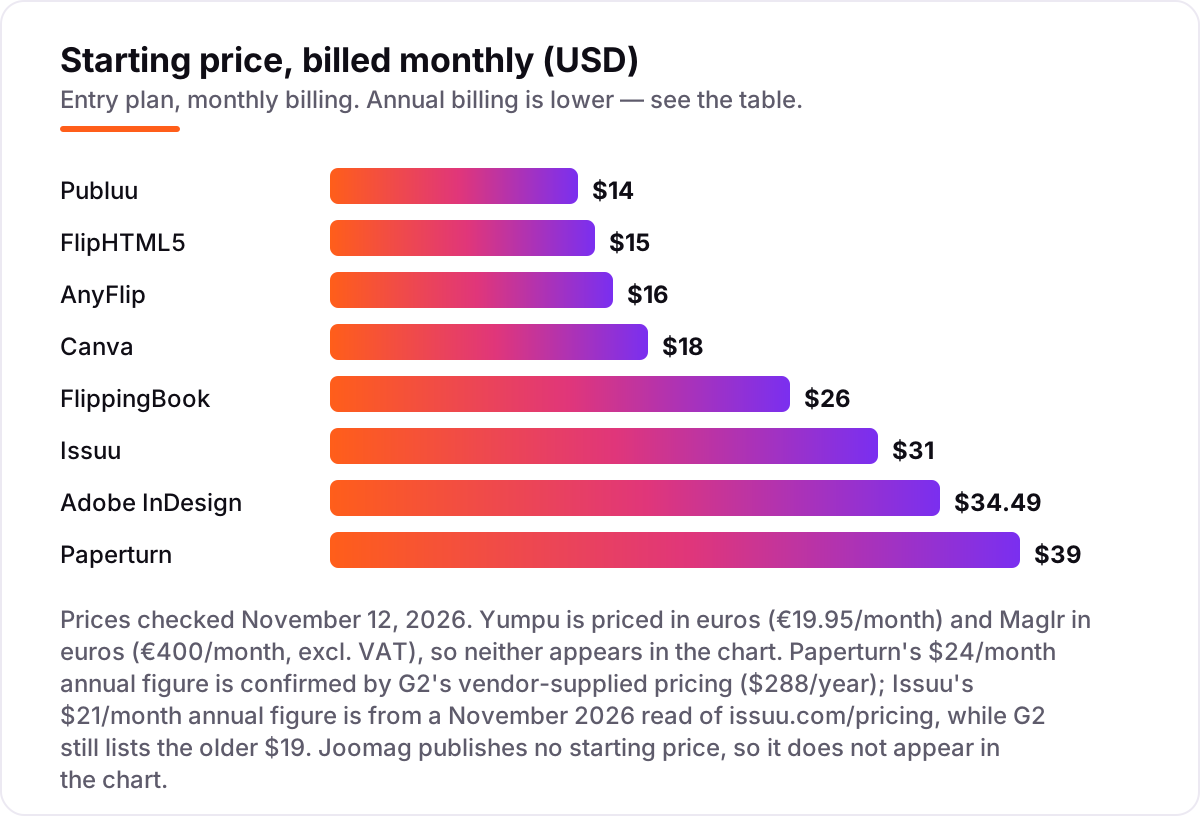
Take a small publisher putting out one magazine a month — 12 issues a year — with one person doing the publishing. On annual billing, the subscription costs $84 a year on Publuu Basic, $144 on Canva Pro, $149 on FlipHTML5 Pro, $157 on AnyFlip Pro, $240 on FlippingBook Lite, $252 on Issuu Starter, $275.88 on Adobe InDesign, and $288 on Paperturn Starter. Joomag publishes no prices, so it is not in this comparison — get a quote before budgeting it. Yumpu adFREE costs €179.40 a year at the €14.95 annual rate, and Maglr Advanced costs €4,800 a year before VAT.
On monthly billing the same year costs more everywhere the page lists both rates: Publuu Basic rises to $168, FlipHTML5 Pro to $180, AnyFlip Pro to $192, FlippingBook Lite to $312, Issuu Starter to $372, InDesign to $413.88, and Paperturn Starter to $468. The annual discount is worth roughly 20 to 50 percent depending on the tool, which is why a publisher who knows the magazine will run all year should pay annually from the start.
Two costs sit outside every number above. First, design: if the team has no designer, the layout either comes from Canva Pro at $144 a year or from InDesign at $275.88 a year per seat, on top of the hosting subscription. Second, the higher tiers: a custom domain, lead capture or a branded kiosk can add $100 to $300 a month on FlippingBook, Paperturn and Yumpu, so price the tier with the features the publication actually needs, not the entry plan.
Know the difference: flipbook host, design tool and content platform
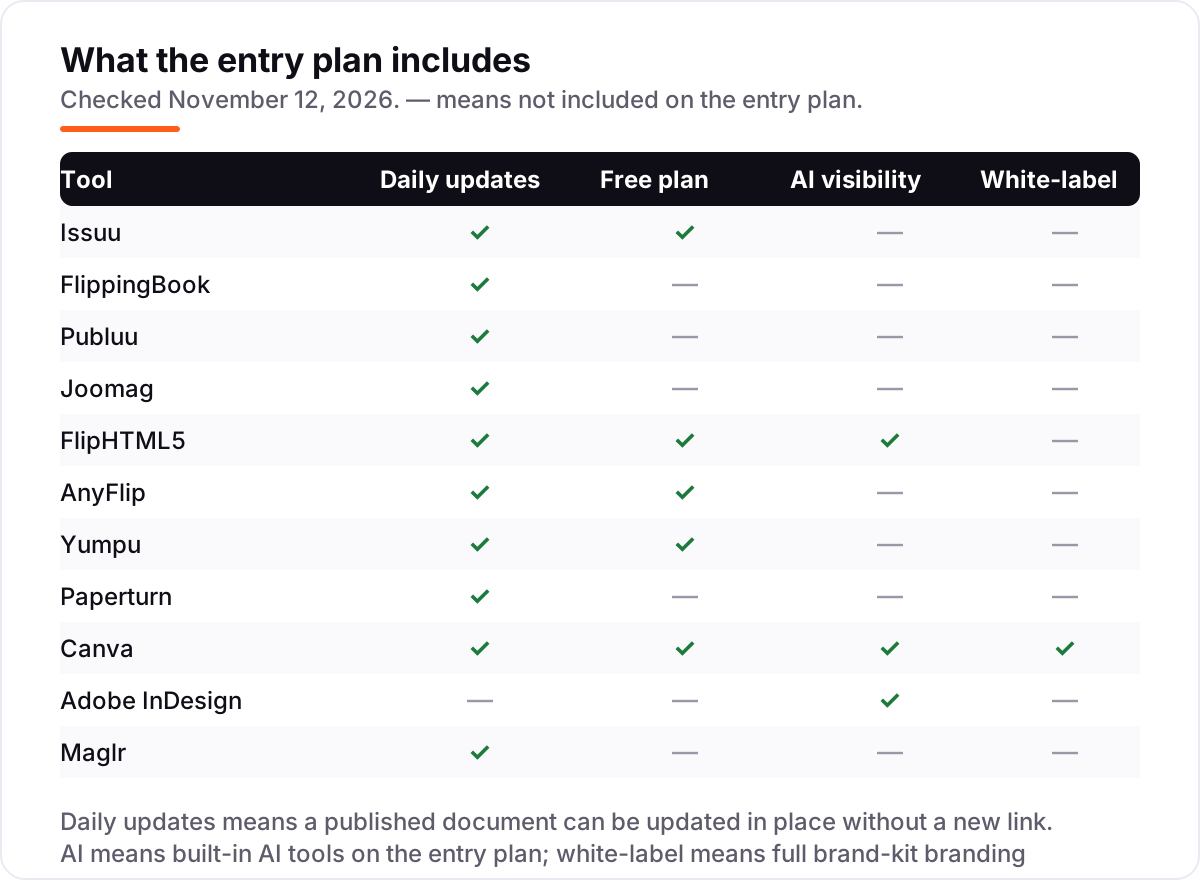
The confusion in this category is that three different products all call themselves publishing platforms. A flipbook host — Issuu, FlippingBook, Publuu, FlipHTML5, AnyFlip, Yumpu and Paperturn — takes a finished PDF and turns it into a page-turning publication with a shareable link and reader analytics. It does not design anything. A design tool — Canva and Adobe InDesign — creates the document itself, from layout and typography to images, and exports a PDF. A content platform — Joomag and Maglr — manages the whole workflow, from creation and branding to analytics and re-engagement, at a much higher price.
The practical consequence is that most publishers need two tools, not one. Design the magazine in Canva or InDesign, export the PDF, and host it on Publuu or Issuu. Buying only a flipbook host leaves the team with nowhere to lay out the next issue; buying only InDesign leaves the PDF sitting on a hard drive with no link to share. Budget for both sides: hosting from $7 a month billed annually on Publuu, design from $18 a month on Canva Pro, and the combination still costs less than most single content platforms.
There is a second, quieter confusion: a free plan is not a free publication. Issuu Basic, FlipHTML5, AnyFlip, Yumpu and Canva all publish real documents for $0, but the reader sees ads or a watermark, and the features that make a publication look professional — a custom logo, a custom domain, page-level analytics — need a paid plan. Budget on the subscription that removes the branding, not on the $0 headline.
Quick comparison: tool type by need
| Buyer | Best pick | Why |
|---|---|---|
| Small publisher who wants an audience | Issuu | Free plan, discovery network, Starter is $21/month billed annually |
| Sales team that needs leads from a catalog | FlippingBook | Trackable links and lead forms, Lite is $20/month billed annually |
| Tightest budget for a paid plan | Publuu | Basic is $7/month billed annually, unlimited pages, no ads |
| Marketing team publishing at volume | Joomag | AI content and CRM automation, priced by quote |
| Non-designer who must design the magazine | Canva | Templates and Brand Kit, Pro is $18/month |
| Professional print layout | Adobe InDesign | Industry-standard typography, $22.99/month billed annually |
Mistakes to avoid
- Buying a host when you need a designer. A flipbook tool cannot lay out a magazine. If the team starts from a blank page, budget for Canva or InDesign as well.
- Comparing monthly prices without checking billing. The annual price is usually 20 to 50 percent lower — Publuu Basic drops from $14 to $7 a month — and a few tools publish no annual rate at all.
- Ignoring the publication cap. Issuu Basic stops at 5 documents and Paperturn Starter at 10 publications. A monthly magazine outgrows both inside a year.
- Trusting a directory price. G2 still lists Issuu Starter at $19 a month and AnyFlip Pro at $12.42, but the live pricing pages say $21 and $13.08 billed annually. Always check the vendor's own page.
- Forgetting the free-plan branding. Ads and watermarks on the free plans make a publication look unfinished to clients. Price the tier that removes them before promising a client a polished result.
How we chose
We checked each vendor's own pricing page on November 12, 2026 and recorded the starting price exactly as shown, including the annual-billing figure where the page lists one, and we ranked the tools by fit for the most common buyer — a small team publishing a few magazines, catalogs or reports a month — not by brand size. Two prices needed extra care. Issuu's $21 a month annual figure comes from a November 2026 read of issuu.com/pricing, while G2 still lists the older $19; the $21 figure is the current one. Paperturn's $24 a month annual figure is confirmed by G2's vendor-supplied pricing at $288 a year, and its $39 monthly figure comes from a September 2026 read of Paperturn's pricing page, since directory listings still show the retired $15 Basic plan. Joomag publishes no prices — every tier on its pricing page says "Let's Talk", and the $39-a-month figure in directories comes from a retired plan ladder — so it is listed as custom quote. Ratings come from G2 pages opened on November 12, 2026, with review counts shown — including Maglr's 4.8 from only 6 reviews and Yumpu's 3.5 from 15, which are small bases worth knowing about. No vendor paid for a place in this list, and none of the links here are affiliate links.
What to do next
Start with the free plan or trial of your top pick and publish one real document through it. Share the link with a few readers, check it on a phone, and look at the analytics to see whether anyone got past the first pages. If the reader looks right and the numbers make sense, pay annually — the discount is worth 20 to 50 percent on most tools here. Once your tools are in place, find out what's holding your rankings back.
Your stack only works if people find you
SerpAstra fixes what keeps your site off page one and makes it easy for AI assistants to recommend.
Get a free audit→Sources we checked (22)
- Issuu pricing — issuu.com/pricing (checked November 12, 2026)
- Issuu on G2 — 4.7/5, 111 reviews (checked November 12, 2026)
- FlippingBook pricing — flippingbook.com/pricing (checked November 12, 2026)
- FlippingBook on G2 — 4.7/5, 298 reviews (checked November 12, 2026)
- Publuu pricing — publuu.com/pricing (checked November 12, 2026)
- Publuu on G2 — 4.8/5, 565 reviews (checked November 12, 2026)
- Joomag pricing page — no prices published (checked November 12, 2026)
- Joomag on G2 — 4.5/5, 85 reviews (checked November 12, 2026)
- FlipHTML5 pricing — fliphtml5.com/fliphtml5-pricing.php (checked November 12, 2026)
- FlipHTML5 on G2 — 4.7/5, 93 reviews (checked November 12, 2026)
- AnyFlip pricing — anyflip.com/pricing (checked November 12, 2026)
- AnyFlip on G2 — 4.4/5, 15 reviews (checked November 12, 2026)
- Yumpu pricing — helpcenter.yumpu.com pricing article (checked November 12, 2026)
- Yumpu on G2 — 3.5/5, 15 reviews (checked November 12, 2026)
- Paperturn pricing — paperturn.com/pricing (checked November 12, 2026)
- Paperturn on G2 — 4.6/5, 54 reviews (checked November 12, 2026)
- Canva pricing — canva.com/pricing (checked November 12, 2026)
- Canva on G2 — 4.7/5, 7,660 reviews (checked November 12, 2026)
- Adobe InDesign pricing — adobe.com/creativecloud/plans (checked November 12, 2026)
- Adobe InDesign on G2 — 4.6/5, 3,482 reviews (checked November 12, 2026)
- Maglr pricing — maglr.com/pricing (checked November 12, 2026)
- Maglr on G2 — 4.8/5, 6 reviews (checked November 12, 2026)
Shamim
Founder of SerpAstra
A full-stack SEO and digital marketer who spends most days on Local SEO for dental practices, AI search visibility and lead generation.
Frequently asked questions
What is the best digital publishing platform?
Issuu is the best fit for most publishers because of its discovery network and free plan, with FlippingBook the best all-rounder for sales teams and Publuu the best value at $7 a month billed annually. The right pick depends on the job: discovery, tracking or budget. Design-led teams should pair a flipbook host with Canva or InDesign.
How much does a digital publishing platform cost?
Paid plans start at $7 a month billed annually on Publuu Basic and run to €400 a month on Maglr Advanced. Most small publishers pay $12 to $39 a month: FlipHTML5 Pro at $12, Publuu Basic at $7 and Issuu Starter at $21, all billed annually. Design tools add $18 a month for Canva Pro or $22.99 for InDesign.
Is there a free digital publishing platform?
Yes, with limits. Issuu, FlipHTML5, AnyFlip, Yumpu and Canva all have free plans that publish real documents. The free tiers show ads or watermarks and cap uploads, so they work for testing and occasional publishing. A publisher putting out a monthly magazine should budget for a paid plan from $7 a month billed annually.
What is the difference between a flipbook tool and a design tool?
A flipbook tool such as Issuu or Publuu hosts a finished PDF and turns it into a page-turning publication with a shareable link and reader analytics. A design tool such as Canva or InDesign creates the publication itself, from layout to typography, and exports a PDF. Most publishers need one of each: design the document, then host it.
Can I publish a magazine for free?
Yes. Issuu Basic publishes up to five documents, FlipHTML5's free plan allows five flipbooks a day, and Canva's free plan designs the whole magazine at no cost. The catch is presentation: free plans show ads or watermarks and limit pages, so a professional-looking magazine usually needs a paid plan from $7 a month billed annually.
Do digital publishing platforms help with SEO?
Some do. Yumpu indexes flipbook content so publications can rank in Google, and Issuu publications are discoverable through its own network. Flipbook pages themselves are rarely a strong SEO channel on their own, so treat search visibility as a bonus. The main SEO job is still the website the publication links back to.
What should I check before paying for a digital publishing platform?
Check four things: what counts as a publication and how many the plan allows, whether your branding survives without a higher tier, whether analytics show page-level reading or just total views, and whether the price is monthly or annual billing. Then run the free plan or trial with a real document before committing.
Free SEO and AI visibility audit
Find out what is holding your rankings back
Send us your site. Within 2 business days you get a written audit, an AI visibility check and a short fix list ranked by impact. Free, with no contract attached.
Request my free audit→Related guides
 Digital Marketing & Ads10 Best Content Marketing Software in 2026, Compared10 best content marketing software tools compared on price, planning, optimization and publishing, with starting prices and the right pick for every team size.Read guide →
 Email, SMS & Social MediaBest Email Design Software for 2026: 12 Options Compared by Use CaseCompare the 12 best email design software options for marketers on price, free plans and editor type, with every price checked November 6, 2026.Read guide →
 Email, SMS & Social Media8 Best Software for Newsletter Design in 2026, ComparedCompare the 8 best software for newsletter design on price, free plans, templates, automation and sending, with every price checked November 6, 2026.Read guide →