
12 Best Digital Rights Management Software in 2026, Compared
Compare the 12 best digital rights management software options for documents and video, with prices checked November 10, 2026 and honest notes on custom quotes.
 Shamim Mia, Founder, SerpAstraLast verified November 10, 202614 min read
We compare pricing pages, documentation and public reviews. We never accept payment for rankings.

Key takeaways
- Vitrium leads at $5,000/year for publishers protecting documents, video and images; Digify follows at $190/month for tracked sharing, and EditionGuard is the cheapest verified price at $95/month for ebook publishers.
- The single most important buying factor is the content type: document DRM, video multi-DRM and enterprise data-centric security are three different products sold under one label, so match the tool to what you protect.
- Five of the twelve tools publish no price at all — Seclore, Kiteworks, Fortra Secure Collaboration, BuyDRM and Adobe Content Server are all custom quote, so budget a sales call, not a checkout.
- Digify, Locklizard, Vitrium, FileOpen, EZDRM and PallyCon prices here are third-party sourced, not vendor-verified, because those vendors publish no price list; only EditionGuard's $95/month was verified on the vendor's own pricing page today.
On this page
Quick comparison
| Tool | Best for | Starting price | Free plan |
|---|---|---|---|
| Vitrium | Publishers and associations protecting documents, video, images and audio with one DRM platform | $5,000/yr | No (free trial) |
| Digify | Teams sharing sensitive documents with investors, clients or partners who need to know exactly who opened what | $190/mo | No (free trial) |
| EditionGuard | Ebook publishers who want Adobe-compatible DRM at the lowest verified price in this list | $95/mo | No (14-day trial) |
| Locklizard | Publishers and firms that need the strictest PDF controls, including blocking screenshots and printing | $500/mo | No (free trial) |
| EZDRM | Video platforms and course creators who need one DRM licence service for a single ecosystem | $99.99/mo | No (free trial) |
| PallyCon | OTT platforms, broadcasters and online educators who need multi-DRM plus forensic watermarking | $299/mo | No (free trial) |
| FileOpen | Publishers who want DRM inside Adobe Acrobat, so readers never leave the PDF app they know | $1,750/yr | No (demo only) |
| Seclore | Enterprises that need data-centric security following files wherever they travel, inside or outside the company | Custom quote | No (demo only) |
| Kiteworks | Regulated enterprises that want secure file sharing, email and DRM governed in one platform | Custom quote | No (demo only) |
| Fortra Secure Collaboration | Companies sharing confidential files with outside partners who need control after the file leaves the building | Custom quote | No (demo only) |
| BuyDRM | Studios and large streamers who need Hollywood-grade multi-DRM run as a managed service | Custom quote | No (demo only) |
| Adobe Content Server | Ebook retailers already in the Adobe ecosystem who need the industry-standard Adobe DRM | Custom quote | No (demo only) |
Make one of these tools?
We re-check this list every quarter. Send a correction, request a review, or ask about a clearly labeled sponsored spot.
Request a listingThe best digital rights management software

Vitrium
Best for: Publishers and associations protecting documents, video, images and audio with one DRM platform
Vitrium is the broadest document DRM in this list, for publishers protecting more than one kind of content. One platform encrypts PDF, Word and Excel files, images, video and audio with AES-256, and applies more than 20 controls: device and open limits, expiry dates, dynamic watermarks that identify the user, and restrictions by IP address or country. Clients read files through a fully branded portal, so the experience looks like yours.
The price is the barrier. At $5,000 a year for Security Pro, Vitrium costs nearly three times FileOpen's annual figure, and there is no published price list to check — the figure comes from G2's vendor-supplied data, and one directory lists $500 a month instead. Buy Vitrium when the catalogue spans documents, video and images and needs one set of controls.
What we like
- Protects over 25 file formats — PDF, Word, Excel, video, images and audio — under one system
- More than 20 DRM controls, including device limits, expiry dates, dynamic watermarks and country restrictions
- Fully branded portal so clients access protected content on a page that looks like yours
- AES-256 encryption with usage tracking, so you see who opened what and can revoke access
Watch out for
- $5,000 a year is a steep entry price for a small publisher or solo creator
- No published price list: the $5,000 figure comes from G2 vendor-supplied data, not a Vitrium pricing page
- One directory lists $500 a month instead, so confirm the annual figure with Vitrium before budgeting

Digify
Best for: Teams sharing sensitive documents with investors, clients or partners who need to know exactly who opened what
Digify is the best pick for sharing a document and knowing what happened to it. Every open is tracked in real time — who viewed it, for how long, and whether they printed or forwarded it — and the protection stays with the file after download, so you can set an expiry date, revoke access or add a watermark at any point. It works in the browser with nothing to install, and the Pro price is published — rare in this category.
The limits are headcount and price. Pro covers one user, so a team pays per person and the bill climbs fast, and third-party sources disagree on the price: G2 still lists $150 a month from July 2026, against $190 today. Buy Digify when the question is not whether a file is locked, but who opened it and when.
What we like
- Real-time tracking shows who opened a document, for how long, and what they did with it
- Protection stays with the file after download: expiry, revocation and dynamic watermarks
- No credit card needed for the free trial, and the Pro price is published, unlike most rivals here
- Data rooms on higher plans add Q&A and folder permissions for deals and due diligence
Watch out for
- Pro covers one user, so a team pays per person and the bill climbs fast
- Third-party sources disagree on the price: G2 still lists $150 a month from July 2026
- No free plan, and data rooms need the higher tiers, not Pro

EditionGuard
Best for: Ebook publishers who want Adobe-compatible DRM at the lowest verified price in this list
EditionGuard is the cheapest verified DRM in this list, and the natural pick for an ebook publisher. Starter costs $95 a month billed annually and covers 50 download credits a month, with ebooks protected by the same Adobe DRM that Adobe Content Server uses — so protected titles open in Adobe Digital Editions, the reader your buyers already have. A 14-day free trial covers the full workflow, and the price was confirmed on the vendor's pricing page today.
The caps are the trade-off. Fifty download credits a month is tight for a busy catalogue, and the $95 rate needs annual billing, with no month-to-month price published. Higher tiers jump to $191, $383 and $959 a month. And EditionGuard is built for ebooks, not video. Buy it when the catalogue is ebooks and the budget is small.
What we like
- Cheapest verified starting price here at $95 a month, confirmed on EditionGuard's own pricing page today
- Works with Adobe Content Server DRM, so protected ebooks open in Adobe Digital Editions
- Download-credit pricing is easy to budget: 50 credits a month on Starter
- A 14-day free trial lets you test the full workflow before paying
Watch out for
- The $95 rate needs annual billing; no month-to-month price is published
- 50 download credits a month is a tight cap for a busy catalogue
- Built for ebooks, not video: it will not protect a course or a film

Locklizard
Best for: Publishers and firms that need the strictest PDF controls, including blocking screenshots and printing
Locklizard is the strictest PDF protection in this list. Its DRM blocks printing, copying, screenshots and screen sharing, encrypts files to US government strength, and enforces licensing controls that follow the document wherever it goes. Access can be revoked and expiry dates set even after a document has been distributed, and annual or perpetual licences are available alongside the cloud subscription.
The cost is friction for readers. They must install the free Secure Viewer — there is no plain PDF to open in Acrobat — and reviewers report bugs and crashes in the viewer, with Apple users reporting frequent access errors. Locklizard also publishes no prices, so the $500 a month figure comes from third-party listings only. Buy Locklizard when the PDF must not leak, and the readers will accept the viewer.
What we like
- The strictest PDF controls here: block printing, copying, screenshots and screen sharing
- US government-strength encryption with licensing controls that follow the document anywhere
- Revoke access and set expiry dates even after a document has been distributed
- Annual and perpetual licences are available alongside the cloud subscription
Watch out for
- Locklizard publishes no prices, so the $500 figure comes from third-party listings only
- Readers must install the free Secure Viewer; there is no plain PDF to open in Acrobat
- Reviewers report bugs and crashes in the viewer, and Apple users report access errors

EZDRM
Best for: Video platforms and course creators who need one DRM licence service for a single ecosystem
EZDRM is the cheapest way into video DRM. A single-DRM plan costs $99.99 a month with 10,000 licences included, and one API delivers Widevine, FairPlay or PlayReady licences, so you integrate once and serve one ecosystem. Universal DRM at $199.99 a month covers all three major DRMs from one service, and the service scales from small trials to the traffic peaks of live events.
What you buy is licence delivery, nothing more: there is no player, no analytics dashboard and no viewer, so the integration work is yours. A one-time setup fee of $99.99 to $199.99 applies on top of the monthly price. The vendor's own pricing page also failed to render its price table in our check today, so the figure rests on third-party reads of that page. Buy EZDRM when you need licences, not a platform.
What we like
- One API delivers Widevine, FairPlay or PlayReady licences, so you integrate once
- Low entry price at $99.99 a month with 10,000 licences included
- Universal DRM at $199.99 a month covers all three major DRMs from one service
- A free trial is available, and the service scales from small trials to live-event peaks
Watch out for
- A one-time setup fee of $99.99 to $199.99 applies on top of the monthly price
- Licence delivery only: there is no player, no analytics dashboard and no viewer
- The vendor's pricing page did not render its price table in our check today, so the figure rests on third-party reads of the same page

PallyCon
Best for: OTT platforms, broadcasters and online educators who need multi-DRM plus forensic watermarking
PallyCon is the multi-DRM pick for video. One service covers Widevine, FairPlay and PlayReady, with forensic watermarking included, and it runs on AWS with pre-integration into Elemental Media Services, so an OTT setup slots in cleanly. Standard covers up to 1,000 monthly active users at $299 a month, which suits a growing streaming service or an online educator with a video library.
The limits are scope and price transparency. PallyCon protects video only — it will not touch a PDF or an image — and the $299 price is third-party sourced, because the parent brand is now DoveRunner and the price needs confirming with the vendor. Setup and configuration can also be complex and need technical expertise. Buy PallyCon when the audience watches video on Android, Apple and Windows alike.
What we like
- One service covers Widevine, FairPlay and PlayReady, with forensic watermarking included
- Runs on AWS with pre-integration into Elemental Media Services, so OTT setups slot in cleanly
- Standard covers up to 1,000 monthly active users, which suits a growing streaming service
- A free trial is available, with no credit card required
Watch out for
- Video only: it will not protect documents, PDFs or images
- The $299 price is third-party sourced; PallyCon's parent brand is now DoveRunner, so confirm the price with the vendor
- Setup and configuration can be complex and need technical expertise

FileOpen
Best for: Publishers who want DRM inside Adobe Acrobat, so readers never leave the PDF app they know
FileOpen is the pick for publishers who want DRM inside Adobe Acrobat. It works as a plugin for Adobe Acrobat Reader, so readers stay in the PDF app they already know, with no new viewer to learn. It also does something most rivals cannot: revoke access to files that have already been sent out. At $1,750 a year it is one of the cheaper enterprise-grade options in this list.
The plugin is also the weakness. Reviewers report bugs and crashes, no annotation saving, and Apple users report frequent access errors that make opening files unreliable. FileOpen quotes per project, so the $1,750 figure is third-party sourced rather than a published price. Buy FileOpen when the readers live in Acrobat and revocation matters more than a polished viewer.
What we like
- Works as a plugin for Adobe Acrobat Reader, so readers stay in a familiar PDF environment
- Revoke access to files that have already been sent out, which most rivals cannot do
- At $1,750 a year it is one of the cheaper enterprise-grade options here
- Supports Windows, macOS, iOS and Android, with a web-based deployment option
Watch out for
- The plugin draws complaints: bugs, crashes and no annotation saving
- Apple users report frequent access errors that make opening files unreliable
- FileOpen quotes per project, so the $1,750 figure is third-party sourced, not a published price

Seclore
Best for: Enterprises that need data-centric security following files wherever they travel, inside or outside the company
Seclore is the enterprise data-centric pick. Instead of locking a file to one app, it attaches protection to the file itself, so the controls travel with it wherever it goes — inside the company, in a partner's inbox, or on a contractor's laptop. Automatic classification and policy enforcement apply the right controls without manual work, and real-time tracking shows who opened, edited or shared each file.
It is built for large, regulated organisations, and it shows: custom quote only, an enterprise sales process, and no self-serve trial. A small publisher would be buying a platform sized for a bank. The G2 score is also the joint-highest here at 4.6 out of 5, but it rests on just 16 reviews. Buy Seclore when confidential files leave the company every day and must stay controlled.
What we like
- Data-centric security: protection travels with the file, even after it leaves the company
- Automatic classification and policy enforcement apply the right controls without manual work
- Real-time activity tracking shows who opened, edited or shared each file
- Rated 4.6 out of 5 on G2, the joint-highest score in this list
Watch out for
- Custom quote only, with an enterprise sales process and no self-serve trial
- Overkill for a small publisher: this is built for large, regulated organisations
- The G2 review count is small at 16, so the score rests on few voices

Kiteworks
Best for: Regulated enterprises that want secure file sharing, email and DRM governed in one platform
Kiteworks is the pick for regulated enterprises that want one governed platform instead of five tools. Its Private Content Network unifies secure file sharing, email, SFTP, managed file transfer and web forms, with next-generation DRM across all of them. You can white-label the data room, customise the branding for external users, and track and report all file activity — who sends what to whom, when and how.
Compliance is the draw: FedRAMP authorised, with HIPAA, GDPR, CMMC and SOC 2 built in. The cost is opacity and scale — custom quote only, no published pricing, no self-serve trial, and an enterprise focus that may exceed what a smaller team needs. Third-party per-user figures conflict, from $15 to $25.50 a user a month, so do not budget on them. Buy Kiteworks when the regulator, not the budget, sets the requirements.
What we like
- One Private Content Network governs file sharing, email, SFTP and web forms together
- White-label the data room and customise branding, appearance and text for external users
- Track and report all file activity — who sends what to whom, when and how
- FedRAMP authorised with HIPAA, GDPR, CMMC and SOC 2 compliance built in
Watch out for
- Custom quote only, with no published pricing and no self-serve trial
- Enterprise focus may exceed what a smaller team needs or can afford
- Third-party per-user figures conflict ($15 to $25.50 a user a month), so do not budget on them

Fortra Secure Collaboration
Best for: Companies sharing confidential files with outside partners who need control after the file leaves the building
Fortra Secure Collaboration — formerly Vera — is the pick for sharing confidential files with outside partners. AES-256 encryption is applied at the individual file level and follows the file everywhere, and you can revoke access at any time, even for files already sitting with departing employees or third parties. It works with the tools teams already use: Dropbox, Box, SharePoint, OneDrive and email.
Real-time tracking shows who is doing what with a document, inside or outside the company, which is the feature that separates it from a shared drive with a password. The drawbacks are enterprise ones: custom quote only, no published pricing, and a sales-led process. The 2023 rebrand from Vera also means older reviews and listings use a different name. Buy it when the file leaves the building and must stay under your control.
What we like
- AES-256 encryption is applied at the individual file level and follows it everywhere
- Revoke access at any time, even for files already with departing employees or third parties
- Works with the tools teams already use: Dropbox, Box, SharePoint, OneDrive and email
- Real-time tracking shows who is doing what with a document, inside or outside the company
Watch out for
- Custom quote only, with no published pricing and an enterprise sales process
- The product was Vera until the 2023 rebrand, so older reviews and listings use a different name
- Now sold as part of Fortra's Digital Guardian line, which can make finding the right product page harder

BuyDRM
Best for: Studios and large streamers who need Hollywood-grade multi-DRM run as a managed service
BuyDRM is the studio-grade pick. Its KeyOS multi-DRM is trusted for premium Hollywood content, covering Widevine, FairPlay and PlayReady from one managed service — BuyDRM runs the DRM infrastructure, so your team does not have to. Flexible service models cover live events, video on demand and subscription streaming, which is why large media companies choose it.
There is no published price and no self-serve route: BuyDRM posts no prices, its own blog says prices vary by offering, and every deal runs through sales. That makes it impossible to budget without a conversation, and overkill for a small course creator who needs a $99 licence service. Buy BuyDRM when the content is premium, the audience is large, and the DRM must simply work.
What we like
- KeyOS is studio-grade multi-DRM, trusted for premium Hollywood content
- Covers Widevine, FairPlay and PlayReady from one managed service
- Managed service means BuyDRM runs the DRM infrastructure for you
- Flexible service models for live events, VOD and subscription streaming
Watch out for
- Custom quote only: BuyDRM posts no prices, and its own blog says prices vary by offering
- No self-serve trial or checkout; every deal runs through sales
- Built for large media companies, so it is overkill for a small course creator

Adobe Content Server
Best for: Ebook retailers already in the Adobe ecosystem who need the industry-standard Adobe DRM
Adobe Content Server is the reference implementation for Adobe ebook DRM, and the pick for retailers already in the Adobe ecosystem. Protected ebooks open in Adobe Digital Editions, which readers already have, and the server has a long track record with retailers and libraries worldwide. EditionGuard offers a cheaper route into the same Adobe DRM ecosystem, for publishers who do not need to run the server themselves.
Adobe publishes no price and sells through authorised resellers only. Reseller-reported licence fees start around $10,000 a year, plus $2,500 a year for maintenance and about $0.23 per ebook activation — a structure that only makes sense at retail volume. It is also a dated, technical product that needs reseller setup rather than a self-serve signup. Buy it when the storefront is Adobe end to end.
What we like
- The industry-standard Adobe DRM for ebooks, used by retailers and libraries worldwide
- Protected ebooks open in Adobe Digital Editions, which readers already have
- Pairs with EditionGuard for a cheaper route into the same Adobe DRM ecosystem
- Long track record: the reference implementation for Adobe ebook DRM
Watch out for
- Adobe publishes no price and sells through authorised resellers only
- Reseller-reported licence fees start around $10,000 a year, plus per-ebook activation fees
- A dated, technical product that needs reseller setup rather than a self-serve signup
The best digital rights management software depends on what you protect, because document DRM, video DRM and enterprise data security are three different products sold under one label. A publisher locking down ebooks needs different software from a streaming service licensing video, and both differ from an enterprise tracking confidential files. We ranked the twelve tools below by fit for the most common buyer — a small publisher or creator protecting paid content — and checked every price on November 10, 2026.
How to choose the best digital rights management software
- Match the DRM to the content type first. Document DRM protects PDFs and ebooks; multi-DRM delivers video licences; data-centric tools follow enterprise files. Buying the wrong type wastes the whole budget.
- Check whether the price is published. Only EditionGuard's $95 a month was verified on the vendor's own pricing page today. Five tools publish no price at all, and six prices here come from third-party listings — treat those as estimates, not quotes.
- Count the pricing unit, not the headline. EditionGuard charges per download credit, Digify per user, EZDRM per licence and PallyCon per monthly active user. Price the tool for your actual volume before comparing.
- Test revocation and tracking in the trial. The point of DRM is control after the file leaves you: revoke access, set an expiry date, and see who opened what. If the trial cannot show you that, the tool cannot do it.
- Check what the reader must install. Locklizard and FileOpen need a dedicated viewer or plugin, while Vitrium and Digify work in the browser. A viewer your readers refuse to install is protection nobody uses.
Protecting content is only half the job — people still need to find it. Our guide to digital asset management software for photographers covers organising the files themselves, and before you publish new product pages, run your titles through the free SERP snippet preview tool to see exactly how they will look in Google.
Whatever you shortlist, try it with real content before you pay. The trials in this list run 14 days or are open-ended evaluations, which is long enough to protect one genuine title, share it with a test reader, revoke it, and check the tracking. That one test tells you more than any review can.
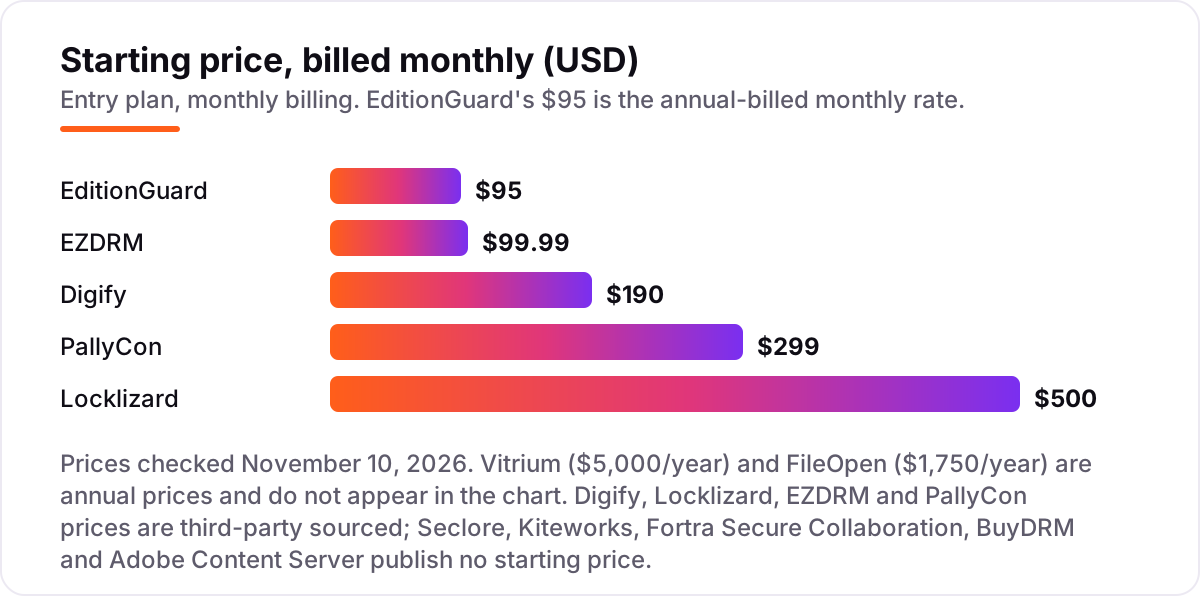
Digital rights management software pricing: what you will actually pay
Take a small publisher protecting 100 ebooks and a short video course. For the ebooks, EditionGuard Starter costs $95 a month billed annually — $1,140 a year for 50 download credits a month. FileOpen costs $1,750 a year, Digify Pro costs $1,680 a year billed annually ($190 a month if paid monthly), and Vitrium Pro costs $5,000 a year. Same 100 ebooks, four very different annual bills: $1,140, $1,680, $1,750 and $5,000.
For the video course, EZDRM single DRM costs $99.99 a month — $1,199.88 a year plus a $99.99 setup fee, so $1,299.87 in year one — while PallyCon Standard costs $299 a month, or $3,588 a year. EZDRM covers one DRM only; PallyCon covers all three, which is why it costs more. If the course must play on Android, Apple and Windows devices, the multi-DRM price is the real comparison.
Three costs sit outside every number above. First, usage overages: EditionGuard's 50 monthly download credits and EZDRM's 10,000 licences are caps, and extra credits or licences cost more. Second, setup fees: EZDRM charges $99.99 to $199.99 once, and Adobe Content Server needs a reseller setup. Third, the custom-quote tools: Seclore, Kiteworks, Fortra Secure Collaboration, BuyDRM and Adobe Content Server publish no price, so their cost is whatever the sales call produces — budget a negotiation, not a checkout.
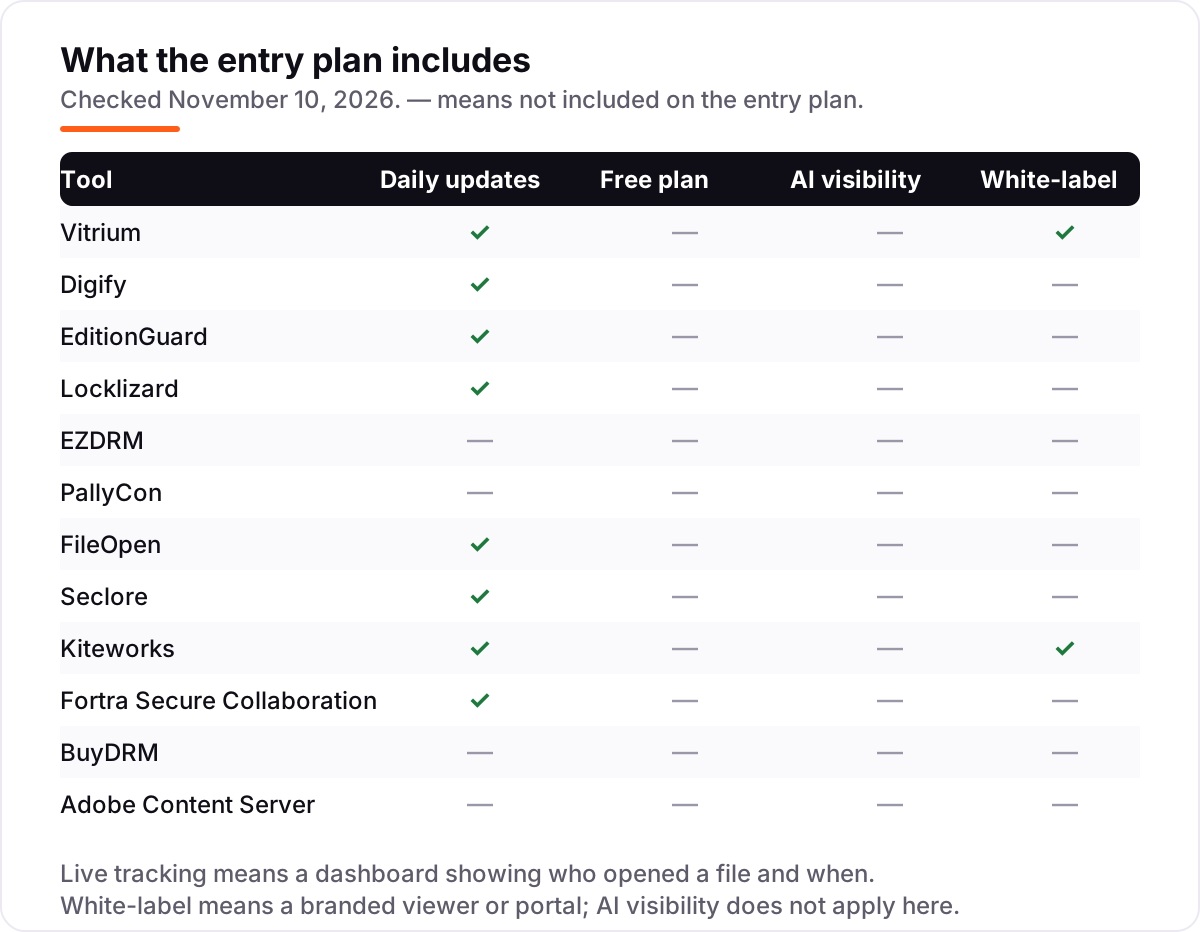
Know the difference: document DRM vs video DRM vs enterprise data security
The confusion in this category is that one label covers three products. Document DRM — Vitrium, Locklizard, FileOpen, EditionGuard, Digify — protects files: it controls printing, copying, expiry and forwarding of PDFs, ebooks and Office documents. Video multi-DRM — EZDRM, PallyCon, BuyDRM — delivers playback licences for Widevine, FairPlay and PlayReady so a video plays on each device's own DRM. Enterprise data-centric security — Seclore, Kiteworks, Fortra Secure Collaboration — follows confidential files wherever they travel and enforces policy on them.
The three rarely overlap. A document tool cannot issue a FairPlay licence, a video service cannot stop a PDF being printed, and an enterprise platform is priced and sold for a different buyer entirely. The most common mistake is buying a video DRM for documents, or an enterprise platform for a 100-ebook catalogue. Decide what you protect first — a file, a stream or a company's confidential data — and the right third of this list picks itself.
Quick comparison: tool type by need
| Buyer | Best pick | Why |
|---|---|---|
| Small ebook publisher | EditionGuard | Cheapest verified price at $95/month, Adobe-compatible |
| Publisher with mixed content | Vitrium | Protects documents, video, images and audio in one system |
| Team sharing tracked documents | Digify | Real-time tracking and revocation from $190/month |
| Strictest PDF lockdown | Locklizard | Blocks printing, copying and screenshots; $500/month |
| Single-ecosystem video | EZDRM | One DRM for $99.99/month with 10,000 licences |
| Multi-DRM video service | PallyCon | Widevine, FairPlay and PlayReady plus watermarking, $299/month |
| Acrobat-based PDF control | FileOpen | DRM inside Adobe Reader, $1,750/year |
| Enterprise data security | Seclore | Protection follows the file anywhere; custom quote |
| Regulated file sharing | Kiteworks | One governed network, FedRAMP authorised; custom quote |
| Studio-grade video DRM | BuyDRM | Hollywood-trusted KeyOS as a managed service; custom quote |
Mistakes to avoid
- Buying video DRM for documents, or the reverse. EZDRM and PallyCon cannot protect a PDF, and Vitrium cannot issue a FairPlay licence. Match the tool to the content type first.
- Budgeting on a third-party price. Six prices in this list come from directories, not the vendor. Digify's own figure changed from $150 to $190 across sources; confirm the price with the vendor before signing.
- Ignoring the pricing unit. EditionGuard charges per download credit, Digify per user, EZDRM per licence and PallyCon per monthly active user. A cheap headline can be an expensive bill at your volume.
- Assuming a free plan exists. None of these twelve has a free plan, and Google retires its free Widevine cloud licence service on April 13, 2027. Budget for a trial, then a subscription.
- Skipping the revocation test. The whole point of DRM is control after distribution. If the trial cannot revoke a shared file and show you who opened it, the tool is not doing its job.
How we chose
We checked each vendor's own pricing page on November 10, 2026. Only one price could be verified that way: EditionGuard's Starter at $95 a month billed annually, with 50 download credits. EZDRM's pricing page opened today but its price table did not render in the text copy, so the $99.99 figure rests on two independent October 2026 reads of that same page, plus SourceForge. Digify's pricing page could not be opened for this check, so its $190 a month rests on HelpRange and Hummingdeck, checked in late October and early November 2026; G2 still lists an older $150 figure. Vitrium ($5,000 a year), Locklizard ($500 a month), FileOpen ($1,750 a year) and PallyCon ($299 a month) publish no price list, so their figures are third-party sourced and labelled as such; one directory lists Vitrium at $500 a month, which conflicts with G2's vendor-supplied $5,000 a year, and we show the annual figure. Seclore, Kiteworks, Fortra Secure Collaboration, BuyDRM and Adobe Content Server publish no prices at all and are shown as custom quote; Adobe's $10,000 licence fee is reseller-reported, not an Adobe price. Ratings appear only where a fresh G2 page gave a score and review count: Vitrium, Digify, EditionGuard, Seclore and Kiteworks. Seclore's G2 figure comes from a page copy crawled four days before this check, the freshest available. The other seven carry no rating because no G2 or Capterra listing was found for them, and we would rather show no rating than an unverified one. No vendor paid for a place in this list, and none of the links here are affiliate links.
What to do next
Start with the trial of your top pick and protect one real title — an ebook, a course video or a confidential file — then share it with a test reader, revoke it, and check the tracking before you pay. If the content is sorted but new customers are not finding you, our AI search optimization service handles the visibility side — or compare providers in our guide to digital asset management software for photographers. Once your tools are in place, find out what's holding your rankings back.
Your stack only works if people find you
SerpAstra fixes what keeps your site off page one and makes it easy for AI assistants to recommend.
Get a free audit→Sources we checked (22)
- EditionGuard pricing — editionguard.com/pricing (checked November 10, 2026)
- EZDRM service pricing — ezdrm.com/service-pricing (checked November 10, 2026)
- Digify pricing — HelpRange Digify alternative (checked November 9, 2026)
- Digify pricing — Hummingdeck Digify alternatives (checked October 2026)
- Vitrium pricing on G2 — vendor-supplied data
- Vitrium pricing — DocMetrics DRM pricing
- Locklizard pricing on TrustRadius
- FileOpen pricing on TrustRadius
- PallyCon pricing on SpotSaaS — sourced from PallyCon's site, May 2026
- EZDRM and PallyCon prices — TripleMinds Widevine vs FairPlay vs PlayReady guide (October 2026)
- BuyDRM pricing explainer — BuyDRM blog
- Vera becomes Fortra Secure Collaboration — Fortra blog (September 29, 2023)
- Fortra Secure Collaboration product page
- Adobe Content Server pricing via Locklizard (reseller-reported)
- Vitrium on G2 — g2.com/products/vitrium-systems/reviews (checked November 10, 2026)
- Digify on G2 — g2.com/products/digify/reviews (checked November 10, 2026)
- EditionGuard on G2 — g2.com/products/editionguard/reviews (checked November 10, 2026)
- Seclore on G2 — g2.com/products/seclore-data-centric-security-platform/reviews (checked November 10, 2026)
- Kiteworks on G2 — g2.com/products/kiteworks/reviews (checked November 10, 2026)
- FileOpen quote page — fileopen.com/request-a-quote (checked November 10, 2026)
- Vitrium request-pricing page — vitrium.com/request-pricing (checked November 10, 2026)
- Kiteworks publishes no pricing — SelectHub Kiteworks vs FileCloud (November 2, 2026)
Shamim
Founder of SerpAstra
A full-stack SEO and digital marketer who spends most days on Local SEO for dental practices, AI search visibility and lead generation.
Frequently asked questions
What is the best digital rights management software?
Vitrium is the best fit for most buyers: it protects documents, video, images and audio under one system, with a 4.8 out of 5 G2 score. Digify is the best pick for tracked document sharing at $190 a month, and EditionGuard is the cheapest verified option for ebook publishers at $95 a month billed annually.
How much does digital rights management software cost?
Entry prices run from $95 a month on EditionGuard to $5,000 a year on Vitrium, with EZDRM at $99.99 a month and PallyCon at $299 a month in between. Five of the twelve tools publish no price at all and need a custom quote, so the real range for enterprise buyers is set by a sales call, not a price page.
What is the difference between document DRM and video DRM?
Document DRM protects files like PDFs and ebooks, controlling printing, copying and expiry — Vitrium, Locklizard and EditionGuard do this. Video DRM delivers playback licences for Widevine, FairPlay and PlayReady — EZDRM, PallyCon and BuyDRM do that. The two solve different problems, so a tool that does one rarely does the other well.
Is there a free digital rights management software?
No tool in this list has a free plan. EditionGuard offers a 14-day free trial, and Vitrium, Digify, Locklizard, EZDRM and PallyCon all offer free trials. Google is also retiring its free Widevine cloud licence service on April 13, 2027, so there is no free route left for video DRM after that date.
Can DRM be removed or bypassed?
No DRM is unbreakable: a determined user can photograph a screen or retype content, and tools here control access rather than making copying impossible. What good DRM does is raise the cost of piracy, stop casual forwarding, and let you revoke access and see who opened a file. Buy it for control and deterrence, not for an absolute guarantee.
What is multi-DRM and do I need it?
Multi-DRM means one service delivering licences for Google Widevine, Apple FairPlay and Microsoft PlayReady, so the same video plays on Android, Apple and Windows devices. You need it if your audience watches on more than one ecosystem. If you only sell ebooks or PDFs, document DRM is the right buy instead.
Do I need DRM if my PDFs are password-protected?
A password only locks the file until it is opened; once shared, the password travels with the file and anyone can forward it. DRM adds controls that stay with the file: expiry dates, print and copy blocks, device limits and revocation. If your content earns revenue or carries confidential information, a password alone is not enough.
Free SEO and AI visibility audit
Find out what is holding your rankings back
Send us your site. Within 2 business days you get a written audit, an AI visibility check and a short fix list ranked by impact. Free, with no contract attached.
Request my free audit→Related guides
 Local Business & Vertical Software8 Best Document Management Software for Small Law Firm in 2026, ComparedCompare the 8 best document management software for small law firm on price, matter filing and email management, with every price checked November 7, 2026.Read guide →
 Local Business & Vertical Software7 Best Digital Asset Management Software for Photographers in 2026, ComparedCompare the 7 best digital asset management software for photographers on price, catalogs, culling speed and free plans, with prices checked November 7, 2026.Read guide →
 Digital Marketing & Ads12 Best Video Marketing Platforms for 2026 (Pros, Cons and Pricing)Compare the 12 best video marketing platforms on price, free plans, hosting and AI creation for small teams, with every price checked November 5, 2026.Read guide →