
7 Best Digital Scrapbooking Software in 2026, Compared
Compare the 7 best digital scrapbooking software options on price, free plans, templates and AI tools, with prices checked November 10, 2026.
 Shamim Mia, Founder, SerpAstraLast verified November 10, 202612 min read
We compare pricing pages, documentation and public reviews. We never accept payment for rankings.

Key takeaways
- Canva leads at $18/month, MyMemories Suite costs $39.95 once, and Scrapbook MAX! costs $39 once — the three best fits for most scrapbookers.
- FotoJet is the cheapest subscription here at $6.99/month, with PicMonkey at $7.99 and Fotor at $8.99; Canva, Fotor and FotoJet have genuinely free plans.
- The single most important buying factor is the pricing model: monthly subscription, yearly plan or one-time licence. A $39 one-time tool can cost less over three years than a $7.99-a-month subscription.
- Desktop tools keep your pages on your own computer, while browser tools work anywhere but need an internet connection — decide which matters more before you pay.
On this page
Quick comparison
| Tool | Best for | Starting price | Free plan |
|---|---|---|---|
| Canva | Beginners and casual scrapbookers who want the biggest template library and the fastest start in a browser | $18/mo | Yes (free) |
| MyMemories Suite | Dedicated scrapbookers who want a scrapbook-first desktop app with albums, kits and print-ready pages | $39.95 one-time | No (free trial) |
| Scrapbook MAX! | Windows users who want the cheapest dedicated scrapbook app with pre-made layouts and no subscription | $39 one-time | No (free trial) |
| PicMonkey | Hobbyists who want an easy browser editor with strong collage tools and one-click background removal | $7.99/mo | No (7-day trial) |
| Fotor | Scrapbookers who want AI photo fixes, batch editing and collage layouts in a cheap browser tool | $8.99/mo | Yes (free) |
| FotoJet | Casual scrapbookers who want free collage-making with no sign-up and the cheapest paid plan here | $6.99/mo | Yes (free) |
| Adobe Photoshop Elements | Hobbyists who want guided photo editing and layered pages without a monthly subscription | $99.99 one-time | No (7-day trial) |
Make one of these tools?
We re-check this list every quarter. Send a correction, request a review, or ask about a clearly labeled sponsored spot.
Request a listingThe best digital scrapbooking software

Canva
Best for: Beginners and casual scrapbookers who want the biggest template library and the fastest start in a browser
Canva is the easiest way for most people to start digital scrapbooking, because it works in a browser and needs no install. Thousands of scrapbook, photo-book and collage templates give every page a starting point, and the drag-and-drop editor handles photos, text, stickers and backgrounds in minutes. Pro costs $18 a month, or $144 a year, and adds premium templates, 100 GB of storage and brand kits.
The catch is that Canva is a general design tool, not a scrapbook-first one. It has no album workspace for building a whole book page by page, and its best templates sit behind the Pro paywall, so the free plan runs out of ideas fast. Exports are digital-first, with print quality depending on the file you choose. Pick Canva when you want the fastest start and the biggest template library.
What we like
- Largest template library here, with scrapbook, photo-book and collage templates ready to use
- Works in any browser with nothing to install, and designs autosave to the cloud
- Pro adds premium templates, 100 GB of storage and brand kits for $18 a month
- Free plan is genuinely usable for simple pages, with 5 GB of storage
Watch out for
- A general design tool, not a scrapbook-first one: no album workspace for building a whole book page by page
- The best scrapbook templates sit behind Pro, so the free plan runs out of ideas fast
- Pro covers one person only; a second person needs Business at $25 per person a month

MyMemories Suite
Best for: Dedicated scrapbookers who want a scrapbook-first desktop app with albums, kits and print-ready pages
MyMemories Suite is the only tool here built from the ground up for scrapbooking, and it shows in the workflow. Instead of one page at a time, you build a whole album in a single workspace, dropping photos into Fast-Fill templates and reordering pages as the story grows. It ships with 1,500 background papers, 1,300 embellishments and more than 30 album templates, and pages can hold video, music and narration too.
The trade-off is that it is desktop software, so your albums live on one computer with no cloud sync and no mobile app. The $39.95 price is a one-time payment, but kits and templates are sold separately, so the real spend grows if you keep buying designs. Pick MyMemories Suite when scrapbooking is the hobby itself, not an occasional project.
What we like
- Built only for scrapbooking: whole albums in one workspace, with Fast-Fill page templates
- Ships with 1,500 background papers, 1,300 embellishments and 30-plus album templates
- Pages can include video, music, narration and web links, not just photos and text
- One-time purchase: no monthly bill once the software is bought
Watch out for
- Desktop software only, so pages live on one computer with no cloud sync or mobile app
- The $39.95 price is third-party sourced: the vendor shows the price at checkout, not on its public pages
- Kits and templates are bought separately, so the real spend grows beyond the software price
Scrapbook MAX!
Best for: Windows users who want the cheapest dedicated scrapbook app with pre-made layouts and no subscription
Scrapbook MAX! is the cheapest way to get a tool made only for scrapbooking. It costs $39 once, with no subscription, and its pre-made layouts plus drag-and-drop editing turn a blank page into a finished spread in minutes. It works with thousands of digital scrapbook kits found online, as well as its own expansion packs, so the design shelf never really runs out.
The limits are platform and place. Scrapbook MAX! runs on Windows only, so Mac and Chromebook scrapbookers cannot use it, and as desktop software it keeps pages on one computer with no cloud sync. Its built-in library is also smaller than MyMemories Suite. Pick it when you are on Windows and want dedicated scrapbook layouts for the lowest one-time price.
What we like
- Cheapest dedicated scrapbook app here at $39 one-time, with no subscription ever
- Pre-made layouts and drag-and-drop editing make a finished page in minutes
- Works with thousands of digital scrapbook kits found online, plus its own expansion packs
- Prints at home or exports digital pages for sharing and print services
Watch out for
- Windows only, so Mac and Chromebook scrapbookers cannot use it at all
- Desktop software with no cloud sync, so pages live on one computer
- Smaller template and kit library than MyMemories Suite, with expansion packs sold separately

PicMonkey
Best for: Hobbyists who want an easy browser editor with strong collage tools and one-click background removal
PicMonkey is the photo-first pick in this list: an easy browser editor whose collage layouts were practically made for memory pages. Basic costs $7.99 a month and includes 1 GB of Hub cloud storage, so a page started on a desktop can be finished on a phone. The font, effect and template libraries are large, and the interface stays simple enough for a first-time scrapbooker.
The catch is the paywall around finishing anything. There is no free plan: you can create for free, but downloading or sharing a page needs a subscription, and the one-click background remover and Smart Resize need Pro at $12.99 a month. Pick PicMonkey when photos come first and you want the easiest editor for turning them into pages.
What we like
- Easiest photo-first editor here, with collage layouts built for memory pages
- Hub cloud storage keeps projects in sync between desktop and mobile
- Huge library of fonts, effects and templates that suit scrapbook pages
- Pro at $12.99 a month adds unlimited storage, Smart Resize and background removal
Watch out for
- No free plan: you can create for free but must subscribe to download or share a finished page
- Background remover and Smart Resize need Pro at $12.99 a month, not Basic
- Batch editing is limited, so multi-size exports mean manual resizing
Fotor
Best for: Scrapbookers who want AI photo fixes, batch editing and collage layouts in a cheap browser tool
Fotor is the AI value pick here. Pro costs $8.99 a month, or $39.99 a year, and its one-click AI enhancer and background remover rescue dull phone photos in seconds. More than 1,000 collage layouts cover birthdays, holidays and family albums, and batch editing lets you polish a whole set of pages at once instead of one photo at a time.
The catch is the credit meter. Pro gets 100 AI credits a month, so heavy AI use hits a ceiling fast, and the free Basic plan watermarks exports and locks most AI tools behind Pro. Fees once billed are also non-refundable. Pick Fotor when you want AI photo fixes and batch editing for the lowest subscription price with a real free plan.
What we like
- One-click AI enhancer and background remover fix phone photos fast
- Over 1,000 collage layouts plus batch editing for whole albums at once
- Pro includes brand kits, HD export and transparent PNG export
- Free Basic plan covers simple pages, with a 7-day Pro trial to test the paid tools
Watch out for
- AI tools run on monthly credits: Pro gets 100 a month, so heavy AI use hits a ceiling fast
- Free plan exports carry a watermark and lock most AI tools behind Pro
- Fees once billed are non-refundable, so a mistaken subscription cannot be clawed back

FotoJet
Best for: Casual scrapbookers who want free collage-making with no sign-up and the cheapest paid plan here
FotoJet is the simplest tool in this list, and the cheapest subscription too. The free plan needs no registration at all: open the site and start building a collage from more than 800 layouts, including birthday, wedding, baby and family designs. Plus costs $6.99 a month, or $39.99 a year, and unlocks every advanced editing tool, font and template.
The trade-off is that FotoJet keeps things basic. There is no cloud storage or project sync, so designs save to your own computer, and there are no AI editing tools, so photo fixes are manual where Fotor and Canva automate them. Pick FotoJet when you want free, instant collage-making and the lowest possible paid price.
What we like
- Cheapest subscription here at $6.99 a month, or $39.99 a year
- Over 800 collage layouts, including birthday, wedding and family designs
- Free plan needs no registration at all: open the site and start designing
- Plus unlocks all advanced editing tools, fonts and templates
Watch out for
- No cloud storage or project sync, so designs save to your own computer only
- No AI editing tools, so photo fixes are manual where Fotor and Canva automate them
- Template and font range is narrower than Canva or PicMonkey

Adobe Photoshop Elements
Best for: Hobbyists who want guided photo editing and layered pages without a monthly subscription
Photoshop Elements is the guided desktop editor in this list, built for hobbyists who want real photo editing without a monthly subscription. Guided Edits explain each step for jobs like replacing a sky or removing an object, while full layer support lets you stack photos, text and decorations the way paper scrapbookers layer card. The Organizer keeps thousands of photos sorted, and the 2026 version adds generative AI.
The catch is the licence clock. The $99.99 payment buys three years of use, not a lifetime: when the term ends, the app stops opening until you buy again. It also needs Windows 11 version 24H2 or later, and the 25 monthly AI credits run out fast. Pick Elements when you want guided, layered editing on your own computer.
What we like
- Guided Edits walk beginners through each step, from sky replacement to double exposure
- Full layer support and an Organizer for sorting thousands of photos
- Generative AI can create images and backgrounds from a text prompt
- No monthly bill: one $99.99 payment covers three years of use
Watch out for
- The $99.99 licence lasts 3 years, then the app stops opening until you buy again
- Needs Windows 11 version 24H2 or later on Intel or AMD; Windows 10 and Arm laptops are not supported
- Only 25 generative AI credits a month, with more needing a separate Firefly subscription
The best digital scrapbooking software turns a folder of photos into finished pages: templates to start from, backgrounds and embellishments to decorate with, and an easy way to print or share the result. We ranked the seven tools below by fit for the most common buyer — a home scrapbooker who wants good-looking pages without learning a professional editor — starting with the easiest option and ending with the most powerful one, and every price was checked on November 10, 2026.
How to choose the best digital scrapbooking software
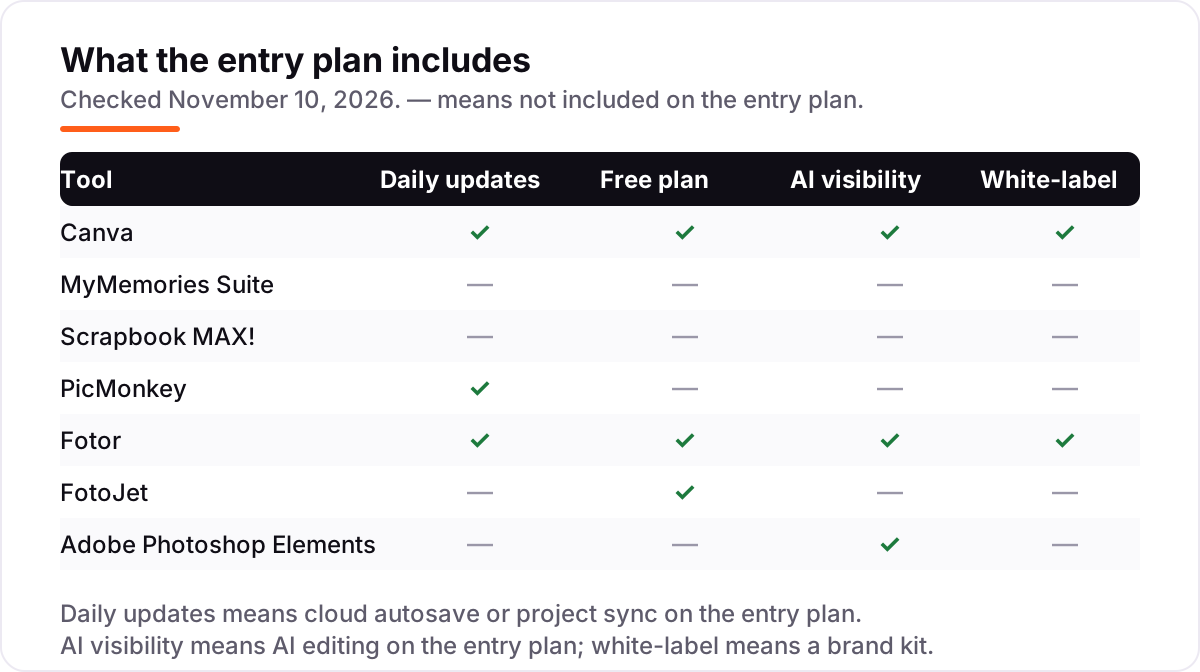
- Decide the pricing model first. Canva, PicMonkey, Fotor and FotoJet charge monthly or yearly, while MyMemories Suite, Scrapbook MAX! and Photoshop Elements charge once. The model decides the three-year cost more than any feature does.
- Match the tool to the job. MyMemories Suite and Scrapbook MAX! are built only for scrapbooking, with albums and page templates; Canva, PicMonkey, Fotor and FotoJet are design and photo tools that also make scrapbook pages.
- Check the free plan before you pay. Canva, Fotor and FotoJet let you build real pages for free; PicMonkey, MyMemories Suite, Scrapbook MAX! and Photoshop Elements offer trials instead, so test before buying.
- Count the platform. Browser tools work on Windows, Mac and Chromebooks; Scrapbook MAX! is Windows only, and Photoshop Elements needs Windows 11 version 24H2 or later.
- Look at the export. A page is only finished when it prints well or shares cleanly, so check that your pick exports at 300 DPI and in the file type your print service wants.
If you sell your scrapbook pages or printables online, being found matters as much as making them. Our monthly SEO service handles the visibility side, and before you publish new product pages, run your titles through the free SERP snippet preview tool — it shows exactly how the title and description will look in Google. For the photo-editing side of the job, see our guide to photo editing software.
Whatever you shortlist, try it with real photos before you pay. The free plans and trials in this list are long enough to build one genuine page — your photos, your story, your style — and that page tells you more than any review can. Check two things while you build it: that the templates fit the photos you actually take, and that the export looks right when printed or shared. Every tool here can make a good page, so the trial is about which one feels natural to you.
Digital scrapbooking software pricing: what you will actually pay
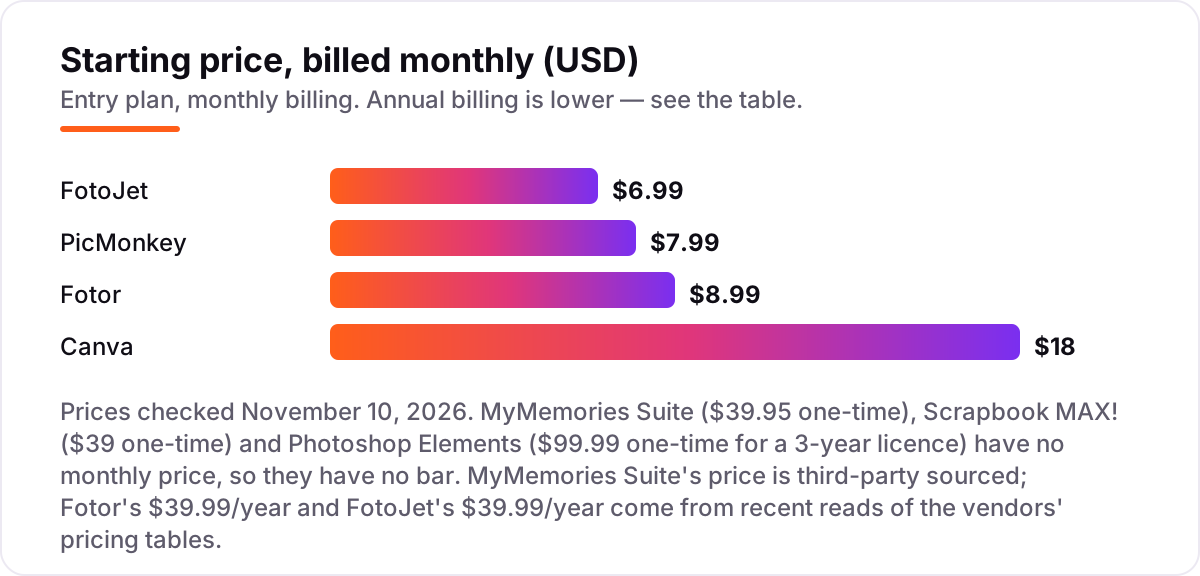
Take one scrapbooker building pages for three years. On list prices, the one-time tools cost $39 once for Scrapbook MAX!, $39.95 once for MyMemories Suite, and $99.99 once for Photoshop Elements — though the Elements licence ends after three years, so a fourth year means buying again. The subscriptions cost far more over the same three years: FotoJet Plus at $6.99 a month is $251.64, PicMonkey Basic at $7.99 a month is $287.64, and Fotor Pro at $8.99 a month is $323.64.
Annual billing cuts the subscription bill sharply. FotoJet Plus drops from $251.64 to $119.97 over three years on the $39.99-a-year plan, and Fotor Pro drops from $323.64 to $119.97 on its $39.99-a-year plan. Canva Pro drops from $648 paid monthly to $432 on the $144-a-year plan. Even so, the cheapest three-year bill in this list is still a one-time tool: $39 for Scrapbook MAX! against $119.97 for the cheapest annual subscription.
Three costs sit outside every number above. First, kits and templates: MyMemories Suite and Scrapbook MAX! sell extra kits, so a keen buyer spends well past the software price. Second, printing: a printed album or photobook costs extra whatever tool you use, so budget it separately. Third, AI credits: Fotor Pro includes 100 AI credits a month, and Photoshop Elements includes 25, so heavy AI use means paying for more. If you mainly want photo editing rather than pages, see our guide to photo editing software for the editing-led side.
Know the difference: digital scrapbooking software vs a photo editor
The confusion in this category is between a tool that fixes photos and a tool that builds pages. A photo editor works on one image at a time: exposure, cropping, retouching and colour. Digital scrapbooking software adds the page itself — templates, albums, backgrounds, embellishments, stickers and journaling — so photos, text and decorations become a finished spread you can print or share. MyMemories Suite and Scrapbook MAX! are built for that job and nothing else, which is why they organise whole albums instead of single images.
There is a second, quieter confusion: browser tools and desktop tools. Canva, PicMonkey, Fotor and FotoJet run in a browser, so they work on any computer and save to the cloud, but they need an internet connection and they charge every month. MyMemories Suite, Scrapbook MAX! and Photoshop Elements live on your computer, work offline and charge once — but your pages live on that one machine, and Scrapbook MAX! is Windows only. Neither model is better in itself; the question is whether you want to work anywhere or own your software outright.
A third distinction worth knowing is the template trap. A huge template library looks generous, but the best templates on Canva and PicMonkey sit behind the paid plan, so the free plan shows you the catalogue and then asks you to pay for the designs you actually want. Always build one real page on the free plan or trial before judging a library by its size.
Quick comparison: tool type by need
| Buyer | Best pick | Why |
|---|---|---|
| Most scrapbookers | Canva | Biggest template library and a real free plan, Pro is $18/month |
| Dedicated scrapbooker | MyMemories Suite | Scrapbook-first albums and kits, $39.95 one-time |
| Windows user on a budget | Scrapbook MAX! | Cheapest dedicated app, $39 one-time, no subscription |
| Photo-first pages | PicMonkey | Easy collages and Hub sync, Basic is $7.99/month |
| AI photo fixes | Fotor | One-click AI enhancer and 1,000-plus collages, Pro is $8.99/month |
| Cheapest subscription | FotoJet | 800-plus collage layouts with no sign-up, Plus is $6.99/month |
| Guided layered editing | Photoshop Elements | Guided Edits and layers, $99.99 for a 3-year licence |
Mistakes to avoid
- Budgeting on the monthly price alone. A $6.99-a-month plan costs $251.64 over three years, while Scrapbook MAX! costs $39 once. Price the tool over the years you will actually use it, not one month.
- Buying on the template count. The best templates on Canva and PicMonkey sit behind the paid plan. Build one real page on the free plan or trial before you judge a library.
- Forgetting the licence clock. Photoshop Elements costs $99.99 for three years, then stops opening until you buy again. It is not a lifetime purchase, whatever older articles say.
- Ignoring the platform. Scrapbook MAX! is Windows only, and Photoshop Elements needs Windows 11 version 24H2 or later. Check the system requirements before you pay, not after.
- Paying for AI credits you will not use. Fotor Pro includes 100 AI credits a month and Elements 25, so a scrapbooker who rarely uses AI is paying for a meter they never fill.
How we chose
We checked each vendor's own pricing page on November 10, 2026 and recorded the starting price exactly as shown, including the annual-billing figure where the page lists one, and we ranked the tools by fit for the most common buyer — a home scrapbooker who wants good-looking pages without learning a professional editor — not by brand size. Two prices could not be read off the vendor's own page in the copy we could reach today: MyMemories Suite's $39.95 is third-party sourced (TechJockey lists $40; the vendor shows the price at checkout), and FotoJet's $6.99 a month and $39.99 a year come from its published pricing table as quoted in October 2026 reads, since the live homepage copy carried no price figures. Fotor's $39.99-a-year figure comes from a November 3, 2026 read of fotor.com/pricing; its page renders dollar figures dynamically, so the text copy we read on November 10 showed no amounts. Ratings are shown only where a fresh G2 page gave a clear score and review count on November 10, 2026: Canva, PicMonkey and Fotor. MyMemories Suite, Scrapbook MAX!, FotoJet and Photoshop Elements carry no rating here because their G2 listings gave no verifiable score, and we would rather show no rating than a stale or estimated one. No vendor paid for a place in this list, and none of the links here are affiliate links.
What to do next
Start with the free plan or trial of your top pick and build one real page with your own photos. Check that the templates fit the photos you actually take, that the export prints cleanly at 300 DPI, and that the workflow feels natural before you commit to a year or a purchase. If the pages are sorted but nobody finds your shop or blog, our monthly SEO service handles the visibility side — or compare editors in our guide to photo editing software. Once your tools are in place, find out what's holding your rankings back.
Your stack only works if people find you
SerpAstra fixes what keeps your site off page one and makes it easy for AI assistants to recommend.
Get a free audit→Sources we checked (12)
- Canva pricing — canva.com/pricing (checked November 10, 2026)
- MyMemories Suite — mymemories.com/mms/what_is_mms (checked November 10, 2026)
- MyMemories Suite price, third-party sourced — techjockey.com/detail/mymemories-suite (checked November 10, 2026)
- Scrapbook MAX! — scrapbookmax.com (checked November 10, 2026)
- PicMonkey pricing — picmonkey.com/pricing (checked November 10, 2026)
- Fotor pricing — fotor.com/pricing (checked November 10, 2026)
- FotoJet — fotojet.com (checked November 10, 2026)
- Photoshop Elements 2026 — adobe.com/products/photoshop-elements.html (checked November 10, 2026)
- Photoshop Elements 2026 price — digitalcameraworld.com (checked November 10, 2026)
- Canva on G2 — g2.com/products/canva/reviews (checked November 10, 2026)
- PicMonkey on G2 — g2.com/compare/adobe-photoshop-vs-picmonkey (checked November 10, 2026)
- Fotor on G2 — g2.com/products/fotor-photo-editor/reviews (checked November 10, 2026)
Shamim
Founder of SerpAstra
A full-stack SEO and digital marketer who spends most days on Local SEO for dental practices, AI search visibility and lead generation.
Frequently asked questions
What is the best digital scrapbooking software?
Canva is the best fit for most people: the biggest template library, a real free plan, and Pro at $18/month. Dedicated scrapbookers should look at MyMemories Suite at $39.95 once, and Windows users on a budget should look at Scrapbook MAX! at $39 once.
How much does digital scrapbooking software cost?
Subscriptions run from $6.99 to $18 a month: FotoJet at $6.99, PicMonkey at $7.99, Fotor at $8.99 and Canva Pro at $18. One-time tools cost $39 for Scrapbook MAX!, $39.95 for MyMemories Suite and $99.99 for Photoshop Elements, which covers three years.
Is there free digital scrapbooking software?
Yes. Canva, Fotor and FotoJet all have genuinely free plans: Canva's free plan covers simple pages, Fotor's Basic plan covers collages with a watermark, and FotoJet needs no sign-up at all. PicMonkey, MyMemories Suite, Scrapbook MAX! and Photoshop Elements offer free trials instead.
What is the difference between digital scrapbooking software and a photo editor?
A photo editor fixes single photos: exposure, cropping and retouching. Digital scrapbooking software adds the page itself — templates, albums, backgrounds, embellishments and journaling — so photos, text and decorations become a finished spread. MyMemories Suite and Scrapbook MAX! are built for that job; Canva and Fotor do both.
Can I print my digital scrapbook pages?
Yes, if you export at print size. MyMemories Suite and Scrapbook MAX! export print-ready pages, and Canva, Fotor and FotoJet offer high-resolution export on paid plans. Always export at 300 DPI at your page size, and test one page at home before ordering a whole printed album.
Do I need a subscription, or is a one-time purchase better?
It depends on how long you will scrapbook. A $39 one-time tool beats any subscription over three years, while a $6.99-a-month plan costs $251.64 over the same period. Subscriptions win if you want new templates, cloud sync and AI tools that keep arriving; one-time tools win if you want to pay once and keep the software.
Which digital scrapbooking software works on Windows and Mac?
Canva, PicMonkey, Fotor and FotoJet run in the browser, so they work on Windows, Mac and Chromebooks alike. Photoshop Elements runs on both Windows and Mac, but needs Windows 11 version 24H2 or later. MyMemories Suite and Scrapbook MAX! are desktop apps: Scrapbook MAX! is Windows only.
Free SEO and AI visibility audit
Find out what is holding your rankings back
Send us your site. Within 2 business days you get a written audit, an AI visibility check and a short fix list ranked by impact. Free, with no contract attached.
Request my free audit→Related guides
 Local Business & Vertical Software9 Best Photo Editing Software for Real Estate in 2026, ComparedCompare the 9 best photo editing software for real estate on price, batch editing, sky swaps and AI retouching, with every price checked November 8, 2026.Read guide →
 Local Business & Vertical Software7 Best Digital Asset Management Software for Photographers in 2026, ComparedCompare the 7 best digital asset management software for photographers on price, catalogs, culling speed and free plans, with prices checked November 7, 2026.Read guide →
 Design, Video & CreativeBest Image Cropper Apps (2026): 10 Apps Worth DownloadingCompare the 10 best image cropper app picks for social and web images, with real starting prices, free plans and crop presets, checked November 4, 2026.Read guide →