
Best Digital Signage Software for 2026: 7 Options Compared by Use Case
Compare the 7 best digital signage software options on price, free plans and features, with every per-screen price checked November 10, 2026.
 Shamim Mia, Founder, SerpAstraLast verified November 10, 202612 min read
We compare pricing pages, documentation and public reviews. We never accept payment for rankings.
Key takeaways
- Yodeck is the best fit for most buyers at $8/screen/month with one screen free forever; OptiSigns follows at $10/screen/month with three screens free, and Play Digital Signage at $8/screen/month with its first screen free after a review.
- The single most important buying factor is the pricing unit: every tool here charges per screen or device per month, so a 10-screen network costs $80 to $240 a month before hardware.
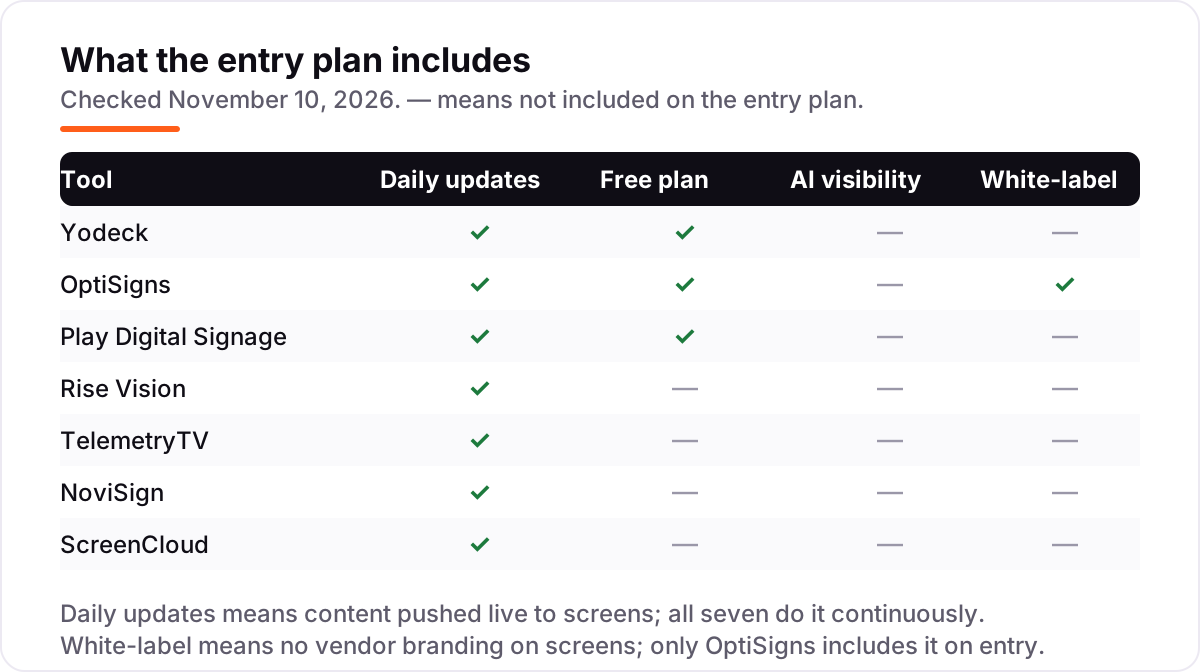
- Only Yodeck, OptiSigns and Play offer a free plan; ScreenCloud, NoviSign, Rise Vision and TelemetryTV are trial-only, so budget from the first screen.
- Proof of play, approvals and SSO usually sit one or two tiers above the entry price — check the tier you will actually need, not the headline price.
On this page
Quick comparison
| Tool | Best for | Starting price | Free plan |
|---|---|---|---|
| Yodeck | Small businesses that want the lowest honest per-screen price and a free first screen | $8/mo | Yes (1 screen free) |
| OptiSigns | Small teams that want the biggest app library and a free plan covering three screens | $10/mo | Yes (3 screens free) |
| Play Digital Signage | Lean teams that want simple month-to-month signage without a contract | $8/mo | Yes (1 screen, after review) |
| Rise Vision | Schools and workplaces that need emergency alerts on their screens | $12/mo | No (14-day trial) |
| TelemetryTV | Operations teams that want live data dashboards and metrics on screens | $8/mo | No (14-day trial) |
| NoviSign | Non-designers who want drag-and-drop signage with AI help and touchscreens | $16/mo | No (30-day trial) |
| ScreenCloud | Mid-size workplaces that want polished internal communications screens | $24/mo | No (14-day trial) |
Make one of these tools?
We re-check this list every quarter. Send a correction, request a review, or ask about a clearly labeled sponsored spot.
Request a listingThe best digital signage software

Yodeck
Best for: Small businesses that want the lowest honest per-screen price and a free first screen
Yodeck is the best fit for most buyers because the math is honest: one screen costs nothing forever, and every screen after that costs $8 a month on Basic. Annual plans add a free Raspberry Pi player per screen, which removes the hardware question that usually follows the software decision. Templates, scheduling and offline playback all work on Basic, so a small shop can run real signage without climbing tiers.
The catch is the second screen. The moment you add one, the free screen converts to paid, so two screens cost $16 a month, not $8. Proof-of-play reports also need Premium at $12 a screen, and menus have no POS sync, so prices are typed by hand. Buy Yodeck when you want the cheapest honest bill for a handful of screens and a free way to test one first.
What we like
- One screen free forever with no credit card, plus a free Raspberry Pi player on annual plans
- Same $8 price whether billed monthly or annually, so there is no billing-cycle trap
- Offline playback for 30+ days keeps screens running when Wi-Fi drops
- 500+ templates and 80+ apps cover menus, schedules and announcements out of the box
Watch out for
- The free screen converts to paid when a second screen is added, so two screens cost $16/month, not $8
- Proof-of-play reports need Premium ($12/screen/month), not the $8 Basic plan
- No native POS menu sync, so menu prices are typed by hand in a separate account
OptiSigns
Best for: Small teams that want the biggest app library and a free plan covering three screens
OptiSigns wins the app contest: more than 100 integrations pull Google Slides, YouTube and social feeds onto screens, and the free plan covers three screens, so a small cafe can run signage for nothing. Standard at $10 a screen adds schedules, zones, templates and unlimited storage, and it removes the OptiSigns logo from screens. It runs on any hardware, from smart TVs to Raspberry Pi and BrightSign.
The tier ladder matters most. Approvals, proof of play and user roles start at Pro, and the features most teams end up wanting — dashboards, Slack and Teams, SSO — sit on Pro Plus at $15 a screen. Video walls, wireless presentation and background music are paid add-ons on top. Pick OptiSigns when you want the widest app library and a free plan that covers a whole small shop.
What we like
- Free plan covers 3 screens, the most generous free tier in this list
- 100+ apps and integrations pull in Google Slides, YouTube and social feeds
- Runs on the widest hardware list here, from smart TVs to Raspberry Pi and BrightSign
- Standard removes the OptiSigns logo from screens, so white-label branding starts at $10
Watch out for
- Approvals, proof of play and user roles need Pro ($12.50/month) or above, not Standard
- Video walls, wireless presentation and background music are paid add-ons on top of the plan
- Enterprise needs a 25-screen minimum, so small teams cannot buy the top tier
Play Digital Signage
Best for: Lean teams that want simple month-to-month signage without a contract
Play Digital Signage keeps things simple: sign up, connect a player or a smart TV app, upload content, and the screens are live the same day. Essential costs $8 a screen with no annual commitment, and the first screen stays free if you leave a review on Capterra, G2 or another listed site within 30 days. The PowerPoint-style editor, templates and offline playback cover what a small team actually needs.
The free-screen deal is the catch to read twice: it depends on a public review, so a team that will not leave one pays from the first screen. Screen alerts need Pro at $12 a screen and proof of play needs the top plan at $16, and there is no POS link for menu boards. Choose Play for month-to-month signage a non-technical team can run from day one.
What we like
- $8 entry matches Yodeck with no annual commitment required to get that price
- First screen stays free after a review on Capterra, G2 or another listed site
- PowerPoint-style editor makes the first screens live the same day
- Runs on 100+ screen types and keeps playing offline when Wi-Fi drops
Watch out for
- The free screen depends on leaving a public review within 30 days of signing up
- Screen alerts need Pro ($12) and proof of play needs the top plan ($16), not Essential
- No POS link, so menu boards are updated by hand rather than synced from a till
Rise Vision
Best for: Schools and workplaces that need emergency alerts on their screens
Rise Vision started in schools and it shows in the best way: more than 600 templates cover class schedules, lunch menus and event boards, and the scheduling tools are simple enough for office staff rather than IT. Basic costs $12 a display a month for businesses, or $11 for schools and nonprofits, with unlimited users on every plan. Content is stored locally, so a display keeps running through a network drop.
The feature that sets it apart is emergency alerting: Advanced at $14 a display adds CAP-based alerts that can push a lockdown or weather warning to every screen at once. Screen sharing and SSO need Enterprise at $180 a display a year, and there is no free plan, only a 14-day trial. Pick Rise Vision when safety messaging matters as much as marketing content.
What we like
- Emergency alerts via Common Alerting Protocol on Advanced ($14/display/month)
- 600+ templates built for class schedules, lunch menus and event boards
- Screen sharing turns any display into a wireless presentation hub on Enterprise
- Volume discounts at 11, 70 and 200 displays cut the per-display price at scale
Watch out for
- No free plan, only a 14-day trial and a 30-day money-back guarantee
- Business pays $12 per display while schools pay $11 for the same Basic plan
- Screen sharing and SSO need Enterprise ($180/display/year), not Basic or Advanced
TelemetryTV
Best for: Operations teams that want live data dashboards and metrics on screens
TelemetryTV is the pick when screens need to show live numbers, not posters: Entry at $8 a device covers more than 70 apps, playlist scheduling, screen zones and Canva, so a dashboard can mix figures, social feeds and video without extra tools. It carries the highest G2 score here at 4.8 out of 5, and reviewers single out support. G2 now lists the product as TelemetryOS at $8.25, while the vendor's pricing page shows TelemetryTV Entry at $8.
The limits are the trial and the tier minimums. There is no free plan, only a 14-day trial, and proof of play needs Elite at $16 with a 10-device minimum, while Enterprise needs 100 devices. Core at $13 adds the API, group permissions and activity logs that multi-location teams need. Choose TelemetryTV when live data on screens is the job, not decoration.
What we like
- Entry at $8 covers 70+ turn-key apps, scheduling, screen zones and Canva
- Live dashboards pull metrics, social feeds and video onto screens without extra tools
- API access and group permissions start on Core ($13/device/month)
- Highest G2 score here at 4.8 out of 5, with reviewers praising support
Watch out for
- No free plan, only a 14-day free trial
- Proof of play needs Elite ($16/device/month) with a 10-device minimum
- Elite and Enterprise minimums (10 and 100 devices) price small teams out of the top tiers

NoviSign
Best for: Non-designers who want drag-and-drop signage with AI help and touchscreens
NoviSign is the easy pick for non-designers: a free-form drag-and-drop editor with more than 500 templates, and Studio AI on Business Plus generates screen content from a plain description. Touchscreens, kiosks and wayfinding work as core features rather than add-ons, and the 30-day trial needs no credit card, the longest in this list.
The trade-off is price against depth. At $16 a screen a month billed monthly, or $14 billed annually, NoviSign costs nearly double Yodeck or Play while offering fewer third-party integrations than either. Business covers only one user and 500 MB of storage per licence, and SSO, the open API and approvals need Premium at $25. Buy NoviSign when the editor and touch support matter more than the lowest bill.
What we like
- Free-form drag-and-drop editor needs no design skills, with 500+ templates
- Studio AI generates screen content from a plain description on Business Plus ($17)
- Touchscreen, kiosk and wayfinding support are core features, not add-ons
- 30-day trial with no credit card is the longest trial in this list
Watch out for
- $14-$16 per screen is nearly double Yodeck or Play for the same screens
- Only 1 user and 500 MB storage per licence on the Business plan
- SSO, the open API and approvals need Premium ($25/screen/month)

ScreenCloud
Best for: Mid-size workplaces that want polished internal communications screens
ScreenCloud is the polished pick for workplace screens: Core at $20 a screen a month billed annually, or $24 month to month, covers more than 80 apps, unlimited storage, remote device management and design templates. Pro at $30 adds premium apps such as Power BI and SharePoint, secure dashboards, QR metrics and proof-of-play logs, and the platform holds a SOC 2 Type 2 report for IT-led deployments.
The price is the obvious barrier: $20 a screen is two and a half times Yodeck, so ten screens cost $200 a month on Core before any add-on, and there is no free plan. SSO needs Enterprise, or Pro with 35 or more licences, and Pro carries a five-screen minimum. Choose ScreenCloud when polished internal comms for a mid-size workplace justify the premium.
What we like
- Strongest workplace app set here, including Power BI, SharePoint and Staffbase on Pro
- Secure dashboards and embeddable channels suit internal comms teams
- SOC 2 Type 2 report for IT-led deployments
- Free device discount on annual plans
Watch out for
- $20-$24 per screen is the highest entry price here, 2-3x the budget picks
- No free plan, and SSO needs Enterprise (or Pro with 35+ licences)
- Pro adds a 5-screen minimum and Enterprise a 25-screen minimum
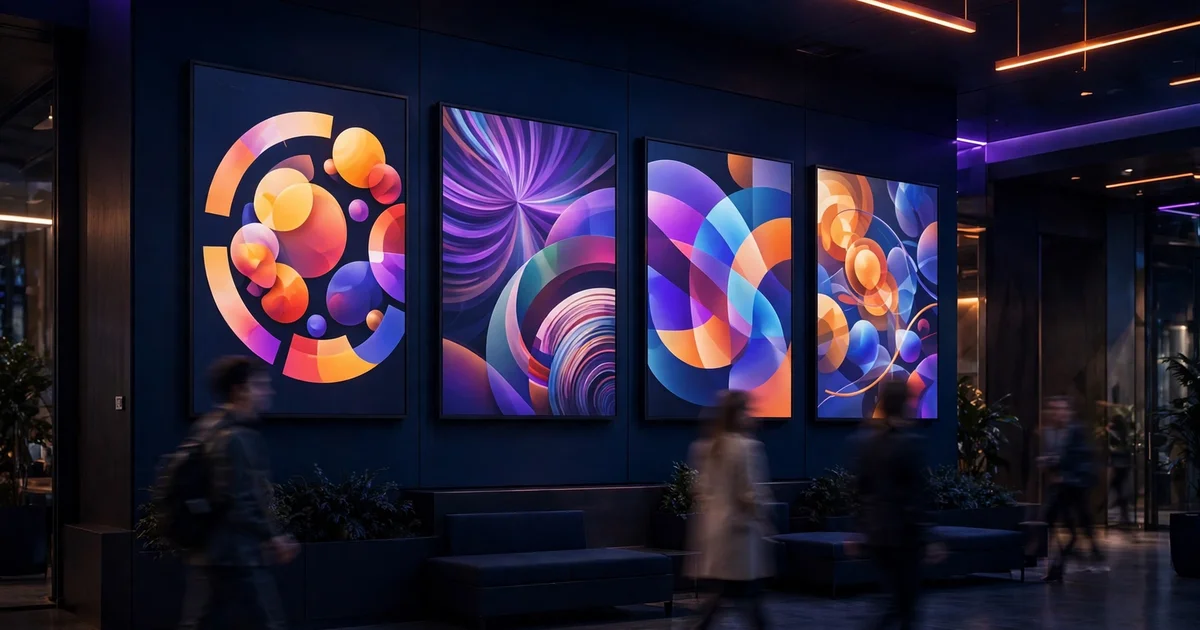
The best digital signage software charges per screen, not per location, so the bill for ten screens can run from $80 to $240 a month before hardware. We ranked the seven tools below by fit for the most common buyer — a small business running a handful of screens in one location — starting with the cheapest honest options and ending with the premium workplace pick, and every price was checked on the vendor's own pricing page on November 10, 2026.
How to choose the best digital signage software
- Count the screens first, then compare per-screen prices. Every tool here charges per screen or device per month, so a 10-screen network costs $80 a month on Yodeck and $240 on ScreenCloud Core for the same screens.
- Read the free tier's real terms. Yodeck's free screen converts to paid when a second screen is added, and Play's free screen needs a public review within 30 days.
- Price the tier you will actually need. Proof of play, approvals and SSO usually sit one or two tiers above the entry price, so check where your must-have feature lives before comparing headline prices.
- Match the tool to the content. Menus need scheduling and templates, dashboards need live data apps, and schools need emergency alerts — no single tool leads on all three.
- Check the hardware list before buying screens. Some tools run as smart TV apps, some need their own player, and a few exclude Raspberry Pi, Apple TV or Roku entirely.
Getting found matters as much as what the screens show. Our guide to digital signage companies covers the firms that install and manage networks, and before you publish new service pages, run your titles through the free SERP snippet preview tool — it shows exactly how the title and description will look in Google. If foot traffic is the goal, our local SEO service handles the visibility side while the screens handle the lobby.
Digital signage software pricing: what you will actually pay
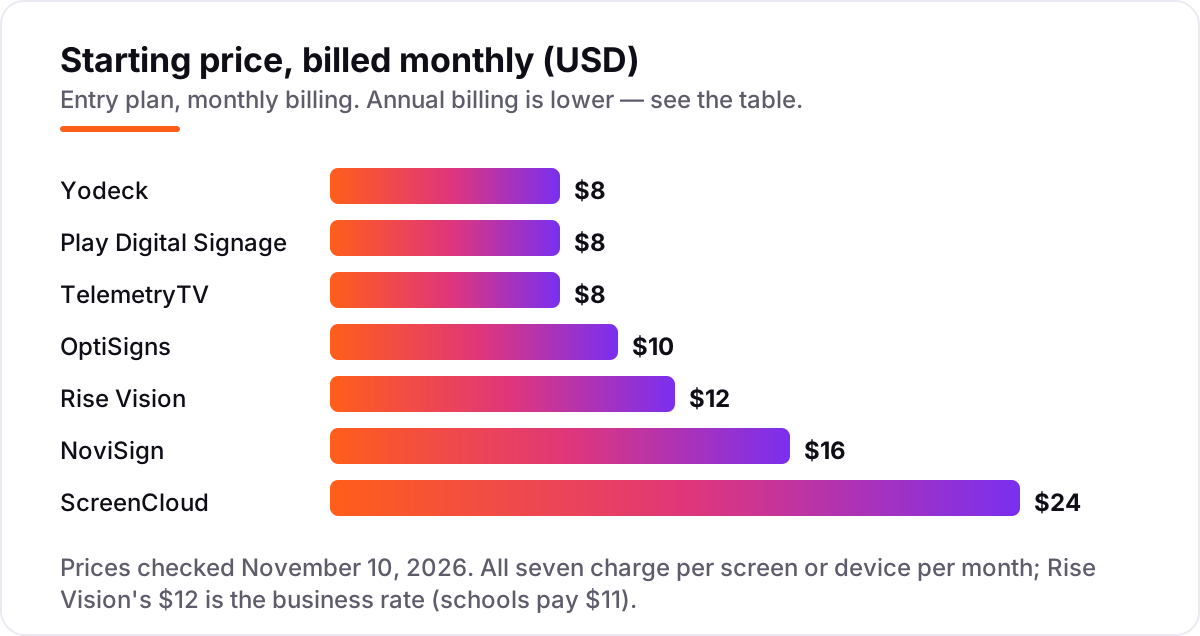
Take a small business with 10 screens at one location, billed month to month. The software costs $80 a month on Yodeck Basic, Play Essential and TelemetryTV Entry, $100 on OptiSigns Standard, $120 on Rise Vision Basic, $160 on NoviSign Business and $240 on ScreenCloud Core. Over a year, that is $960 on Yodeck, Play and TelemetryTV, $1,200 on OptiSigns, $1,440 on Rise Vision, $1,920 on NoviSign and $2,880 on ScreenCloud.
Annual billing cuts most of those bills: Play drops to $72 a month ($864 a year), OptiSigns Standard to $90 ($1,080 a year), NoviSign Business to $140 ($1,680 a year) and ScreenCloud Core to $200 ($2,400 a year). Yodeck and TelemetryTV charge the same $8 either way, so their annual bill stays $960. The free tiers cut the bill further: OptiSigns covers three screens free, so seven paid screens cost $70 a month billed monthly, and Yodeck's one free screen means nine paid screens cost $72.
Two costs sit outside every number above. First, the player: Yodeck includes a Raspberry Pi player per screen on annual plans, OptiSigns sells its OptiStick for $99.99, and ScreenCloud sells dedicated players from $299. Second, the tier jump: proof of play costs extra on every tool here, because it lives above the entry plan on every tool here. If the business also needs emergency alerts, the comparison changes — see our guide to digital signage companies for the install side.
Know the difference: digital signage software vs a smart TV slideshow
The confusion in this category is between software that manages screens and a screen that just plays a loop. A smart TV slideshow, a USB stick or a PowerPoint on repeat shows the same images in the same order until someone walks over and changes them by hand. Digital signage software schedules content by time of day, pushes updates to every screen from a browser, pulls in live data such as menus, calendars and sales figures, and logs what actually played.
There is a second, quieter confusion: per-screen pricing against flat pricing. Every tool in this list charges per screen or device per month, so the bill grows with the network — ten screens cost ten times one screen. A few tools outside this list charge a flat monthly fee for unlimited screens, which can be cheaper past twenty screens but wasteful below five. Always price the tool for your actual screen count, at your actual location count, before comparing headline prices.
A third distinction worth knowing is the player. The software is only half the purchase: each screen also needs something to run the app, whether that is the TV's own smart app, a streaming stick, or the vendor's dedicated player. Yodeck bundles a player into annual plans, OptiSigns sells its own stick, and ScreenCloud sells dedicated players — so two tools with the same $8 or $20 headline price can cost very different amounts once hardware is counted.
Quick comparison: tool type by need
| Buyer | Best pick | Why |
|---|---|---|
| Small business on a budget | Yodeck | One screen free forever, then $8/screen/month |
| Team that wants the most apps | OptiSigns | 100+ integrations, three screens free, from $10/screen/month |
| Lean team, no contract | Play Digital Signage | $8/screen/month, month to month, first screen free after a review |
| School or workplace with alerts | Rise Vision | Emergency alerts and 600+ templates, from $12/display/month |
| Live data on screens | TelemetryTV | 70+ apps and live dashboards, from $8/device/month |
| Non-designers and touchscreens | NoviSign | Drag-and-drop editor with Studio AI, from $14/screen/month billed annually |
| Polished workplace comms | ScreenCloud | Workplace apps and secure dashboards, from $20/screen/month billed annually |
Mistakes to avoid
- Budgeting on the headline price alone. A $8 tool costs $80 a month for ten screens and $240 on ScreenCloud Core. Price the tool for your actual screen count, not for one screen.
- Assuming the free screen stays free. Yodeck's free screen converts to paid when a second screen is added, and Play's free screen needs a public review within 30 days. Read the condition before counting on $0.
- Buying on the annual price, then paying monthly. ScreenCloud Core is $20 a screen billed annually but $24 month to month, and NoviSign Business is $14 billed annually but $16 monthly. Compare tools on the billing cycle you will actually use.
- Forgetting the player. A $99.99 stick or a $299 player per screen is a real cost, and Yodeck's free player only comes with annual plans. Budget hardware next to software.
- Paying for a tier you did not budget. Proof of play, approvals and SSO sit above the entry price on every tool here, so a team that needs them pays $12 to $30 a screen, not $8.
How we chose
We checked each vendor's own pricing page on November 10, 2026 — via fresh search-index copies of the vendors' own pages crawled within the last two days — and recorded the starting price exactly as shown, including the annual-billing figure where the page lists one. We ranked the tools by fit for the most common buyer — a small business with a handful of screens — not by brand size. Ratings are shown only where a G2 page gave a clear score and review count: all seven carry one here, but read the counts with care. NoviSign's 5.0 out of 5 rests on only 47 reviews, and the Yodeck, Rise Vision and TelemetryTV counts come from G2 copies crawled 6 to 9 days before publication, because no fresher copy of those pages was available; the scores agree across every copy we saw. One conflict to note: third-party directories list NoviSign at $18, $26 and $44 per screen, but NoviSign's own pricing page lists $14, $17 and $25 billed annually, and the vendor's page wins. G2 now lists TelemetryTV as TelemetryOS at $8.25, while the vendor's own pricing page still shows $8 Entry; we use the vendor's page. No vendor paid for a place in this list, and none of the links here are affiliate links.
What to do next
Start with the free plan or trial of your top pick and run one real screen for a week: your content, your schedule, your hardware. Check that updates push instantly, that the screen recovers after a Wi-Fi drop, and that the player you own actually runs the app. If the screens are sorted but new customers are not finding you, our local SEO service handles the visibility side — or compare providers in our guide to digital signage companies. Once your tools are in place, find out what's holding your rankings back.
Your stack only works if people find you
SerpAstra fixes what keeps your site off page one and makes it easy for AI assistants to recommend.
Get a free audit→Sources we checked (16)
- Yodeck pricing — yodeck.com/pricing (checked November 10, 2026)
- OptiSigns pricing — optisigns.com/pricing (checked November 10, 2026)
- Play Digital Signage pricing — playsignage.com/pricing (checked November 10, 2026)
- Rise Vision pricing — risevision.com/pricing (checked November 10, 2026)
- TelemetryTV pricing — telemetrytv.com/digital-signage-software-pricing (checked November 10, 2026)
- NoviSign pricing — novisign.com/pricing (checked November 10, 2026)
- ScreenCloud pricing — screencloud.com/pricing (checked November 10, 2026)
- Yodeck on G2 — g2.com/products/yodeck/reviews (checked November 10, 2026)
- OptiSigns on G2 — g2.com/products/optisigns/reviews (checked November 10, 2026)
- Play Digital Signage on G2 — g2.com/products/play-digital-signage/reviews (checked November 10, 2026)
- Rise Vision on G2 — g2.com/products/rise-vision/reviews (checked November 10, 2026)
- TelemetryTV on G2 — g2.com/compare/screencloud-digital-signage-vs-telemetryos-digital-signage (checked November 10, 2026)
- NoviSign on G2 — g2.com/products/novisign-digital-signage/reviews (checked November 10, 2026)
- ScreenCloud on G2 — g2.com/compare/rise-vision-vs-screencloud-digital-signage (checked November 10, 2026)
- ScreenCloud players and pricing — juuno.co/blog/screencloud-alternatives (checked November 10, 2026)
- OptiStick price and plan comparison — digitalsignagetrends.com (checked November 10, 2026)
Shamim
Founder of SerpAstra
A full-stack SEO and digital marketer who spends most days on Local SEO for dental practices, AI search visibility and lead generation.
Frequently asked questions
What is the best digital signage software?
Yodeck is the best fit for most buyers: one screen free forever, then $8 per screen per month, with a free player on annual plans. OptiSigns is the pick for the biggest app library and three free screens, and ScreenCloud is the pick for polished workplace communications at $20 per screen.
How much does digital signage software cost?
Entry prices run $8 to $24 per screen per month. A 10-screen network costs $80 a month on Yodeck, Play or TelemetryTV, $100 on OptiSigns Standard, $120 on Rise Vision Basic and $240 on ScreenCloud Core, all billed monthly. Hardware is extra: players run from about $100 for a stick to $299 or more for a dedicated box.
Is there really free digital signage software?
Yes, with limits. Yodeck is free for one screen forever, OptiSigns is free for three screens with its branding, and Play Digital Signage keeps the first screen free after you leave a review. ScreenCloud, NoviSign, Rise Vision and TelemetryTV offer trials only, so budget from the first screen with those four.
What is the difference between Yodeck and OptiSigns?
Both are budget picks, but they differ on the free tier and apps. Yodeck gives one screen free forever and charges $8 per screen with a free player on annual plans. OptiSigns gives three screens free and offers 100-plus apps, but charges $10 per screen and puts approvals and proof of play on higher tiers.
Do I need a media player for each screen?
Usually yes, unless the screen runs the vendor's smart TV app. Yodeck includes a Raspberry Pi player per screen on annual plans, OptiSigns sells its OptiStick for $99.99, and ScreenCloud sells dedicated players from $299. Many tools also run as apps on Samsung Tizen, LG webOS, Android TV and Fire TV.
Can I use digital signage software on a smart TV?
Yes, most tools here run as apps on Samsung Tizen, LG webOS, Android TV, Fire TV and ChromeOS, so a compatible smart TV needs no extra player. Check the vendor's hardware list before buying screens: Yodeck works best with its own player, ScreenCloud does not run on Raspberry Pi, and some tools exclude Apple TV or Roku.
What is proof of play and do I need it?
Proof of play is a log showing what actually played on each screen and when. You need it if advertisers pay for screen time, or if compliance requires evidence that a message ran. It usually sits above the entry price: Yodeck Premium, OptiSigns Pro, Play’s top plan, ScreenCloud Pro and TelemetryTV Elite.
Free SEO and AI visibility audit
Find out what is holding your rankings back
Send us your site. Within 2 business days you get a written audit, an AI visibility check and a short fix list ranked by impact. Free, with no contract attached.
Request my free audit→Related guides
 Companies & Services11 Best Digital Signage Companies in 2026Compare the 11 best digital signage companies on per-screen price, free plans and hardware, with every price checked November 4, 2026, before you buy.Read guide →
 Digital Marketing & Ads10 Best Display Advertising Software in 2026, ComparedThe 10 best display advertising software tools compared on price, reach and ease of use, from Google Ads to The Trade Desk. Checked November 4, 2026.Read guide →
 Digital Marketing & Ads8 Best Digital Out of Home Advertising Platforms in 2026, ComparedThe 8 best digital out of home advertising platforms compared on price, buying model and reach — with real pricing checked November 4, 2026.Read guide →