
8 Best Digital Tools in 2026 (Free and Paid, Compared)
Compare the 8 best digital tools on price, free plans and everyday fit for small businesses, with prices checked on vendor pages November 10, 2026.
 Shamim Mia, Founder, SerpAstraLast verified November 10, 202613 min read
We compare pricing pages, documentation and public reviews. We never accept payment for rankings.

Key takeaways
- Google Workspace is the best starting point at $7 a user a month billed annually, Notion follows at $10 a member a month, and Canva Pro at $12 a month billed annually — the three cover email, docs and design for most small businesses.
- Six of the eight tools have a genuinely free plan, and every paid plan here starts under $30 a month billed monthly.
- The single most important buying factor is the pricing unit: per user, per member, per creator or per task. The unit, not the headline price, decides what a 10-person team actually pays.
- Every price below was checked against the vendor's own pricing page on November 10, 2026. Ratings are G2, with review counts shown.
On this page
Quick comparison
| Tool | Best for | Starting price | Free plan |
|---|---|---|---|
| Google Workspace | Small businesses that need business email, Docs, Drive and Meet in one subscription | $7/mo (annual) | No (14-day trial) |
| Notion | Small teams that want one workspace for notes, docs, wikis and project tracking | $10/mo (annual) | Yes (free) |
| Canva | Small businesses that need on-brand social graphics, presentations and print without a designer | $12/mo (annual) | Yes (free) |
| Slack | Teams of 5 to 100 people that live in chat and need searchable history and integrations | $7.25/mo (annual) | Yes (90-day history) |
| Trello | Small teams that want simple visual task boards without learning a full project suite | $5/mo (annual) | Yes (10 boards) |
| Zapier | Small businesses that want to connect their apps and automate repetitive work without code | $19.99/mo (annual) | Yes (100 tasks) |
| Grammarly | Writers and small teams that want every email, doc and post checked for grammar and tone | $12/mo (annual) | Yes (free) |
| Loom | Remote teams that want to replace meetings with short screen-and-camera videos | $15/mo (annual) | Yes (25 videos) |
Make one of these tools?
We re-check this list every quarter. Send a correction, request a review, or ask about a clearly labeled sponsored spot.
Request a listingThe best digital tools

Google Workspace
Best for: Small businesses that need business email, Docs, Drive and Meet in one subscription
Google Workspace is the foundation most small businesses buy first, because one subscription replaces four separate ones: business email, documents, storage and meetings. Business Starter costs $7 a user a month billed annually, or $8.40 on the flexible monthly plan, and every Business plan now includes Gemini AI in Gmail and the Gemini app. For a team that already uses Gmail, the switch costs almost nothing in training.
The catch is the ceiling. Business editions cap at 300 users across all three tiers, so a growing company must move to Enterprise pricing, and Meet recording and advanced admin controls need Business Standard at $14 a user a month. The new-customer 50% discount also covers only the first 20 users for 12 months. Buy Workspace when email, docs and meetings should live in one place.
What we like
- Business email, Docs, Sheets, Slides, Drive and Meet in one subscription from $7 a user a month billed annually
- Gemini AI is included in Gmail and the Gemini app on every Business plan
- 30 GB of pooled storage per user on Business Starter, with Meet for up to 100 participants
- The suite most clients already use, so sharing files and calendars needs no training
Watch out for
- Business editions cap at 300 users, so a growing company must move to Enterprise
- Meet recording and advanced admin controls need Business Standard ($14) or higher
- The 50%-off new-customer offer covers only the first 20 users for 12 months

Notion
Best for: Small teams that want one workspace for notes, docs, wikis and project tracking
Notion is the all-in-one workspace in this list: notes, docs, wikis, databases and project tracking in one app, from $10 a member a month billed annually. Plus adds unlimited file uploads, 30-day page history, unlimited guests and custom database automations, and the free plan covers solo use. Thousands of templates cover meeting notes, content calendars, CRM and roadmaps, so most teams start from a template rather than a blank page.
The trade-off is the learning curve. Reviewers praise the flexibility but report slow performance on very large workspaces, and full Notion AI needs the Business plan at $20 a member a month billed annually — Plus gets only a limited trial. Per-member billing also adds up: a 10-person team pays $100 a month on Plus. Pick Notion when one shared workspace should replace several single-purpose tools.
What we like
- One workspace for notes, docs, wikis, databases and project tracking, from $10 a member a month billed annually
- Unlimited file uploads, 30-day page history and unlimited guests on Plus
- Free plan covers solo use, and students get Plus free with a school email
- Thousands of templates cover meeting notes, CRM, content calendars and roadmaps
Watch out for
- Full Notion AI needs the Business plan ($20 a member a month billed annually); Plus gets only a limited trial
- Reviewers report a steep learning curve and slow performance on very large workspaces
- Per-member billing adds up fast: a 10-person team pays $100 a month on Plus billed annually

Canva
Best for: Small businesses that need on-brand social graphics, presentations and print without a designer
Canva is the design tool for teams without a designer. Pro costs $18 a month billed monthly, or $144 a year, and unlocks more than 141 million premium assets, background removal, Magic Resize, 5 Brand Kits, 100 GB of storage and the Magic Studio AI tools. Templates cover social posts, presentations, flyers, videos and print, and the free plan stays genuinely usable for basic designs.
The limit is the licence. Pro covers one person only, so a second person means Business at $25 a person a month, and AI use is metered at up to 200 Premium or 20 Ultra uses a month on Pro. Advanced design control is also limited next to professional tools. Buy Canva when one person makes most of the visuals and needs them on brand fast.
What we like
- Pro unlocks 141 million-plus premium assets, background removal and Magic Studio AI tools
- 5 Brand Kits and 100 GB of cloud storage on Pro, with social scheduling included
- Free plan is genuinely usable for basic designs, with a 30-day Pro trial
- Templates cover social posts, presentations, flyers, videos and print in one editor
Watch out for
- Pro covers one person only, so a second person means Business at $25 a person a month
- AI use is metered: up to 200 Premium or 20 Ultra AI uses a month on Pro
- Advanced design control is limited next to professional tools like Illustrator or Figma

Slack
Best for: Teams of 5 to 100 people that live in chat and need searchable history and integrations
Slack is the team chat most small businesses already know. Pro costs $8.75 a user a month billed monthly, or $7.25 billed annually, and removes the free plan's 90-day history cap: unlimited message history, unlimited app integrations, group huddles, canvases, lists and Workflow Builder. AI conversation summaries and huddle notes are bundled into paid plans, and Fair Billing means you only pay for members active in a 28-day period.
The billing unit needs attention. Slack charges per active user, and multi-channel guests count as paid members, so a busy workspace with outside collaborators costs more than the headcount suggests. Standard SAML, SCIM and data residency also need Business+ or higher. Choose Slack when the whole team lives in chat and searchable history matters.
What we like
- Unlimited message history and unlimited app integrations from $7.25 a user a month billed annually
- Channels, huddles, canvases, lists and Workflow Builder included on Pro
- AI conversation summaries and huddle notes are bundled into paid plans
- Fair Billing means you only pay for members who are active in a 28-day period
Watch out for
- Bills per active user, and multi-channel guests count as paid members
- No standard SAML, SCIM or data residency on Pro; those need Business+ or higher
- Message history is capped at 90 days on the free plan, so teams outgrow it fast

Trello
Best for: Small teams that want simple visual task boards without learning a full project suite
Trello is the simplest project tool here, and the cheapest paid seat among the mainstream options. Standard costs $6 a user a month billed monthly, or $5 billed annually, and removes the free plan's caps: unlimited boards and collaborators, custom fields, advanced checklists, card mirroring, 250 MB attachments and 1,000 automation runs a month. AI features and the full Planner are included on Standard.
The limits are the views and the scale. Timeline, calendar and dashboard views need Premium at $10 a user a month billed annually, and G2 reviewers say Trello gets unwieldy for large projects with complex dependencies. The free plan also caps a workspace at 10 collaborators and 10 open boards. Pick Trello when visual boards and simple task tracking are the whole job.
What we like
- Cheapest paid seat among the mainstream project tools at $5 a user a month billed annually
- Unlimited boards and collaborators on Standard, with custom fields and advanced checklists
- AI features and the full Planner are included on Standard
- 250 MB attachments and 1,000 automation runs a month on Standard
Watch out for
- Free plan caps a workspace at 10 collaborators and 10 open boards
- No timeline, calendar or dashboard views below Premium ($10 a user a month billed annually)
- Gets unwieldy for large projects with complex dependencies, per G2 reviewers

Zapier
Best for: Small businesses that want to connect their apps and automate repetitive work without code
Zapier is the glue between the other tools in this list. Professional starts at $29.99 a month billed monthly, or $19.99 billed annually, for 750 tasks a month, with multi-step Zaps, unlimited premium apps, webhooks, AI fields and two-minute polling. It connects more than 9,000 apps, so most tools a small business uses already have a Zapier integration, and the free plan covers 100 tasks a month.
The bill is task-based, so it grows with volume. A busy workflow can climb from $19.99 to $129 a month or more as tasks rise, and AI Copilot, Agents and Chatbots are separate paid add-ons. Professional also covers only one user; teams need Team from $69 a month billed annually. Buy Zapier when repetitive work moves between apps that do not talk to each other directly.
What we like
- Connects 9,000-plus apps, so most tools a small business uses already have a Zapier integration
- Multi-step Zaps, unlimited premium apps, webhooks and AI fields from Professional
- Entry tier covers 750 tasks a month from $19.99 billed annually, with a free plan for 100 tasks
- Two-minute polling on Professional keeps automations close to real time
Watch out for
- Bills by tasks, so a busy workflow can climb from $19.99 to $129 a month or more as volume grows
- AI Copilot, Agents and Chatbots are priced as separate add-ons on top of the subscription
- Professional covers only 1 user; teams need Team from $69 a month billed annually

Grammarly
Best for: Writers and small teams that want every email, doc and post checked for grammar and tone
Grammarly is the writing checker that sits across browsers, Google Docs, Microsoft Office, desktop apps and mobile from one account. Pro costs $30 a member a month billed monthly, or $12 billed annually, and adds full-sentence rewrites, tone adjustment, plagiarism and AI detection, plus 2,000 AI prompts a member a month. Style guides and brand tones make it work for small teams, not just solo writers.
The gap between the two billing rates is the widest in this list: monthly billing costs two and a half times the annual rate, so the $12 figure only holds on a yearly commitment. Grammarly also checks English only, and the free plan already covers grammar, spelling and tone detection. Pay for Pro when rewrites, tone control and AI prompts are the work, not basic error checking.
What we like
- Works in browsers, Google Docs, Microsoft Office, desktop apps and mobile from one account
- Pro adds full-sentence rewrites, tone adjustment, plagiarism and AI detection
- 2,000 AI prompts a member a month on Pro, with style guides and brand tones for teams
- Free plan covers grammar, spelling and tone detection, so the paid tier is easy to test against
Watch out for
- Monthly billing costs $30 a member, two and a half times the $12 annual rate
- Only checks English, so multilingual teams get no value from it
- The free plan covers grammar and spelling, so Pro only pays off if you need rewrites and tone control

Loom
Best for: Remote teams that want to replace meetings with short screen-and-camera videos
Loom replaces meetings with short screen-and-camera videos. Business costs $18 a user a month billed monthly, or $15 billed annually, and removes the free plan's limits: unlimited videos, unlimited recording length, 4K recording, custom branding, trim and stitch editing, engagement insights and password protection. Only the people who record need paid seats; viewers watch, comment and react for free.
Two things changed in 2026, and older roundups still show the old numbers. Business used to cost $12.50 a user a month billed annually; Loom's own pricing page now lists $18 billed monthly and $15 billed annually, and full AI features need Business + AI at $24 billed monthly. Annual billing also uses fixed user tiers now. Pick Loom when async video should replace the meetings nobody needed.
What we like
- Unlimited videos and unlimited recording length on Business, with 4K recording
- Only creators need paid seats; viewers watch, comment and react for free
- Custom branding, trim and stitch editing, engagement insights and password protection included
- Recordings upload automatically and share by link, so there is no file to attach or host
Watch out for
- Full AI features (summaries, chapters, filler removal) need Business + AI at $24 a user a month billed monthly
- Only the people who record videos need paid seats, but annual billing now uses fixed user tiers
- The free Starter plan caps recordings at 5 minutes and 25 videos per person
The best digital tools for a small business are the ones the whole team actually opens every day: email and documents, a shared workspace, design, chat, task boards, automation, writing help and async video. We ranked the eight tools below by fit for the most common buyer — a small business buying its everyday stack — starting with the foundation and ending with the specialist tools, and every price was checked against the vendor's own pricing page on November 10, 2026.
How to choose the best digital tools
- Work out the pricing unit first. Google Workspace, Notion, Slack and Trello charge per user or per member, Loom charges per creator, and Zapier charges per task. The unit decides the real bill.
- Count the team on the plan you would actually buy. A 10-person team pays $70 a month for Google Workspace, $100 for Notion, $72.50 for Slack and $50 for Trello on annual billing — four similar headline prices, four different bills.
- Start on the free plan, then pay for the limit you hit. Six of the eight tools here have a free plan. Pay only when the team hits a real cap: 90 days of Slack history, 10 Trello boards, 100 Zapier tasks or 25 Loom videos.
- Check the annual discount before comparing prices. Monthly billing costs 17% to 60% more than annual billing across this list, and Grammarly's monthly rate is two and a half times its annual rate.
- Buy the suite before the specialist. Google Workspace and Notion cover most daily work between them. Add Canva, Slack, Trello, Zapier, Grammarly or Loom only when a specific job keeps coming up that the suite does not handle.
Once you pick your stack, it still needs to be found: our monthly SEO service handles the visibility side, and before you publish new pages, run your titles through the free title tag checker — it shows whether a title is the right length for Google. If automation is the part you want to go deeper on, our guide to AI automation tools for small business compares the options beyond Zapier.
Whatever you shortlist, try it with real work before you pay. The free plans and trials in this list run 7 to 30 days, which is long enough to run one genuine week — your documents, your boards, your clients — and that week tells you more than any review can. Check two things in the trial: that the tool fits the way your team already works, and that the limit you would pay to remove is one you actually hit.
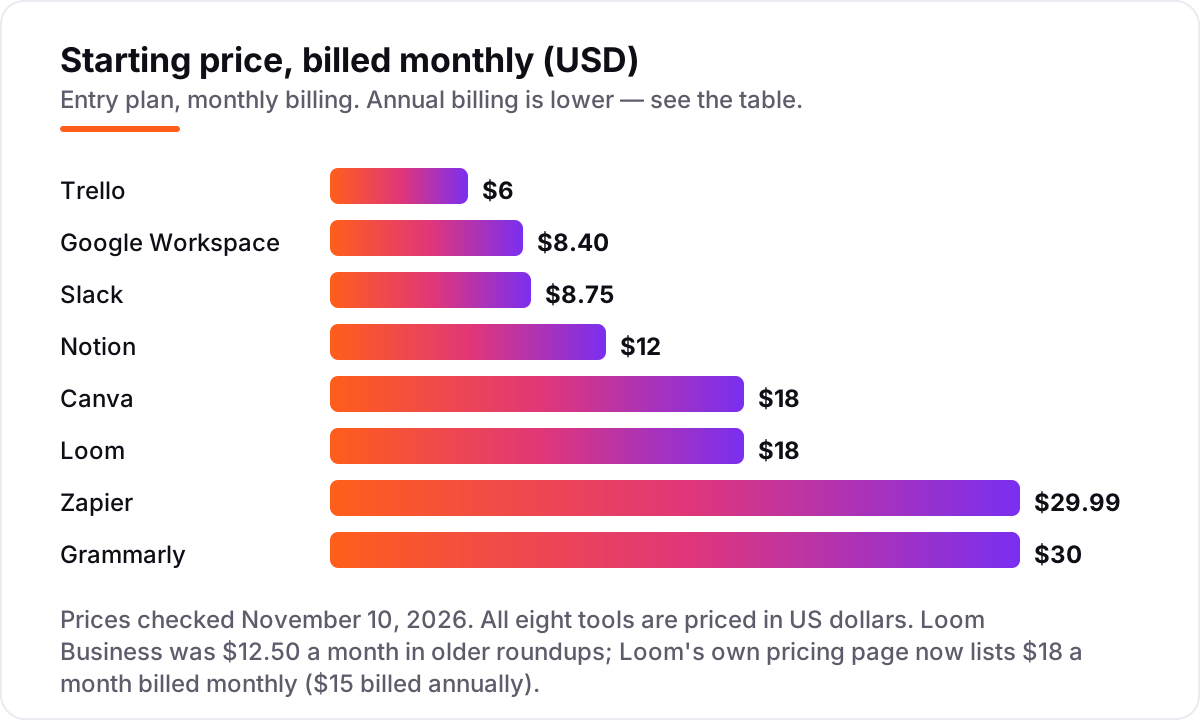
Digital tools pricing: what you will actually pay
Take a 10-person team that buys all eight tools on annual billing. Google Workspace Business Starter costs $70 a month ($840 a year), Notion Plus $100 a month ($1,200 a year), Slack Pro $72.50 a month ($870 a year), Trello Standard $50 a month ($600 a year), Zapier Professional $19.99 a month ($239.88 a year), Grammarly Pro $12 a month ($144 a year) and Loom Business $15 a month ($180 a year). Canva Pro is a single-person licence at $144 a year. Add them up and the full stack costs $4,217.88 a year.
Pay monthly instead and the same stack costs $5,369.88 a year — $1,152 more. The biggest single saving is Grammarly: $360 a year billed monthly against $144 billed annually. The smallest is Slack, where annual billing saves $1.50 a user a month. Most small businesses do not need all eight tools at once: Google Workspace, Notion and Slack together cost $242.50 a month for 10 people billed annually, and that trio covers email, docs, planning and chat.
Three costs sit outside every number above. First, the step-up plans: Business Standard on Google Workspace ($14), Notion Business ($20), Slack Business+ ($15) and Trello Premium ($10) all add features a growing team eventually wants. Second, the metered extras: Zapier tasks above 750 a month, Loom's Business + AI tier at $24 billed monthly, and Canva's AI Pass add-on at $100 a person a month. Third, the per-seat creep: every new hire adds a seat on Workspace, Notion, Slack and Trello, so price the team you will have in six months, not the team you have today.
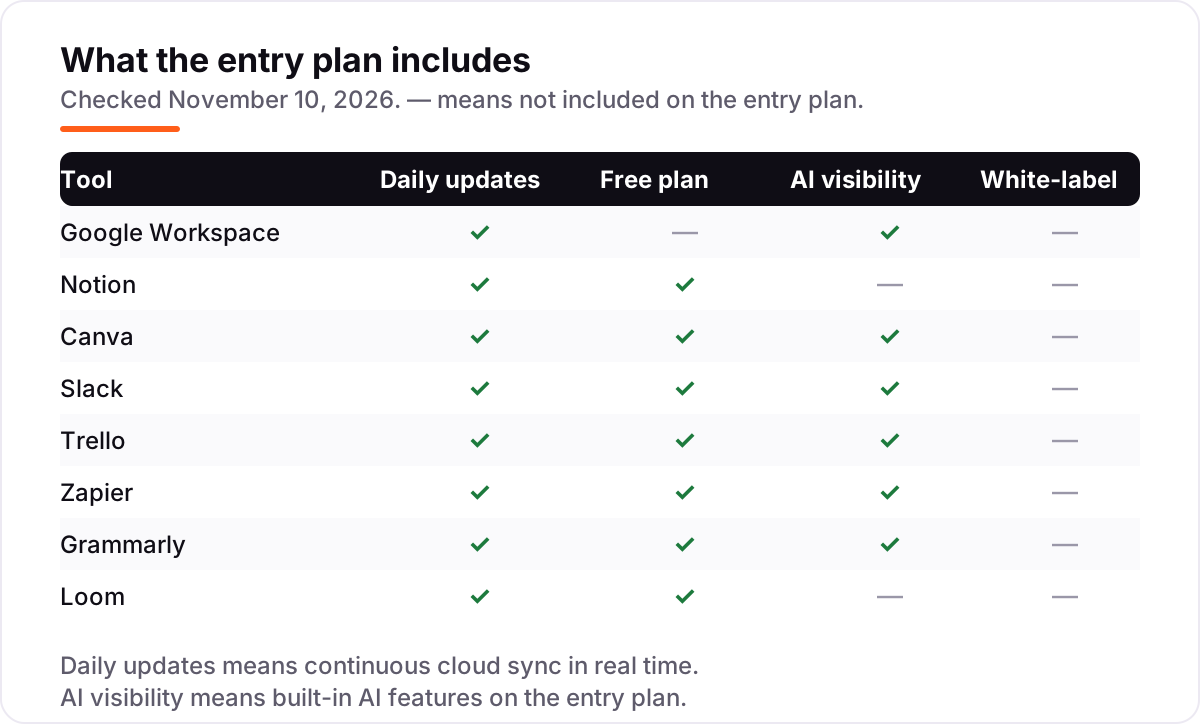
Know the difference: all-in-one suites vs single-purpose tools
The confusion in this category is between a tool that does one job well and a suite that does many jobs adequately. Google Workspace and Notion are suites: Workspace covers email, docs, storage and meetings, and Notion covers notes, wikis, databases and project tracking. Canva, Slack, Trello, Zapier, Grammarly and Loom are specialists: each does one job — design, chat, boards, automation, writing or video — and does it better than a suite ever will.
There is a second, quieter confusion: buying the specialist before the suite. A team that buys Loom before it has business email, or Zapier before it has anything to automate, pays for a tool with nothing to connect to. The order that works is suite first, then the specialist for the job that keeps coming up. If the team writes all day, that specialist is Grammarly; if it meets all day, it is Loom; if work keeps moving between apps by hand, it is Zapier.
A third distinction worth knowing is the pricing unit. Two tools can both advertise about $12 a month and cost very different amounts for the same team: Grammarly Pro at $12 a member a month billed annually costs $120 a month for 10 people, while Canva Pro at $12 a month billed annually costs $12 a month in total because it covers one person. Always price the tool for your actual team size before comparing headline prices.
Quick comparison: tool type by need
| Buyer | Best pick | Why |
|---|---|---|
| Small business starting from scratch | Google Workspace | Email, docs, storage and meetings in one subscription from $7 a user a month billed annually |
| Team that needs one shared workspace | Notion | Notes, wikis and project tracking in one app from $10 a member a month billed annually |
| Business without a designer | Canva | Premium assets, Brand Kits and AI tools from $12 a month billed annually for one person |
| Team that lives in chat | Slack | Unlimited history and integrations from $7.25 a user a month billed annually |
| Small team that wants simple boards | Trello | Cheapest paid seat here at $5 a user a month billed annually, with AI included |
| Team moving work between apps by hand | Zapier | 9,000-plus apps connected from $19.99 a month billed annually for 750 tasks |
| Writers and teams that publish daily | Grammarly | Rewrites, tone control and 2,000 AI prompts a month from $12 a member billed annually |
| Remote team drowning in meetings | Loom | Unlimited async video from $15 a user a month billed annually; only creators pay |
Mistakes to avoid
- Budgeting on the headline price alone. A $12 tool can cost $12 a month or $120 a month depending on whether it charges per person or per account. Price the tool for your actual team size, not for one person.
- Paying monthly by default. Monthly billing costs 17% to 60% more than annual billing across this list. Grammarly at $30 a month costs $360 a year; the same seat is $144 billed annually.
- Buying the specialist before the suite. Loom and Zapier are excellent tools with nothing to connect to if the team has no business email or shared workspace yet. Buy Workspace or Notion first.
- Trusting an old price in a roundup. Loom Business used to cost $12.50 a user a month billed annually; it now costs $15, and Canva Pro's annual price has bounced between $144 and $180 in 2026 snapshots. Always check the vendor's own page.
- Paying for seats nobody uses. Notion, Trello and Google Workspace bill per seat whether the person opens the tool or not. Audit seats every quarter and remove the ones that went quiet.
How we chose
We checked each vendor's own pricing page on November 10, 2026 and recorded the starting price exactly as shown, including the annual-billing figure where the page lists one, and we ranked the tools by fit for the most common buyer — a small business buying its everyday stack — not by brand size. Two prices needed care: Loom's page now lists Business at $18 a month billed monthly ($15 billed annually), not the $12.50 in older roundups, and Canva's annual Pro price has appeared as both $144 and $180 in 2026 snapshots — the October reads of Canva's own page agree on $144, which is the figure we use. Ratings are shown only where a fresh G2 page gave a clear score and review count on November 10, 2026: Google Workspace, Notion, Canva, Slack, Trello and Zapier. Grammarly and Loom carry no rating here because the G2 pages we could verify today were months old, and we would rather show no rating than a stale one. No vendor paid for a place in this list, and none of the links here are affiliate links.
What to do next
Start with the foundation: put the team on Google Workspace, then add Notion for shared planning and Canva Pro for the visuals. Run each one on its free plan or trial for a real week of work, and pay only for the limit you actually hit. If the stack is sorted but new customers are not finding you, our monthly SEO service handles the visibility side. Once your tools are in place, find out what's holding your rankings back.
Your stack only works if people find you
SerpAstra fixes what keeps your site off page one and makes it easy for AI assistants to recommend.
Get a free audit→Sources we checked (14)
- Google Workspace pricing — workspace.google.com/pricing (checked November 10, 2026)
- Notion pricing — notion.com/pricing (checked November 10, 2026)
- Canva pricing — canva.com/pricing (checked November 10, 2026)
- Slack pricing — slack.com/pricing (checked November 10, 2026)
- Trello pricing — trello.com/pricing (checked November 10, 2026)
- Zapier pricing — zapier.com/pricing (checked November 10, 2026)
- Grammarly pricing — grammarly.com/plans (checked November 10, 2026)
- Loom pricing — loom.com/pricing (checked November 10, 2026)
- Google Workspace on G2 — 4.6/5, 48,169 reviews (checked November 10, 2026)
- Notion on G2 — 4.6/5, 13,767 reviews (checked November 10, 2026)
- Canva on G2 — 4.7/5, 7,522 reviews (checked November 10, 2026)
- Slack on G2 — 4.5/5, 40,449 reviews (checked November 10, 2026)
- Trello on G2 — 4.4/5, 14,064 reviews (checked November 10, 2026)
- Zapier on G2 — 4.5/5, 2,138 reviews (checked November 10, 2026)
Shamim
Founder of SerpAstra
A full-stack SEO and digital marketer who spends most days on Local SEO for dental practices, AI search visibility and lead generation.
Frequently asked questions
What are the best digital tools for a small business?
Google Workspace, Notion and Canva are the best starting trio for most small businesses: email and docs from $7 a user a month billed annually, a shared workspace from $10 a member a month, and design from $12 a month billed annually. Add Slack for team chat and Trello for task boards, then Zapier when the tools need to talk to each other.
How much do digital tools cost per month?
A 10-person team pays $4,217.88 a year for all eight tools in this list on annual billing, or $5,369.88 on monthly billing. Most small businesses need only three or four of them: Google Workspace, Notion and Slack cost $242.50 a month for 10 people billed annually. The cheapest useful stack is Trello Standard plus Canva Pro.
Is there a free digital tool that covers the basics?
Yes, with limits. Notion, Canva, Slack, Trello, Zapier, Grammarly and Loom all have free plans, and only Google Workspace has none — it offers a 14-day trial instead. The free plans cover solo use and small teams well, but they cap history, boards, tasks or recording length. A business that relies on a tool daily usually outgrows its free plan within months.
Should I pick Notion or Google Workspace?
Pick Google Workspace if email, documents and meetings are the core work — it is the foundation, and most clients already use it. Pick Notion if the team needs a shared wiki, project tracker and notes in one place. Most small businesses end up with both: Workspace for email and files, Notion for everything the team plans and documents together.
Is Canva Pro worth $18 a month?
Yes, if one person makes visuals every week. Pro unlocks 141 million-plus premium assets, background removal, Magic Resize, 5 Brand Kits and AI tools for $144 a year, which is $12 a month billed annually. It is not worth it for occasional designs — the free plan covers those. Remember Pro covers one person only, so a team needs Business at $25 a person a month.
Do I need Zapier if my tools already integrate?
Probably not at first. Most tools in this list connect directly to each other — Slack, Trello and Google Workspace all have native integrations. Zapier earns its $19.99 a month billed annually when work moves between apps with no direct connection, or when a workflow needs several steps and conditions. Start with the free plan's 100 tasks a month and upgrade only when you hit the cap.
How do I avoid paying for tools my team never uses?
Audit seats every quarter: check who actually opened each tool in the last 30 days and remove the rest. Slack only bills active users, but Notion, Trello and Google Workspace bill per seat regardless of use. Start every tool on its free plan or trial, set a reminder for the day the trial converts, and cancel anything the team did not open that week.
Free SEO and AI visibility audit
Find out what is holding your rankings back
Send us your site. Within 2 business days you get a written audit, an AI visibility check and a short fix list ranked by impact. Free, with no contract attached.
Request my free audit→Related guides
 AI, Data & Analytics10 Best AI Automation Tools for Small Business in 2026, Compared10 best ai automation tools for small business compared on price, free plans and AI features, with real starting prices checked November 2, 2026.Read guide →
 AI, Data & Analytics8 Best AI Tools for Content Creators in 2026 (Free and Paid, Compared)The 8 best ai tools for content creators, compared on price, free plans and strengths — writing, design, video. Prices checked on vendor sites, Nov 2, 2026.Read guide →
 Digital Marketing & Ads10 Best AI Tools for Social Media Content Creation in 2026, ComparedCompare the 10 best ai tools for social media content creation on price, free plans and AI features, with every price checked November 5, 2026.Read guide →