
Best Digital Twin Software for 2026: 12 Options Compared by Use Case
Compare the 12 best digital twin software options for 2026 on price, live data, simulation depth and use case, with prices checked November 10, 2026.
 Shamim Mia, Founder, SerpAstraLast verified November 10, 202613 min read
We compare pricing pages, documentation and public reviews. We never accept payment for rankings.

Key takeaways
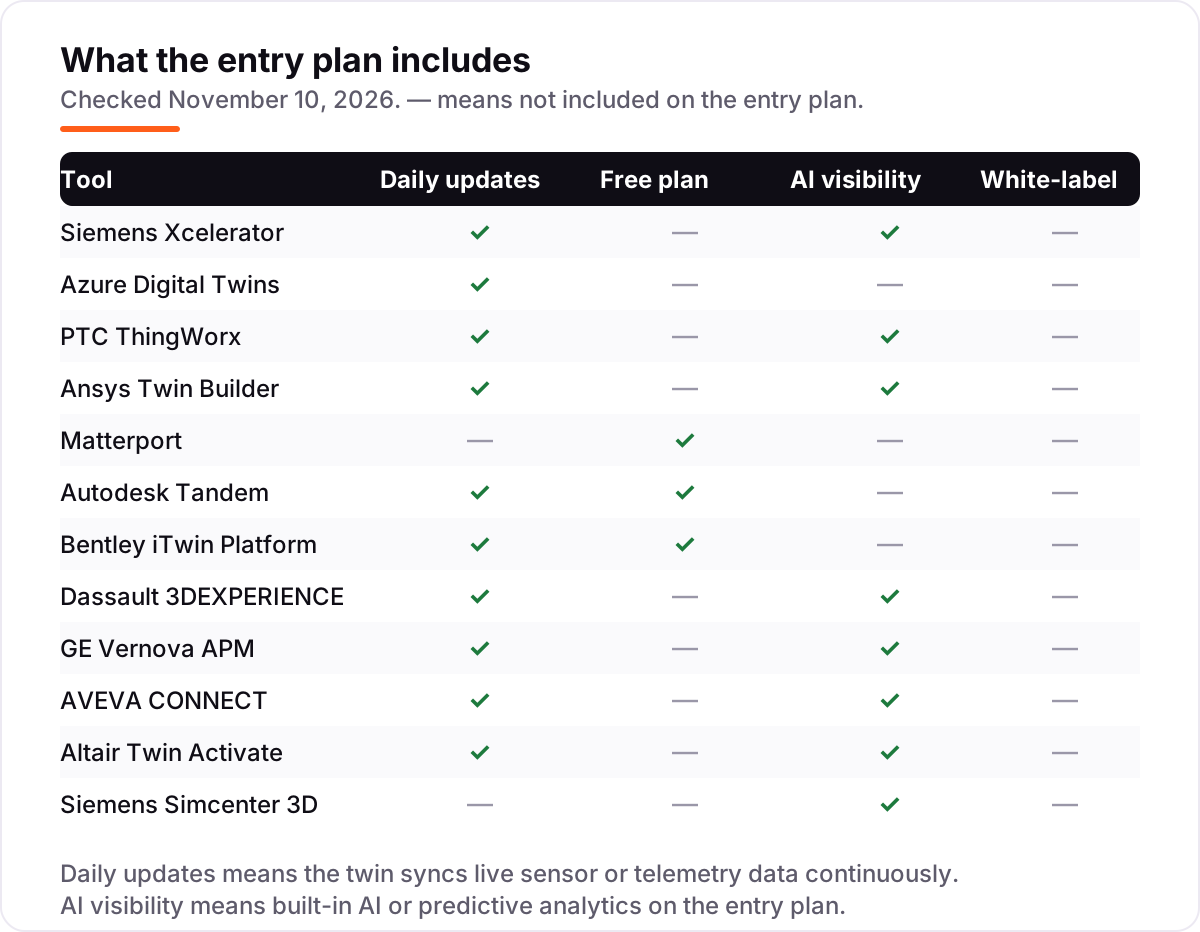
- Siemens Xcelerator is the best fit for most manufacturers; Azure Digital Twins is the cheapest way in at $1 per million messages, and Matterport is the only tool here with a published monthly price, from $14/month.
- Ten of the twelve tools publish no price at all — expect a custom quote and a sales-led evaluation for every enterprise platform here.
- The single most important buying factor is the data source: a twin is only as good as the live sensor, BIM or simulation data feeding it.
- Free entry exists at the edges — a free Azure account, a Matterport free plan, and free tiers from Autodesk Tandem and Bentley iTwin — but no enterprise platform here has a free plan.
On this page
Quick comparison
| Tool | Best for | Starting price | Free plan |
|---|---|---|---|
| Siemens Xcelerator | Manufacturers unifying design, simulation and plant operations in one digital thread | Custom quote | No (free trials) |
| Azure Digital Twins | Cloud teams building IoT twin graphs on Azure at pay-as-you-go cost | Pay as you go | No (free Azure account) |
| PTC ThingWorx | Manufacturers connecting machines and sensors for real-time asset twins | Custom quote | No |
| Ansys Twin Builder | Engineering teams building simulation-based twins for predictive maintenance | Custom quote | No |
| Matterport | Property and facilities teams that need measurable 3D twins of buildings fast | $14/mo | Yes (1 space) |
| Autodesk Tandem | Facility operators turning Revit or IFC models into operational building twins | Custom quote | Yes (free tier) |
| Bentley iTwin Platform | Infrastructure owners and engineering firms twinning roads, rails and utilities | Custom quote | Yes (developer tier) |
| Dassault 3DEXPERIENCE | Product companies that want one virtual twin from design through operations | Custom quote | No |
| GE Vernova APM | Utilities and energy operators twinning turbines, grids and plant assets | Custom quote | No (demo only) |
| AVEVA CONNECT | Process-industry teams unifying engineering and operations data into one twin | Custom quote | No (demo) |
| Altair Twin Activate | Engineering teams simulating whole systems as live, connected twins | Custom quote | No (trial on request) |
| Siemens Simcenter 3D | Simulation engineers validating product performance against test data | Custom quote | No (free trial) |
Make one of these tools?
We re-check this list every quarter. Send a correction, request a review, or ask about a clearly labeled sponsored spot.
Request a listingThe best digital twin software

Siemens Xcelerator
Best for: Manufacturers unifying design, simulation and plant operations in one digital thread
Siemens Xcelerator is the best fit for most manufacturers because it covers the whole digital thread, not one slice of it. Design in NX, simulation in Simcenter, manufacturing execution and operations data all connect through the same portfolio, and a marketplace of more than 700 certified sellers fills the gaps with vetted hardware, software and services. Siemens says manufacturers using its digital twins reduce ramp-up time by up to 40%.
The honest catch is the buying process. There are no published prices, every deployment is scoped and quoted, and implementation and integration services typically cost well above the software licence itself. Free trials of around three months are available for core software, so a team can test with its own data before committing. Choose Xcelerator when the goal is one thread from design to operations.
What we like
- Covers the full digital thread: design, simulation, manufacturing execution and operations data in one portfolio
- Marketplace of 700+ certified sellers and partners extends the platform with vetted hardware, software and services
- Subscription and as-a-service models let a team start with one line or one site and expand step by step
- Manufacturers using its digital twins report ramp-up time reductions of up to 40% (Siemens)
Watch out for
- Buying is a project, not a purchase: expect a long procurement and implementation cycle
- No published prices anywhere — every deployment is scoped and quoted by Siemens or a partner
- Implementation and integration services typically cost well above the software licence itself

Azure Digital Twins
Best for: Cloud teams building IoT twin graphs on Azure at pay-as-you-go cost
Azure Digital Twins is the cheapest real entry point in this list because there is no licence to buy: you pay $1 per million messages, $2.50 per million operations and $0.50 per million query units, with no upfront cost or termination fee. Models are written in DTDL, the Digital Twins Definition Language, and a graph query language lets you ask questions across the whole environment — which rooms are overheating, which machines share a failing part.
What Azure does not give you is a finished product. There are no built-in dashboards, no simulation engine and no AI analytics; those come from other Azure services that your team wires up. The metered bill is also hard to predict until you know your message volume. Pick Azure when your team can build and you want the lowest possible starting cost.
What we like
- Only metered pricing in this list: $1 per million messages with no upfront cost or termination fee
- DTDL models and a graph query language map whole environments — buildings, factories, grids — as connected twins
- Sits inside Azure, so IoT Hub, Event Hubs, Functions and Azure AI plug in without a second vendor
- A free Azure account is the cheapest way to experiment with a real twin before committing
Watch out for
- No built-in dashboards, simulation or AI analytics — those come from other Azure services you must wire up
- The bill is hard to predict: messages, operations and query units are metered separately
- Azure-only: the twin graph lives in Microsoft's cloud and does not run on premises

PTC ThingWorx
Best for: Manufacturers connecting machines and sensors for real-time asset twins
ThingWorx is the industrial IoT workhorse of this list. It connects more than 500 industrial device types out of the box — PLCs, sensors, SCADA systems — and its built-in machine learning turns those sensor streams into predictive maintenance alerts without a data-science team. The drag-and-drop Composer builds twin applications quickly, and Vuforia adds augmented-reality views of the same asset on the shop floor.
The trade-offs are price transparency and ease of use. There are no published prices and no free trial, so evaluation runs through PTC sales, and per-feature pricing grows complex as the deployment expands. It also carries the lowest G2 score here at 3.9 out of 5, with reviewers citing high cost and a steep learning curve. Pick ThingWorx when connectivity breadth matters most.
What we like
- Connects 500+ industrial device types out of the box, including PLCs, sensors and SCADA systems
- Built-in machine learning and predictive analytics turn sensor streams into maintenance alerts without a data-science team
- Drag-and-drop Composer builds twin apps fast, and Vuforia adds AR views of the same asset
- Runs on cloud, on premises or hybrid, so regulated plants keep data inside their own network
Watch out for
- Lowest G2 score in this list at 3.9 out of 5, with reviewers citing high cost and a steep learning curve
- No published prices and no free trial — evaluation runs through PTC sales
- Per-feature pricing grows complex as the deployment expands beyond the first use case

Ansys Twin Builder
Best for: Engineering teams building simulation-based twins for predictive maintenance
Ansys Twin Builder is the physics-first twin in this list. Instead of starting from sensor data, it starts from multidomain system simulation: the twin predicts how an asset will behave, and live sensor data then corrects the model through hybrid analytics. Reduced-order models export to real-time systems, so the same twin that guided the design keeps working once the asset is in service.
That depth comes with a sales-led buying process. Licensing is quote-only with annual contracts, there is no free plan and no published trial, and third-party directories disagree on price, so the only reliable number is the one Ansys quotes you. It also needs good models and engineering skill. Choose Twin Builder when prediction, not just monitoring, is the job.
What we like
- Builds twins from multidomain system simulation, so the twin predicts behaviour before sensors confirm it
- Hybrid analytics blend physics models with live sensor data for twins that stay accurate as assets age
- Reduced-order models export to real-time systems, so the same twin runs in design and in operation
- Part of the Ansys simulation stack, so twin models reuse existing Fluent, Mechanical and electronics work
Watch out for
- Quote-only licensing with annual contracts; third-party directories disagree on price, so expect a sales process
- No free plan and no published trial — evaluation runs through Ansys sales
- Simulation-first tool: it needs good models and engineering skill, and it is not a plug-and-play IoT dashboard

Matterport
Best for: Property and facilities teams that need measurable 3D twins of buildings fast
Matterport is the fastest building twin in this list and the only tool here with a published monthly price. Starter costs $14 a month, or $12 billed annually, for 5 active spaces, and a free plan covers 1 space. Anyone can capture a twin with a phone, a 360 camera or a Pro3 lidar camera, and the result is a measurable 3D model — dimensions, floor plans and MatterPak exports come from the same scan.
The limitation is that Matterport twins are static. The model only changes when someone re-scans the space, so there is no live sensor feed and no predictive maintenance. The Pro3 camera also needs the Professional plan at $69 a month, and floor plans and MatterPak exports are paid add-ons. Pick Matterport when the twin is a building and speed matters more than live data.
What we like
- Only published monthly price in this list: Starter from $14/month, with a free plan covering 1 active space
- Capture with a phone, 360 camera or Pro3 lidar camera — no engineering team needed to build the twin
- Twins are measurable: dimensions, floor plans and MatterPak exports come from the same scan
- Large install base in real estate and facilities, so contractors and clients already know the format
Watch out for
- Twins are static scans, not live models — the twin only updates when someone re-scans the space
- Pro3 lidar camera does not work on the Starter plan; serious capture needs Professional at $69/month
- Floor plans and MatterPak exports are paid add-ons ($19.99 and $59 per order on Starter)

Autodesk Tandem
Best for: Facility operators turning Revit or IFC models into operational building twins
Autodesk Tandem is the facilities twin for teams that already build in Revit. It turns Revit and IFC models into an operational asset database: facility templates define which asset data is required, and the data is validated through construction and commissioning. A free tier lets a team import models and test sensor connections before paying anything, and Tandem Connect adds low-code links to BMS, IoT and CMMS systems.
Pricing is capacity-based, so the bill scales with the size and complexity of the twin rather than per seat — but the rates are not published, and the paid tiers need a quote. Data also leaves through CSV, Excel or the REST API only; there is no IFC or BCF export. Choose Tandem when the building already exists as a good BIM model.
What we like
- Free tier lets a team import models and test sensor connections before paying anything
- Turns Revit and IFC models into an operational asset database with facility templates and validation
- Capacity-based pricing scales with the size of the twin, not per seat, so whole teams can view it
- Tandem Connect adds low-code data connectivity to BMS, IoT and CMMS systems
Watch out for
- Paid-tier pricing is not published in detail — the bill depends on twin capacity and needs a quote
- Data leaves via CSV, Excel or the REST API; there is no IFC or BCF export
- Built for the operations phase — it is not a design tool, and it needs a good BIM model to start from

Bentley iTwin Platform
Best for: Infrastructure owners and engineering firms twinning roads, rails and utilities
Bentley iTwin is the infrastructure twin in this list. Its platform aligns engineering models, reality data such as point clouds and meshes, GIS and sensor data in a single iModel that tracks change over time. The iTwin.js library is open source, so a development team can build exactly the viewer or application it needs, and a free developer tier makes the first experiment cheap.
The platform is developer-oriented, and that is the honest trade-off. A ready-to-use facilities application still has to be built or bought, commercial pricing is quote-based and credit-metered, and using iTwin.js well needs TypeScript and cloud skills. Pick iTwin when the asset is a road, a railway, a pipeline or a grid.
What we like
- Open-source iTwin.js library (v5.x) gives full control over custom twin applications
- Aligns engineering models, reality data, GIS and sensor data in one iModel that tracks change over time
- Free developer tier and extensive tutorials lower the barrier to building a first twin
- Built for linear infrastructure — bridges, rail, pipelines and grids — where other twins stop at the building
Watch out for
- Developer-oriented: a ready-to-use facilities application still has to be built or bought
- Commercial pricing is quote-based and credit-metered, with no published starting price
- Using iTwin.js well needs TypeScript and cloud development skills, so the learning curve is high

Dassault 3DEXPERIENCE
Best for: Product companies that want one virtual twin from design through operations
Dassault 3DEXPERIENCE is the virtual twin platform for product companies that already design in CATIA or simulate in SIMULIA. One platform carries the twin from design through manufacturing and into operations, with a continuous feedback loop between the virtual model and the real product. AI assistants named AURA, LEO and MARIE are built into the platform, and role-based packaging means a team buys only the capabilities it needs.
There is no published platform price: entry is quoted per role, per user, per year, and single-app reseller prices run about €290 to €1,217 a month per workstation, so a multi-role twin is a large commitment. It is also a heavyweight platform that needs training and change management. Choose it when one twin must span the whole product lifecycle.
What we like
- One platform for CATIA, SIMULIA, ENOVIA and DELMIA, so the twin spans design, simulation and manufacturing
- AI assistants (AURA, LEO, MARIE) are built into the platform, not bolted on
- Virtual twin experiences add a continuous feedback loop between the virtual model and the real product
- Role-based packaging lets a team buy only the capabilities it needs
Watch out for
- No published platform price — entry is quoted per role, per user, per year
- Single-app reseller prices run about €290–€1,217 a month per workstation, so a multi-role twin is a large commitment
- Enterprise-leaning: heavyweight platform that needs training and change management to adopt

GE Vernova APM
Best for: Utilities and energy operators twinning turbines, grids and plant assets
GE Vernova APM is the energy twin in this list, and the former GE Digital software business behind it. Asset Performance Management pairs Digital Twin analytics with SmartSignal predictive analytics, which flag developing equipment problems before they cause outages. It carries the highest G2 score here at 4.4 out of 5, with reviewers praising centralized data management, and the GridOS portfolio covers grid orchestration alongside asset performance.
The scope is the limitation: this is an energy product, and a poor fit outside utilities and heavy industry. There are no published prices, so buying runs through quotes and annual contracts, and reviewers report a steep learning curve and uneven support. Choose GE Vernova when the assets are turbines, grids or plant equipment.
What we like
- Purpose-built for energy assets: turbines, grids and plant equipment, with Digital Twin analytics built into APM
- SmartSignal predictive analytics flag developing equipment problems before they cause outages
- Highest G2 score in this list at 4.4 out of 5, with reviewers praising centralized data management
- GridOS portfolio covers grid orchestration as well as asset performance in one vendor
Watch out for
- Energy-focused, not general-purpose — a poor fit outside utilities and heavy industry
- No published prices; the software business sells through quotes and annual contracts
- Reviewers report a steep learning curve and uneven support, with training needed to get value

AVEVA CONNECT
Best for: Process-industry teams unifying engineering and operations data into one twin
AVEVA CONNECT is the process-industry twin in this list. It is an open, vendor-neutral cloud platform that unifies engineering, operations and maintenance data — the three sources a twin needs to be trustworthy. The AVEVA PI System streams real-time operations data in, Asset Information Management builds the trusted data core, and Flows adds more than 800 connectors to other systems.
Pricing runs on Flex credits under an annual subscription, and the token rates are quote-only with volume discounts, so the bill is impossible to compare without a sales conversation. There is no free plan and no self-serve trial. A twin builder with agentic AI is announced for early 2027, so the newest capability is not shipping yet. Pick CONNECT for plants, refineries and process lines.
What we like
- CONNECT unifies engineering, operations and maintenance data on one open, vendor-neutral cloud platform
- AVEVA PI System streams real-time operations data into the twin, with 800+ connectors via Flows
- Asset Information Management builds the trusted data core a digital twin depends on
- AI tools in Point Cloud Manager auto-classify industrial objects from 3D scans
Watch out for
- Flex token pricing is quote-only, with per-token annual rates that vary by volume
- No free plan and no self-serve trial — evaluation runs through AVEVA sales
- A twin builder with agentic AI is announced for early 2027, so the newest capability is not shipping yet

Altair Twin Activate
Best for: Engineering teams simulating whole systems as live, connected twins
Altair Twin Activate is the systems twin in this list. Its block-diagram environment models multi-disciplinary systems — mechanical, electrical, controls and software — as one connected model, and romAI machine-learning models turn simulation data into fast reduced-order twins that run in real time. Open standards run throughout: Modelica, SPICE, Python, FMI 2.0 and 3.0, and MQTT for live data.
Licensing runs on Altair Units, a pool of credits shared across the Altair toolset, which is flexible but quote-only and hard to compare with per-seat pricing. Building a twin also needs modelling skill; this is not a turnkey IoT dashboard. And the full 'total twin' story spans many Altair products. Choose Twin Activate for whole-system simulation.
What we like
- Block-diagram modelling covers multi-disciplinary systems — mechanical, electrical, controls and software — in one model
- romAI machine-learning models turn simulation data into fast reduced-order twins
- Open standards throughout: Modelica, SPICE, Python, FMI 2.0/3.0 and MQTT for live data
- Altair Units licensing lets one pool of credits cover Twin Activate and the wider Altair toolset
Watch out for
- No published prices — the Units model needs a quote and is hard to compare with per-seat pricing
- Simulation-first: building a twin needs modelling skill, and it is not a turnkey IoT dashboard
- The full 'total twin' story spans many Altair products, so the real scope is wider than one tool
Siemens Simcenter 3D
Best for: Simulation engineers validating product performance against test data
Simcenter 3D is the validation twin in this list. It puts multiphysics simulation — structural, thermal, CFD, motion, acoustics and electromagnetics — in one environment, and it correlates test data with simulation results in the same workflow, so the twin is checked against physical measurements rather than trusted on faith. Deep NX and Teamcenter integration keeps the model tied to the CAD file and the PLM record.
It is simulation software, not a live twin platform: continuous data sync comes from the wider Simcenter portfolio, not from 3D itself. Pricing is unit-based and quote-only, with the full solver portfolio needing an enterprise licence, and reviewers note a steep learning curve for multiphysics work. A free trial is available. Pick Simcenter 3D when validation accuracy is the priority.
What we like
- Multiphysics in one environment: structural, thermal, CFD, motion, acoustics and electromagnetics
- Largest review base in this list at 4.3 out of 5 on G2 from 211 reviews
- Test and simulation data correlate in one workflow, so the twin is validated against physical measurements
- Deep NX and Teamcenter integration keeps the twin tied to the CAD model and the PLM record
Watch out for
- Unit-based pricing is quote-only, and the full solver portfolio needs an enterprise licence
- Reviewers note a steep learning curve, especially for multiphysics problems
- Simulation software, not a live twin platform — live data sync comes from the wider Simcenter portfolio
The best digital twin software turns a physical asset — a factory, a building, a turbine, a production line — into a live virtual replica that updates as the real thing changes. We ranked the twelve tools below by fit for the most common buyer, an industrial or facilities team choosing its first twin platform, starting with the broadest industrial platforms and ending with the specialist simulation tools. Ten of the twelve publish no price at all, so this list is honest about that: only Azure Digital Twins and Matterport carry a number you can budget from.
How to choose the best digital twin software
- Name the asset first. A factory line, a building, a turbine and a bridge need different twins — Siemens Xcelerator and ThingWorx fit factories, Tandem and Matterport fit buildings, iTwin fits infrastructure, GE Vernova fits energy assets.
- Check the data source before the software. A twin is only as good as the live sensor, BIM or simulation data feeding it. If you have no data pipeline, you are buying an expensive 3D viewer.
- Decide simulation or monitoring. Ansys Twin Builder, Altair Twin Activate and Simcenter 3D predict behaviour from physics; Azure, ThingWorx and AVEVA monitor live data. Most serious twins need both.
- Price the whole project, not the licence. Ten tools here are quote-only, and implementation, integration and training are billed separately from the software.
- Test with your own asset. Free tiers from Tandem, Bentley iTwin and Matterport, plus a free Azure account, let you build a small twin before any sales conversation.
A twin also needs to be found online once it is built — and so does the business behind it. Our SEO audit service checks what is holding a site back in search, the free SERP snippet preview tool shows how your pages will look in Google, and our guide to 3D CAD software covers the design tools that feed most engineering twins.
Digital twin software pricing: what you will actually pay
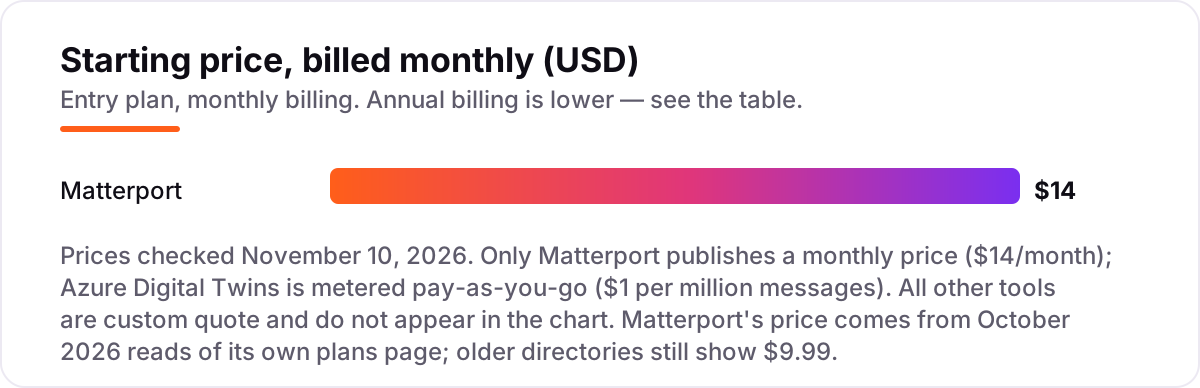
Take a plant with 1,000 sensors, each reporting every 10 seconds. That is 6 readings a minute per sensor, or about 259 million messages a month across the plant. On Azure Digital Twins, messages cost $1 per million, so the message traffic alone is about $259 a month — before operations at $2.50 per million and query units at $0.50 per million, and before the IoT Hub and storage the twin also needs. A small pilot with 100 sensors reporting once a minute costs a few dollars a month in messages; a large plant costs hundreds.
Matterport is the only subscription price in this list you can put in a budget without a sales call: Starter at $14 a month billed monthly, or $12 a month billed annually, which is $168 or $144 a year for 5 active spaces. A solo agent keeping 5 tours live pays $144 a year; a team that needs the Pro3 camera moves to Professional at $69 a month, or $58 billed annually. Everything else here is a quote: Siemens, PTC, Ansys, Dassault, GE Vernova, AVEVA, Altair, Bentley and Autodesk all price per deployment, so the honest budget line for those ten is "ask for a quote, then add implementation".
Know the difference: a digital twin is not a 3D model
The biggest confusion in this category is between a 3D model and a digital twin. A 3D model is a static shape: a CAD file, a BIM model, a Matterport scan. It shows what the asset looks like. A digital twin is a live replica: sensor data, BIM data or simulation results flow into it continuously, and the twin updates as the real asset changes. A BIM file becomes a twin only when live data is connected to it — which is exactly what Autodesk Tandem and Bentley iTwin exist to do.
There is a second, quieter distinction: a digital shadow and a digital twin. A shadow receives data one way, from the asset to the model. A twin talks both ways: the model can send commands, setpoints or maintenance orders back to the asset. Most tools in this list build twins, but check the direction of the data flow before you buy — a monitoring dashboard that cannot act on what it sees is a shadow, however good it looks.
A third distinction is simulation versus monitoring. Ansys Twin Builder, Altair Twin Activate and Simcenter 3D are simulation twins: they predict what will happen from physics. Azure Digital Twins, ThingWorx and AVEVA CONNECT are monitoring twins: they report what is happening from live data. The strongest deployments pair the two, using simulation to predict and live data to correct — which is why Siemens Xcelerator, which covers both, tops this list.
Quick comparison: tool type by need
| Buyer | Best pick | Why |
|---|---|---|
| Manufacturer, full digital thread | Siemens Xcelerator | Design to operations in one portfolio, custom quote |
| Cloud team, lowest starting cost | Azure Digital Twins | Pay as you go from $1 per million messages |
| Factory floor connectivity | PTC ThingWorx | 500+ device types, custom quote |
| Simulation-based predictive maintenance | Ansys Twin Builder | Physics models plus live sensor data, custom quote |
| Building twins, fast and cheap | Matterport | Measurable 3D twins from $14/month |
| Facility operator with Revit models | Autodesk Tandem | Free tier, capacity-based quote |
| Infrastructure owner | Bentley iTwin Platform | Open-source library, free developer tier |
| Energy or utility operator | GE Vernova APM | 4.4 out of 5 on G2, custom quote |
Mistakes to avoid
- Buying the platform before the data. A twin with no sensor feed, BIM model or simulation behind it is an expensive 3D viewer. Line up the data source first, then choose the software.
- Comparing headline prices that do not exist. Ten of the twelve tools here are quote-only. A list that ranks them by price is ranking by nothing — compare them by fit, then get quotes for the shortlist.
- Forgetting the implementation bill. The quote covers the licence. Integration, data pipelines, training and change management are billed separately and often cost more than the software.
- Picking a building twin for a machine problem. Matterport is excellent for rooms and poor for turbines; Ansys is excellent for turbines and poor for rooms. Match the twin type to the asset.
- Assuming the twin maintains itself. Sensors drift, models age and BIM files go stale. Budget for someone to keep the twin honest, or it quietly becomes a snapshot of the day it was built.
How we chose
We checked each vendor's own pricing or product page on November 10, 2026. Ten tools publish no price, so they are listed as custom quote — we did not invent figures from directories. Azure Digital Twins is metered pay-as-you-go ($1 per million messages, $2.50 per million operations, $0.50 per million query units) on Microsoft's own pricing page. Matterport's $14 a month Starter price comes from October 2026 reads of Matterport's own plans page, corroborated by two independent sources; the vendor's plans page could not be opened directly on November 10, and some directories still show the older $9.99 Starter figure. Ratings are shown only where a fresh G2 page gave a clear score and review count: ThingWorx, Matterport, GE Vernova APM and Simcenter 3D. The other eight carry no rating because their G2 listings are missing, belong to a different product, or gave conflicting counts. We ranked by fit for the most common buyer — an industrial or facilities team choosing a first twin platform — not by brand size. No vendor paid for a place in this list, and none of the links here are affiliate links.
What to do next
Start small and start with your own asset. Build a pilot twin on a free tier — Matterport for a building, Tandem for a Revit model, Azure for a sensor stream — and prove the data flows before any sales conversation. Then shortlist two or three tools that match your asset type and get quotes for the same scope, so the numbers are comparable. If the twin is built but customers still cannot find the business behind it, our monthly SEO service handles the visibility side. Once your tools are in place, find out what's holding your rankings back.
Your stack only works if people find you
SerpAstra fixes what keeps your site off page one and makes it easy for AI assistants to recommend.
Get a free audit→Sources we checked (19)
- Siemens Xcelerator — siemens.com/en-us/company/digital-transformation (checked November 10, 2026)
- Azure Digital Twins pricing — azure.microsoft.com/en-us/pricing/details/digital-twins (checked November 10, 2026)
- Azure Digital Twins product page — azure.microsoft.com/en-us/services/digital-twins (checked November 10, 2026)
- PTC ThingWorx — ptc.com/en/products/thingworx (checked November 10, 2026)
- ThingWorx on G2 — 3.9/5, 33 reviews (checked November 10, 2026)
- Ansys Twin Builder — ansys.com/products/digital-twin/ansys-twin-builder (checked November 10, 2026)
- Matterport plans — buy.matterport.com/en-gb/plans (checked November 10, 2026)
- Matterport on G2 — 4.1/5, 97 reviews (checked November 10, 2026)
- Matterport price list (add-ons) — support.matterport.com (checked November 10, 2026)
- Autodesk Tandem — autodesk.com/ae/products/tandem/overview (checked November 10, 2026)
- Bentley iTwin Platform pricing — developer.bentley.com/pricing (checked November 10, 2026)
- Bentley iTwin Platform — bentley.com/software/itwin-platform (checked November 10, 2026)
- Dassault 3DEXPERIENCE virtual twins — 3ds.com/products/3dexperience/ai-powered-virtual-twin-experiences (checked November 10, 2026)
- GE Vernova software — gevernova.com/software (checked November 10, 2026)
- GE Vernova APM on G2 — 4.4/5, 63 reviews (checked November 10, 2026)
- AVEVA CONNECT — aveva.com/en/solutions/connect (checked November 10, 2026)
- Altair digital twin — altair.com/digital-twin (checked November 10, 2026)
- Simcenter 3D on G2 — 4.3/5, 211 reviews (checked November 10, 2026)
- Simcenter 3D pricing on G2 — g2.com/products/simcenter-3d/pricing (checked November 10, 2026)
Shamim
Founder of SerpAstra
A full-stack SEO and digital marketer who spends most days on Local SEO for dental practices, AI search visibility and lead generation.
Frequently asked questions
What is the best digital twin software in 2026?
Siemens Xcelerator is the best fit for most manufacturers because it covers design, simulation and operations in one thread. Azure Digital Twins is the cheapest way in, at $1 per million messages. For buildings, Matterport is the fastest option at $14 a month, and Autodesk Tandem is the best fit for facility operators with Revit models.
How much does digital twin software cost?
Ten of the twelve tools in this list publish no price and sell by custom quote, so enterprise deployments are scoped per project. The two exceptions are Azure Digital Twins, metered from $1 per million messages, and Matterport, from $14 a month. Budget for implementation and integration on top of any quote, since that work is billed separately.
Is there a free digital twin software?
There is no free enterprise platform here, but free entry exists. A free Azure account lets you experiment with metered twins, Matterport has a free plan with 1 active space, and Autodesk Tandem and Bentley iTwin both offer free tiers for developers. Every other tool needs a paid licence or a sales-led trial.
What is the difference between a digital twin and a 3D model?
A 3D model is a static shape. A digital twin is a live, data-fed replica: sensors, BIM data or simulation results flow into it continuously, and the twin updates as the real asset changes. A BIM file or a Matterport scan becomes a twin only when live data is connected to it.
Do I need IoT sensors to use digital twin software?
Not always. Building twins can start from a BIM model or a 3D scan, and simulation twins can start from engineering models. But a twin without live data is a snapshot, not a twin. For predictive maintenance or real-time monitoring, sensors and a data pipeline are essential, and that is where most of the project cost sits.
Which digital twin software is best for manufacturing?
Siemens Xcelerator is the strongest fit for manufacturers, with PTC ThingWorx close behind for machine connectivity and Ansys Twin Builder for simulation-based twins. If the budget is tight, Azure Digital Twins gives a metered starting point. Pick the tool that matches your data: CAD and simulation, machine telemetry, or both.
Can I build a digital twin without coding?
For buildings, yes: Matterport builds a twin from a phone scan with no code, and Autodesk Tandem imports Revit models through a visual interface. For industrial twins, low-code tools exist — ThingWorx Composer and Tandem Connect — but a production twin usually needs integration work, so expect some development even on the friendliest platforms.
Free SEO and AI visibility audit
Find out what is holding your rankings back
Send us your site. Within 2 business days you get a written audit, an AI visibility check and a short fix list ranked by impact. Free, with no contract attached.
Request my free audit→Related guides
 Design, Video & CreativeBest 3D CAD Software for 2026: 10 Options Compared by Use CaseCompare the best 3d cad software for 2026: 10 tools with real starting prices, free plans and G2 ratings, sorted by the job you need them for.Read guide →
 Design, Video & Creative10 Best CAD Software for 3D Modeling in 2026, ComparedCompare the 10 best cad software for 3d modeling on price, free plans and fit for every budget, with every single price checked November 4, 2026.Read guide →
 Local Business & Vertical Software10 Best Digital Tools for Construction Management in 2026, ComparedCompare the 10 best digital tools for construction management on price, field tools, job costing and AI features, with every price checked November 7, 2026.Read guide →