
Best Email Encryption Services for 2026: 12 Providers Ranked by Value
Compare the 12 best email encryption services on price, free plans and encryption models, with every starting price checked November 6, 2026.
 Shamim Mia, Founder, SerpAstraLast verified November 6, 202614 min read
We compare pricing pages, documentation and public reviews. We never accept payment for rankings.
Key takeaways
- Proton Mail is the best fit for most people at $4.99 a month, with a free plan and end-to-end encryption; SecureMyEmail follows at $3.99 a month for encrypting an existing Gmail or Outlook address.
- Tuta and Mailfence are the cheapest paid options in euros — €3 and €2.50 a month — while Virtru and Paubox price per five-user bundle, from $119 and $32 a month.
- The single most important buying factor is who your recipients are: end-to-end encryption works best when both sides use the same service, and portal or PGP friction decides whether messages actually get read.
- Mimecast, Proofpoint and Barracuda publish no starting price — budget for a sales quote, and expect enterprise pricing rather than a per-user list price.
On this page
Quick comparison
| Tool | Best for | Starting price | Free plan |
|---|---|---|---|
| Proton Mail | People who want a private inbox with a free plan and a full privacy suite behind it | $4.99/mo | Yes (free plan) |
| Tuta | Privacy-focused individuals and small teams who want the lowest paid price for encrypted mail, calendar and contacts | €3.60/mo | Yes (free plan) |
| SecureMyEmail | People who want to keep their Gmail, Yahoo or Outlook address and add end-to-end encryption on top | $3.99/mo | Yes (free plan) |
| StartMail | Individuals who want PGP-compatible private mail with unlimited aliases and no tracking | $6.99/mo | No (7-day trial) |
| Mailfence | Individuals who want encrypted mail plus calendar, contacts and documents in one Belgian suite | €2.50/mo | Yes (free plan) |
| Hushmail | Solo healthcare and legal professionals who want encrypted mail plus secure web forms | $59.99/yr | No (60-day refund) |
| PreVeil | Businesses that must prove compliance (HIPAA, CMMC, ITAR) without making staff manage keys | $25/mo | Yes (Basic free) |
| Virtru | Teams on Google Workspace or Microsoft 365 who want encryption and control without migrating mailboxes | $119/mo (5 users) | No (free trial) |
| Paubox | Clinics and health businesses that must send HIPAA-compliant mail patients can open without a portal | $32/mo (5 users) | No (14-day trial) |
| Mimecast | Mid-size and enterprise teams that want email security, archiving and continuity in one platform | Custom quote | No (free trial) |
| Proofpoint | Enterprises that need the strongest threat detection and email encryption under one gateway | Custom quote | No (demo only) |
| Barracuda Email Protection | Microsoft 365 shops that want easy-setup gateway security with cloud backup options | Custom quote | No (free trial) |
Make one of these tools?
We re-check this list every quarter. Send a correction, request a review, or ask about a clearly labeled sponsored spot.
Request a listingThe best email encryption services

Proton Mail
Best for: People who want a private inbox with a free plan and a full privacy suite behind it
Proton Mail is the most complete encrypted mail service here, with end-to-end encryption between Proton users, a free tier that covers everyday use, and paid plans adding storage, custom domains and addresses. It sits inside a wider Proton suite covering VPN, calendar, drive and password management. Mail Plus costs $4.99 a month billed monthly, or $3.99 a month billed annually, and includes 15 GB of storage, 10 addresses and 1 custom domain.
The trade-offs are the ones encryption always brings. Subject lines are not end-to-end encrypted, search is limited because the server cannot read message contents, and Bridge for desktop mail apps needs a paid plan. Business mail costs extra: Mail Essentials is $6.99 per user a month billed annually. Pick Proton Mail when you want a private inbox with a clear upgrade path when storage or domains matter.
What we like
- End-to-end encryption between Proton users, with password-protected mail to anyone else
- A real free plan with the same encryption as paid plans, plus VPN, Drive and Pass in the wider suite
- Custom domains, 10 addresses and Bridge for desktop mail apps on Mail Plus
- Swiss jurisdiction and open-source apps, independently audited
Watch out for
- Subjects are not end-to-end encrypted, and search is limited on encrypted mail
- Custom domains and Bridge need a paid plan; the free plan caps at 1 GB
- Business mail costs extra: Mail Essentials is $6.99 per user a month billed annually

Tuta
Best for: Privacy-focused individuals and small teams who want the lowest paid price for encrypted mail, calendar and contacts
Tuta, formerly Tutanota, encrypts mail, calendar and contacts end to end, including subject lines, with a free tier and low-priced paid plans. Its open-source clients let reviewers inspect the code, and its focus stays narrow: private communication, not a broad suite. The paid plan costs €3.60 a month billed monthly, or €3 a month billed annually, and includes 20 GB of storage, 15 extra addresses and 3 custom domains.
The ecosystem is smaller than Proton's, with fewer integrations and no VPN or drive bundle, and there is no IMAP support, so desktop mail apps are out — you use Tuta's own apps. The review base is thin at 18 G2 reviews. Pick Tuta when you want the most complete encryption at the lowest price and you are happy to live inside one provider's apps.
What we like
- Encrypts mail, calendar and contacts end to end, including subject lines
- The cheapest paid plan here at €3 a month billed annually, with 20 GB and 3 custom domains
- Open-source clients and post-quantum encryption (TutaCrypt) on every account
- German jurisdiction with 100% renewable energy powering the service
Watch out for
- Smaller ecosystem than Proton: no VPN, drive or password manager bundle
- No IMAP support, so you must use Tuta's own apps to read mail
- Only 18 G2 reviews, so the public review base is thin

SecureMyEmail
Best for: People who want to keep their Gmail, Yahoo or Outlook address and add end-to-end encryption on top
SecureMyEmail is the only tool here that encrypts the mailbox you already have instead of giving you a new one. It layers true end-to-end encryption over Gmail, Yahoo and Microsoft consumer accounts, so there is no migration, no new address to tell people about, and no change to your workflow. The paid plan costs $3.99 a month billed monthly, or $29.99 a year, and the free plan covers one consumer account.
The limits are scope, not price. The free plan covers a single consumer account, other addresses need the paid plan, and there is no mailbox of its own with a custom domain. Independent feedback is also very thin at 4 G2 reviews. Pick SecureMyEmail when your address is the asset — a Gmail or Outlook address clients already know — and you want encryption without moving house.
What we like
- Adds true end-to-end encryption to an existing address — no mailbox migration
- Free plan covers Gmail, Yahoo and Microsoft consumer accounts with no payment details
- Cheapest monthly-billed option here at $3.99, or $29.99 a year
- Works on Mac, Windows, iOS and Android with one subscription
Watch out for
- The free plan covers one consumer account only; other addresses need the paid plan
- Only 4 G2 reviews, so independent feedback is very thin
- No custom-domain mailbox of its own — it encrypts mail you already have

StartMail
Best for: Individuals who want PGP-compatible private mail with unlimited aliases and no tracking
StartMail offers private email with PGP support, letting users exchange encrypted mail with any PGP-capable correspondent, not only fellow StartMail users. It blocks tracking pixels, keeps servers in the Netherlands, and avoids advertising-based revenue. That standards-based approach appeals to users who already understand PGP or want interoperability. Personal costs $6.99 a month billed monthly, or $4.99 a month billed annually, and includes 20 GB of storage, unlimited aliases and 1 custom domain.
There is no free tier beyond a 7-day trial, no mobile apps, and no built-in calendar — the feature set is narrower than Proton's suite. The first-year price is also discounted: Personal renews at $59.88 a year after a $23.96 first year. Pick StartMail when PGP compatibility matters more than a free plan or a bundled suite.
What we like
- One-click PGP encryption that works with any PGP-capable correspondent
- Unlimited aliases and 20 GB of storage on the Personal plan
- No tracking, no ads, servers in the Netherlands
- Bitcoin payment accepted on annual plans
Watch out for
- No free plan beyond the 7-day trial, and no mobile apps
- No built-in calendar, and the interface is plainer than Proton's
- Custom domains need the Business plan at $8.99 a month billed monthly

Mailfence
Best for: Individuals who want encrypted mail plus calendar, contacts and documents in one Belgian suite
Mailfence combines encrypted email with calendar, contacts and document tools, plus OpenPGP support for standards-based encryption. Its free tier covers basic mail use, and paid plans add storage and group features. The service is based in Belgium, which some users prefer for data protection reasons. Base costs €2.50 a month and is the cheapest entry price in this list, while Entry at €3.50 a month adds custom domains and IMAP access.
The interface is functional rather than polished, and heavy users will need a paid plan for storage — the free plan is only 500 MB and blocks IMAP and SMTP. The public review base is also thin at 5 G2 reviews. Pick Mailfence when you want encrypted mail plus office tools in one account, with OpenPGP compatibility for correspondents outside the service.
What we like
- OpenPGP encryption for mail, plus encrypted calendar, contacts and documents
- The cheapest entry price here at €2.50 a month, with a free plan to start
- Belgian jurisdiction under EU privacy law, with no ads
- Group features let small teams share calendars and documents
Watch out for
- Free plan is only 500 MB and blocks IMAP and SMTP access
- Webmail looks dated next to Proton and Tuta, and the mobile app is new
- Only 5 G2 reviews, so the public review base is thin

Hushmail
Best for: Solo healthcare and legal professionals who want encrypted mail plus secure web forms
Hushmail is one of the longest-running encrypted webmail services, offering passphrase-based encryption in a simple web interface. Businesses use its encrypted web forms to receive sensitive messages from customers without those customers needing an account. That form feature remains a distinctive, practical use case. Personal costs $59.99 a year and includes 15 GB of storage, unlimited aliases and 2 secure web forms, with a 60-day money-back guarantee instead of a free trial.
There is no free tier, no Android app, and the interface feels dated beside Proton and Tuta. Healthcare plans, which add a business associate agreement and e-signatures, start at $11.99 a month. Pick Hushmail when you want straightforward encrypted webmail, or encrypted intake forms for a practice, without learning PGP or managing keys yourself.
What we like
- Running since 1999, one of the longest-lived encrypted mail services
- Secure web forms let clients send sensitive messages without an account
- OpenPGP encryption with unlimited aliases and 15 GB of storage
- Healthcare plans add a business associate agreement and e-signatures
Watch out for
- No free plan and no free trial on personal accounts — only a 60-day refund window
- No Android app, and the interface feels dated next to Proton and Tuta
- Healthcare plans start at $11.99 a month, so compliance use costs more than personal mail

PreVeil
Best for: Businesses that must prove compliance (HIPAA, CMMC, ITAR) without making staff manage keys
PreVeil provides end-to-end encrypted email and file sharing for businesses, with key management handled by the service so staff never manage keys directly. It targets compliance-sensitive industries, including defense and finance supply chains, and it works alongside existing email rather than replacing it entirely. Individual costs $25 a month with annual payments, Business costs $30 per user a month, and a free Basic plan covers 5 GB for individuals.
Pricing is business-grade and quote-based at the top end, and personal users will find better value elsewhere. Recipients outside PreVeil need the app or browser access to read mail, and the review base is thin at 10 G2 reviews, with some reporting sync problems. Pick PreVeil when compliance proof matters more than price and staff must never touch a key.
What we like
- End-to-end encrypted mail and files with no key management for staff
- Free Basic plan covers 5 GB for individuals
- Business plan supports HIPAA, FTC Safeguards and IRS Publication 4557 requirements
- Works alongside Outlook and Gmail, so teams keep their addresses
Watch out for
- Business pricing is $30 per user a month, and contract minimums apply
- Recipients outside PreVeil need the app or browser access to read mail
- Only 10 G2 reviews, and some report sync problems

Virtru
Best for: Teams on Google Workspace or Microsoft 365 who want encryption and control without migrating mailboxes
Virtru adds encryption, access controls and revocation to Gmail and Outlook, so teams keep their existing mail provider and add protection on top. Senders can set expiry, revoke access after sending, and track opens, which matters for sensitive business documents. Audit trails support compliance reporting. Starter costs $119 a month for 5 users, billed annually, and includes a signed business associate agreement for HIPAA use.
The bundle pricing is the catch: $119 a month covers only 5 users, so a 10-person team pays for two bundles, and Business and Compliance tiers cost $219 and $499 a month for 5 users. Some recipients still struggle to open encrypted messages. Pick Virtru when your team is standardized on Google Workspace or Microsoft 365 and needs control without migrating mailboxes.
What we like
- Adds encryption, expiry and revocation inside Gmail and Outlook
- Audit trails and DLP rules support compliance reporting
- Recipients need no username or password to read a message
- FIPS 140-3 validated encryption on higher tiers
Watch out for
- Starter covers only 5 users at $119 a month — about $24 per user
- Business and Compliance tiers cost $219 and $499 a month for 5 users
- Some recipients still struggle to open encrypted messages, reviewers say

Paubox
Best for: Clinics and health businesses that must send HIPAA-compliant mail patients can open without a portal
Paubox is built for healthcare email, with HIPAA-focused encryption that works without forcing recipients into a portal to read messages. That recipient experience matters in healthcare, where patients and partners should not need new accounts to read a secure message. An email API lets developers add encryption to existing workflows. Standard costs $32 a month for 5 users, with a 14-day free trial, and Plus and Premium add inbound security, archiving and DLP.
The healthcare focus narrows its fit for general business use, and pricing is business-grade: the per-sender price rises steeply as the team grows. Paubox's own pricing page also did not show prices when we checked, so the $32 figure comes from Paubox's vendor-supplied G2 listing. Pick Paubox when you send protected health information by email and want the simplest possible recipient experience.
What we like
- Every outbound email is encrypted automatically — recipients need no portal or password
- Highest-rated tool here: 4.9 out of 5 from 669 G2 reviews
- HITRUST certified with a signed business associate agreement
- Works with Google Workspace and Microsoft 365, plus an email API
Watch out for
- Standard is $32 a month for 5 users, and the price rises steeply per sender
- The healthcare focus narrows its fit for general business mail
- Paubox's own pricing page did not show prices when we checked, so the figure comes from G2

Mimecast
Best for: Mid-size and enterprise teams that want email security, archiving and continuity in one platform
Mimecast is a long-established email security platform that combines gateway protection, targeted threat defense, archiving and business continuity. Its strength is breadth: phishing and impersonation protection on the way in, policy-based encryption on the way out, and a cloud archive with long retention and e-discovery for compliance teams. Email continuity keeps mail flowing when Microsoft 365 goes down, which matters to regulated teams that cannot lose a day of mail.
There is no published price — every deal is a sales quote, so budgeting needs a call with the vendor or a partner. Setup and policy tuning also take longer than the consumer tools here, and reviewers report occasional false positives. Pick Mimecast when a regulated team needs security, archive and compliance in one platform and can run a proper procurement process.
What we like
- Multi-layer phishing, malware and impersonation protection with targeted threat defense
- Cloud archive with long retention and e-discovery for compliance teams
- Email continuity keeps mail flowing when Microsoft 365 goes down
- Rated 4.4 out of 5 from 350 G2 reviews
Watch out for
- No published price — every deal is a sales quote, so budgeting needs a call
- Setup and policy tuning take longer than the consumer tools here
- Reviewers report occasional false positives and a learning curve

Proofpoint
Best for: Enterprises that need the strongest threat detection and email encryption under one gateway
Proofpoint Core Email Protection is the enterprise gateway in this list, with AI-driven threat detection, URL and attachment sandboxing, and policy-based encryption and DLP for outbound mail. It is the highest-rated enterprise gateway here at 4.6 out of 5 from 584 G2 reviews, and its detailed reporting suits security teams that must show what was blocked and why. Encryption runs by policy, so sensitive mail is protected without staff remembering to encrypt.
There is no published price — enterprise products are sold by quote only, and the small-business Essentials line is migrating to 365 Total Protection, so check the current platform before buying. Configuration is complex, and reviewers report false positives that need manual release. Pick Proofpoint when threat detection matters as much as encryption and the budget allows an enterprise purchase.
What we like
- Rated 4.6 out of 5 from 584 G2 reviews, the highest-rated enterprise gateway here
- AI-driven threat detection with URL and attachment sandboxing
- Policy-based encryption and DLP for outbound mail
- Detailed reporting and a large enterprise customer base
Watch out for
- No published price — enterprise products are sold by quote only
- The small-business Essentials line is migrating to 365 Total Protection, so check the current platform
- Configuration is complex, and reviewers report false positives

Barracuda Email Protection
Best for: Microsoft 365 shops that want easy-setup gateway security with cloud backup options
Barracuda Email Protection is an email security solution that uses machine learning to defend against spam, phishing, malware and business email compromise. It combines gateway defenses with API-based inbox defense, and a cloud-to-cloud backup add-on protects Microsoft 365 data. Setup is fast — reviewers praise the easy Microsoft 365 integration — and a free trial is available before you commit to a quote.
There is no published price: Barracuda sells by quote, and reported per-user prices vary widely, so the only way to budget is to ask. Reviewers also report false positives that need manual release, and some find the interface harder to navigate since the AI features arrived. Pick Barracuda when a Microsoft 365 shop wants gateway security that is easy to set up and can add backup later.
What we like
- Easy setup with Microsoft 365 and Google Workspace, rated 4.5 out of 5 from 204 G2 reviews
- Strong spam blocking with AI visibility into impersonation attacks
- Cloud-to-cloud backup add-on protects Microsoft 365 data
- Free trial available before you commit
Watch out for
- No published price — Barracuda sells by quote, with reported per-user prices varying widely
- Reviewers report false positives that need manual release
- The interface changed with the AI features, and some users find it harder to navigate
The best email encryption services protect your messages from everyone except the intended recipient — including the provider itself. We ranked the 12 tools below by fit for the most common buyer: a person or small team that needs private mail without becoming a cryptography expert. Prices run from free to custom enterprise quotes, and every price was checked on the vendor's own pricing page on November 6, 2026.
How to choose the best email encryption services
- Start with your recipients. End-to-end encryption works best when both sides use the same service. If your contacts are on Gmail and Outlook, an overlay like Virtru or SecureMyEmail beats a new mailbox nobody else uses.
- Decide between a new mailbox and an overlay. Proton Mail, Tuta, StartMail, Mailfence and Hushmail replace your inbox; SecureMyEmail, Virtru, Paubox and PreVeil encrypt the address you already have.
- Check what is actually encrypted. Subject lines, metadata and attachments often follow different rules from message bodies, so read each vendor's model before assuming everything is hidden.
- Count the per-user cost, not the headline. Virtru and Paubox price per five-user bundle, PreVeil charges per user, and the enterprise gateways publish no price at all — the headline number is rarely the bill.
- Test recovery before you migrate. With zero-access encryption, a lost password can mean a lost mailbox, so set up recovery codes and try them on a secondary account first.
If you also need to hide your real address behind disposable ones, our guide to email alias services covers that side of inbox privacy. And before you send a sensitive message from a new mailbox, run your subject line through the free SERP snippet preview tool — it is built for search titles, but it shows exactly how a line of text reads at a glance.
Whatever you shortlist, try it with real correspondents before you pay. The free plans and trials in this list are long enough to send encrypted mail to your five most common contacts, and that test tells you more than any review can. Check two things in the trial: that recipients can actually open what you send without a support call, and that you can recover the account if you lose the password.
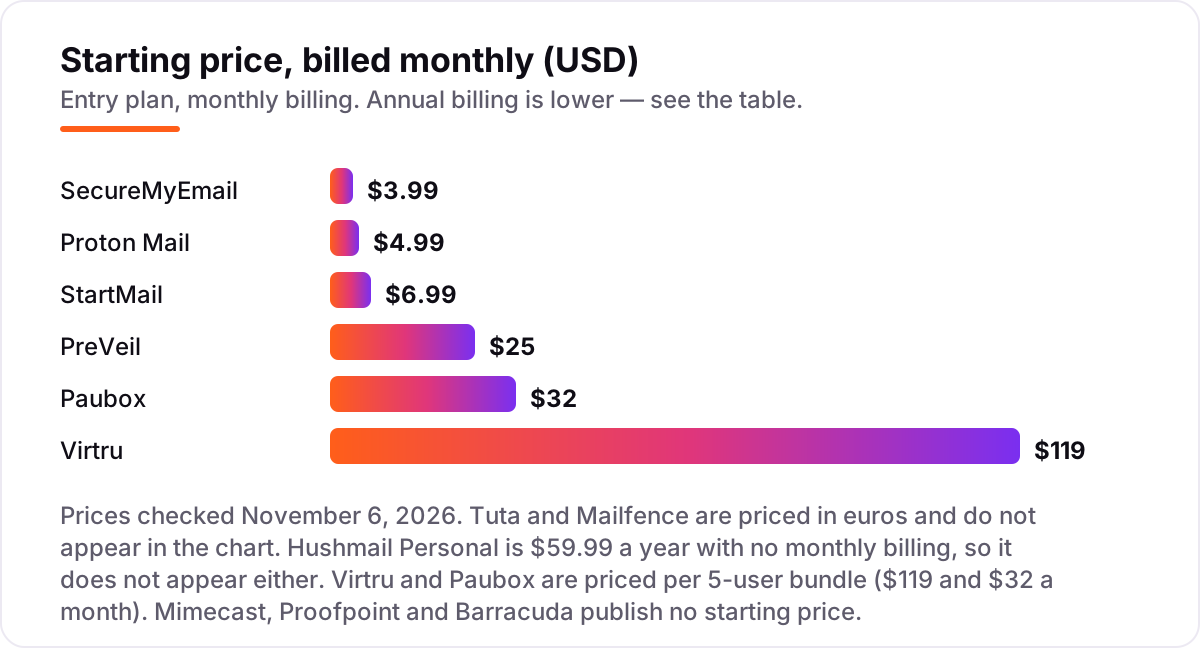
Email encryption pricing: what you will actually pay
Take a five-person clinic that sends patient mail every day. On list prices, the subscription costs $19.95 a month on SecureMyEmail at $3.99 per user, $32 a month on Paubox Standard for 5 users, $34.95 a month on Proton Mail Essentials at $6.99 per user billed annually, $119 a month on Virtru Starter for 5 users, and $150 a month on PreVeil Business at $30 per user.
Over a year, that is $239.40 on SecureMyEmail, $384 on Paubox, $419.40 on Proton Mail Essentials, $1,428 on Virtru and $1,800 on PreVeil — a $1,560 gap between the cheapest and the dearest option for the same five people. The gap comes from what you are buying: SecureMyEmail encrypts the mail you already send, while Virtru and PreVeil add revocation, audit trails and compliance proof on top.
Individuals pay far less. Tuta's paid plan is €36 a year, StartMail Personal is $59.88 a year, Hushmail Personal is $59.99 a year, and Mailfence Base is €2.50 a month. The three enterprise gateways — Mimecast, Proofpoint and Barracuda — publish no starting price, so a quote is the only way to budget them; expect enterprise pricing, not a per-user list price. If encrypted mail is one part of a wider security setup, our guide to email deliverability services covers the sending side.
Two costs sit outside every number above. First, the introductory prices: StartMail Personal renews at $59.88 a year after a $23.96 first year, so budget on the renewal price. Second, the bundle minimums: Virtru and Paubox sell in five-user bundles, so a three-person team still pays for five seats. One more cost to check before you commit: a second domain or a second team is a second subscription on most tools here, so price the whole organization, not one mailbox.
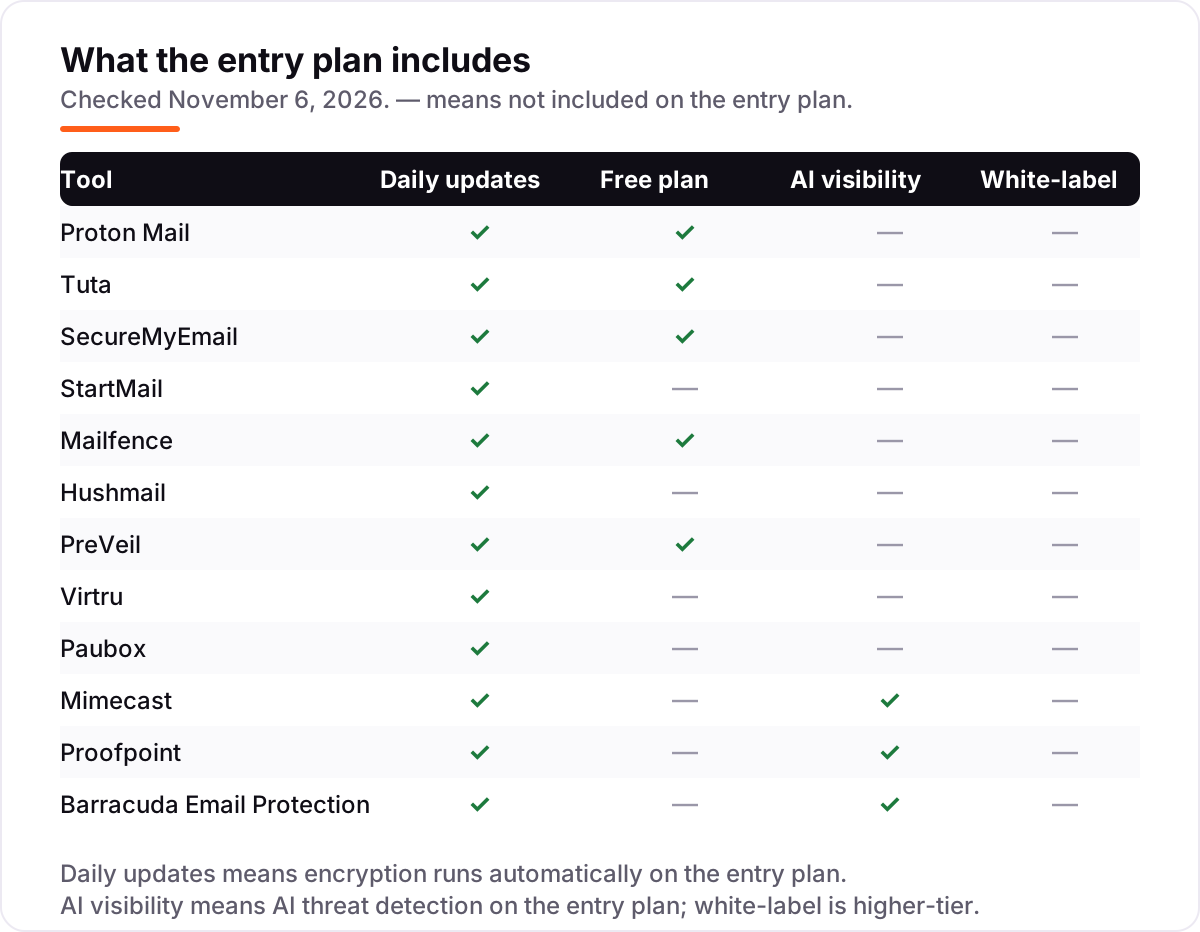
Know the difference: end-to-end encryption vs gateway encryption
The confusion in this category is between two different promises. End-to-end encryption scrambles the message on your device so only the intended recipient can read it — not even the provider. Gateway encryption, used by Mimecast, Proofpoint and Barracuda, encrypts mail by policy as it passes through the company's server: the provider can read it, but outsiders cannot. Both protect mail in transit; only the first protects it from the provider.
There is a second, quieter confusion: TLS is not end-to-end encryption. TLS encrypts mail while it travels between servers, which every modern provider does by default, but the message sits readable on each server along the way. If a vendor says "encrypted" without saying end-to-end, it usually means TLS plus storage encryption — useful, but not the same as Proton Mail or Tuta, where the provider itself cannot read your mail.
A third distinction worth knowing is key handling. In a zero-access model, the provider cannot decrypt your messages even if asked, which is stronger but means a lost password can mean lost mail. In a managed-key model, the provider holds keys or recovery material, which makes recovery easier but adds a party that could access messages. Neither model is wrong in itself, but buyers should know which one they are choosing, since it changes both security and recovery.
Quick comparison: tool type by need
| Buyer | Best pick | Why |
|---|---|---|
| Individual who wants a private inbox | Proton Mail | Free plan, end-to-end encryption, Mail Plus is $4.99/month |
| Privacy purist on a budget | Tuta | €3/month billed annually, encrypts mail, calendar and contacts |
| Encrypting an existing Gmail or Outlook address | SecureMyEmail | $3.99/month, keeps your address, free plan for consumer accounts |
| PGP-compatible private mail | StartMail | $6.99/month, unlimited aliases, one-click PGP |
| Small clinic sending patient mail | Paubox | $32/month for 5 users, no recipient portal needed |
| Team on Google Workspace or Microsoft 365 | Virtru | $119/month for 5 users, revoke and expiry controls |
| Defense or finance supplier needing compliance | PreVeil | $30/user/month, CMMC and ITAR focus, keys handled for you |
| Enterprise gateway with archiving | Mimecast | Custom quote, security plus archive and continuity |
Mistakes to avoid
- Buying on the headline price. Virtru at $119 a month covers 5 users and Paubox at $32 a month covers 5 senders — compare per-user costs, not bundle prices, and remember the enterprise gateways publish no price at all.
- Assuming encryption hides everything. Subject lines, sender, recipient and timing often stay visible, and Proton Mail does not end-to-end encrypt subjects. Check what each vendor actually encrypts before you promise privacy to a client.
- Picking a mailbox your recipients will not use. The best encryption is the one your recipients actually complete: a secure message nobody opens helps no one, and a portal that confuses patients will push them toward insecure workarounds.
- Forgetting recovery until you need it. With zero-access encryption, a lost password can mean a lost mailbox. Save recovery codes in a password manager and test recovery on a secondary account before you rely on the service.
- Paying for the enterprise gateway when an overlay would do. A five-person team rarely needs Mimecast or Proofpoint; Virtru, Paubox or PreVeil cover the same mail at a known price, without a sales cycle.
How we chose
We checked each vendor's own pricing page on November 6, 2026 and recorded the starting price exactly as shown, including the annual-billing figure where the page lists one, and we ranked the tools by fit for the most common buyer — a person or small team that needs private mail without becoming a cryptography expert — not by brand size. Two prices are not vendor-page figures: Paubox's own pricing page showed no prices when we checked, so its $32-a-month figure comes from Paubox's vendor-supplied G2 listing, and Hushmail Personal is $59.99 a year with no monthly billing option. Mimecast, Proofpoint and Barracuda publish no starting price, so they are listed as custom quote rather than estimated.
Ratings come from the G2 and Trustpilot pages we opened on November 6, 2026, with the score, review count and source shown on each card. No vendor paid for a place in this list, and none of the links here are affiliate links.
What to do next
Start with the free plan or trial of your top pick and send encrypted mail to your five most common contacts. Check that recipients can open what you send without a support call, and that you can recover the account if you lose the password, before you migrate a team. If the mail is sorted but new customers are not finding you, our monthly SEO service handles the visibility side — or compare providers in our guide to email archiving software. Once your tools are in place, find out what's holding your rankings back.
Your stack only works if people find you
SerpAstra fixes what keeps your site off page one and makes it easy for AI assistants to recommend.
Get a free audit→Sources we checked (24)
- Proton Mail pricing — proton.me/mail/pricing (checked November 6, 2026)
- Tuta pricing — tuta.com/pricing (checked November 6, 2026)
- SecureMyEmail pricing — securemyemail.com (checked November 6, 2026)
- StartMail pricing — startmail.com (checked November 6, 2026)
- Mailfence pricing — mailfence.com (checked November 6, 2026)
- Hushmail pricing — hushmail.com (checked November 6, 2026)
- PreVeil pricing — preveil.com/pricing (checked November 6, 2026)
- Virtru pricing — virtru.com/pricing (checked November 6, 2026)
- Paubox pricing — paubox.com/pricing (checked November 6, 2026)
- Mimecast pricing — mimecast.com (checked November 6, 2026)
- Proofpoint pricing — proofpoint.com (checked November 6, 2026)
- Barracuda Email Protection pricing — barracuda.com (checked November 6, 2026)
- Proton Mail G2 reviews — g2.com/products/proton-mail-for-business/reviews (checked November 6, 2026)
- Tuta G2 reviews — g2.com/products/tuta/reviews (checked November 6, 2026)
- SecureMyEmail G2 reviews — g2.com/products/securemyemail/competitors/alternatives (checked November 6, 2026)
- StartMail Trustpilot reviews — trustpilot.com/review/startmail.com (checked November 6, 2026)
- Mailfence G2 reviews — g2.com/products/mailfence/reviews (checked November 6, 2026)
- Hushmail Trustpilot reviews — trustpilot.com/review/www.hushmail.com (checked November 6, 2026)
- PreVeil G2 reviews — g2.com/products/preveil-file-sharing-and-email/reviews (checked November 6, 2026)
- Virtru G2 reviews — g2.com/products/virtru-email-encryption/reviews (checked November 6, 2026)
- Paubox G2 reviews — g2.com/products/paubox/reviews (checked November 6, 2026)
- Mimecast G2 reviews — g2.com/compare/mimecast-advanced-email-security-vs-zix-email-threat-protection (checked November 6, 2026)
- Proofpoint G2 reviews — g2.com/products/proofpoint-core-email-protection/reviews (checked November 6, 2026)
- Barracuda Email Protection G2 reviews — g2.com/products/barracuda-barracuda-email-protection/reviews (checked November 6, 2026)
Shamim
Founder of SerpAstra
A full-stack SEO and digital marketer who spends most days on Local SEO for dental practices, AI search visibility and lead generation.
Frequently asked questions
What is the best email encryption service?
Proton Mail is the best fit for most people: a free plan, end-to-end encryption, and paid plans from $4.99 a month. Tuta is the better value pick at €3 a month billed annually. Teams on Gmail or Outlook should look at Virtru or Paubox instead, since both encrypt inside the mail you already use.
How much does email encryption cost?
Entry prices run from $0 to custom enterprise quotes. Proton Mail, Tuta, Mailfence, PreVeil and SecureMyEmail all have free plans. The first paid plans cost $2.50 to $6.99 a month for individuals, $25 to $30 per user a month for business tools, and $119 a month for a 5-user Virtru bundle. Mimecast, Proofpoint and Barracuda publish no price.
Can I send an encrypted email to someone on Gmail?
Yes, with limits. PGP-based services like StartMail and Mailfence can encrypt to any PGP user, and overlay tools like Virtru, Paubox and SecureMyEmail handle Gmail recipients through links or built-in decryption. Full end-to-end encryption works smoothest when both sides use the same encrypted service.
Is there a free email encryption service?
Yes, with limits. Proton Mail, Tuta and Mailfence all offer free plans with real encryption, and PreVeil Basic is free with 5 GB of storage. SecureMyEmail is free for one Gmail, Yahoo or Microsoft consumer account. Free plans cap storage and addresses, so most people upgrade once the mailbox grows.
What is the difference between end-to-end encryption and TLS?
TLS encrypts mail while it travels between servers, but the provider can still read it at rest. End-to-end encryption scrambles the message on your device so only the intended recipient can read it — not even the provider. Most business gateways use TLS plus policy encryption, which is weaker than true end-to-end encryption but easier to manage.
Do I need a new email address to encrypt my email?
No. Overlay tools like SecureMyEmail, Virtru, Paubox and PreVeil encrypt the address you already use, inside Gmail, Outlook or Microsoft 365. A new address is only needed if you switch to a dedicated encrypted mailbox like Proton Mail, Tuta, StartMail, Mailfence or Hushmail.
What happens if I forget my encryption password?
It depends on the service. With zero-access encryption, the provider cannot recover your mail without the password, so a lost password can mean a lost mailbox. Managed-key services can reset access, but that means the provider holds recovery material. Save recovery codes in a password manager and set up recovery options before you need them.
Free SEO and AI visibility audit
Find out what is holding your rankings back
Send us your site. Within 2 business days you get a written audit, an AI visibility check and a short fix list ranked by impact. Free, with no contract attached.
Request my free audit→Related guides
 Digital Marketing & Ads10 Best Email Alias Services in 2026: Prices, Pros and Cons ComparedCompare the 10 best email alias service options on price, free plans, custom domains and reply support, with every price checked November 5, 2026.Read guide →
 Digital Marketing & Ads10 Best Email Archiving Software in 2026, ComparedCompare the 10 best email archiving software tools on price, retention, legal hold and eDiscovery, with every price checked November 5, 2026.Read guide →
 Digital Marketing & Ads7 Best Email Deliverability Services in 2026Compare the 7 best email deliverability services on real prices, inbox testing, warmup and monitoring, with every price checked November 5, 2026.Read guide →