
10 Best Email Management Software in 2026, Compared
Compare the 10 best email management software tools on price, free plans, shared inboxes and AI features, with every price checked November 6, 2026.
 Shamim Mia, Founder, SerpAstraLast verified November 6, 202614 min read
We compare pricing pages, documentation and public reviews. We never accept payment for rankings.

Key takeaways
- Front is the best fit for most teams at $35/seat/month; Missive follows at $18/user/month for smaller teams, and Superhuman at $30/user/month for power users who live in email.
- Spark, Spike and Shortwave all offer genuinely free plans — Spark with unlimited accounts, Spike with one address, and Shortwave with basic AI and 90 days of search history.
- The single most important buying factor is whether you need a shared inbox, a better personal client, or just a filter on top of the mail you already have — the three kinds solve different problems and barely overlap.
- Watch the seat rules: Hiver's free plan is gone, Missive Starter caps at 5 users, Front Starter caps at 10 seats, and Superhuman Mail Starter is a different ladder from the $33 Business suite tier.
On this page
Quick comparison
| Tool | Best for | Starting price | Free plan |
|---|---|---|---|
| Front | Teams running a shared inbox for support or sales who need assignments, internal comments and omnichannel replies in one place | $35/mo | No (14-day trial) |
| Missive | Small teams that want a multichannel shared inbox — email, SMS and social — at a lower seat price than Front | $18/mo | No (30-day trial) |
| Hiver | Google Workspace teams that want shared inboxes, assignments and SLAs without leaving Gmail | $35/mo | No (7-day trial) |
| Superhuman | Executives and power users who process hundreds of emails a day and will learn keyboard shortcuts | $30/mo | No |
| Spark | Individuals and tiny teams who want a smarter free inbox across Mac, Windows, iOS, Android and web | Free; Plus $10/mo | Yes (free plan) |
| Spike | Individuals and small teams who want email to feel like chat, with notes, tasks and calls in one app | Free; Pro $8/mo | Yes (free plan) |
| Shortwave | Gmail users who want an AI assistant to search, summarize and draft across years of mail | Free; Pro $18/mo | Yes (free plan) |
| SaneBox | Anyone drowning in email who wants AI sorting without switching email apps | $9.49/mo | No (7-day trial) |
| Clean Email | Individuals cleaning up years of inbox clutter in bulk, then keeping it tidy with Auto Clean rules | $9.99/mo | No (free account) |
| Mailbird | Windows and Mac users who want a fast unified inbox with apps and integrations beside their mail | $27.36/yr | Yes (free plan) |
Make one of these tools?
We re-check this list every quarter. Send a correction, request a review, or ask about a clearly labeled sponsored spot.
Request a listingThe best email management software

Front
Best for: Teams running a shared inbox for support or sales who need assignments, internal comments and omnichannel replies in one place
Front is the shared inbox other team tools are measured against. It pulls email, SMS, live chat, social and WhatsApp into one collaborative queue where teammates assign conversations, leave internal comments and draft replies together. Starter costs $35 a seat a month, or $25 billed annually, and covers a single channel type with AI Topics, up to 10 automation rules and a no-code knowledge base.
The catch is the step up. Most teams that need email plus another channel land on Professional at $65 a seat a month, and the AI Copilot costs $20 a seat a month on top of Starter and Professional. Starter also caps at 10 seats. Buy Front when a shared inbox is the team's main workspace; buy Missive when the same job needs doing for roughly half the seat price.
What we like
- True shared inbox: assignments, internal comments and shared drafts keep every conversation owned
- Omnichannel on Professional: email, SMS, chat, social and WhatsApp in one queue
- AI Topics and up to 10 automation rules included on Starter, not held for the top tier
- Trusted by 9,300+ companies, with a no-code knowledge base on every plan
Watch out for
- Starter covers a single channel type — email plus chat or SMS means Professional at $65/seat/month
- AI Copilot costs $20/seat/month extra on Starter and Professional
- The 10-seat cap on Starter forces growing teams onto Professional quickly

Missive
Best for: Small teams that want a multichannel shared inbox — email, SMS and social — at a lower seat price than Front
Missive is the value challenger to Front. It combines email with live chat, SMS, WhatsApp, Facebook Messenger and Instagram in one team workspace, and shared inboxes work the same way across every provider. You can turn any email into a task, comment inside threads and build automation rules without leaving the inbox. Starter costs $18 a user a month, or $14 billed annually, for up to 5 users.
The catches are modest. The 5-user cap means growing teams step up to Productive at $24 a user a month fairly soon, and API access is not available on Starter. AI usage is billed on top of the seat price unless you bring your own key. For small businesses that want multichannel shared inboxes without Front's seat prices, Missive is the most direct answer.
What we like
- Email, SMS, WhatsApp and social in one workspace from the entry plan
- Turn any email into a task and comment inside threads without forwarding
- 30-day free trial with no credit card required
- Works with Gmail, Microsoft 365, iCloud or any IMAP account
Watch out for
- Starter caps at 5 users — a sixth seat means Productive at $24/user/month
- API and MCP access, rules and the AI assistant wait for Productive
- AI usage is billed at the model provider's price plus a markup unless you bring your own key

Hiver
Best for: Google Workspace teams that want shared inboxes, assignments and SLAs without leaving Gmail
Hiver takes the opposite approach from Front: instead of a separate app, it turns Gmail itself into a help desk. Shared inboxes like support@ live in Gmail with assignments, collision detection, tags, internal notes and analytics layered on top. Growth costs $35 a user a month, or $25 billed annually, with Pro at $55 and Elite at $85, and AI Agents and Copilot are included on every paid plan.
The honest catch is scope. If your team lives in Gmail, Hiver is the path of least resistance — but the free plan was removed from the pricing page in September 2026, so the door is now the paid Growth tier with its 2-seat minimum. Teams on Outlook get a newer, less proven experience through Hiver Omni. Pick Hiver when Gmail is already home.
What we like
- Runs inside Gmail, so there is no new interface for the team to learn
- AI Agents and Copilot are included on paid plans, not sold as add-ons
- Assignments, collision detection, SLAs and analytics turn Gmail into a help desk
- Hiver Omni adds a standalone web platform for Outlook and other providers
Watch out for
- Paid plans start at 2 seats and scale in packs of 5 past five users
- The free plan was removed from the pricing page in September 2026 — only a 7-day trial remains
- Outlook support is newer and less proven than the Gmail experience

Superhuman
Best for: Executives and power users who process hundreds of emails a day and will learn keyboard shortcuts
Superhuman is the luxury pick for people whose job is email. The whole product is built around speed: keyboard shortcuts for everything, split inboxes, instant search, scheduled follow-ups and AI features like auto drafts and custom auto labels that learn how you write. Mail Starter costs $30 a user a month, or $25 billed annually, and Business costs $40, or $33 billed annually.
The catch is that Superhuman only pays off if you invest in the workflow. Users who will not learn the shortcuts get an expensive email client, and there is no free plan or published trial to test with. Since the Grammarly acquisition, Mail is also sold inside a $33 Business suite bundle — but standalone Mail Starter at $30 is still the cheapest way into the inbox itself.
What we like
- Keyboard-first workflow with Split Inbox and instant search clears a busy inbox fast
- AI writing, summaries and reminders included on Starter, not held for Business
- Shared conversations and team comments keep colleagues in the thread
- Calendar and booking links built in, so scheduling needs no separate tool
Watch out for
- No free plan and no published free trial — the $30 is a commitment
- You still need a Gmail, Google Workspace or Microsoft 365 account underneath
- Auto Drafts, Ask AI and CRM integrations wait for Business at $40/user/month

Spark
Best for: Individuals and tiny teams who want a smarter free inbox across Mac, Windows, iOS, Android and web
Spark is the best free email client in this list for individuals. The free plan includes the Smart Inbox, unlimited email accounts, smart notifications, a calendar and the essential productivity features across Mac, Windows, iOS, Android and web. Paid plans add the AI layer: Plus at $10 a user a month, or $99 a year, brings the AI assistant, meeting notes and team collaboration.
The free plan is honest, not a trial in disguise — but the ceiling is real. Shared inboxes, assignments and the deeper AI features need Plus or Pro, and the free AI preview looks back only one month. For individuals and tiny teams who want a smarter inbox without paying, Spark is the easy default; teams that need real shared-inbox workflows will outgrow it.
What we like
- A real free plan: Smart Inbox, unlimited accounts and a calendar at $0
- Works across Gmail, Outlook, iCloud, Yahoo and IMAP on every platform
- Plus adds the full AI assistant, templates and 40 AI meeting notes a month
- More than 21 million people use Spark, according to the vendor
Watch out for
- Shared inboxes and the deeper AI features need Plus or Pro
- The free plan's AI assistant looks back only one month and includes 5 meeting notes in total
- Paid plans carry a 7-day trial only when subscribed inside the app

Spike
Best for: Individuals and small teams who want email to feel like chat, with notes, tasks and calls in one app
Spike turns email into chat. Long threaded chains become clean conversation bubbles, and the same app holds your notes, tasks and video calls, so a thread can become a meeting without switching tools. The free plan covers one email address with 60 days of search history, and Email App Pro costs $8 a user a month, or $6 billed annually, for up to 3 addresses and unlimited Spike AI.
The pricing has two families, and that is the part to read twice. Email App plans cover the inbox; Teamspace plans cover collaboration, and a shared inbox with your own domain needs Teamspace Team at $4 a member a month on top. Pick Spike when chat-style email fits how your team actually talks; pick a shared inbox tool when assignments and SLAs matter more.
What we like
- Chat-style threads turn long email chains into readable conversations
- Unified inbox, notes, tasks and video calls in one app
- Free plan covers one address with the core chat-style inbox at $0
- Pro adds unlimited search history, 5-person video calls and unlimited Spike AI
Watch out for
- Pro covers up to 3 email addresses — unlimited addresses need the top tier at $12/user/month
- A shared inbox and your own domain need Teamspace Team at $4/member/month, a separate plan family
- No Linux app, and reviewers note the mobile app can feel laggy

Shortwave
Best for: Gmail users who want an AI assistant to search, summarize and draft across years of mail
Shortwave is the AI-first inbox for Gmail. Instead of searching by keyword, you ask the assistant a question — what did the client promise, when did the invoice go out — and it answers from your mail history, with summaries, autocomplete and personalized writing on top. Pro costs $18 a seat a month for individuals, and the team plans run Business at $30, Premier at $45 and Max at $120.
The limits are scope and billing. Shortwave works with Gmail and Google Workspace only, so Outlook users are out, and every paid plan bills monthly with no annual discount — the price you see is the price every month. The free plan is a fair test, but it stamps a 'Sent with Shortwave' signature on every email you send.
What we like
- AI-powered search answers questions from your email history instead of keyword matching
- AI summaries, autocomplete and personalized writing learn how you write
- Bundles, splits and delivery schedules organize the inbox with one click
- Free plan keeps basic AI and 90 days of search history at $0
Watch out for
- Gmail and Google Workspace only — no Outlook support
- No annual discount: every paid plan bills monthly at the same rate
- The free plan stamps a 'Sent with Shortwave' signature on every email

SaneBox
Best for: Anyone drowning in email who wants AI sorting without switching email apps
SaneBox is different from everything else here: you keep your email app and it adds an AI sorting layer on top. Its algorithms move unimportant mail out of your inbox into folders like SaneLater, send you a daily digest of what was filtered, remind you when people do not reply, and let you snooze messages or banish annoying senders. Snack costs $9.49 a month for one account, or $65 a year.
The honest catch is that SaneBox organizes email rather than replacing your client, so it will not help with team collaboration or shared inboxes. The Snack plan's limits on accounts and features push most users to Lunch at $15.99 a month. For individuals whose problem is volume rather than teamwork, it is the lowest-effort fix in this list.
What we like
- Works inside your existing email client — nothing new to learn
- AI moves low-priority mail to SaneLater and sends a daily digest of what was filtered
- Analyzes headers only and never stores full emails or attachments
- A 7-day trial covers all features on up to 4 accounts
Watch out for
- Snack covers 1 account and 2 features — most users need Lunch at $15.99/month
- It organizes email rather than replacing your client, so no team collaboration
- No free plan, and the monthly price has risen from $7 to $9.49 since 2025

Clean Email
Best for: Individuals cleaning up years of inbox clutter in bulk, then keeping it tidy with Auto Clean rules
Clean Email is the cleanup crew of the category. Instead of managing email day to day, it organizes your mailbox into smart bundles — newsletters, social notifications, old emails — and lets you archive, delete, label or move hundreds at a time. The Unsubscriber sends unsubscribe requests on your behalf, and Auto Clean rules keep the inbox tidy automatically afterward.
Paid plans start at $9.99 a month for one account, with a yearly option at $29.99, and the free account cleans your first 1,000 emails. The honest catch is price versus ongoing use: $9.99 a month is a lot for a tool whose main job is a one-time cleanup, so the value depends on actually setting up Auto Clean rules afterward.
What we like
- Bulk cleanup: archive, delete or label hundreds of emails in a few clicks
- Unsubscriber sends unsubscribe requests and blocks senders that ignore them
- Auto Clean rules keep the inbox tidy automatically after the first cleanup
- Analyzes only email headers, never downloads full emails, and does not sell data
Watch out for
- $9.99 a month is a lot for a tool whose main job is a one-time cleanup
- The free account stops at 1,000 cleaned emails and 25 unsubscribes
- Multi-account plans climb fast: 5 accounts cost $19.99/month

Mailbird
Best for: Windows and Mac users who want a fast unified inbox with apps and integrations beside their mail
Mailbird is a desktop email client built around a clean unified inbox. It merges multiple accounts into one view, with snooze, send later, templates, filters and built-in apps beside your mail, and one licence covers Windows and Mac. Standard costs $27.36 a year, Premium costs $48.36 a year, and a pay-once Premium licence costs $99.75.
The limits are the free plan and the reviews. Free covers one account only, so anyone with several inboxes pays, and Mailbird carries the lowest reviewer score in this list at 3.6 out of 5, with complaints about bugs and support. Pick Mailbird when you want a fast desktop inbox and like the pay-once option; pick Spark or Spike for a stronger free plan.
What we like
- Clean, fast unified inbox across unlimited accounts on the paid plans
- One licence covers Windows and Mac, with 3 devices per licence
- Built-in apps, email tracking, templates and ChatGPT integration on Premium
- A pay-once Premium licence ($99.75) ends the subscription for long-term users
Watch out for
- The free plan covers 1 account only — multiple inboxes need a paid licence
- Reviewers report bugs, weak support and frustration over licence changes
- G2's vendor-supplied page lists Premium Yearly at $5.75/month, above the $48.36/year figure on Mailbird's own blog — check before buying
The best email management software splits into two very different jobs: teams that need to share one inbox, and individuals who need to tame their own. This list covers both, ranked by fit for the most common buyer — a small team or a busy individual — with every price checked on the vendor's own pricing page on November 6, 2026.
How to choose the best email management software
- Decide shared inbox or personal inbox first. Front, Missive and Hiver are team tools built around shared addresses; Superhuman, Spark, Spike, Shortwave and Mailbird are personal clients; SaneBox and Clean Email are filters on top of the mail you already have.
- Count seats, not just the headline price. Missive Starter caps at 5 users, Front Starter at 10 seats, and Hiver starts at 2 seats — the cap you hit first is your real starting price.
- Check the channel mix. If support arrives by SMS, chat or WhatsApp as well as email, Front Professional and Missive cover it; Hiver covers it from Growth, but Superhuman and the personal clients do not.
- Check what the AI does on the entry plan. Front, Hiver, Superhuman, Spark, Spike, Shortwave and SaneBox all include AI on the entry plan; Missive, Clean Email and Mailbird hold it for higher tiers.
- Check the free plan's real limits. Spark Free covers unlimited accounts, Spike Free covers one address, Shortwave Free keeps 90 days of history, and Mailbird Free covers one account — none of them includes a shared inbox.
- Check the provider underneath. Superhuman needs a Gmail, Workspace or Microsoft 365 account, Shortwave is Gmail only, and Hiver is built for Gmail first.
Email is one system in your stack, not the whole stack. If the business also needs to be found online, our monthly SEO service handles the visibility side while you sort the inbox. And before you publish new pages for the services you sell, run your titles through the free SERP snippet preview tool — it shows exactly how the title and description will look in Google.
Whatever you shortlist, try it with real mail before you pay. The free plans and trials in this list are long enough to run one genuine week — your real inbox, your real team, your real volume — and that week tells you more than any review can. Check two things in the trial: that messages get assigned and answered without anyone asking who owns them, and that the tool still feels fast at your real volume. If you want the wider picture first, our guide to the best email client software covers the personal-client side in more depth.
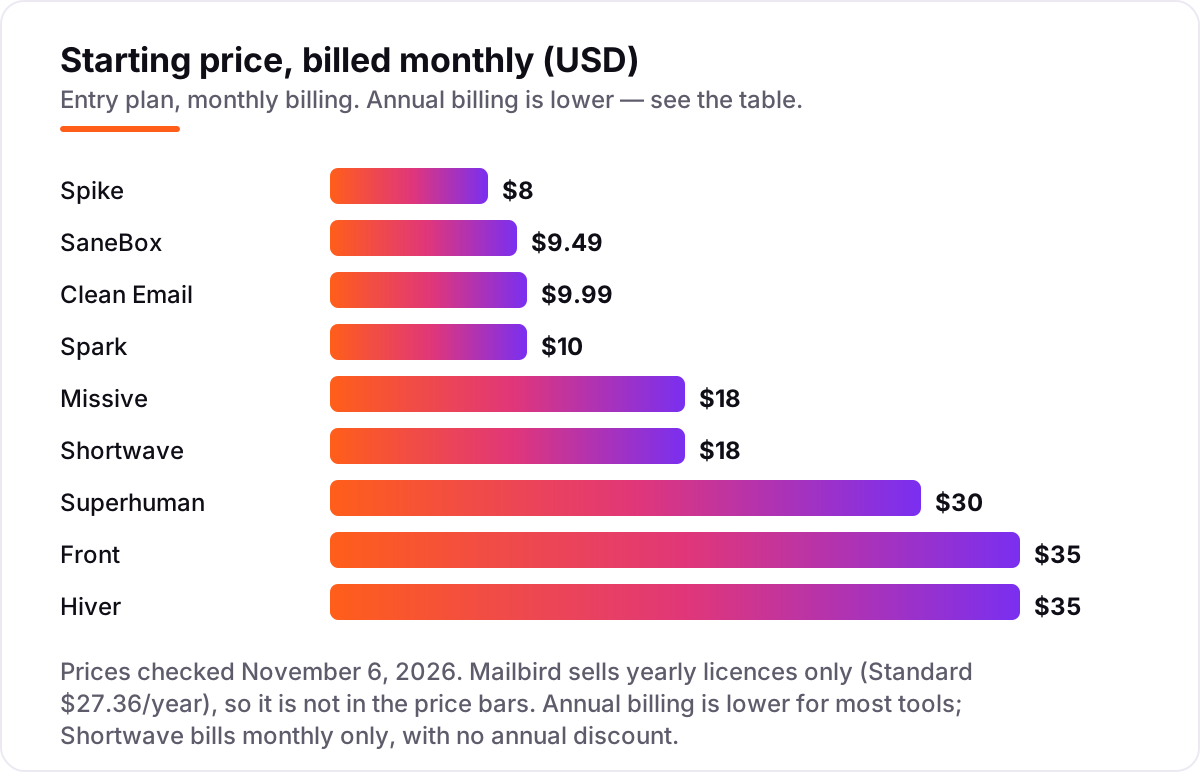
Email management software pricing: what you will actually pay
Take a five-person team on annual billing. On list prices, the subscription costs $136.80 a year on Mailbird Standard, $149.95 on Clean Email, $325 on SaneBox, $360 on Spike Pro, $495 on Spark Plus, $840 on Missive Starter, $1,080 on Shortwave Pro, and $1,500 each on Front Starter, Hiver Growth and Superhuman Mail Starter. The same five people cost $136.80 a year at the cheap end and $1,500 at the dear end — an $1,363 gap that comes entirely from what the tool does, not from billing tricks.
Three numbers need adjusting before they are real. First, Shortwave has no annual discount, so its $1,080 is the same on monthly billing — while Front and Hiver drop from $2,100 a year on monthly billing to $1,500 on annual billing. Second, the seat caps: a sixth person moves Missive from Starter to Productive at $24 a user a month, and an eleventh seat moves Front from Starter to Professional at $65. Third, the account underneath: Superhuman and Shortwave sit on top of Gmail, Workspace or Microsoft 365, which you still pay for separately.
The cheapest tools here are not cheaper versions of the dear ones. Mailbird, Clean Email and SaneBox solve one person's problem — a desktop inbox, a cluttered mailbox, an overloaded inbox — while Front, Hiver and Superhuman solve a team's problem or a power user's whole working day. If the job is a shared support inbox, budget $840–$1,500 a year for five people; if the job is a tidier personal inbox, $137–$495 a year buys the best options here.
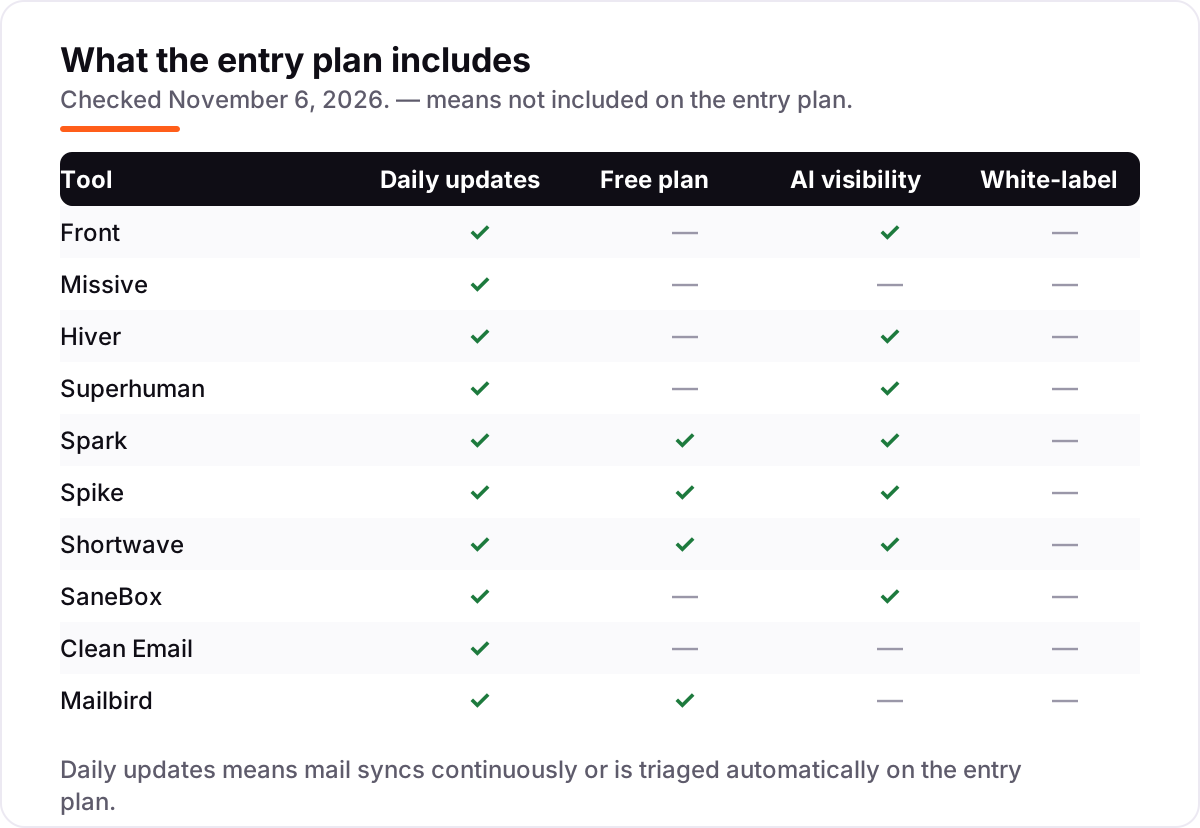
Know the difference: shared inbox vs email client vs inbox filter
The confusion in this category is that three different kinds of tool all call themselves email management software. A shared inbox — Front, Missive, Hiver — is owned by a team: several people work the same addresses, assign conversations, comment inside threads and track response times. It replaces the forwarding chains and the "did anyone answer this?" messages, and it is priced per seat because every teammate needs one.
An email client — Superhuman, Spark, Spike, Shortwave, Mailbird — is owned by one person: it replaces Gmail or Outlook on your own devices with a faster, smarter interface. It can have team features, like Superhuman's shared conversations or Spike's Teamspace, but the unit of work is still your inbox, not the team's queue. Clients are the right buy when the problem is your own speed and focus.
An inbox filter — SaneBox and Clean Email — is neither: it sits on top of the mail you already have and sorts or cleans it. SaneBox moves low-priority mail out of the way every day; Clean Email bulk-deletes years of clutter once, then keeps it tidy with rules. Filters are the cheapest fix when the problem is volume, and the wrong buy when the problem is teamwork — no filter will assign an email to the right person.
Quick comparison: tool type by need
| Buyer | Best pick | Why |
|---|---|---|
| Team running a shared support inbox | Front | Most complete shared inbox, from $35/seat/month |
| Small team on a budget | Missive | Multichannel inbox from $18/user/month |
| Gmail team that wants a help desk | Hiver | Help desk inside Gmail, from $35/user/month |
| Power user who lives in email | Superhuman | Fastest triage, from $30/user/month |
| Individual who wants a free smart inbox | Spark | Free plan with Smart Inbox, Plus $10/month |
| Fan of chat-style email | Spike | Conversational inbox, free plan, Pro $8/month |
| Gmail user who wants AI search | Shortwave | AI search across mail history, free plan, Pro $18/month |
| Inbox overload without switching apps | SaneBox | AI sorting on your current inbox, $9.49/month |
| Years of clutter to clear | Clean Email | Bulk cleanup, $9.99/month |
| Windows or Mac desktop user | Mailbird | Unified inbox, $27.36/year |
Mistakes to avoid
- Budgeting on the annual price when you pay monthly. Front and Hiver cost $25 a seat a month billed annually but $35 billed monthly — a five-person team pays $600 a year more on monthly billing. Shortwave has no annual discount at all, so its price never drops.
- Buying a shared inbox for one person. Front, Missive and Hiver are priced per seat and built for teams. One person with a messy inbox needs Spark, SaneBox or Clean Email, not a $35-a-month seat.
- Trusting the free plan without reading its limits. Hiver's free plan was removed in September 2026, Clean Email's free account stops at 1,000 emails, Spike Free covers one address, and Mailbird Free covers one account.
- Ignoring the seat cap that bites first. A sixth user moves Missive to Productive, an eleventh seat moves Front to Professional, and Hiver sells seats in packs of 5 past five users — the cap decides the real bill.
- Forgetting the account underneath. Superhuman needs a Gmail, Workspace or Microsoft 365 account you still pay for, Shortwave is Gmail only, and Hiver is built for Gmail first — check your provider before you buy.
How we chose
We checked each vendor's own pricing page on November 6, 2026 and recorded the starting price exactly as shown, including the annual-billing figure where the page lists one, and we ranked the tools by fit for the most common buyer — a small team or a busy individual — not by brand size. Ratings come from G2 pages checked the same day through fresh search-index crawls, including the thin samples: Spark's rating sits on its Spark for Teams listing with 22 reviews, and Clean Email's on 10 reviews. Three prices need a note: Hiver's free plan was removed from its pricing page in September 2026, so this list shows no free plan for it; Mailbird's pricing page renders its prices in script, so its figures come from Mailbird's own site updated October 27, 2026, and G2's vendor-supplied page lists a higher Premium Yearly figure; and Superhuman's $30 Mail Starter is the standalone inbox ladder, separate from the $33 Business suite bundle that also includes Grammarly, Docs and Go. No vendor paid for a place in this list, and none of the links here are affiliate links.
What to do next
Start with the free plan or trial of your top pick and run one real week of mail through it. Check that messages get assigned and answered without anyone asking who owns them, and that the tool still feels fast at your real volume. If the inbox is sorted but new customers are not finding you, our monthly SEO service handles the visibility side — or compare the personal clients in our guide to the best email client software. Once your tools are in place, find out what's holding your rankings back.
Your stack only works if people find you
SerpAstra fixes what keeps your site off page one and makes it easy for AI assistants to recommend.
Get a free audit→Sources we checked (20)
- Front pricing — front.com/pricing (checked November 6, 2026)
- Missive pricing — missiveapp.com/pricing (checked November 6, 2026)
- Hiver pricing — hiverhq.com/pricing (checked November 6, 2026)
- Superhuman pricing — superhuman.com/pricing (checked November 6, 2026)
- Spark pricing — sparkmailapp.com/pricing (checked November 6, 2026)
- Spike pricing — spikenow.com/pricing (checked November 6, 2026)
- Shortwave pricing — shortwave.com/pricing (checked November 6, 2026)
- SaneBox pricing — sanebox.com/pricing (checked November 6, 2026)
- Clean Email pricing — clean.email/pricing (checked November 6, 2026)
- Mailbird pricing — getmailbird.com/pricing (checked November 6, 2026)
- Front on G2 — g2.com/products/front/reviews (checked November 6, 2026)
- Missive on G2 — g2.com/products/missive/reviews (checked November 6, 2026)
- Hiver on G2 — g2.com/products/hiver-in-gmail/reviews (checked November 6, 2026)
- Superhuman Mail on G2 — g2.com/products/superhuman-mail/reviews (checked November 6, 2026)
- Spark for Teams on G2 — g2.com/products/spark-for-teams/reviews (checked November 6, 2026)
- Spike on G2 — g2.com/products/spike/reviews (checked November 6, 2026)
- Shortwave on G2 — g2.com/products/shortwave-communications-inc-shortwave/reviews (checked November 6, 2026)
- SaneBox on G2 — g2.com/products/sanebox/reviews (checked November 6, 2026)
- Clean Email on G2 — g2.com/compare/clean-email-vs-mailstrom (checked November 6, 2026)
- Mailbird on G2 — g2.com/products/mailbird/reviews (checked November 6, 2026)
Shamim
Founder of SerpAstra
A full-stack SEO and digital marketer who spends most days on Local SEO for dental practices, AI search visibility and lead generation.
Frequently asked questions
What is the best email management software?
Front is the best fit for most teams: the most complete shared inbox, from $35/seat/month. Missive is the better pick for small teams at $18/user/month, and Superhuman is the best pick for power users at $30/user/month. Spark is the best free option, with a genuinely useful free plan.
How much does email management software cost?
Entry prices run from $0 to $35 a seat a month. Spark, Spike, Shortwave and Mailbird all have free plans, and the first paid plans cost $8–$18 a month for individuals. A five-person team pays $137–$1,500 a year on annual billing, depending on whether it needs a shared inbox or just a better client.
Is there really free email management software?
Yes, with limits. Spark Free covers unlimited accounts with a Smart Inbox, Spike Free covers one address, Shortwave Free keeps basic AI with 90 days of history, and Mailbird Free covers one account. None of them includes a real shared inbox — that starts at $14–$25 a user a month.
What is the difference between a shared inbox and an email client?
A shared inbox is owned by a team: several people work the same addresses, assign conversations and comment inside threads. An email client is owned by one person: it replaces Gmail or Outlook on your own devices. SaneBox and Clean Email are neither — they are filters that sit on top of the mail you already have.
Can I keep using Gmail or Outlook with these tools?
Mostly yes. Hiver and Shortwave run on top of Gmail, SaneBox and Clean Email work with almost any provider, and Spark and Spike connect Gmail, Outlook and IMAP accounts. Superhuman needs a Gmail, Google Workspace or Microsoft 365 account underneath, and Shortwave is Gmail only.
What should I check before switching email tools?
Check three things before you move. First, whether your mail provider is supported — Shortwave is Gmail only. Second, the seat rules: caps, minimums and per-seat prices decide the real bill. Third, export: confirm your labels, rules and history carry over, and run the trial with real mail first.
Free SEO and AI visibility audit
Find out what is holding your rankings back
Send us your site. Within 2 business days you get a written audit, an AI visibility check and a short fix list ranked by impact. Free, with no contract attached.
Request my free audit→Related guides
 Digital Marketing & AdsBest Email Client Software for 2026: 9 Options Compared by Use CaseCompare the 9 best email client software options for 2026 on price, free plans, AI features and privacy, with every price checked November 5, 2026.Read guide →
 Email, SMS & Social Media10 Best AI Email Management Tools in 2026 (Free and Paid, Compared)Compare the 10 best ai email management tools on price, AI triage, drafting and shared inboxes, with every starting price checked November 5, 2026.Read guide →
 Digital Marketing & Ads12 Best Email Apps Alternatives to Superhuman in 2026Compare the 12 best email apps alternatives to Superhuman on price, free plans, AI features and speed, with every price checked November 5, 2026.Read guide →