
Best Email Software for PC in 2026: 12 Options Compared by Use Case
Compare the 12 best email software for pc options on price, free plans, offline access and AI help, with every price checked November 6, 2026.
 Shamim Mia, Founder, SerpAstraLast verified November 6, 202614 min read
We compare pricing pages, documentation and public reviews. We never accept payment for rankings.

Key takeaways
- Microsoft Outlook is the best fit for most PC users at $9.99/month through Microsoft 365; Thunderbird and Foxmail cost $0, and Spark has the most generous free plan of the paid clients.
- The single most important buying factor is the licence model: subscriptions, yearly plans and one-time licences diverge sharply over three years, so price the third year, not the first.
- Free plans vary more than prices do: Thunderbird is free without limits, while eM Client stops at 2 accounts, Mailbird at 1 account, and Spike at 1 address.
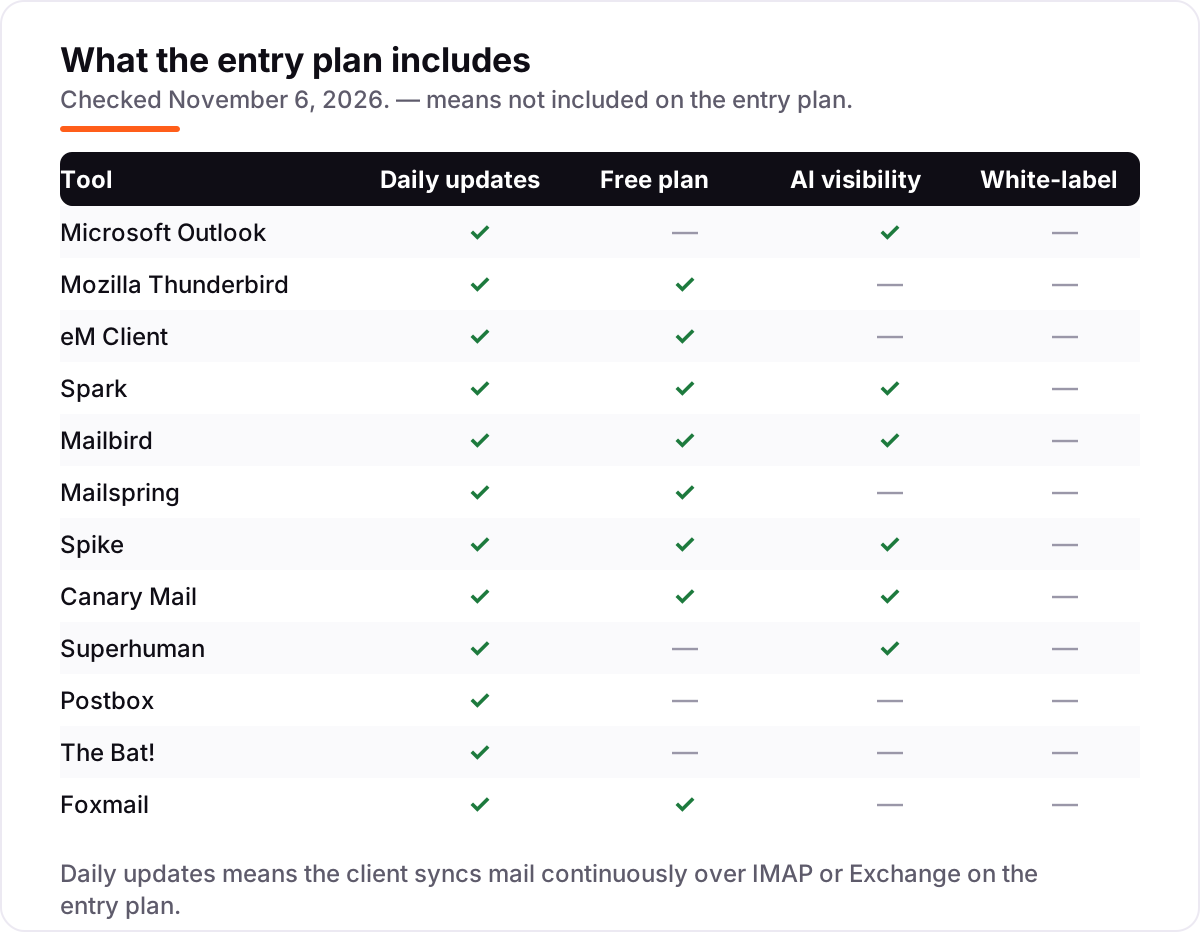
- AI help is now the split in this category: Superhuman, Spark, Spike and Canary Mail put AI in the entry plan, while Thunderbird, The Bat! and Postbox offer none.
On this page
Quick comparison
| Tool | Best for | Starting price | Free plan |
|---|---|---|---|
| Microsoft Outlook | People whose workplace runs on Microsoft 365 and who want mail, calendar and meetings in one business-standard app | $9.99/mo | No (1-month trial) |
| Mozilla Thunderbird | Anyone who wants a capable, private desktop email client for $0, with no ads and no subscription | Free | Yes (free) |
| eM Client | Windows and Mac professionals who want a polished Outlook-style client with mail, calendar, tasks and chat in one window | $40/yr | Yes (free plan) |
| Spark | People who want a smart, cross-platform inbox with AI help and a genuinely useful free plan | $10/mo | Yes (free plan) |
| Mailbird | Windows-first users who live in messaging apps as much as email and want WhatsApp and Slack inside the inbox | $27.36/yr | Yes (free plan) |
| Mailspring | People on older or modest PCs who want the fastest, lightest client with a free core | $8/mo | Yes (free) |
| Spike | People who want email to feel like chat, with team spaces, notes and video calls in the same app | $8/mo | Yes (free plan) |
| Canary Mail | Privacy-minded users who want AI writing and summaries plus PGP encryption in a native app | $36/yr | Yes (free) |
| Superhuman | High-volume professionals who live in Gmail or Outlook and will pay for keyboard-first speed and AI triage | $30/mo | No |
| Postbox | Writers and professionals who want a focused compose experience and a single one-time payment | $49 once | No |
| The Bat! | Power users and privacy-first professionals who process huge volumes of mail and want total control | One-time | No |
| Foxmail | Anyone who wants a simple, light, free email client for basic multi-account mail on Windows | Free | Yes (free) |
Make one of these tools?
We re-check this list every quarter. Send a correction, request a review, or ask about a clearly labeled sponsored spot.
Request a listingThe best email software for pc

Microsoft Outlook
Best for: People whose workplace runs on Microsoft 365 and who want mail, calendar and meetings in one business-standard app
Outlook is still the centre of gravity for business email on PC: it is the client most workplaces already run, so compatibility is never a question. Classic Outlook comes with Microsoft 365 Personal at $9.99 a month or $99.99 a year, which also buys Word, Excel, PowerPoint, 1 TB of OneDrive storage and Copilot inside the Office apps. Mail, calendar, tasks and contacts share one window, and Exchange support — shared calendars, meeting rooms, out-of-office — is deeper than any rival here.
The price is really a subscription to the whole Office suite, which is good value if you use the apps and poor value if you only want email. It also feels heavy with very large mailboxes. Buy Outlook when your workplace runs on Microsoft 365; buy Thunderbird or eM Client when you want email without the suite.
What we like
- Deep Exchange and Microsoft 365 integration, including shared calendars and Copilot in the Office apps
- Calendar, tasks and contacts built in, so meetings and mail live in one window
- The business standard — the client most employers and clients already use
- Focused Inbox, rules and flags handle high-volume mail well
Watch out for
- Classic Outlook needs a Microsoft 365 subscription — there is no one-time purchase
- Feels heavy with very large mailboxes, and search can be slow
- The redesigned new Outlook divides longtime users, and some classic features moved or vanished

Mozilla Thunderbird
Best for: Anyone who wants a capable, private desktop email client for $0, with no ads and no subscription
Thunderbird is the free, open-source desktop email client that refuses to die, and recent versions have modernised it more than its reputation suggests. It costs $0, carries no ads and collects no telemetry, yet it handles unlimited accounts, smart folders, message filters and OpenPGP encryption. Extensions add a calendar, tasks and extra features, and it runs on Windows, Mac and Linux, so the same client follows you across machines.
The trade-offs are presentation and hand-holding. The interface still shows its heritage, first setup asks more decisions than a commercial installer, and Exchange calendar sync needs an add-on rather than working out of the box. For anyone who wants capable free email without subscriptions or ads, Thunderbird is the answer — start here, and only pay for a client if you miss polish or hand-holding.
What we like
- Completely free and open source, with no ads, no tracking and no subscription
- Powerful message filters, smart folders and OpenPGP encryption built in
- Extensions add calendar, tasks and new features without paying
- Runs on Windows, Mac and Linux with unlimited accounts
Watch out for
- The interface still looks dated next to polished commercial clients
- First setup asks more questions than a guided commercial installer
- No built-in calendar sync with Exchange; calendar comes from add-ons or CalDAV

eM Client
Best for: Windows and Mac professionals who want a polished Outlook-style client with mail, calendar, tasks and chat in one window
eM Client is what Outlook would feel like if a small, focused team rebuilt it today: a polished Windows and Mac client with mail, calendar, tasks, contacts and chat in one elegant window. The Personal subscription costs $40 a year and covers unlimited accounts on up to three devices, with PGP and S/MIME encryption and an AI add-on, and a one-time licence is also sold.
The free plan is genuinely usable for personal mail, but it stops at two accounts on one device, so most professionals hit the limit quickly. Paid licences are priced per person or per device, which adds up for a team, and there is no Linux version or web client. Pick eM Client when you want premium email without Microsoft 365; pick Thunderbird when free matters more than polish.
What we like
- The most polished interface here: mail, calendar, tasks, contacts and chat in one window
- PGP and S/MIME encryption built in on paid plans
- Free companion apps for Android and iOS complete the setup
- One-time licence option avoids an endless subscription
Watch out for
- Free plan stops at 2 email accounts for personal use only
- Paid licences are per person or per device, so a team pays for every seat
- No Linux version and no web client to fall back on

Spark
Best for: People who want a smart, cross-platform inbox with AI help and a genuinely useful free plan
Spark is the email app people land on when they want something nicer than the stock Mail app without Superhuman money. It runs on Windows, Mac, iPhone and Android and pulls Gmail, Outlook, iCloud, Yahoo and IMAP accounts into one Smart Inbox, and its free plan is the most generous of any premium client here, with unlimited accounts, snooze and send later at $0. Plus costs $10 a month or $99 a year and adds the AI assistant and 40 AI meeting notes.
The catch is the cloud: send later, snooze sync and notifications work through Readdle's servers, so your account tokens live there. The AI is metered by a monthly quota on Plus. Choose Spark when you want a smart inbox for free and will pay for AI; choose Thunderbird when you want your mail to stay entirely local.
What we like
- The most generous free plan among the paid clients: Smart Inbox, unlimited accounts, snooze and send later
- Clean design with a calendar built in and apps for Windows, Mac, iOS and Android
- AI assistant drafts, summarises and prioritises mail on Plus
- Shared drafts and templates suit small teams
Watch out for
- Most AI features and the full assistant history need Plus at $10/month
- Send later, snooze and notifications route through Readdle's servers
- Spark 3 removed some Spark 2 features that longtime users still miss

Mailbird
Best for: Windows-first users who live in messaging apps as much as email and want WhatsApp and Slack inside the inbox
Mailbird differentiates with integrations: WhatsApp, Slack, Google Calendar and Dropbox live inside the email client, so the inbox becomes the place where messaging and mail meet. Standard costs $27.36 a year and Premium $48.36 a year, with a $99.75 pay-once licence for buyers who prefer a single payment. The design is clean, the unified inbox works well, and a 14-day money-back guarantee covers paid plans.
The weak spots are the free plan, which covers one account, and the recent history: the Mailbird 3 upgrade and pricing changes drew angry reviews from longtime buyers, which shows in its 3.6 out of 5 G2 score. It is also Windows-first at heart, with the Mac version only arriving in September 2025. Pick Mailbird when messaging apps matter as much as mail; pick eM Client when email depth matters more.
What we like
- WhatsApp, Slack, Google Calendar and Dropbox live inside the email window
- Clean unified inbox across unlimited accounts on Premium
- Email tracking, snooze, send later and templates included on Premium
- Cross-platform licence covers Windows and Mac on up to 3 devices
Watch out for
- Free plan covers a single email account on one device
- Recent pricing changes and the Mailbird 3 upgrade annoyed longtime buyers
- Windows-first history shows: some features still feel thinner on Mac

Mailspring
Best for: People on older or modest PCs who want the fastest, lightest client with a free core
Mailspring is a fast, lightweight email client for Windows, Mac and Linux, and it feels snappy where heavier clients lag. The free core covers unlimited accounts and a unified inbox with search across all of them, plus a weekly allowance of Pro features — snooze, send later, read receipts and link tracking. Pro costs $8 a month or $85 a year and removes those weekly caps, adding templates, contact profiles and a grammar check.
The trade-off is that sync runs through Mailspring's servers, and Pro buys no premium support. The free plan is generous enough to live on for light use, but anyone who snoozes and schedules daily will hit the weekly caps fast. Pick Mailspring when speed on modest hardware matters most; pick Thunderbird when you want the same lightness with nothing routed through a vendor server.
What we like
- Very fast and light, even on older hardware, with instant search across accounts
- Free core covers unlimited accounts and a unified inbox
- Read receipts, link tracking, send later and follow-up reminders on Pro
- Open source, with themes and layouts including dark mode
Watch out for
- Full features need Pro at $8/month — the free plan caps snooze, send later and tracking weekly
- Mail sync runs through Mailspring's servers, which privacy-first users should note
- No premium support, even on the paid plan

Spike
Best for: People who want email to feel like chat, with team spaces, notes and video calls in the same app
Spike shows email as chat: it turns threads into a chat-like view and sorts conversations by person, like a messaging app, which suits people drowning in long chains. Email App Pro costs $8 a month billed monthly or $6 billed annually, and adds a unified inbox for up to three addresses, unlimited search history, 5 GB of storage and unlimited Spike AI. Teamspace adds shared inboxes, notes and video calls for teams.
The free plan is thin — one address and a short search history — so a real unified inbox needs Pro, and unlimited addresses need the top tier at $12 a month billed annually. There is no Linux app. Pick Spike when the chat metaphor clicks for you and you want team tools in the same app; pick Mailspring when you want speed without the chat framing.
What we like
- Chat-style threads turn long email chains into readable conversations
- Unlimited Spike AI, unlimited search history and 5 GB of storage on Pro
- Teamspace adds shared inboxes, notes and video calls in one app
- Read receipts on every plan, including the free one
Watch out for
- Free plan covers one email address with 30 to 60 days of search history
- Unlimited addresses need the top tier at $12/month billed annually
- No Linux app, and some advanced admin features are still marked coming soon

Canary Mail
Best for: Privacy-minded users who want AI writing and summaries plus PGP encryption in a native app
Canary Mail is a native email app for Windows, Mac, iPhone, iPad and Android that works with Gmail, Outlook, iCloud, Yahoo, Exchange and any IMAP account. The free plan covers unlimited accounts on two devices with AI inbox sorting, snooze and templates. Growth costs $36 a year and adds the AI Copilot that drafts replies, rewrites and summarises threads, plus full read receipts, send later and a calendar. Pro+ at $100 a year adds PGP encryption and SecureSend.
There is no monthly billing, so the yearly price is the commitment, and encryption sits on the top tier rather than the entry one. Tracker blocking is on by default, which privacy-minded buyers will like. Pick Canary Mail when you want AI help and encryption in one native app; pick Spark when you want the same AI for free to try first.
What we like
- AI Copilot drafts replies, rewrites and summarises threads on Growth
- Tracker blocking on by default, with PGP encryption on Pro+
- Free plan includes unlimited accounts, AI inbox sorting and snooze
- Native apps for Windows, Mac, iPhone, iPad and Android
Watch out for
- No monthly billing — Growth and Pro+ are yearly or lifetime only
- PGP encryption and SecureSend wait for Pro+ at $100 a year
- Free plan covers unlimited accounts but only 2 devices

Superhuman
Best for: High-volume professionals who live in Gmail or Outlook and will pay for keyboard-first speed and AI triage
Superhuman is a premium email client built for people who live in email: keyboard shortcuts, a split inbox, snippets and follow-up reminders turn a packed inbox into a to-do list you can clear fast. Starter costs $30 a month billed monthly or $25 billed annually, and it now includes Superhuman AI: drafts, auto labels and Ask AI. Business at $40 a month adds Auto Drafts, Ask AI extras and CRM integrations.
The price sits on top of the Gmail or Outlook account you already pay for, so the real cost is $30 plus that subscription, and it works with Gmail and Outlook accounts only. There is no free plan. Pick Superhuman when email is your job and speed pays for itself; pick Spark or Spike when you want most of the speed for a tenth of the price.
What we like
- The fastest inbox here: keyboard shortcuts, split inbox and snippets clear mail in half the time
- AI drafts, auto labels and Ask AI come with the entry Starter plan
- Top-rated client in this list on G2 at 4.7 out of 5 from over 1,300 reviews
- Guided onboarding and team comments suit busy professionals
Watch out for
- The most expensive client here at $30 a month, on top of the Gmail or Outlook account you already pay for
- Works with Gmail and Outlook accounts only — no generic IMAP
- No free plan, and the speed-first workflow takes a week to learn

Postbox
Best for: Writers and professionals who want a focused compose experience and a single one-time payment
Postbox targets professionals who write a lot of email: a focused compose experience, smart folders and organisation tools in a clean package that stays out of the way. It costs $49 once per user as a lifetime licence, with unlimited accounts included and a free trial to test it first. Over three years that is $49 total against $900 for Superhuman or $300 for Outlook, which is why it wins the long-term value math in this list.
The trade-offs are scope and support. There is no free plan, enterprise features trail Outlook and eM Client, and support costs $8 per incident while major-version upgrades cost extra. Pick Postbox when you write all day and hate subscriptions; pick eM Client when you want the same polish with a calendar and tasks included.
What we like
- One $49 payment, no subscription — the licence never expires for the version you buy
- Focused compose view, smart folders and quick replies suit heavy writers
- Unlimited accounts included in the single licence
- Highest reviewer score in this list on Capterra at 4.7 out of 5
Watch out for
- Paid only, with no free plan beyond the trial
- Fewer enterprise features than Outlook or eM Client — no Exchange calendar depth
- Paid support at $8 per incident, and major-version upgrades cost extra

The Bat!
Best for: Power users and privacy-first professionals who process huge volumes of mail and want total control
The Bat! is the power user's email client: endlessly customisable, with strong built-in encryption, templates and filtering that serious email handlers love. It collects no telemetry, supports OpenPGP and S/MIME, and handles very large local mailboxes fast. Home covers non-commercial use and Professional adds the portable Voyager edition, biometrics and on-the-fly encryption. A 30-day trial lets you test it before buying.
The interface is unapologetically old-school and the learning curve is real — casual users will bounce off it. It is Windows only, and Ritlabs shows the price only at checkout on its order page, in euros, so we do not assert a figure here. Pick The Bat! when you process hundreds of messages a day and want total control; pick Thunderbird when you want the same privacy ideas in a friendlier free client.
What we like
- Endlessly customisable, with templates, filters and macros for heavy mail volumes
- Strong built-in encryption, including OpenPGP and S/MIME, with no telemetry collected
- Handles very large local mailboxes fast, with on-the-fly encryption on Professional
- Portable Voyager edition on Professional runs from a USB drive
Watch out for
- The interface is unapologetically old-school and the learning curve is real
- Windows only — no Mac, Linux or mobile version
- Price is shown only at checkout on Ritlabs' order page, in euros

Foxmail
Best for: Anyone who wants a simple, light, free email client for basic multi-account mail on Windows
Foxmail, from Tencent, is a simple free email client popular in Asia: lightweight, straightforward multi-account email without fuss. It has served basic email needs for decades, runs well on older Windows PCs, and asks for no account, subscription or payment at any step. For a second PC, an older laptop or a family member who just needs mail to work, it remains functional.
Development pace is slow and the design is dated, and it has far fewer power features than Thunderbird or eM Client — no rules engine to match them, no encryption story to tell. Privacy-conscious Western users may prefer Thunderbird for the same $0. Pick Foxmail when the job is simple free mail on a modest PC; pick Thunderbird when you want free mail with power features attached.
What we like
- Free and simple, with multi-account mail in a lightweight install
- Runs well on older Windows PCs with minimal memory use
- Long track record — serving basic email needs for decades
- No account, subscription or payment step at all
Watch out for
- Development pace is slow and the design is dated
- Made by Tencent, which privacy-conscious users may weigh
- Fewer power features than Thunderbird or eM Client — no rules engine to match them
The best email software for pc does one job well: it pulls every account you own into a single inbox on your computer, works offline, and files mail the way you want without a browser tab in sight. We ranked the twelve tools below by fit for the most common buyer — a Windows PC user with two or three accounts who wants mail to stay fast and organised — starting with the business standard and ending with the simple free options, and every price was checked on November 6, 2026.
How to choose the best email software for pc
- Count your accounts first. eM Client's free plan stops at 2 accounts, Mailbird's at 1, and Spike's at 1 address. The cap you hit first is your real starting price.
- Decide whether you need Exchange. Outlook handles Exchange calendars natively; Thunderbird needs an add-on for calendar sync, and Superhuman works with Gmail and Outlook accounts only.
- Pick a licence model, not just a price. Subscriptions, yearly plans and one-time licences diverge sharply over three years — Postbox costs $49 once, Superhuman $900 over the same period.
- Check the offline story. A desktop client should work without internet: Thunderbird, The Bat! and eM Client keep full local mail; web-first clients lean on their servers for search and sync.
- Weigh AI against privacy. Superhuman, Spark, Spike and Canary Mail put AI in the entry plan; Thunderbird and The Bat! collect no telemetry and route nothing through a vendor server.
Email is one system in your stack, not the whole stack. If the business also needs to be found online, our guide to email client software covers the wider field. And before you publish new pages for the services you sell, run your titles through the free SERP snippet preview tool — it shows exactly how the title and description will look in Google.
Whatever you shortlist, try it with real mail before you pay. The free plans and trials in this list are long enough to run one genuine week — your accounts, your rules, your volume — and that week tells you more than any review can. Check two things in the trial: that search stays fast with your whole mailbox loaded, and that sending from every account works without extra sign-in steps. Every tool here works with Gmail over IMAP, so there is no reason to buy before your own accounts have been through it.
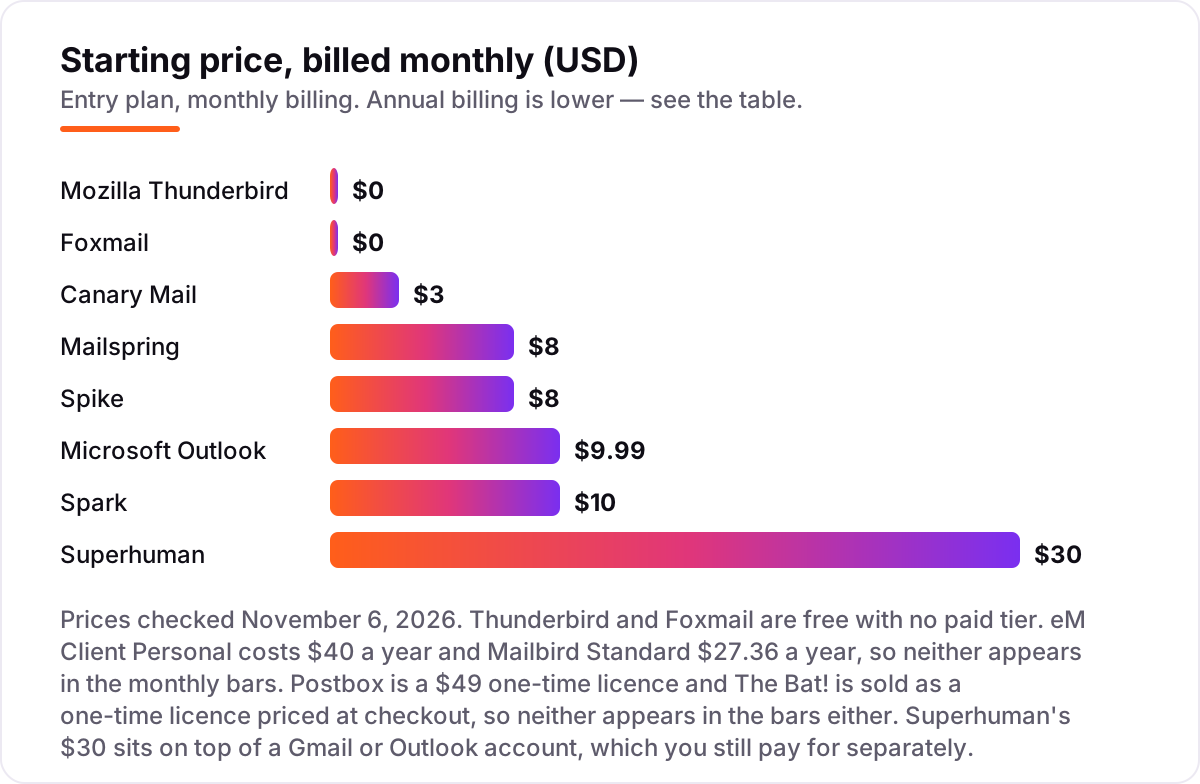
Email software for PC pricing: what you will actually pay
Take one person with three email accounts — Gmail, work Exchange and a personal IMAP address — who wants a unified inbox and send-later. On list prices for year one, the subscription costs $0 on Thunderbird or Foxmail, $27.36 on Mailbird Standard, $36 on Canary Mail Growth, $40 on eM Client Personal, $49 once on Postbox, $72 on Spike Pro billed annually, $85 on Mailspring Pro billed annually, $99 on Spark Plus billed annually, $99.99 on Outlook through Microsoft 365 Personal billed annually, and $300 on Superhuman Starter billed annually.
Over three years the picture changes. Postbox stays at $49 total, while Mailbird reaches $82.08, Canary Mail $108, eM Client $120, Spike $216, Mailspring $255, Spark $297, Outlook $299.97 and Superhuman $900. The same person and the same three accounts cost $49 at the cheap paid end and $900 at the dear end — an $851 gap that comes entirely from the licence model, not from features. The Bat! is the one price we do not assert: Ritlabs shows it only at checkout, in euros.
Three costs sit outside every number above. First, the email account itself: Superhuman's $30 sits on top of the Gmail or Outlook account you already pay for, and Outlook's $9.99 buys the whole Office suite, not just mail. Second, the upgrade: a one-time licence covers the version you buy, so a major-version upgrade costs extra on Postbox, eM Client and The Bat!. Third, the team: per-user pricing multiplies fast, so a five-person team pays $1,500 a year for Superhuman Starter against $200 for eM Client Personal. If you run a small business rather than a single inbox, compare providers in our guide to email apps as Superhuman alternatives.
Know the difference: desktop email client vs webmail
The confusion in this category is between a client and a mailbox. Webmail — Gmail or Outlook.com in a browser — is a mailbox you visit; a desktop client is software that downloads and manages mail from any provider, with features browsers cannot match: a unified inbox across providers, true offline access, advanced rules, encryption and deep customisation. Webmail won casual use, but professionals handling high volumes still prefer a real client, and that is what this list is.
There is a second, quieter confusion: an email app is not an email provider. Thunderbird, eM Client, Spark, Mailbird and the rest do not give you an address or store your mail — they read the accounts you already own, whether Gmail, Outlook.com, Yahoo, iCloud or a work Exchange server. Superhuman and Spark are the exceptions that prove the rule: they still need your Gmail or Outlook account underneath. If you need the address itself, that is email hosting, not email software, and it belongs in a different list.
A third distinction worth knowing is sync versus storage. IMAP keeps mail on the server and syncs it everywhere, so your phone, tablet and PC stay in step; POP3 downloads mail to one device and leaves the rest behind. Every client here supports IMAP, and you should use it everywhere. If a client only offers POP3 for an account, your sent mail and folders will not follow you to your phone.
Quick comparison: tool type by need
| Buyer | Best pick | Why |
|---|---|---|
| Business on Microsoft 365 | Microsoft Outlook | The standard your workplace already uses, $9.99/month with the Office suite |
| Free, with no limits | Mozilla Thunderbird | Open source, unlimited accounts, encryption, $0 forever |
| Polished all-in-one client | eM Client | Mail, calendar, tasks and chat in one window, $40 a year |
| Smart inbox with AI | Spark | Generous free plan, Plus is $10/month with the full AI assistant |
| Email that feels like chat | Spike | Chat-style threads and team tools, Pro is $8/month |
| Fastest inbox, price no object | Superhuman | Keyboard-first speed and AI triage, Starter is $30/month |
Mistakes to avoid
- Buying on the monthly price. A $10/month client costs $360 over three years, while a $49 one-time licence costs $49. Compare three-year totals before you commit.
- Ignoring the free-plan cap. A free plan is no bargain once you pass it: eM Client stops at 2 accounts, Mailbird at 1, Spike at 1 address — and the upgrade is the real price.
- Assuming every client handles Exchange. Outlook handles Exchange calendars natively; Thunderbird needs an add-on, and Superhuman only takes Gmail and Outlook accounts. Verify your work account before you buy.
- Paying for AI you will not use. Superhuman, Spark, Spike and Canary Mail charge for AI writing and triage. If you write short replies yourself, Thunderbird or Postbox gives you the same inbox for far less.
- Forgetting the account underneath. Superhuman needs a Gmail or Outlook account you already pay for, and Outlook needs Microsoft 365. Price the account and the client together.
How we chose
We checked each vendor's own pricing page on November 6, 2026 and recorded the starting price exactly as shown, including the annual-billing figure where the page lists one, and we ranked the tools by fit for the most common buyer — a Windows PC user with two or three accounts — not by brand size. Two prices are not vendor-page reads: eM Client's $40 a year and Mailbird's $27.36 a year come from vendor-page reads dated November 5, 2026, because both vendors' pages render prices in scripts that today's crawl could not read, and Mailbird's own page today shows a $69 lifetime promotion instead of its yearly rate. The Bat!'s price is shown only at checkout, so we assert no figure for it. Ratings come from G2 or Capterra pages with the score and review count visible in a fresh search-index copy of the exact review page; Spark, The Bat! and Foxmail carry no rating because their G2 pages could not be verified the same way. No vendor paid for a place in this list, and none of the links here are affiliate links.
What to do next
Start with the free plan or trial of your top pick and run one real week of mail through it. Check that search stays fast with your whole mailbox loaded and that sending from every account works without extra sign-in steps before you commit to a year. If the inbox is sorted but new customers are not finding you, our monthly SEO service handles the visibility side — or compare providers in our guide to email backup software. Once your tools are in place, find out what's holding your rankings back.
Your stack only works if people find you
SerpAstra fixes what keeps your site off page one and makes it easy for AI assistants to recommend.
Get a free audit→Sources we checked (21)
- Microsoft 365 pricing — microsoft.com/en-us/microsoft-365/buy/compare-all-microsoft-365-products (checked November 6, 2026)
- Thunderbird — thunderbird.net (checked November 6, 2026)
- eM Client pricing — emclient.com/pricing (checked November 6, 2026)
- Spark pricing — sparkmailapp.com/pricing (checked November 6, 2026)
- Mailbird pricing — getmailbird.com/pricing (checked November 6, 2026)
- Mailspring Pro — getmailspring.com/pro (checked November 6, 2026)
- Spike pricing — spikenow.com/pricing (checked November 6, 2026)
- Canary Mail pricing — canarymail.io/pricing (checked November 6, 2026)
- Superhuman pricing — superhuman.com/pricing (checked November 6, 2026)
- Postbox pricing — g2.com/products/postbox/pricing (vendor-supplied, checked November 6, 2026)
- The Bat! order page — ritlabs.com/en/products/thebat/order.php (checked November 6, 2026)
- Foxmail — foxmail.com (checked November 6, 2026)
- Microsoft Outlook reviews — g2.com/products/microsoft-outlook/reviews (checked November 6, 2026)
- Thunderbird vs Outlook comparison — g2.com/compare/microsoft-outlook-vs-thunderbird (checked November 6, 2026)
- eM Client reviews — g2.com/products/em-client/reviews (checked November 6, 2026)
- Mailbird reviews — g2.com/products/mailbird/reviews (checked November 6, 2026)
- Mailspring vs eM Client comparison — g2.com/compare/mailspring-vs-em-client (checked November 6, 2026)
- Spike reviews — g2.com/compare/microsoft-teams-vs-spike (checked November 6, 2026)
- Canary Mail reviews — g2.com/products/canary-mail/reviews (checked November 6, 2026)
- Superhuman Mail reviews — g2.com/products/superhuman-mail/reviews (checked November 6, 2026)
- Postbox reviews — capterra.com Postbox vs Microsoft 365 (checked November 6, 2026)
Shamim
Founder of SerpAstra
A full-stack SEO and digital marketer who spends most days on Local SEO for dental practices, AI search visibility and lead generation.
Frequently asked questions
What is the best email software for PC?
Outlook is the best fit for most PC users, especially on Microsoft 365, at $9.99/month. Thunderbird is the best free option, eM Client the most polished paid alternative at $40 a year, and Spark the best smart inbox with a generous free plan. The right pick depends on your accounts and budget.
Is there really free email software for PC?
Yes. Thunderbird and Foxmail are completely free with no paid tier, and Spark, Mailspring and Canary Mail all have usable free plans. Thunderbird is the only one with no limits at all — unlimited accounts, filters and encryption. The others cap accounts, devices or Pro features, so check the cap before you commit.
Is Outlook free?
The classic Outlook desktop app is not free: it comes with Microsoft 365 Personal at $9.99/month or $99.99 a year, with a 1-month free trial. Microsoft also offers a free ad-supported new Outlook app for Windows with fewer features. If you only need basic mail, the free app or Thunderbird costs nothing.
What is the best Outlook alternative?
eM Client is the most polished direct alternative, with mail, calendar, tasks and chat in one window from $40 a year. Thunderbird is the best free alternative, with unlimited accounts and encryption at $0. Spark is the best choice if you want AI help and a smart inbox, with a free plan included.
Do desktop email clients work with Gmail?
Yes. Every client in this list works with Gmail over IMAP, and most also support Outlook.com, Yahoo, iCloud and Exchange. Google may ask for an extra sign-in step or an app-specific setup the first time you connect. Exchange support varies most: Outlook handles it best, while Thunderbird needs an add-on for calendar sync.
Should I pay monthly or buy a one-time licence?
Compare three years, not one month. Postbox costs $49 once, so it beats every subscription by year two. A $10/month client costs $360 over three years, while eM Client at $40 a year costs $120. Buy one-time when you plan to keep the client for years; rent monthly when you want the newest version and support.
Free SEO and AI visibility audit
Find out what is holding your rankings back
Send us your site. Within 2 business days you get a written audit, an AI visibility check and a short fix list ranked by impact. Free, with no contract attached.
Request my free audit→Related guides
 Digital Marketing & AdsBest Email Client Software for 2026: 9 Options Compared by Use CaseCompare the 9 best email client software options for 2026 on price, free plans, AI features and privacy, with every price checked November 5, 2026.Read guide →
 Digital Marketing & Ads12 Best Email Apps Alternatives to Superhuman in 2026Compare the 12 best email apps alternatives to Superhuman on price, free plans, AI features and speed, with every price checked November 5, 2026.Read guide →
 Digital Marketing & AdsBest Email Backup Software for 2026: 9 Options Compared by Use CaseCompare the 9 best email backup software options for Microsoft 365 and Google Workspace on price and storage, with every price checked November 5, 2026.Read guide →