
8 Best Embedded Analytics Tools for Data Analytics in 2026, Compared
Compare the 8 best embedded analytics tools for data analytics on price, embedding, white-labeling and AI, with every price checked November 7, 2026.
 Shamim Mia, Founder, SerpAstraLast verified November 7, 202615 min read
We compare pricing pages, documentation and public reviews. We never accept payment for rankings.

Key takeaways
- Luzmo is the fastest route to live embedded dashboards at €1,995/month; Metabase is the budget route with a free open-source edition and Starter at $100/month, and ThoughtSpot is the search-first option from $25/user/month.
- Four of the eight tools publish no embedded price at all — Looker, Tableau, Sisense and Qlik are custom quote, so budget for a sales conversation, not a checkout page.
- The single most important buying factor is the pricing model: per-user, capacity, platform fee or quote — the model decides what you pay at scale, not the headline number.
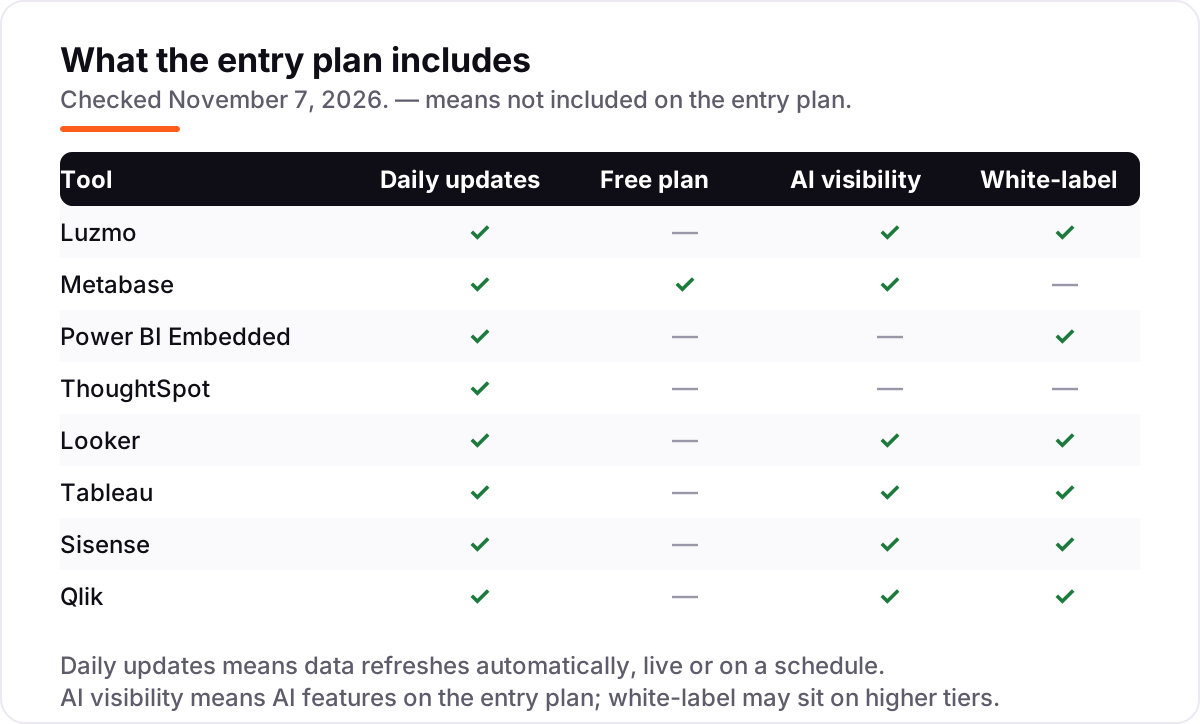
- White-labeling and multi-tenant controls are not on every entry plan: Metabase and ThoughtSpot hold them for higher tiers, so check the plan, not the brochure.
On this page
Quick comparison
| Tool | Best for | Starting price | Free plan |
|---|---|---|---|
| Luzmo | SaaS product teams that want customer-facing dashboards live this quarter, with a published price | €1,995/mo | No (free trial) |
| Metabase | Startups and small teams that want embedded dashboards on a budget, with a free self-hosted option | $100/mo (Starter) | Yes (open source) |
| Power BI Embedded | Microsoft shops that already run on Azure and want capacity-priced embedding without per-user fees | $1.01/hr (A1) | No |
| ThoughtSpot | Product teams whose customers ask ad-hoc questions all day and want search-driven answers | $25/user/mo | No (free trial) |
| Looker | SaaS companies that need one governed set of metrics across every embedded dashboard | Custom quote | No |
| Tableau | Products where analytics is a headline feature and customers expect the best visualizations | Custom quote | No (14-day trial) |
| Sisense | Mid-market and enterprise product teams embedding analytics at scale with multi-tenant controls | Custom quote | No (7-day trial) |
| Qlik | Products whose customers explore data freely and need to see relationships, not just filtered charts | Custom quote | No (30-day trial) |
Make one of these tools?
We re-check this list every quarter. Send a correction, request a review, or ask about a clearly labeled sponsored spot.
Request a listingThe best embedded analytics tools for data analytics

Luzmo
Best for: SaaS product teams that want customer-facing dashboards live this quarter, with a published price
Luzmo exists for one job: putting analytics inside your product, fast. Its dashboards render as web components in your pages, with first-party SDKs for React, Vue and Angular, and an embedded editor your customers can use without leaving your product. There is one plan, Embedded Everywhere, so there is no tier maze: white-labeling, multi-tenant embedding and Luzmo IQ all come with it.
The price is the honest part and the hard part. Embedded Everywhere starts at €1,995 a month billed annually in Europe, or $2,495 a month in the Americas, plus usage beyond 500 AI conversations and 100 million Warp rows a month. That is a lot for a startup, but it is a published number you can budget against, which four tools here do not offer. Pick Luzmo when speed to live dashboards matters more than the lowest bill.
What we like
- Purpose-built for embedding, with web components and SDKs for React, Vue and Angular
- One published plan with white-labeling, the embedded dashboard editor and AI included
- Platform fee plus usage is easier to forecast than per-viewer licensing
- Luzmo IQ answers customer questions in natural language against governed data
Watch out for
- €1,995 a month is a steep entry point for an early-stage product
- Usage above the included AI conversations and Warp rows is billed at a contract rate
- Smaller ecosystem and community than the large BI vendors

Metabase
Best for: Startups and small teams that want embedded dashboards on a budget, with a free self-hosted option
Metabase is the pragmatic pick when the budget is the constraint. The open-source edition is free to self-host with unlimited users, unlimited questions and dashboards, and guest embeds included, and the cloud Starter plan costs $100 a month with 5 users included. The visual query builder is simple enough that non-technical teammates build their own dashboards, and AI-assisted querying is available on every plan.
The catch is the tier that real embedding needs. White-labeling, single sign-on, row-level security and multi-tenant embedding all sit on Pro at $575 a month for 10 users, and signed-in embed users count toward that total. Starter is fine for a first dashboard inside your product; the moment customers sign in to their own data, budget for Pro. Choose Metabase when you have engineering capacity and want the cheapest honest start.
What we like
- Open-source edition is genuinely free to self-host with unlimited users
- Starter is $100 a month with 5 users included, then $6 per extra user
- Simple visual query builder that non-technical users can learn quickly
- AI-assisted querying is available on all plans, including the free edition
Watch out for
- White-labeling and multi-tenant embedding need Pro at $575/month, not Starter
- Signed-in embed users count toward your user total on paid plans
- Dashboards can slow down on complex queries or very large datasets

Power BI Embedded
Best for: Microsoft shops that already run on Azure and want capacity-priced embedding without per-user fees
Power BI Embedded wins on pricing transparency, which is rare in this category. Microsoft charges for capacity by the hour, starting at about $1.01 an hour for the smallest A1 node, with no per-user licensing for your customers. That model fits products with spiky usage: you scale capacity up for month-end reporting and pause it afterwards, and your team authors in the Power BI they already know.
The catch is operational. Somebody must manage Azure capacity, decide when to pause and resume, and understand how capacity maps to performance, and Copilot AI needs larger Fabric capacity rather than the A1 node. Teams already running on Azure absorb this easily. Teams with no Azure footprint should budget learning time, or look at Luzmo or Metabase, where the vendor manages the infrastructure.
What we like
- Consumption pricing with no per-user licensing for your customers
- A1 capacity starts at about $1.01 an hour and can be paused when idle
- Familiar Power BI authoring, so your team already knows the tool
- Scales up for month-end reporting and down again afterwards
Watch out for
- Copilot AI is a paid add-on that needs larger Fabric capacity, not the A1 node
- Somebody has to manage Azure capacity, pausing and performance tuning
- No white-labeling polish out of the box — you build the portal around the embed

ThoughtSpot
Best for: Product teams whose customers ask ad-hoc questions all day and want search-driven answers
ThoughtSpot brings its search-driven interface into customer-facing products: customers type a question, get a chart back, and keep exploring without waiting on your analysts. Entry pricing is published, which puts it ahead of most enterprise names here — Essentials starts at $25 per user per month billed annually, for 5 to 50 users and up to 25 million rows, and the Spotter agent answers questions in natural language on Pro.
Read the plan boundaries before you budget. Essentials covers dashboards, but natural-language search and Spotter start on Pro at $50 per user per month, and embedded use through the Visual Embed SDK is quoted separately from the per-user plans. StartupSpot, a flat $12,999 a year for early-stage companies, is the honest embedded entry point. Pick ThoughtSpot when your customers ask ad-hoc questions all day.
What we like
- Search-driven interface lets customers ask questions without writing SQL
- Published entry pricing, rare in this category, from $25/user/month
- Spotter agent gives conversational answers on Pro and above
- StartupSpot offers flat-rate embedding at $12,999 a year for early-stage companies
Watch out for
- Natural-language search and the Spotter agent start on Pro at $50/user/month, not Essentials
- Per-user costs scale with adoption, and embedded tiers are a separate quote
- Implementation most often takes one to three months, longer with data modeling

Looker
Best for: SaaS companies that need one governed set of metrics across every embedded dashboard
Looker is the choice when metric consistency matters more than anything else. Its LookML semantic layer defines business logic once, and every embedded dashboard, API call and AI agent works from the same definitions. For SaaS companies whose customers will argue about numbers, that single source of truth is worth real money, and the embedding APIs and SDKs allow deep integration, from one chart in a page to a full analytics portal.
The pricing has two components, platform and user licensing, and Google asks you to work with sales to size a deal, so there is no number to put in a spreadsheet before the first call. There is also a skills cost: someone on your team needs to learn LookML. Companies already on BigQuery and Google Cloud will feel at home; everyone else should weigh the ecosystem commitment.
What we like
- LookML semantic layer defines each metric once, so every dashboard agrees
- Strong APIs and SDKs for custom embedded experiences
- Gemini-powered conversational analytics on governed data
- Deep integration with BigQuery and the rest of Google Cloud
Watch out for
- Quote-only pricing with platform plus user licensing components
- LookML expertise is required to get the full value from the semantic layer
- Heaviest commitment for teams not already on BigQuery and Google Cloud

Tableau
Best for: Products where analytics is a headline feature and customers expect the best visualizations
Nobody embeds Tableau for the price. Teams embed it because their customers already know the experience and because its visualizations remain the standard others are judged against. The JavaScript API and embedding SDKs allow deep integration, from a single chart in a page to a full analytics portal inside your product, and Tableau Agent brings AI-assisted analysis to the same canvases.
Tableau offers a 14-day free trial of the platform, but embedded pricing is negotiated, so the trial tells you about the product and nothing about the bill. Internal Standard seats cost $75 per user per month, which adds up once several people author content. The honest math: Tableau makes sense when analytics is a headline feature of your product and customers will pay for it.
What we like
- Best-in-class interactive visualizations, the standard others are judged against
- Embedding options from the JavaScript API to a full analytics portal
- Largest talent pool of any BI tool here, so hiring help is easy
- Tableau Agent and AI features are built into the platform
Watch out for
- Embedded licensing is quote-based and historically expensive
- Internal Standard seats are $75/user/month, so authoring costs add up fast
- Governance needs deliberate setup rather than arriving by default

Sisense
Best for: Mid-market and enterprise product teams embedding analytics at scale with multi-tenant controls
Sisense has focused on embedded analytics longer than most vendors on this list, and it shows in the architecture. Multi-tenancy, tenant-safe data access and white-labeling are core to the product rather than add-ons, which matters when hundreds of customers share one deployment, and the Compose SDK gives pixel-perfect embedded experiences in React, Angular or Vue. Its AI features let end users ask questions in plain language against governed data.
There is no public pricing and no self-serve path beyond a 7-day free trial, so expect an enterprise sales cycle and a quote shaped by tenants, data volume and deployment. In 2026 Sisense added a Self-Serve route for startups, but Enterprise pricing is still custom. Sisense fits product companies with real scale requirements and the budget to match, not early startups looking for a quick integration.
What we like
- Purpose-built for customer-facing embedded use, with multi-tenancy at its core
- Compose SDK gives pixel-perfect embedded experiences in React, Angular or Vue
- AI features let end users ask questions in plain language
- Strong dashboard customization and flexible data integration
Watch out for
- No public pricing — every deal is a custom quote through sales
- Enterprise sales process from the start, with a 7-day trial as the only self-serve route
- AI features use a managed credit model on top of the subscription

Qlik
Best for: Products whose customers explore data freely and need to see relationships, not just filtered charts
Qlik's associative engine is genuinely different from the query-based approach of most BI tools: it shows users what is related to their selections, including the excluded data, which leads to discoveries that filtered dashboards hide. Combined with Qlik's data integration capabilities, it appeals to companies that want ingestion and analytics from one stack, and the enterprise governance is mature enough for regulated customers.
Like the other enterprise names here, Qlik prices embedded and OEM licensing by quote with no public tiers, so the only way to learn the number is a sales conversation. The product's breadth is a double-edged sword for embedding: you get a lot of capability, but a simple embedded dashboard can feel like more machinery than the job needs. Choose Qlik when free-form exploration is the feature your customers pay for.
What we like
- Associative engine reveals relationships that filtered dashboards hide
- Strong data integration alongside analytics, from one vendor
- Mature enterprise governance and security controls
- AI features including Insight Advisor and Qlik Answers on cloud plans
Watch out for
- Embedded and OEM licensing is quoted, not published, so budgeting needs a sales call
- The product's breadth can complicate a simple embedded dashboard
- Internal cloud plans are capacity-based, so the per-user math is not straightforward
The best embedded analytics tools for data analytics turn your product into the place customers check their numbers, instead of sending them to a separate BI tool. We ranked the eight tools below by fit for the most common buyer — a SaaS product team embedding dashboards for its customers — starting with the fastest published-price options and ending with the quoted enterprise platforms, and every price was checked on the vendor's own pricing page on November 7, 2026.
How to choose the best embedded analytics tools for data analytics
- Name the pricing model first. Per-user (ThoughtSpot), capacity (Power BI Embedded), platform fee (Luzmo) and custom quote (Looker, Tableau, Sisense, Qlik) behave very differently as your customer count grows — model your cost at 10x your current users before you shortlist.
- Check white-labeling on your exact plan. Metabase holds it for Pro at $575/month and ThoughtSpot holds embedding for a separate quoted tier, so a tool can be embeddable in the brochure and not on the plan you would actually buy.
- Demand tenant isolation. One customer's data must never leak into another customer's view. Ask how row-level security works on your plan, and test it with two dummy tenants before you sign.
- Count the builders, not just the viewers. Metabase counts signed-in embed users, ThoughtSpot counts per user, and Power BI Embedded counts nobody — the same product can cost $250 or $736 a month depending on who counts.
- Test the embed in your own product. A trial dashboard in the vendor's demo environment tells you nothing about load times, styling and mobile behavior inside your app. Embed a real dashboard in a staging build first.
Embedding is one system in your stack, not the whole stack. If the business also needs to be found online, our AI search optimization service covers the visibility side. And before you publish new pages for the product you sell, run your titles through the free SERP snippet preview tool — it shows exactly how the title and description will look in Google.
Whatever you shortlist, try it with real data before you pay. The free plans and trials in this list are long enough to run one genuine pilot — your data, your customers, your branding — and that pilot tells you more than any review can. Check two things in the trial: that a second tenant cannot see the first tenant's data, and that the embedded dashboard loads fast inside your own product on a phone.
Embedded analytics pricing: what you will actually pay
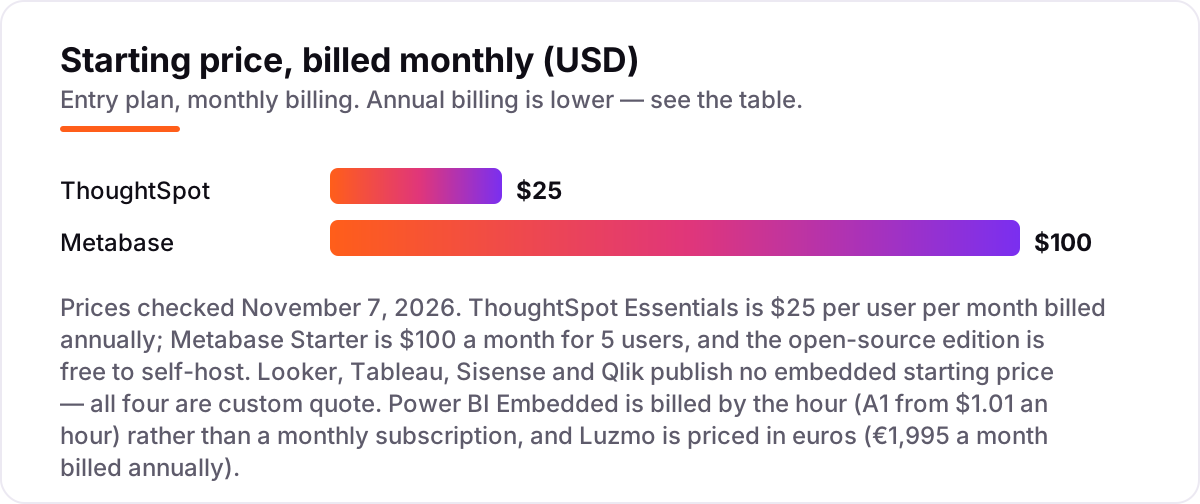
Take a product team with 10 internal builders embedding dashboards for 1,000 end customers. On list prices, ThoughtSpot Essentials costs $25 per user per month, so 10 users is $250 a month, or $3,000 a year — but that is not the embedded price, because embedded use through the Visual Embed SDK is quoted separately, and natural-language search starts on Pro at $50 per user. The honest embedded entry for a startup is ThoughtSpot's StartupSpot at a flat $12,999 a year.
Metabase is the cheapest honest embedded buy. Starter at $100 a month covers the first dashboard, but white-labeling and multi-tenant embedding need Pro at $575 a month, or $6,900 a year — and signed-in embed users count toward the 10 included users, so a growing customer base pushes the bill up by $12 per extra user a month. Power BI Embedded on an A1 node running around the clock costs about $736 a month, or about $8,832 a year, at the published $1.01 an hour; pausing it outside business hours cuts that substantially. Luzmo is the most expensive published option at €1,995 a month billed annually, or €23,940 a year, plus usage beyond the included AI conversations and Warp rows.
Looker, Tableau, Sisense and Qlik cannot be modeled at all from public prices — every one of them is a custom quote, so get all four quotes on the same usage assumptions (10 builders, 1,000 viewers, one tenant per customer) and compare those. If you run a broader analytics stack rather than embedding alone, see our guide to the best BI software for analytics for the internal-BI side of the same vendors.
Know the difference: embedded analytics vs business intelligence
The confusion in this category is between analytics for your team and analytics for your customers. Business intelligence is analytics for your own staff: your analysts build dashboards, your managers read them, and the tool lives in your office. Embedded analytics puts those dashboards inside your product, so your customers read their own numbers without leaving your app — which adds white-labeling, multi-tenant security and per-customer data isolation that internal BI never needs.
There is a second, quieter confusion: an embedded dashboard is not the same as a shared BI link. A shared link sends the customer to the vendor's portal with the vendor's branding and your login model; a true embed renders inside your product, under your brand, with your authentication and your tenant rules. All eight tools in this list offer true embedding, but the depth varies: Luzmo and Sisense build for it first, while Tableau and Looker embed a general-purpose BI platform into your product.
A third distinction worth knowing is the pricing model, because it decides the bill more than the feature list does. Per-user pricing punishes products with large customer bases, capacity pricing punishes products that never pause, platform fees punish small products with a high floor, and custom quotes punish everyone who needs a number before the first sales call. Our guide to the best analytics software covers the same vendors from the internal-BI angle, where the pricing models behave differently.
Quick comparison: tool type by need
| Buyer | Best pick | Why |
|---|---|---|
| Fastest route to live dashboards | Luzmo | Purpose-built for embedding, one published plan from €1,995/month |
| Startup on a tight budget | Metabase | Free open-source edition, Starter is $100/month |
| Microsoft shop on Azure | Power BI Embedded | Capacity from about $1.01 an hour, no per-user licensing |
| Customers who ask ad-hoc questions | ThoughtSpot | Search-driven answers, Essentials from $25/user/month |
| One governed set of metrics | Looker | LookML semantic layer, priced by quote |
| Best visualizations as the headline | Tableau | Deepest charting engine, embedded licensing by quote |
Mistakes to avoid
- Budgeting on the internal price. ThoughtSpot Essentials at $25/user and Tableau Standard at $75/user are internal analytics prices — embedded use is quoted separately, so the per-user number is not your embedded bill.
- Buying on the free plan, then finding white-labeling costs extra. Metabase's free edition and Starter do not include white-labeling; the plan that does is Pro at $575 a month. If your customers must never see the vendor's brand, count Pro in the price from day one.
- Ignoring who counts as a user. Metabase counts signed-in embed users, ThoughtSpot counts per user, and Power BI Embedded counts nobody. The same 1,000 customers can cost nothing extra or thousands a month depending on the model.
- Skipping the tenant-isolation test. A demo with one customer proves nothing. Embed with two dummy tenants and confirm that neither can see the other's data before you sign a contract.
- Forgetting the AI add-on. Copilot on Power BI Embedded needs larger capacity, Spotter on ThoughtSpot needs Pro, and Sisense AI runs on a credit model — the AI feature in the demo is often not in the entry price.
How we chose
We checked each vendor's own pricing page on November 7, 2026 and recorded the starting price exactly as shown, including the annual-billing figure where the page lists one, and we ranked the tools by fit for the most common buyer — a SaaS product team embedding dashboards for its customers — not by brand size. Four tools publish no embedded starting price, so we list them as custom quote rather than repeating third-party estimates, and Power BI Embedded is shown at its published hourly rate because Azure bills capacity by the hour, not by the month. Ratings come from G2 review pages checked the same day; where a G2 page could only be read through a fresh search-index copy, we used the score and review count that copy showed. No vendor paid for a place in this list, and none of the links here are affiliate links.
What to do next
Start with the free plan or trial of your top pick and run one real pilot: your data, two dummy tenants, and a dashboard embedded in a staging build of your product. Check that tenant isolation holds, that the dashboard loads fast on a phone, and that your brand — not the vendor's — is what customers see. If the pilot works but new customers are not finding you, our AI search optimization service handles the visibility side — or compare providers in our guide to business analytics tools for data analytics. Once your tools are in place, find out what's holding your rankings back.
Your stack only works if people find you
SerpAstra fixes what keeps your site off page one and makes it easy for AI assistants to recommend.
Get a free audit→Sources we checked (16)
- Luzmo pricing — luzmo.com/pricing (checked November 7, 2026)
- Metabase pricing — metabase.com/pricing (checked November 7, 2026)
- Power BI Embedded pricing — azure.microsoft.com/en-us/pricing/details/power-bi-embedded (checked November 7, 2026)
- ThoughtSpot pricing — thoughtspot.com/pricing (checked November 7, 2026)
- Looker pricing — cloud.google.com/looker/pricing (checked November 7, 2026)
- Tableau pricing — tableau.com/pricing (checked November 7, 2026)
- Sisense pricing — sisense.com/pricing (checked November 7, 2026)
- Qlik pricing — qlik.com/pricing (checked November 7, 2026)
- Luzmo reviews — g2.com/products/luzmo/reviews (checked November 7, 2026)
- Metabase reviews — g2.com/products/metabase/reviews (checked November 7, 2026)
- Power BI Embedded reviews — g2.com/products/microsoft-power-bi-embedded/reviews (checked November 7, 2026)
- ThoughtSpot reviews — g2.com/products/thoughtspot/reviews (checked November 7, 2026)
- Looker reviews — g2.com/products/looker/reviews (checked November 7, 2026)
- Tableau reviews — g2.com/products/tableau/reviews (checked November 7, 2026)
- Sisense reviews — g2.com/products/sisense/reviews (checked November 7, 2026)
- Qlik Sense reviews — g2.com/products/qlik-sense/reviews (checked November 7, 2026)
Shamim
Founder of SerpAstra
A full-stack SEO and digital marketer who spends most days on Local SEO for dental practices, AI search visibility and lead generation.
Frequently asked questions
What is the best embedded analytics tool for data analytics?
Luzmo is the best fit for most product teams: purpose-built for embedding, live in weeks, with a published price from €1,995/month. Metabase is the better pick on a tight budget, with a free open-source edition. Looker wins when one governed set of metrics matters most.
How much do embedded analytics tools cost?
Published entry prices run from free to €1,995 a month. Metabase is free self-hosted or $100/month on Starter, ThoughtSpot Essentials is $25/user/month, and Power BI Embedded starts at about $1.01 an hour. Looker, Tableau, Sisense and Qlik publish no embedded price and quote every deal.
What is the difference between embedded analytics tools and embedded analytics platforms?
The phrases describe the same products. 'Tools' usually means a single embeddable product such as Metabase or Luzmo, while 'platforms' is the broader label vendors use for suites with APIs, SDKs, governance and AI. When you compare embedded analytics platforms, check the same things: pricing model, white-labeling and tenant isolation.
Is there a free embedded analytics tool?
Yes, one: Metabase. Its open-source edition is free to self-host with unlimited users, questions and dashboards, including guest embeds. The trade-off is that white-labeling and multi-tenant embedding need the $575/month Pro plan, and you run the servers yourself, including upgrades and security.
What is the difference between embedded analytics and business intelligence?
Business intelligence is analytics for your own team; embedded analytics puts those dashboards inside your product for your customers to use. The same vendors often sell both, but embedding adds white-labeling, multi-tenant security and per-customer data isolation that internal BI does not need.
Can I embed Power BI in my product without licensing every customer?
Yes. Power BI Embedded uses capacity pricing, not per-user licensing: you buy an Azure A-series node from about $1.01 an hour and your customers view reports without Power BI licences. You pay for the capacity whether or not anyone is looking at a dashboard, unless you pause it.
Which embedded analytics tool is best for a startup?
Metabase for the lowest cost, since the open-source edition is free and Starter is $100/month. Luzmo if you want to move fastest with a published price and no infrastructure to run. ThoughtSpot's StartupSpot, a flat $12,999 a year, is the third option when search-driven analytics is the selling point.
Free SEO and AI visibility audit
Find out what is holding your rankings back
Send us your site. Within 2 business days you get a written audit, an AI visibility check and a short fix list ranked by impact. Free, with no contract attached.
Request my free audit→Related guides
 AI, Data & Analytics10 Best BI Software for Analytics in 2026, ComparedThe 10 best BI software for analytics compared on real 2026 prices, free plans and G2 ratings, so you can pick the right dashboard tool for your team.Read guide →
 AI, Data & Analytics12 Best Analytics Software in 2026: Pricing, Features and Pros & ConsThe 12 best analytics software tools for 2026, compared on price, free plans and what each one measures, with every price checked on the pricing page.Read guide →
 IT, Security & DevOps8 Best Business Analytics Tools Data Analytics in 2026, ComparedCompare the 8 best business analytics tools data analytics buyers pick in 2026 on price, free plans and AI features, with prices checked November 6, 2026.Read guide →