
7 Best English to Spanish Translation App in 2026
Compare the 7 best English to Spanish translation app picks for 2026, with real prices, free plans, offline modes, camera translation and conversation mode.
 Shamim Mia, Founder, SerpAstraLast verified November 4, 202613 min read
We compare pricing pages, documentation and public reviews. We never accept payment for rankings.
Key takeaways
- Google Translate leads for most people at $0, DeepL follows at $10.49/month for the most natural written Spanish, and Microsoft Translator is the best free conversation app.
- All seven apps have a free tier, and three of them — Google Translate, Microsoft Translator and Papago — have no paid tier at all for the app.
- The single most important buying factor is what you translate: spoken chats need conversation mode, written documents need DeepL or Reverso, and learners need SpanishDict.
- Watch the paywall: voice, offline packs and conversation mode sit behind PRO or Premium on iTranslate, Reverso and SpanishDict, while Google and Microsoft include them free.
On this page
Quick comparison
| Tool | Best for | Starting price | Free plan |
|---|---|---|---|
| Google Translate | Anyone who needs fast, free English-to-Spanish translation on the go, including camera and voice | Free | Yes (free) |
| DeepL | People who write emails, documents or messages in Spanish and want the most natural-sounding result | $10.49/mo | Yes (free plan) |
| Microsoft Translator | Microsoft 365 and Windows users who want live conversation translation and offline packs free | Free | Yes (free) |
| SpanishDict | Spanish learners and students who want translations plus conjugations and grammar in one place | $12.99/mo | Yes (free) |
| Reverso | Writers and students who check how a word is really used, with real example sentences in both languages | €9.99/mo | Yes (free) |
| iTranslate | iPhone users and travellers who want voice, conversation and offline translation in one polished app | $12.99/mo | Yes (free) |
| Papago | Travellers who want a clean, ad-free translator with handwriting and conversation modes | Free | Yes (free) |
Make one of these tools?
We re-check this list every quarter. Send a correction, request a review, or ask about a clearly labeled sponsored spot.
Request a listingThe best english to spanish translation app

Google Translate
Best for: Anyone who needs fast, free English-to-Spanish translation on the go, including camera and voice
Google Translate is the app most people should start with, because it does everything for free. Text, voice, camera and conversation translation all work in 130+ languages, and offline packs let you translate without a connection. Point the camera at a menu or a sign and the Spanish appears over the original words, a favourite with travellers. Conversation mode translates two-way speech in real time, so you can talk with someone who speaks no English at all.
The catch is quality on longer text. Google Translate can sound literal on idioms, slang and complex sentences, so check important text first. It also teaches nothing: there are no conjugations, grammar notes or example sentences, and document translation is thinner. Pick Google Translate when you need a fast, free answer; pick DeepL when the words have to read well.
What we like
- Completely free with no paid tier: text, voice, camera and conversation translation cost nothing
- 130+ languages, the widest coverage in this list, with offline language packs for use without a connection
- Camera mode translates menus, signs and documents live through the phone camera
- Conversation mode translates two-way speech in real time
Watch out for
- Translations can sound literal on idioms and long sentences, so check important text before sending it
- No grammar help, conjugations or example sentences, so it teaches nothing about Spanish
- Document translation is limited next to DeepL and Reverso

DeepL
Best for: People who write emails, documents or messages in Spanish and want the most natural-sounding result
DeepL is the quality pick in this list. Its translations read like they were written by a person, not a machine, and it offers alternative wordings so you can pick the tone that fits. The free plan covers 50,000 characters a month, which handles everyday messages, and Individual raises that to 300,000 characters with 3 file translations a month. Document translation keeps the original formatting, which matters when the file goes straight to a client.
The limits are coverage and spoken use. DeepL handles only 33 languages, so it cannot help outside that set, and it has no camera translation and no conversation mode for live chats. The free plan's 50,000-character cap also runs out fast on long documents. Pick DeepL when the Spanish has to read well — emails, reports, applications — and keep Google Translate for everything spoken.
What we like
- Most natural-sounding Spanish in this list, with alternative wordings to pick from
- Free plan covers 50,000 characters a month, enough for everyday messages
- Document translation keeps formatting, with 3 files a month on Individual
- Glossary keeps your preferred terms consistent across translations
Watch out for
- Only 33 languages, far fewer than Google Translate or Microsoft Translator
- No camera translation and no conversation mode for live spoken chats
- Free plan stops at 50,000 characters a month and 1 file translation a month

Microsoft Translator
Best for: Microsoft 365 and Windows users who want live conversation translation and offline packs free
Microsoft Translator is the best free conversation app here, and the obvious pick if you already live in Microsoft's world. The app itself is completely free, including offline packs and conversation mode, and it is built into Office, Edge and Windows, so you can translate a Word document or a web page without opening another app. Conversation mode links up to 100 people, each speaking their own language, which suits meetings and group travel.
The trade-off is written quality. On longer Spanish text, Microsoft's wording can sound stiff next to DeepL, with no dictionary, conjugations or example sentences, so it teaches nothing. Camera translation also lags behind Google's. Pick Microsoft Translator when you talk more than you write, or when Office is already open; pick DeepL when the document has to read well.
What we like
- Completely free with no paid tier, including offline packs and conversation mode
- Conversation mode links up to 100 people for live two-way translation
- Built into Office, Edge and Windows, so it translates where you already work
- Phrasebooks and a split-screen conversation view suit travel and meetings
Watch out for
- Spanish wording can sound stiff next to DeepL on longer written text
- No dictionary, conjugations or example sentences for learning Spanish
- Camera translation is less polished than Google Translate's

SpanishDict
Best for: Spanish learners and students who want translations plus conjugations and grammar in one place
SpanishDict is the only app here built for Spanish alone, and it shows. Every translation arrives with conjugations, example sentences and notes on regional usage, so you learn while you use it — the difference between saber and conocer stops being a mystery. The free plan covers the dictionary, the conjugator and the translator, and the offline dictionary works without a connection. Grammar lessons and videos sit alongside the reference tools.
The limits are scope and price. SpanishDict handles Spanish and English only, so a third language needs a second app, and there is no conversation mode or live voice translation for face-to-face chats. Premium costs $12.99 a month or $59.99 a year, and it buys little beyond ad removal and offline quizzes. Pick SpanishDict when you are learning Spanish; pick Google Translate when you just need the words.
What we like
- Every translation comes with conjugations, example sentences and regional usage notes
- The free plan covers the dictionary, conjugator and translator; Premium only removes ads and adds extras
- Offline dictionary and verb conjugations work without a connection
- Grammar lessons and videos teach Spanish while you translate
Watch out for
- Spanish and English only, so it is useless the moment a third language appears
- Premium at $12.99 a month buys little beyond ad removal and offline quizzes
- No conversation mode or live voice translation for face-to-face chats

Reverso
Best for: Writers and students who check how a word is really used, with real example sentences in both languages
Reverso answers the question the other engines skip: not only what does this mean, but how is it actually used. Its Context feature shows example sentences in both languages for most words, so you can tell whether a translation fits formal email or chat. The free plan includes the translator, the dictionary and conjugation tables, and saved vocabulary syncs across devices. Premium adds a grammar checker, an unlimited Rephraser and document translation.
The catches are currency and coverage. Premium is priced in euros — €9.99 a month, or €6.49 billed annually — so the dollar cost moves with the exchange rate; it covers only 26 languages. The free tier also caps text length and shows ads. Pick Reverso when you write in Spanish and need to check usage; pick DeepL for the cleanest translation of a whole document.
What we like
- Context shows real example sentences for every translation, so you see how a word is actually used
- Free plan includes the translator, dictionary and conjugation tables
- Premium adds a grammar checker, unlimited Rephraser and document translation up to 50,000 words a year
- Offline dictionaries and saved vocabulary sync across devices
Watch out for
- Premium is priced in euros (€9.99 a month), so the dollar cost moves with the exchange rate
- Only 26 languages, a fraction of Google Translate's coverage
- The free tier caps text length and shows ads

iTranslate
Best for: iPhone users and travellers who want voice, conversation and offline translation in one polished app
iTranslate is the polished traveller's app: one subscription covers voice-to-voice translation, conversation mode, offline packs for 40+ languages and an Apple Watch app, with verb conjugations and romanization for pronunciation. The keyboard extension translates inside other apps, so you can reply in Spanish from any chat window. It has been around since 2009, and the interface still feels like the most finished one in this list.
The catch is the paywall. Voice, offline and conversation modes all need PRO, at $12.99 a month or $99.99 a year — the dearest monthly price here — and the free tier is ad-supported basic text translation only. Google Translate and Microsoft Translator include the same spoken and offline features free. Pick iTranslate when you want one polished app for travel; pick Google Translate when free matters more than polish.
What we like
- Voice-to-voice and conversation modes handle live spoken chats in both directions
- Offline packs cover 40+ languages for travel without a connection
- Verb conjugations, romanization and a keyboard that translates inside other apps
- Apple Watch support for quick translations on your wrist
Watch out for
- PRO costs $12.99 a month or $99.99 a year, the dearest monthly price here for a phone app
- Voice, offline and conversation modes all sit behind the PRO paywall
- Free tier is ad-supported and limited to basic text translation
Papago
Best for: Travellers who want a clean, ad-free translator with handwriting and conversation modes
Papago, from Naver, is the quiet pick in this list: a free app with no ads at all, covering text, voice, image, handwriting and conversation translation. Handwriting input is the feature the others lack — draw a Spanish word with your finger and get the English back — and conversation mode handles face-to-face chats well. Offline text and website translation are included free, and version 1.13.1 arrived in October 2026.
The limit is coverage. Papago supports only 14 languages, the smallest set here, so it cannot help outside that list. The free plan also caps images at 30 a month, documents at 20 and voice translation at 30 minutes, and Spanish quality trails DeepL on longer text. Pick Papago when you want a clean, ad-free translator for travel; pick Google Translate when you need more than 14 languages.
What we like
- Completely free in the app, with no ads: text, voice, image and handwriting translation
- Handwriting input and a two-way conversation mode work well for face-to-face chats
- Offline text translation and website translation included free
- Updated regularly, with version 1.13.1 arriving in October 2026
Watch out for
- Only 14 languages, the smallest coverage in this list
- Free plan caps images at 30 a month, documents at 20 and voice at 30 minutes
- Spanish quality trails DeepL on longer written text
The best English to Spanish translation app for you depends on what you are translating. A traveller pointing a phone at a menu needs camera translation and offline packs. A student writing an essay needs conjugations and example sentences. A professional sending a client email needs Spanish that reads like it was written by a person. The seven apps below are ranked by fit for the most common buyer — someone who translates between English and Spanish every day on their phone — and every price was verified on November 4, 2026.
Three of the seven apps cost nothing at all, and the other four all have free tiers, so the real question is rarely whether to pay. It is which free tier covers your job, and which paid feature is worth buying when it does not. The cards below show the real starting price for each app, what the free plan actually covers, and where the paywall sits.
How to choose the best english to spanish translation app
- Match the app to the job: spoken or written. Spoken chats need conversation mode and voice translation; written text needs quality and document support. Google Translate and Microsoft Translator cover spoken use free, while DeepL wins on written Spanish.
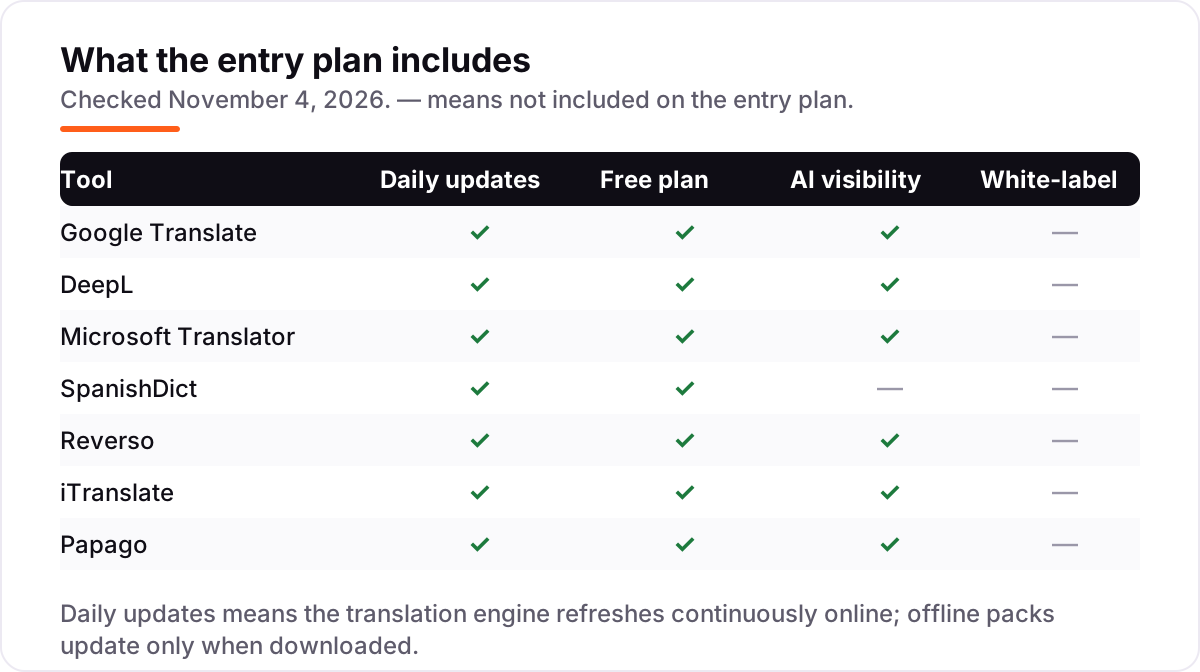
- Check what the free tier actually covers. Google, Microsoft and Papago include offline packs and voice free. iTranslate, Reverso and SpanishDict put voice, offline or document features behind PRO or Premium.
- Test the Spanish, not the feature list. Translate one real sentence you would actually send — an idiom, a request, a formal email — and read the Spanish back. DeepL and Reverso usually sound more natural than the free engines on longer text.
- Count the languages you will actually need. SpanishDict handles Spanish and English only, Papago covers 14 languages, Reverso 26 and DeepL 33. If a third language ever appears, Google Translate's 130+ languages or Microsoft's 100+ are the safe picks.
- Try the camera and the conversation mode before a trip. Point the camera at a real menu, and hold a two-sentence spoken exchange. A camera mode that misreads small print or a conversation mode that needs perfect silence will fail you abroad.
Translation is one tool in your stack, not the whole stack. If the business also needs to be found online, our monthly SEO service handles the visibility side, and our guide to Spanish translation apps covers the wider category. Before you publish new pages for the services you sell, run your titles through the free SERP snippet preview tool — it shows exactly how the title and description will look in Google.
Whatever you shortlist, try it with real translations before you pay. The free tiers in this list are long enough to run one genuine week — your sentences, your documents, your trips — and that week tells you more than any review can. Check two things in the trial: that the Spanish sounds natural when you read it aloud, and that the offline pack works with the connection switched off.
English to Spanish translation app pricing: what you will actually pay
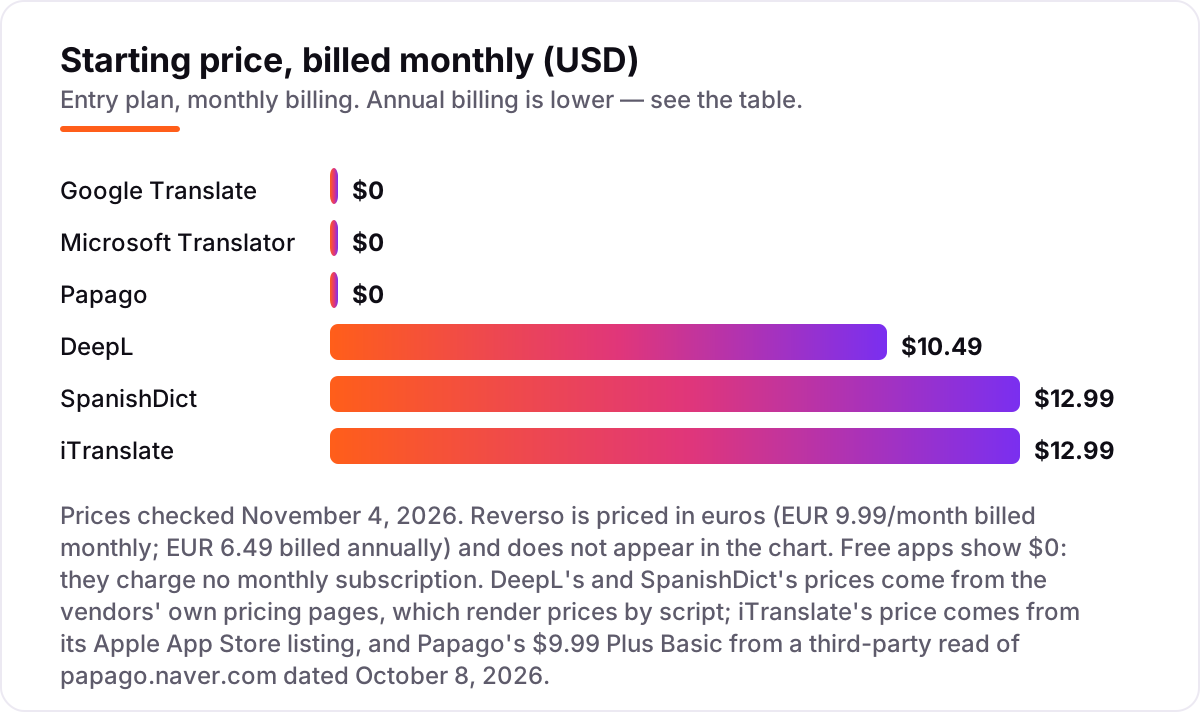
Take one person who translates every day and pays monthly. The subscription costs $0 on Google Translate, Microsoft Translator and Papago, $10.49 on DeepL Individual, $12.99 on iTranslate PRO and $12.99 on SpanishDict Premium. Reverso Premium costs €9.99 a month, or €6.49 billed annually. A year of monthly billing comes to $125.88 for DeepL, $155.88 each for iTranslate and SpanishDict, and €119.88 for Reverso.
Annual billing cuts those figures. DeepL Individual drops to $8.74 a month, or $104.88 a year, saving $21 over monthly billing. SpanishDict Premium drops to $59.99 a year, saving $95.89 against the $155.88 monthly total. iTranslate PRO drops to $99.99 a year, saving $55.89. Reverso Premium drops to €6.49 a month, or €77.88 a year, saving €42. The same app costs 17–62% less on annual billing, so the monthly price is the worst way to buy any paid plan here.
Two costs sit outside every number above. First, the paid tiers that look small: Papago's Plus Basic costs $9.99 a month for higher web limits, and it is the only paid tier on an otherwise free app. Second, the free-tier caps: DeepL's free plan stops at 50,000 characters a month, Reverso's free tier caps text length, and Papago's free plan caps images at 30 a month and documents at 20. A heavy month pushes you onto a paid plan whether you planned to or not. If you want the wider category, including apps that translate whole websites, see our guide to Spanish translation apps.
Know the difference: translation app vs language-learning app
The confusion in this category is between translating and learning. A translation app turns English into Spanish on the spot: you type or speak, it answers, and the job is done. A language-learning app teaches you Spanish over weeks and months with lessons, speaking practice and tests, so you eventually need the translator less. Every app in this list is a translation app first — but SpanishDict sits between the two, because its conjugations, example sentences and grammar lessons teach you while you translate.
That split is why the prices look inconsistent. A learning app charges for a course; a translation app charges for removing limits — more characters, more documents, offline packs, voice mode. Google Translate, Microsoft Translator and Papago give those limits away free, while iTranslate, Reverso and SpanishDict sell them as PRO or Premium. Judge each app on both halves: what the free tier covers, and what the paid tier adds at your volume.
A third distinction worth knowing is translator versus dictionary. A translator handles whole sentences; a dictionary handles single words, with conjugations and usage notes. SpanishDict and Reverso are both, which is why learners love them, while Google Translate and DeepL are translators only — fast on sentences, silent on grammar. If you are learning Spanish, pick the app that explains the words; if you are just getting through the day, pick the fastest translator. Our guide to Spanish learning apps covers the learning side in full.
Quick comparison: tool type by need
| Buyer | Best pick | Why |
|---|---|---|
| Most people, most days | Google Translate | Free, 130+ languages, camera and conversation modes included |
| Written Spanish that reads well | DeepL | Most natural wording, from $10.49/month |
| Live conversation, free | Microsoft Translator | Free conversation mode for up to 100 people |
| Learning Spanish while you translate | SpanishDict | Conjugations, examples and grammar with every translation |
| Checking how a word is really used | Reverso | Real example sentences, Premium from €6.49/month billed annually |
| Traveller who wants one polished app | iTranslate | Voice, conversation and offline packs, PRO $12.99/month |
| Clean, ad-free translator | Papago | Free with no ads, handwriting and conversation modes |
Mistakes to avoid
- Paying for what Google and Microsoft give away free. Voice, offline packs and conversation mode are free on Google Translate and Microsoft Translator. Before paying $12.99 a month for iTranslate PRO, check whether the free apps already cover your trip.
- Judging an app on one easy sentence. "Hello, how are you" translates well everywhere. Test an idiom, a formal request and a long sentence — that is where the free engines sound literal and DeepL earns its price.
- Buying on the monthly price. Annual billing saves 17–62% on every paid plan here: SpanishDict drops from $155.88 a year to $59.99, iTranslate from $155.88 to $99.99, DeepL from $125.88 to $104.88. The monthly price is the most expensive way to buy.
- Ignoring the free-tier cap. DeepL's free plan stops at 50,000 characters a month, Reverso's free tier caps text length, and Papago's free plan caps images and documents. A heavy month forces an upgrade whether you planned one or not.
- Picking a Spanish-only app for a multi-language trip. SpanishDict handles Spanish and English only, Papago covers 14 languages and Reverso 26. If the trip adds a third language, Google Translate's 130+ languages or Microsoft's 100+ are the safe picks.
How we chose
We checked each vendor's own pricing page on November 4, 2026 and recorded the starting price exactly as shown, including the annual-billing figure where the page lists one, and we ranked the apps by fit for the most common buyer — someone translating between English and Spanish every day on their phone — not by brand size. Three prices needed a workaround: DeepL's and SpanishDict's pricing pages render prices by script, so their figures were confirmed from several independent pages quoting the vendors' own pricing pages in late October and early November 2026; iTranslate sells only through the app stores, so its $12.99 a month and $99.99 a year come from its Apple App Store listing; Papago's $9.99 Plus Basic comes from a third-party read of papago.naver.com dated October 8, 2026. Reverso's €6.49 and €9.99 figures were read directly from its own pricing page today. Ratings come only from G2 pages opened on November 4, 2026: DeepL at 4.6 out of 5 from 181 reviews. The G2 pages for Google Translate and Microsoft Translator returned a rate-limit error when we tried to open them, so those ratings are omitted rather than estimated; iTranslate and Reverso have G2 pages with only 2 reviews each, and SpanishDict and Papago have no G2 or Capterra page, so those ratings are omitted too. No vendor paid for a place in this list, and none of the links here are affiliate links.
What to do next
Start with the free tier of your top pick and run one real week of translations through it. Check that the Spanish sounds natural when you read it aloud, that the offline pack works with the connection off, and that the camera mode reads a real menu before you trust it abroad. If the translation is sorted but new customers are not finding you, our monthly SEO service handles the visibility side — or compare learning apps in our guide to AI Spanish learning apps. Once your tools are in place, find out what's holding your rankings back.
Your stack only works if people find you
SerpAstra fixes what keeps your site off page one and makes it easy for AI assistants to recommend.
Get a free audit→Sources we checked (8)
- Google Translate — translate.google.com (checked November 4, 2026)
- DeepL Pro pricing — deepl.com/en/pro (checked November 4, 2026)
- DeepL Translate on G2 — g2.com/products/deepl/reviews (checked November 4, 2026)
- Microsoft Translator — microsoft.com/en-us/translator (checked November 4, 2026)
- SpanishDict Premium — spanishdict.com/premium (checked November 4, 2026)
- Reverso Premium pricing — documents.reverso.net/pricing.aspx (checked November 4, 2026)
- iTranslate Translator on the App Store — apps.apple.com (checked November 4, 2026)
- Papago — papago.naver.com (checked November 4, 2026)
Shamim
Founder of SerpAstra
A full-stack SEO and digital marketer who spends most days on Local SEO for dental practices, AI search visibility and lead generation.
Frequently asked questions
What is the best English to Spanish translation app?
Google Translate is the best fit for most people: it is free, covers 130+ languages, and includes camera, voice and conversation translation. DeepL is the better pick when the Spanish has to read well, at $10.49/month. Microsoft Translator is the best free conversation app, and SpanishDict is the best pick for learners.
Is there a really free English to Spanish translation app?
Yes. Google Translate, Microsoft Translator and Papago are completely free in the app, with no paid tier for personal use. DeepL, Reverso, SpanishDict and iTranslate all have free tiers too, but their best features — offline packs, voice mode and document translation — sit behind a paid plan.
Which translation app works offline?
Google Translate, Microsoft Translator and Papago all offer free offline text translation through downloadable language packs. iTranslate needs PRO for offline packs, SpanishDict offers an offline dictionary on its free plan, and Reverso offers offline dictionaries. DeepL has no offline mode, so it needs a connection.
Is DeepL better than Google Translate for Spanish?
For written Spanish, yes. DeepL's translations sound more natural and it offers alternative wordings, which is why it scores 4.6 out of 5 on G2. Google Translate wins on coverage with 130+ languages against DeepL's 33, and on camera translation, conversation mode and offline packs, all of which DeepL lacks.
What is the difference between a translation app and a Spanish learning app?
A translation app turns one language into another on the spot, which is what every app in this list does. A learning app teaches you Spanish over time with lessons, speaking practice and tests. SpanishDict sits between the two: it translates, but its conjugations, examples and grammar lessons also teach you while you use it.
Can I translate a whole document from English to Spanish?
Yes, with DeepL or Reverso. DeepL Individual translates 3 files a month with formatting kept, and the free plan covers 1 file a month. Reverso Premium translates documents up to 50,000 words a year. Google Translate handles short documents in the browser, but its document translation is thinner than either paid option.
Do these translation apps work on iPhone and Android?
Yes, all seven apps run on both iPhone and Android, and most also work in a web browser. Google Translate, DeepL, Microsoft Translator, Reverso and Papago all have web versions, so you can translate on a computer without installing anything. SpanishDict and iTranslate are strongest on mobile.
Free SEO and AI visibility audit
Find out what is holding your rankings back
Send us your site. Within 2 business days you get a written audit, an AI visibility check and a short fix list ranked by impact. Free, with no contract attached.
Request my free audit→Related guides
 Consumer Apps10 Best Spanish Translation Apps in 2026: Free and Paid Apps RankedCompare the 10 best Spanish translation apps on price, free plans, offline mode and accuracy for travel and work, with every price checked November 4, 2026.Read guide →
 AI, Data & Analytics7 Best AI Spanish Learning Apps in 2026: Free and Paid Apps RankedThe 7 best ai spanish learning apps of 2026, ranked with real prices, free plans and AI conversation features — pick the app that fits how you actually study.Read guide →
 Consumer Apps12 Best Spanish Learning Apps for 2026, Tested on Features and PriceCompare the 12 best spanish learning app picks for 2026 on price, free plans and speaking practice, with every price checked November 4, 2026.Read guide →