
10 Best Spanish Translation Apps in 2026: Free and Paid Apps Ranked
Compare the 10 best Spanish translation apps on price, free plans, offline mode and accuracy for travel and work, with every price checked November 4, 2026.
 Shamim Mia, Founder, SerpAstraLast verified November 4, 202614 min read
We compare pricing pages, documentation and public reviews. We never accept payment for rankings.
Key takeaways
- Google Translate is the best fit for most people at $0, DeepL follows at $10.49/month for the most natural wording, and Microsoft Translator is free inside Office and Teams.
- Four of the ten apps are completely free with no paid tier, and the cheapest paid plan is Translate Me at $5.99/month.
- The single most important buying factor is what the free tier actually lets you do: offline mode, camera translation and document translation are the features most often locked behind a subscription.
- Reverso is the only app priced in euros, at 9.99 EUR a month billed monthly or 6.49 EUR a month billed annually.
On this page
Quick comparison
| Tool | Best for | Starting price | Free plan |
|---|---|---|---|
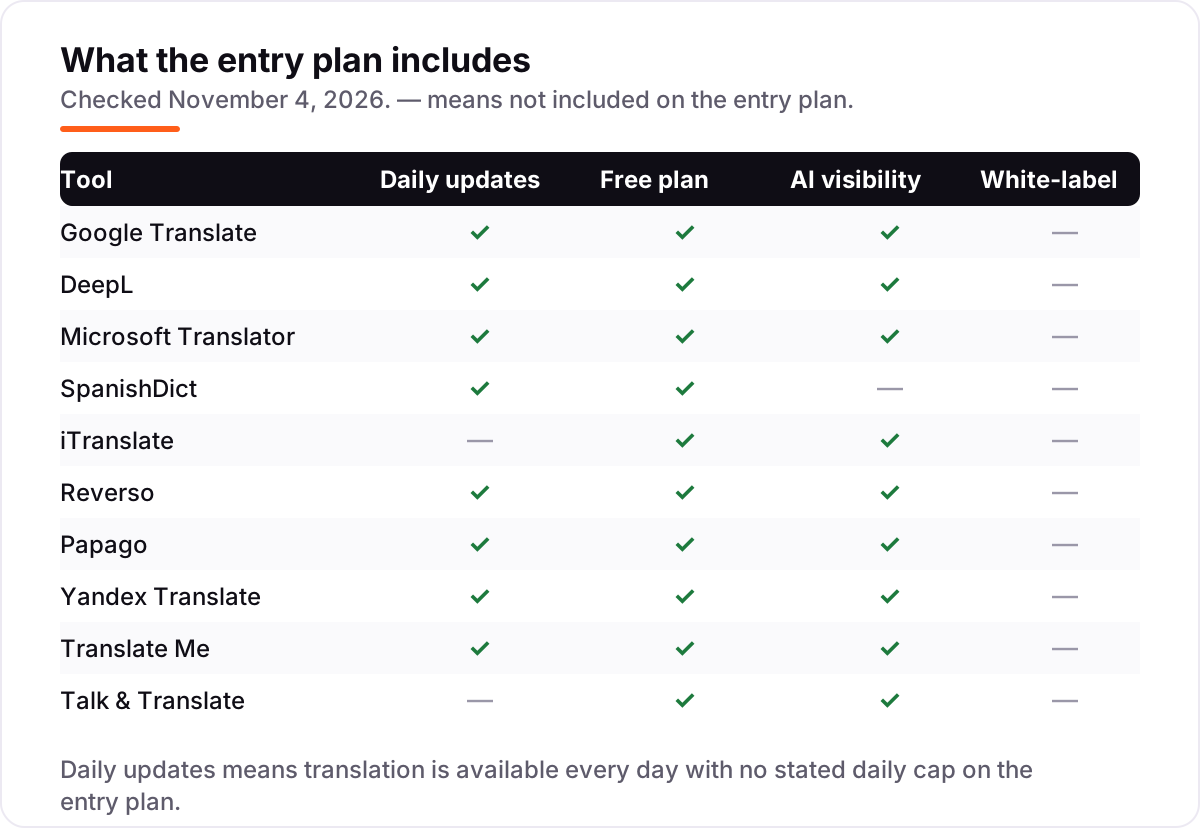
| Google Translate | Travelers and anyone who needs a free Spanish translator on any device, with camera and conversation modes | Free | Yes (free) |
| DeepL | People who translate Spanish documents and emails for work and want the most natural-sounding wording | $10.49/mo | Yes (free plan) |
| Microsoft Translator | People who live in Microsoft apps and want free Spanish translation inside Office, Teams and Edge | Free | Yes (free) |
| SpanishDict | Spanish learners and travelers who want a dictionary, verb conjugator and translator in one app | $12.99/mo | Yes (free) |
| iTranslate | iPhone travelers who want voice, camera and offline Spanish translation in one polished app | $14.99/mo | Yes (free) |
| Reverso | People who translate Spanish documents and want context examples for every word before they trust a translation | 9.99 EUR/mo | Yes (free) |
| Papago | Travelers to Korea, Japan or China who also need solid Spanish translation on the same free app | Free | Yes (free) |
| Yandex Translate | Travelers who need a free offline Spanish translator and strong Russian-English translation on the side | Free | Yes (free) |
| Translate Me | Android users who want a free Spanish translator with a conversation guide and camera mode | $5.99/mo | Yes (free) |
| Talk & Translate | Travelers who want live voice translation and full offline Spanish in one app | $9.99/mo | Yes (5 free) |
Make one of these tools?
We re-check this list every quarter. Send a correction, request a review, or ask about a clearly labeled sponsored spot.
Request a listingThe best Spanish translation apps

Google Translate
Best for: Travelers and anyone who needs a free Spanish translator on any device, with camera and conversation modes
Google Translate is the default Spanish translator for a reason: it is free everywhere, it covers more than 240 languages, and it handles text, voice, camera, handwriting and live conversation in one app. Point the camera at a menu in Madrid and the Spanish turns into English on the screen; speak into the phone in a taxi and the driver hears the Spanish back. Offline packs keep the basics working without data.
The trade-off is accuracy. Short, simple Spanish comes out clean, but idioms, slang and long passages often come out literal or wrong, so do not trust it with a contract or a medical instruction without a human check. There is no paid plan to upgrade into — what you see is the whole product. Start here, and pay for DeepL only when natural wording matters more than price.
What we like
- Free on every platform with text, voice, camera, handwriting and conversation modes
- Covers more than 240 languages, far wider than any paid app in this list
- Offline language packs work without a data connection once downloaded
- Translates whole documents and websites in the browser at no cost
Watch out for
- Accuracy drops on idioms, slang and long passages, so important messages still need a human check
- Offline translation is weaker than online and covers fewer languages
- No document translation with formatting on the free app

DeepL
Best for: People who translate Spanish documents and emails for work and want the most natural-sounding wording
DeepL is the accuracy pick in this list. Its Spanish reads like it was written by a person, not a machine: sentences keep their tone, formal and informal registers come out right, and the app offers alternative wordings so you can pick the one that fits. The Individual plan costs $10.49 a month billed monthly, or $8.74 a month billed annually, and covers 300,000 characters and 3 file translations a month.
The free plan is genuinely useful for short texts, with 50,000 characters a month and one file translation, but anyone translating documents every week will hit the cap fast. There is no camera translation and no conversation mode, so it is a desk tool first and a travel tool second. Choose DeepL when the wording has to sound right; keep Google Translate for the street.
What we like
- The most natural-sounding Spanish translations in this list, with alternative wordings to choose from
- Individual plan raises the cap to 300,000 characters a month and 3 file translations a month
- Glossary support keeps brand and technical terms consistent across documents
- Desktop and mobile apps plus a browser extension, with no data training on paid plans
Watch out for
- Free plan caps text at 50,000 characters a month and allows only 1 file translation a month
- Spanish coverage is strong but the language list is far smaller than Google Translate
- Write Pro is a paid add-on on Individual and Team, not included in the base price

Microsoft Translator
Best for: People who live in Microsoft apps and want free Spanish translation inside Office, Teams and Edge
Microsoft Translator is the free pick for anyone already living in Microsoft products. It translates text, voice, images and live conversation in more than 70 languages, and it sits inside Word, Outlook, Teams, Edge and Bing, so a Spanish email or document translates without opening another app. Conversation mode is the standout: up to 100 people can join one translated chat, each speaking their own language.
The limits are language coverage and nuance. Offline packs cover 44 languages, and each translation request stops at 50,000 characters, so long documents need splitting. On formal or technical Spanish, DeepL still reads better. Pick Microsoft Translator when your work already runs on Microsoft 365 and you want translation built in rather than bolted on.
What we like
- Free text, voice, image and multi-person conversation translation in more than 70 languages
- Built into Office, Teams, Edge and Bing, so Spanish text translates where you already work
- Conversation mode lets up to 100 people chat across languages in real time
- Offline packs cover 44 languages for travel without data
Watch out for
- Offline translation covers 44 languages, fewer than Google Translate
- Translation quality is weaker than DeepL on nuanced or formal Spanish
- The 50,000-character limit per request makes long documents awkward to translate

SpanishDict
Best for: Spanish learners and travelers who want a dictionary, verb conjugator and translator in one app
SpanishDict is the only app in this list built for Spanish alone, and it shows. The dictionary marks regional words — so you know when a word means one thing in Mexico and another in Spain — and the conjugator covers every verb with audio, while grammar lessons and quizzes build on top. The translator handles everyday sentences, and the dictionary works offline, which matters on a plane or in a rural town.
Premium costs $12.99 a month, or $59.99 a year, and buys ad-free access, offline quizzes, voice recognition and regional phrasebooks. That is a lot to pay when the dictionary and conjugator are free, so buy it for the quizzes and phrasebooks, not the reference tools. Choose SpanishDict when you are learning Spanish; choose Google Translate when you only need to be understood.
What we like
- The strongest Spanish-English dictionary here, with regional word labels for Mexico, Spain and Argentina
- Every conjugation of every verb, with audio, grammar lessons and vocabulary quizzes
- Dictionary works offline, so it keeps working on a plane or in a dead zone
- Premium adds phrasebooks for regional Spanish dialects and offline quizzes
Watch out for
- Premium costs $12.99 a month, the dearest monthly price in this list for what is mainly a reference tool
- It is a dictionary and grammar reference first, not a conversation translator
- Premium adds offline quizzes and removes ads, but the core dictionary stays free either way

iTranslate
Best for: iPhone travelers who want voice, camera and offline Spanish translation in one polished app
iTranslate is one of the oldest translator apps on the iPhone, and it feels like it: the design is polished, the modes are all in one place, and the phrasebooks with audio cover the travel situations that actually come up — ordering food, asking directions, checking into a hotel. Pro costs $14.99 a month, or $99.99 a year, and unlocks offline packs, camera translation and voice mode in over 100 languages.
The free tier is thin by design: text translation works, but the features you would pay for — offline mode, camera, voice — are all behind Pro. At $14.99 a month it is also the dearest monthly plan here, dearer than DeepL, which translates better. Pick iTranslate if you travel on an iPhone and want one polished app; pick Google Translate if free matters more than polish.
What we like
- One of the oldest translator apps, with text, voice, camera and conversation modes in over 100 languages
- Offline language packs cover text and voice translation with no connection
- Phrasebooks with audio for common travel situations in Spanish
- One Pro subscription covers iTranslate, iTranslate Voice and the other iTranslate apps
Watch out for
- The best features — offline packs, camera translation and voice mode — all need Pro
- At $14.99 a month it is the most expensive monthly plan in this list
- The Android app is rated far lower than the iPhone app by its own users

Reverso
Best for: People who translate Spanish documents and want context examples for every word before they trust a translation
Reverso earns its place with the context dictionary: look up a Spanish word and you get real example sentences showing how it is used, so you can tell whether the translation fits your sentence before you send it. Premium costs 9.99 EUR a month billed monthly, or 6.49 EUR a month billed annually, and adds the rephraser, a grammar checker, a Word add-in and document translation that keeps the original layout.
The catch is metering. Premium covers 50,000 words of document translation a year — about 120 pages — and monthly subscribers get only 6,000 words a month, so a long contract eats the allowance quickly. The free tier is fine for single words and short sentences. Choose Reverso when you need to verify a word in context; choose DeepL when you need whole documents translated well.
What we like
- Context dictionary shows real example sentences for every Spanish word, so you can check the meaning before you use it
- Premium removes ads and unlocks the rephraser, grammar checker and Word add-in
- Document translation keeps the original layout, up to 100 pages per PDF on Premium
- 29 languages with a strong focus on European language pairs including Spanish
Watch out for
- Priced in euros, so the dollar cost moves with the exchange rate
- Monthly billing at 9.99 EUR is far dearer than the 6.49 EUR annual rate
- Document translation is metered by words, so long files eat the allowance fast
Papago
Best for: Travelers to Korea, Japan or China who also need solid Spanish translation on the same free app
Papago comes from Naver, the company behind South Korea's biggest search engine, and it is the app to pack for East Asia. It translates text, voice, images, handwriting and conversation in 14 languages, including Spanish, Korean, Japanese and Chinese, all free and without ads. Offline text translation works once packs are downloaded, and website and document translation are included at no cost.
The limit is the language list: 14 languages against more than 240 on Google Translate, so if your trip goes beyond East Asia and Europe, Papago cannot follow. Spanish is solid but it is not the specialty — Korean, Japanese and Chinese are. Pick Papago when your travel includes East Asia; otherwise the wider free apps cover more ground.
What we like
- Free text, voice, image, handwriting and conversation translation with no ads
- Offline text translation works without a connection once packs are downloaded
- Strongest of the free apps for Korean, Japanese and Chinese alongside Spanish
- Website and document translation included at no cost
Watch out for
- Only 14 languages, so it cannot help with most other languages you might meet
- Spanish is a side language here, not the specialty — East Asian languages are the focus
- Some premium features sit behind a paywall with no published subscription price

Yandex Translate
Best for: Travelers who need a free offline Spanish translator and strong Russian-English translation on the side
Yandex Translate is a solid free backup: text, voice, image and website translation in more than 100 languages, with an offline mode that reviewers single out as a strength. The interface is simple, setup takes minutes, and the app is quick to use on the move. Russian-English is its strongest pair, but Spanish works well for everyday travel sentences, menus and signs.
The weaknesses are quality on long texts and a thin ecosystem — there are fewer integrations and companion apps than Google or Microsoft offer, and Spanish is not the language Yandex is tuned for. It costs nothing, so there is no reason not to keep it installed as a second app. Choose Yandex Translate as a free offline backup, not as your only translator.
What we like
- Free text, voice, image and website translation in more than 100 languages
- Offline mode is a headline strength and works well without a connection
- Simple interface that is quick to set up and easy to use on the move
- Strong Russian-English translation alongside Spanish
Watch out for
- Translation quality falls off for long texts and less common languages
- Fewer integrations and companion apps than Google Translate or Microsoft Translator
- The app is best for Russian-English pairs, so Spanish is not its strongest language

Translate Me
Best for: Android users who want a free Spanish translator with a conversation guide and camera mode
Translate Me is a straightforward free translator with a useful twist: a conversation guide holding more than 1,000 essential words and phrases for travel, so you can find the sentence you need even before you translate it. Text and voice translation cover more than 100 languages, camera mode reads signs and menus from a photo, and Premium — at $5.99 a month — is the cheapest paid plan in this list.
The trade-offs are real. There is no offline mode, so the app stops working without a connection, and the store listing shows several overlapping subscription prices, which makes the real cost harder to pin down than it should be. The free tier caps camera translations and shows ads. Pick Translate Me for the phrase guide and the low price; keep Google Translate installed for offline use.
What we like
- Free text and voice translation in more than 100 languages with a simple interface
- Conversation guide holds more than 1,000 essential words and phrases for travel
- Camera translation reads signs and menus straight from a photo
- Premium is the cheapest paid plan in this list at $5.99 a month
Watch out for
- The monthly price is unclear on the store listing, with several overlapping subscription options
- No offline mode, so it stops working without a connection
- The free tier caps camera translations and shows ads until you pay

Talk & Translate
Best for: Travelers who want live voice translation and full offline Spanish in one app
Talk & Translate is built for live conversation: speak, and the other person hears the Spanish; they answer, and you hear the English back, with live transcription running alongside. Premium costs $9.99 a month and unlocks unlimited voice-to-voice translation, unlimited camera translation, full offline mode for text, voice and photos, and an ad-free app in more than 100 languages.
The free tier is the thinnest in this list — five translations, then you pay — so treat the download as a trial, not a tool. The store listing also mixes weekly and yearly prices, so check which plan you are buying before you tap. Choose Talk & Translate when live voice conversation is the job; for anything else, the free apps do the same work for $0.
What we like
- Live voice-to-voice translation and live transcription with translation in more than 100 languages
- Full offline mode for text, voice and photo translation once languages are downloaded
- Camera translation reads menus, signs and documents from a photo
- Phrase favorites save the translations you use most for quick reuse offline
Watch out for
- The free tier allows only 5 translations, so it is barely usable without paying
- Premium pricing on the store listing is confusing, with weekly and yearly options mixed together
- Full offline mode, including offline voice, is a Premium feature only
The best Spanish translation app for you depends on how you will use it: a traveler pointing a camera at a menu needs something different from a professional translating a contract. We ranked the ten apps below by fit for the most common buyer — someone who needs English-Spanish translation on a phone, every day, without paying for features they will never use — and every price was checked on November 4, 2026.
How to choose the best Spanish translation app
- Start with the free tier, not the price. Four apps here cost $0 and cover Spanish well, so pay only for a feature the free apps lack, such as document translation or natural wording.
- Check offline mode before you travel. Google Translate, Papago and Yandex Translate offer free offline translation; iTranslate and Talk & Translate lock it behind a subscription.
- Match the mode to the moment. Camera mode reads menus and signs, conversation mode handles a live chat, and document mode translates files — no single app is best at all three.
- Test accuracy on your own sentences. Translate five sentences you actually say, in both directions, and check whether the tone survives. DeepL wins this test most often.
- Count the languages you will need next. If Spanish is one stop on a longer trip, Google Translate covers more than 240 languages; Papago covers only 14.
Translation is one tool in your stack, not the whole stack. If the business also needs to be found online, our monthly SEO service covers the visibility side. And before you publish new pages in Spanish or English, run your titles through the free SERP snippet preview tool — it shows exactly how the title and description will look in Google.
Whatever you shortlist, try it with real sentences before you pay. The free tiers in this list are enough to run a genuine test — your menus, your messages, your documents — and that test tells you more than any review can. Check two things: that offline mode works with data off, and that the camera reads a real menu in dim light. Every paid app here offers a trial or a free tier, so there is no reason to buy before you have tried it.
Translation app pricing: what you will actually pay
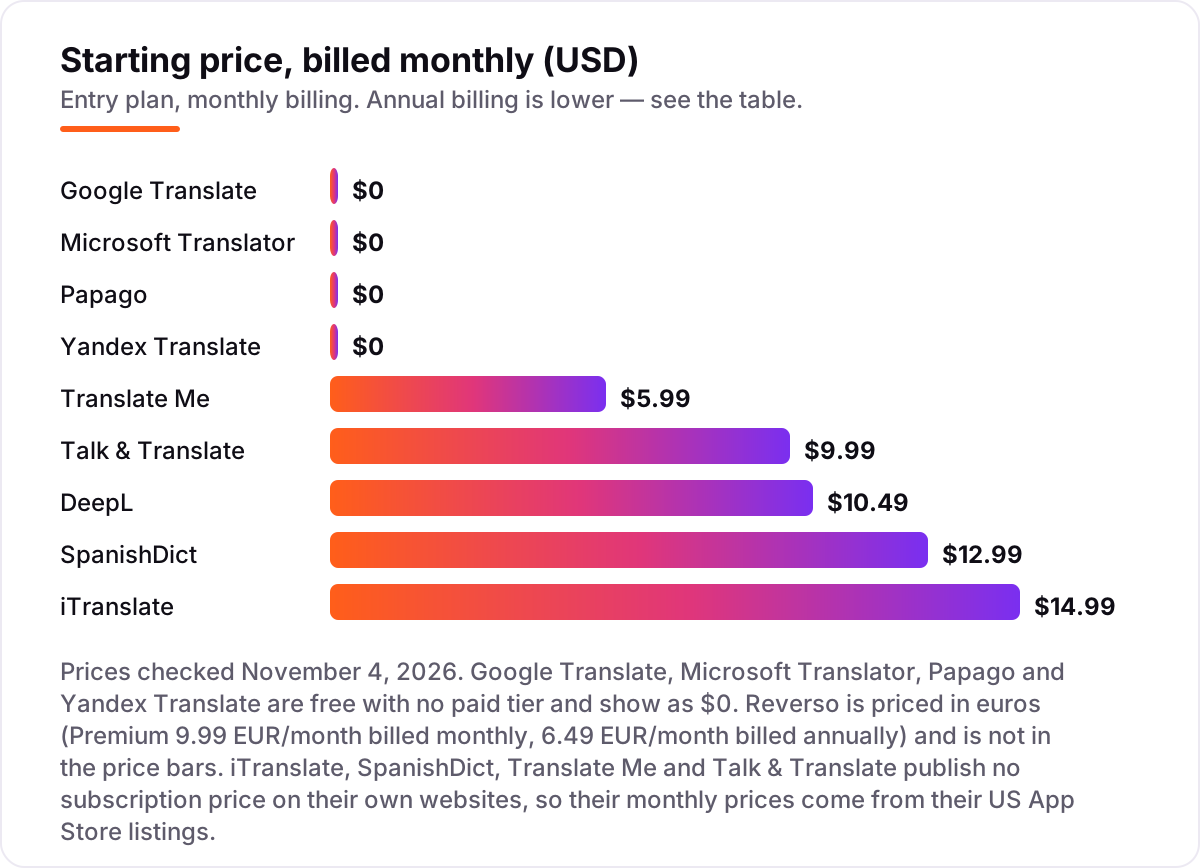
Take one year of the paid apps. On monthly billing, DeepL costs $125.88 a year, SpanishDict $155.88, iTranslate $179.88, Talk & Translate $119.88 and Translate Me $71.88. On annual billing, the same year costs $104.88 for DeepL, $59.99 for SpanishDict and $99.99 for iTranslate — a saving of $21.00, $95.89 and $79.89 against paying month to month. Translate Me and Talk & Translate publish no annual price on their store listings, so the monthly figure is the whole story there.
The cheapest honest setup is $0: Google Translate for travel and Microsoft Translator inside Office cover text, voice, camera and conversation without spending anything. The most useful paid combination is DeepL at $104.88 a year plus SpanishDict at $59.99 a year — $164.87 a year for the best written Spanish and the best Spanish reference in one pocket. Reverso sits outside the dollar math: Premium costs 77.88 EUR a year billed annually, against 9.99 EUR a month, or 119.88 EUR a year, billed monthly.
Three costs sit outside every number above. First, the free tiers cap what you can do — DeepL's free plan stops at 50,000 characters a month, Reverso's free credits run out after 2,500 words, and Talk & Translate stops after 5 translations. Second, the monthly prices for iTranslate, SpanishDict, Translate Me and Talk & Translate come from their App Store listings, not the vendors' own pages, so the price in your country may differ. Third, a second device is not a second subscription on any app here — one account covers phone, tablet and desktop — so the yearly figures above are the full cost for one person.
Know the difference: translation vs learning Spanish
The confusion in this category is between translating and learning. A translation app tells you what a sentence means right now; it does not teach you the language, build your vocabulary or correct your pronunciation. If you use a translator every day for a year, you will still not speak Spanish — you will just be faster at asking the phone. A learning app does the opposite: it teaches in small lessons, tests you, and tracks progress, but it cannot translate a menu in front of you.
There is a second, quieter confusion: a dictionary is not a translator. SpanishDict is the best dictionary in this list, with regional labels and full conjugations, but it is built for looking words up one at a time. Google Translate and DeepL are built for whole sentences, and they handle grammar and word order that a dictionary never sees. Use the dictionary to check a word, and the translator to move a sentence.
A third distinction worth knowing is offline translation versus online translation. Offline packs translate on the phone with no connection, but they are smaller models: the wording is rougher and the language list is shorter. Online translation sends your text to the vendor's servers and comes back better, but it needs data and it shares what you type. For a menu, offline is fine; for a contract, go online — or better, go to DeepL and a human check.
Quick comparison: tool type by need
| Buyer | Best pick | Why |
|---|---|---|
| Most people, most days | Google Translate | Free, every mode, over 240 languages |
| Work documents and emails | DeepL | Most natural wording, from $10.49/month |
| Microsoft 365 users | Microsoft Translator | Free, built into Office and Teams |
| Learning Spanish | SpanishDict | Dictionary and conjugator, free to start |
| iPhone travelers | iTranslate | Polished app, offline packs, Pro is $14.99/month |
| Checking a word in context | Reverso | Example sentences, Premium is 9.99 EUR/month |
| East Asia travel | Papago | Free, best for Korean, Japanese and Chinese |
| Free offline backup | Yandex Translate | Free, strong offline mode, over 100 languages |
Mistakes to avoid
- Paying before trying the free tier. Four apps here cost $0 and cover Spanish well. If the free tier does the job, the subscription buys nothing but a cleaner screen.
- Buying on the monthly price. Annual billing cuts DeepL from $125.88 to $104.88 a year, SpanishDict from $155.88 to $59.99, and iTranslate from $179.88 to $99.99. The monthly price is the most expensive way to buy.
- Assuming offline mode is free. iTranslate and Talk & Translate both lock offline translation behind Pro. Download the language packs and switch data off before the trip, not after.
- Trusting a translation with a contract or a prescription. Machine translation still mistranslates idioms and technical terms. Use DeepL or Reverso for a first draft, then have a human check anything with legal or medical consequences.
- Forgetting the language list. Papago covers 14 languages and SpanishDict covers two. If the next trip goes somewhere else, the app that was perfect in Spain may be useless in Bangkok.
How we chose
We checked each vendor's own pricing page on November 4, 2026 and recorded the starting price exactly as shown, including the annual-billing figure where the page lists one. Four apps publish no subscription price on their own websites — iTranslate, SpanishDict, Translate Me and Talk & Translate — so their monthly prices come from their US App Store listings and are disclosed as such in the price footnote. Reverso's price is in euros, from its own pricing page, and DeepL's US price is $10.49 a month billed monthly or $8.74 billed annually. Ratings come only from G2 pages opened on November 4, 2026; apps without a G2 page show no rating. We ranked the apps by fit for the most common buyer — someone who needs English-Spanish translation on a phone every day — not by brand size. No vendor paid for a place in this list, and none of the links here are affiliate links.
What to do next
Start with Google Translate and DeepL's free plan, and run one real week through both: your messages, your menus, your documents. Check that offline mode works with data off and that the camera reads a real menu before you pay for anything. If the wording has to sound right for work, DeepL's Individual plan at $10.49 a month is the first subscription to buy; if you are learning the language, add SpanishDict's free dictionary alongside it. Once your tools are in place, find out what's holding your rankings back.
Your stack only works if people find you
SerpAstra fixes what keeps your site off page one and makes it easy for AI assistants to recommend.
Get a free audit→Sources we checked (14)
- Google Translate — translate.google.com (checked November 4, 2026)
- Google Translate reviews on G2 — g2.com/products/google-translate/reviews (checked November 4, 2026)
- DeepL pricing — deepl.com/en/pro (checked November 4, 2026)
- DeepL Translate reviews on G2 — g2.com/products/deepl-translate/reviews (checked November 4, 2026)
- Microsoft Translator — translator.microsoft.com (checked November 4, 2026)
- Microsoft Translator vs Yandex.Translate on G2 — g2.com/compare/microsoft-translator-vs-yandex-translate (checked November 4, 2026)
- SpanishDict Premium — spanishdict.com/premium (checked November 4, 2026)
- iTranslate on the App Store — apps.apple.com/us/app/itranslate-translator/id288113403 (checked November 4, 2026)
- Reverso pricing — documents.reverso.net/Pricing.aspx (checked November 4, 2026)
- Papago — papago.naver.com (checked November 4, 2026)
- Yandex Translate — translate.yandex.com (checked November 4, 2026)
- Translate Me reviews on G2 — g2.com/products/translate-me/reviews (checked November 4, 2026)
- Translate Me on Google Play — play.google.com (checked November 4, 2026)
- Talk & Translate on the App Store — apps.apple.com/us/app/talk-translate-ai-translator/id1102728735 (checked November 4, 2026)
Shamim
Founder of SerpAstra
A full-stack SEO and digital marketer who spends most days on Local SEO for dental practices, AI search visibility and lead generation.
Frequently asked questions
What is the best Spanish translation app?
Google Translate is the best Spanish translation app for most people: it is free, covers more than 240 languages, and handles text, voice, camera and conversation modes. DeepL is the better pick when the wording has to sound natural, for example in work emails and documents, from $10.49 a month.
Is there a completely free Spanish translation app?
Yes. Google Translate, Microsoft Translator, Papago and Yandex Translate are all completely free with no paid tier, and they all cover Spanish. SpanishDict, Reverso, iTranslate and Translate Me also have free tiers, but their best features — offline mode, camera translation and document translation — usually need a subscription.
Which Spanish translation app works best offline?
Google Translate has the widest offline coverage, with downloadable packs for many languages, and Papago and Yandex Translate also offer solid free offline text translation. iTranslate and Talk & Translate offer offline mode too, but only on their paid plans, so check the price before a trip with no data.
Is DeepL better than Google Translate for Spanish?
For written Spanish, yes. DeepL produces more natural wording, keeps formal and informal tone straight, and offers alternative translations to choose from. Google Translate is better for travel, because it is free and covers camera, conversation and offline modes that DeepL does not offer at all.
How much does a Spanish translation app cost?
Four of the ten apps in this list cost $0. Paid plans run from $5.99 a month for Translate Me to $14.99 a month for iTranslate, with DeepL at $10.49 and SpanishDict at $12.99. Annual billing cuts most of those prices: DeepL drops to $8.74 a month and SpanishDict to $59.99 a year.
Can I trust a translation app with an important document?
For everyday messages, yes, but check the result before you send it. Machine translation still mistranslates idioms, legal terms and medical wording. For a contract, a medical form or anything with legal consequences, use DeepL or Reverso for a first draft and have a human translator check it.
Do I need a different app for learning Spanish?
Yes. A translator tells you what a sentence means; it does not teach you the language. If you want to learn Spanish rather than just translate it, our guide to the best AI Spanish learning app covers the apps that actually teach, with lessons, speaking practice and progress tracking.
Free SEO and AI visibility audit
Find out what is holding your rankings back
Send us your site. Within 2 business days you get a written audit, an AI visibility check and a short fix list ranked by impact. Free, with no contract attached.
Request my free audit→Related guides
 AI, Data & Analytics7 Best AI Spanish Learning Apps in 2026: Free and Paid Apps RankedThe 7 best ai spanish learning apps of 2026, ranked with real prices, free plans and AI conversation features — pick the app that fits how you actually study.Read guide →
 AI, Data & AnalyticsBest Chatbot Apps (2026): 8 Apps Worth DownloadingThe 8 best chatbot apps compared on price, AI quality and free plans. Real starting prices checked November 2, 2026, sorted by who each app fits best.Read guide →
 AI, Data & Analytics10 Best Automation Apps for Small Business in 202610 best automation apps for small business compared on price, free plans and billing units, with starting prices checked on vendor pages, November 2, 2026.Read guide →