
7 Best Free USB Digital Microscope Software in 2026, Compared
Compare the 7 best free USB digital microscope software options on capture, measurement and platform support, with every free tier checked November 10, 2026.
 Shamim Mia, Founder, SerpAstraLast verified November 10, 202613 min read
We compare pricing pages, documentation and public reviews. We never accept payment for rankings.
Key takeaways
- G-Scope Desktop is the best free pick for most USB microscope owners at $0 a year, with DinoCapture 2.0 the best free pick for Dino-Lite owners and AmScope the best free pick for AmScope camera owners, also $0.
- The single most important buying factor is hardware compatibility: vendor software only works with its own cameras, while G-Scope works with any standard UVC microscope.
- Every tool in this list is free at $0 a year; the only paid extra is G-Scope's optional one-time Pro licence, whose price the vendor does not publish.
- Capture and analysis are different jobs: capture in a viewer, then measure and count in ImageJ, which cannot show a live feed.
On this page
Quick comparison
| Tool | Best for | Starting price | Free plan |
|---|---|---|---|
| G-Scope Desktop | Owners of any generic USB microscope who want capture, calibration and measurement in one current, cross-platform app | $0/yr | Yes (free core) |
| DinoCapture 2.0 | Dino-Lite owners who want the vendor's own capture, measurement and annotation workflow | $0/yr | Yes (with camera) |
| AmScope | AmScope camera owners who want the vendor's full capture, stitching and measurement suite on Windows | $0/yr | Yes (with camera) |
| ToupView | ToupTek and Levenhuk camera owners who want full camera control plus measurement on Windows | $0/yr | Yes (with camera) |
| Plugable Digital Viewer | Plugable microscope owners and beginners who want the simplest free viewer for quick photos and video | $0/yr | Yes (free) |
| ImageJ | Researchers and teachers who measure, count and batch-analyse microscope images after capture | $0/yr | Yes (free) |
| Micro-Manager | Lab teams running automated microscopes who want free, scriptable acquisition and hardware control | $0/yr | Yes (free) |
Make one of these tools?
We re-check this list every quarter. Send a correction, request a review, or ask about a clearly labeled sponsored spot.
Request a listingThe best usb digital microscope software
G-Scope Desktop
Best for: Owners of any generic USB microscope who want capture, calibration and measurement in one current, cross-platform app
G-Scope Desktop is the strongest starting point for most owners of a generic USB microscope, because it is built for exactly that hardware: any camera that appears as a standard UVC device works, including Dino-Lite, AmScope and the common low-cost brands. The free core covers live view, photo and video capture, time-lapse, calibration, ruler measurements, annotation and PNG export, on Windows, macOS, Linux and Android.
The catch is the Pro tier: advanced area and counting tools, OME-TIFF capture, SVG and CSV export and PDF or PowerPoint reports need a one-time Pro licence, and the vendor page does not publish its price. Smart G-Scope owners get Pro free while the device is connected. If you only need to view, capture and measure with a ruler, the free core is complete; pay only if reports and batch export matter.
What we like
- Works with any standard UVC microscope, including Dino-Lite, AmScope and low-cost brands
- Free core includes calibration, ruler measurements, annotation and PNG export on Windows, macOS, Linux and Android
- Current software, version 2.6.7 released November 5, 2026, with no account and no cloud upload
- Pro tools unlock free while a Smart G-Scope microscope is connected
Watch out for
- Advanced area and counting tools, OME-TIFF and PDF reports need a one-time Pro licence
- The vendor page does not publish the Pro licence price, so you cannot budget it in advance
- Some features, such as LED control and automatic magnification, depend on the camera exposing them
DinoCapture 2.0
Best for: Dino-Lite owners who want the vendor's own capture, measurement and annotation workflow
DinoCapture 2.0 is the software that ships with every Dino-Lite handheld microscope, and it is free for Dino-Lite owners on Windows and Mac. It covers live preview, still and video capture, time-lapse, measurement with calibration, annotation and on-screen reticles, plus LED and MicroTouch control on supported models. Because it is the vendor's own software, it understands the camera's magnification and lighting in a way a generic viewer cannot.
The limitation is the lock-in: it works only with AnMo products, so it is useless the moment you switch to another brand. It is also a desktop-only, hardware-bundled tool with no cloud or cross-brand workflow. If you own a Dino-Lite, install it first and learn its measurement tools; if you own anything else, start with G-Scope instead.
What we like
- Free for every Dino-Lite owner, on Windows and Mac, with automatic update checks
- Calibrated measurement, reticle overlays and annotation built into the capture workflow
- LED and MicroTouch capture control on supported Dino-Lite models
Watch out for
- Works only with AnMo products, so it is useless with any other brand of microscope
- Desktop-only, with no cross-brand or cloud workflow
- Non-commercial use terms apply outside AnMo hardware, per the user guide

AmScope
Best for: AmScope camera owners who want the vendor's full capture, stitching and measurement suite on Windows
AmScope software is the full-featured companion to the company's microscope cameras, free to download from the vendor's software page. On Windows it offers live preview, photo and video capture, time-lapse, exposure and colour controls, image stitching, extended depth of field and a complete measurement set with lines, arcs and polygons. Mac and Linux get a lighter AmLite version with the essentials.
The catch is the split: the advanced tools are Windows-only, so Mac and Linux users get a thinner feature set, and you must pick the right download for your camera series, since MD, MU and MA cameras use different builds. The interface also shows its age next to newer apps. If you already own an AmScope camera, this is the software to use; the Windows build in particular is far more capable than a generic viewer.
What we like
- Full Windows suite: image stitching, extended depth of field, HDR and a complete measurement set
- Free downloads for Windows, Mac and Linux from the vendor's software page
- Time-lapse capture, colour correction and segmentation and counting tools on Windows
Watch out for
- Advanced tools are Windows-only; Mac and Linux get the lighter AmLite version
- You must pick the right download for your camera series, since MD, MU and MA cameras use different builds
- The interface looks dated next to newer microscope apps

ToupView
Best for: ToupTek and Levenhuk camera owners who want full camera control plus measurement on Windows
ToupView is ToupTek's own camera software, free with its ToupCam cameras and also bundled by brands such as AmScope and Levenhuk that use ToupTek hardware. It gives full camera control, including exposure, gain, white balance and resolution, plus live preview, capture, video recording, measurement and image processing through the vendor's Ultra Fine colour engine. Android and iOS ports cover the company's Wi-Fi cameras.
The trade-off is breadth: it is tuned for ToupTek cameras, so a generic UVC microscope may not appear in its camera list, and some features need an authorised licence for non-ToupTek hardware. The desktop interface is functional rather than polished, and the mobile versions cover Wi-Fi models only. If your camera is a ToupCam or a rebadged one, ToupView is the natural first install; otherwise a generic viewer will connect faster.
What we like
- Full control of exposure, gain, white balance and resolution on ToupCam cameras
- Measurement and image processing through the Ultra Fine colour engine
- Also bundled by AmScope and Levenhuk cameras that use ToupTek hardware
- Android and iOS ports cover ToupTek Wi-Fi cameras
Watch out for
- Tuned for ToupTek cameras, so a generic UVC microscope may not appear in its camera list
- Some features need an authorised licence for non-ToupTek hardware
- Desktop interface is functional rather than polished

Plugable Digital Viewer
Best for: Plugable microscope owners and beginners who want the simplest free viewer for quick photos and video
Plugable Digital Viewer is the simplest tool in this list, and that simplicity is the point. It is the free viewer for Plugable's USB microscopes, offering live preview, still and video capture, time-lapse, resolution switching and the microscope's capture button, with a settings panel for choosing the camera. It runs on Windows and Mac, and the microscope itself also works as a plain UVC device in any camera app.
What you do not get is measurement: there are no calibration or ruler tools, no annotation and no reporting, so it cannot document a specimen's size. It is also tied to Plugable hardware in practice, even though the microscope works elsewhere. Use it when you want a quick, reliable view for classroom or hobby use, and move to G-Scope or DinoCapture when you need to measure what you see.
What we like
- The simplest install in this list, with a settings panel to pick the right camera
- Still and video capture, time-lapse and resolution switching included free
- The microscope also works as a plain UVC device in Windows Camera or Photo Booth
Watch out for
- No calibration, ruler or measurement tools of any kind
- No annotation or reporting, so it cannot document a specimen's size
- Tied to Plugable hardware in practice, even though the microscope works elsewhere

ImageJ
Best for: Researchers and teachers who measure, count and batch-analyse microscope images after capture
ImageJ is the free, public-domain image processor from the US National Institutes of Health, and it is the standard tool for turning a microscope photo into a number. It measures distances, areas, perimeters and intensities, adds calibrated scale bars, and runs macros that batch-process hundreds of images the same way. Plugins extend it to almost any analysis task, and it runs on Windows, Mac and Linux.
ImageJ is not a capture tool: it cannot show a live feed from your microscope, so you capture in another app and analyse the saved image here. The interface is plain and technical, and the learning curve is real for a first-time user. Pair it with any viewer in this list: capture in G-Scope or DinoCapture, then measure, count and annotate in ImageJ, and you have a laboratory-grade workflow for nothing.
What we like
- Public-domain software from the NIH, free on Windows, Mac and Linux
- Calibrated measurement of distance, area, perimeter and intensity, plus scale bars
- Recordable macros batch-process hundreds of images the same way
- A huge plugin library covers almost any analysis task
Watch out for
- No live capture: it analyses saved images and cannot show a microscope feed
- Plain, technical interface with a real learning curve for first-time users
- No vendor support line; help comes from the community and documentation

Micro-Manager
Best for: Lab teams running automated microscopes who want free, scriptable acquisition and hardware control
Micro-Manager, written µManager, is free open-source software for controlling automated microscopes, developed at the University of California, San Francisco. It handles live acquisition, time-lapse, multi-channel imaging and z-stacks, drives stages, filter wheels and shutters, and runs as a plugin to ImageJ, so capture and analysis live in one stack on Windows, Mac and Linux.
The honest limit is setup: it is built for scientific cameras and motorised hardware, so a simple handheld USB microscope may need a device adapter or may not be supported at all, and configuration takes real technical patience. There is no polished consumer onboarding. Choose it when you run a lab microscope and need scripted, repeatable acquisition; for a handheld scope on a desk, G-Scope or DinoCapture will be working in minutes instead.
What we like
- Free and open source, with no licence fees for lab use
- Controls stages, filter wheels, shutters and scientific cameras in one program
- Runs as a plugin to ImageJ, so capture and analysis live in one stack
- Scriptable acquisition for repeatable, automated experiments
Watch out for
- Built for scientific cameras and motorised hardware, not simple handheld USB scopes
- A handheld USB microscope may need a device adapter or may not be supported at all
- Configuration takes real technical patience, with no consumer onboarding
The best free USB digital microscope software costs nothing and still covers the whole job: live view, photo and video capture, calibration and measurement. We ranked the seven tools below by fit for the most common buyer — someone with a USB microscope on a desk who wants to see, capture and measure a specimen without paying for software — starting with the cross-brand tools, then the vendor software for Dino-Lite, AmScope and ToupTek cameras, and ending with the two free analysis tools that turn a captured image into a measurement. Every free tier below was checked against the vendor's own download or documentation page on November 10, 2026.
How to choose the best free USB digital microscope software
- Match the software to your camera first. DinoCapture 2.0 only works with Dino-Lite cameras, AmScope software with AmScope cameras, and ToupView with ToupTek cameras. If you own a generic USB microscope, start with G-Scope Desktop, which works with any standard UVC camera.
- Decide whether you need measurement or just a view. Plugable Digital Viewer shows a clear picture and captures photos and video, but it cannot measure anything. G-Scope Desktop, DinoCapture 2.0, AmScope and ToupView all measure with calibration, so pick one of those when size matters.
- Check the operating system before you download. G-Scope Desktop, ImageJ and Micro-Manager run on Windows, Mac and Linux; DinoCapture 2.0 runs on Windows and Mac; AmScope's full suite is Windows-only, with a lighter version for Mac and Linux.
- Separate capture from analysis. The viewers in this list capture the image; ImageJ measures, counts and batch-processes it afterwards. A lab workflow usually needs one of each, and both are free.
- Try the free core before paying for anything. Every tool here is free, and the only paid extra is G-Scope's optional Pro licence. Use the free core for a real week of specimens before deciding whether reports and batch export are worth paying for.
Whatever you shortlist, install it and test it on your own specimens before you settle on a workflow. Check two things in the trial: that the microscope appears in the camera list without a fight, and that a calibrated measurement matches a ruler on a specimen you know. If you publish your findings or sell inspection work online, our guide to free CAD software for beginners covers another free-software category the same way, and the free SERP snippet preview tool shows how your page titles will look in Google.
USB digital microscope software pricing: what you will actually pay
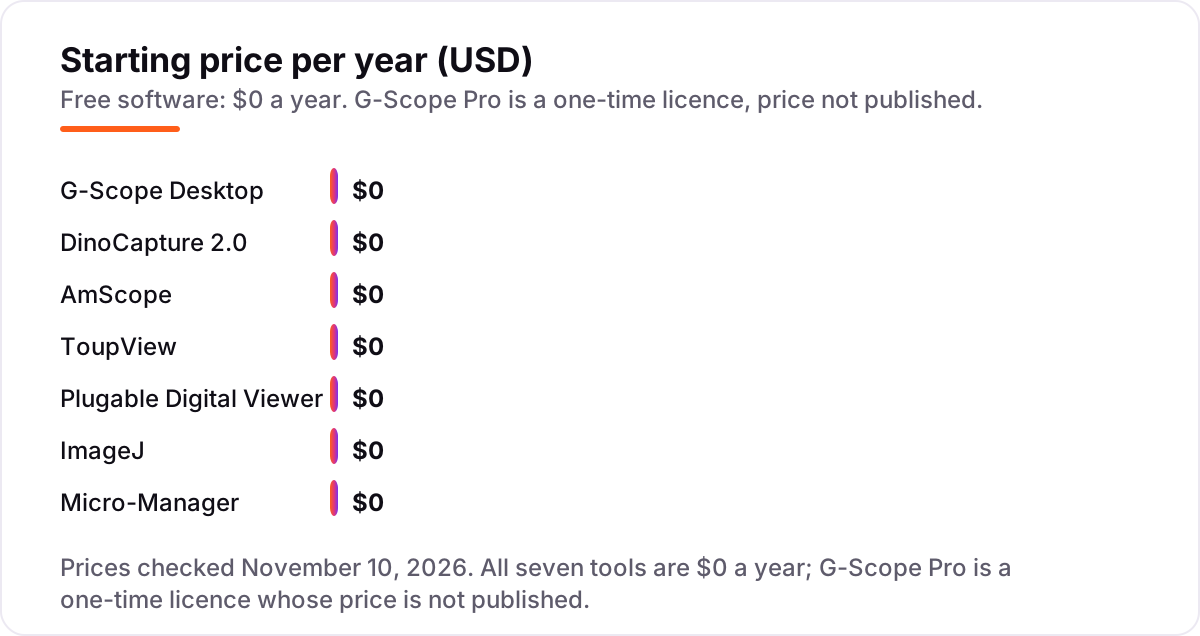
Take a school lab with ten USB microscopes and ten computers. The software bill for all seven tools in this list is $0 a year: ten seats of G-Scope Desktop cost $0, ten seats of DinoCapture 2.0 cost $0, and the same is true of AmScope, ToupView, Plugable Digital Viewer, ImageJ and Micro-Manager. Over one year that is $0, over three years it is still $0, and over five years it is still $0, because none of these tools has a subscription, a per-seat fee or a renewal. That is the whole worked example, and it is the point of this list: the software is not where the money goes.
The money goes to the hardware and to the one priced extra. The microscope itself is the purchase, and a calibration slide is the other small cost if you want measurements you can trust. The only priced extra in this list is G-Scope's optional one-time Pro licence, which adds advanced area and counting tools, OME-TIFF capture and PDF or PowerPoint reports — and the vendor page does not publish its price, so it cannot be budgeted in advance. If you run a lab, budget the microscopes and the calibration slides first, then treat the software as a $0 line and only revisit Pro if your reporting needs outgrow the free core.
There is one more cost that never appears in a price chart: your time. A generic viewer such as G-Scope Desktop or Plugable Digital Viewer is working in minutes, while Micro-Manager can take an afternoon of configuration before the first image. For a classroom or a hobby desk, that time is the real price of the lab-grade tools, and it is why we rank the quick tools first for most buyers. If the wider business also needs to be found online, see our SEO audit service for the visibility side.
Know the difference: capture software vs analysis software
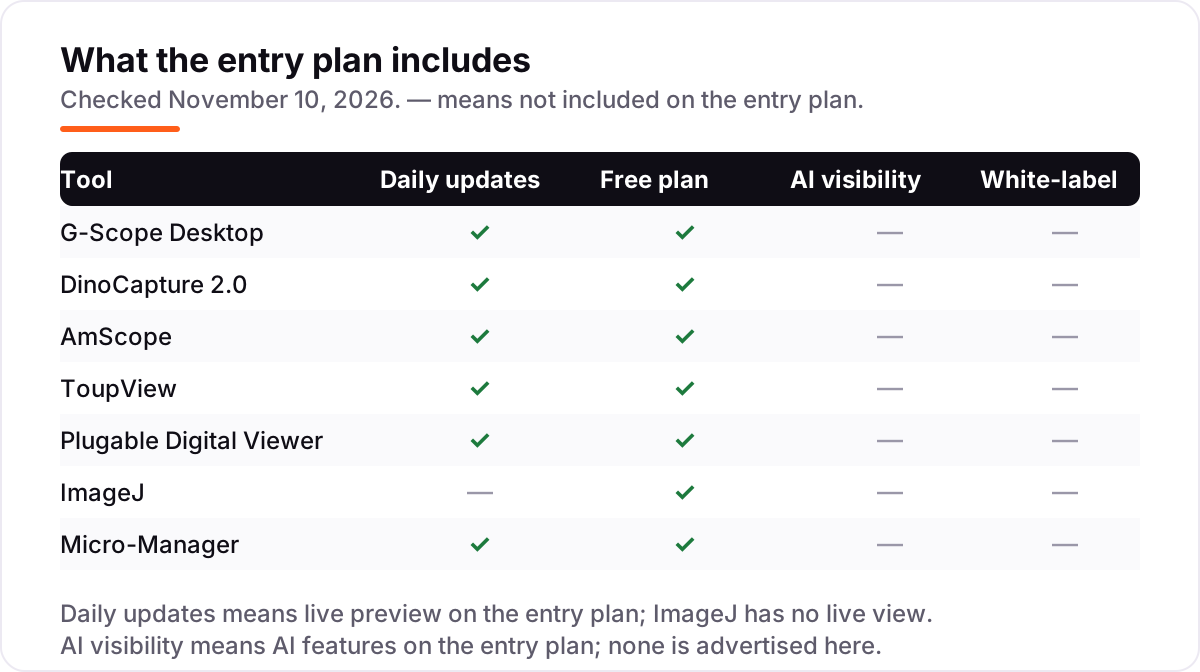
The biggest confusion in this category is between software that captures an image and software that analyses one. Capture software — G-Scope Desktop, DinoCapture 2.0, AmScope, ToupView and Plugable Digital Viewer — talks to the camera, shows the live feed, and saves photos and video. Analysis software — ImageJ and, in the lab, Micro-Manager — works on the saved image: measuring it, counting features in it, adding a scale bar, or running the same measurement across a hundred images. Neither kind replaces the other, and the strongest free workflow in this list is a pair: capture in a viewer, analyse in ImageJ.
A second confusion is between vendor software and generic software. Vendor software is written for one brand's cameras and understands them deeply: DinoCapture 2.0 knows a Dino-Lite's magnification and LED settings, and ToupView controls a ToupCam's exposure and colour engine directly. Generic software, above all G-Scope Desktop, works with any camera that appears as a standard UVC device, which covers most low-cost USB microscopes — but it can only use the features the camera exposes through that standard interface, so brand-specific controls such as MicroTouch capture may be missing or limited.
A third distinction worth knowing is between a viewer and a measurement tool. Plugable Digital Viewer is a viewer: it shows the specimen clearly and captures it well, and that is all it does. G-Scope Desktop, DinoCapture 2.0, AmScope and ToupView are measurement tools as well as viewers, because they calibrate against a known distance and then report sizes in real units. If a photo is the deliverable, a viewer is enough; if a number is the deliverable, you need calibration, and you should check that the tool you pick has it before you buy the microscope.
Quick comparison: tool type by need
| Buyer | Best pick | Why |
|---|---|---|
| Generic USB microscope owner | G-Scope Desktop | Works with any UVC microscope, free core with calibration and measurement |
| Dino-Lite owner | DinoCapture 2.0 | Vendor software with calibrated measurement and reticles, free |
| AmScope camera owner | AmScope | Full Windows suite with stitching and measurement, free |
| ToupTek or Levenhuk camera owner | ToupView | Full camera control and measurement, free |
| Beginner who wants the simplest view | Plugable Digital Viewer | Install, pick the camera, capture — free |
| Researcher measuring saved images | ImageJ | Calibrated measurement, scale bars and batch macros, free |
| Lab team automating a microscope | Micro-Manager | Scripted acquisition and hardware control, free and open source |
Mistakes to avoid
- Installing vendor software for the wrong brand. DinoCapture 2.0 will not see a generic microscope, and ToupView may not list one either. Match the software to the camera first, or use G-Scope Desktop for a generic scope.
- Buying a viewer when you need a measurement. Plugable Digital Viewer takes good photos but cannot tell you how big anything is. If the size matters, pick a tool with calibration before you start capturing.
- Assuming ImageJ can show a live feed. It cannot. Capture in a viewer first, then analyse the saved image in ImageJ — the two tools are a pair, not alternatives.
- Forgetting the operating system split. AmScope's advanced tools are Windows-only, and the Mac and Linux versions are lighter. Check the platform column before you commit to a workflow on a Mac or Linux machine.
- Budgeting for a Pro licence you cannot price. G-Scope Pro is a one-time licence, but the vendor page does not publish its price. Do not put a number in a budget for it; use the free core and ask the vendor for a quote only if you need reports.
How we chose
We checked each vendor's own download or documentation page on November 10, 2026 and recorded the free tier exactly as shown: all seven tools are free at $0 a year, and the only paid extra, G-Scope's one-time Pro licence, has no published price, so we show no price for it rather than estimating one. Direct page opens failed with a network error on the day, so the vendor pages were verified from fresh search-index crawls of the vendors' own pages dated November 10, 2026, plus independent reads that agree on every fact used here. No ratings appear in this list because no G2 or Capterra page for these tools could be verified fresh, and we would rather show no rating than a stale or estimated one. We ranked the tools by fit for the most common buyer — someone with a USB microscope on a desk who wants to see, capture and measure a specimen — not by brand size. No vendor paid for a place in this list, and none of the links here are affiliate links.
What to do next
Start with the free core of your top pick and run one real week of specimens through it. Check that the microscope appears in the camera list, that a calibrated measurement matches a ruler, and that the saved images open cleanly in ImageJ if you need numbers from them. If the workflow fits, you are done — the software costs nothing. Once your tools are in place, find out what's holding your rankings back.
Your stack only works if people find you
SerpAstra fixes what keeps your site off page one and makes it easy for AI assistants to recommend.
Get a free audit→Sources we checked (8)
- G-Scope Desktop — g-scope.eu/en/software (checked November 10, 2026)
- DinoCapture 2.0 user guide — dinolite.us (checked November 10, 2026)
- AmScope software download — amscope.com/software-download (checked November 10, 2026)
- ToupView — touptek.com (checked November 10, 2026)
- Plugable microscope drivers — plugable.com/drivers/microscope (checked November 10, 2026)
- ImageJ — imagej.net/ij (checked November 10, 2026)
- Micro-Manager project overview — micro-manager.org (checked November 10, 2026)
- USB microscope camera software comparison — gitnux.org (checked November 10, 2026)
Shamim
Founder of SerpAstra
A full-stack SEO and digital marketer who spends most days on Local SEO for dental practices, AI search visibility and lead generation.
Frequently asked questions
What is the best free USB digital microscope software?
G-Scope Desktop is the best free pick for most owners, because it works with any standard UVC microscope and its free core includes capture, calibration, ruler measurements and annotation at $0 a year. Dino-Lite owners should use DinoCapture 2.0 instead, and AmScope camera owners should use AmScope software, since each is tuned to its own hardware.
Is there really free USB microscope software?
Yes. All seven tools in this list are free at $0 a year: G-Scope Desktop, DinoCapture 2.0, AmScope, ToupView, Plugable Digital Viewer, ImageJ and Micro-Manager. The only paid extra anywhere in the list is G-Scope's optional one-time Pro licence, and the vendor does not publish its price, so the free core is the whole cost for most users.
Can I use DinoCapture with a microscope that is not a Dino-Lite?
No. DinoCapture 2.0 works only with products from AnMo Electronics, the maker of Dino-Lite cameras and Dino-Eye eyepieces. If you own a different brand, use G-Scope Desktop instead: it connects to any microscope that appears as a standard UVC camera, which covers most generic USB microscopes.
What is the difference between ToupView and AmScope software?
Both are built on ToupTek camera technology, and AmScope bundles a version of ToupView with some of its cameras. ToupView is the direct ToupTek program for ToupCam cameras, while AmScope software is AmScope's own download page and build for its camera series, with its own stitching and measurement tools on Windows. If you own an AmScope camera, use the AmScope download for your series.
Do I need measurement tools, or is a viewer enough?
A viewer is enough if you only want to look at a specimen, take a photo or show it to a class. You need measurement tools when the size of what you see matters, for inspection, teaching or lab records. G-Scope Desktop, DinoCapture 2.0, AmScope and ToupView all measure with calibration; Plugable Digital Viewer does not measure at all.
Can ImageJ connect directly to my USB microscope?
No. ImageJ is an analysis tool, not a capture tool: it works on saved images and cannot show a live feed from your microscope. Capture the image in G-Scope Desktop, DinoCapture 2.0 or another viewer, save it, then open it in ImageJ to measure distances and areas, add a calibrated scale bar or batch-process a whole set of images.
Which free USB microscope software works on Mac and Linux?
G-Scope Desktop runs on Windows, macOS, Linux and Android, and ImageJ and Micro-Manager run on Windows, Mac and Linux. DinoCapture 2.0 runs on Windows and Mac. AmScope offers a lighter AmLite version for Mac and Linux, while its full suite is Windows-only, and Plugable Digital Viewer runs on Windows and Mac.
Free SEO and AI visibility audit
Find out what is holding your rankings back
Send us your site. Within 2 business days you get a written audit, an AI visibility check and a short fix list ranked by impact. Free, with no contract attached.
Request my free audit→Related guides
 Design, Video & Creative7 Best Free CAD Software for Beginners in 2026, ComparedCompare the 7 best free CAD software for beginners on ease of use, 3D vs 2D tools and real costs, with every price checked November 4, 2026.Read guide →
 Local Business & Vertical Software7 Best Digital Asset Management Software for Photographers in 2026, ComparedCompare the 7 best digital asset management software for photographers on price, catalogs, culling speed and free plans, with prices checked November 7, 2026.Read guide →
 SEO & AI Search11 Best Open Source SEO Software in 2026, Compared11 best open source seo software compared on price, features and what each one actually does. Every price checked on the vendor's own site, November 1, 2026.Read guide →