
Best Heat Map Software for 2026: 10 Options Compared by Use Case
Compare the 10 best heat map software tools for 2026, from free Clarity to enterprise FullStory, with prices checked November 4, 2026 and sorted by use case.
 Shamim Mia, Founder, SerpAstraLast verified November 4, 202614 min read
We compare pricing pages, documentation and public reviews. We never accept payment for rankings.

Key takeaways
- Microsoft Clarity is free forever, Hotjar starts at $49 a month and Crazy Egg at $29 a month billed annually — the three most common starting points cover most small sites.
- The single most important buying factor is what the heatmap sits next to: a heatmap alone explains little, so pick the tool whose recordings, funnels, forms or tests answer your next question.
- Two tools are quote-only — FullStory and VWO — and Smartlook is gone, after Cisco ended sales on May 31, 2026.
- Annual billing cuts the monthly rate on most tools here — Hotjar drops from $49 to $39 a month — so compare yearly totals, not monthly headlines.
On this page
Quick comparison
| Tool | Best for | Starting price | Free plan |
|---|---|---|---|
| Microsoft Clarity | Small sites and marketers who want unlimited heatmaps and recordings at $0 | Free | Yes (free) |
| Hotjar | Small UX and marketing teams that want heatmaps, recordings and surveys in one familiar tool | $49/mo | Yes (free plan) |
| Crazy Egg | Marketers who want simple visual reports plus built-in A/B testing in one subscription | $29/mo | Yes (free plan) |
| Mouseflow | CRO and UX teams that need friction detection and form analytics beside their heatmaps | $25/mo | Yes (free plan) |
| Lucky Orange | Small ecommerce stores that want heatmaps, recordings and live chat in one plan | $39/mo | Yes (free plan) |
| Plerdy | Marketers who want heatmaps, recordings, pop-ups, SEO checks and unlimited A/B tests in one subscription | $32/mo | Yes (free plan) |
| Inspectlet | Teams on dynamic or single-page-app sites that need heatmaps that render on the live page | $39/mo | Yes (free plan) |
| Heatmap.com | Ecommerce stores that want revenue-per-click heatmaps tied to real orders | $117/mo | No (14-day trial) |
| FullStory | Product and enterprise teams that need autocapture and deep session analytics at scale | Custom | Yes (free plan) |
| VWO | CRO teams that want heatmaps inside a full experimentation platform | Custom | No (30-day trial) |
Make one of these tools?
We re-check this list every quarter. Send a correction, request a review, or ask about a clearly labeled sponsored spot.
Request a listingThe best heat map software

Microsoft Clarity
Best for: Small sites and marketers who want unlimited heatmaps and recordings at $0
Microsoft Clarity is the only tool in this list with no price at all, and it is a real product rather than a trial: unlimited sessions, unlimited heatmaps, session recordings, funnels, rage-click and dead-click detection, plus Copilot AI summaries, all free forever. It ships five heatmap types, including click, scroll, area, attention and Shopify conversion maps, and it plugs straight into Google Analytics.
The cost sits elsewhere. Recordings are kept about 30 days, there is no form analytics, A/B testing or survey tool, and Microsoft acts as an independent data controller, using aggregated data to improve its products and advertising. Start here when the budget is $0, or when you need a second opinion beside a paid tool; pay for something else when you need longer retention or deeper analysis.
What we like
- Completely free with no session caps, no paid tier and no credit card
- Five heatmap types, including click, scroll, area, attention and Shopify conversion maps
- Dead-click and rage-click detection plus Copilot AI session summaries at no cost
- Native Google Analytics integration and a mobile SDK included free
Watch out for
- Recordings are kept about 30 days, so long-term trend analysis is limited
- No form analytics, A/B testing or surveys, and Microsoft acts as an independent data controller, which some teams cannot accept

Hotjar
Best for: Small UX and marketing teams that want heatmaps, recordings and surveys in one familiar tool
Hotjar is the best-known name in heatmaps, and the toolkit is still there: click, scroll, movement, engagement-zone and rage-click maps, plus session recordings and funnels. Since Hotjar merged into Contentsquare in July 2025, new buyers get it as Contentsquare Experience Analytics, with a free plan covering 200,000 sessions a month and a Growth plan from $49 a month, or $39 a month billed annually.
The catch is the split billing. Surveys and feedback now live in a separate Voice of Customer product from $99 a month, and there is no native A/B testing — experiments run through third-party integrations. Choose Hotjar when you want the familiar workflow and the generous free tier; choose Crazy Egg or Plerdy when the same subscription must also run the test that fixes what the heatmap found.
What we like
- The best-known heatmap workflow: click, scroll, movement, engagement-zone and rage-click maps
- Free plan covers 200,000 sessions a month with heatmaps, recordings and funnels
- Growth adds zone-based heatmaps, journey analysis, impact quantification and Sense AI summaries
- Feedback widgets and surveys available in the same platform family
Watch out for
- New accounts buy Contentsquare plans, not standalone Hotjar, so the familiar Hotjar billing is gone
- Surveys are a separate Voice of Customer product from $99 a month, not included in the $49 Growth price
- Free plan keeps only one month of data and captures replays for 5 percent of sessions

Crazy Egg
Best for: Marketers who want simple visual reports plus built-in A/B testing in one subscription
Crazy Egg is the visual-first pick in this list: click maps, scroll maps, confetti reports, overlay reports and list reports, with more than 20 audience filters across them. The confetti map is the standout — every individual click, color-coded by traffic source, UTM parameter, device or conversion status — and every plan includes unlimited domains, unlimited team members and surveys with unlimited responses.
The price to watch is the billing term, not the headline. Every plan is billed annually only, so Starter costs $348 for the year, and it covers just 5,000 tracked pageviews and 50 recordings a month. A/B testing starts on Plus at $99 a month. Pick Crazy Egg when simple visual reports and a built-in test matter more than session volume; pick Mouseflow when the site needs deeper friction and form analysis.
What we like
- Five visual reports, including confetti maps that segment every click by source, device or conversion
- Native A/B testing with a visual editor on Plus and above, plus surveys with unlimited responses
- Unlimited domains and team members on every plan, with no overages ever
- AI analysis reads heatmaps, recordings and surveys and flags the most useful sessions
Watch out for
- All plans are billed annually only, so the smallest commitment is $348 for the year
- Starter covers only 5,000 tracked pageviews and 50 recordings a month
- A/B testing, popup CTAs and error tracking start on Plus at $99 a month, not on Starter

Mouseflow
Best for: CRO and UX teams that need friction detection and form analytics beside their heatmaps
Mouseflow is the friction specialist here. It generates seven heatmap types — click, scroll, movement, attention, geo, interactive and friction — and its friction detection flags rage clicks, click errors, dead clicks and form problems without any setup. Funnels and field-level form analytics then connect a cold spot on the map to the exact form field where visitors give up.
The entry price needs a careful read: Mouseflow's own pages show both $25 and $39 a month as the starting point, and we used the $25 annual-billing figure from the vendor guide we opened on November 4, 2026. The free plan covers 500 sessions a month on one website. Choose Mouseflow when friction and forms are the job; choose Clarity when the budget is $0 and simple click and scroll maps are enough.
What we like
- Seven heatmap types, including interactive, friction and geographic heatmaps
- Friction detection flags rage clicks, click errors, dead clicks and form problems automatically
- Side-by-side heatmap comparison across periods, pages, devices and segments
- Funnels and form analytics connect heatmap patterns to the exact field where visitors quit
Watch out for
- Mouseflow's own pages show two entry figures ($25 and $39 a month), so confirm the live price before buying
- Form analytics and journey analysis sit on higher tiers, not on Essential
- The interface packs in more analysis options than a basic heatmap tool, so onboarding takes longer

Lucky Orange
Best for: Small ecommerce stores that want heatmaps, recordings and live chat in one plan
Lucky Orange is the small-store all-rounder: one plan holds dynamic heatmaps, session recordings, conversion funnels, surveys, form analytics and live chat, and every feature is included on every tier — you pay for session volume, not for unlocking tools. The real-time dashboard shows visitors as they browse, and support can watch someone struggle on a checkout page and start a chat before the sale is lost.
The limit is volume. Build covers 3,500 sessions a month, so a store doing 10,000 sessions needs Grow at $72 a month billed annually, and the free plan's 100 sessions last days on a live store. Pick Lucky Orange when chat plus behavior data in one bill beats two subscriptions; pick Clarity or Plerdy when the store outgrows 3,500 sessions and the price jumps.
What we like
- Every feature on every plan: heatmaps, recordings, funnels, surveys, form analytics and live chat
- Dynamic heatmaps update as visitors interact, with a real-time visitor dashboard
- Unlimited team members and unlimited heatmaps, recordings and surveys on paid plans
- Live chat lets support watch a struggling visitor and step in during the session
Watch out for
- Build covers only 3,500 sessions a month, so a growing store jumps to Grow at $72 a month billed annually
- Discovery AI is a paid add-on, not included in the entry price
- The free plan covers only 100 sessions a month, which a live store exhausts in days

Plerdy
Best for: Marketers who want heatmaps, recordings, pop-ups, SEO checks and unlimited A/B tests in one subscription
Plerdy is the CRO bundle in this list: click, scroll and hover heatmaps, session recordings, conversion funnels, pop-ups, surveys, event tracking, error tracking and an SEO checker under one subscription and one tracking script. A/B testing is unlimited on every plan, including the free one, which is rare — most rivals gate testing behind a higher tier or a separate product.
The trade-off is volume. Startup costs $32 a month, or $21 a month billed annually, and covers 500 heatmaps a day and 5,000 video sessions, so a high-traffic site needs Scale at $64 a month. The free plan keeps data for one month. Choose Plerdy when one subscription should diagnose the problem and test the fix; choose VWO when the testing program needs multivariate and server-side experiments.
What we like
- Click, scroll and hover heatmaps segmented by device and traffic source
- Unlimited A/B testing on every plan, including the free one
- Bundles pop-ups, surveys, funnels, event tracking, error tracking and an SEO checker
- One tracking script and a public price list, with no sales call to buy
Watch out for
- Heatmap and recording volumes are set by plan, so high-traffic sites need a higher tier
- The free plan keeps data for only one month
- No feature flags, server-side testing or mobile app testing

Inspectlet
Best for: Teams on dynamic or single-page-app sites that need heatmaps that render on the live page
Inspectlet solves the one problem that quietly breaks most heatmaps: static screenshots. Its dynamic heatmaps record the actual page structure and overlay data on the live page, so single-page apps, tabbed content, modals and responsive layouts show clicks where visitors really made them. It also offers eye-tracking heatmaps, which use cursor movement to approximate where attention lands.
Every feature is included on every plan, including the free tier's 2,500 recorded sessions a month — replay, heatmaps, A/B testing, form analytics, error logging, surveys and AI Session Insights. The catches are scale and setup: form analytics and API access start on Growth at $149 a month, and reviewers rate setup lower than rivals. Pick Inspectlet when the site is dynamic; pick Clarity when it is mostly static pages.
What we like
- Dynamic heatmaps render on the live page, so SPAs and tabbed content show data in the right place
- Eye-tracking heatmaps use cursor movement to approximate where visitors focus attention
- Every feature is included on every plan: replay, heatmaps, A/B testing, error logging and surveys
- AI Session Insights surfaces the sessions worth watching instead of making you scan them all
Watch out for
- A smaller brand presence than Hotjar or Clarity, with fewer third-party tutorials
- Form analytics, targeting controls and API access start on the Growth plan at $149 a month
- Setup scores lower than rivals in G2 reviewer ratings, so expect a learning curve

Heatmap.com
Best for: Ecommerce stores that want revenue-per-click heatmaps tied to real orders
Heatmap.com is the only tool in this list built exclusively for ecommerce, and it shows: instead of counting clicks, it ties every click to revenue, so a navigation link that earns money and a banner that earns nothing stop looking the same. Shopify, WooCommerce and BigCommerce integrations pull real order data automatically, and AI-driven recommendations rank fixes by revenue impact.
The price is the barrier: $117 a month for stores up to $4.9 million in annual revenue, with no free plan — only a 14-day trial. Outside ecommerce it is a poor fit, since a blog or SaaS site gets little from revenue-per-click tracking. Choose Heatmap.com when the store's question is which clicks make money; choose Lucky Orange or Crazy Egg for the same behavior data at a third of the price.
What we like
- The only tool here that ties every click to revenue, showing which page elements actually earn money
- AI-driven recommendations rank the fixes by revenue impact instead of by click volume
- Native Shopify, WooCommerce and BigCommerce integrations pull real order data automatically
- Two-minute setup with no developer help and session recordings included
Watch out for
- The $117 entry price is steep next to general-purpose heatmap tools
- Built for ecommerce only, so it is a poor fit for content sites, blogs or SaaS marketing pages
- G2's vendor-supplied listing shows the Behavioral Suite from $149 a month, so confirm the live price at checkout

FullStory
Best for: Product and enterprise teams that need autocapture and deep session analytics at scale
FullStory is the enterprise analyst in this list. Fullcapture records every click, scroll and interaction automatically, so nothing needs tagging before the question is asked, and Enhanced Heatmaps configure themselves, overlaying revenue and conversion data on the page. Friction detection flags rage clicks, dead clicks, error clicks and thrashed cursors, and retroactive funnels can be built from data already collected.
The cost is opacity. There is no published paid price — Business, Advanced and Enterprise are all quote-only — and real-world contracts commonly run into five figures a year. The free plan is generous, with 30,000 sessions a month and 12 months of retention for up to 10 users. Start on the free plan to validate the product; budget for a sales conversation once the team outgrows it.
What we like
- Fullcapture records every click, scroll and interaction automatically, with no manual tagging
- Enhanced Heatmaps configure themselves and overlay revenue and conversion data on the page
- Friction detection flags rage clicks, dead clicks, error clicks and thrashed cursors
- Retroactive funnels can be built from data already collected, with no waiting period
Watch out for
- No published paid price, so budgeting means a sales conversation and a quote
- Paid plans commonly run into five figures a year, far above the self-serve tools here
- Mobile analytics, StoryAI and Guides and Surveys are add-ons, so the quote grows with the stack

VWO is the testing platform in this list, and that is the reason to buy it: heatmaps, recordings, funnels and form analytics sit beside a mature A/B testing engine, so the team moves from finding a problem to testing the fix without changing tools. The Bayesian statistics engine and visual editor are well regarded, and multivariate and server-side testing cover experiments a heatmap-only tool cannot run.
Since VWO merged with AB Tasty under the Wingify brand in 2026, there are no public prices at all — every tier says schedule a demo — and heatmaps live in the separate Insights product, so the full loop means more than one quote. A 30-day free trial needs no card. Choose VWO when testing is the program and heatmaps feed it; choose Plerdy or Crazy Egg when a published price matters.
What we like
- Heatmaps, session recordings, funnels and form analytics sit beside a mature A/B testing engine
- A well-regarded Bayesian statistics engine judges test results, with a visual editor for variants
- Multivariate and server-side testing cover experiments a heatmap-only tool cannot run
- Broad integrations with analytics, CRM and tag management stacks
Watch out for
- No public prices since the Wingify merger: every tier is demo-led, so there is nothing to budget from
- Heatmaps live in the separate Insights product, so the full CRO loop means more than one quote
- Overkill and overpriced for teams that only need to see where visitors click
The best heat map software turns a page of guesses into a picture: red where visitors click, cold where they never scroll, and a clear answer to why a button nobody sees keeps getting blamed for low conversions. We ranked the ten tools below by fit for the most common buyer — a marketer or small team choosing its first behavior tool — and every price was checked on November 4, 2026.
How to choose the best heat map software
- Decide what the heatmap must sit next to. A heatmap alone shows where people click; recordings, funnels, form analytics or A/B testing explain why. Pick the companion feature first, then the heatmap.
- Match the meter to your traffic. Tools charge by sessions, pageviews or tracked users, and the entry tier caps each one differently — Crazy Egg counts pageviews, Lucky Orange counts sessions, VWO counts tracked users.
- Check how the map is drawn. Most tools overlay data on a static screenshot, which breaks on single-page apps and tabbed content. Inspectlet renders on the live page instead.
- Count the sites and the seats. Some plans cover one website, others cover unlimited domains; some charge per seat, others include the whole team. Multiply before you compare.
- Test the trial on your worst page. Every paid tool here offers a free plan or trial. Run it on the page that converts worst, not the homepage, and check that the map matches what your analytics already says.
A heatmap is one system in your stack, not the whole stack. If the page it exposes also needs to rank, our guide to A/B testing software shows how to test the fix once the heatmap finds the problem. And before you publish new pages for the services you sell, run your titles through the free SERP snippet preview tool — it shows exactly how the title and description will look in Google.
Whatever you shortlist, try it with real traffic before you pay. The free plans and trials in this list are generous enough to run for two weeks on a live site — your checkout, your pricing page, your signup form — and that fortnight tells you more than any review can. Check two things in the trial: that the heatmap matches what your analytics already says about the page, and that you can get from a cold spot on the map to the recording that explains it in two clicks. If either fails, the price does not matter.
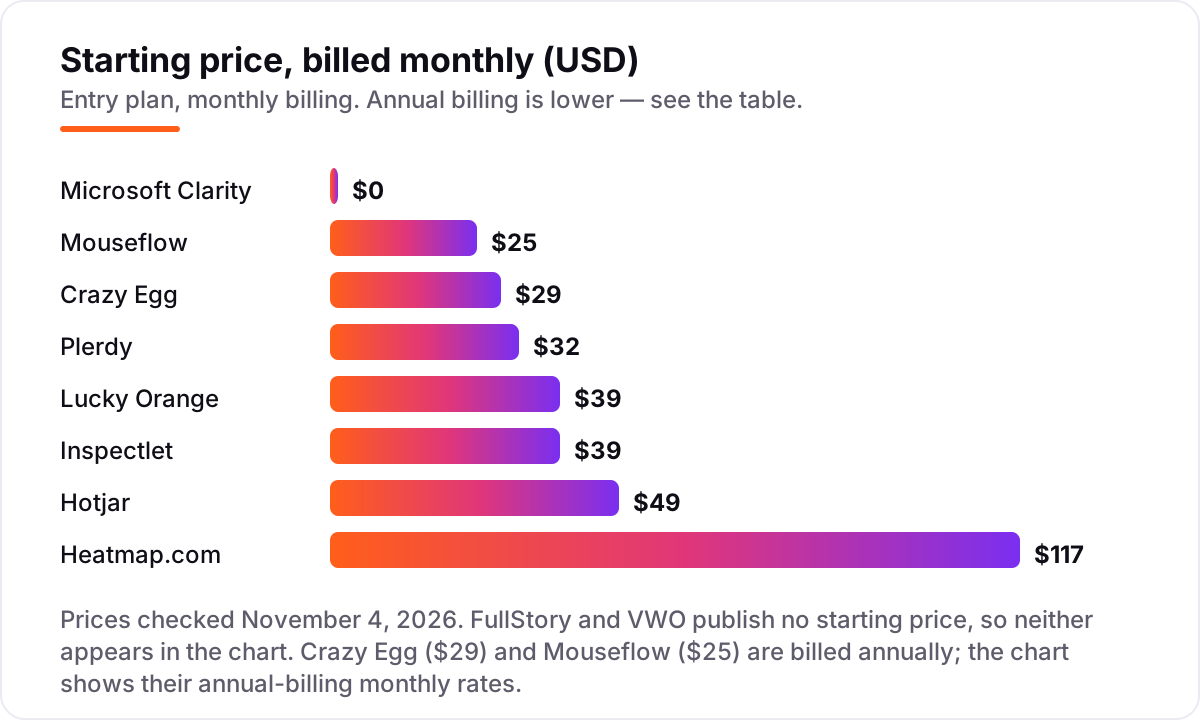
Best heat map software pricing: what you will actually pay
Take a small site buying one entry plan for a year. On list prices, the annual cost is $0 on Microsoft Clarity, $252 on Plerdy ($21 a month billed annually), $300 on Mouseflow ($25 a month billed annually), $348 on Crazy Egg ($29 a month billed annually), $384 on Lucky Orange ($32 a month billed annually), $468 on Inspectlet ($39 a month on monthly billing), $468 on Hotjar ($39 a month billed annually) and $1,404 on Heatmap.com ($117 a month). FullStory and VWO publish no starting price, so there is no number to put in the list — budget for a sales conversation instead.
Two of those numbers need adjusting before they are real. First, monthly billing costs more than annual billing on most tools here: the same Hotjar Growth plan costs $588 a year on monthly billing instead of $468, Lucky Orange Build costs $468 instead of $384, and Plerdy Startup costs $384 instead of $252. Second, the entry price is rarely the final price: Hotjar surveys are a separate product from $99 a month, Lucky Orange charges extra for its Discovery AI add-on, and FullStory prices mobile analytics and StoryAI as add-ons on top of the quote.
Three costs sit outside every number above. First, the session cap: Hotjar Growth covers 7,000 sessions a month, Crazy Egg Starter covers 5,000 pageviews, Mouseflow Essential covers 5,000 sessions and Lucky Orange Build covers 3,500 sessions — pass the cap and the next tier is the real price. Second, the second tool: a heatmap that finds the problem still needs a test to fix it, so budget for the testing tier or the second subscription. Third, the time to act: a heatmap nobody opens is a subscription, not an insight, and the cheapest tool you actually check beats the best tool you ignore.
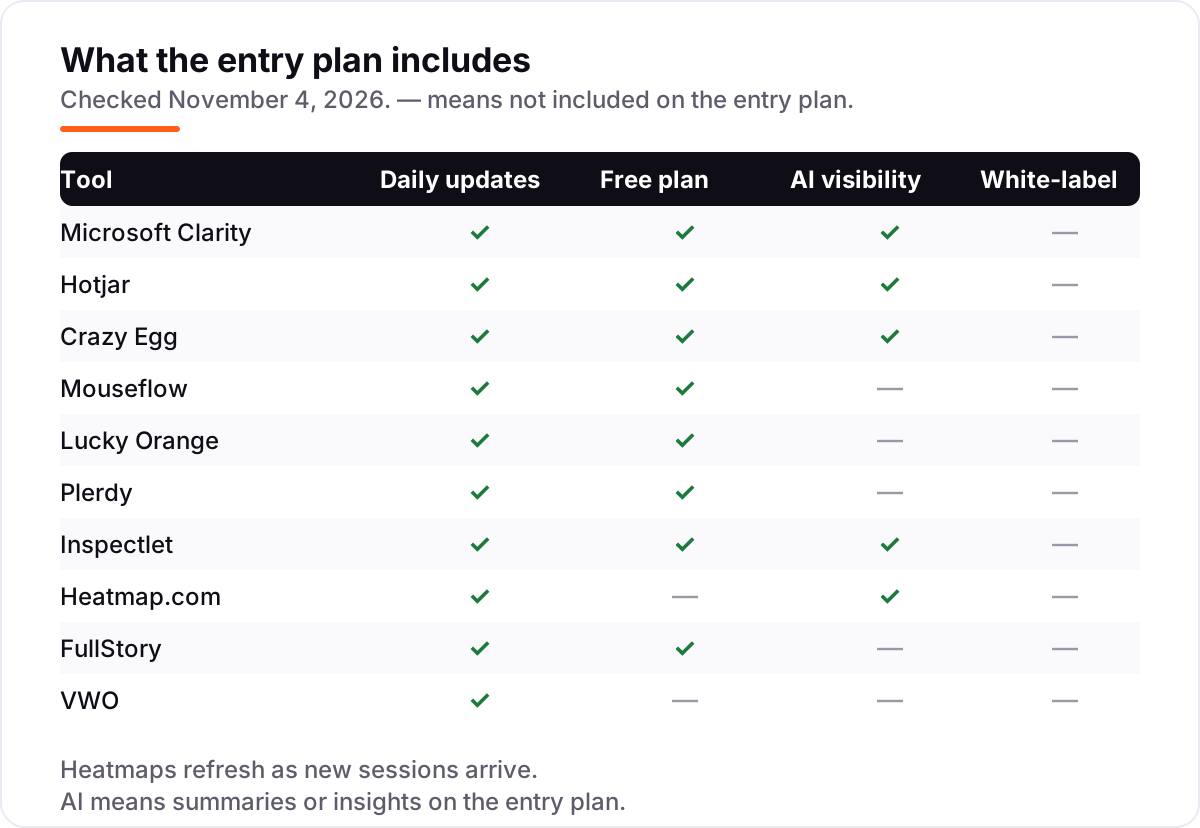
Know the difference: heatmaps vs session recordings
The confusion in this category is between two views of the same visitors that answer different questions. A heatmap aggregates thousands of visits into one picture: where people clicked, how far they scrolled, which sections held attention. A session recording plays back one visitor's whole visit in order: the clicks, the hesitation, the rage-click on a button that does nothing, the form field where they gave up.
Neither one replaces the other, and the tools that sell only one of them are selling half the answer. A heatmap tells you the checkout button is cold; it cannot tell you whether visitors never saw it, saw it and did not trust it, or clicked it and hit an error. A recording tells you exactly what one visitor did; it cannot tell you whether that visitor was typical or the only one. The workflow that works is boring and sequential: open the heatmap, find the cold spot or the hot spot that should not be hot, then open the recordings for the visitors behind that spot and watch five of them.
There is a second, quieter confusion: heatmaps and web analytics are not the same job either. Analytics tells you the conversion rate fell; a heatmap shows you the page element that stopped earning clicks the week it fell. Buy the heatmap when the question is where on the page behavior changed; keep analytics for how much traffic and revenue changed overall.
Quick comparison: tool type by need
| Buyer | Best pick | Why |
|---|---|---|
| Zero budget, any site | Microsoft Clarity | Unlimited heatmaps and recordings for $0, with AI summaries |
| Small team, familiar workflow | Hotjar | The best-known heatmaps, from $49/month, with a generous free tier |
| Marketers who also test | Crazy Egg | Visual reports plus native A/B testing, from $29/month billed annually |
| CRO team, friction and forms | Mouseflow | Seven heatmap types and automatic friction detection, from $25/month |
| Small store, chat included | Lucky Orange | Heatmaps, recordings and live chat in one plan, from $39/month |
| One subscription, whole CRO loop | Plerdy | Heatmaps plus unlimited A/B tests and SEO checks, from $32/month |
| Dynamic or single-page-app site | Inspectlet | Dynamic heatmaps that render on the live page, from $39/month |
| Ecommerce, revenue per click | Heatmap.com | The only revenue-based heatmaps here, from $117/month |
| Enterprise product analytics | FullStory | Autocapture and revenue-overlaid heatmaps, quoted by sales |
| Testing program at scale | VWO | Heatmaps beside a mature testing engine, quoted by sales |
Mistakes to avoid
- Budgeting on the monthly headline. Monthly billing costs more than annual billing here — Hotjar is $49 a month against $39 a month billed annually. Compare yearly totals for a full year, and remember Crazy Egg is annual-only, so its smallest commitment is $348.
- Reading a heatmap without recordings. A cold spot does not say why it is cold. Open five recordings behind every pattern before you redesign anything, or you will fix the wrong thing.
- Trusting a static screenshot on a dynamic site. If the page changes after load — tabs, modals, single-page-app routes — a screenshot heatmap misplaces clicks. Use Inspectlet's dynamic maps, or verify the map against the live page.
- Ignoring what the meter counts. Sessions, pageviews and tracked users are different meters, and the entry cap is the real price. A 10,000-session store does not fit Lucky Orange Build at 3,500 sessions, whatever the $32 headline says.
- Paying for enterprise depth you will not use. FullStory and VWO are quote-only platforms built for teams with analysts and testing programs. A small site pays for scale it never touches — Clarity plus one $25–$39 tool covers the same pages.
How we chose
We checked each vendor's own pricing page on November 4, 2026 and recorded the starting price exactly as shown, including the annual-billing figure where the page lists one, and we ranked the tools by fit for the most common buyer — a marketer or small team choosing its first behavior tool — not by brand size. Three prices need a note. Hotjar no longer has its own pricing page since merging into Contentsquare in July 2025, so its price is Contentsquare's published Experience Analytics Growth price of $49 a month, or $39 a month billed annually. Mouseflow's own pages show two entry figures, $25 and $39 a month, so we used the $25 annual-billing figure from the vendor guide we opened on November 4, 2026. Heatmap.com's own pages quote $117 a month for the Behavioral Suite, while G2's vendor-supplied listing shows the same suite from $149 a month — we used the vendor's own figure, and buyers should confirm it at checkout. Lucky Orange's own blog still lists a free plan, although one 2026 comparison reported it retired; we went with the vendor's own pages. FullStory and VWO publish no starting price, so both are listed as custom quote. Smartlook was excluded because Cisco ended sales on May 31, 2026. Only one rating is shown: Heatmap.com at 4.8 out of 5 on G2 across 43 reviews, from the G2 page opened on November 4, 2026. The other G2 pages returned rate-limit errors when we tried to open them, so those ratings were omitted rather than estimated. No vendor paid for a place in this list, and none of the links here are affiliate links.
What to do next
Start free and narrow fast: install Microsoft Clarity today, then trial the one paid tool that matches your next question — Crazy Egg if you will test, Mouseflow if forms leak, Inspectlet if the site is dynamic. Run both for two weeks on your worst-converting page, then keep the one whose heatmap you actually opened twice. If the tools are sorted but new customers are not finding you, our monthly SEO service handles the visibility side — or compare behavior tools in our guide to user behavior analytics tools. Once your tools are in place, find out what's holding your rankings back.
Your stack only works if people find you
SerpAstra fixes what keeps your site off page one and makes it easy for AI assistants to recommend.
Get a free audit→Sources we checked (16)
- Microsoft Clarity homepage — clarity.microsoft.com (checked November 4, 2026)
- Contentsquare pricing (Hotjar Experience Analytics) — contentsquare.com (checked November 4, 2026)
- Crazy Egg pricing — crazyegg.com (checked November 4, 2026)
- Mouseflow pricing — mouseflow.com (checked November 4, 2026)
- Lucky Orange pricing — luckyorange.com (checked November 4, 2026)
- Plerdy pricing — plerdy.com (checked November 4, 2026)
- Inspectlet plans — inspectlet.com (checked November 4, 2026)
- Heatmap.com pricing — heatmap.com (checked November 4, 2026)
- FullStory pricing — fullstory.com (checked November 4, 2026)
- Wingify pricing (VWO) — wingify.com (checked November 4, 2026)
- Heatmap reviews on G2 — g2.com (checked November 4, 2026)
- Crazy Egg vs Hotjar comparison — crazyegg.com (checked November 4, 2026)
- Best website heatmap tools — mouseflow.com (checked November 4, 2026)
- Best website heatmap tools — inspectlet.com (checked November 4, 2026)
- VWO alternatives and Wingify pricing — plerdy.com (checked November 4, 2026)
- FullStory pricing plans — fullstory.com (checked November 4, 2026)
Shamim
Founder of SerpAstra
A full-stack SEO and digital marketer who spends most days on Local SEO for dental practices, AI search visibility and lead generation.
Frequently asked questions
What is the best heat map software?
Microsoft Clarity is the best starting point for most sites because it is free forever with unlimited heatmaps and recordings. Hotjar is the best-known paid option at $49 a month, and Crazy Egg is the best pick when the same subscription must also run A/B tests, from $29 a month billed annually.
How much does heat map software cost?
Entry prices run from $0 to $117 a month. Clarity is free, Plerdy costs $21 a month billed annually, Mouseflow $25, Crazy Egg $29 and Lucky Orange $32. Hotjar starts at $39 a month billed annually, Inspectlet at $39 a month, and Heatmap.com at $117 a month. FullStory and VWO are quote-only.
Is there really free heat map software?
Yes. Microsoft Clarity is completely free with no session caps, no paid tier and no credit card, including five heatmap types and session recordings. Hotjar, Mouseflow, Lucky Orange, Plerdy, Inspectlet and FullStory also have free plans, though each caps sessions or data retention.
What is the difference between a heatmap and a session recording?
A heatmap aggregates thousands of visits into one picture, showing where visitors click and how far they scroll. A session recording plays back one visitor's whole visit, showing what they did in order. Use the heatmap to find the problem page, then watch recordings to see why individual visitors struggled there.
Do heatmaps work on single-page apps and dynamic websites?
Most heatmaps do not work well there, because they overlay data on a static screenshot that goes stale when content changes. Inspectlet is the exception in this list: its dynamic heatmaps render on the live page, so SPAs, tabbed content and responsive layouts show clicks in the right place.
Why is Smartlook missing from this list?
Smartlook reached end of sale on May 31, 2026, after Cisco announced end-of-sale dates for the product, so it can no longer be bought. Older lists still recommend it, but we only include tools that are actively sold in 2026, and Smartlook no longer qualifies.
Can I switch heat map software later?
Yes, and switching is easier than with most software because the tools are independent scripts: remove the old snippet, add the new one, and start collecting fresh data. The catch is history — heatmaps do not transfer — so run both tools for two weeks and export any reports you need before cancelling.
Free SEO and AI visibility audit
Find out what is holding your rankings back
Send us your site. Within 2 business days you get a written audit, an AI visibility check and a short fix list ranked by impact. Free, with no contract attached.
Request my free audit→Related guides
 Digital Marketing & AdsBest A/B Testing Software for 2026: 12 Options Compared by Use CaseCompare the 12 best a/b testing software options on price, free plans and stats engines, with every price checked November 4, 2026, and sorted by use case.Read guide →
 AI, Data & Analytics12 Best Analytics Software in 2026: Pricing, Features and Pros & ConsThe 12 best analytics software tools for 2026, compared on price, free plans and what each one measures, with every price checked on the pricing page.Read guide →
 SEO & AI Search11 Best User Behavior Analytics Tools in 2026, Compared11 best user behavior analytics tools compared on price, free plans and session replay, from free Clarity to quote-only Fullstory. Checked November 2, 2026.Read guide →