
9 Best Intranet Software for Small Business in 2026, Compared
9 best intranet software for small business picks compared on price, free plans and setup, with real starting prices checked November 10, 2026.
 Shamim Mia, Founder, SerpAstraLast verified November 10, 202611 min read
We compare pricing pages, documentation and public reviews. We never accept payment for rankings.

Key takeaways
- Microsoft SharePoint leads for most small businesses at $7/user/month, with Notion at $10 and Google Workspace at $7 close behind for teams already on those suites.
- Three tools start free — Notion, Confluence and Zoho Connect — but the free plans cap users hard: Confluence stops at 10 users, Zoho Connect at 5.
- The single most important buying factor is where your team already lives: an intranet that rides on your existing email and files gets used, and one that needs a new login does not.
- Every price below was checked on November 10, 2026, mostly on the vendor's own pricing page; Zoho Connect's $1 figure is third-party sourced, and Happeo publishes no price.
On this page
Quick comparison
| Tool | Best for | Starting price | Free plan |
|---|---|---|---|
| Microsoft SharePoint | Small businesses already on Microsoft 365 that want a branded intranet, document hub and news feed for about $7 a user | $7/mo (annual) | No (1-month trial) |
| Notion | Small teams of 5–20 people who want a wiki, handbook and project tracker in one flexible workspace | $10/mo (annual) | Yes (limited) |
| Google Workspace | Small businesses on Gmail and Google Drive that want an intranet built from Google Sites, Chat and shared drives | $7/mo (annual) | No (14-day trial) |
| Confluence | Small teams that document everything and want a structured wiki with permissions, page history and Jira links | $6/mo (annual) | Yes (up to 10 users) |
| Slack | Chat-first teams of 5–100 people who want channels, canvases and announcements where work already happens | $7.25/mo (annual) | Yes (90-day history) |
| Zoho Connect | Budget-conscious teams of 25–100 people who want feeds, forums, manuals and tasks for about a dollar a user | $0.80/mo (annual) | Yes (up to 5 users) |
| Bitrix24 | Small businesses that want CRM, tasks, chat and an intranet in one flat-rate subscription instead of five tools | $49/mo (annual) | Yes (1–2 users) |
| Blink | Small businesses with frontline or deskless staff who need news, chat and a knowledge hub on a phone | $3.75/mo (annual) | No (free trial) |
| Happeo | Google Workspace teams of 200-plus that want a polished, branded intranet with channels and AI-assisted knowledge hubs | Custom quote | No (14-day trial) |
Make one of these tools?
We re-check this list every quarter. Send a correction, request a review, or ask about a clearly labeled sponsored spot.
Request a listingThe best intranet software for small business

Microsoft SharePoint
Best for: Small businesses already on Microsoft 365 that want a branded intranet, document hub and news feed for about $7 a user
SharePoint is the default intranet for small businesses already paying for Microsoft 365, because the intranet rides on the same $7 seat as email, Teams and OneDrive. Team sites, news posts, document libraries and permissions give a 10-person office the same structure a 300-person company uses, and files open in Word and Excel where people already work.
The catch is the price rise: Microsoft lifted Business Basic from $6 to $7 a user a month on July 1, 2026, so guides still quoting $6 are out of date, and month-to-month billing costs $8.40. Building a polished home page also takes real setup time. If your team already lives in Microsoft 365, start here; if it lives in Google, start with Google Workspace instead.
What we like
- SharePoint, Teams, email and 1 TB of storage per user come in one $7 seat, so the intranet costs nothing extra if you already pay for Microsoft 365
- Team sites, news posts, document libraries and permissions scale from a 5-person office to 300 users on the same plan
- Deep integration with Word, Excel, Outlook and OneDrive, so files open where people already work
Watch out for
- No desktop Office apps on Basic, and building a polished intranet page takes real setup time or a SharePoint-savvy admin
- G2 reviewers rate ease of use 7.8 out of 10, and new users report a steep learning curve
Notion
Best for: Small teams of 5–20 people who want a wiki, handbook and project tracker in one flexible workspace
Notion became many teams' intranet almost by accident: people started taking notes in it, then built a handbook, then a project tracker, and suddenly the whole company lived there. Plus costs $10 a member a month billed annually, removes the block limit, and adds unlimited file uploads, 30-day page history and unlimited guests.
The trade-off is structure. Notion has no news feed, no employee directory and no page-level permissions as strict as Confluence, so it suits teams that value flexibility over governance. Guests are free, which keeps the bill down when contractors need to read pages. Pick Notion when your team wants one flexible workspace, not a formal intranet.
What we like
- Plus removes the block limit and adds unlimited file uploads, 30-day page history and unlimited guests for $10 a member
- Databases, templates and linked pages turn a handbook into a searchable intranet without extra software
- Guests are free, so contractors and clients read pages without a paid seat
Watch out for
- Full Notion AI sits on Business at $20 a member, so Plus buyers get only a trial of the AI features
- Permissions are weaker than Confluence: page-level access is broad, and there is no true intranet news feed or employee directory

Google Workspace
Best for: Small businesses on Gmail and Google Drive that want an intranet built from Google Sites, Chat and shared drives
Google Workspace is the intranet for teams that already live in Gmail and Drive, because the pieces are all in the $7 Business Starter seat: Sites for pages, Chat spaces for conversation, Drive for files, and Gemini AI bundled into every Business plan. A small team can publish a tidy home page in an afternoon with no code and no extra subscription.
The limit is depth. Sites has no news targeting, no employee directory and no read receipts, so it works as a noticeboard and handbook, not as a managed internal comms platform. Google also runs introductory discounts for new customers, so check the list price at checkout. If your team runs on Google, this is the cheapest real intranet you can build.
What we like
- Business Starter bundles custom email, 30 GB of pooled storage per user, Meet and Gemini AI for $7 a user
- Google Sites builds intranet pages with no code, and Chat spaces carry the daily conversation
- Gemini is included in every Business plan, so AI summaries and drafting cost nothing extra
Watch out for
- Google Sites is a simple page builder, not a real intranet: no news targeting, no employee directory and no read receipts
- Storage is 30 GB per user on Starter, and the annual plan locks seats until renewal

Confluence
Best for: Small teams that document everything and want a structured wiki with permissions, page history and Jira links
Confluence is the most structured wiki in this list, and the right pick when documentation is the job: spaces with their own permissions, page history, templates and a deep link into Jira. Standard costs $7.15 a user a month billed monthly, or $6 billed annually for teams of 1–100 users, and includes Rovo AI search, chat and agents.
Watch the headline price. Atlassian's pricing page shows $5.78 for Standard, but that is a blended rate for a 300-user team; a 10-user team pays the 1–100 rate. Confluence is a wiki first, so there is no news feed or employee directory — pair it with Slack or Teams for the daily conversation, and use Confluence for the record.
What we like
- Standard adds page permissions, 250 GB of storage, public links and Rovo AI search, chat and agents
- Free plan covers up to 10 users, so a tiny team can run a real wiki for nothing
- Deep Jira integration turns specs and decision pages into linked, traceable records
Watch out for
- The $7.15 rate is for the first 100 users; Atlassian raised it from $6.70 on October 13, 2026, and the pricing page headline shows a lower blended rate
- No built-in news feed, employee directory or chat, so it is a wiki first and an intranet second

Slack
Best for: Chat-first teams of 5–100 people who want channels, canvases and announcements where work already happens
Slack works as a small-business intranet when the team already lives in channels: Pro costs $7.25 a user a month billed annually, and canvases turn any channel into a pinned page for the handbook, onboarding or announcements. Unlimited history and apps, group huddles and Workflow Builder come with it, and Slack bills only active users.
The honest limit is structure. There is no news targeting, no employee directory and no page hierarchy, so a 50-person company can outgrow the channel model fast. The free plan also stops history at 90 days, so pinned pages survive but the conversation around them does not. Pick Slack as your intranet when chat is the habit and pages are the backup.
What we like
- Pro unlocks unlimited message history, unlimited apps, group huddles and Workflow Builder for $7.25 a user billed annually
- Canvases turn any channel into a pinned intranet page for handbooks, onboarding and announcements
- Slack bills only active users, so people who do not post in a 28-day window earn credits
Watch out for
- No real intranet structure: no news targeting, no employee directory and no page hierarchy
- Free plan history stops at 90 days, so the handbook disappears from search unless you pay

Zoho Connect
Best for: Budget-conscious teams of 25–100 people who want feeds, forums, manuals and tasks for about a dollar a user
Zoho Connect is the cheapest paid intranet in this list by a wide margin: $1 a user a month billed monthly, or $0.80 billed annually, for the first 100 users on the internal network. Feeds, forums, manuals, tasks, boards and events are all included, and an external network brings clients and partners into the same space.
Two catches to price honestly. First, the minimum order is 25 users, so a 10-person team pays for 25 seats. Second, the free plan now covers up to 5 users on Zoho's current pricing page, down from 25 in older guides. Even with the minimum, a 25-seat year costs $240 — less than one month of most tools here.
What we like
- The cheapest paid intranet here: $1 a user a month, or $0.80 billed annually, for the first 100 users
- Feeds, forums, manuals, tasks, boards and events are all included, with an external network for clients and partners
- Free plan covers up to 5 users with feeds, polls, manuals and tasks
Watch out for
- A 25-user minimum order means a 10-person team pays for 25 seats, or $25 a month at the monthly rate
- Only 98 G2 reviews, so the 4.5 rating rests on a much smaller base than the suites here
Bitrix24
Best for: Small businesses that want CRM, tasks, chat and an intranet in one flat-rate subscription instead of five tools
Bitrix24 is the all-in-one bet: one flat fee buys a CRM, tasks, chat, video calls, drive and an activity feed, instead of five per-seat subscriptions. Basic costs $49 a month billed annually for up to 5 users, and adding people inside the tier costs nothing extra — the opposite of every per-seat tool in this list.
The pricing catch is the tier jump. Basic stops at 5 users, so a 10-person team needs Standard at $99 a month billed annually, and the interface packs in telephony and a website builder that take time to learn. Buy Bitrix24 when you want one subscription to replace several; buy a focused tool when you only need an intranet.
What we like
- One flat fee covers the whole organisation: CRM, tasks, chat, video calls, drive and the activity feed for $49 a month on Basic
- Flat pricing means adding users inside the tier costs nothing extra, unlike the per-seat tools here
- CoPilot AI assistant, automation and online document editing are bundled into the paid plans
Watch out for
- Basic covers only 5 users, so a 10-person team needs Standard at $99 a month, and the flat price jumps with each tier
- The interface packs in a CRM, telephony and a website builder, so the intranet side takes time to find and set up

Blink
Best for: Small businesses with frontline or deskless staff who need news, chat and a knowledge hub on a phone
Blink is built for the staff most intranets never reach: shop, warehouse, care and delivery workers who have no desk and often no corporate email. Core costs $3.75 a user a month billed annually and packs a news feed, chat, a Hub knowledge base and custom branding into one mobile-first app, with sign-up by phone number or QR code.
There is no free plan, only a free trial, and the extras — Blink IQ, live streaming, voice and video, white-label branding — are paid add-ons. The desktop experience is secondary to the phone app by design. Pick Blink when half your team never sits at a computer; pick SharePoint or Notion when everyone does.
What we like
- Core costs $3.75 a user a month billed annually, with a news feed, chat, Hub and custom branding included
- Mobile-first by design: staff join by phone number or QR code with no corporate email required
- No minimum seat count and a self-serve trial, so a 10-person team can start today
Watch out for
- Blink IQ, live streaming, voice and video, and white-label branding are paid add-ons on top of the per-user price
- No free plan, only a free trial, and the desktop experience is secondary to the mobile app

Happeo
Best for: Google Workspace teams of 200-plus that want a polished, branded intranet with channels and AI-assisted knowledge hubs
Happeo is the only purpose-built intranet in this list: pages, channels and announcements designed as an intranet from the start, with AI-assisted knowledge hubs on the Starter plan and deep Google Workspace integration. G2 reviewers rate its ease of use 9.1 out of 10, the highest ease score here.
The price is the problem for small buyers. Happeo publishes no starting price, so budgeting means a sales call, and its own comparison pages position it for companies of 200 to 10,000 employees. Treat Happeo as the step-up: start with Google Workspace or Notion, and move here when a real intranet — not a wiki or a chat tool — becomes the requirement.
What we like
- Purpose-built intranet pages, channels and announcements with AI-assisted knowledge hubs on the Starter plan
- Deep Google Workspace integration: profiles, Drive files and calendars stay in sync
- G2 reviewers rate ease of use 9.1 out of 10, the highest ease score in this list
Watch out for
- Quote-only pricing with no published starting price, so small teams cannot budget without a sales call
- Built around Google Workspace, so Microsoft 365 teams lose the tightest integrations
The best intranet software for small business is the one your team actually opens every day, at a price that fits how you already work. This list is sorted by fit for the most common buyer — a business of 5 to 50 people that needs one place for news, documents and know-how — not by brand size, and every starting price was checked on November 10, 2026.
How to choose the best intranet software for small business
- Start with the suite you already pay for. If you have Microsoft 365, SharePoint costs nothing extra; if you have Google Workspace, Sites and Chat are already in the $7 seat.
- Count who will actually use it. Desk staff live in a wiki or chat tool; frontline staff need a mobile app they can open without a corporate email, which is why Blink exists.
- Check the free plan's real cap. Confluence stops at 10 users and Zoho Connect at 5, so a free plan that fits today may not fit after your next two hires.
- Read the per-user maths, not the headline. Flat-rate tools like Bitrix24 look cheap until the tier cap forces an upgrade, and Zoho Connect's 25-user minimum means a 10-person team pays for 25 seats.
- Decide wiki, chat or real intranet. Wikis store knowledge, chat carries conversation, and a dedicated intranet targets news and proves it was read — most small businesses need the first two, not the third.
- Try it with real content first. Every tool here has a free plan or a free trial, so load your actual handbook and announcements before paying.
Before you publish your new intranet pages, check that the titles read well in search with the free SERP snippet preview tool — it shows exactly how a title and description will look in Google.
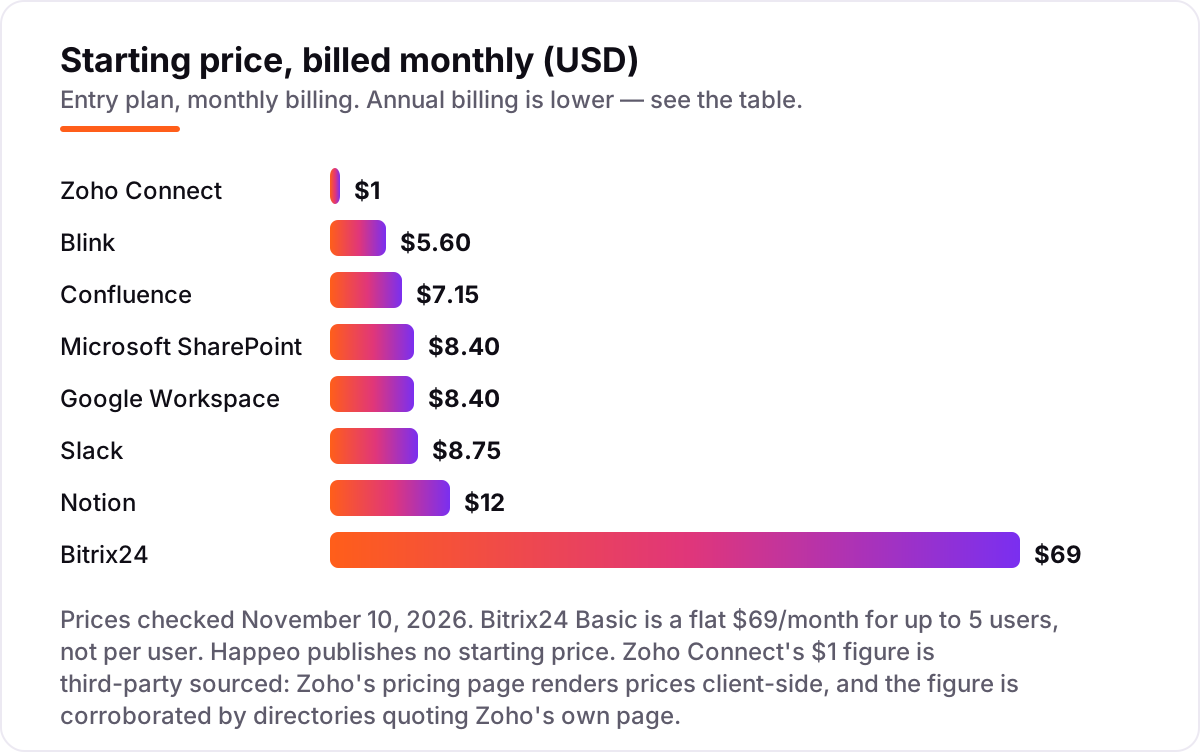
Intranet software for small business pricing: what you will actually pay
Take a 10-person business paying annually. On Blink Core at $3.75 a user a month, the year costs $450. On Zoho Connect the rate is $0.80 a user, but the 25-user minimum means the year costs $240 for 25 seats, not 10. On SharePoint or Google Workspace at $7 a user, the year costs $840 each. On Confluence Standard at $6 a user billed annually, the year costs $720. On Notion Plus at $10 a member, the year costs $1,200. On Slack Pro at $7.25 a user, the year costs $870.
Bitrix24 breaks the per-user pattern: Basic at $49 a month covers only 5 users, so a 10-person team needs Standard at $99 a month, or $1,188 a year. Happeo publishes no price, so there is no honest number to put in the comparison — request a quote at your headcount and compare it against the $450–$1,200 range above. The lesson is consistent: the per-user rate is only half the maths, and seat minimums and tier caps decide the real bill.
If the numbers above feel high for a business still finding customers, read our guide to how much SEO costs before spending on tools — getting found is usually the cheaper growth lever. And if you want help turning more searches into customers, our monthly SEO service is built around exactly that job.
Intranet vs employee app vs chat tool: know the difference
These three terms get used as if they mean the same thing, and buying the wrong one is the most common mistake in this category. An intranet is a managed home for the whole company: news targeted at the right people, a searchable handbook, an employee directory and proof that people read what matters. SharePoint and Happeo sit here, and so does a well-built Google Sites home page, though Sites cannot target news or track reads.
An employee app is built for people who never sit at a desk. Blink is the example in this list: a phone-first feed, chat and knowledge hub that staff join by phone number, with no corporate email and no desktop needed. A chat tool is different again: Slack carries the daily conversation brilliantly, but it has no news targeting, no directory and no page hierarchy, so the knowledge sinks as the chat scrolls past.
Pick the category that matches how your team works, then pick the tool inside it. A desk-based office of 10 needs a wiki or a SharePoint site; a shop floor of 30 needs Blink; a 200-person company that must prove every employee saw a policy change needs a dedicated intranet like Happeo.
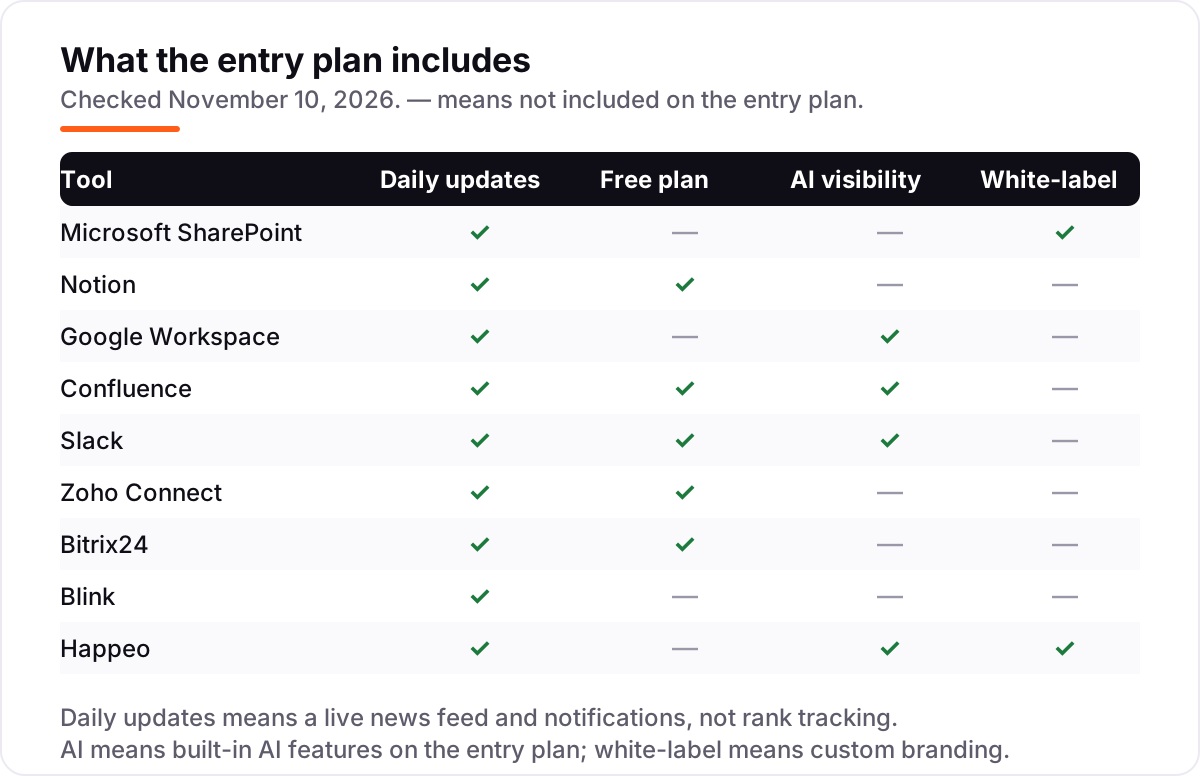
Quick comparison: tool type by need
| Buyer | Best pick | Why |
|---|---|---|
| Already on Microsoft 365 | Microsoft SharePoint | $7/user/month, intranet rides on the seat you already pay for |
| Small team that wants one flexible workspace | Notion | $10/member/month, wiki, handbook and tracker in one place |
| Already on Google Workspace | Google Workspace | $7/user/month, Sites, Chat, Drive and Gemini AI included |
| Documentation-first team, uses Jira | Confluence | $6/user/month billed annually, structured wiki with permissions |
| Chat-first team under 50 people | Slack | $7.25/user/month billed annually, channels plus canvases |
| Tightest budget, 25-plus people | Zoho Connect | $0.80/user/month billed annually, full social intranet |
| Wants CRM, tasks and intranet in one bill | Bitrix24 | $49/month flat for up to 5 users, Standard $99 for 50 |
| Frontline or deskless staff | Blink | $3.75/user/month billed annually, mobile-first, no email needed |
| Needs a real intranet at 200-plus people | Happeo | Custom quote, purpose-built intranet for Google Workspace teams |
One more check before you buy: open the pricing page yourself and read the plan you would actually buy, not the headline on the homepage. Promotional prices expire, free plans cap users, and per-user pricing multiplies fast on a team plan. The figures in this guide are the list prices as shown on November 10, 2026, so if a checkout page shows a different number, the checkout page is the one that will bill you.
How we chose
We checked each vendor's own pricing page on November 10, 2026 through fresh search-index crawls of the vendors' own pages, because the live page reader was unavailable today, and recorded the starting price exactly as shown, including the annual-billing figure where the page lists one. Two prices carry a caveat: Zoho Connect's pricing page renders its figures client-side, so the $1 a user a month figure is third-party sourced from directories quoting Zoho's own page, and Happeo publishes no starting price at all, so it is listed as a custom quote. Ratings come from G2, with review counts shown. We ranked the tools by fit for the most common buyer — a small business of 5 to 50 people that needs one place for news, documents and know-how — not by brand size. No vendor paid for a place in this list, and none of the links here are affiliate links.
What to do next
Start with the worked example above: count your people, check which suite you already pay for, and price the two or three tools that fit your headcount, including seat minimums and tier caps. Then take the free plan or trial of your top pick and load your real handbook and announcements into it for a week. If internal comms is the wider gap, compare our communication software picks and our internal newsletter software guide, and if you need a login hub for staff, see the employee portal reviews. Once your tools are in place, find out what's holding your rankings back.
Your stack only works if people find you
SerpAstra fixes what keeps your site off page one and makes it easy for AI assistants to recommend.
Get a free audit→Sources we checked (18)
- Microsoft 365 Business Basic pricing — microsoft.com (checked November 10, 2026)
- Microsoft SharePoint on G2 — 4.0/5, 8,980 reviews (checked November 10, 2026)
- Notion pricing — notion.com/pricing (checked November 10, 2026)
- Notion on G2 — 4.6/5, 13,765 reviews (checked November 10, 2026)
- Google Workspace pricing — workspace.google.com/pricing (checked November 10, 2026)
- Google Workspace on G2 — 4.6/5, 48,293 reviews (checked November 10, 2026)
- Confluence pricing — atlassian.com/software/confluence/pricing (checked November 10, 2026)
- Confluence on G2 — 4.1/5, 4,368 reviews (checked November 10, 2026)
- Slack pricing — slack.com/pricing (checked November 10, 2026)
- Slack on G2 — 4.5/5, 40,449 reviews (checked November 10, 2026)
- Zoho Connect pricing — zoho.com/connect/pricing.html (checked November 10, 2026)
- Zoho Connect on G2 — 4.5/5, 98 reviews (checked November 10, 2026)
- Bitrix24 pricing — bitrix24.com/pricing (checked November 10, 2026)
- Bitrix24 on G2 — 4.1/5, 609 reviews (checked November 10, 2026)
- Blink pricing — joinblink.com/pricing (checked November 10, 2026)
- Blink on G2 — 4.6/5, 404 reviews (checked November 10, 2026)
- Happeo — happeo.com (checked November 10, 2026; no published pricing)
- Happeo on G2 — 4.5/5, 155 reviews (checked November 10, 2026)
Shamim
Founder of SerpAstra
A full-stack SEO and digital marketer who spends most days on Local SEO for dental practices, AI search visibility and lead generation.
Frequently asked questions
What is the best intranet software for a small business?
Microsoft SharePoint is the best pick for most small businesses, because it rides on the $7 Microsoft 365 seat most teams already pay for. Notion at $10 a member is the flexible pick for teams that want a wiki and tracker in one place, and Google Workspace at $7 is the pick for Gmail-based teams.
How much does intranet software cost for a small business?
Between $1 and $12 per user per month at the entry level. Zoho Connect costs $1 a user, Blink $3.75 and SharePoint, Google Workspace and Confluence $6–$7 billed annually. A 10-person team pays $450 a year on Blink, $840 on SharePoint and $1,200 on Notion Plus, before any discounts.
Is there a free intranet software for small business?
Yes, with tight caps. Notion's free plan covers individuals and small teams, Confluence is free for up to 10 users, and Zoho Connect is free for up to 5 users. Bitrix24 has a free plan for 1–2 users. Free plans work for a handful of people; a whole company needs a paid plan.
SharePoint vs Notion vs Confluence: which is best for a small team?
SharePoint wins if you already pay for Microsoft 365, because the intranet costs nothing extra. Notion wins if you want the most flexible workspace and do not need strict permissions. Confluence wins if documentation is the job and you use Jira, thanks to its structured spaces and page permissions.
Do I need a dedicated intranet, or is Slack enough?
Slack is enough when the team is small and chat-first: channels plus canvases cover announcements and a handbook. It breaks down past about 50 people, because there is no news targeting, employee directory or page hierarchy. A dedicated intranet like Happeo earns its price when you must target news and prove people read it.
What should I check before paying for intranet software?
Four things: whether the price is per user or flat, and what the seat minimum or user cap is; whether the free plan covers your whole team or only a few people; whether the features you need sit on the entry plan or a higher tier; and whether the price is monthly or annual billing. All four vary widely across this list.
Free SEO and AI visibility audit
Find out what is holding your rankings back
Send us your site. Within 2 business days you get a written audit, an AI visibility check and a short fix list ranked by impact. Free, with no contract attached.
Request my free audit→Related guides
 Communication & Customer Support7 Best Communication Software for Small Business in 2026, ComparedCompare the 7 best communication software for small business on price, free plans, AI features and phone systems, with every price checked November 4, 2026.Read guide →
 Email, SMS & Social Media9 Best Internal Newsletter Software in 2026, ComparedCompare the 9 best internal newsletter software tools on price, free plans, read analytics and Outlook integration, with prices checked November 6, 2026.Read guide →
 HR & Recruiting10 Best Employee Portal Software Reviews in 2026, ComparedCompare the 10 best employee portal software reviews side by side on price, free trials and AI features, with every price checked November 6, 2026.Read guide →