
7 Best Load Testing Tools in 2026 (Free and Paid, Compared)
Compare the 7 best load testing tools on starting price, free plans, scripting language and cloud scale, with every price checked November 7, 2026.
 Shamim Mia, Founder, SerpAstraLast verified November 7, 202614 min read
We compare pricing pages, documentation and public reviews. We never accept payment for rankings.

Key takeaways
- Grafana k6 leads for developer teams at $19/month in the cloud; Apache JMeter and Locust are free with no paid tier, and Gatling Enterprise starts at €89/month billed annually.
- The single most important buying factor is how your team writes tests: code-first tools (k6, Locust, Gatling) fit developers, while JMeter's GUI and NeoLoad's codeless design fit testers who do not code.
- Five of the seven tools are free to start, but the bill that matters is the cloud bill: k6 charges $0.15 per virtual user hour above 500 included hours, while BlazeMeter and Artillery charge flat monthly rates.
- NeoLoad is the only tool here without a published price — budget for a sales conversation and a custom quote.
On this page
Quick comparison
| Tool | Best for | Starting price | Free plan |
|---|---|---|---|
| Grafana k6 | Development teams that write load tests in JavaScript and gate releases in CI | $19/mo | Yes (free tier) |
| Apache JMeter | Testers who need the widest protocol coverage at zero licence cost | Free | Yes (free) |
| Locust | Python teams that want readable, code-first load tests in the same repo as the app | Free | Yes (free) |
| Gatling | JVM teams that need high throughput from modest hardware and shareable reports | Free; €89/mo | Yes (Community) |
| Artillery | Node.js teams that want YAML scenarios and browser load testing with Playwright | Free; Team $199/mo | Yes (free tier) |
| BlazeMeter | Enterprises that run JMeter, Gatling and other open-source tests at cloud scale | $149/mo | Yes (Free Starter) |
| NeoLoad | Enterprise teams testing SAP, Oracle and other packaged applications under load | Custom quote | No (free trial) |
Make one of these tools?
We re-check this list every quarter. Send a correction, request a review, or ask about a clearly labeled sponsored spot.
Request a listingThe best load testing tools

Grafana k6
Best for: Development teams that write load tests in JavaScript and gate releases in CI
Grafana k6 fits teams that already treat testing as code. A script defines virtual users, stages and thresholds in JavaScript, runs with a single command, and can fail a CI pipeline when response times or error rates cross a limit. That makes performance a gate in delivery, not a report that arrives after release. The same script runs on a laptop, in Kubernetes, or in Grafana Cloud from 21 load zones.
The open-source engine covers most API and web load testing at no cost, while the cloud adds team reporting, larger scale and longer result retention. Grafana Cloud Pro costs a $19 monthly platform fee and includes 500 virtual user hours a month; extra hours cost $0.15 each. Choose k6 when your team lives in Git and CI and wants load tests that behave like the rest of the codebase.
What we like
- Tests are plain JavaScript stored in Git, so they get reviewed like any other code
- Thresholds and checks fail a build when response times or error rates cross a limit
- The same script runs locally, in Kubernetes, or in Grafana Cloud from 21 load zones
- Open-source engine is free, and the Cloud free tier covers 500 virtual user hours a month
Watch out for
- Cloud billing is metered, so a big test month costs more than the $19 platform fee
- Browser-based testing is an extension, not the core of the tool
- Only JavaScript and TypeScript are supported, so other-language teams must learn them

Apache JMeter
Best for: Testers who need the widest protocol coverage at zero licence cost
Apache JMeter has been the default free load testing tool for years, and its breadth is still unmatched at zero cost. A test plan can hit a web app, a REST API, a database through JDBC and a message queue, then report response times, throughput and error rates in a single run. The graphical builder lets a tester record a browser session, build a plan from it, and run it headlessly from CI.
The cost is learning time rather than money. JMeter is not a browser, so it does not run JavaScript or render pages, and dynamic values such as session tokens must be extracted and reused by hand. Large tests need distributed machines to generate enough load. For a team with varied protocols and no budget, JMeter remains excellent value; for API-only testing, k6 or Locust will feel lighter.
What we like
- The widest protocol coverage here: HTTP, JDBC, JMS, FTP and LDAP in one free tool
- Graphical test builder with recording, so a first test needs no code
- Distributed mode and HTML reports cover large tests without a paid tier
- A large plugin community covers almost every sampler and listener you will need
Watch out for
- The interface looks dated and takes time to learn for complex test plans
- Running large tests through the GUI is slow; big runs need headless or distributed mode
- Dynamic values such as session tokens must be correlated by hand

Locust
Best for: Python teams that want readable, code-first load tests in the same repo as the app
Locust models load the way a developer thinks about users: a user class with tasks, wait times and weights, written in Python. That readability helps when a test needs realistic behaviour, such as browsing, adding to a cart and checking out with different probabilities for each step. A web UI shows requests per second, response times and failures live, and the same tests can run distributed across several workers for larger scale.
Locust asks for code, so a QA team without Python skills will move slower than with a recorder-based tool. Its reports are also plainer than Gatling or BlazeMeter, with less built-in trend analysis across releases. For a Python shop that wants load tests in the same repository as the application, with the same review process, Locust is a clean and honest choice.
What we like
- Tests are plain Python with a clear user model of tasks, waits and weights
- A web UI shows requests per second, response times and failures live during a run
- Distributed mode scales across workers for larger tests
- Lightweight to run: it uses less memory per virtual user than JMeter
Watch out for
- No graphical test builder, so non-developers need a developer's help
- Reports are plainer than Gatling or BlazeMeter, with no built-in trend history
- Very large tests need distributed workers and your own machines

Gatling
Best for: JVM teams that need high throughput from modest hardware and shareable reports
Gatling is known for efficiency: its asynchronous engine can drive a large number of virtual users from a single machine, which lowers the infrastructure cost of a big test. Tests are written as code in Scala, Java or Kotlin, with a domain language for scenarios, feeders and checks, and the resulting reports show response-time percentiles, active users over time and error breakdowns in a form that is easy to share with developers.
The open-source Community Edition is enough for many teams, while Gatling Enterprise adds cloud load generation, team collaboration, trend comparison and CI integration. Enterprise Basic costs €89 a month billed annually and covers up to 60,000 virtual users on one load generator. Gatling suits performance engineers and JVM teams who value throughput and report quality over a drag-and-drop builder.
What we like
- An asynchronous engine drives thousands of virtual users from a single machine
- Expressive Scala, Java and Kotlin DSL with feeders, checks and scenarios
- Rich HTML reports with percentiles, throughput and error breakdowns
- Converters turn JMeter and LoadRunner scripts into Gatling simulations
Watch out for
- Scripting in Scala or Java can deter testers without a programming background
- Distributed testing and trend comparison across runs need Enterprise, not Community
- No-code test creation and the recorder sit on the paid platform

Artillery
Best for: Node.js teams that want YAML scenarios and browser load testing with Playwright
Artillery takes a configuration-first approach: scenarios, phases and assertions live in YAML, which a team can review in a pull request without reading a full program. That simplicity helps a team start load testing quickly, while plugins and JavaScript hooks cover custom logic when a scenario needs it. Artillery also stands out for browser load testing, since existing Playwright tests can be reused to measure real browser performance, including Web Vitals, under load.
The free CLI covers local and self-hosted runs, while Artillery Cloud adds a central dashboard, team collaboration and managed runners. Team costs $199 monthly and covers 1,000 reports a month, 6 months of retention and 8 team members, with 20% off on annual billing. For a JavaScript team, or one already invested in Playwright, Artillery is the most direct route to both API and browser load testing.
What we like
- Scenarios live in YAML, so a test can be reviewed in a pull request without reading code
- Existing Playwright tests can be reused to measure real browser performance under load
- Cloud dashboard adds shared reports, trends and spend controls for teams
- Both load testing and end-to-end testing are included in every subscription
Watch out for
- Cloud pricing is flat per plan, so occasional testers pay the same as heavy users
- Browser tests cost far more per virtual user than protocol-level tests
- Enterprise reporting and SSO need the Business plan or a $1,199/month add-on

BlazeMeter
Best for: Enterprises that run JMeter, Gatling and other open-source tests at cloud scale
BlazeMeter, from Perforce, is less a single test engine and more a platform for running the engines a team already uses. A JMeter test, a Gatling simulation or a Selenium functional test can be uploaded and run at cloud scale, with results, trends and team sharing in one place. That matters for enterprises that have invested in open-source tests but need managed infrastructure, geographic load zones and governance without rebuilding every test.
Basic costs $149 a month, or $1,188 a year billed annually, and covers 1,000 concurrent users, 200 tests a year and 1-hour tests. Pro costs $649 a month and raises the limits to 5,000 concurrent users, 80,000 virtual user hours a year and 5-hour tests. Small teams with one framework get more value running it directly; large teams with several frameworks will find the consolidation worth the price.
What we like
- Runs tests from many open-source frameworks, including JMeter, Gatling, Locust and Selenium
- Cloud load generation across regions, with no machines to manage yourself
- Shared reporting and trend analysis with CI integrations for Jenkins and Azure
- Browser recording turns a session into a JMeter test plan
Watch out for
- Basic caps tests at 1 hour and 200 tests a year, so soak tests need Pro at $649/month
- API testing and monitoring are separate plans, not part of the performance price
- Reviewers call it expensive, and the breadth can feel heavy for a small team

NeoLoad
Best for: Enterprise teams testing SAP, Oracle and other packaged applications under load
NeoLoad, from Tricentis, is built for the enterprise stack that simpler tools do not cover well. It tests web and API layers, SAP GUI and Fiori, Citrix, Oracle and other enterprise applications, and it can combine protocol results with RealBrowser measurements in a single run, so a team sees both server response and what a user actually experienced. Design can be codeless with drag-and-drop, or as-code with YAML and CLI execution.
That depth comes with enterprise pricing and a longer rollout, including training. Tricentis publishes no starting price, so the buying process starts with a trial and a sales conversation. For a company whose critical systems are SAP, Oracle or a mix of legacy and cloud applications, NeoLoad's protocol coverage is the deciding factor; for a web-only startup, an open-source tool delivers the same core answer at far lower cost.
What we like
- Codeless design plus YAML as-code authoring, so specialists and developers share one platform
- Native SAP, Citrix and enterprise protocol coverage that code-first tools lack
- RealBrowser measures browser-level performance alongside protocol results in one run
- Automatic correlation and script maintenance cut the rework after each release
Watch out for
- No published price, so budgeting needs a sales conversation and a custom quote
- Enterprise depth needs training and a longer rollout than a code-first tool
- Reviewers report licence costs on the high side versus open-source alternatives
The best load testing tools answer one question before release day: how many users can your app handle before it slows down or falls over? We ranked the seven tools below by fit for the most common buyer — a team that needs a trustworthy answer without hiring a performance specialist — starting with the code-first tools developers reach for first and ending with the enterprise platforms, and every price was checked on the vendor's own pricing page on November 7, 2026.
How to choose the best load testing tools
- Start with how your team writes tests. Developers who live in code will move fastest with k6 (JavaScript), Locust (Python) or Gatling (Scala or Java). Testers who do not code will move faster with JMeter's graphical builder or NeoLoad's codeless design.
- Match the tool to the protocol. JMeter and NeoLoad cover the widest protocol mix, including databases and message queues; k6, Locust and Gatling are strongest on HTTP APIs and web apps. If the system under test is SAP or Oracle, NeoLoad is the only tool here built for it.
- Decide where the load comes from. Open-source tools run on your own machines, so you pay for the load generators; cloud tools (Grafana Cloud k6, BlazeMeter, Artillery Cloud) generate load from many regions and charge for it. A single laptop covers a few hundred virtual users; thousands need cloud or distributed runners.
- Check what happens after the run. A good report shows response-time percentiles, throughput and error rates per step, and lets you compare runs over time. Gatling's reports and BlazeMeter's trend analysis do this best; Locust's built-in history is the thinnest here.
- Price the second month, not the first. Free tiers and trials end. k6's free tier covers 500 virtual user hours a month, BlazeMeter Basic caps at 200 tests a year, and Artillery Team is a flat $199 a month whatever you run.
Load testing sits next to other testing work, so the same shortlist logic applies elsewhere: our guide to email testing tools covers the same kind of pre-send check for a different channel. And before you publish the performance results or a launch post, run your titles through the free SERP snippet preview tool — it shows exactly how the title and description will look in Google.
Whatever you shortlist, run one real user journey before you pay. Pick the checkout flow or the login flow, model the steps a real user takes, and run it at your current peak load. That single run tells you more than any comparison table: whether the tool is easy to script, whether the report points at the bottleneck, and whether the price makes sense at your scale. Start free where you can — five of the seven tools here cost nothing to try.
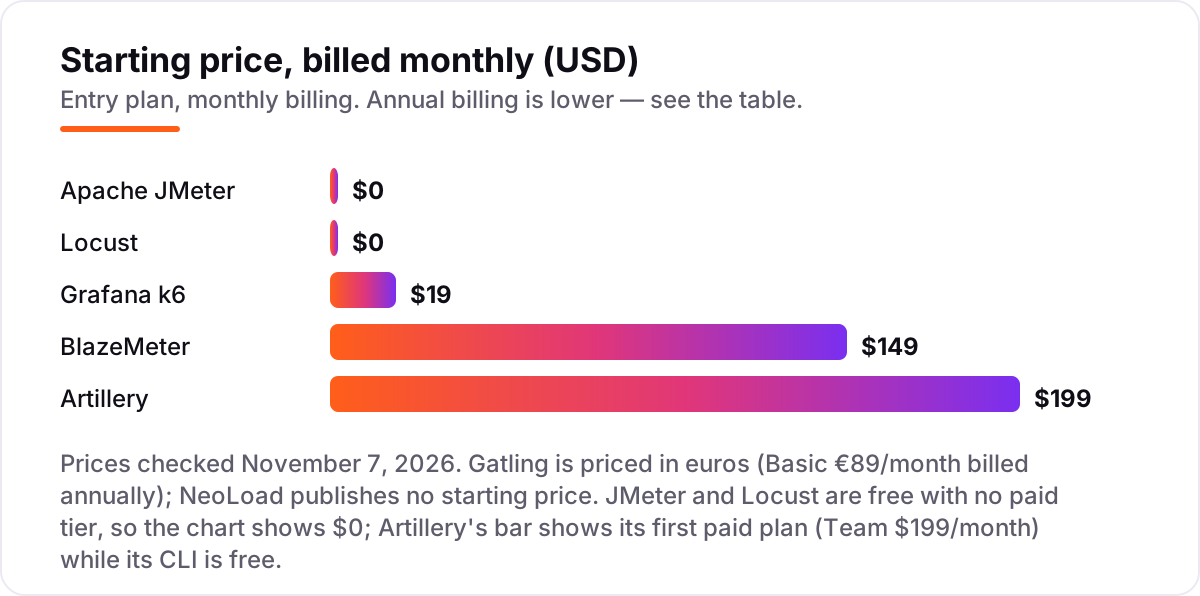
Load testing tools pricing: what you will actually pay
Take a team that runs one 1-hour test each week with 500 virtual users — four tests a month, 2,000 virtual user hours in total. On Grafana Cloud k6 Pro, the $19 platform fee includes 500 virtual user hours, so the other 1,500 hours cost $0.15 each: $19 plus $225, or $244 for the month. The same four tests on BlazeMeter Basic cost a flat $149 a month, since 500 concurrent users and 1-hour tests sit inside Basic's limits and four tests a month is 48 a year against a 200-test cap.
Artillery Team costs a flat $199 a month for the same workload, with 1,000 reports a month against only four used, and 20% off on annual billing. Gatling Enterprise Basic, at €89 a month billed annually, covers up to 60,000 virtual users on one load generator, so the same four tests fit easily. JMeter and Locust cost $0 in licences for the same four tests — but the team pays for the machines that generate the load, whether that is a cloud server or a spare laptop left running overnight.
Over a year, the metered and flat options diverge. Four tests a month on k6 Pro costs about $2,928 a year at that usage, before any volume discount on virtual user hours. BlazeMeter Basic costs $1,788 a year on monthly billing, or $1,188 a year billed annually. Artillery Team costs $2,388 a year on monthly billing, with 20% off on annual billing. NeoLoad has no published price to compare against, so any enterprise budget for it starts with a sales quote, not a list price.
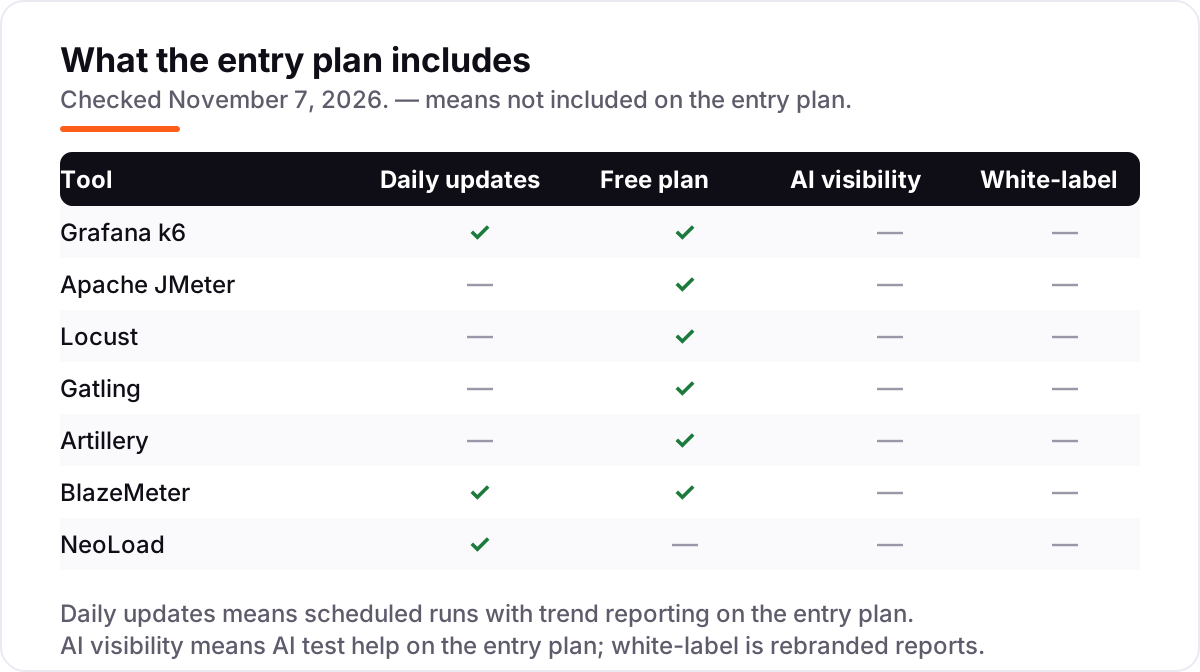
Know the difference: load testing vs stress testing
The confusion in this category is between two tests that sound alike but answer different questions. Load testing checks how an application behaves under the traffic you expect — peak shopping-hour load, Monday-morning logins — and whether response times stay within the limits you promised. Stress testing pushes past that expected load to find the breaking point and to see how the system fails when it gets there. Every tool in this list does both; the difference is in the test you design, not the tool you buy.
There is a second, quieter confusion: load testing is not monitoring. A load test generates traffic in a test environment and measures the response; monitoring watches real traffic in production. A site can pass a load test and still fail in production if the test environment does not match production sizing, or if the test data is too small. Run load tests in an environment that mirrors production as closely as you can afford, and treat monitoring as the check that keeps running after the test ends.
A third distinction worth knowing is protocol-level testing versus browser-level testing. Protocol tools (k6, JMeter, Locust, Gatling) send HTTP requests directly and can simulate thousands of users cheaply, but they do not run JavaScript or render pages. Browser tools (Artillery with Playwright, NeoLoad with RealBrowser) drive a real browser, so they measure what a user actually experiences — at roughly ten times the cost per virtual user. Most teams need protocol testing first and add browser testing only for the flows where rendering time matters.
Quick comparison: tool type by need
| Buyer | Best pick | Why |
|---|---|---|
| Developer team writing tests as code | Grafana k6 | JavaScript tests in Git with CI gates, from $19/month in the cloud |
| Widest protocol coverage for $0 | Apache JMeter | Free, with HTTP, JDBC, JMS, FTP and LDAP in one tool |
| Python team, code-first tests | Locust | Readable Python tests with a live web UI, free |
| High throughput from one machine | Gatling | Efficient engine, Community Edition free, Enterprise from €89/month |
| Node.js team or browser load testing | Artillery | YAML scenarios plus Playwright browser tests, free to start |
| Enterprise running many frameworks | BlazeMeter | Runs JMeter, Gatling and Locust tests at cloud scale, from $149/month |
| SAP and packaged enterprise apps | NeoLoad | Codeless design with native SAP coverage, priced on quote |
Mistakes to avoid
- Testing a single endpoint at full speed. Hammering one URL tells you nothing about real behaviour. Model a full user journey — browse, add to cart, check out — with think time between steps, or the results will flatter the system.
- Watching the average instead of the percentiles. An average response time can hide a slow minority that represents real users. Judge a test on the 95th percentile and the error rate, not the mean.
- Running the test against a tiny staging server. A staging box a tenth the size of production will not predict production behaviour. Mirror production sizing where you can, seed realistic data volumes, and record the build and data size with each result.
- Forgetting the load generators in the budget. JMeter and Locust are free, but the machines that generate the load are not. A test that needs ten generators costs ten servers, whether they are cloud instances or spare hardware.
- Buying the enterprise platform for a web-only startup. NeoLoad and BlazeMeter earn their price on SAP, multi-framework estates and compliance needs. A team testing one web app and one API will get the same core answer from k6 or JMeter at a fraction of the cost.
How we chose
We checked each vendor's own pricing page on November 7, 2026 and recorded the starting price exactly as shown, including the annual-billing figure where the page lists one, and we ranked the tools by fit for the most common buyer — a team that needs a trustworthy load test without hiring a performance specialist — not by brand size. Tricentis publishes no starting price for NeoLoad, so we list it as a custom quote rather than repeating the figure that circulates in third-party roundups. Artillery has no G2 review page, so it carries no rating here; the other six ratings come from the G2 review pages we opened on November 7, 2026. No vendor paid for a place in this list, and none of the links here are affiliate links.
What to do next
Start with the free version of your top pick and run one real user journey at your current peak load. Check that the report shows percentiles and error rates per step, and that the price still makes sense when you run the test weekly rather than once. If the test shows the site slowing down under load, the fix is usually on the site itself — our SEO audit service finds the performance and structure issues that hold rankings back, or compare approaches in our guide to A/B testing software for app developers. Once your tools are in place, find out what's holding your rankings back.
Your stack only works if people find you
SerpAstra fixes what keeps your site off page one and makes it easy for AI assistants to recommend.
Get a free audit→Sources we checked (13)
- Grafana pricing — grafana.com/pricing (checked November 7, 2026)
- Apache JMeter — jmeter.apache.org (checked November 7, 2026)
- Locust — locust.io (checked November 7, 2026)
- Gatling pricing — gatling.io/pricing (checked November 7, 2026)
- Artillery pricing — artillery.io/pricing (checked November 7, 2026)
- BlazeMeter pricing — blazemeter.com/pricing (checked November 7, 2026)
- Tricentis NeoLoad — tricentis.com/products/performance-testing-neoload (checked November 7, 2026)
- k6 reviews — g2.com/products/k6/reviews (checked November 7, 2026)
- Apache JMeter reviews — g2.com/products/apache-jmeter/reviews (checked November 7, 2026)
- Locust reviews — g2.com/products/locust/reviews (checked November 7, 2026)
- Gatling reviews — g2.com/products/gatling/reviews (checked November 7, 2026)
- BlazeMeter reviews — g2.com/products/blazemeter-continuous-testing-platform/reviews (checked November 7, 2026)
- Tricentis NeoLoad reviews — g2.com/products/tricentis-tricentis-neoload/reviews (checked November 7, 2026)
Shamim
Founder of SerpAstra
A full-stack SEO and digital marketer who spends most days on Local SEO for dental practices, AI search visibility and lead generation.
Frequently asked questions
What is the best load testing tool for beginners?
Apache JMeter is the best free starting point for breadth, since its graphical builder needs no code and it covers the most protocols. Grafana k6 is the better start for developers who prefer code, because tests are plain JavaScript that run in one command. Both have large communities and documentation, and either can run a first meaningful test in a day.
How much does load testing software cost?
Entry prices run from $0 to $149 a month. JMeter and Locust are free with no paid tier, k6 Cloud Pro starts at $19 a month plus usage, Gatling Enterprise starts at €89 a month billed annually, and BlazeMeter Basic is $149 a month. Artillery Team is $199 a month, and NeoLoad is priced on a custom quote.
Is there a free load testing tool?
Yes, five of the seven tools here are free to start. JMeter and Locust are fully free with no paid tier. Grafana k6, Gatling and Artillery all have free open-source versions, and k6 and Artillery add free cloud tiers. BlazeMeter has a free Starter plan, while NeoLoad offers a free trial but no free plan.
What is the difference between load testing and stress testing?
Load testing checks how an application behaves under the traffic you expect, such as peak shopping-hour load, and whether response times stay within limits. Stress testing pushes past that expected load to find the breaking point and see how the system fails. Use load testing to confirm you are ready for launch, and stress testing to learn where the limits sit.
How many virtual users do I need to test?
Base the number on real traffic, not a round number. Look at peak concurrent users, requests per second and session length from production analytics, then test at that level plus a margin of about 25–50% for growth and spikes. A site with 500 users at peak should test at 500, then at 750 to see where performance starts to bend.
Do I need the cloud version of k6, JMeter or Gatling?
No, not to start. The open-source versions run on your own machines and cover most API and web load testing. Pay for the cloud when you need geographic load zones, shared reporting across a team, or more virtual users than one machine can generate. If one laptop already covers your peak load, the free version is enough.
Free SEO and AI visibility audit
Find out what is holding your rankings back
Send us your site. Within 2 business days you get a written audit, an AI visibility check and a short fix list ranked by impact. Free, with no contract attached.
Request my free audit→Related guides
 Email, SMS & Social Media8 Best Email Testing Tools in 2026 (Free and Paid, Compared)Compare the 8 best email testing tools on price, free plans, rendering previews and automation, with every price checked on November 6, 2026.Read guide →
 Digital Marketing & Ads9 Best A/B Testing Software for App Developers in 2026, ComparedCompare the 9 best A/B testing software for app developers on price, free tiers, SDKs and stats, with every price checked today, November 4, 2026.Read guide →
 IT, Security & DevOpsBest Web Scraping Software Reviews for 2026: 10 Options Compared by Use CaseCompare the 10 best web scraping software reviews by price, free plan and use case, from $19 APIs to enterprise tools, with prices checked November 7, 2026.Read guide →