
10 Best Marketing Planning Software in 2026, Compared
Compare the 10 best marketing planning software tools on price, free plans, calendars and approvals, with every price checked November 5, 2026.
 Shamim Mia, Founder, SerpAstraLast verified November 5, 202612 min read
We compare pricing pages, documentation and public reviews. We never accept payment for rankings.

Key takeaways
- CoSchedule is the best fit for most marketing teams at $29/month billed annually; HubSpot Marketing Hub follows at $20/seat a month for teams that want the CRM built in, and Trello Standard is the cheapest paid start at $5/user a month billed annually.
- Five tools here have genuinely free plans — CoSchedule, HubSpot, Monday.com, Asana and ClickUp — but Asana's free plan stops at 2 users and Trello's at 10 boards per workspace.
- The single most important buying factor is the limit that forces your next upgrade: user caps, seat minimums and per-workspace pricing decide what you actually pay, not the headline price.
- Planable is the only tool priced per workspace instead of per seat, so a large team pays the same $33 a month billed annually while a second brand doubles the bill.
On this page
Quick comparison
| Tool | Best for | Starting price | Free plan |
|---|---|---|---|
| CoSchedule | Marketing teams that plan campaigns on a shared calendar and publish social posts from the same view | $29/mo (annual) | Yes (free plan) |
| HubSpot Marketing Hub | Growing teams that want campaign planning, email, landing pages and CRM records in one system | $20/seat/mo | Yes (free plan) |
| Monday.com | Visual teams that plan campaigns as boards and want automations without a learning curve | $9/seat/mo (annual) | Yes (free plan) |
| Asana | Cross-functional teams running campaigns, launches and repeatable processes | $10.99/user/mo (annual) | Yes (2 users) |
| ClickUp | Small teams that want docs, goals, chat and Gantt in one workspace at the lowest entry price | $9/user/mo (annual) | Yes (free) |
| Planable | Agencies and brands whose bottleneck is getting social posts approved by clients | $33/workspace/mo (annual) | No (50-post trial) |
| Wrike | Larger marketing departments that need proofing, resource planning and reporting | $9.80/user/mo (annual) | Yes (free plan) |
| Airtable | Teams that plan campaigns as a database: every asset, date and owner in linked tables | $20/user/mo (annual) | Yes (free plan) |
| Notion | Teams that want campaign plans, briefs and wikis in one flexible workspace | $10/member/mo (annual) | Yes (free plan) |
| Trello | Small teams that want the simplest visual board for campaign tasks | $5/user/mo (annual) | Yes (free plan) |
Make one of these tools?
We re-check this list every quarter. Send a correction, request a review, or ask about a clearly labeled sponsored spot.
Request a listingThe best marketing planning software

CoSchedule
Best for: Marketing teams that plan campaigns on a shared calendar and publish social posts from the same view
CoSchedule is the only tool here built around the calendar first: campaigns, blog posts and social messages all sit on one shared calendar, and moving a campaign's launch date moves its whole schedule with it. Starter costs $29 a month billed annually, or $39 billed monthly, for one user and three social profiles, with unlimited scheduling and publishing, ReQueue evergreen recycling and AI writing assistants included.
The catch is the seat count. Starter allows exactly one user, and Professional allows three at most, so a team of four or more needs the custom Suite plan. Extra social profiles cost $5 a month each, and X profiles cost $16 a month on top of that.
What we like
- The only calendar-first planner here: campaigns, social posts and projects on one shared calendar
- ReQueue refills gaps in the schedule with evergreen posts automatically
- AI Social Assistant and AI Campaign Assistant are included on Starter, not held for a higher tier
- A real free plan covers one profile and 15 scheduled posts
Watch out for
- Starter covers 1 user only — a team of 3 needs Professional at $49/month billed annually
- X (Twitter) profiles cost $16 a month each on every paid plan
- Approvals and white-label client calendars wait for Professional or Suite

HubSpot Marketing Hub
Best for: Growing teams that want campaign planning, email, landing pages and CRM records in one system
HubSpot Marketing Hub is the only tool here where the plan and the customer record are the same system: campaigns, emails, landing pages and forms all feed the CRM, so a campaign's results attach to real contacts instead of living in a spreadsheet. Starter costs $20 a seat a month, or $7 a seat a month billed annually for new customers, and includes 1,000 marketing contacts, email marketing, landing pages, forms and live chat.
The price to watch is the contact count, not the seat count. Extra contacts cost $50 a month per 1,000 on Starter, and the step up to Professional is $890 a month plus a $3,000 onboarding fee, so budget for the list you will have in a year, not the list you have today.
What we like
- Campaign planning is wired straight into the CRM, so plans, contacts and results live together
- The free plan covers 2 users and 2,000 email sends a month with no time limit
- Starter removes HubSpot branding from emails, forms and landing pages
- More than 1,500 integrations connect the Hub to the rest of the stack
Watch out for
- The jump to Professional is steep: $890/month plus a $3,000 one-time onboarding fee
- Contact-based pricing means the bill grows as the marketing list grows
- AI campaign tools and advanced automation wait for Professional

Monday.com
Best for: Visual teams that plan campaigns as boards and want automations without a learning curve
Monday.com turns a campaign plan into a color-coded board anyone can read at a glance: every task shows its owner, date and status, and the timeline and calendar views show the whole quarter in one look. Basic costs $9 a seat a month billed annually, or $12 billed monthly, and covers unlimited items and boards, 5 GB of storage and unlimited free viewers for stakeholders.
The two traps are the seat minimum and the feature gate. Every paid plan needs at least three seats, so a solo planner still pays $27 a month on Basic, and automations and integrations only arrive on Standard at $12 a seat a month billed annually.
What we like
- The most visual planner here: color-coded boards, timelines and calendars anyone can read
- Unlimited free viewers let stakeholders watch the plan without a paid seat
- 1,000 AI credits a month are included even on Basic
- Hundreds of templates cover campaign launches, content calendars and events
Watch out for
- Every paid plan needs at least 3 seats, so a solo planner still pays $27/month on Basic
- Basic has no automations or integrations — those start on Standard at $12/seat a month
- Time tracking, private boards and formulas wait for Pro at $19/seat a month

Asana
Best for: Cross-functional teams running campaigns, launches and repeatable processes
Asana is the tool teams actually open: one assignee per task makes ownership unambiguous, and timelines, forms and automation rules cover most campaign workflows without configuration. Starter costs $10.99 a user a month billed annually, or $13.49 billed monthly, and includes timeline and Gantt views, dashboards, custom fields, unlimited automations and unlimited free guests.
The free plan is the tightest in this list: Personal stops at two users, so a team of three has no free option at all. Portfolios, goals, workload and native time tracking all wait for Advanced at $24.99 a user a month, which more than doubles the Starter price.
What we like
- Asana AI — AI Teammates, Dash and AI Studio — is included on Starter
- Unlimited automations and unlimited free guests come with Starter
- Timeline and Gantt views make campaign dates visible to the whole team
- Forms and custom templates turn repeatable campaigns into a one-click start
Watch out for
- The free Personal plan stops at 2 users, so a team of 3 has no free option
- Portfolios, goals and workload reporting wait for Advanced at $24.99/user a month
- Native time tracking sits on Advanced, not Starter

ClickUp
Best for: Small teams that want docs, goals, chat and Gantt in one workspace at the lowest entry price
ClickUp packs docs, whiteboards, goals, chat and Gantt into one workspace, and its free plan is the most generous here: unlimited tasks and unlimited members at $0, with only a 60 MB storage cap to show for it. Core costs $9 a user a month billed annually, or $12 billed monthly, and adds unlimited storage and Spaces, custom fields, Gantt charts and 1,000 automations a month.
The catch is that upgrades bill the whole workspace: every member becomes a paid seat, including people who only needed to watch. The flexibility also takes setup — a blank workspace plans nothing until someone configures Spaces, statuses and views.
What we like
- The most generous free plan here: unlimited tasks and unlimited members at $0
- Core includes Gantt charts, custom fields and unlimited storage for $9/user a month billed annually
- 1,000 AI credits a user a month are bundled into Core
- Docs, whiteboards, goals and chat sit in the same workspace as the plan
Watch out for
- Upgrading bills the whole workspace — every member becomes a paid seat
- The flexibility takes setup: a blank workspace needs configuring before it plans anything
- Free Forever storage is only 60 MB, so file-heavy teams hit the limit fast

Planable
Best for: Agencies and brands whose bottleneck is getting social posts approved by clients
Planable is built for the review step: posts are drafted in a workspace where teammates and clients comment, suggest and approve, then publish to Facebook, Instagram, LinkedIn, X, TikTok and more. Basic costs $33 a workspace a month billed annually, or $39 billed monthly, for 60 posts a month, 4 social pages and 3 campaigns — with unlimited users on every plan.
The pricing model is the thing to model before you buy. One workspace covers one brand or client, so five clients means five workspaces at $33 a month each billed annually, and analytics and the social inbox cost extra as add-ons. The first 50 posts are free, with no time limit.
What we like
- Unlimited users on every plan — a 20-person team pays the same as a 2-person team
- Approval workflows are the core of the product, not an add-on
- The first 50 posts are free with no time limit and no card
- Feed, calendar, grid and list views show the same plan four ways
Watch out for
- Per-workspace pricing multiplies fast: 5 clients means 5 workspaces at $33 a month each billed annually
- Analytics and the social inbox are paid add-ons, not included on any plan
- Basic caps at 60 posts a month and 4 social pages per workspace

Wrike
Best for: Larger marketing departments that need proofing, resource planning and reporting
Wrike is the enterprise end of this list: Gantt charts, dashboards, proofing and resource management built for marketing departments that run dozens of campaigns across teams. Team costs $9.80 a user a month billed annually, or $10 billed monthly, for 2 to 15 users, with interactive Gantt charts, shareable dashboards and AI Essentials included.
The price ladder is steep and lumpy. The features most marketing teams actually want — proofing, resource management and advanced reporting — live on Business at $25 a user a month, and seats are sold in groups of five, so a six-person team pays for ten.
What we like
- Proofing, resource management and advanced reporting are built for marketing teams
- AI Essentials are included on the Team plan
- The free plan covers up to 5 users with board, table and Gantt views
- Interactive Gantt charts and shareable dashboards come with Team
Watch out for
- The useful features jump to Business at $25/user a month — Team is the plain tier
- Seats are sold in groups of 5, so a 6-person team pays for 10
- Setup is heavier than Trello or Notion and usually needs an admin to own it

Airtable
Best for: Teams that plan campaigns as a database: every asset, date and owner in linked tables
Airtable plans a campaign the way a database would: one table for content, one for channels, one for owners, all linked, so changing a launch date updates every view at once. Team costs $20 a user a month billed annually, or $24 billed monthly, and covers 50,000 records per base, Gantt and timeline views, 25,000 automation runs a month and 20 GB of attachments per base.
The billing rule softens the price: only editors are billed, so read-only collaborators, form submitters and share-link viewers cost nothing. The hard edge is the record cap — a base that outgrows 50,000 records pushes the team to Business at $45 a user a month.
What we like
- Linked tables turn a campaign plan into a live database of assets, dates and owners
- Only editors are billed — read-only collaborators and form submitters are free
- Gantt and timeline views come with the Team plan
- 15,000 AI credits a paid user a month are included on Team
Watch out for
- The most expensive per-seat price here at $24/user a month billed monthly
- Record caps push growing teams to Business at $45/user a month
- A database mindset takes longer to learn than a board or a calendar
Notion
Best for: Teams that want campaign plans, briefs and wikis in one flexible workspace
Notion is the docs-first choice: the campaign brief, the calendar and the asset database live in the same workspace, so the plan and the writing never drift apart. Plus costs $10 a member a month billed annually, or $12 billed monthly, and covers unlimited blocks and file uploads, a 30-day page history, unlimited guests and custom forms and sites.
The two limits to know are the free-plan block cap and the AI gate. A free workspace with two or more members stops at 1,000 blocks, and full Notion AI — the Agent, meeting notes and enterprise search — needs Business at $20 a member a month, not Plus.
What we like
- Briefs, calendars and databases live in one workspace instead of three tools
- Guests are free on every plan, so clients and freelancers cost nothing
- Plus is cheap per seat and covers unlimited blocks, uploads and guests
- Students and educators get Plus free for one member
Watch out for
- Full Notion AI needs Business at $20/member a month — Plus gets a trial only
- The free plan caps teams at 1,000 blocks once a second member joins
- No built-in proofing or approval workflow, and an over-built workspace slows teams down

Trello
Best for: Small teams that want the simplest visual board for campaign tasks
Trello is the simplest tool here and proud of it: a campaign is a board, a task is a card, and anyone can read the whole plan in one glance. Standard costs $5 a user a month billed annually, or $6 billed monthly, and covers unlimited boards and collaborators, custom fields, advanced checklists, card mirroring and 1,000 automation runs a month.
The simplicity has edges. Calendar, Timeline, Table, Dashboard and Map views all wait for Premium at $10 a user a month, and the free plan stops at 10 boards and 10 collaborators per workspace — fine for one campaign, tight for a whole marketing calendar.
What we like
- The cheapest paid start here at $5/user a month billed annually
- The simplest tool to adopt — a new hire understands a board in minutes
- Atlassian Intelligence writing and summaries are included on Standard
- Unlimited Power-Ups connect Trello to Slack, Google Drive and 200+ apps
Watch out for
- Calendar, Timeline, Table, Dashboard and Map views wait for Premium at $10/user a month
- The free plan stops at 10 boards and 10 collaborators per Workspace
- Reporting is thin — there is no real dashboard on Standard
The best marketing planning software turns a scattered campaign calendar into one shared plan: every launch date, owner and asset visible in one place, so nothing ships late because someone missed a spreadsheet update. We ranked the ten tools below by fit for the most common buyer — a marketing team planning campaigns across channels — starting with the calendar-first planners and ending with the simplest boards, and every price was checked on the vendor's own pricing page on November 5, 2026.
How to choose the best marketing planning software
- Start with the unit you will be billed for. Most tools charge per seat, but Planable charges per workspace, so a 20-person team costs the same as a 2-person team there — while five clients cost five workspaces.
- Count the seats you actually need, then check the minimum. Monday.com needs at least 3 seats on paid plans, CoSchedule Starter allows exactly 1 user, and Wrike sells seats in groups of 5.
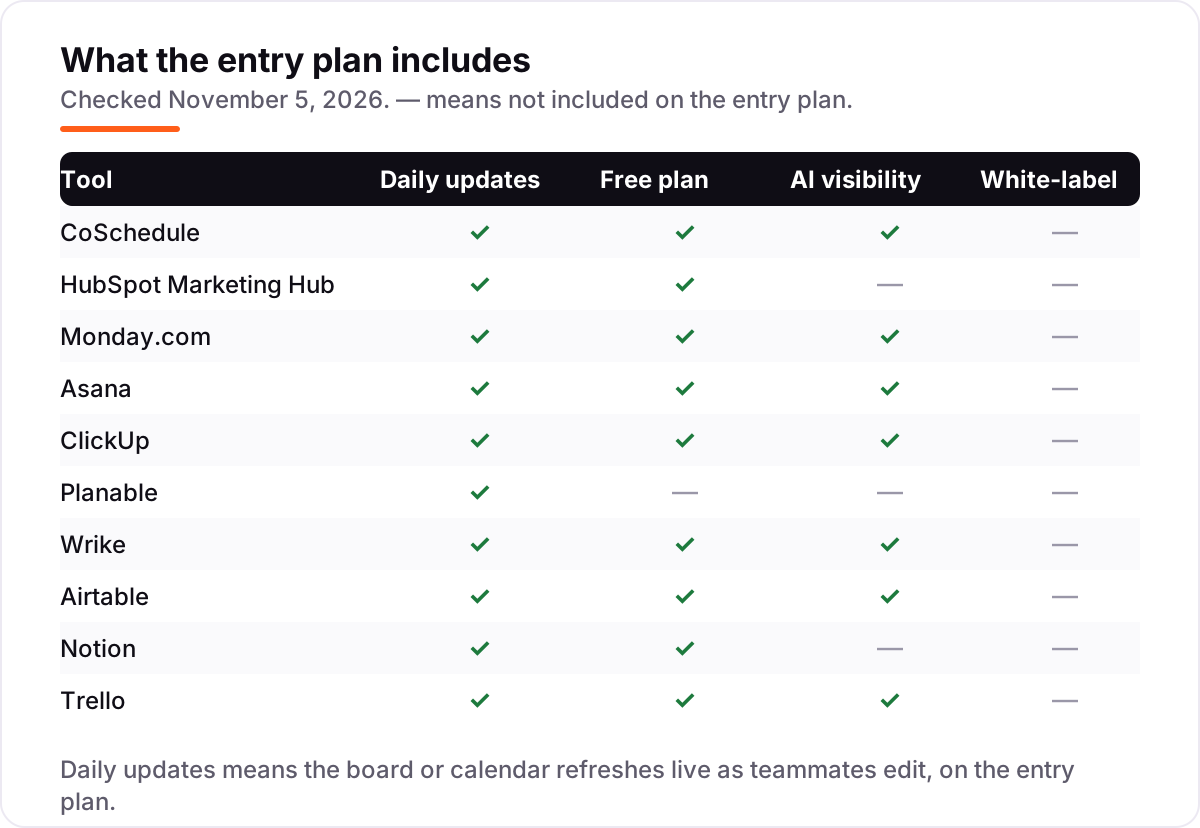
- Check what the entry plan leaves out. Approvals wait for CoSchedule Professional, automations wait for Monday.com Standard, extra views wait for Trello Premium, and full AI waits for Notion Business.
- Decide how approvals work before you buy. Planable is approval-first, CoSchedule adds message approvals on Professional, and the general tools handle approvals through workflows and comments instead.
- Try the free plan with a real campaign, not a demo. Run one launch end to end — brief, dates, approvals, publishing — and check that the calendar view still makes sense when ten campaigns overlap.
Planning is one system in your stack, not the whole stack. If the campaigns also need to be found online, our monthly SEO service handles the visibility side, and our guide to marketing platforms for small business SEO covers the wider toolset. And before a campaign goes live, build its tracking links with the free UTM builder tool — it keeps every channel's results separate in analytics.
Marketing planning software pricing: what you will actually pay
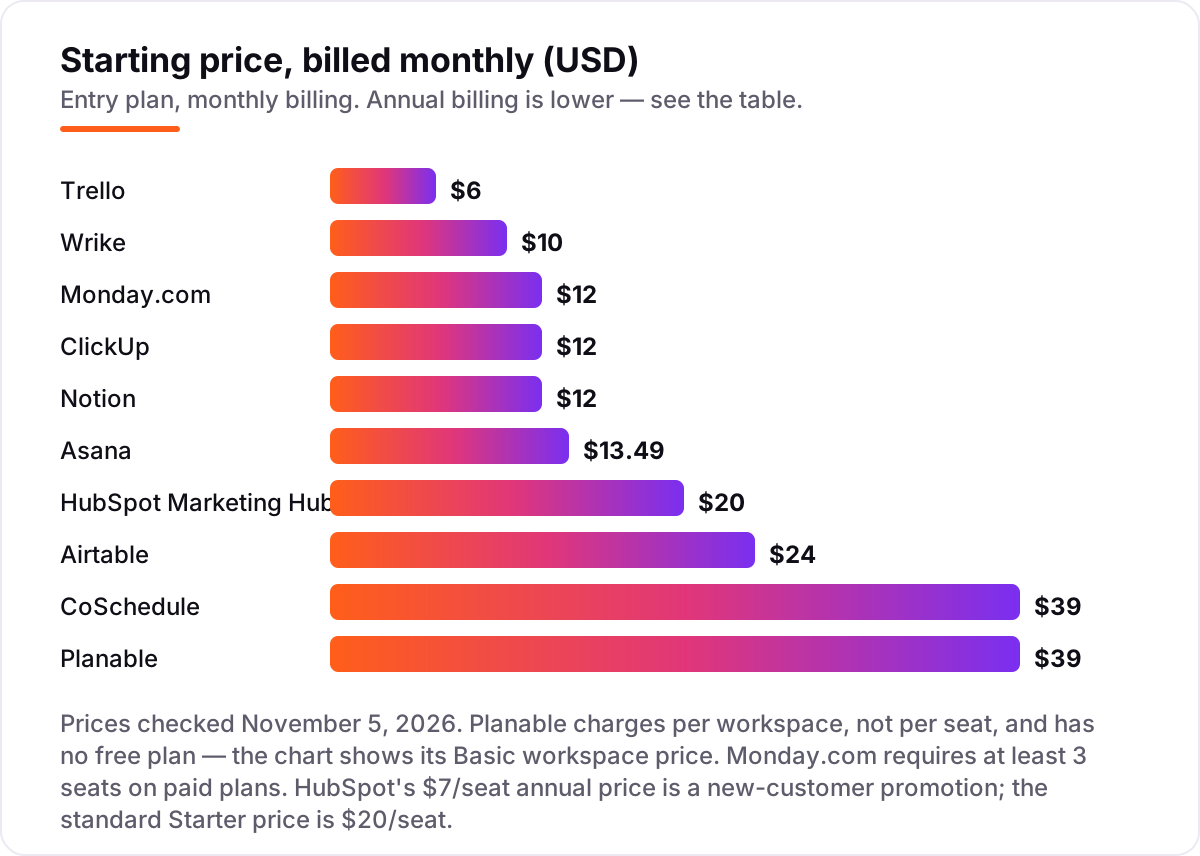
Take a five-person marketing team running one brand. On monthly billing, the subscription costs $30 a month on Trello Standard, $39 on Planable Basic (one workspace, unlimited users), $50 on Wrike Team, $60 on Monday.com Basic, ClickUp Core or Notion Plus, $67.45 on Asana Starter, $100 on HubSpot Starter and $120 on Airtable Team. CoSchedule does not fit this team at all on its published plans: Starter allows one user and Professional allows three at most, so five people need the custom Suite plan.
On annual billing, the same five people cost $300 a year on Trello, $396 on Planable, $540 on Monday.com or ClickUp, $588 on Wrike, $600 on Notion, $659.40 on Asana and $1,200 on Airtable or HubSpot at standard prices. Two numbers need adjusting before they are real: Monday.com's $540 assumes the 3-seat minimum is already met, and HubSpot's $1,200 drops to $420 a year on the $7-a-seat new-customer promotion. A second brand changes the picture only for Planable, where a second workspace adds another $33 a month billed annually — every seat-based tool in this list absorbs a second brand for free until you add people.
Three costs sit outside every number above. First, the step-up tiers: Asana Advanced at $24.99 a user a month, Wrike Business at $25 and HubSpot Professional at $890 a month plus a $3,000 onboarding fee all wait one tier above the entry price. Second, add-ons: Planable analytics and inbox, CoSchedule X profiles at $16 a month each, and HubSpot's extra contacts at $50 a month per 1,000. Third, the per-seat tools bill every member on upgrade — ClickUp bills the whole workspace, and Wrike sells seats in groups of five — so count guests and viewers before you compare headline prices. If email is a big part of your campaigns rather than the planning itself, compare the wider field in our guide to email marketing software for small business.
Know the difference: marketing planning software vs project management software
The confusion in this category is between a campaign tool and a task tool. Marketing planning software is campaign-first: the calendar, the channels, the approvals and the publishing dates are the work itself. General project management software is task-first: it tracks any work, and campaigns are just one kind of project inside it. CoSchedule and Planable are the campaign-first tools here — their calendars and approval flows exist for publishing. Asana, Monday.com, ClickUp and Wrike are general tools that plan campaigns well, but their boards also run product launches, hiring and operations.
There is a second distinction worth knowing: docs tools and database tools plan differently again. Notion plans through documents — the brief is the plan — and Airtable plans through linked tables, where every asset, date and owner is a record. Both are powerful, but neither publishes a post or approves one: if the bottleneck is getting content out the door, the campaign-first tools beat them. Pick the campaign-first tool when publishing dates are the work; pick the general tool when the same team also runs non-marketing projects; pick the docs or database tool when the plan itself is the deliverable.
Quick comparison: tool type by need
| Buyer | Best pick | Why |
|---|---|---|
| Solo marketer on a budget | Trello | Free plan, then Standard at $5/user a month billed annually |
| Most marketing teams | CoSchedule | Calendar-first planning from $29/month billed annually |
| Team that wants the CRM built in | HubSpot Marketing Hub | Planning plus CRM from $20/seat a month |
| Visual team that hates setup | Monday.com | Color-coded boards from $9/seat a month billed annually |
| Agency drowning in approvals | Planable | Unlimited users, $33/workspace a month billed annually |
| Data-driven campaign planning | Airtable | Linked tables from $20/user a month billed annually |
Mistakes to avoid
- Budgeting on the promo price. HubSpot's $7-a-seat annual price is a new-customer promotion, and CoSchedule's $29 is the annual rate against $39 billed monthly. The standard price is what you pay in year two, so compare tools on that number.
- Buying on the per-seat price, then finding the seat minimum. Monday.com bills at least 3 seats and Wrike sells seats in groups of 5, so a small team pays more than the headline rate times headcount.
- Paying per workspace without counting brands. Planable is cheap for one brand and expensive for five — count workspaces the way you would count seats anywhere else.
- Picking the calendar tool when the bottleneck is approvals. A beautiful calendar does not get a client to sign off a post. If approvals are the pain, buy the approval tool, not the prettiest calendar.
- Forgetting the step-up tier. Asana Advanced, Wrike Business and HubSpot Professional all sit one tier above the entry price, and most growing teams land there within a year.
How we chose
We checked each vendor's own pricing page on November 5, 2026 and recorded the starting price exactly as shown, including the annual-billing figure where the page lists one, and we ranked the tools by fit for the most common buyer — a marketing team planning campaigns across channels — not by brand size. CoSchedule, Asana, ClickUp, Wrike, Trello, Airtable and Planable were read directly on the vendors' own pricing pages; HubSpot, Monday.com and Notion render their price tables dynamically, so their figures were confirmed through fresh October–November 2026 reads of those same vendor pages, cross-checked against multiple independent pricing guides quoting them. Ratings come from G2 product pages as captured in fresh search-index crawls within the last few days, and no vendor paid for a place in this list.
What to do next
Start with the free plan or trial of your top pick and run one real campaign through it — brief, dates, approvals, publishing — before you commit to a year. Check that the calendar view still makes sense when ten campaigns overlap, and that the approval step matches how your clients actually sign things off. If the plan is sorted but new customers are not finding you, our monthly SEO service handles the visibility side — or compare the wider field in our guide to content marketing software. Once your tools are in place, find out what's holding your rankings back.
Your stack only works if people find you
SerpAstra fixes what keeps your site off page one and makes it easy for AI assistants to recommend.
Get a free audit→Sources we checked (20)
- CoSchedule pricing — coschedule.com/pricing (checked November 5, 2026)
- CoSchedule Marketing Suite reviews — g2.com (checked November 5, 2026)
- HubSpot Marketing Hub pricing — hubspot.com/pricing/marketing (checked November 5, 2026)
- HubSpot Marketing Hub reviews — g2.com (checked November 5, 2026)
- Monday.com pricing — monday.com/pricing (checked November 5, 2026)
- Monday.com reviews — g2.com (checked November 5, 2026)
- Asana pricing — asana.com/pricing (checked November 5, 2026)
- Asana reviews — g2.com (checked November 5, 2026)
- ClickUp pricing — clickup.com/pricing (checked November 5, 2026)
- ClickUp reviews — g2.com (checked November 5, 2026)
- Planable pricing — planable.io/pricing (checked November 5, 2026)
- Planable reviews — g2.com (checked November 5, 2026)
- Wrike pricing — wrike.com/pricing (checked November 5, 2026)
- Wrike reviews — g2.com (checked November 5, 2026)
- Airtable pricing — airtable.com/pricing (checked November 5, 2026)
- Airtable reviews — g2.com (checked November 5, 2026)
- Notion pricing — notion.com/pricing (checked November 5, 2026)
- Notion reviews — g2.com (checked November 5, 2026)
- Trello pricing — trello.com/pricing (checked November 5, 2026)
- Trello reviews — g2.com (checked November 5, 2026)
Shamim
Founder of SerpAstra
A full-stack SEO and digital marketer who spends most days on Local SEO for dental practices, AI search visibility and lead generation.
Frequently asked questions
What is the best marketing planning software?
CoSchedule is the best fit for most marketing teams: it is the only calendar-first planner here, from $29 a month billed annually, with social publishing and evergreen recycling built in. HubSpot Marketing Hub is the better pick when planning must live inside the CRM, and Trello is the cheapest paid start.
How much does marketing planning software cost?
Entry prices run from $0 to $39 a month. Trello Standard starts at $5 a user a month billed annually, Monday.com and ClickUp at $9, and Planable at $33 a workspace a month billed annually. A five-person team typically pays $300 to $1,200 a year for the subscription, before any add-ons.
Is there really free marketing planning software?
Yes, with limits. ClickUp Free Forever covers unlimited members and tasks, CoSchedule's free plan covers one social profile, and HubSpot's free plan covers 2 users. Asana's free plan stops at 2 users and Trello's at 10 boards, so both run out fast for a real team.
What is the difference between marketing planning software and project management software?
Marketing planning software is campaign-first: calendars, channels, approvals and publishing dates are the work. General project management software is task-first: it tracks any work, not just campaigns. CoSchedule and Planable are the campaign-first tools here; Asana, Monday.com, ClickUp and Wrike are general tools that plan campaigns well.
Can I plan campaigns for multiple clients in one tool?
Yes, but the billing differs. Planable charges per workspace, so each client needs its own workspace at $33 a month billed annually — five clients cost $165 a month. Seat-based tools like ClickUp or Notion charge per person instead, so extra clients cost nothing until you add people.
Do I need approvals built into my planning tool?
Only if someone else signs off your work. Agencies and regulated brands should pick Planable, where approvals are the core, or CoSchedule Professional, which adds message approvals. A team that publishes its own content does not need approvals and should save money with Trello, Notion or ClickUp.
Can I switch marketing planning tools later?
Yes, but plan the move between campaigns, not during one. Export your boards, tasks, calendars and asset lists from the old tool, then rebuild the active campaign in the new one and check that every date, owner and approval carried over. Switching mid-launch means running two plans through the busiest week.
Free SEO and AI visibility audit
Find out what is holding your rankings back
Send us your site. Within 2 business days you get a written audit, an AI visibility check and a short fix list ranked by impact. Free, with no contract attached.
Request my free audit→Related guides
 Digital Marketing & Ads10 Best Content Marketing Software in 2026, Compared10 best content marketing software tools compared on price, planning, optimization and publishing, with starting prices and the right pick for every team size.Read guide →
 SEO & AI Search12 Best Marketing Platforms for Small Business SEO in 2026, ComparedThe 12 best marketing platforms for small business SEO, compared on real prices, SEO tools and AI visibility. Every price checked November 1, 2026.Read guide →
 Digital Marketing & Ads11 Best Email Marketing Software for Small Business in 2026, ComparedThe 11 best email marketing software for small business, compared on real 2026 prices, free plans and automation — Brevo starts at $9/month.Read guide →